Repository navigation
core 8.2.0-alpha.1+ : Binding: Run-time error occured in file: undefined at line: undefined and column: undefined #9785
Description

Issue Description
When installing @nativescript/core 8.2.0-alpha.1 and newer (also latest 8.2.0-alpha.9), I see many binding errors in the console in Android and iOS.
CONSOLE ERROR: Binding: Run-time error occured in file: undefined at line: undefined and column: undefined
Mostly it happens when using nested bindings. Some of the occurencies of this error I am not able to explain or to reproduce, but at least I can reproduce it in one scenari with RadListView.
Let's assume this layout in XML:
<lv:RadListView items="{{ items }}">
        <lv:RadListView.itemTemplate>
            <StackLayout padding="15">
                <Label text="{{ 'id: ' + id }}"/>
                <Label text="{{ 'name: ' + name }}"/>
                <Label text="{{ authorInfo.name, 'author name: ' + authorInfo.name }}"/>     <!-- is causing the error message -->
            </StackLayout>
        </lv:RadListView.itemTemplate>
</lv:RadListView>
And I have this binding context of the page:
(just some dummy data...)
export const vm = fromObject({
  items: new ObservableArray([
    { id: 1, name: "Item 1", authorInfo: { id: 999, name: "Firstname Lastname"} },
    { id: 2, name: "Item 2", authorInfo: { id: 999, name: "Firstname Lastname"} },
    { id: 3, name: "Item 3", authorInfo: { id: 999, name: "Firstname Lastname"} },
    ...
  ])
});
then I see this error message when initially loading the page and when scrolling the list.
The error message is caused by this:
<Label text="{{ authorInfo.name, 'author name: ' + authorInfo.name }}"/>
When removing the static string in that Label's text and do something like this:
<Label text="{{ authorInfo.name }}"/>
then the error message does not appear.
Note that this issue does NOT happen at all with @nativescript/core 8.2.0-alpha.0, only on newer versions.
Reproduction
Get the demo app:
ns-binding-issue.zip
Run it -> you will see the error messages in the console.
Relevant log output (if applicable)
CONSOLE ERROR: Binding: Run-time error occured in file: undefined at line: undefined and column: undefinedEnvironment
not able to run that command for an unknown reason, so here is my package.json content instead:
{
"name": "ns-binding-issue",
"main": "app/app.ts",
"version": "1.0.0",
"private": true,
"dependencies": {
"@nativescript/core": "^8.2.0-alpha.9",
"nativescript-ui-listview": "^10.0.2"
},
"devDependencies": {
"@nativescript/android": "^8.2.0-alpha.11",
"@nativescript/ios": "^8.2.0-alpha.6",
"@nativescript/types": "~8.1.1",
"@nativescript/webpack": "~5.0.0",
"typescript": "~4.3.5"
}
}
Please accept these terms
- I have searched the existing issues as well as StackOverflow and this has not been posted before
- This is a bug report
- I agree to follow this project's Code of Conduct
Activity
rigor789 commentedon Feb 18, 2022
Likely related to the expression parser change here: #9734
Not sure if that syntax is supposed to work in the new parser, or an alternative should be used? /cc @dimitrisrk
What's the difference between:
and
?
CatchABus commentedon Feb 18, 2022
@felixkrautschuk @rigor789 It's not supposed to remove old features like this one.
This seems like a case I missed myself during testing, but I'll take a look at it as soon as possible.
CatchABus commentedon Feb 18, 2022
@rigor789 So far, I only got these binding errors using
RadListView.The same above code sample worked without any error output in
ListView.It seems
RadListViewwon't set item bindings unless list is completely loaded as an element.Android code that is also called too late:
Perhaps, old parser just swallowed this problem.
@felixkrautschuk Any other components this issue occured?
fix: NativeScript#9785 Binding: Run-time error occured in file: undef…
felixkrautschuk commentedon Feb 19, 2022
Thanks for your quick responses.
There are other situations where this error occurs as well, but those pages have some more complex layouts and I was not able to detemrine which part is causing the error log. Will need some time to find out, I am away from the computer for a few days.
fix: A much better approach to solve binding errors in NativeScript#9785
felixkrautschuk commentedon Mar 1, 2022
Thanks again for your pull request. I do not get the binding error on RadListView anymore.
I still get some binding errors in different scenarios, but the improved error logs help a lot, so I am closing this issue for now.
CatchABus commentedon Mar 1, 2022
@felixkrautschuk Has the new version gotten rid of your view issues?
If anything comes up, we can check it.
felixkrautschuk commentedon Mar 1, 2022
@dimitrisrk yes I see binding errors in the log in our apps with nativescript/core alpha 12. But not sure if it is a mistake by myself or if this is caused by nativescript in any way, I still need to investigate. At least I am now able to see which components are affected.
The only thing I can tell is, that the binding errors did not appear when using NS 8.1.
As soon as I am able to make the scenarios reproducable in a sample app, I will come back here.
felixkrautschuk commentedon Mar 3, 2022
Let's assume we have a viewmodel that contains a field that may be an object or even null
and we have the following binding in XML:
I modified the sample app:
ns-binding-issue.zip
If the object is null, I want to show nothing. If the object is defined, I want to show some fields from it.
It is actually working, but I get a binding error for the 2nd Label and the 3rd Label, but not for the 1st Label.
NativeScript 8.1.5 did not show a binding error at all.
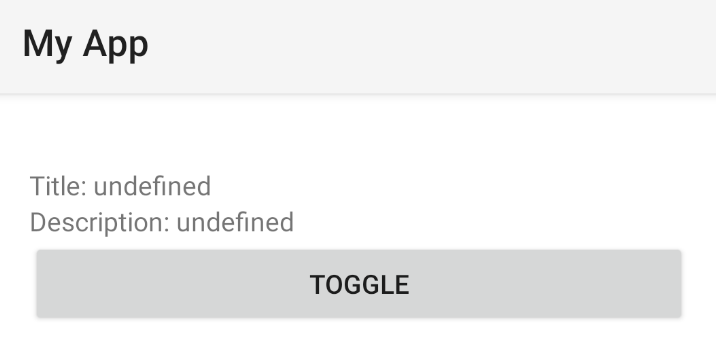
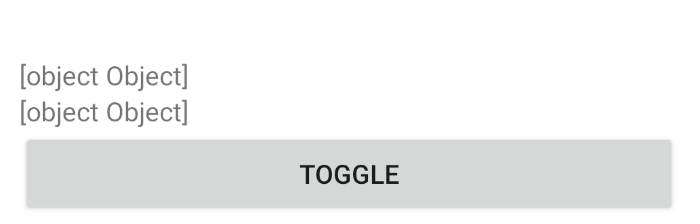
When I remove that visibility binding from the StackLayout containing those Labels, I get a different result as well between 8.1.5 and alpha:
NS 8.1.5:
NS 8.2.0-alpha.12:
(But not sure if that is really important... just a side note).
In our real apps there are some certain situations where the app is crashing due to a binding error using alpha (tested 10-12). This crash did not happen with NS 8.1.5.
But again, I need to make some further investigations to make that situation reproducable in a sample app.
CatchABus commentedon Mar 3, 2022
@felixkrautschuk Your problem is related to expressions. Old expression parser was null-safe according to README here: https://www.npmjs.com/package/polymer-expressions, therefore it was completely silent in such cases.
Thanks to your old feedback, my latest changes included an
undefined-safemechanism in cases where the XML caller isundefined(caller could becustomObjectin your case) and perhaps I'll add a check fornullvalues as well.So how could this be taken care of using new parser?
The meaning of this rework was to fix old issues, add missing ECMA features, have better error reporting, and stop relying on an abandoned package source altogether.
You can solve such issues using optional chaining. Something like this could take care of warnings.
I'm planning to add a check for
nullcallers but optional chaining will also be useful for sub-properties.Automated null-safety is good but I believe it deprives one of control inside code.
For anything related to similar binding issues, perhaps we can create a thread in discord and exchange feedback.
Let me know if this solved your problems.
felixkrautschuk commentedon Mar 4, 2022
@dimitrisrk the "?" operator seems to do the trick in the sample project, thanks.
But in one of our projects, I get a strange binding error message as soon as I use the "?" operator.
Event when I initially set customObject to a valid object like
Not sure why it is working in the sample app from this then (and even in one production project).
Main differences in that project compared to the sample project here:
But even when downgrading NS webpack in the sample project (from this thread here) from 5.0.0 to 4.1.0, this error message does not come up there.
When creating a new JS project the error message also does not come up...
So unfortunately I am not able to provide a demo app for reproduction as I am not allowed to share that project where I get this error.
Do you have any idea what could cause this?
CatchABus commentedon Mar 4, 2022
@felixkrautschuk Not really. Either way, I have worked on a patch here #9805 that includes a null-safe check which may get rid of your issue.