| 【EN】 | 〖RU〗 |
|---|
Note
This is a special version, deliberately made to be compatible with old versions of Python 3. It was successfully tested with Python 3.4 under Windows XP, and may probably work even with something more antique. If you have Python 3.11 or above, it is highly recommended to switch to main branch.
PPM (Portable Pixel Map) and PGM (Portable Gray Map) (particular cases of PNM format group) are simplest file formats for RGB and L images, correspondingly. Paradoxically, this simplicity lead to some adverse consequences:
-
lack of strict official specification. Instead, you may find words like "usual" in format description. Surely, there is someone who implement this part of image format in unprohibited, yet a totally unusual way.
-
unwillingness of many software developers to provide any good support for simple and open format. It took years for almighty Adobe Photoshop developers to include PNM module in distribution rather than count on third-party developers, and surely (see above) they took their chance to implement a separator scheme nobody else uses. What as to PNM support in Python, say, Pillow... sorry, I promised not to mention Pillow anywhere ladies and children are allowed to read it.
As a result, novice Python user (like me) may find it difficult to get reliable input/output modules for PPM and PGM image formats.
-
Obtain suitable facility for visualization of image-like data (images first and foremost), existing in form of 3D nested lists, via Tkinter
PhotoImage(data=...)method. -
Obtain simple and compact cross-platform module for reading PPM and PGM files as 3D nested lists for further processing with Python, and subsequent writing of processed 3D nested lists data to PPM or PGM files.
To accomplish this, current PyPNM module was developed, combining input/output functions for 8-bits and 16-bits per channel binary and ascii Portable Gray Map and Portable Pixel Map files, i.e. P2, P5, P3 and P6 PNM file types. All color depth ranges supported directly, without limitations and without dancing with tambourine and proclaiming it to be a novel method.
Current PyPNM version is maximal backward compatibility build. While most of the development was performed using Python 3.12, extensive testing with other versions was carried out, and PyPNM proven to work with antique Python 3.4 (reached end of life 18 Mar 2019) under Windows XP 32-bit (reached end of support 8 Apr 2014).
Note
Tkinter, bundled with standard CPython distributions 3.10 and below have problems with 16 bpc images. Although it's not PyPNM but Tkinter problem, it's still ungood and severely discombobulating. As a workaround, list2bin function in PyPNM extended compatibility version (.34) includes a routine for color depth reduction from 16 bpc to 8 bpc when generating a preview. Surely list2bin tries to avoid such a remapping unless it is absolutely necessary since remapping requires extra calculation and therefore slows the function down; decision on remapping, however, is based on correlation between Python version and bundled Tkinter version, and therefore may fail if you have custom builds of Tkinter, or Python, or both. Failure is most likely to manifest as unnecessary slowdowns, and least likely as Tkinter crash. Remember that this module is provided under Unlicense, I don't care much of my copyright, so you may edit the source, including Python version detection criteria, at will. Hint: Python versions is determined as python_version_tuple()[1].
On the other hand, if you have only new versions of Python and Tkinter, you may prefer downloading Main version of PyPNM, which doesn't have any backward compatibility fixes, and therefore doesn't waste CPU time on it.
Current PyPNM module read and write capabilities are briefly summarized below.
| Image format | File format | Read | Write |
|---|---|---|---|
| 16 bits per channel RGB | P6 Binary PPM | ✅ | ✅ |
| 16 bits per channel RGB | P3 ASCII PPM | ✅ | ✅ |
| 8 bits per channel RGB | P6 Binary PPM | ✅ | ✅ |
| 8 bits per channel RGB | P3 ASCII PPM | ✅ | ✅ |
| 16 bits per channel L | P5 Binary PGM | ✅ | ✅ |
| 16 bits per channel L | P2 ASCII PGM | ✅ | ✅ |
| 8 bits per channel L | P5 Binary PGM | ✅ | ✅ |
| 8 bits per channel L | P2 ASCII PGM | ✅ | ✅ |
| 1 bit ink on/off | P4 Binary PBM | ✅ | ❌ |
| 1 bit ink on/off | P1 ASCII PBM | ✅ | ❌ |
Main goal of module under discussion is not just bytes reading and writing but representing image as some logically organized structure for further image editing.
Is seems logical to represent an RGB image as nested 3D structure - (X, Y)-sized matrix of three-component RGB vectors. Since in Python list seem to be about the only variant for mutable structures like that, it is suitable to represent image as list(list(list(int))) structure. Therefore, it would be convenient to have module read/write image data to/from such a structure.
Note that for L images memory structure is still list(list(list(int))), with innermost list having only one component, thus enabling further image editing with the same nested Y, X, Z loop regardless of color mode.
Note that for the same reason when reading 1 bit PBM files into image this module promotes data to 8 bit L, inverting values and multiplying by 255, so that source 1 (ink on) is changed to 0 (black), and source 0 (ink off) is changed to 255 (white).
In case of installing using pip:
pip install PyPNM
then in your program import section:
from pypnm import pnmlpnm
then use functions as described below.
In case you downloaded file pnmlpnm.py from Github or somewhere else as plain .py file and not a package, simply put this file into your program folder, then use import pnmlpnm.
Module file pnmlpnm.py contains 100% pure Python implementation of everything one may need to read/write a variety of PGM and PPM files. I/O functions are written as functions/procedures, as simple as possible, and listed below:
- pnm2list - reading binary or ascii RGB PPM or L PGM file and returning image data as nested list of int.
- list2bin - getting image data as nested list of int and creating binary PPM (P6) or PGM (P5) data structure in memory. Suitable for generating data to display with Tkinter.
- list2pnmbin - getting image data as nested list of int and writing binary PPM (P6) or PGM (P5) file.
- list2pnmascii - alternative function to write ASCII PPM (P3) or PGM (P2) files.
- list2pnm - getting image data as nested list of int and writing either binary or ASCII file depending on
binargument. - create_image - creating empty nested 3D list for image representation. Not used within this particular module but often needed by programs this module is supposed to be used with.
Detailed functions arguments description is provided below as well as in docstrings.
X, Y, Z, maxcolors, image3D = pnmlpnm.pnm2list(in_filename)
read data from PPM/PGM file to nested image data list, where:
X, Y, Z- image sizes (int);maxcolors- number of colors per channel for current image (int);image3D- image pixel data as list(list(list(int)));in_filename- PPM/PGM file name (str).
image_bytes = pnmlpnm.list2bin(image3D, maxcolors, show_chessboard)
Convert nested image data list to PGM P5 or PPM P6 (binary) data structure in memory, where:
image3D-Y*X*Zlist (image) of lists (rows) of lists (pixels) of ints (channels);maxcolors- number of colors per channel for current image (int);show_chessboard- optional bool, setTrueto show LA and RGBA images against chessboard pattern;Falseor missing show existing L or RGB data for transparent areas as opaque. Default isFalsefor backward compatibility;image_bytes- PNM-structured binary data.
image_bytes object thus obtained is well compatible with Tkinter PhotoImage(data=...) method and therefore may be used to (and actually was developed for) visualize any data represented as image-like 3D list.
Note
When encountering image list with 2 or 4 channels, current version of list2bin may treat it as LA or RGBA image correspondingly, and generate image preview for Tkinter as transparent over chessboard background (like Photoshop or GIMP). Since PNM images do not have transparency, this preview is actually either L or RGB, with image mixed with chessboard background, generated by list2bin (pattern settings match Photoshop "Light Medium" defaults). This behaviour is controlled by show_chessboard option. Default setting is False (meaning simply skipping alpha channel) for backward compatibility.
pnmlpnm.list2pnm(out_filename, image3D, maxcolors)
Write PGM P5 or PPM P6 (binary) file from nested image data list, where:
image3D-Y*X*Zlist (image) of lists (rows) of lists (pixels) of ints (channels);maxcolors- number of colors per channel for current image (int);out_filename- PNM file name.
pnmlpnm.list2pnmascii(out_filename, image3D, maxcolors) where:
Write PGM P2 or PPM P3 (ASCII text) file from nested image data list, where:
image3D-Y*X*Zlist (image) of lists (rows) of lists (pixels) of ints (channels);maxcolors- number of colors per channel for current image (int);out_filename- PNM file name.
pnmlpnm.list2pnm(out_filename, image3D, maxcolors, bin)
Write either binary or ASCII file from nested image data list, where:
image3D-Y*X*Zlist (image) of lists (rows) of lists (pixels) of ints (channels);maxcolors- number of colors per channel for current image (int);bin- switch defining whether to write binary file or ASCII (bool). Default is True, meaning binary output, to provide backward compatibility.out_filename- Name of PNM file to be written.
Note that list2pnm, is merely a switch between list2pnmbin and list2pnmascii, introduced for simplifying writing "Save as..." GUI dialog functions - now you can use one function for all PNM flavours, passing bin via lambda, is necessary.
image3D = create_image(X, Y, Z)
Create empty 3D nested list of X*Y*Z sizes.
Program viewer.py is a small illustrative utility: using pnmlpnm package, it reads different flavours of PGM and PPM files, and allows saving them as different types of PGM/PNM, i.e. it can read ascii PPM and write it as binary PPM or vs. Also this program shows images using pnmlpnm and Tkinter. No, there is no mistake: it does not feed PPM files to Tkinter directly. Instead, it uses nested 3D list data loaded using pnmlpnm to generate in-memory bytes object of PPM structure using preview_data = pnmlpnm.list2bin(image3D, maxcolors), and then feeds this in-memory bytes object to Tkinter as preview = PhotoImage(data=preview_data) (note using data=, not file=). This way it displays, for example, ascii PPM and PGM which Tkinter itself cannot handle.
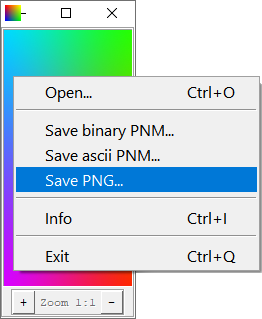
Beside having simple yet fully functional GUI with mouse events handling a-la Photoshop, viewer.py is also capable to process command line arguments like
py -3.4 viewer.py filename.ppm
for opening files. In theory, you may even register it as system viewer for PPM, PGM and PBM files.
Using PyPNM and Tkinter you may easily visualize any data that can be represented as greyscale or RGB images (images first and foremost), without large external packages and writing files on disk. Nested list data structures used by PyPNM are well suited for nested loop/map image processing.
-
PyPNM at PyPI - installing PyPN with
pip. Does not contain viewer example etc., only core converter, but provides regularpip-driven automated updates. -
PyPNM at Github containing example viewer application, illustrating using
list2binto produce data for TkinterPhotoImage(data=...)to display, as well as opening/saving various portable map formats. -
PyPNM docs (PDF). While current documentation was written for 9 May 2025 "Victory" version, it remains valid for 2 Sep 2025 "Victory II" release since it involves total inner optimization without changing input/output format.
-
PixelArtScaling - usage example, pure Python image rescaling applications using Scale2x and Scale3x, PNG I/O is based on PyPNG, and PPM/PGM I/O - on PyPNM, thus making everything pure Python and therefore cross-platform.
-
POVRay Thread: Linen and Stitch - usage example, contains image filtering application «Averager», implementing non-standard adaptive image averaging. Filter before/after preview based on PyPNM list2bin code and Tkinter
PhotoImage(data=...)class. Filtering itself largely utilize the fact that nested lists, produced by PyPNM, may be easily processed with one-loop-fits-all algorithms regardless of color mode. As a result, fully operational pure Python interactive image filtering application ensued. -
img2mesh - usage example, programs for converting bitmap height fields to 3D triangle meshes in various formats. 3D conversion modules take x, y, z data as nested list of the same structure, as PyPNM output, that makes building 2D➔3D converted just a matter of pouring data from one module to another.