BookStack Version:
BookStack v0.20.3
PHP Version:
PHP Version 7.1.15
MySQL Version:
Server version: 5.7.21
OS Version:
Ubuntu 17.10.1 artful
Expected Behavior
PDF Export and download
Current Behavior
Export fails with error:
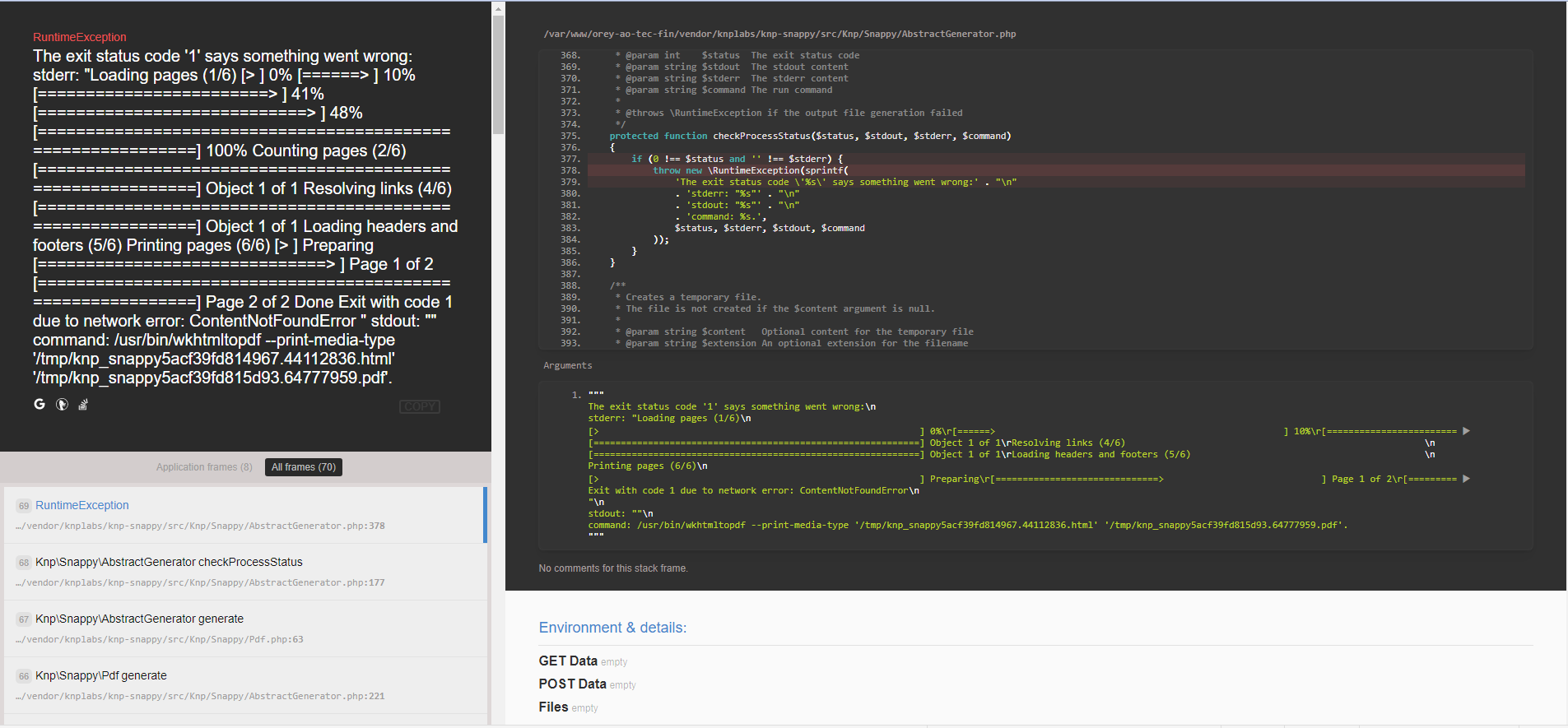
The exit status code '1' says something went wrong: stderr: "Loading pages (1/6) [> ] 0% [======> ] 10% [========================> ] 41% [============================> ] 48% [============================================================] 100% Counting pages (2/6) [============================================================] Object 1 of 1 Resolving links (4/6) [============================================================] Object 1 of 1 Loading headers and footers (5/6) Printing pages (6/6) [> ] Preparing [==============================> ] Page 1 of 2 [============================================================] Page 2 of 2 Done Exit with code 1 due to network error: ContentNotFoundError " stdout: "" command: /usr/bin/wkhtmltopdf --print-media-type '/tmp/knp_snappy5acf39fd814967.44112836.html' '/tmp/knp_snappy5acf39fd815d93.64777959.pdf'.
Steps to Reproduce
Use Callouts as the generated css references the callout icons with a relative path like "/icon/info-filled.svg?color=015380"
or for testing
- Generate a contained html file from the page at fault
- Store it in /tmp (where the knp snappy stores temp html and pdf)
- try to run
wkhtmltopdf test.html test.php result will be something like this:
root@server1:/tmp# wkhtmltopdf teste.html teste.pdf Loading pages (1/6) Counting pages (2/6) Resolving links (4/6) Loading headers and footers (5/6) Printing pages (6/6) Done Exit with code 1 due to network error: ContentNotFoundError
After commenting out all the relative paths the result becomes:
root@server1:/tmp# wkhtmltopdf teste.html teste.pdf Loading pages (1/6) Counting pages (2/6) Resolving links (4/6) Loading headers and footers (5/6) Printing pages (6/6) Done
Steps to solve temporarily
Create a symlink in the root path of your server that points to /path-to-bookstack-instance/resources/assets/icons and name it "icon" *see image below

BookStack Version:
BookStack v0.20.3
PHP Version:
PHP Version 7.1.15
MySQL Version:
Server version: 5.7.21
OS Version:
Ubuntu 17.10.1 artful
Expected Behavior
PDF Export and download
Current Behavior
Export fails with error:
The exit status code '1' says something went wrong: stderr: "Loading pages (1/6) [> ] 0% [======> ] 10% [========================> ] 41% [============================> ] 48% [============================================================] 100% Counting pages (2/6) [============================================================] Object 1 of 1 Resolving links (4/6) [============================================================] Object 1 of 1 Loading headers and footers (5/6) Printing pages (6/6) [> ] Preparing [==============================> ] Page 1 of 2 [============================================================] Page 2 of 2 Done Exit with code 1 due to network error: ContentNotFoundError " stdout: "" command: /usr/bin/wkhtmltopdf --print-media-type '/tmp/knp_snappy5acf39fd814967.44112836.html' '/tmp/knp_snappy5acf39fd815d93.64777959.pdf'.Steps to Reproduce
Use Callouts as the generated css references the callout icons with a relative path like "/icon/info-filled.svg?color=015380"
or for testing
wkhtmltopdf test.html test.phpresult will be something like this:root@server1:/tmp# wkhtmltopdf teste.html teste.pdf Loading pages (1/6) Counting pages (2/6) Resolving links (4/6) Loading headers and footers (5/6) Printing pages (6/6) Done Exit with code 1 due to network error: ContentNotFoundErrorAfter commenting out all the relative paths the result becomes:
root@server1:/tmp# wkhtmltopdf teste.html teste.pdf Loading pages (1/6) Counting pages (2/6) Resolving links (4/6) Loading headers and footers (5/6) Printing pages (6/6) DoneSteps to solve temporarily
Create a symlink in the root path of your server that points to /path-to-bookstack-instance/resources/assets/icons and name it "icon" *see image below