Describe the bug
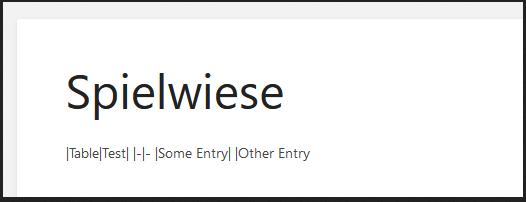
After saving a page with version 0.31.1 using the Markdown editor, the tables are not longer rendered in the page view. Instead the raw text is displayed. The preview works as expected.
Steps To Reproduce
Steps to reproduce the behavior:
- Configure BookStack to use the Markdown editor
- Create a new page anywhere and create a table with the table syntax. The preview will look just fine
- Save the page
- The page view no longer displays the table as expected
Expected behavior
The table should be rendered like in older versions or the preview
Screenshots
Preview rendered correct (on the right side) while editing:

Page rendering after save (shows raw text):
Your Configuration (please complete the following information):
- Exact BookStack Version (Found in settings): 0.31.1
- PHP Version: PHP 7.2.24-0ubuntu0.18.04.7 (cli) (built: Oct 7 2020 15:24:25) ( NTS )
- Hosting Method (Nginx/Apache/Docker): Apache
Additional context
I already wrote in Discord and @ssddanbrown answered:
That's totally possible as an issue (Have not tested yet).
I switched the final Markdown rendering from front-end to server-side in v0.31 for consistency with the API and better security. It's very likely that back-end rendered does not currently render tables.
Feel free to raise
Describe the bug
After saving a page with version 0.31.1 using the Markdown editor, the tables are not longer rendered in the page view. Instead the raw text is displayed. The preview works as expected.
Steps To Reproduce
Steps to reproduce the behavior:
Expected behavior
The table should be rendered like in older versions or the preview
Screenshots

Preview rendered correct (on the right side) while editing:
Page rendering after save (shows raw text):

Your Configuration (please complete the following information):
Additional context
I already wrote in Discord and @ssddanbrown answered: