Describe the bug
I am trying to create a "front page" for my bookstack app. My front page uses "resued content" from other pages. When accesing the page in the book I can see the used conent showing up. But if I go to the homepage (main url of my bookstack instance rather than the page specific URL) the "reused conent" does not show up.
Steps To Reproduce
Steps to reproduce the behavior:
- Create New Page & insert content from another page
- Set new page as Front page of bookstack Instance
- Go to main URL of instance (ie. htttps://localhost/)
- Reused content not visible
Expected behavior
Front page should look the same as the page when viewing it with the explisit URL (ie htttps://localhost/books/book-name/page/page-name)
Screenshots
In Editor on content page
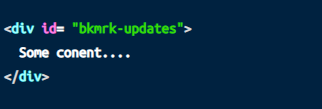
In Editor on Main Page:

On Page Spesific URL (ie htttps://localhost/books/book-name/page/page-name)
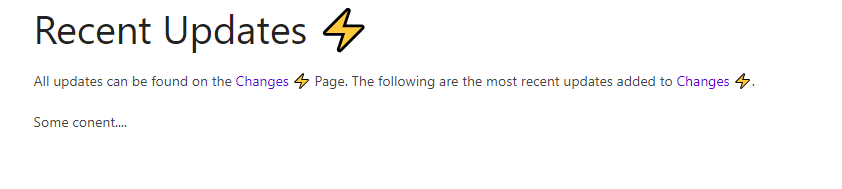
On Front Page: (ie. htttps://localhost/)

Your Configuration (please complete the following information):
- Exact BookStack Version (Found in settings): BookStack v0.30.0
- PHP Version: PHP 7.3.22 (cli)
- Hosting Method (Nginx/Apache/Docker): Docker
- Editor: Markdown
Additional context
I have looked for an open issue that describes this but I was unable to find one, I may have missed it. It is also possible I am making these bookmarks incorrectly, am I missing something?
Describe the bug
I am trying to create a "front page" for my bookstack app. My front page uses "resued content" from other pages. When accesing the page in the book I can see the used conent showing up. But if I go to the homepage (main url of my bookstack instance rather than the page specific URL) the "reused conent" does not show up.
Steps To Reproduce
Steps to reproduce the behavior:
Expected behavior
Front page should look the same as the page when viewing it with the explisit URL (ie htttps://localhost/books/book-name/page/page-name)
Screenshots

In Editor on content page
In Editor on Main Page:

On Page Spesific URL (ie htttps://localhost/books/book-name/page/page-name)

On Front Page: (ie. htttps://localhost/)

Your Configuration (please complete the following information):
Additional context
I have looked for an open issue that describes this but I was unable to find one, I may have missed it. It is also possible I am making these bookmarks incorrectly, am I missing something?