

Kuvaus
Finally, analytics that you’ll actually use.
Google Analytics is overkill. Other WordPress statistics plugins are cluttered and confusing. You just want to know what’s happening on your site – without a data science degree.
Burst Statistics gives you a clean, intuitive analytics dashboard focused on the metrics that actually matter. No external accounts. No complex setup. Install, activate, and understand your traffic in seconds.
Trusted by 200,000+ WordPress sites. Built by the experienced team behind UpdraftPlus, WP-Optimize, and All-In-One Security.
What our users are saying
”Finally, an analytics plugin I can actually explain to clients.”
— @anguskeystone on wordpress.org”I tried WP Statistics and Independent Analytics, but they’re overloaded and confusing. Burst’s UI is intuitive and focused on what matters to me.”
— @vallered on wordpress.org
Why Burst Statistics?
Designed to be actionable
Other analytics plugins throw everything at you. Burst shows what matters — visitors, pageviews, referrers, top pages — in a dashboard you’ll actually use. No overload of data. No confusing menus.
Privacy-first by design
All statistics stay on your server. No external tracking. Your data is yours – we never see it without your explicit permission.
Zero setup friction
Install, activate, done. No Google accounts, no tracking codes, no configuration headaches. Start seeing live visitors immediately.
Built for WordPress
Not a port from another platform. Designed specifically for WordPress with native performance and seamless integration.
Fast and lightweight
Optimized database queries, no bloated scripts (<4kb tracking script), no external dependencies slowing down your pages. Designed to track accurately even when using aggressive server-side caching.
Features
Understand your traffic
- View table of top performing pages and posts
- Track key metrics (Visitors, Sessions, Pageviews, Bounce Rate)
- Breakdown of visitors by device (Desktop, Tablet, Mobile)
- Filter data by custom date ranges
- Compare traffic over time
Real-time analytics
- Identify the real-time source for live visitors
- View the specific pages users are visiting now
- See a live count of active users on your site
See what content performs
- Top pages and posts ranked by views
- Compare any date range
- Track individual page performance
Custom conversion tracking
- Track views, clicks and hooks
- Track WooCommerce sales
- Track custom events or hooks
Privacy without compromise
- 100% self-hosted — all statistics stored locally in your WordPress database
- Cookieless tracking option (no consent banner required in some countries)
- Designed to support GDPR, CCPA, DSGVO, AVG, RGPD, and PECR compliance
Stay informed
- Weekly or monthly email reports delivered to your inbox
- Compare periods to spot trends
- Get notified when tracking does not work
UpdraftPlusin, WP Optimizen ja All In One Securityn luojilta
Burst Statistics was created by experienced developers who also created:
* UpdraftPlus: WP Backup & Migration Plugin
* All-In-One Security (AIOS) – Security and Firewall
* WP-Optimize – Cache, Compress images, Minify & Clean database to boost page speed & performance
Who is Burst for?
- Bloggers & content creators — See which posts resonate with your audience
- Small business owners — Understand your traffic without complexity
- WooCommerce stores — Track visitor behavior and sales (Burst Pro – Business plan)
- Agencies & freelancers — Manage analytics for your clients (Burst Pro – Agency plan)
- Privacy-conscious site owners — GDPR-compliant stats without consent banners
- Anyone tired of Google Analytics — Get clarity instead of confusion
Unlock comprehensive insights into your website’s user behaviour with Burst Pro. Benefit from advanced features designed to improve performance, boost engagement, and drive conversions. Get Burst Pro now.
Free vs Pro
Burst Statistics (Free) includes everything you need to understand your website traffic: visitors, pageviews, referrers, top content, device stats, goal tracking, email reports, and more.
Burst Pro adds advanced features for businesses and professionals:
CREATOR PLAN
* UTM campaign tracking — See which marketing efforts drive results
* Geographic data — Country and city-level visitor insights
* Advanced filtering — Segment data by any dimension
* Data archiving settings — Keep your database lean automatically
* Priority support — Direct contact with our developers (You’ll speak to actual humans!)
BUSINESS PLAN
* Everything in the creator plan +
* Full sales dashboard — Understand what content brings in the most revenue
* Revenue attribution — Connect WooCommerce sales to traffic sources
AGENCY PLAN
* Everything in the business plan +
* Reporting — Generate shareable reports
All Burst Pro plans include priority support. You’ll have direct contact with our developers (You’ll speak to actual humans!)
Learn More
Privacy and Data Sharing
Burst Statistics includes an optional data sharing program. It is disabled by default. You can enable it under Burst Statistics Settings Data Sharing, and you can turn it off again at any time from the same location.
When enabled, the plugin sends a small set of aggregated, anonymized metrics to Burst Statistics’ servers once per month. This includes traffic statistics (visitors, pageviews, bounce rate, session duration), database row counts and query performance timings. No personal data, IP addresses, domain names, or visitor information is ever transmitted. All data is aggregated on your server before it leaves, making it impossible to trace back to your website or any individual user.
We use this data to:
* build anonymous industry benchmarks so you can compare your site’s performance against peers;
* understand which features are most used, so we can prioritize development effectively;
* know which WordPress and PHP versions are in active use, so we can make informed support decisions;
* identify slow database queries across real-world installs, so we can improve plugin performance for everyone.
For the complete list of data fields collected and full details on how the data is used, please read our Data Sharing Policy.
This feature connects to: https://api.burst-statistics.com
Asennus
- Go to Plugins Add New in your WordPress dashboard
- Search for Burst
- Click Install Now, then Activate
- Visit Statistics Dashboard to see your analytics
That’s it. No external accounts. No tracking codes to paste. Burst starts collecting statistics immediately.
Kuvankaappaukset
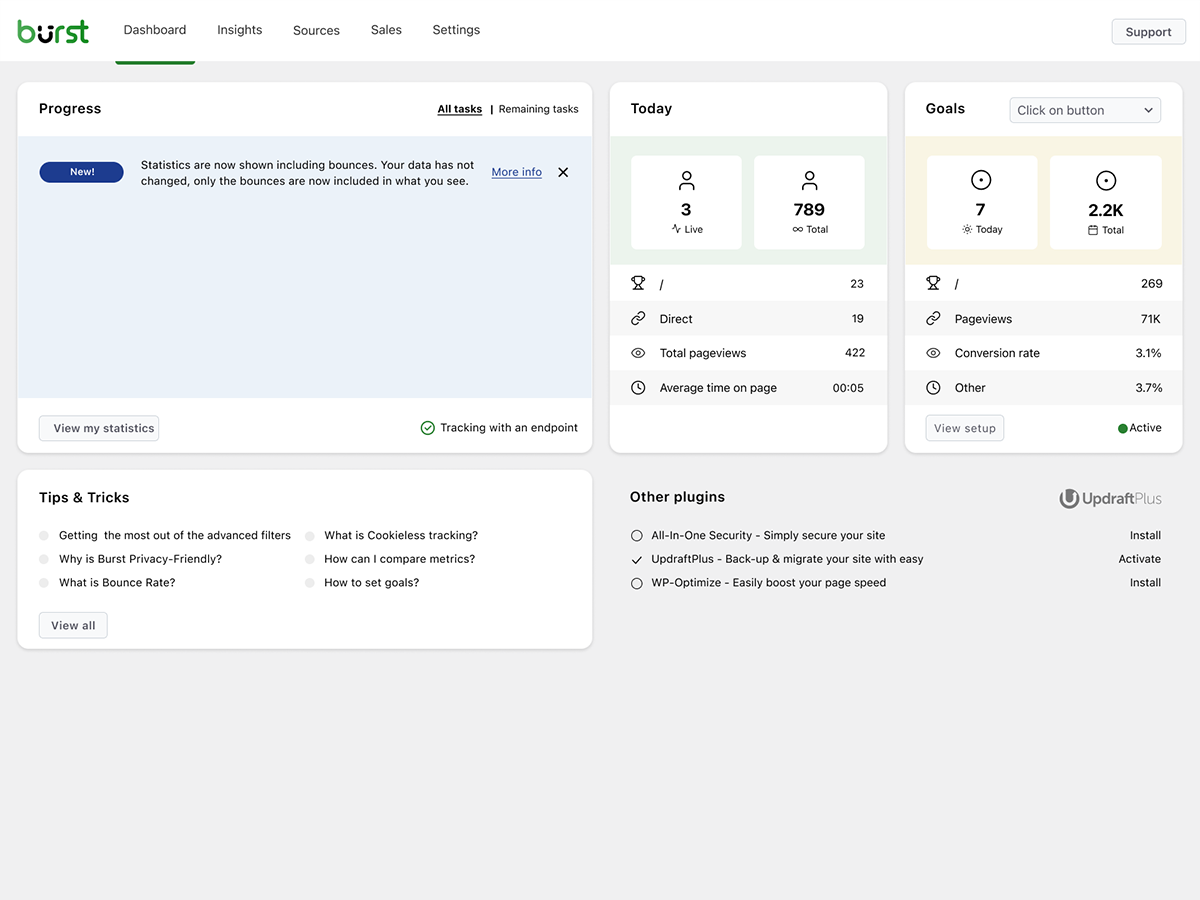
Burst-tilastot: Analytiikkapaneeli 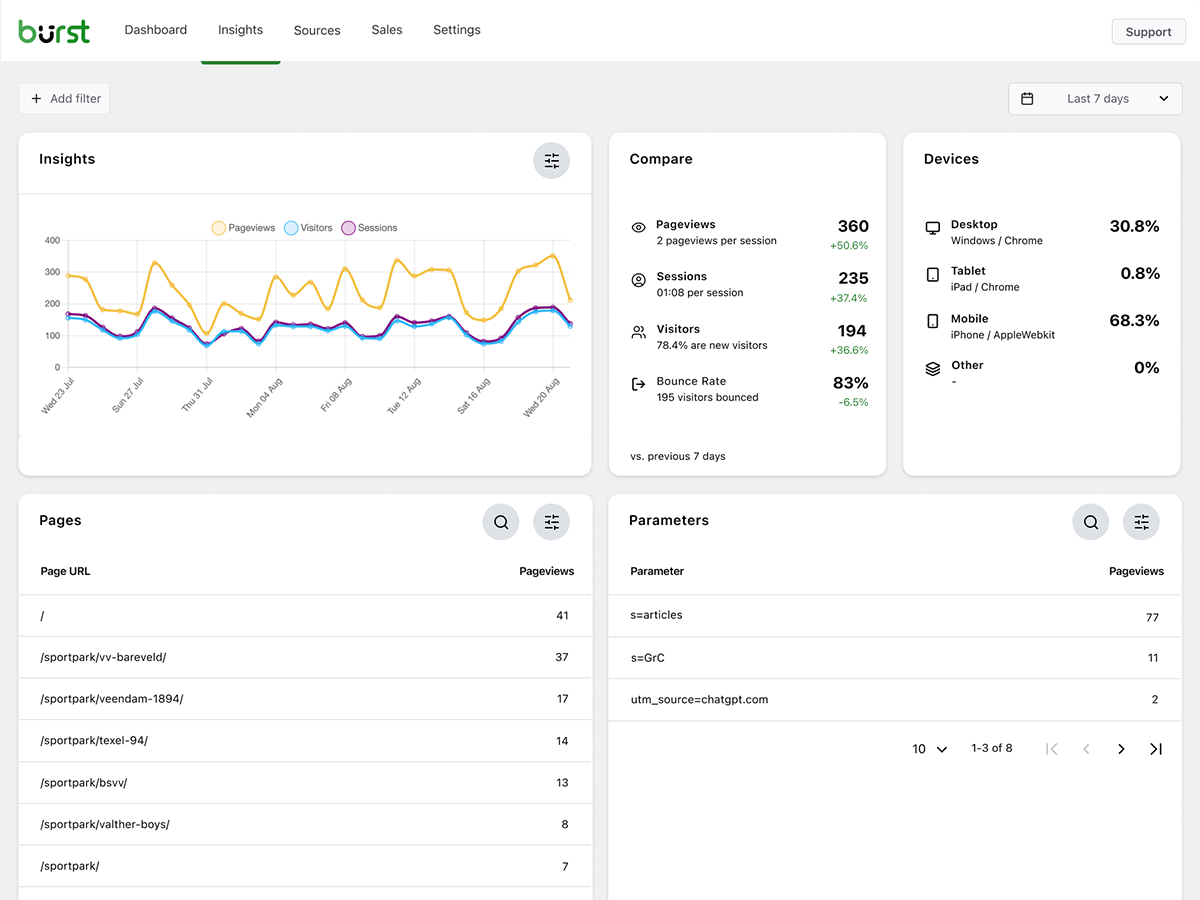
Dashboard: Clean and easy-to-read overview 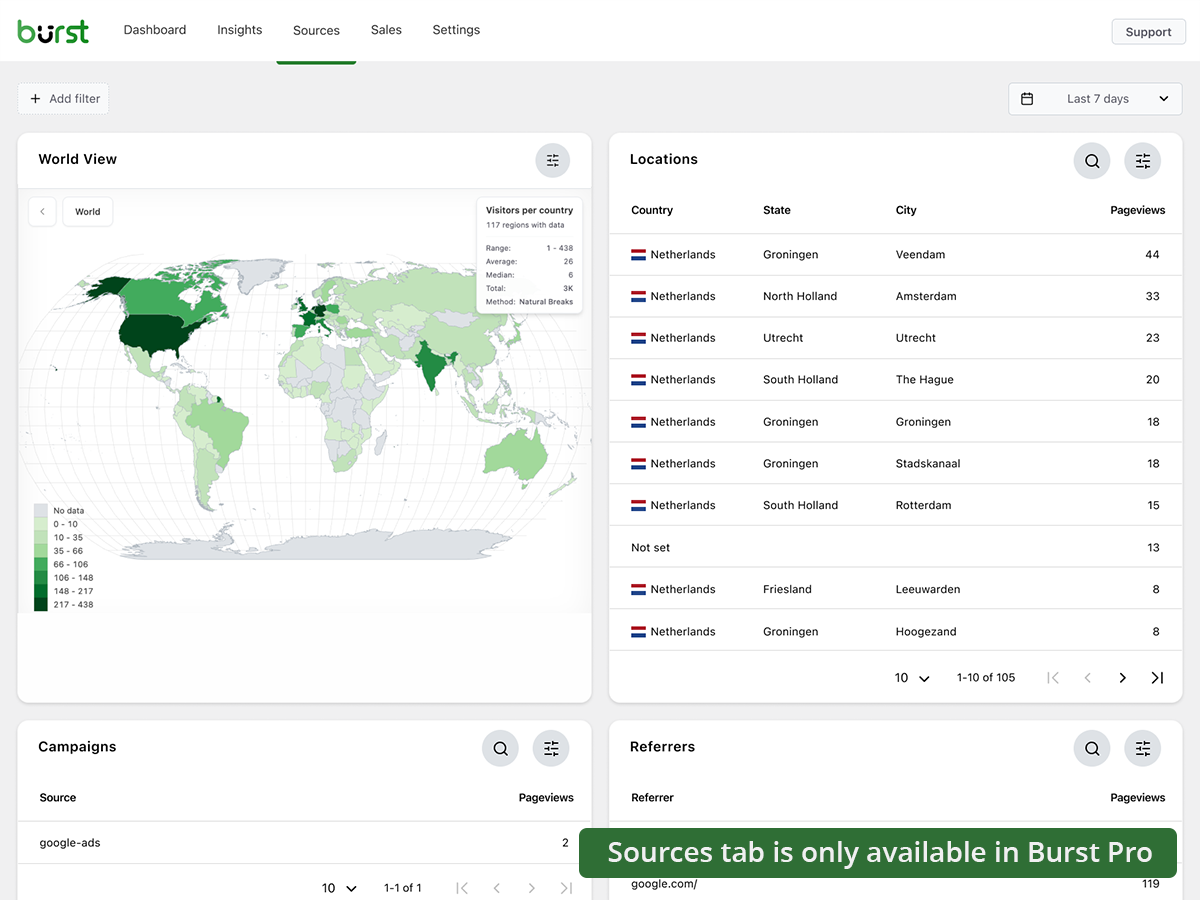
Insights: See exactly how your website performs 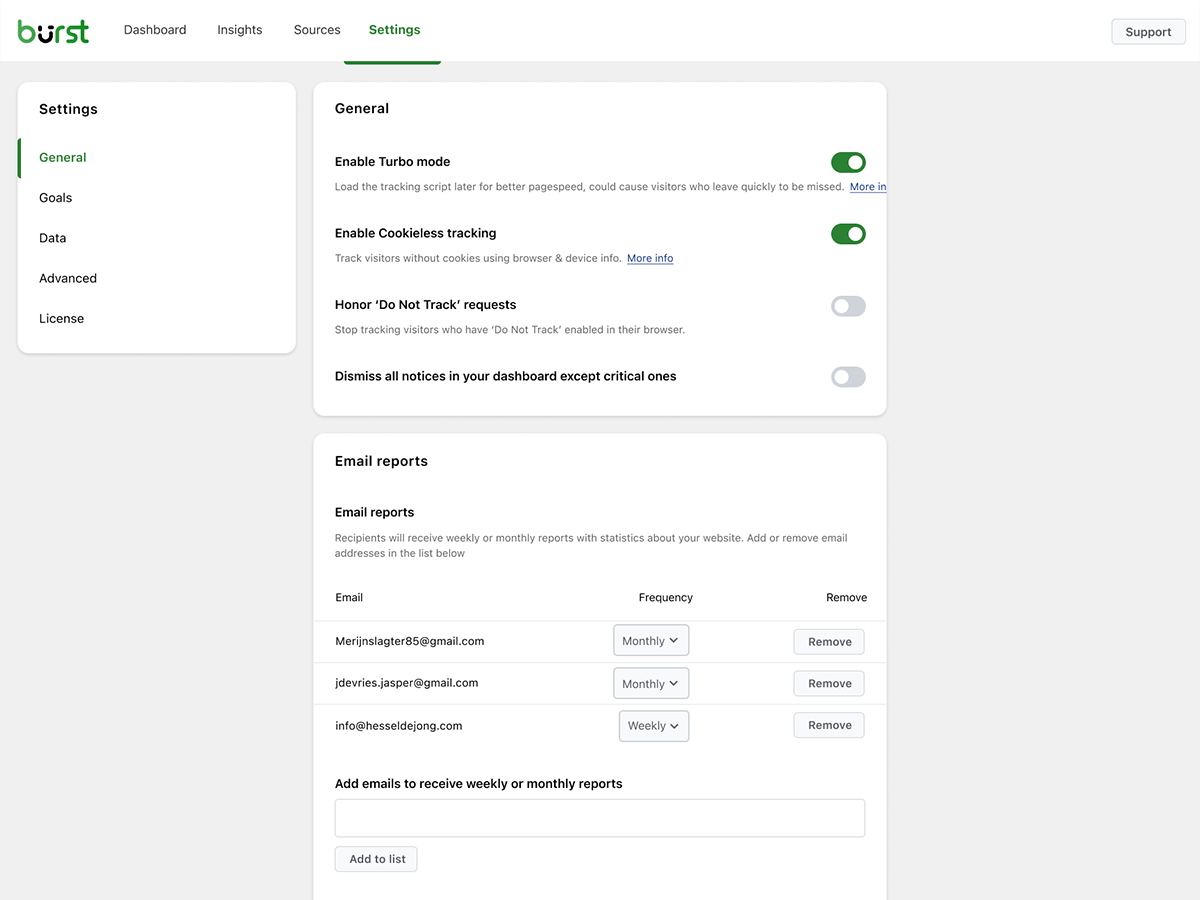
Sources: Analyze where your visitors come from (Burst Pro)


Blocks
This plugin provides 1 block.
- Pageviews Counter
UKK
-
Is Burst really free?
-
Yes. Burst Statistics is 100% free with no tracking limits. Pro is optional for users who need advanced features like UTM tracking, revenue attribution, geographic data or reporting. That’s how we can keep Burst Statistics Free for most users.
-
Mihin tiedot tallennetaan?
-
All statistics are stored in your own WordPress database. Unlike Google Analytics or cloud-based tools, we have zero access to your data. Your data never leaves your server, unless you manually opt in to share anonymous usage insights with us.
-
Is Burst a good Google Analytics alternative?
-
Yes. If you find GA4 too complex or are concerned about sending visitor data to Google, Burst is the perfect replacement. You get the statistics you actually need – visitors, referrers, top pages, conversions – without the overwhelm.
-
Tarvitsenko tilin?
-
Ei, et tarvitse tiliä; tietoja ei lähetetä toiselle verkkosivustolle.
-
Onko kävijöiden määrälle rajoitusta, jota voin seurata?
-
Ei, rajoitusta ei ole. Ainoa rajoittava tekijä on oma tietokantasi ja palvelimesi.
-
Voit halutessasi käyttää evästeetöntä seurantaa. Oletuksena Burst käyttää kuitenkin evästeitä, koska ne ovat tarkempia ja kevyempiä. Evästeitä käytettäessä Burst säilyy yksityisyyttä kunnioittavana, koska kaikki tiedot ovat anonyymejä ja tallennetaan palvelimellesi. Lue lisää siitä, miksi evästeitä ymmärretään väärin.
-
Burst Statistics -tilastoja voidaan käyttää ilman evästeiden asettamista tai tietojen tallentamista selaimiin. Tämä voi kuitenkin vaikuttaa tarkkuuteen, joten on mahdollista käyttää hybridivaihtoehtoa, jossa evästeet otetaan käyttöön suostumuksen jälkeen. Lue lisää evästeettömästä seurannasta.
-
Miksi Burst Statistics on tietosuojaa kunnioittava?
-
Burst Statistics provides an Analytics Dashboard with anonymised data that is yours and yours alone. Read more about Why Burst Statistics is Privacy-Friendly.
-
How is Burst different from WP Statistics or Independent Analytics?
-
Burst focuses on clarity over quantity. While other plugins can feel cluttered and overwhelming, Burst’s dashboard is designed to show you what matters without the noise. Users consistently mention our clean, intuitive interface as the reason they switched.
-
Can I use Burst alongside Google Analytics?
-
Yes. Many users run both during a transition period or keep GA4 for historical data while using Burst for daily insights. There’s no conflict.
-
Does Burst Statistics slow down my website? ?
-
No. Burst is built for performance with optimized database queries, minimal tracking scripts, and Turbo Mode if speed is more important than accuracy. Your site stays fast.
-
Does Burst work with WooCommerce?
-
Yes. Basic pageview tracking works in the free version. For revenue tracking, product analytics, and sales attribution, you’ll need Burst Pro.
-
How do I migrate from another analytics plugin?
-
Install and activate Burst — it starts tracking immediately. Historical data from other plugins can’t be imported, but you can run both side-by-side during a transition period.
-
Is it possible to install Burst Statistics with Composer?
-
Absolutely! Both free and premium plugins can be managed with Composer. Read the documentation for more information.
-
Voinko antaa palautetta laajennuksesta?
-
Arvostamme palautettasi. Voit lähettää tukipyynnön WordPress-foorumeilla, ja vastaamme nopeasti.
Arvostelut


Avustajat & Kehittäjät
“Burst Statistics – Privacy-Friendly WordPress Analytics (Google Analytics Alternative)” perustuu avoimeen lähdekoodiin. Seuraavat henkilöt ovat osallistuneet tämän lisäosan kehittämiseen.
Avustajat


“Burst Statistics – Privacy-Friendly WordPress Analytics (Google Analytics Alternative)” has been translated into 56 locales. Kiitoksia kääntäjille heidän työstään.
Oletko kiinnostunut kehitystyöstä?
Browse the code, check out the SVN repository, or subscribe to the development log by RSS.
Muutosloki
3.2.3
- March 12th 2026
- Fix: share link for non logged in users not loading page.
3.2.1
- March 9th 2026
- Security fix: Fixed a missing authorization check that allowed users with Burst View privilege to manage reports. Props Sanjay Singh Jhala.
- Improvement: set turbo default to enabled, and add notice to recommend enabling it when cookieless tracking is enabled.
- Improvement: check if PharData class is installed on the server to prevent fatal errors.
- Fix: Store scheme for usage during cron jobs. During cron, the site_url is http. For the javascript generation, we need it to reflect the actual scheme, usually https.
- Fix: duplicate fields in the reporting settings when the share link is opened by an admin user.
- Fix: url not found warning when classic premium report is generated.
- Fix: too strict use of sanitizers causing table prefixes to get lowercase. props @parkentosh
3.2.0
- February 25rd 2026
- New: anonymously share data to help us improve Burst Statistics: build industry benchmarks, targeted feature development, and performance improvements.
- New: add notice about discord, inviting users to join our discord server.
- New: Easily share statistics with your team or clients, with the share button in the Burst Statistics dashboard.
- Fix: catch non json encoded data in Rest API tracking, props @rajkumarreddyv
- Fix: Bounce and bounce rate calculations now correctly count distinct bounced sessions instead of summing bounce flags, preventing inflated numbers.
- Fix: default value logic for ’merge variables and scripts’ made it impossible to disable the setting.
3.1.6
- January 20th 2026
- Korjaus: vanhan datan poistaminen arkistointitoiminnossa ei toiminut väärän SQL-syntaksin vuoksi.
- Korjaus: Selaimen/OS:n tietoja ei suodatettu laitteen mukaan insights-lohkossa, kiitokset @alisontaylorbc.
- Parannus: lisää automaattinen testi datan poistolle.
- Parannus: lisää pysyvä lajittelu datataulukon lohkoon, kiitokset @ankush.
- Parannus: suodatus maanosan mukaan.
3.1.5
- 7. tammikuuta 2026
- Parannus: ilmoitukset sulkeutuvat automaattisesti näytön oikeassa alakulmassa.
- Parannus: pieniä parannuksia mobiiliresponsiivisuuteen.
- Parannus: laajenna automaattisia testejä lisäämällä mukaan testit oikeilla kävijöillä.
- Parannus: pitkien URL-osoitteiden rivittäminen live-kävijöiden näkymässä.
- Parannus: laajennettu PHPCS-kattavuus.
- Korjaus: kun selaimen paikallinen tallennustila on täynnä, suodattimien lisääminen voi aiheuttaa virheen.
- Korjaus: pakota https yhdistetyille muuttujille ja skriptien URL-osoitteille, jotta vältetään sekasisältövaroitukset.
- Korjaus: RTL-kielien käyttöönotto yritti ladata olematonta RTL CSS -tiedostoa.
3.1.4
- 23. joulukuuta 2025
- Parannus: tietotaulukkojen ja lataustilojen tyylittely.
- Parannus: viittauskyselyn suorituskyvyn parannukset.
- Parannus: parametrikyselyiden suorituskyvyn parannukset.
- Parannus: jätä Rest Api:n kautta tulevat osumat Burst Rest Api Optimizerin ulkopuolelle, näin kaikki lisäosat latautuvat osuman aikana, mikä on tarpeen hook-tavoitteiden saavuttamiseksi.
- Parannus: lisätty varamenetelmä yhdistämään muuttujat ja skriptit, jos latauskansio ei ole kirjoitettavissa.
- Parannus: ’cron ei toimi’ -ilmoitusta ei voi enää ohittaa, koska se on kriittinen ongelma.
- Parannus: mahdollistaa muotoillun datan haun datataulukoista, esim. voit nyt hakea ’Yhdysvallat’ sijaan ’US’ sijaintien datataulukosta.
- Parannus: lisää parametrien suodatus.
- Korjaus: laitteiden suodatus estossa.
3.1.0.3
- 1. joulukuuta
- Korjaus: asetusten muutosten tallentaminen alkuperäisten muutosten jälkeen vaati sivun uudelleenlatauksen.
- Suorituskyky: Suorituskyvyn parannuksia siirtämällä resurssisyöppöjä prosesseja seurantavaiheessa erissä cronille
- Parannus: Käyttäjäagentin jäsentimen parannuksia, poistetaan virheelliset selaimet
- Korjaus: edistyneiden suodattimien pudotusvalikko ei suodata listaa.
- Korjaus: määrittelemätön välilehti, joka johtui myyntivalikon puutteellisesta poistosta, kun WooCommercea tai EDD:tä ei havaittu.
- Korjaus: objektivälimuisti sivujen laskennassa aiheutti sivulaskennan hitaan päivittymisen, kiitokset @fveits
3.0.2
- 25. marraskuuta 2025
- Korjaus: jotkin ilmoitukset hylättiin virheellisesti tarkistuksen aikana.
- Parannus: lisätty automaattinen testi hook-tavoitteille.
- Parannus: lisätty automaattinen testi arkistoinnin palautukselle.
3.0.0
- 11. marraskuuta 2025
- Korjaus: yhteensopivuus tuntemattoman lisäosan kanssa, sallii null-arvon get_timerange_dropdown()-toiminnossa WooCommerce-tuotteiden yleiskatsauksessa, kiitokset @tegid
- Korjaus: älä käsittele www- ja ei-www-verkkotunnuksia eri verkkotunnuksina, kun havaitaan usean verkkotunnuksen asennus.
- Korjaus: poista vanhentunut kauttaviiva tavoitteiden skriptin latauksesta, joka joissain kokoonpanoissa estää sen latautumisen, kiitokset @jhndkrvzc
- Korjaus: yläpalkin laskuri ei näyttänyt ’k’ tuhansille, ’M’ miljoonille jne., vaan näytti vain 1, sen sijaan että olisi näyttänyt 1k.
- Uutta: nosta PHP:n vähimmäisversioksi 8.0 ja WordPressin 6.4
2.2.9.3
- Korjaus: joitakin css-tyylejä korjattu.
2.2.9.2
- Parannus: css-muutos, jotta Burst-kuvake on oikein linjattu valikossa
- Parannus: poista vanhentunut lokirivi
- Parannus: poista upgrader_process_complete hook päivitysten käsittelyyn
- Parannus: poistettiin joitakin vanhentuneita tiedostoja
2.2.9.1
- Parannus: Päivämäärävalinnan vaihtoehto sivujen ja artikkelien yleiskatsauksen näyttöasetuksissa.
- Korjaus: ongelma aloitusvelhon tietojen tallennuksessa.
2.2.9
- Korjaus: siirrä koodihakemisto /src:stä /includes:iin, koska muuten WordPress ei skannaa javascript-tiedostoja käännöksiä varten
2.2.8
- Uutta: parannettu kirjasto evästeettömään seurantaan.
- Uutta: sisään-/uloskäyntisivujen suodatin
- Parannus: lisätty varamekanismi tietokannan päivitykselle siltä varalta, että normaali päivitys ei käynnistynyt.
- Parannus: PHP-ilmoituksen hylkääminen.
2.2.7
- Uutta: Yksityiskohtainen välilehti live-kävijöille
- Parannus: mobiililaitteiden responsiivisuus, palautettu 1280px katkaisupiste
- Parannus: epäilyttävä data (yli 1000 käyntiä yhdeltä käyttäjältä) havaitaan nyt vain ja ylläpitäjälle ilmoitetaan, sitä ei poisteta automaattisesti.
- Korjaus: kun multisite-ympäristössä Burst-verkko on aktivoitu, päätepiste ei virheellisesti tunnistanut Burstia aktiiviseksi, mikä estää seurannan toimimisen.
2.2.6.1
- Korjaus: poista virheellinen ilmoitus puuttuvista tauluista.
2.2.6
- Parannus: välitä post_id JavaScriptille käyttämällä data-attribuuttia body-elementissä, jotta sivukohtaisten katselukertojen tarkkuus paranee.
- Parannus: luovuttiin kokonaan epätarkan post_meta-sivun katselukertojen mittarin käytöstä.
- Parannus: mahdollistettu hook-tavoitteiden seuranta evästeettömällä seurannalla.
- Parannus: siirrettiin kaikki jäljellä oleva css Tailwind css:ään.
- Korjaus: Parametrien yleiskatsauksen ryhmittely tulisi tehdä parametrin ja arvon yhdistelmän mukaan.