

1. Introduction
In this lesson, we will look at some excellent examples with which Java programmers can get started with Scala very fast and learn some important concepts that will help them call themselves as Scala professionals in a very short time.
Well, the biggest challenge for any programmer, may he be comfortable with Java, Kotlin, Python or any other programming language is to learn another programming language. This is because when we are comfortable with a programming language, we tend to find the same qualities in the new programming language as well which, in most cases, presents disappointment because there is always something new in each programming language. Still, in this lesson, we will present an easy, clear to pick approach by comparing code-snippets which were in Java and their equivalent in Scala programming language. Some of the good things with Scala are:
- The Scala’s XML API is very good
- Type inference like Scala is very less verbose and more understandable than more explicit static typing (though that has its benefits too). And for a language that doesn’t require too much typing (compared to others), it performs well
- Pattern matching; case statements in Scala are super-powerful
- Inheritance due to mixing traits (more on this later) are great, and they definitely reduce code repetition
- Concurrency (actor model is far more digestible than threading model, IMO)
In some of the final sections, we will also cover how execution and compilation Scala code differs from that of Java programming language so that we can get a sense of completeness and our understanding with Scala is not just limited to the code comparison but how it executes on the JVM as well.
Table Of Contents
2. Hello World with Scala
As per the traditional methods, we can start working in Scala by executing a “Hello World” program quickly. Here is a Java program for printing “Hello World” to the console:
Hello World with Java
class HelloWorld {
  public static void main(String[] args) {
    System.out.println("Hello, geeks!");
  }
}
Now, if we write an equivalent Scala program, it will look very similar to that above:
Hello World with Scala
object HelloWorld {
  def main(args: Array[String]) {
    println("Hello, geeks!")
  }
}
Here is the anatomy of the above program in terms of Java, which is very much similar to the original Java program. But we need to provide points about how it stands different from a Java program as well and that is exactly what we will do here:
- The most similar thing is the main method which is the entry point for this Scala program, just like Java. It takes input an array of String arguments and contains a single line of code, a call to the pre-defined method with a String greeting
- Instead of the
public void staticdefinition for the main method, we usedefkeyword to define a Scala function.Also, there is nothing like static in Scala (more on static members in later section) - The part which might not make sense to Java programmers will be the
objectdefinition in the beginning. This definition defines a class called HelloWorld and an instance with the same name. This instance is created on demand, i.e. when it is used the first time
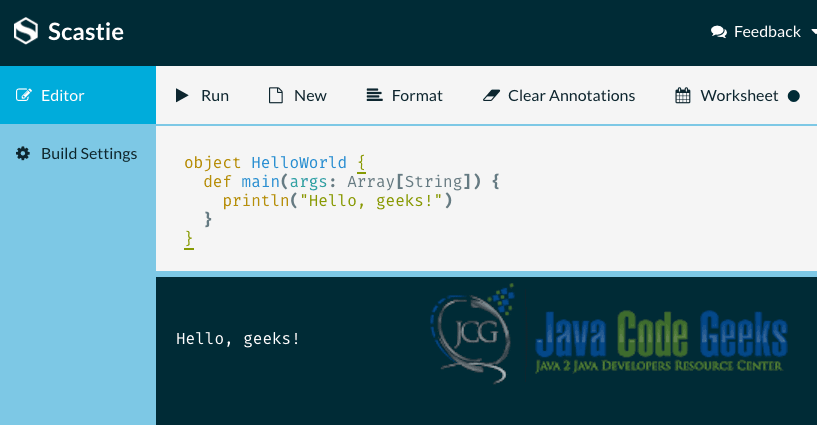
To run the program, we are using an online compiler known as Scastie which is an excellent tool to run Scala programs without having to go through the process of installing and running Scala on your local machine. Here is the output we get when we run the above Scala program:
Let’s continue our journey by looking at some other important conceptual differences on how Scala stands differently from Java. Going forward in this lesson, we will make use of the IntelliJ IDE to write and run programs for Scala with a plugin which is easy to install.
3. Using Java classes in Scala
The most important thing to understand with Scala is that we can use everything from Java packages in our Scala programs. To make it more clear, let us look at a clear example by using java.io.File package from Java which creates a file and print its absolute path:
Using Java’s File package in Scala
package com.javacodegeeks

import java.io.File

object FileObject {
  def main(args: Array[String]): Unit = {
    val file = new File("JCG.txt")
    print(file getAbsolutePath)
  }
}
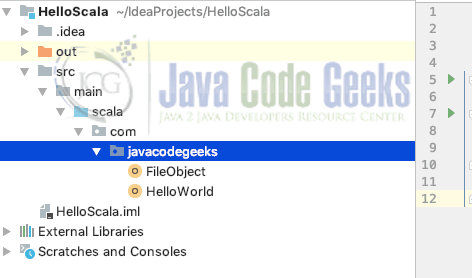
To keep our files in a Scala project, we have made a new project and added our files in it. Here is the project structure we are using for now:
Once we run our program, we will see the absolute path of the file being printed on the console. Just like Java, the java.lang package is imported by default in a Scala program. Also, the import statement is similar to Java but it is more powerful as it is possible to import multiple classes from a single package to be imported in a single statement. Let us look at an example for the syntax we use in this case:
Multiple imports in a single line
import java.util.{Date, Locale}
This representation of importing multiple classes from a single package in a single statement makes code a lot more consise and easy to read. Finally, instead of using an asterisk (*), we use an underscore (_) to import all classes of a package because asterisk is a valid Scala identifier (e.g. method name).
Next thing to notice is that print statement. The syntax file getAbsolutePath is equivalent to file.getAbsolutePath() code in Java and it represents in infix syntax property of Scala. If getAbsolutePath method can take 1 argument, we could have even wrote it like:
Infix syntax in Scala
file getAbsolutePath true
It’s equivalent code in Java would have been:
Java equivalent
file.getAbsolutePath(true);
This can be done when a method takes just one argument as an input. Of course, the above expression is just for demonstration purposes as getAbsolutePath method doesn’t actually take an argument as an input.
Another thing to note in the above program is the use of val keyword. Scala is a pure object-oriented programming language and like Java, it does not make use of primitive types. This means, that everything is an Object in Scala.
To conclude this section about integration with Java, it should be noted that it is also possible to inherit from Java classes and implement Java interfaces directly in Scala. This means that the complete Java class set is at disposal in a Scala program but it also leads to the performance overhead as we will see in a later section when we compare Java performance to Scala.
4. Classes in Scala
Based on the standard Java definition, a Class is a blueprint to create an Object. Here is the minimal class definition in Scala:
Minimal class definition
class Student

var shubham = new Student
This class definition contains just the class definition and the variable identifier as the class object. To expand upon this example, it is possible to include a standard class constructor in the class definition itself in Scala:
Class definition with constructor
package com.javacodegeeks

class Student(var name: String, var rollNo: Int) {

  def getName: String = this.name

  override def toString: String = s"($name, ', ', $rollNo)"
}
Apart from the complete class definition with inline constructor, we also provided an example on how to provide a getter and override a function in Scala with the override keyword in which we concatenate Strings as well.
To return a value from a function in Scala, we must specify its return type after function definition as described in the getName function. Next, we override the toString function, in which we concatenate Strings with the help of $ operator. We can make use of the class we defined above and make its object. Let is demonstrate this with an example:
Making Class object
package com.javacodegeeks

object HelloWorld {

  def main(args: Array[String]) {
    val shubham = new Student("Shubham", 1)
    println(shubham.getName)
  }
}
Simply, we provided default values to the object we are making and using val keyword to create a new instance of the Student class.
5. Functional Programming in Scala
Just like everything else, functions are objects in Scala. It is, therefore, possible to pass functions as arguments to other functions, to store them in variables, and to return them from other functions as well. This allows us to manipulate functions just like values and it is one of the definitions of a very interesting programming paradigm called functional programming.
In this section, we will look at a simple example where we pass a function as an argument to another function. To add, we will pass another boolean variable to the main function so that we can invoke the passed function only conditionally. Here is the code snippet for the example:
Functions as arguments
package com.javacodegeeks

object FunctionArgs {
  def checkIfStudent(callback: () => Unit, shouldCheck: Boolean): Unit = {
    if(shouldCheck) callback()
  }

  def printStudent(): Unit = {
    println("I am a Student.")
  }

  def main(args: Array[String]): Unit = {
    checkIfStudent(printStudent, shouldCheck = true)
  }
}
The function we defined first is the checkIfStudent and it gets a call-back function as argument. The type of this function is written () => Unit and is the type of all functions which take no arguments and return nothing (the type Unit is similar to void in C/C++). The main function of this program simply calls this checkIfStudent function with a call-back which prints a sentence on the terminal.
6. Inheritance and Overriding in Scala
All classes in Scala inherit from a super-class. When no super-class is specified, as in the Student example of previous section, scala.AnyRef is implicitly used.
It is possible to override a method in Scala from one of its parent class but describing this is mandatory by using the override keyword. This can be seen from one of the examples we earlier defined:
Overidding toString method
package com.javacodegeeks

class Student(var name: String, var rollNo: Int) {

  ...

  override def toString: String = s"($name, ', ', $rollNo)"
}
Here, we overridden a function provided by the super class. Let’s look at a quick example on how to extend a class in Scala. We will define a base class first:
Scala Base class
package com.javacodegeeks.inheritance

abstract class Pizza(price: Double) {
  def getPrice: Double = price
}
Next, we can define a child class which will extend the above abstract class and implementing necessary abstract methods:
pom.xml
package com.javacodegeeks.inheritance

class FarmhousePizza(veggies: String, price: Double) extends Pizza(price) {
  override def getPrice: Double = super.getPrice
}
Finally, we can make an object in which we make the instance of FarmhousePizza:
pom.xml
package com.javacodegeeks.inheritance

object FarmhouseObj {

  def getOnePizza(veggies: String): Pizza = {
    new FarmhousePizza(veggies, 25.2)
  }
}
This way, we can make a child class with more properties than a parent class and make use of inheritance. In Scala, there are five types of inheritance supported:
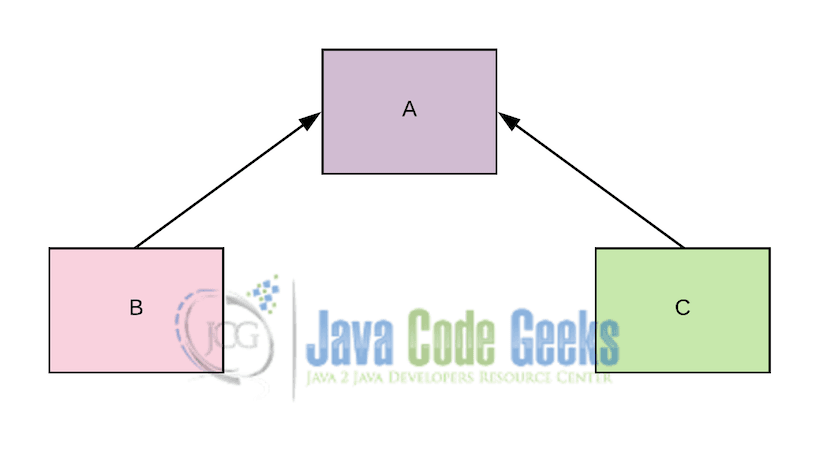
- Single-level Inheritance: When one class inherits from a single other class, it is termed as Single-level Inheritance
- Multilevel Inheritance: When one class extends another, which in turn extends another, it is an example of multilevel inheritance
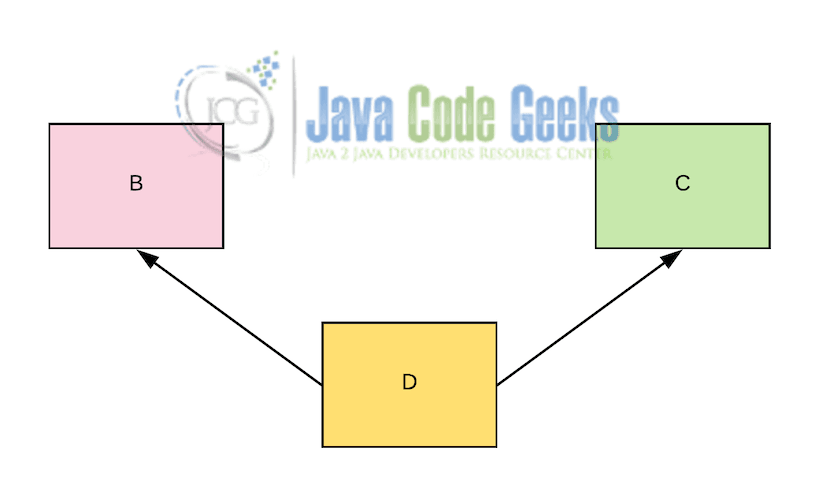
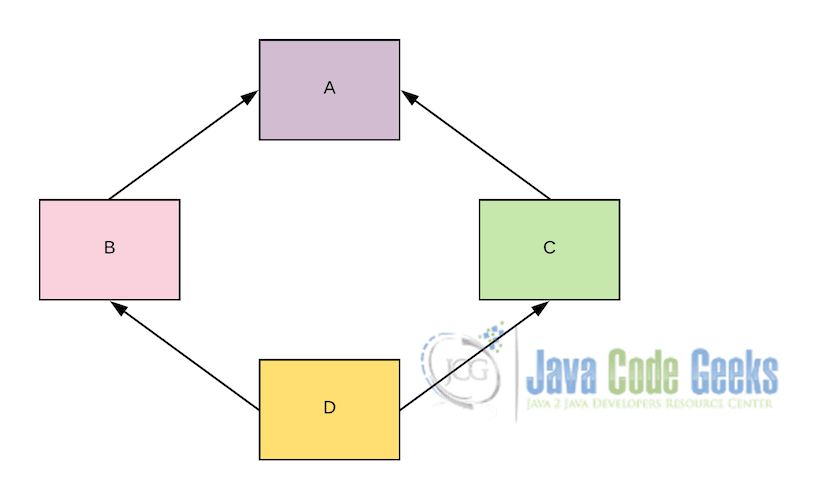
- Multiple Inheritance: When one class inherits from multiple base classes, it is a case of multiple inheritances. Let us describe it diagramatically:
7. Traits in Scala
Traits in Scala are very much similar to Download NOW!


Traits in Scala are very much similar to interfaces in Java. -> This statement is wrong
Traits in Scala are very much similar to abstract classes in Java not Interfaces.