

Descripción
Fonts Plugin is the top Google Fonts plugin for WordPress, with over 200,000 active installations and over a thousand verified 5-star ratings. It gives website owners instant access to all 1,455 fonts in the Google Fonts library — directly inside the WordPress Customizer — without touching a single line of code. Install the plugin, open the Customizer, choose your fonts, and see the result live on your actual website before publishing. It takes less than two minutes from installation to a completely new look.
What Can You Do With Fonts Plugin?
Fonts Plugin lets you apply different fonts to different parts of your website. Choose one typeface for headings and a completely different one for body text, then fine-tune size, weight, colour, line height, and letter spacing — all from the same screen. The live preview updates instantly as you make changes, so you never have to guess what a font will look like on your content. Once you are happy with the result, click Save and the changes go live. The plugin works with every WordPress theme — from Twenty Twenty-Five to Genesis to Elementor — and requires no changes to your theme files.
Is Fonts Plugin GDPR Compliant?
Yes. Fonts Plugin Pro includes a built-in local hosting option that downloads font files directly from Google and serves them from your own domain. This means no requests are ever sent to Google’s servers when a visitor loads your page. Enabling local hosting also improves your Google PageSpeed score by removing a render-blocking third-party request. For European website owners or anyone running a GDPR-compliant site, local font hosting is the recommended setting — and it is available in Fonts Plugin Pro.
What Fonts Are Available?
Fonts Plugin gives you access to three distinct font libraries. The Google Fonts library contains 1,455 unique, professionally designed typefaces — all free to use on personal and commercial websites. The Adobe Fonts (Typekit) integration connects your Adobe Creative Cloud subscription to your WordPress site, unlocking thousands of premium Adobe typefaces. You can also upload your own font files in any standard format, giving you complete typographic freedom. Whether you need a clean sans-serif for a corporate site, a warm serif for a blog, or a distinctive display font for a landing page, Fonts Plugin covers every use case without requiring multiple plugins.
Características del Plugin
Free Features
* Live Customizer Preview — see fonts on your real site before saving
* 1,455 Google Fonts — the complete library, always up to date
* Adobe Fonts (Typekit) integration
* Upload Custom Fonts — use your own .ttf, .otf, or .woff2 files
* Works with any WordPress theme — no coding required
* Gutenberg Block — apply Google Fonts inside the block editor
* WooCommerce support
* Translated into 25+ languages
* SSL / HTTPS compatible
* Tested with PHP 7 and PHP 8
Pro Features
* Host Google Fonts Locally — GDPR-compliant, no data sent to Google
* Selective Font Loading — load only the exact font weights used, up to 400% faster
* Preconnect Resource Hints — improve font loading performance
* Font Size control per element
* Font Colour control per element
* Line-Height control per element
* Letter Spacing control per element
* Text Transform (uppercase, capitalize, lowercase)
* Custom Elements — define your own CSS selectors and build controls for them
* Priority email support — responses within 24 hours
Ready to unlock the full power of typography? Upgrade to Fonts Plugin Pro
Why Choose Fonts Plugin Over Other Font Plugins?
Fonts Plugin is the only WordPress font plugin that combines Google Fonts, Adobe Fonts, and custom font uploads in a single, lightweight plugin — with a live preview built directly into the WordPress Customizer. Unlike page builder-specific typography tools, it works with every theme and every builder. Unlike GDPR-focused font plugins that only localize existing fonts, Fonts Plugin lets you choose, preview, and change fonts too. With over 200,000 active installs and 1,200+ five-star reviews, it is the most trusted all-in-one typography solution in the WordPress ecosystem.
Compatibilidad de plugin
Fonts Plugin works with all WordPress themes. It has been specifically tested and confirmed compatible with:
Page Builders
* Elementor
* Divi Builder
* Beaver Builder
* WPBakery
Themes
* All StudioPress / Genesis themes
* Twenty Twenty-Five, Twenty Twenty-Four, Twenty Twenty-Three
* Twenty Twenty, Twenty Nineteen, Twenty Seventeen
* ThemeGrill themes
* LyraThemes
* ThemeIsle themes
Helpful Resources
- Full Documentation
- Best Google Font Combinations for WordPress
- Google Fonts Checker — audit any website’s fonts
- How to Add Google Fonts to WordPress (step-by-step guide)
- Website Font Checker
- Free vs Pro Comparison
Found a Bug?
Please let us know via the support forum. We read every report.
Contribute
Fonts Plugin is open source and welcomes contributions:
- Report a bug or issue
- Translate the plugin into your language
- Submit feedback or feature requests
Capturas

Live Font Preview — see Google Fonts on your real website in real time 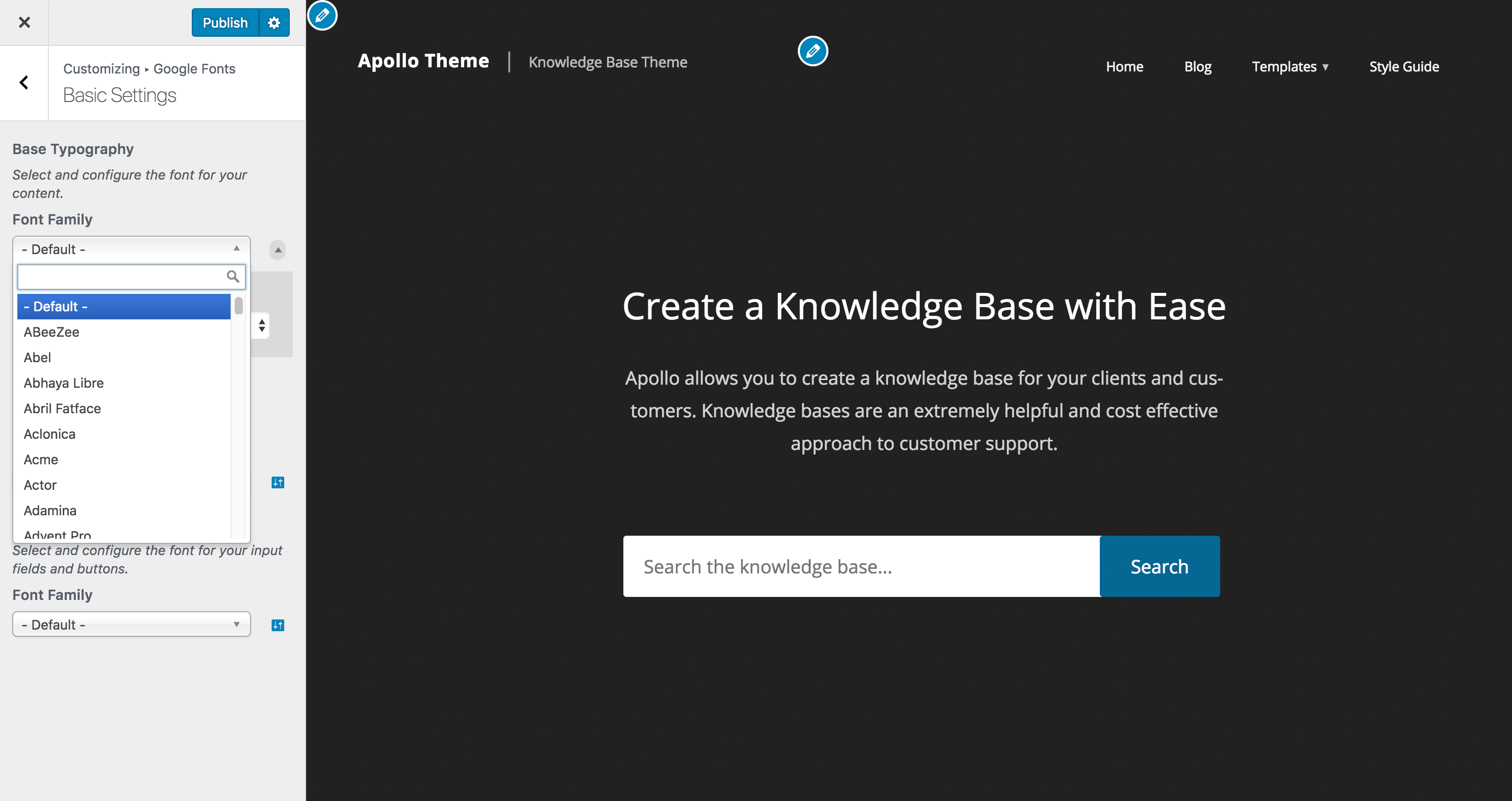
Customizer Font Search — instantly find any of the 1,455 Google Fonts 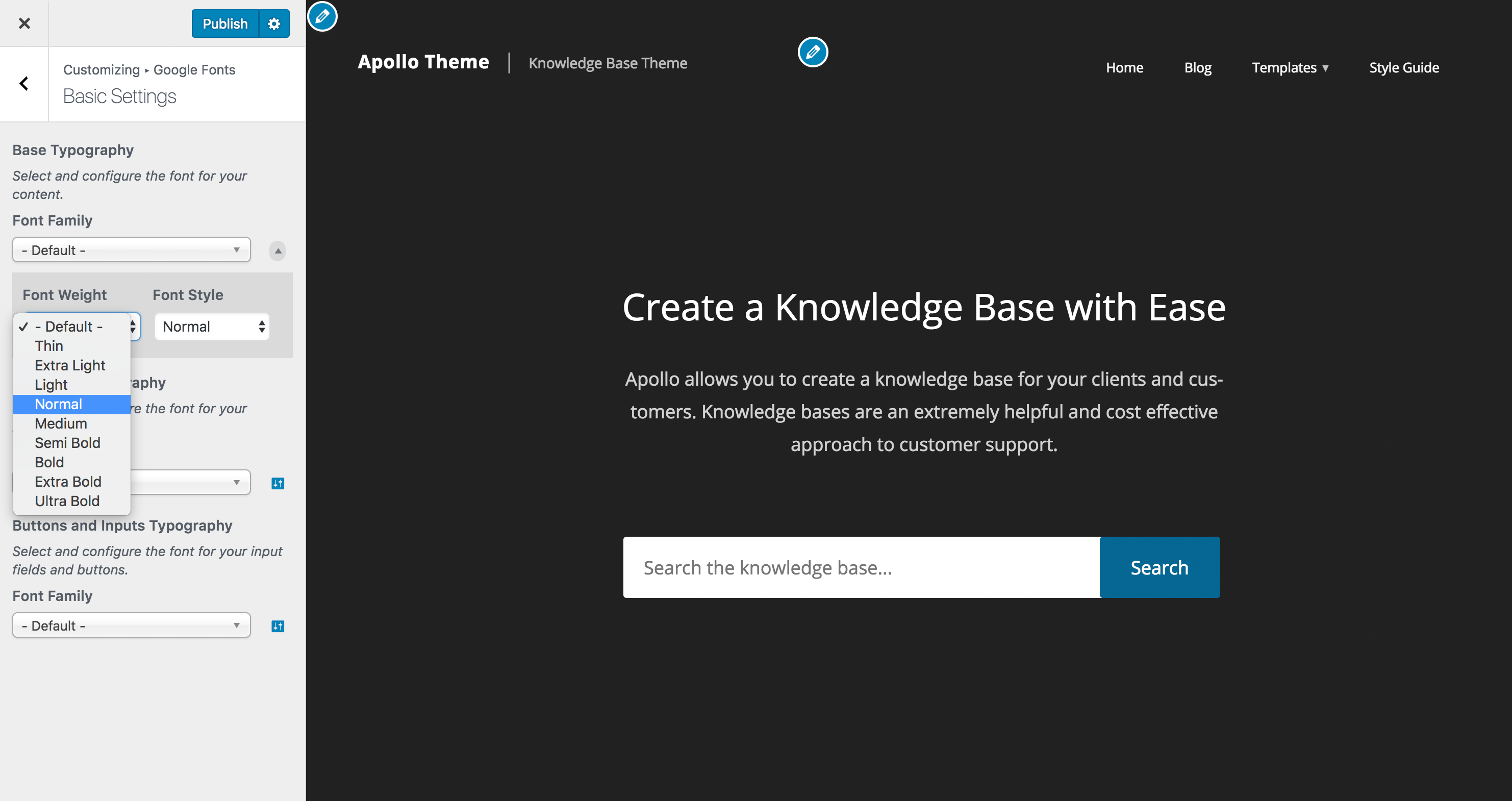
Typography Controls — adjust font weight, style, size, and line height


Bloques
Este plugin proporciona 1 bloque.
- Google Fonts
Instalación
Automatic installation (recommended)
- Log in to your WordPress dashboard
- Go to Plugins Add New
- Search for “Fonts Plugin”
- Click Install Now, then Activate
- Go to Appearance Customize and open the Fonts Plugin tab
Manual installation
- Download the plugin zip file
- Go to Plugins Add New Upload Plugin
- Upload the zip file, then activate
- Go to Appearance Customize Fonts Plugin
That’s it — no API keys, no configuration files, no code.
Preguntas frecuentes
-
What is Fonts Plugin?
-
Fonts Plugin is a free WordPress plugin that lets you add any Google Font to your website using the built-in WordPress Customizer. It supports all 1,455 fonts in the Google Fonts library, Adobe Fonts (Typekit), and custom uploaded fonts. You can preview every font live on your own site, apply different fonts to headings and body text, and save changes in a single click — all without writing any code.
-
Will Fonts Plugin work with my theme?
-
Yes — Fonts Plugin is compatible with virtually all WordPress themes. It has been tested with every default WordPress theme, all Genesis / StudioPress themes, Elementor, Divi, Beaver Builder, WPBakery, and hundreds of others. If you experience an issue with your specific theme, open a support ticket and we will investigate.
-
Is Fonts Plugin GDPR compliant?
-
Yes. Fonts Plugin Pro includes a local hosting feature that downloads your selected Google Fonts files and serves them directly from your own web server. This eliminates any data transfer to Google’s servers, which is the core GDPR concern around Google Fonts. Local hosting is available in Fonts Plugin Pro and can be enabled with a single toggle.
-
How do I add Google Fonts to WordPress?
-
Install and activate Fonts Plugin, then go to Appearance Customize. You will see a new Fonts Plugin tab in the Customizer. Open it, choose a font for your headings and a font for your body text, preview the result live, and click Publish. The change goes live immediately. No code edits, no CSS, no file transfers required.
-
How is Fonts Plugin different from other Google Fonts plugins?
-
Most Google Fonts plugins do one thing: add fonts. Fonts Plugin combines font selection, live preview, Adobe Fonts integration, and custom font uploads — all in a single plugin. Fonts Plugin Pro goes further, adding GDPR-compliant local hosting, granular per-element controls (size, colour, line height, letter spacing, text transform), and up to 400% faster font loading through optimised weight selection and font preloading. You don’t need a separate plugin for each concern.
-
Does Fonts Plugin support Adobe Fonts (Typekit)?
-
Yes. Fonts Plugin integrates with Adobe Fonts (formerly Typekit). If you have an Adobe Creative Cloud subscription, you can connect your Adobe Fonts kit to WordPress and use any Adobe typeface on your site — alongside or instead of Google Fonts.
-
Can I upload my own custom fonts?
-
Yes. Fonts Plugin lets you upload font files in standard formats (including .woff, .woff2, .ttf, and .otf) and use them anywhere on your WordPress site. This is useful if you have a licensed brand font that is not available in Google Fonts or Adobe Fonts. Custom font uploads are available in the free version.
-
Will Fonts Plugin slow down my website?
-
Any tool that outputs extra CSS or loads font files adds a small amount of work for the browser, so you may see a minor impact compared to using only system fonts. Fonts Plugin is built to keep that impact as low as possible. With Pro, Local Hosting, Selective Font Loading and Optimised Font Loading (which strips unused font weights) can improve font delivery speed by up to 400%.
-
What is the difference between the free version and Fonts Plugin Pro?
-
The free version covers everything you need to add and display Google Fonts, Adobe Fonts, or custom fonts on your WordPress site. Fonts Plugin Pro adds GDPR-compliant local font hosting, per-element typography controls (font size, colour, line height, letter spacing, text transform), custom element targeting, Font Preloading, Optimised Font Loading for maximum speed, and priority email support with responses within 24 hours. See the full comparison
-
How do I host Google Fonts locally for GDPR compliance?
-
Local font hosting is a feature of Fonts Plugin Pro. Once activated, go to the Fonts Plugin settings within the WordPress Customizer and enable the Host Google Fonts Locally option. The plugin will automatically download the font files to your server and update all references to point to your domain instead of Google’s servers. No manual file transfers or code edits are required. Upgrade to Pro
-
Does Fonts Plugin work with Elementor, Divi, and other page builders?
-
Yes. Fonts Plugin works alongside all major page builders. It applies fonts at the theme level, so any font you select will also appear inside Elementor, Divi, Beaver Builder, WPBakery, and the WordPress Block Editor (Gutenberg). There is also a dedicated Gutenberg block that lets you apply Google Fonts to individual blocks within the editor. Detailed integration guides are available in the documentation.
Reseñas


Colaboradores y desarrolladores
Este software es de código abierto. Las siguientes personas han contribuido a este plugin.
Colaboradores


“Fonts Plugin | Google Fonts, Adobe Fonts & Upload Fonts” ha sido traducido a 25 idiomas locales. Gracias a los traductores por sus contribuciones.
Traduce “Fonts Plugin | Google Fonts, Adobe Fonts & Upload Fonts” a tu idioma.
¿Interesado en el desarrollo?
Revisa el código, echa un vistazo al repositorio SVN o suscríbete al registro de desarrollo por RSS.