
Descripción
Track returning customers and registered users, monitor Javascript events, detect intrusions, analyze email campaigns. Thousands of WordPress sites are already using it.
Main Features
- Real-Time Access Log: measure server latency, track page events, keep an eye on your bounce rate and much more.
- Admin Bar Stats: view real-time site stats directly from the WordPress admin bar — online visitors, pageviews, and top pages at a glance.
- Shortcodes: display reports in widgets or directly in posts and pages.
- Customize Reports: Customize all pages—Real-time, Overview, Audience, Site Analysis, and Traffic Sources—to fit your needs easily!
- GDPR: fully compliant with GDPR European law. Integrates seamlessly with WP Consent API. Consent banner translatable with WPML and Polylang.
- Filters: exclude users from statistics collection based on various criteria, including user roles, common robots, IP subnets, admin pages, country, etc.
- Export to Excel: download your reports as CSV files, generate user heatmaps or get daily emails right in your mailbox (via Pro).
- Cache: compatible with W3 Total Cache, WP SuperCache, CloudFlare and most caching plugins.
- Privacy: hash IP addresses to protect your users’ privacy.
- Geolocation: identify your visitors by city and country, browser type and operating system (courtesy of MaxMind and Browscap).
- World Map: see where your visitors are coming from, even on your mobile device (courtesy of JQVMap).
Pro Pack Features
- Network Analytics: Enable a network-wide view of your reports and settings.
- Email Reports: Receive your reports directly in your mailbox with customizable column mappings and HTML tables.
- Export to Excel: Download your reports as CSV files.
- Heatmap: Display a heatmap layer of the most clicked areas on your website.
- User Overview: Monitor your registered users by tracking their activities and time on site.
- User Avatars: Gravatar integration in the User Overview report for quick visitor identification.
- MaxMind Integration: Connect to MaxMind’s Geolocation API to retrieve detailed information about your visitors.
- Custom DB: Use an external database to store all the information about your visitors.
- Extended Overview: Add custom columns to the User Overview widget and export file.
Requirements
- WordPress 5.6+
- PHP 7.4+
- MySQL 5.0.3+
- At least 5 MB of free web space (240 MB if you plan on using the external libraries for geolocation and browser detection)
- At least 10 MB of free DB space
- At least 32 Mb of free PHP memory for the tracker (peak memory usage)
Please note
- If you decide to uninstall Slimstat Analytics, all the stats will be PERMANENTLY deleted from your database. Make sure to setup a database backup (wp_slim_*) to avoid losing your data.
Report Bugs
Having trouble with a bug? Please create an issue on GitHub. Kindly note that GitHub is exclusively for bug reports; other inquiries will be closed.
For security vulnerabilities, please report them through the Patchstack Vulnerability Disclosure Program. The Patchstack team will validate, triage, and handle any security issues.
Capturas
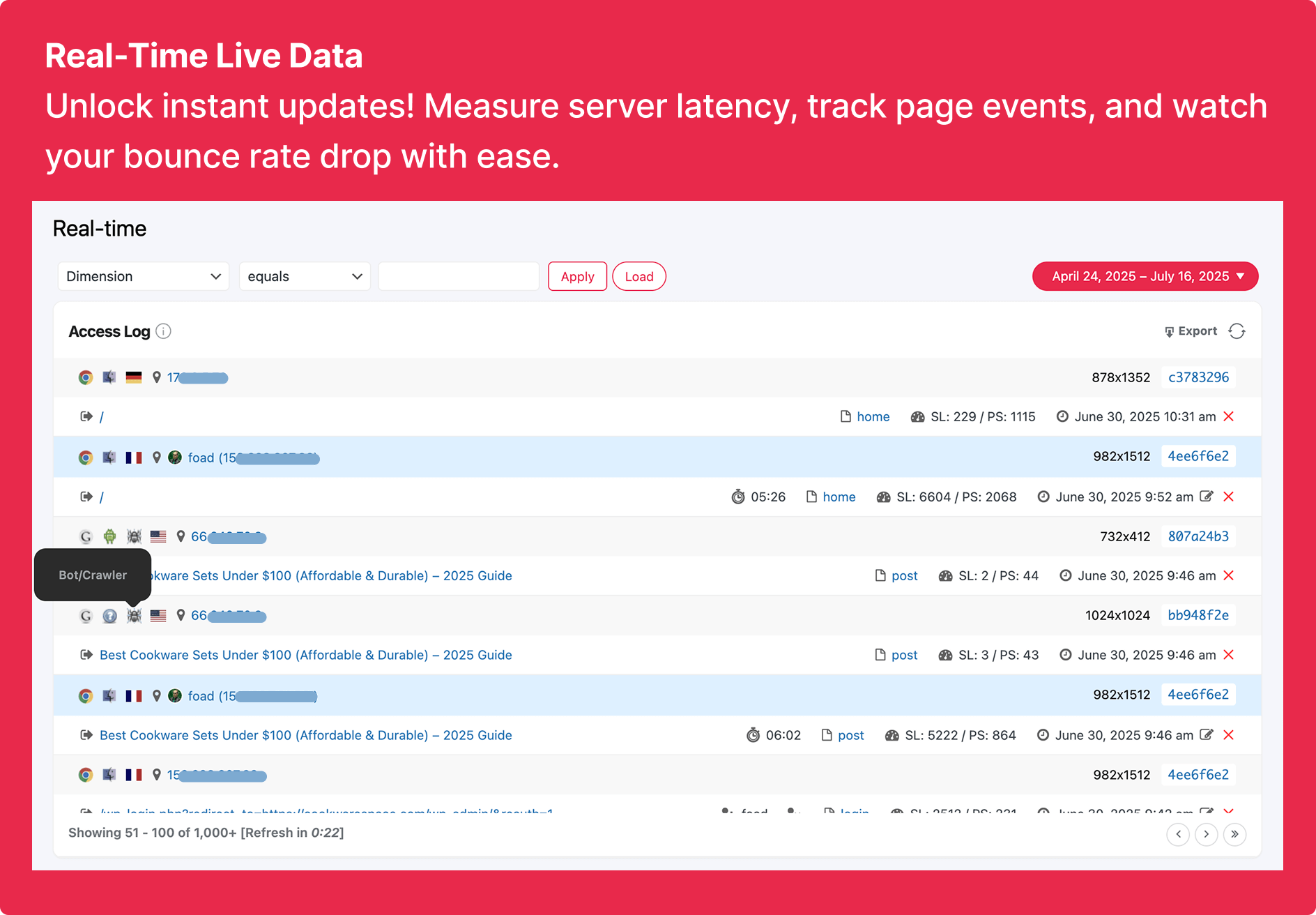
Real-Time – A real-time view of your visitors’ whereabouts 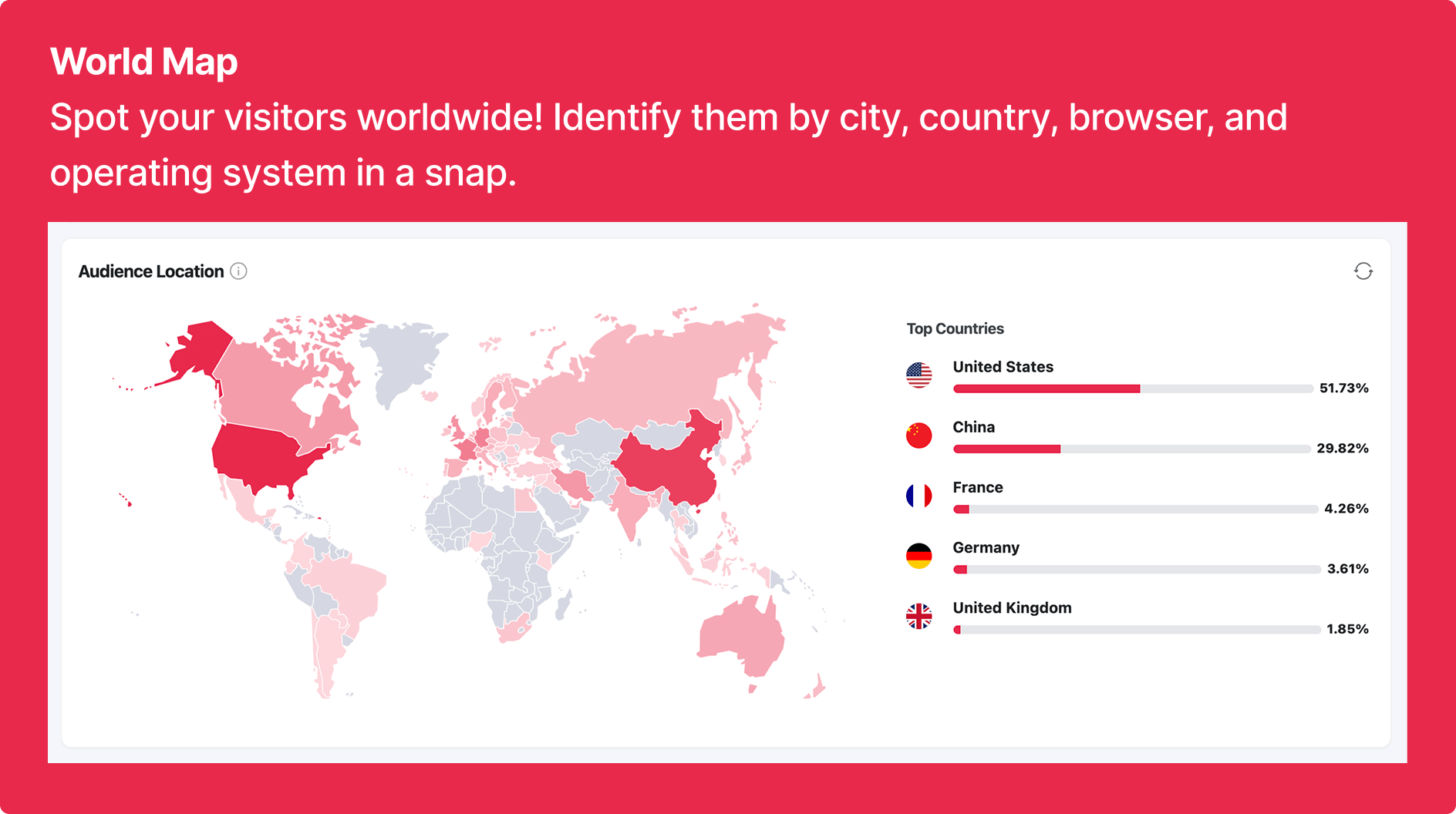
Word Map – Identify them by country, browser, and operating system in a snap. 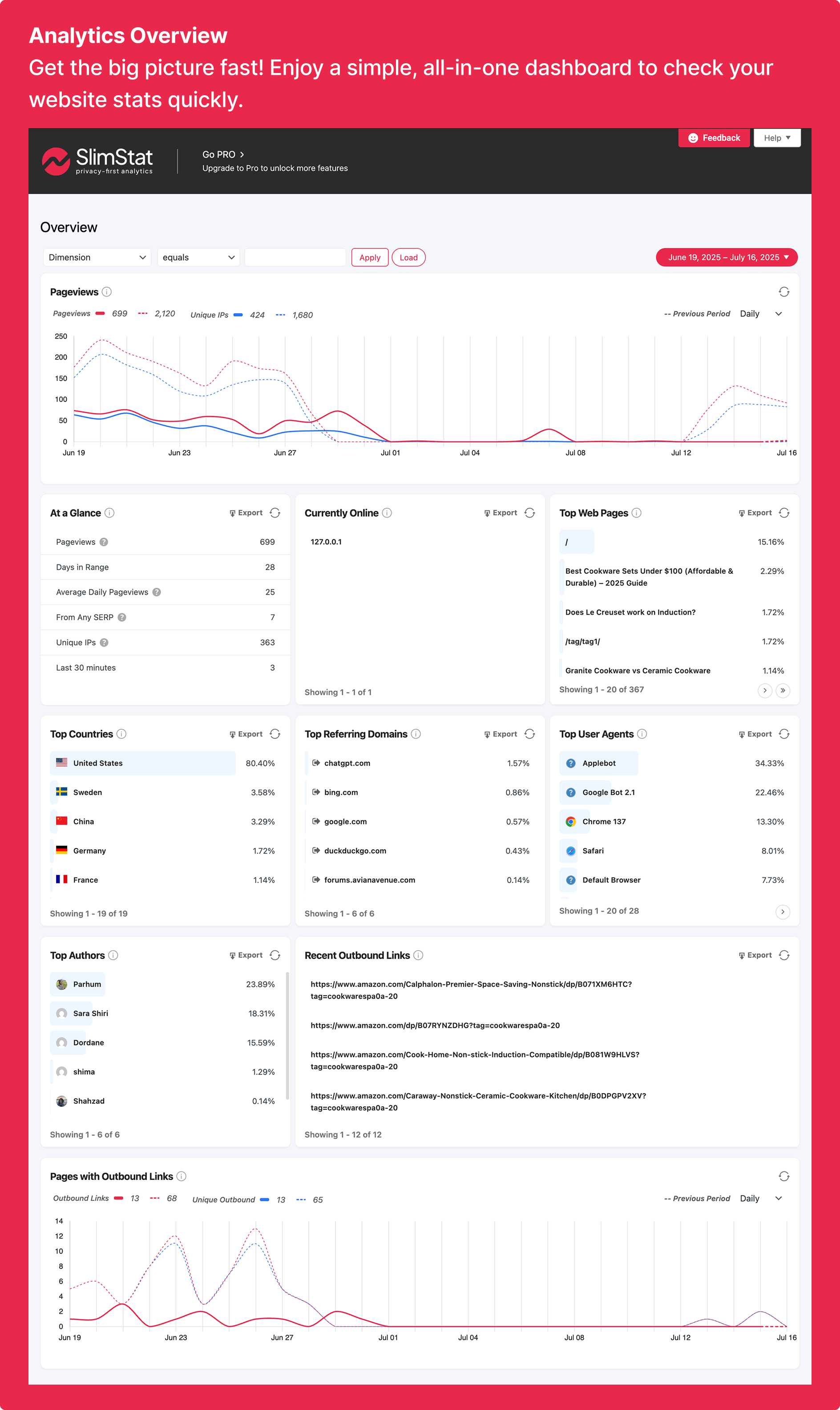
Overview – Your website traffic at a glance. Enjoy a simple, all-in-one dashboard to check your website stats quickly. 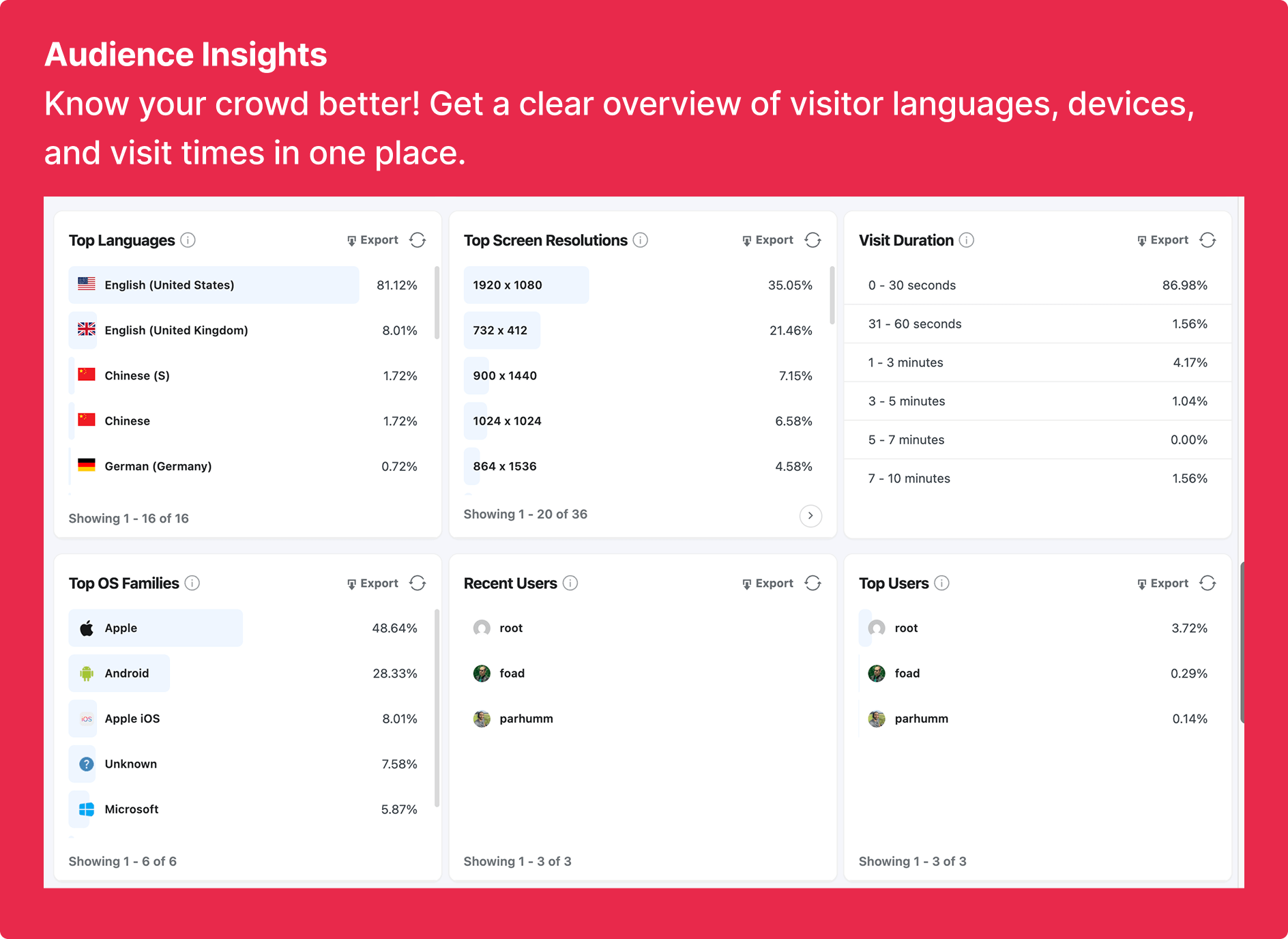
Audience – See your visitors’ full information 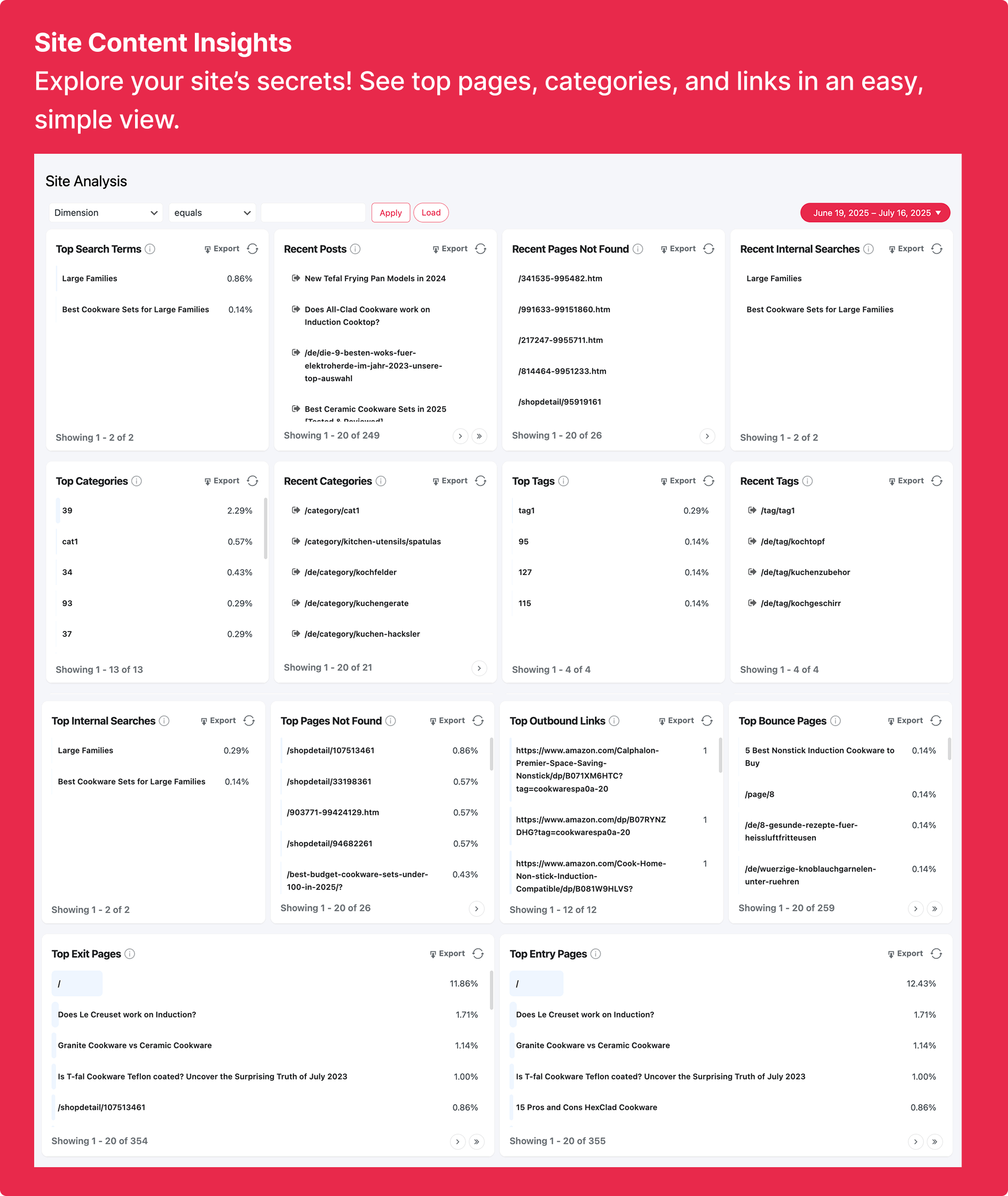
Site Analysis – See top pages, categories, download and outbound links in an easy, simple view. 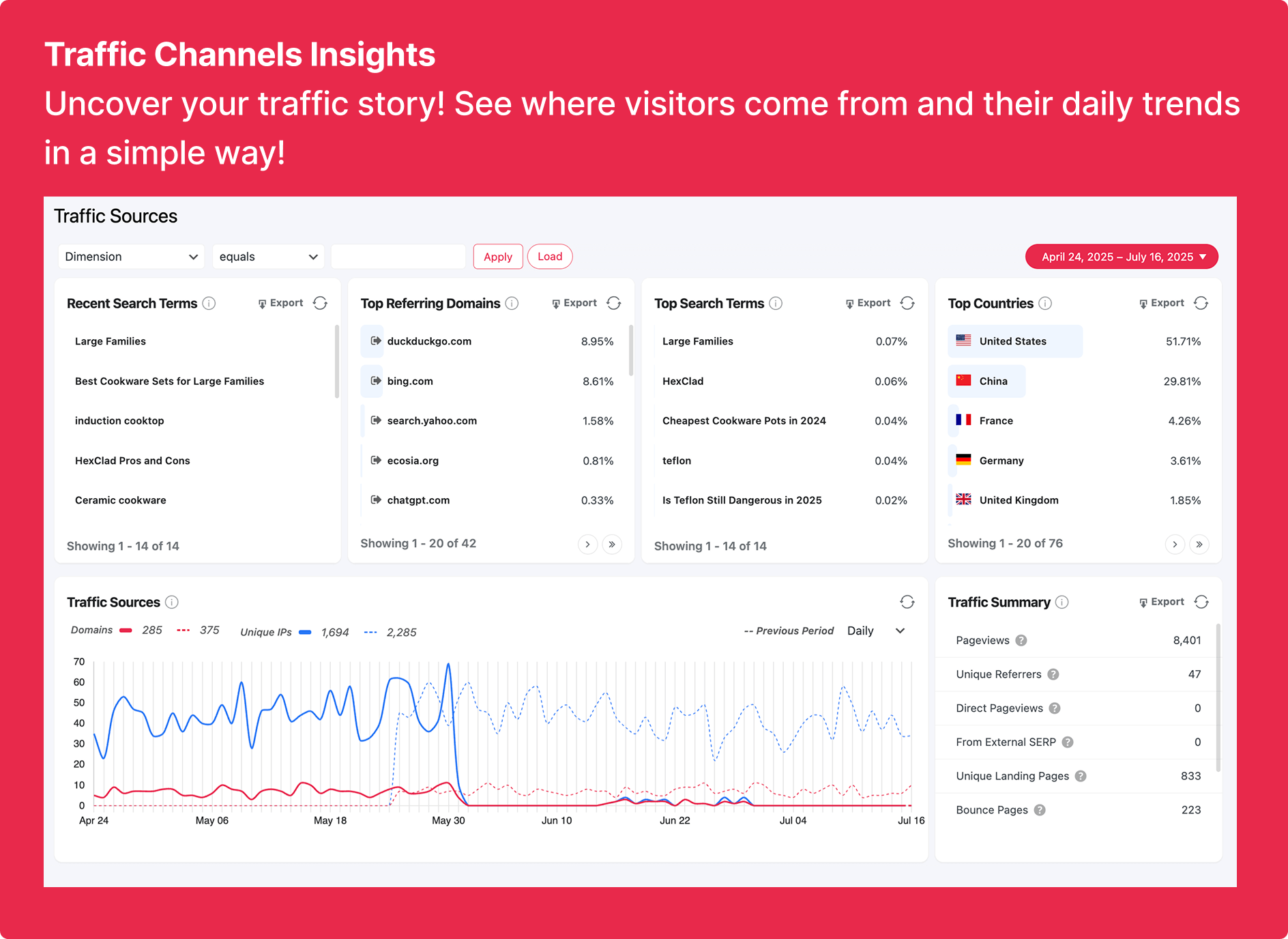
Traffic Sources – See where your visitors are coming from, such as search engines, social media, or referral websites 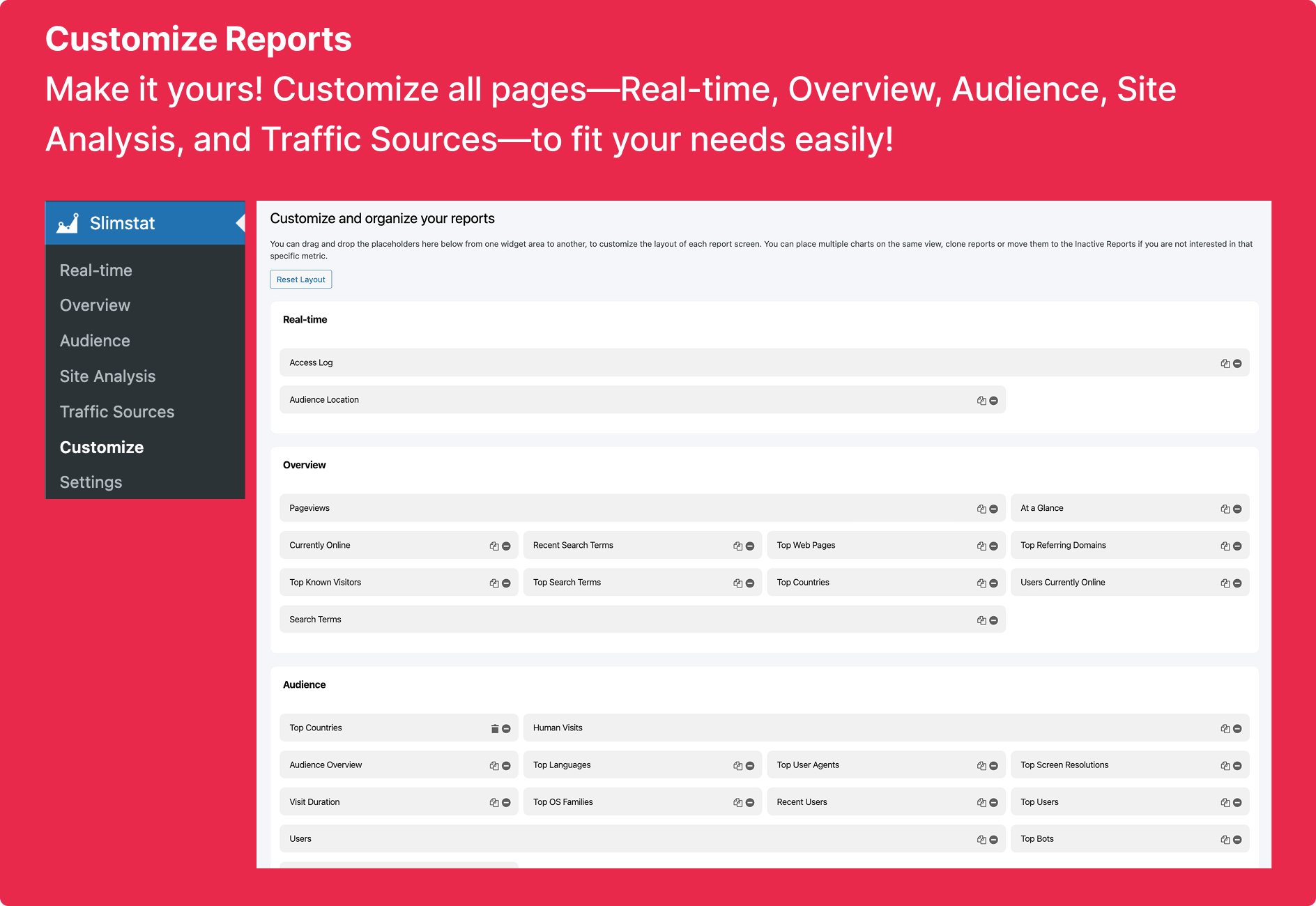
Customize widgets – Customize all pages—Real-time, Overview, Audience, Site Analysis, and Traffic Sources—to fit your needs easily! 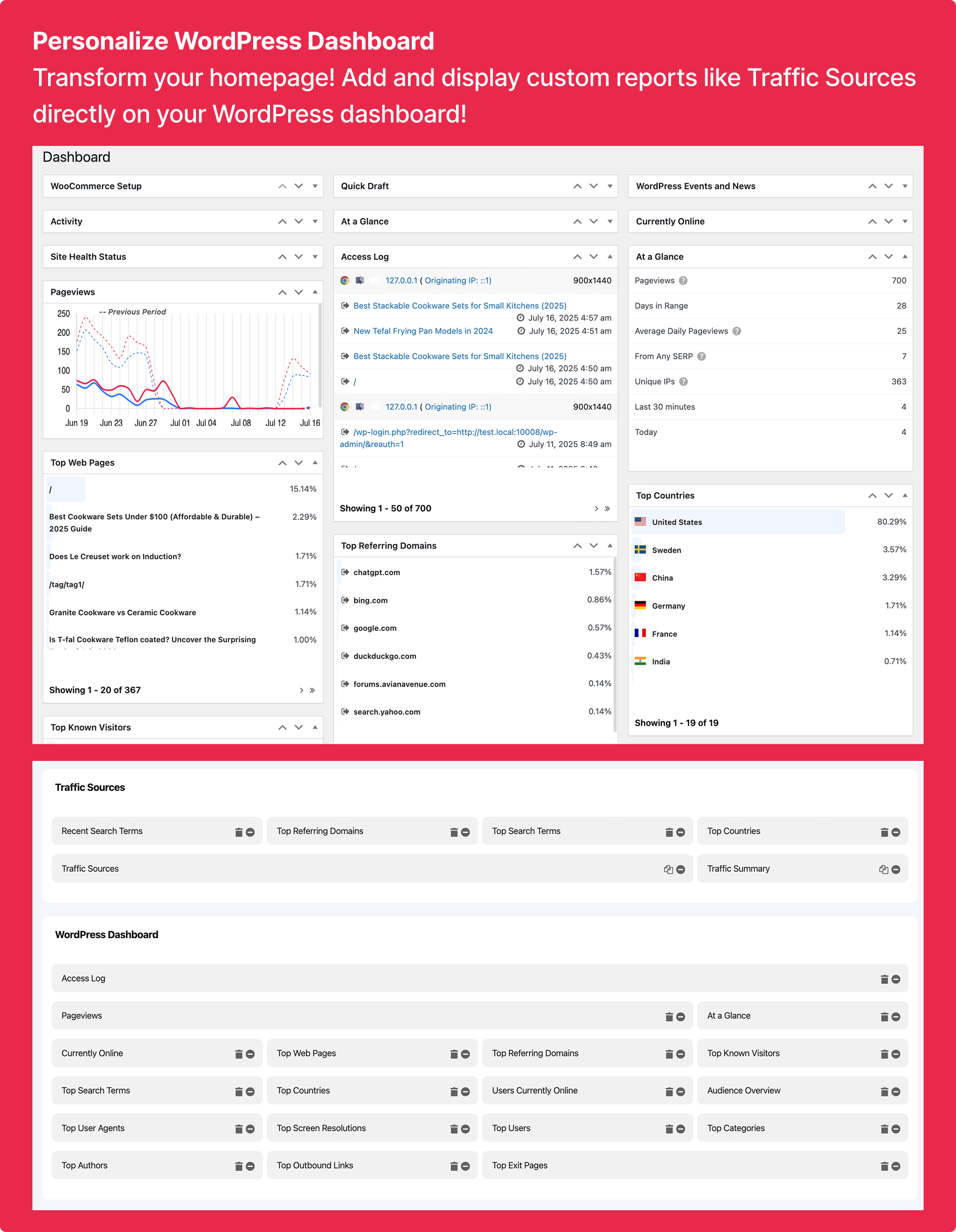
WordPress Dashboard – Add and display custom reports like Traffic Sources directly on your WordPress dashboard! 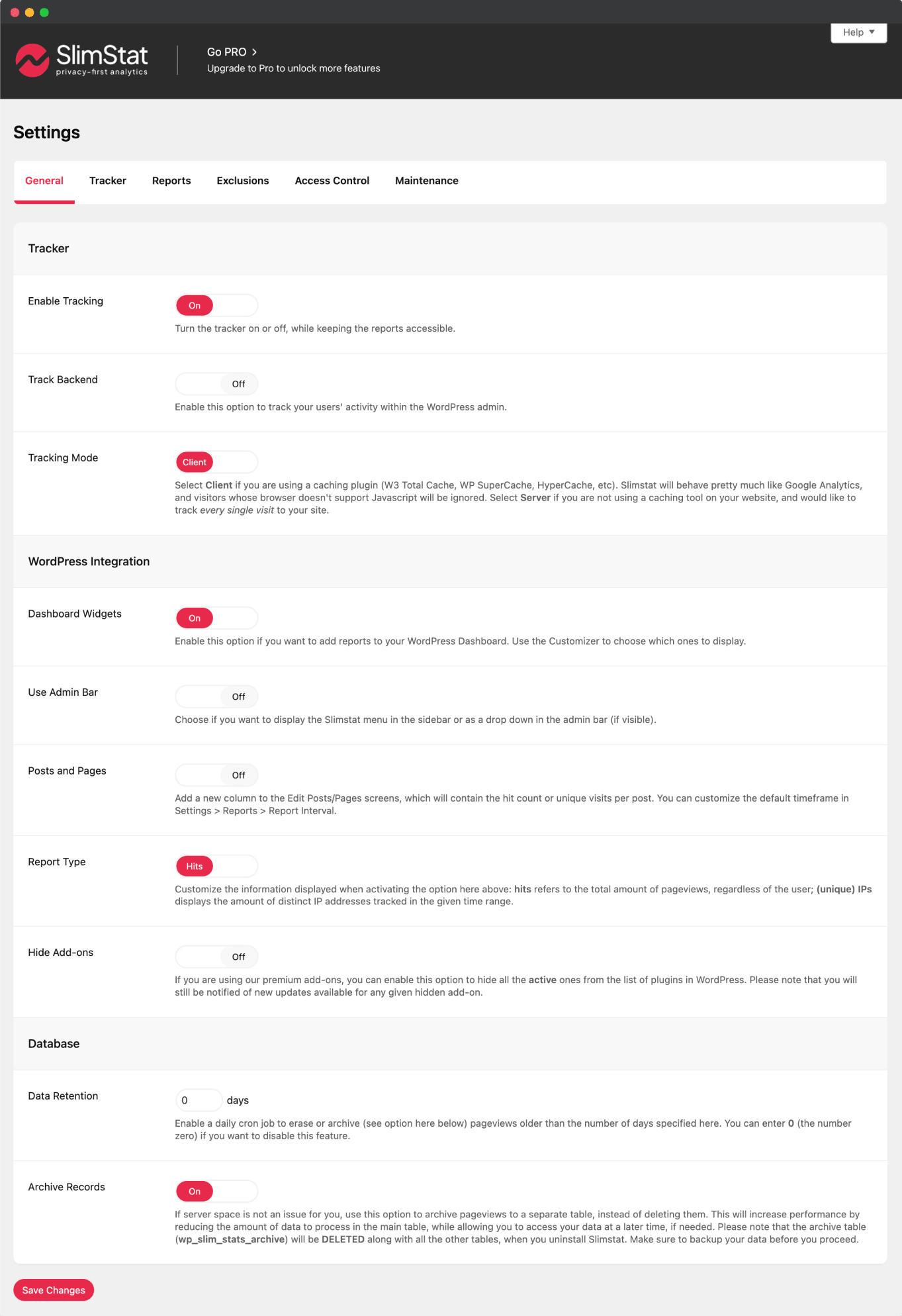
Settings – Plenty of options to customize the plugin’s behavior


Instalación
- In your WordPress admin, go to Plugins > Add New
- Search for Slimstat Analytics
- Click on Install Now next to Slimstat Analytics and then activate the plugin
- Make sure your template calls
wp_footer()or the equivalent hook somewhere (possibly just before the</body>tag)
FAQ
An extensive knowledge base is available on our website.
Reseñas


Colaboradores y desarrolladores
«SlimStat Analytics» es un software de código abierto. Las siguientes personas han colaborado con este plugin.
Colaboradores


«SlimStat Analytics» ha sido traducido a 12 idiomas locales. Gracias a los traductores por sus contribuciones.
Traduce «SlimStat Analytics» a tu idioma.
¿Interesado en el desarrollo?
Revisa el código , echa un vistazo al repositorio SVN o suscríbete al registro de desarrollo por RSS.
Registro de cambios
5.4.6 – 2026-03-23
We heard you — upgrading to 5.4.x broke tracking for many of you. Visitor counts dropped to zero, IPs were masked without your permission, and a consent banner appeared on sites that never asked for one. This release fixes all of that. After updating, your site works the way it did before 5.4.0 — no manual steps required.
If you want to enable GDPR features:
- Consent banner: Settings Tracker Data Protection GDPR Compliance Mode = On, then Settings Tracker Consent Management choose SlimStat Banner, WP Consent API, or Real Cookie Banner
- Anonymize IPs: Settings Tracker Data Protection Anonymize IP Addresses = On
- Hash IPs: Settings Tracker Data Protection Hash IP Addresses = On
Fixed
- Visitor counts dropping to zero after upgrading: a consent banner was silently enabled on every site, blocking all anonymous visitors. The banner is now off by default. If you had configured opt-in or opt-out privacy features in an earlier version, we detect that and keep consent enabled for you automatically.
- IPs being masked or hashed without your permission: v5.4.0 changed IP storage defaults, so full IP addresses were replaced with anonymized or hashed values. Your IPs are now stored in full again, matching pre-5.4 behavior.
- Tracking broken on sites using WP Rocket, W3TC, or other caching plugins: fresh installs defaulted to server-side tracking, which doesn’t work with page caching. We’ve restored browser-based (JavaScript) tracking as the default.
- Ad-blocker bypass failing after plugin updates: the bypass URL included the plugin version, so cached pages had a stale URL after every update. The bypass URL is now stable across versions.
- Internal tracking URLs and bypass file URLs appearing as pages in the Access Log. All SlimStat-internal URLs are now filtered from both reports and server-side tracking.
- Access Log pagination showing the same rows when clicking the next-page arrow. The second page now correctly shows the next set of results.
- Pageviews silently lost when a transport fails: the tracker now tries adblock-bypass, AJAX, and REST fallbacks before giving up.
- Stale cached tracker data causing abandoned pageviews: the tracker recovers gracefully.
- “Respect Do Not Track” setting only working when GDPR mode was on: DNT is now honored regardless of your GDPR setting. The DNT toggle is now always visible in settings.
- Migration admin notice linking to a non-existent settings page. The link now correctly opens Settings Tracker Data Protection.
Improved
- Tracker health diagnostics now distinguish between fatal errors and recoverable warnings.
- Session cookies are restored by default — returning visitors are recognized across pages again, just like in v5.3.x.
- Cookie info registered with WP Consent API now uses proper plural-aware translations.
5.4.5 – 2026-03-20
- Fix: Hardened user exclusion logic — fixed consent-upgrade path, capability key matching, and defensive
wp_get_current_user()calls (#246) - Fix: GDPR consent cookie domain, cached page banner display, and anonymous nonce handling
- Fix: Removed double-escaping in report filters and tightened XSS sanitization (#243, #244)
- Fix: Strict fingerprint input sanitization (#244)
- Fix: Output escaping in reports default case (#244)
- Fix: Store attachment content_type as
cpt:attachment(#236) - Fix: Narrowed dashboard nested widget CSS selectors to avoid style conflicts (#247)
- Fix: Increased Access Log widget height on WP Dashboard
- Fix: Synced stat before
ensureVisitIdto prevent ID loss on finalization - Fix: Skipped REST nonce for anonymous users on non-consent tracking endpoints, removed dead adblock fallback URL
- Security: Restored nonce verification for all consent endpoints
- Improved: Refactored
isUserExcluded()into standalone method with full test coverage - Improved: Inlined
get_current_user_id()in nonce guards for clarity
5.4.4 – 2026-03-17
- Fix: Chart data not showing due to incorrect bounds check (PR #232)
- Fix: Weekly chart not showing today’s data and not respecting start_of_week setting (PR #235)
- Improved: Added
cpt:prefix guidance to content type exclusion setting
5.4.3 – 2026-03-16
- Fix: Fixed fatal error on servers without the PHP calendar extension (PR #229)
- Fix: Added defensive fallback for corrupted
start_of_weekoption in calendar-related reports - Improved: Moved day names array to a class constant in DataBuckets for better maintainability
5.4.2 – 2026-03-15
- Fix: Fixed tracking data not being recorded on some server configurations — REST API and admin-ajax endpoints now return responses correctly (PR #218)
- Fix: Fixed visitor locations showing a proxy server IP instead of the real visitor IP on Cloudflare-powered sites (#150)
- Fix: Fixed 503 errors that could occur on high-traffic sites due to inefficient visit ID generation (#155)
- Fix: Fixed excessive server requests when WP-Cron is disabled, caused by repeated geolocation lookups (#164)
- Fix: Fixed a CSS rule that could accidentally disable animations across your entire site, not just on SlimStat pages (#167)
- Fix: Fixed outbound link clicks, file downloads, and page-exit events not being recorded — a silent regression in recent versions (#174)
- Fix: Fixed consent rejections being ignored — visitors who declined tracking could still be tracked, and unconfigured consent types were incorrectly treated as granted (PR #178)
- Fix: Fixed a crash when the WP Consent API plugin is not installed alongside SlimStat (PR #172)
- Fix: Fixed a crash during background geolocation database updates (#180)
- Fix: Fixed geolocation database updates not retrying after a failed download — previously blocked retries for up to a month (PR #185)
- Fix: Fixed admin page styling conflicts with WordPress core styles (PR #175)
- Fix: Fixed Email Reports page layout not matching other SlimStat admin pages (PR #177)
- Fix: Fixed browser detection failing due to a library compatibility issue (#187)
- Fix: Fixed the external page tracking snippet being completely broken — the snippet only set the legacy
ajaxurlparameter while the tracker expects transport-specific endpoints (#220) - Improved: Every fix in this release is backed by ~329 automated tests across 46 test files — covering tracking, geolocation, consent, performance, and upgrade safety
- Improved: Restored the server-side tracking API (
wp_slimstat::slimtrack()) for themes and plugins that track visits programmatically (#171) - Improved: Unique visitor counts now work correctly even when IP addresses are anonymized or hashed (PR #178)
- Improved: 261+ previously untranslated strings are now available for translation in all languages (#173)
- Improved: Geolocation now works consistently across all request types, including background tasks
- Improved: DB-IP restored as the default geolocation provider for new installations
- Improved: Faster admin page loads by removing redundant database queries (PR #189)
5.4.1 – 2026-03-09
- New: The GDPR consent banner message, accept, and decline labels can now be translated with WPML and Polylang (#145)
- Fix: Fixed the GDPR consent banner appearing even when GDPR Compliance Mode was turned off (#140)
- Fix: Fixed duplicate Accept/Deny buttons showing in the consent banner when the custom message contained links (#144)
- Fix: Fixed charts not loading in older browsers including Firefox before version 121 (#139)
- Fix: Fixed a potential error when chart data was missing from the page
- Fix: Fixed real URLs (e.g., privacy policy links) being incorrectly stripped from the consent banner message
- Fix: Fixed refresh button not resetting countdown timer (#153)
5.4.0 – 2026-03-08
- Breaking: Removed internal GDPR consent management system (shortcode, banner, opt-in/opt-out cookies) in favor of external CMP integrations.
- New: Integration with Consent Management Platforms (CMPs) for GDPR compliance: WP Consent API and Real Cookie Banner Pro.
- New: GDPR Compliance Mode toggle – Enable/disable GDPR compliance requirements (default: enabled).
- New: Consent change listener that automatically resumes tracking when user grants consent via CMP.
- New: Do Not Track (DNT) header respect with configurable option in settings.
- New: WordPress Privacy Policy content registration for GDPR Article 13/14 compliance.
- Enhancement: Refactored GDPR architecture – consent management fully delegated to external CMPs.
- Enhancement: Smart IP handling – automatically upgrades from anonymized/hashed IP to full IP when consent is granted.
- Enhancement: Improved JavaScript consent handling with polling-based consent state monitoring.
- Enhancement: Default data retention period set to 420 days (14 months) for GDPR compliance.
- Fix: Legacy mode now conservatively denies PII collection when GDPR enabled and no CMP configured.
- Fix: Consent revocation properly deletes tracking cookie when user opts out via banner.
- Fix: Removed legacy cookie-based opt-in/opt-out handling for cleaner, CMP-based consent flow.
See full release notes
5.3.6
- Security: Hardened output escaping in reports
5.3.5 – 2025-12-31
- Security: Hardened plugin security
5.3.4 – 2024-12-28
- Security: Hardened plugin security
5.3.3 – 2025-12-17
- Maintenance: Stability and compatibility improvements.
5.3.2 – 2025-11-24
- Fix: Minor improvements & Hardened plugin security.
5.3.1 – 2025-09-09
- Fix: Resolved “Invalid Date, NaN” error in monthly charts for 12-month ranges.
- Fix: Real-time report date filters not properly cleared during auto-refresh.
- Fix: Real-time report not updating at midnight with filters.
- Fix: Undefined variable $unpacked in PHP tracking logic;
- Enhancement: Enhanced responsive design for the “Access Log” report.
- Enhancement: Improved tracking logic to prevent duplicate pageviews and events.
- Enhancement: Enhanced interaction tracking and heartbeat finalization.
5.3.0 – 2025-08-25
- New: Tracker type options (REST API + Ad-blocker bypass) for improved tracking flexibility.
- New: Support for WordPress date format setting in charts.
- New: Hourly, daily, weekly, monthly, and yearly chart granularities for deeper insights.
- Enhancement: Redesigned line charts for better readability.
- Enhancement: Compatibility with WordPress’s Interactivity API for seamless integration.
- Enhancement: Added new 3 date ranges formats (Last 2 weeks, Previous month, This month).
See full release notes
5.2.13 – 2025-04-29
- Fix: Resolved issues with pagination in reports.
5.2.12 – 2025-04-26
- Enhancement: Removed red color from report export boxes to reduce eye strain and improve user experience.
5.2.11 – 2025-04-25
- Full release notes WordPress Real-time Analytics Plugin – SlimStat 5.2.11 Release Notes
- Visual Enhancement: Improved UI with eye-catching visual elements for better user experience.
- Enhancement: Optimized SQL query to reduce the chances of errors and improve overall performance.
- Enhancement: The “Export” button for non-Pro users now links to the Slimstat PRO version page, improving clarity around upgrade options.
- Enhancement: Added support for the WordPress date format setting for the charts.
- Fix: Fatal error in EmailReportsAddon.php for missing
get_pluginsmethod. - Fix: Prevented PHP warning by checking if ‘referer’ array key is set in searchterms reports view.
- Fix: Fix a database error related to the notes column.
- Fix: Prevented horizontal scrolling in the reports area and improved page loading animations by ensuring styles are applied correctly.
- Fix: Addressed several user-reported issues to enhance overall stability and user experience.
- Fix: Investigate and resolve the “Division by zero” fatal error in
wp-slimstat-db.phpcaused by PHP version 8.2.22. Further investigation needed to determine the root cause and provide a fix.
5.2.9 – 2024-11-12
- Enhancement: Ensured compatibility with WordPress version 6.7.
- Fix: Resolved the Top Referring Domain Issue.