For organizations using Pullfrog in private repos, all repository activity is private and all actions are triggered by trusted team members. The risks in this scenario are minimal. The rest of this document primarily applies to users who are using Pullfrog on public repos.
| Layer | Protection |
|---|---|
| System prompt | Instructs agents to refuse exfiltration attempts |
| Secret masking | Redacts secrets from all logs |
| Secret isolation | Repo secrets not passed to actions by default |
| Shell environment scrubbing | Only minimal env vars reach the agent subprocess |
| Short-lived tokens | GitHub tokens expire and are revoked after each run |
| Permission checks | Only collaborators can trigger runs by default |
| Protected branches | Agents cannot push directly to main/master/production |
System prompt
All runs triggered by Pullfrog include a system prompt with instructions to identify and avoid common exfiltration vectors. The boundaries of the user prompt are indicated in the structure of the prompt, so the agent knows where the system prompt ends and the user prompt begins.Secret masking
All secrets are auto-masked using GitHub’s first-party secret masking feature, so they cannot be publicly logged in GitHub Actions logs by accident.Secret isolation
Repository secrets are not automatically available to the Pullfrog action. You must explicitly pass the necessary secrets (like API keys) via environment variables in your workflow configuration. This gives you full control over which secrets are exposed to the agent.Shell environment scrubbing
Pullfrog supports a Restricted shell permission, which automatically scrubs sensitive environment variables from the Shell tool. This works across all agents.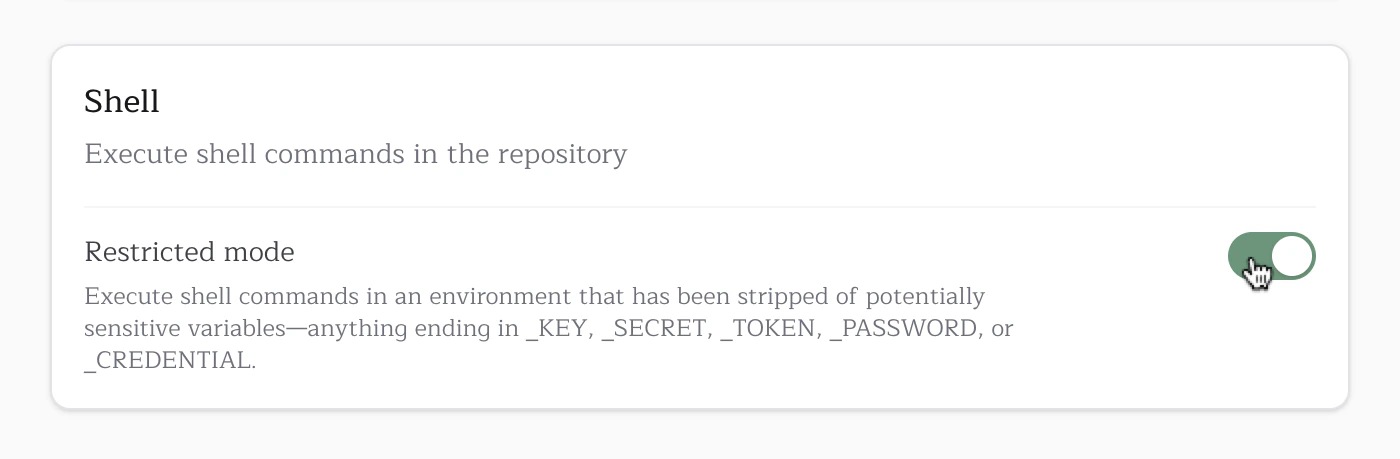
env or printenv. The shell environment uses a default-deny allowlist — only known-safe GitHub Actions runner variables, system variables, and toolchain variables are passed to shell commands. Everything else (secrets, API keys, database URLs) is stripped.
GITHUB_TOKEN and GH_TOKEN are always blocked from shell subprocesses, even though other GITHUB_* runner metadata variables are allowed. Git operations use a separate, scoped authentication mechanism (ASKPASS) that does not expose tokens in the environment.
Note that the agent process itself receives the full environment to ensure all configured tools and integrations work correctly. The filtering happens at the shell execution layer, which is the primary vector for exfiltration attacks.
In CI, shell commands also require Linux PID namespace isolation (unshare or sudo unshare). If namespace isolation is unavailable, shell execution fails closed instead of running unsandboxed.
Default allowed variables
The following variables are automatically passed through to shell commands. Any variable not in this list is blocked by default. Prefix-matched — all variables starting with these prefixes are allowed (exceptGITHUB_TOKEN and GH_TOKEN, which are always blocked):
| Prefix | Description |
|---|---|
GITHUB_* | GitHub Actions runner metadata and workflow context |
RUNNER_* | Runner configuration and paths |
JAVA_HOME_* | JDK version paths (e.g., JAVA_HOME_17_X64) |
GOROOT_* | Go installation paths |
PULLFROG_* | Pullfrog internal variables |
System variables
System variables
CI, HOME, LANG, LOGNAME, PATH, SHELL, SHLVL, TERM, TMPDIR, TZ, USER, XDG_CONFIG_HOME, XDG_RUNTIME_DIR, DEBIAN_FRONTENDRunner image toolchain variables
Runner image toolchain variables
ACCEPT_EULA, AGENT_TOOLSDIRECTORY, ANDROID_HOME, ANDROID_NDK, ANDROID_NDK_HOME, ANDROID_NDK_LATEST_HOME, ANDROID_NDK_ROOT, ANDROID_SDK_ROOT, ANT_HOME, AZURE_EXTENSION_DIR, BOOTSTRAP_HASKELL_NONINTERACTIVE, CHROME_BIN, CHROMEWEBDRIVER, CONDA, DOTNET_MULTILEVEL_LOOKUP, DOTNET_NOLOGO, DOTNET_SKIP_FIRST_TIME_EXPERIENCE, EDGEWEBDRIVER, GECKOWEBDRIVER, GHCUP_INSTALL_BASE_PREFIX, GRADLE_HOME, HOMEBREW_CLEANUP_PERIODIC_FULL_DAYS, HOMEBREW_NO_AUTO_UPDATE, ImageOS, ImageVersion, JAVA_HOME, NVM_DIR, PIPX_BIN_DIR, PIPX_HOME, PSModulePath, SELENIUM_JAR_PATH, SGX_AESM_ADDR, SWIFT_PATH, VCPKG_INSTALLATION_ROOTEnvironment allowlist
You can configure additional environment variables to pass through via the Environment allowlist field in your repository’s security settings. Add one variable name per line. This is useful for variables your build tools or dependencies require (e.g.,DATABASE_URL, NPM_TOKEN).
GITHUB_TOKEN and GH_TOKEN cannot be added to the allowlist — they are always blocked regardless of configuration.
Restricted mode is ALWAYS ON for public repositories and cannot be disabled. Private repositories default to Enabled (full access), but can be configured to use Restricted mode if desired.
Short-lived tokens
Pullfrog uses GitHub OIDC to acquire installation tokens that are scoped to the repository and short-lived. Moreover, they are explicitly revoked at the end of each run.Permission checks
Pullfrog provides the ability to trigger agent runs in response to actions performed by non-collaborators, like mentions, new issues, and new PRs.- By default, these triggers are all disabled. This means agent runs cannot be triggered by non-collaborators unless explicitly enabled.
- Any agent runs triggered by external actions are automatically run with limited permissions. This cannot be disabled.
Protected branches
Agents cannot push directly tomain, master, or production. They must create feature branches and open pull requests.