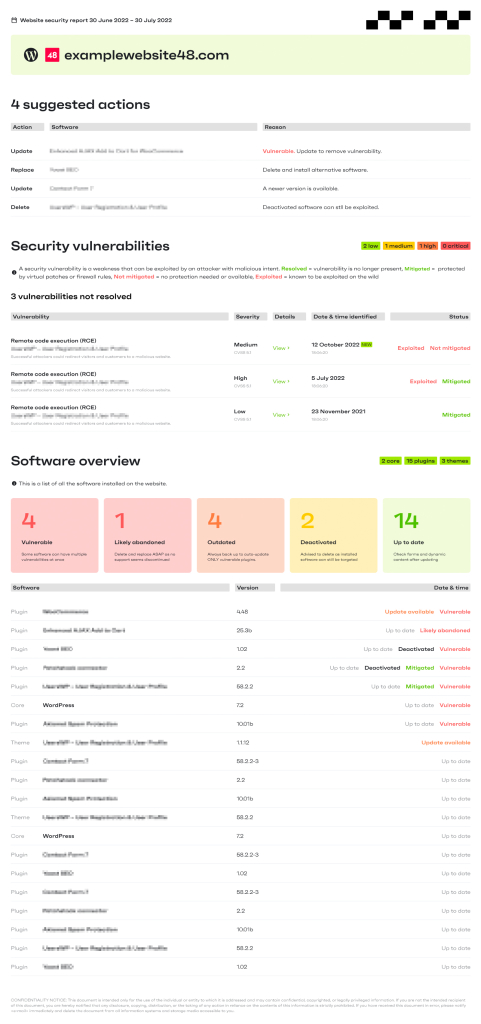
Snapshot report
Snapshot reports feature is available for all Patchstack users, including the Personal (Free) plan.
Snapshot report is a PDF security report, which shows the current situational report of the website.
Generating a Snapshot report
Section titled “Generating a Snapshot report”- Open the Reports page in Patchstack App: https://app.patchstack.com/reports/. On the Personal (Free) plan there is no Reports item in the side menu; click the Reports heading on your Dashboard instead.
- Under Quick-generate a report, choose your site in Search site.
- Open the Type menu and choose Snapshot. Choosing a site clears the type, so pick the site first.
- Click Generate.
- The report appears under Available for download when it is ready. Click Download to get the PDF.
Generated reports are kept for 90 days.
Snapshot report shows:
- Actions that are suggested for you to take with the site (which plugin or theme to update or delete)
- Which vulnerabilities does the site currently have
- Overview of the third-party components installed on the site
Click here to download an example of a Snapshot report!