References
Overview
This document outlines the integration process and API details for the Bluefin TECS Web eCommerce system, which is used for processing card transactions through a merchant's online shop.
TecsWeb JS
Integrating an iframe can present some challenges.
One issue is resizing the iframe to match the dimensions of the child page content as users navigate through different pages within the iframe.
Another challenge is ensuring communication between the child and parent pages. When a return URL is defined, TecsWeb will redirect to this URL after the payment is completed. However, since this URL opens within the iframe, you need a way to inform the parent page about the transaction status and details.
Default Appearance
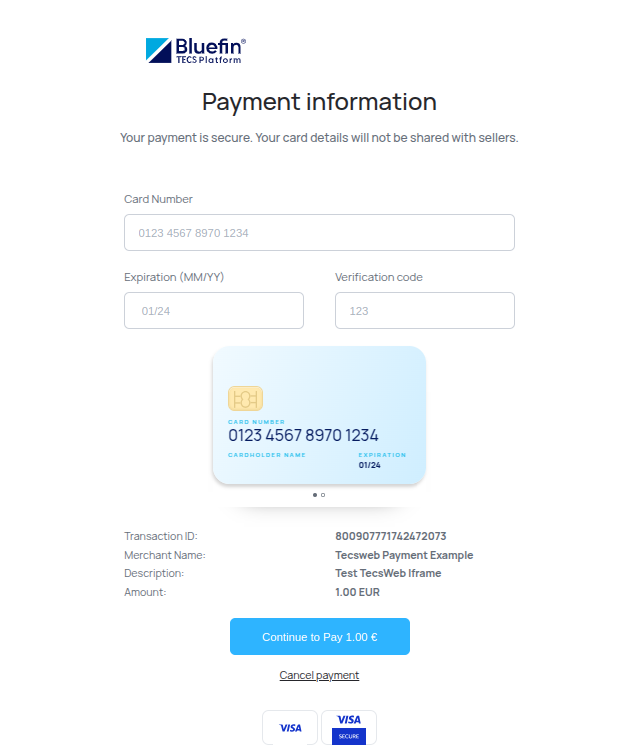
TECS JS SDK IFrame: Default Appearance
Customized Appearance
TecsWeb.createIframe(
  'tecsweb-iframe-customized',
  response.data.tecsWebRequestToken,
  {
    backgroundColor: '#eee',
    scrollBar: true,
    iframeSize: 'small', // (small | medium | large), medium is default
    width: '600px', // if defined, overrides predefined iframeSize
    height: '1000px' // if defined, overrides predefined iframeSize
  }
);
For response.data.tecsWebRequestToken in use, check out JSON Web Service Example.
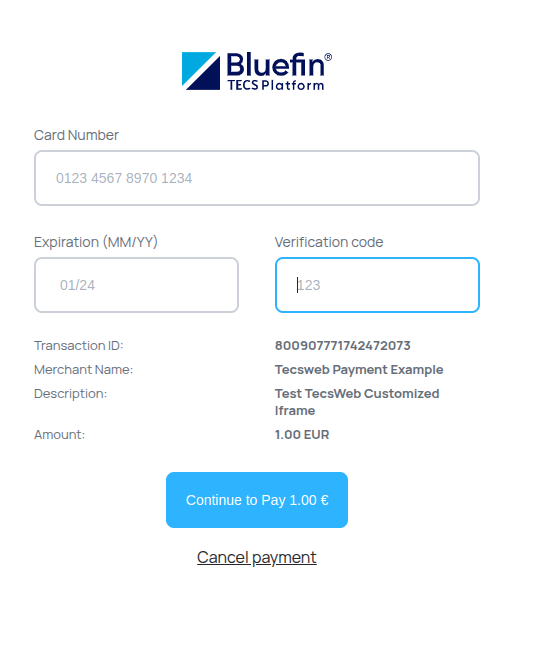
TECS JS SDK IFrame: Customized Appearance
Button Styling
// Button Styling
{
  label: `Order for 1 \u20AC`,
  style: {
    backgroundColor: '#066fc9',
    color: '#FFF',
    borderRadius: '6px',
    border: '2px solid #066fc9',
    cursor: 'pointer',
    fontSize: '16px',
    padding: '8px 16px',
    fontWeight: 'bold'
  },
  styleHover: {
    backgroundColor: '#0680dd'
  },
  styleDisabled: {
    backgroundColor: 'rgb(115,141,201)',
    color: '#d6d4ff',
    border: '2px solid #066fc9',
  },
  scrollBar: false,
  iframeSize: 'medium', // small,  medium, large (medium is default)
  hideOnOpen: false,
  onPopupClose: () => confirm('Your callback after close')
}
Iframe Styling
// Iframe Styling
{
  backgroundColor: '#eee',
  scrollBar: true,
  iframeSize: 'small', // (small | medium | large), medium is default
}
Customized Appearance Configuration
-
iframeSize(string) (Optional):"small"|"medium"|"large""small"-width: 500px, height: 1350px"medium"-width: 800px, height: 1400px"large"-width: 1000px, height: 1000px
-
width | height(string | number) (Optional):
Iframe Resizing
Typically, you define the dimensions of an iframe and decide whether it should display a scrollbar if the content overflows its height.
But what if you need to dynamically change the dimensions based on the content of the child page?
To address this, we have integrated iframe-resizer in our TecsWeb library.
For full details about iframe-resizer, please visit: https://iframe-resizer.com.
In brief, you need to load the parent JavaScript into your parent page and the child JavaScript into your child page.
In this scenario, our TecsWeb page acts as the child page, so we've already implemented the child JavaScript on our pages. You only need to implement the parent JavaScript.
For effective communication with TecsWeb, we strongly recommend using iframe-resizer as wrapped in our TecsWeb library. This ensures that both the parent and child pages use the same version of iframe-resizer.
For example, this is how to use our iframe-resizer wrapper.
<script>
  TecsWeb.iframeResize({ license: "xxxx" });
  // For more options, see https://iframe-resizer.com/api/parent
</script>
NoteThe Iframe Resizer is available under a GPLv3 license for non-commercial use only. For use in cross-domain scenarios, there is a fee of $76. For more information, visit https://iframe-resizer.com/pricing
Communication Between Child and Parent Pages
As mentioned earlier, the Return URL provided to TecsWeb will open in the iframe after the payment is processed. Therefore, your parent page needs to be informed about the status of the payment transaction.
In a cross-domain scenario, the only solution for this is to fire the "message" event using the postMessage function supported by JavaScript.
Here is a simple example of the child-parent relationship:
Child Page
window.parent.postMessage("Fired from the child page");Parent Page
window.addEventListener("message", function (event) {
  if (event.data == "Fired from the child page") {
      // DO SOMETHING
  }
}});
Triggering with postMessage
Without having to code PHP, you can choose this method where you can fire this event from the Return page as follows:
<!DOCTYPE html>
<html>
  <head>
    <script src="https://test.tecs.at/tecs/js/tecsweb.js"></script>
  </head>
  <body>
    <script>
      window.parent.postMessage(TecsWeb.getQueryString())
    </script>
  </body>
</html>
NoteFor this event to get registered, don't forget to add the event listener to the main parent page as noted above.
Another alternative solution would be to move all the data to the parent to the same URL, or to the different one. This solution is put to use using TecsWeb.redirectParent.
redirectParent #1
In this example, the PHP code handles the TecsWeb response - then, the TecsWeb.redirectParent function redirects the parent to the URL passed as the first argument of this function.
<html>
  <head>
    <?php
      // handle the response
      // check the signature
      // collect GET data
      // saving to database or some other operation
      // handle successful or errorous response
    ?>
    <script src="https://test.tecs.at/tecs/js/tecsweb.js"></script>
  </head>
  <body>
    <script>
      TecsWeb.redirectParent("after-trasaction.php?transaction=OK");
    </script>
  </body>
</html>
redirectParent #2
On the other hand, here we omit the PHP code to jump straight to redirecting the parent to the given URL.
<script>
  const responseDataQueryString = TecsWeb.getQueryString();
  TecsWeb.redirectParent(
    'after-trasaction.php?' + responseDataQueryString
  );
</script>
With getQueryString, we can get all the response query parameters for reuse in the parent page about the status and details of the processed transaction.
PHP SDK REFERENCE
\Tecs\TecsWeb:: means that the given attributes are in that namespace e.g. \Tecs\TecsWeb::AMOUNT.
-
class TecsWeb-
__construct(secretKey, merchantId, paygateUrl)-
merchantId(string) (Required)-
Often referred to as terminalId
-
-
secretKey(string) (Required) -
paygateUrl(string) (Required)- TECS Web Payment Portal
-
-
createSignedUrl(array)-
array - transaction configuration e.g.
[ \Tecs\TecsWeb::AMOUNT => '100' ]. -
\Tecs\TecsWeb::-
AMOUNT(string) (Required)- Transaction amount in cents.
-
TX_ID(string) (required)-
transactionId
NoteThis identifier must be unique per transaction.
We recommend using the Unix Epoch current timestamp format with milliseconds for uniqueness. For example, in Bash we have
echo $(date +%s%N | cut -b1-13). In JavaScript,Date.now(). For various other languages, please refer to Current Millis ‐ Milliseconds since Unix Epoch.Feel free to use your logic generating a unique ID. For example, a sequence of random integers, or similar.
-
-
TX_CURRENCY(string) (required)- ISO 4217 currency code
-
TX_DESC(string) (required)- Transaction description
-
RECEIPT_NUMBER(string) (required)- Invoice number - useful for tracking purposes.
- Receipt number of the request should identify business process on the eshop side.
- Should be unique per loading procedure.
-
RETURN_URL(string) (required)- Target URL that handles the transaction response e.g. validation, status, etc.
/vterm/purchase.jspis provided by Bluefin TECS as the complementary RETURN page, which you can use when you don't want to create your own customized page to process the purchase. The RETURN page is also useful for testing and debugging.
-
TX_DATE_TIME(required) (default:current_date)- Transaction date and time (format = yyyymmddhhmmss)
-
TX_SOURCE_ID(integer) (optional) (default:1)- Merchant account ID (for multi-account systems)
-
TX_PLACE(string) (optional) (default:"")- Describes the place (e.g. webshop name) where the transaction took place
-
USER_DATA(string) (optional) (default:"")- The
USER_DATAfield is for supplementary information that a shop wants to keep for particular transactions. This encompasses data collected for enhanced cardholder verification, as well as straightforward tags intended for subsequent analysis or statistical insights.
- The
-
LANG(string) (optional) (default:"en")- Forces the TECS Web page to be displayed in a certain language. Possible values: en, de, it, es, fr, pl.
-
MESSAGE_TYPE(integer) (optional) (default:0001)- Type of transaction request
-
TX_ORIG_ID(integer) (optional) (default:2)- Additional information for the transaction type as provided in the parameter
MESSAGE_TYPE
- Additional information for the transaction type as provided in the parameter
-
**
ORIG_TX_ID(integer) (optional) **- Original transaction number (txid of the source transaction)
-
CARD_NUMBER_POST(string) (optional) (default:"")- Should be in the format "cardnumber_expirydate" (for more details see the TXML spec). If this parameter is present, the TECS Web page shouldn't ask the cardholder to enter any data.
-
EC_DATA(string) (optional | required)-
Note that this parameter is only required in the production environment for processing subsequent recurring transactions. See Payment Gateway Endpoints.
-
"INST;": Used for either installment or initial payments in a series, marking it as a Credential On File (COF) initial transaction. This value is only applied in the Request URL. For more details, refer to the Recurring Transaction Request URL. -
"RECU;": Indicates a recurring payment, used for COF MIT (Merchant Initiated Transaction) or Unscheduled Credential On File (UCOF) transactions. -
"CIT;": Denotes customer-initiated transactions that are part of a recurring payment series.
-
-
-
-
-
class TecsWebTransactionStatus-
__construct(merchantId, secretKey, mode = 'prod')-
merchantId(string) (required)-
Often referred to as terminalId
-
-
secretKey(string) (required) -
mode(string) (optional)'prod' | 'test'
-
-
getTransactionStatus(transactionId) -> TransactionStatusResponsetransactionId(string) (required)- Original transaction identifier from Creation of TECS Web Request Token
-
-
class TecsWebResponse__construct(secretKey, data)secretKey(string) (required)data(array) (required)- Return parameters parsed from response URL as an array. These include
responsecode,responsetext,txid, etc. This response URL is retrieved by the payment gateway.
- Return parameters parsed from response URL as an array. These include
isSignedCorrectly() -> bool- Checks if the response has valid signature
getResponseText() -> string- Returns
responsetextfrom response URL
- Returns
getResponseCode() -> string- Returns
responsecodefrom response URL
- Returns
getTXID() -> string- Returns unique transaction ID
getTXDateTime() -> string- Returns the transaction time stamp
getAuthorizationNumber() -> string- Returns the authorization number
getAcquirerName() -> string- Returns the acquirer name
getCardReferenceNumber() -> string- Returns the card reference number
getCardType() -> string- Returns the card type
getUserData() -> string- Returns the user data
getSign() -> string- Returns the hashed signature
getAllData() -> array- Returns response URL parameters as an array
Table of Transaction Types
| Transaction Type | Message-Type | Txorigid | Description |
|---|---|---|---|
| PRE-AUTH | 0901 | 0001 | 5 | This type of transaction reserves a certain amount on the customer's card but does not complete the payment immediately. It's commonly used in industries like hospitality (e.g. hotels, car rentals) where final charges may vary based on services used. |
| *OFFLINE AUTHORIZATION | 0901 | 6 | This is similar to pre-authorization but is processed offline, meaning the authorization is done without an immediate connection to the card issuer. It's used in situations where online authorization is not possible, such as in-flight purchases. |
| AUTHORIZATION | 0001 | NOT 5 | This type of transaction authorizes a payment amount and checks if the customer's account has sufficient funds for the transaction. It's a standard authorization for a purchase. |
| REFUND | 0911 | 0011 | Refund transactions are used to return funds to the customer's card, typically for returned goods or canceled services. | |
| CAPTURE | 0013 | 0017 | 4 | A capture transaction completes a pre-authorized AUTHORIZATION transaction, transferring the reserved funds to the merchant's account. It's the final step in processing a pre-authorization. |
| CANCELLATION | 0013 | NOT 4 | A cancellation transaction cancels a pre-authorization or an authorization before it is captured. It releases the reserved funds back to the cardholder. |
| TECHNICAL CANCELLATION | 0017 | NOT 4 | Similar to cancellation, a technical cancellation is used to release reserved funds without completing the transaction. It's often used in cases of technical errors or system issues. |
| *REVERSAL | 0420 | NOT 4 | A reversal transaction cancels a previous authorization or capture request. It's used to void a transaction that hasn't been completed yet, such as in the case of a payment error. |
| *AUTHORIZATION+TIP | 0907 | 0007 | This transaction type includes an additional tip amount with the authorization, commonly seen in industries where tipping is customary, such as restaurants. | |
| *TIP | 0909 | 0009 | A tip transaction is a standalone transaction to add a tip amount to a previously authorized transaction, typically done in scenarios where tipping is separate from the initial payment authorization. |
Note
*- represents the transactions that aren't supported by the eCommerce platform but can be performed with either Merchant Services REST API or TECS SmartPOS.
Request URL Parameters
Required Parameters
| Name | Data Type | Length | Description |
|---|---|---|---|
| /tecswebmvc_start.do | AN | n/a | URI of TECS Web application, must be same for every transaction. |
| amt | N | 11 | Desired transaction amount in minor units of currency without comma. |
| txid | N | 20 | Unique identifier of transaction. |
| txcur | AN | 3 | Currency code according to ISO 4217 (3 characters) eg. EUR, USD, GBP. |
| txdesc | AN | 39 | Transaction description. |
| receiptnumber | AN | 20 | Receipt number – defined by shop for later payment reconciliation. |
| mid | N | 8 | Merchant's identifier or terminal ID. |
| sign | AN | n/a | Transaction signature. |
| rurl | AN | n/a | URL of the shop return URL. |
| Date-Time-TX | N | 14 | Transaction date and time (format = yyyymmddhhmmss). |
Optional Parameters
| Name | Data Type | Len | Default value | Description |
|---|---|---|---|---|
| ecdata | AN | "" | Type of recurring payment: "INST;" | "RECU;" | "CIT;". Note that this parameter is required in the production environment for recurring payments. See PHP SDK REFERENCE. | |
| TX-Source-Id | N | 1 | 1 | Merchant account ID (for multi-account systems). |
| Transaction-Place | AN | 13 | "" | Describes the place (e.g. webshop name) where the transaction took place. |
| User-Data | AN | 250 | "" | User-specific data. See PHP SDK REFERENCE. |
| lang | AN | 2 | en | Force the TECS Web page to be displayed in a certain language. |
| Message-Type | N | 4 | 0001 | Type of the transaction request. For full list of message types, check out Table of Transaction Types. |
| Txorigid | N | 1 | 2 | Additional information on the transaction type as provided in the parameter Message-Type. |
| origTRXNum | N | 20 | Original transaction number (txid of source transaction). | |
| CardNumberPost | AN | 80 | Should be in the format "Cardnumber_expirydate" (for more details, see TXML spec). If this parameter is present, the TECS Web page shouldn't ask the cardholder to enter any data. |
Response URL Parameters
After the transaction request is successfully processed, the customer is redirected back to the online shop along with the result of the transaction. The customer is redirected back to the URL of the transaction request, which is specified by parameter "rurl". Depending on the response, the shop may notify the customer about the result of the authorization request.
| Name | Data Type | Length | Description |
|---|---|---|---|
| responsecode | N | 4 | Authorization response code (see also chapter 7). |
| responsetext | AN | 80 | Description of response code. |
| txid | N | 20 | Transaction identifier. |
| Date-Time-TX | N | 14 | Transaction date and time. |
| Authorization-number | AN | 9 | Authorization number generated by the authorization centre. |
| VU-NUMMER | AN | 15 | Contract number of the merchant. |
| Operator-ID | AN | 12 | Operator-ID identifies the network processor in authorization request to the acquirer. |
| SERIEN-NR | AN | 9 | Card entry mode and transaction condition code. |
| Orig-TX-ID | N | 20 | Original transaction ID (e.g. in case of a cancellation). |
| STAN | N | 6 | System trace audit number. |
| Orig-STAN | N | 6 | System trace audit number of the original transaction (e.g. in the case of a cancellation). |
| SVC | N | 3 | |
| User-Data | AN | 250 | User-specific data. See PHP SDK REFERENCE. |
| sign | AN | n/a | Transaction return signature. |
| AcquirerName | AN | 20 | Name of the acquirer that received the transaction authorization request. |
| CardType | AN | 20 | Name of the card brand used by the customer (e.g. VISA, MasterCard, etc.). |
| CardReferenceNumber | AN | 40 | See below. |
CardReferenceNumber - returned when the ecdata parameter is specified.
- For approved transactions:
- Format: REFY….Y_ZZZZ_XXXX_AAAAAA
- REF – string identifier
- Y….Y – variable length string - card reference number generated by payment engine
- ZZZZ – 4N – card expiration date (YYMM)
- XXXX – 4N – last 4 digits of PAN
- AAAAAA – 6N – first 6 digits of PAN
- For declined transactions, field contains last 4 digits of PAN
Missing Response
Sometimes, the response might not get back to the merchant shop system because of various accidents (customer closes the browser, browser crashes, internet connection failure, etc). In this case, the shop cannot evaluate the response and has to consider the payment as failed.
However, the payment request still might have been authorized and the card holder will be billed by their card issuer without receiving the goods or services they ordered from the merchant.
To avoid this situation, the shop system needs to keep track of all requests and handle them accordingly. There are several ways to handle this situation:
- Automatically send a cancellation request for each transaction request with unknown result.
- Use Bluefin TECS Transaction Web Service to check the status of a transaction and react accordingly.
For more options and best-practice procedures, please reach out to your TECS consultant.
Secure Hash
The secure hash is a sequence of characters that ensures the authenticity of given parameters. It is calculated using a one-way cipher algorithm.
The secure hash consists of the following parameters:
- amt
- txid
- txcur
- txdesc
- mid
- rurl
- User-Data ( optional )
The secure hash is calculated with these parameters and the MerchantSecretKey. All the parameters needed for the hash are delimited by the pipe character '|' in the order specified below. It is critical that the values in the hash are not URL encoded.
As mentioned earlier, the hash algorithm is determined in accordance with the hashed signature length.
Hash Signature Table
| Algorithm | Signature Length |
|---|---|
SHA-224 | 56 |
SHA-256 | 64 |
SHA-384 | 96 |
SHA-512 | 128 |
Data for signature can be encoded with either US-ASCII or UTF-8 Charset. TECS Web checks for both of them on request validation.
Manual Hash Calculation
Request URL
By default, the PHP SDK uses SHA-256 for hashing the signature. The hashing also can be done manually as shown in the bash example below.
#!/bin/bash
AMT='100'
TransactionId='1000010165' # Optimally, consider using the current Unix Epoch timestamp for uniqueness: $(date +%s%N | cut -b1-13)
txCur='EUR'
txDesc='Transaction Description'
MerchantId='MerchantId'
RURL='http://127.0.0.1:8000/payment-response'
userData='CHI=1108;'
skey='SecretKey'
sigData="$AMT|$TransactionId|$txCur|$txDesc|$MerchantId|$RURL|$userData$skey"
signature=`echo -n "$sigData" | openssl dgst -sha256 -binary | xxd -p`
S=`echo -n $signature | awk '{print toupper($0)}'`
echo "$S"
It is important to note that the secretKey is appended, NOT separated by a delimiter. For example, if there is no userData, the following would be applied:
sigData="$AMT|$TransactionId|$txCur|$txDesc|$MerchantId|$RURL$skey"For more detail, check out RFC 2104.
Once the hash is ready, it can be used to construct a request URL and URL-encode it as follows:
https://test.tecs.at/tecsweb/tecswebmvc2.do
?mid=11450002
&sign=AA128DB70C700F809FBD1EBE74829DFA3AE1045E927586680BAE1509779BEBB0
&amt=800
&txid=1003812387331892
&txcur=EUR
&txdesc=Transaction+Description
&receiptnumber=123457
&rurl=http%3A%2F%2F127.0.0.1%3A8000%2Fpayment-response
&Date-Time-TX=20240522143437
For the full list of parameters, refer to Request URL Creation Parameters.
Before redirecting, we have to encode every parameter separately and put them all together with &.
Manual Hash Calculation is also demonstrated in NodeJS here.
NoteencodeUrl function has to replace
' 'with'+'.
Response URL
Using our PHP SDK, the response must be validated by checking if the signature is signed correctly using your merchant credentials. This is done for extra security to ensure that the merchant was the one who made the initial request URL for the respective transaction.
For example,
<?php
    require 'vendor/autoload.php';

    $tecsWebResponseToken = $_GET;

    $tecsWebResponse = new \Tecs\TecsWebResponse(
        'SecretKey',   // Merchant Secret Key
        $tecsWebResponseToken
    );

    // FIRST WE CHECK IF THE RESPONSE HAS VALID SIGNATURE.
    // IF NOT THEN CREATE LOG AND REDIRECT TO OR INCLUDE ERROR PAGE.
    if (!$tecsWebResponse->isSignedCorrectly()) {
        $payloadToLog = $tecsWebResponse->getAllData();
        // Instead of echoing, you place the message to your HTML
        echo ('The result of payment has been incorrect! Please contact support.');
    }
    // IF THE RESPONSE WAS SIGNED CORRECTLY, LOG TRANSACTION RESULT AND SHOW RESULT PAGE BASED ON RESPONSE CODE
    // FOR AVAILABLE RESPONSE CODES AND MESSAGES, SEE TECSWEB DOCUMENTATION
    // YOU HAVE ACCESS TO THE RESPONSE VALUES WITH GETTERS
    else {
        $payloadToLog = $tecsWebResponse->getAllData();
        $txid = $tecsWebResponse->getTXID();
        $responseMessage = $tecsWebResponse->getResponseText();
        $responseCode = $tecsWebResponse->getResponseCode();
        // instead of echoing you place the message to your HTML.
        echo ('Transaction id ' . $txid . '; responseCode: ' . $responseCode
              . '; authorization result: ' . $responseMessage);
    }
?>
Custom Response Signature Validation
As noted in the introduction, if the merchant uses a programming language for which Bluefin TECS Web does not provide an SDK, here a pure PHP implementation is available for processing the response hash that is convertible to other languages.
<?php
    // Get the current page URL, including query string
    $redirectedUrl = $_SERVER['REQUEST_URI'];

    // Parse the URL and extract query parameters
    $parsedUrl = parse_url($redirectedUrl);
    $queryParams = [];
    if (isset($parsedUrl['query'])) {
        parse_str($parsedUrl['query'], $queryParams);
    }

    // Extract parameters required for signature calculation
    $responseCode = $queryParams['responsecode'] ?? '';
    $responseMessage = $queryParams['responsetext'] ?? '';
    $txid = $queryParams['txid'] ?? '';
    $CardReferenceNumber = $queryParams['CardReferenceNumber'] ?? ''; // Optional
    $UserData = $queryParams['User-Data'] ?? ''; // Optional
    $receivedSign = strtoupper($queryParams['sign'] ?? ''); // Received signature

    // Merchant's Secret Key
    $secretkey = "SecretKey"; // Replace with the actual secret key

    // Construct the payload in the specified order for the computed hash
    // This is how it is implemented in our PHP SDK.
    // See https://support.tecs.at/developers/ecommerce/tecsweb-php-integration/-/blob/main/src/Generator/ResponseSign.php?ref_type=heads#L45
    $payload = $responseCode . $responseMessage . $txid . $CardReferenceNumber . $UserData;

    // Convert the payload to US-ASCII encoding
    $payloadAscii = mb_convert_encoding($payload, 'US-ASCII', 'UTF-8');

    // Append the shared secret to the payload
    $payloadWithSecret = $payloadAscii.$secretkey;

    // Compute the hash using the same algorithm (SHA-256)
    $computedSign = strtoupper(hash('sha256', $payloadWithSecret));

    // Validate the computed signature against the received signature
    $isSignatureValid = ($computedSign === $receivedSign);

    if($isSignatureValid) {
              echo ('Transaction id ' . $txid . '; responseCode: ' . $responseCode
      . '; authorization result: ' . $responseMessage);
    }

    echo('Computed:' . $computedSign);
    echo('Received:' . $receivedSign);
?>
Merchant Services REST API
These are the REST API endpoints used throughout the entirety of this documentation. See API Examples and Example Use Cases.
| Endpoint | Method | Description |
|---|---|---|
/statusTransaction | POST | Retrieve the status of a transaction. |
/cancelTransaction | POST | Cancel a specific transaction. |
/refundTransaction | POST | Refund a processed transaction. |
/preAuthCompletionTransaction | POST | Complete a pre-authorized transaction. |
/paymentTransaction | POST | Initiate a payment transaction. |
/transactionHistory | POST | Search for transactions by specified parameters. |
NoteDetailed API Reference documentation is available at Merchant Services REST API.
Example Endpoint Details
-
/paymentTransaction- Required role:
BO_TRANSACTIONMANAGEMENT_PAYMENT. - Supports authentication with bearer tokens.
- Function: searches for a transaction by given parameters:
TransactionId+terminalId+sourceIdand sends aPaymentTransactionviaTecsXmlinterface. Send XML MessageType: 0001 and whenTransactionType == 'AUTHORIZATION', thenTransactionOriginId: 2, else ifTransactionType == 'PRE-AUTH'thenTransactionOriginId: 5. - Request body example
{ "cardNumberReference": "string", "transactionType": "PRE-AUTH", "transactionId": "string", "transactionDate": "20230509114131", "terminalId": 0, "clientId": 0, "cvc": "string", "amount": 0, "currency": "string", "receiptNumber": "string", "paymentReason": "string", "terminalLocation": "string", "password": "string", "ecData": "string", "ecrData": "string", "emvData": "string", "languageCode": "string", "receiptLayout": 99 } - Response
{
  "responseCode": 0,
  "responseMessage": "string",
  "transactionId": "string",
  "messageType": "string",
  "cardNumber": "string",
  "originalTransactionId": "string",
  "amount": 0,
  "ecrData": "string",
  "emvData": "string",
  "userData": "string",
  "transactionDate": "2024-05-02T11:48:17.643Z",
  "authorizationCode": "string",
  "txType": "string",
  "acquirerName": "string",
  "acquirerId": "string",
  "cardBrand": "string",
  "merchantNumber": "string",
  "serialNumber": "string",
  "traceNumber": 0,
  "originalTraceNumber": 0,
  "svc": "string",
  "balanceAmount": "string",
  "exchangeRate": "string",
  "merchantName": "string",
  "merchantAddress": "string",
  "receiptHeader": "string",
  "receiptFooter": "string",
  "actualBonusPoints": "string",
  "exchangeFee": 0
}
- Required role:
-
/cancelTransaction- Required role:
BO_TRANSACTIONMANAGEMENT_CANCEL. - Supports authentication with bearer tokens or basic credentials or TECS Web token.
- Function: searches for a transaction by given parameters:
originalTransactionId+terminalId+sourceIdand cancels it viaTecsXmlinterface. - Request body example
{ "transactionId": "string", "messageType": "string", "terminalId": 0, "clientId": 0, "originalTransactionId": "string", "cvc": "string", "amount": 0, "currency": "string", "receiptNumber": "string", "paymentReason": "string", "terminalLocation": "string", "password": "string", "ecData": "string", "ecrData": "string", "emvData": "string", "languageCode": "string", "receiptLayout": 0, "transactionDate": "20230509114131" } - Response
{
  "responseCode": 0,
  "responseMessage": "string",
  "transactionId": "string",
  "messageType": "string",
  "cardNumber": "string",
  "originalTransactionId": "string",
  "amount": 0,
  "ecrData": "string",
  "emvData": "string",
  "userData": "string",
  "transactionDate": "2024-05-02T11:51:51.657Z",
  "authorizationCode": "string",
  "txType": "string",
  "acquirerName": "string",
  "acquirerId": "string",
  "cardBrand": "string",
  "merchantNumber": "string",
  "serialNumber": "string",
  "traceNumber": 0,
  "originalTraceNumber": 0,
  "svc": "string",
  "balanceAmount": "string",
  "exchangeRate": "string",
  "merchantName": "string",
  "merchantAddress": "string",
  "receiptHeader": "string",
  "receiptFooter": "string",
  "actualBonusPoints": "string",
  "exchangeFee": 0
}
- Required role:
Integration Details
Authorization
TECS Web utilizes HMAC for secure authorization.
- Merchant ID (or terminal ID)
- SecretKey (namely, MerchantSecretKey - used for HMAC and URL generation)
Transaction Process
-
Create payment URL:
- Server-side generation of a secure URL to redirect customers for payment.
- Ensures security by using HMAC for signing parameters.
-
Customer redirection:
- Customers are redirected to the TECS Web payment page via the generated URL to enter their payment details.
-
Payment response:
- After payment processing, the customer is redirected back to the merchant site with transaction results appended to the return URL.
Response Handling
Responses include the transaction status, unique identifiers and any pertinent error messages or codes.
Successful Transaction Example
{
    "transactionId": "123456789",
    "status": "approved",
    "message": "Transaction successful.",
    "responseCode": 0,
}
Error Handling
Error Codes and Responses
General Response Codes
| Code | Description |
|---|---|
| 200 | Success. |
| 400 | Bad request - invalid parameters. |
| 401 | Unauthorized - authentication failure. |
| 500 | Internal server error - server-side error. |
Transaction Payment Response Codes
These are possible response codes after the transaction payment is made and sent to the payment portal or gateway.
| Code Name | Code | Possible Causes |
|---|---|---|
| Approved | 0 | |
| Declined | See below | Invalid card number, invalid expiry date, invalid card verification value, card not accepted, etc. |
| Technical Error | >=9900 AND <9999 | Network problems, database errors, donnectivity issues, dommunication errors, etc. |
When it comes to declined transactions, there are two groups of response codes:
- Response from acquirer (
ResponseCode>0 AND ResponseCode<=100)- These codes indicate reasons why a transaction wasn't authorized by the acquirer. Examples of reasons include exceeded limits or a blocked card. While these codes fall within the 0-100 range, their meanings can vary from one acquirer to another. When a transaction is declined, it can be helpful to show both the
responsecodeandresponsetextto the customer for clarity.
- These codes indicate reasons why a transaction wasn't authorized by the acquirer. Examples of reasons include exceeded limits or a blocked card. While these codes fall within the 0-100 range, their meanings can vary from one acquirer to another. When a transaction is declined, it can be helpful to show both the
- Response from payment gateway (
ResponseCode>100 AND ResponseCode<9900)- These codes are generated when the TECS system conducts various checks on transaction and card details before sending the transaction to an acquirer for authorization. If any of these checks fail, the TECS system declines to process the transaction and no authorization request is sent to the acquirer.
Merchant Services Response Codes
All merchant REST services respond with a JSON object in format. For example:
{"responseCode": 0, "responseMessage": "OK"}responseCode and HTTP status are described in the table below.
| HTTP Status | Response Code | Description |
|---|---|---|
| 200 | 0 | OK. |
| 500 | 25000 | Internal server error. |
| 400 | 25001 | OAuth interaction failed, e.g. failed to call UserProfile service. |
| 401 | 25002 | Invalid OAuth token. |
| 403 | 25003 | Unauthorized, e.g. missing required role. |
| 400 | 25004 | Bad request, invalid parameter supplied. |
| 403 | 25005 | User inactive. |
| 500 | 25006 | Corporate account error. |
| 400 | 25007 | Terminal not found. |
| 400 | 25008 | Mandator not found. |
| 400 | 25009 | Invalid template. |
| 400 | 25010 | Invalid country. |
| 400 | 25011 | TECS company not found. |
| 500 | 25012 | Data integrity error, e.g. some DB constraint was violated when a template was being processed. |
| 500 | 25013 | Data access error, e.g. a DB error occurred when a template was being processed. |
| 200 | 25014 | Terminal already registered. |
| 400 | 25015 | Transaction not found. |
| 400 | 25016 | VU nummer must be unique. |
| 200 | 25017 | Card blacklisted. |
| 500 | 25018 | CAS user management error. |
| 403 | 25019 | Missing role. |
| 400 | 25020 | Missing parameter. |
| 400 | 25021 | Record already exists. |
Further Information
For advanced configurations, detailed API methods and additional parameters, refer to the comprehensive API documentation provided through the Merchant Services Reference or Merchant Services Swagger.
For support and technical issues, merchants are advised to contact the TECS Web support team via the support channels specified in the merchant portal.
Updated 1 day ago
On completion of reading TecsWeb documentation, we suggest you next check out the following