End-to-End LLM Evaluation
End-to-end evaluation assesses the observable inputs and outputs of your LLM application and treats it as a black box — you only care about what goes in and what comes out, not the path the system took to get there. The shape of "input" and "output" depends entirely on what your app does:
- Tool-using agent treated as a black box — input is the user's task, output is the final answer plus the tools that were called.
- Multi-turn chatbot / support agent — input is the scenario the user is in, output is the full conversation.
- RAG / QA app — input is a question, output is the answer (and the retrieved context, if you want to score faithfulness).
- Document summarization — input is the source document, output is the summary.
- Classifier / extractor — input is a chunk of text, output is the label or the structured fields you pulled out.
- Writing assistant / rewriter — input is the draft (and any instructions), output is the rewritten text.
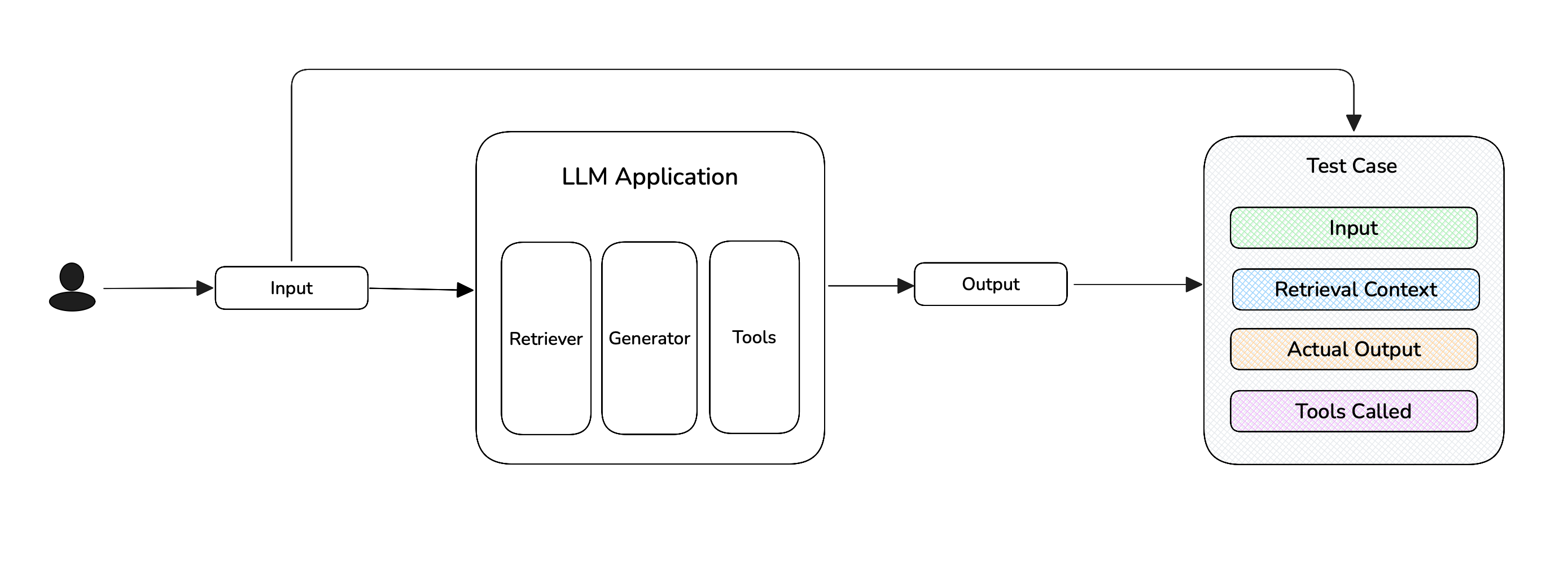
This page explains the concepts behind end-to-end evaluation. For the actual step-by-step walkthroughs, jump to the right flavor for your application:
- Single-Turn End-to-End Evals — for any LLM app where one input maps to one output (agents treated as a black box, RAG / QA, summarization, classifiers, etc.).
- Multi-Turn End-to-End Evals — for chatbots and conversational agents where the unit of evaluation is the whole conversation.
Treating Your App as a Black Box
In end-to-end evaluation, you only describe what's observable from outside your LLM application — the input you sent, the output that came back, and any context that was used along the way. You do not describe the retrieval algorithm, the chain of LLM calls inside an agent, or any internal reasoning steps. That's the whole point of "end-to-end": you're grading the result, not the path the system took to get there.
Concretely, the parameters you populate on a test case are the entire surface your metrics see.
For single-turn apps, you populate fields on an LLMTestCase:
input— what you sent into your app (the question, document, draft, task, etc.).actual_output— what your app produced (the answer, summary, label, rewritten text, agent's final reply).retrieval_context— for RAG-style apps, the chunks your retriever returned. Required by metrics likeFaithfulnessMetricandContextualRelevancyMetric.tools_called— for agentic apps, the tools the agent invoked. Required by metrics likeToolCorrectnessMetricandArgumentCorrectnessMetric.expected_output/expected_tools— optional gold references, used by reference-based metrics.context— optional extra background, used by some reference-based metrics.
For multi-turn apps, you populate fields on a ConversationalTestCase:
scenario— what the simulated user is trying to do.expected_outcome— what success looks like.user_description— who the user is (persona, role, constraints).turns— the sequence ofTurn(role, content)objects that make up the conversation.
Notice what's not there: there's no place to describe "the retriever's prompt", "the tool argument schema", or "the inner LLM call that produced this answer." If a metric needs to score one of those things in isolation, end-to-end isn't the right fit.
Single-Turn vs Multi-Turn
Pick the flavor that matches your application:
| Single-Turn | Multi-Turn | |
|---|---|---|
| Test case | LLMTestCase | ConversationalTestCase |
| Dataset entry | Golden | ConversationalGolden |
| What's evaluated | One input → one output | A full conversation (a sequence of Turns) |
| How test cases are made | You invoke your app on each golden and build the test case from the result | The ConversationSimulator drives a synthetic user against your chatbot until the scenario plays out |
| Typical apps | Agents-as-black-box, RAG / QA, summarization, classifiers, writing assistants | Chatbots, support agents, multi-turn assistants |
| Metric base class | BaseMetric | BaseConversationalMetric |
| Walkthrough | Single-Turn E2E Evals → | Multi-Turn E2E Evals → |
The two flavors live on different test case classes because the unit of evaluation is genuinely different (one exchange vs many), and deepeval will refuse to mix them in the same test run.
End-to-End vs Component-Level
End-to-end and component-level evaluation are not two separate workflows — they're the same workflow at different granularities. End-to-end evaluation is just component-level evaluation where the entire system is treated as one component with no internal steps. That's the only real difference.
In both cases you're attaching metrics to a unit of work and scoring the input/output of that unit:
- End-to-end — the unit is the whole app. One test case per run of your app, scoring the final input → final output.
- Component-level — the unit is each
@observe'd span. Many test cases per run of your app — one per span you've chosen to grade — each scoring the input → output of that span.
| End-to-End | Component-Level | |
|---|---|---|
| What you score | The final user-visible output (the system as one black-box component) | Individual internal spans (retriever, tool call, sub-agent, etc.) |
| How metrics are attached | To the test case (or to the trace as a whole) | To @observe(metrics=[...]) on each span |
| Best for | Anything with a "flat" architecture, or where you only care about the result | Complex agents, multi-step pipelines, anywhere different components need different metrics |
| Multi-turn supported | Yes | Single-turn only today |
You don't have to choose just one — and in fact, when you use the recommended evals_iterator() path, end-to-end and component-level run in the same loop: the metrics you pass to evals_iterator(metrics=[...]) are scored end-to-end, while any metrics you've attached to @observe(metrics=[...]) on individual spans are scored component-level. Many real applications run both, with end-to-end on the final answer and component-level on a few critical spans.
When should you choose end-to-end?
Choose end-to-end evaluation when:
- Your LLM application has a "flat" architecture that fits naturally into a single
LLMTestCase(agents treated as a black box, RAG / QA, summarization, single-shot classifiers, writing assistants, etc.) - Your application is multi-turn (chatbots, support agents) and you want to score the whole conversation rather than each step.
- Your application is a complex agent, but you've concluded that component-level evaluation gives you too much noise and you'd rather grade the final outcome.
In short: you care about the result, not the path the system took to get there. Most of the quickstart is end-to-end evaluation.
Two Ways to Run a Test Run
Both single-turn and (for evaluate()) multi-turn give you a choice between two equivalent code paths:
| Approach | What it looks like | When to choose it |
|---|---|---|
evaluate(test_cases=...) | Build a list of LLMTestCases (or ConversationalTestCases) up front, hand them to a single evaluate() call. | You want a self-contained script with no tracing dependency. |
dataset.evals_iterator() with @observe — recommended (single-turn only) | Decorate your app with @observe, loop over goldens with evals_iterator(metrics=[...]). deepeval builds the test cases from the captured trace. | Your app is (or will be) instrumented with tracing. You also get a full per-test-case trace view on Confident AI for free. |
For new single-turn projects we recommend evals_iterator() — same amount of code, plus traces, plus the same setup carries over to component-level evaluation later.
Multi-turn end-to-end evaluation only uses evaluate() today; the evals_iterator() form is single-turn only.
What's Next
- Walk through a single-turn end-to-end evaluation.
- Walk through a multi-turn end-to-end evaluation using the
ConversationSimulator. - Run end-to-end evals in CI/CD pipelines using
assert_test()anddeepeval test run. - Compare with component-level evaluation if your app has internal structure worth grading.