
Beschreibung
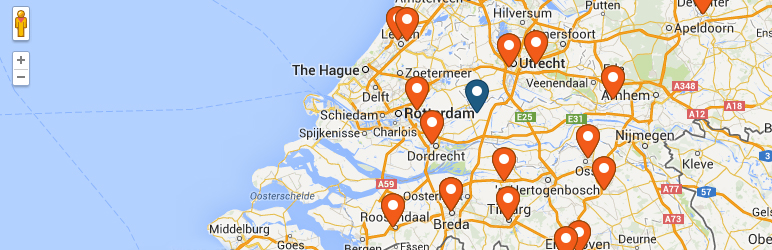
WP Store Locator is a powerful and easy to use location management system.
You can customize the appearance of the map, and provide custom labels for entry fields.
Users can filter the results by radius, and see driving directions to the nearby stores in
the language that is set in the admin panel.
Features include:
- Manage an unlimited numbers of stores.
- Provide extra details for stores like the phone, fax, email, url, description and opening hours. There are filters available that allow you add custom meta data.
- Support for custom map styles.
- Choose from nine retina ready marker icons.
- Show the driving distances in either km or miles.
- Shortcodes that enable you to add individual opening hours, addresses or just a map with a single marker to any page.
- Compatible with multilingual plugins like WPML and qTranslate X.
- You can drag the marker in the editor to the exact location on the map.
- Show the search results either underneath the map, or next to it.
- Show Google Maps in different languages, this also influences the language for the driving directions.
- Show the driving directions to the stores.
- Customize the max results and search radius values that users can select.
- Users can filter the returned results by radius, max results or category.
- Supports marker clusters.
- Customize map settings like the terrain type, location of the map controls and the default zoom level.
- Use the Geolocation API to find the current location of the user and show nearby stores.
- Developer friendly code. It uses custom post types and includes almost 50 different filters that help you change the look and feel of the store locator.
- DSGVO – Lade Google Maps erst, wenn der Benutzer zugestimmt hat ( benötigt das Borlabs Cookie Plugin ).
Dokumentation
Schau bitte zuerst in die Store Locator Dokumentation bevor du den Support kontaktierst.
Premium-Add-ons
CSV-Manager
The CSV Manager allows you to bulk import, export and update your locations using a CSV file.
Such-Widget
The Search Widget enables users to search from any of the widgetized areas in your theme for nearby store locations, and show the results on the store locator page.
Statistik
Die Statistik Erweiterungen versetzt dich in Lage, zu sehen, nach welchen Orten die Nutzer häufig suchen, also wo sich eventuell eine neue Filiale lohnen würde.
Erweiterungen
Die Erweiterungen fügen interessante Funktionen hinzu wie z.B. Events an Orten in der Nähe, Social-Media-Informationen und Orte, die von anderen eingeloggten Benutzern eingetragen wurden.
Screenshots
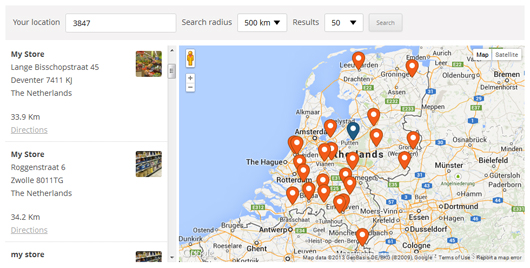
Front-end of the plugin 
The driving directions from the user location to the selected store 
The ‚Store Details‘ section 
The plugin settings 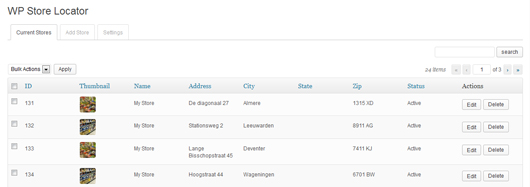


Blöcke
Dieses Plugin bietet 2 Blöcke.
- Map Display a WP Store Locator map for specific store locations by ID or category.
- Store Locator Display a WP Store Locator map with search functionality.
Installation
- Upload the
wp-store-locatorfolder to the/wp-content/plugins/directory - Aktiviere das Plugin mittels dem ‚Plugins‘-Menü in WordPress
- Generiere einen Google API Key und trage ihn auf der Seite Einstellungen ein.
- Setze den Startpunkt in den Einstellungen.
- Add your stores under ‚Store Locator‘ -> Add Store
- Add the map to a page with this shortcode: [wpsl]
FAQ
-
How do I add the store locator to a page?
-
Füge das Folgende in die Seite ein, um an der Stelle das Standortverwaltungssystem anzuzeigen: shortcode [wpsl]
-
Hoppla! Etwas ist schief gelaufen
-
Du kannst dies korrigieren, in dem du den Google API Key auf der Einstellungsseite einträgst.
-
Es gibt komische Zeichen in den Suchergebnissen, wie kann ich sie entfernen?
-
This is most likely caused by a plugin like W3 Total Cache that tried to minify the HTML output on the store locator page. You can fix this by excluding the store locator from being minified on the settings page of the caching plugin you’re using. In W3 Total Cache this is done by going to Minify -> Advanced -> Never minify the following pages, and fill in the page you don’t want to have minified. So if your store locator is used on mydomain.com/store-locator, then fill in ’store-locator‘.
-
Kann ich verschiedene Marker für die Kategorien oder Orte nutzen?
-
Wie man die Custom-Marker nutzt ist hier beschrieben: . Du kannst aber auch diese verschiedenen Marker für die verschiedenen Orte oder einfach nur die Kategorien nutzen.
-
The map doesn’t display properly. It’s either broken in half or doesn’t load at all.
-
Make sure you have defined a start point for the map under settings -> Map Settings.
-
The map doesn’t work anymore after installing the latest update
-
If you use a caching plugin, or a service like Cloudflare, then make sure to flush the cache.
-
I can’t dismiss the pop up asking me to join the mailing list, how do I fix this?
-
There is probably a JS error in the WP Admin area that prevents the pop up from being dismissed. Try for a second to switch back to a default WP theme, disable all other plugins, and then try to dismiss the newsletter pop up again.
-
Why does it show the location I searched for in the wrong country?
-
Some location names exist in more then one country, and Google will guess which one you mean. This can be fixed by setting the correct ‚Map Region‘ on the settings page -> API Settings.
-
The store locator doesn’t load, it only shows the number 1?
-
This is most likely caused by your theme using ajax navigation ( the loading of content without reloading the page ), or a conflict with another plugin. Try to disable the ajax navigation in the theme settings, or deactivate the plugin that enables it to see if that solves the problem.
If you don’t use ajax navigation, but do see the number 1 it’s probably a conflict with another plugin. Try to disable the plugins one by one to see if one of them is causing a conflict.
If you find a plugin or theme that causes a conflict, please report it on the support page.
You can find the full documentation here.
-
Where do I report security bugs found in this plugin?
-
Please report security bugs found in the source code of the WP Store Locator plugin through the Patchstack Vulnerability Disclosure Program. The Patchstack team will assist you with verification, CVE assignment, and notify the developers of this plugin.
Rezensionen


Mitwirkende und Entwickler
„WP Store Locator“ ist Open-Source-Software. Folgende Menschen haben an diesem Plugin mitgewirkt:
Mitwirkende
„WP Store Locator“ wurde in 19 Sprachen übersetzt. Danke an die Übersetzer für ihre Mitwirkung.
Übersetze „WP Store Locator“ in deine Sprache.
Interessiert an der Entwicklung?
Durchstöbere den Code, sieh dir das SVN-Repository an oder abonniere das Entwicklungsprotokoll per RSS.
Änderungsprotokoll
= 2.3.0
* Added: Two blocks for the [wpsl] and [wpsl_map] shortcodes
* Added: Temporary notice that enables users to sign up for testing the beta version of the 3.0 update
* Changed: Ensured all code follows the latest WordPress Coding Standards
* Fixed: Authenticated stored XSS vulnerability for the [wpsl_map] shortcode
* Fixed: Shortcode option ‚control_position‘ not working in the [wpsl_map] shortcode if the option is disabled on the settings page
* Fixed: Styling issues with the Geocode API Response test dialog and the hours in the admin area