
Beschreibung
Verfolge wiederkehrende Kunden und registrierte Benutzer, überwache Javascript-Ereignisse, erkenne Eindringlinge, analysiere E-Mail-Kampagnen. Tausende von WordPress-Websites nutzen es bereits.
Hauptfunktionen
- Echtzeit-Zugriffsprotokoll: Messe die Server-Latenz, verfolge die Seitenereignisse, behalte die Bounce-Rate im Auge und vieles mehr.
- Admin Bar Stats: view real-time site stats directly from the WordPress admin bar — online visitors, pageviews, and top pages at a glance.
- Shortcodes: Anzeigen von Berichten in Widgets oder direkt in Beiträgen und Seiten.
- Customize Reports: Customize all pages—Real-time, Overview, Audience, Site Analysis, and Traffic Sources—to fit your needs easily!
- GDPR: fully compliant with GDPR European law. Integrates seamlessly with WP Consent API. Consent banner translatable with WPML and Polylang.
- Filter: Schließe Benutzer basierend auf verschiedenen Kriterien, einschließlich Benutzerrollen, gängigen Robots, IP-Subnetzen, Admin-Seiten, Ländern etc. von der Statistikerfassung aus.
- Export nach Excel: Lade deine Berichte als CSV-Dateien herunter, erstelle Benutzer-Heatmaps oder erhalte tägliche E-Mails direkt in dein Postfach (via Pro).
- Cache: Kompatibel mit W3 Total Cache, WP SuperCache, Cloudflare, und den meisten Caching-Plugins.
- Datenschutz: Hash-IP-Adressen zum Schutz der Privatsphäre deiner Besucher/Benutzer.
- Geolocation: Identifiziere deine Besucher nach Stadt und Land, Browsertyp und Betriebssystem (mit freundlicher Genehmigung von MaxMind und Browscap).
- World Map: see where your visitors are coming from, even on your mobile device (courtesy of JQVMap).
Pro Pack Eigenschaften
- Netzwerkanalyse: Aktiviere eine netzwerkweite Übersicht über deine Berichte und Einstellungen.
- Email Reports: Receive your reports directly in your mailbox with customizable column mappings and HTML tables.
- Exportiere nach Excel: Lade deine Berichte als CSV-Dateien herunter.
- Heatmap: Zeige eine Heatmap-Ebene mit den meistgeklickten Bereichen auf deiner Website an.
- Benutzerübersicht: Überwache deine registrierten Nutzer, indem du ihre Aktivitäten und ihre Verweildauer auf der Website verfolgst.
- User Avatars: Gravatar integration in the User Overview report for quick visitor identification.
- MaxMind Integration: Verbinde dich mit der Geolocation API von MaxMind, um detaillierte Informationen über deine Besucher zu erhalten.
- Custom DB: Verwende eine externe Datenbank, um alle Informationen über deine Besucher zu speichern.
- Erweiterte Übersicht: Füge benutzerdefinierte Spalten zum Widget Benutzerübersicht und zur Exportdatei hinzu.
Voraussetzungen
- WordPress 5.6+
- PHP 7.4+
- MySQL 5.0.3+
- Mindestens 5 MB freier Web-Speicherplatz (240 MB, wenn du die externen Bibliotheken für die Geolokalisierung und Browser-Erkennung verwenden möchtest)
- Mindestens 10 MB freier DB-Speicherplatz
- Mindestens 32 Mb freier PHP-Speicher für den Tracker (maximale Speichernutzung)
Hinweis
- Wenn du dich entscheidest, Slimstat Analytics zu deinstallieren, werden alle Statistiken DAUERHAFT aus deiner Datenbank gelöscht. Stelle sicher, dass deine Datenbanksicherung (wp_slim_*) eingerichtet ist, um den Verlust der Daten zu vermeiden.
Report Bugs
Having trouble with a bug? Please create an issue on GitHub. Kindly note that GitHub is exclusively for bug reports; other inquiries will be closed.
For security vulnerabilities, please report them through the Patchstack Vulnerability Disclosure Program. The Patchstack team will validate, triage, and handle any security issues.
Screenshots
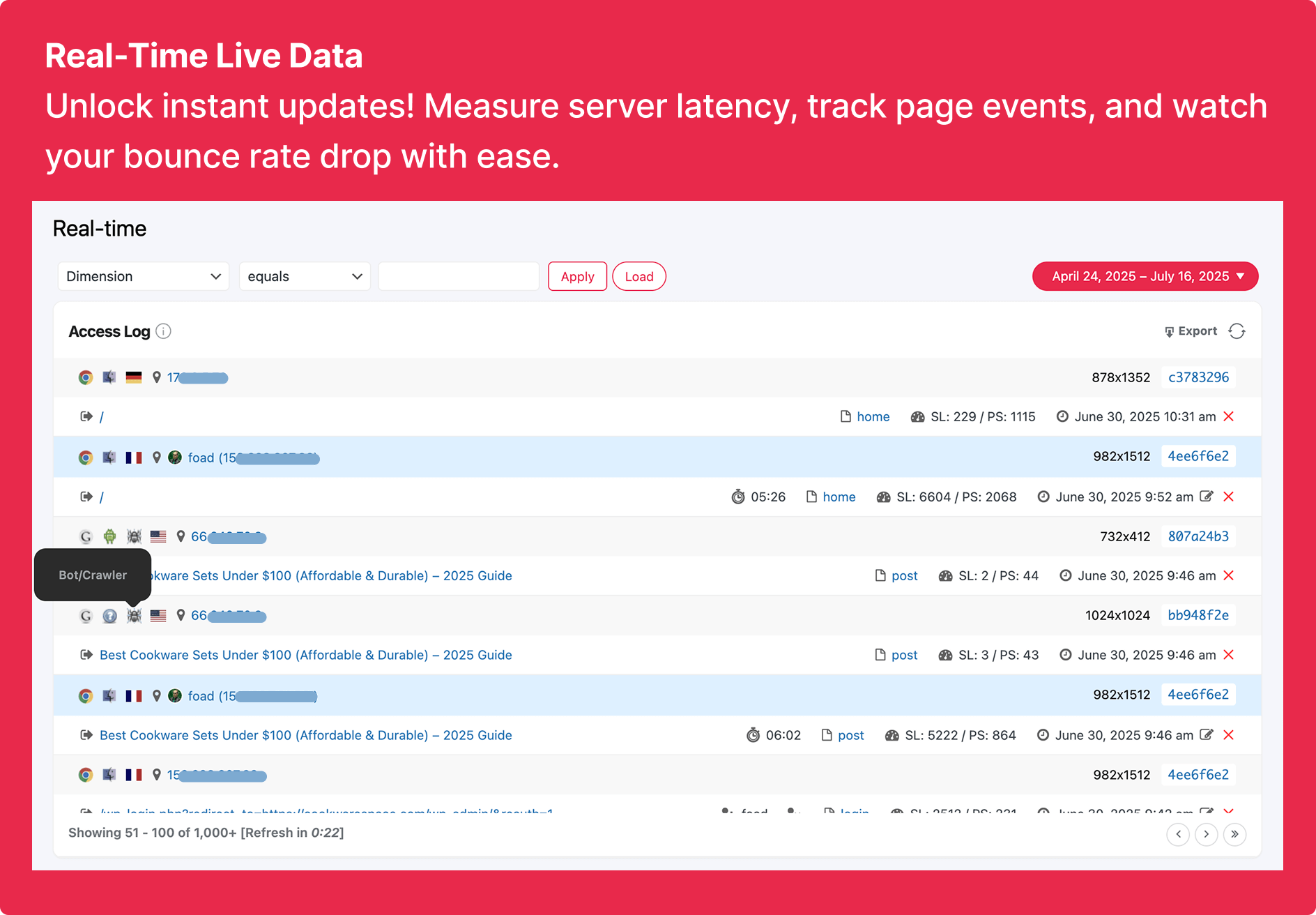
Echtzeit – Eine Echtzeit-Ansicht des Aufenthaltsortes deiner Besucher 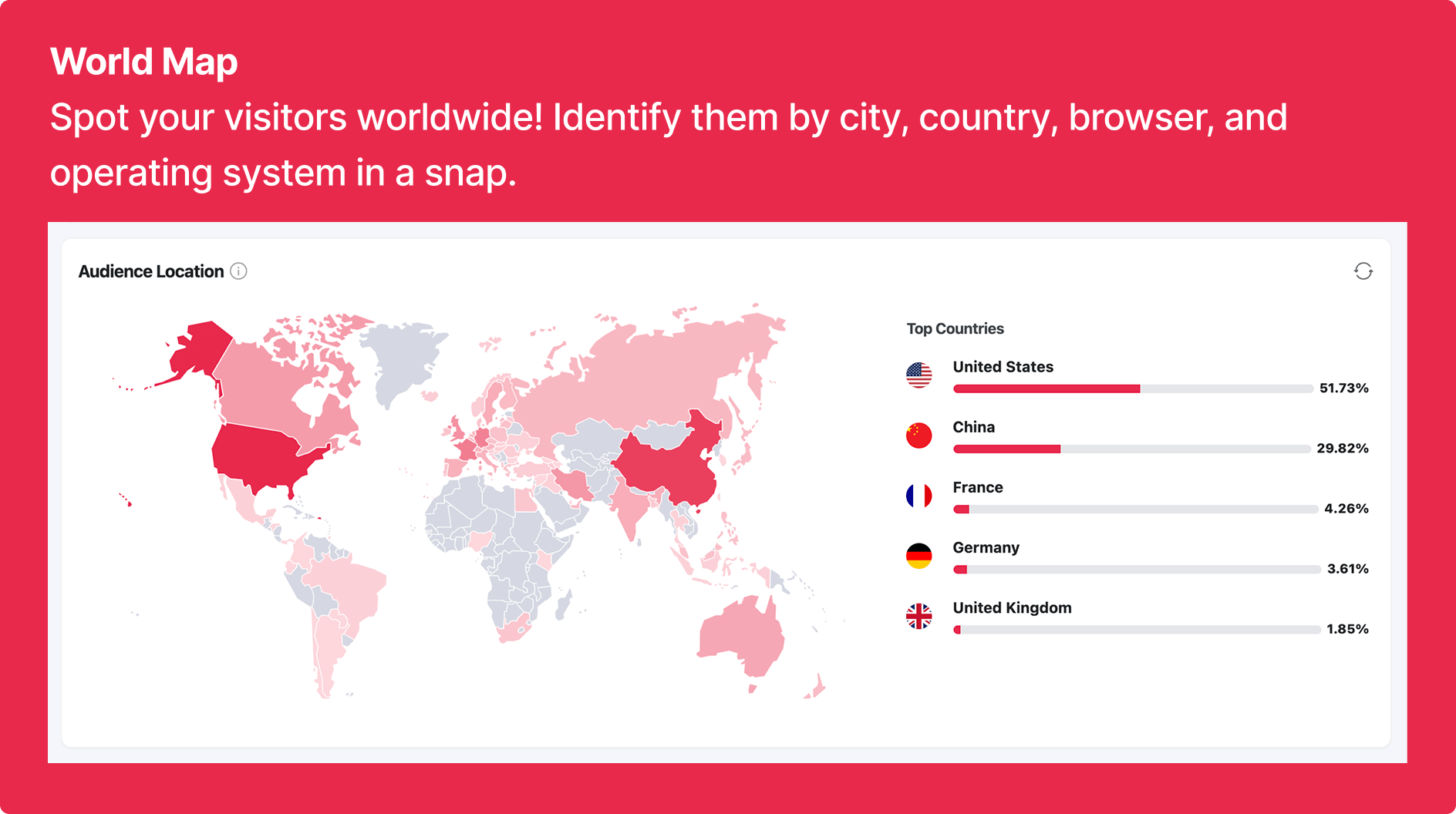
Word Map – Identify them by country, browser, and operating system in a snap. 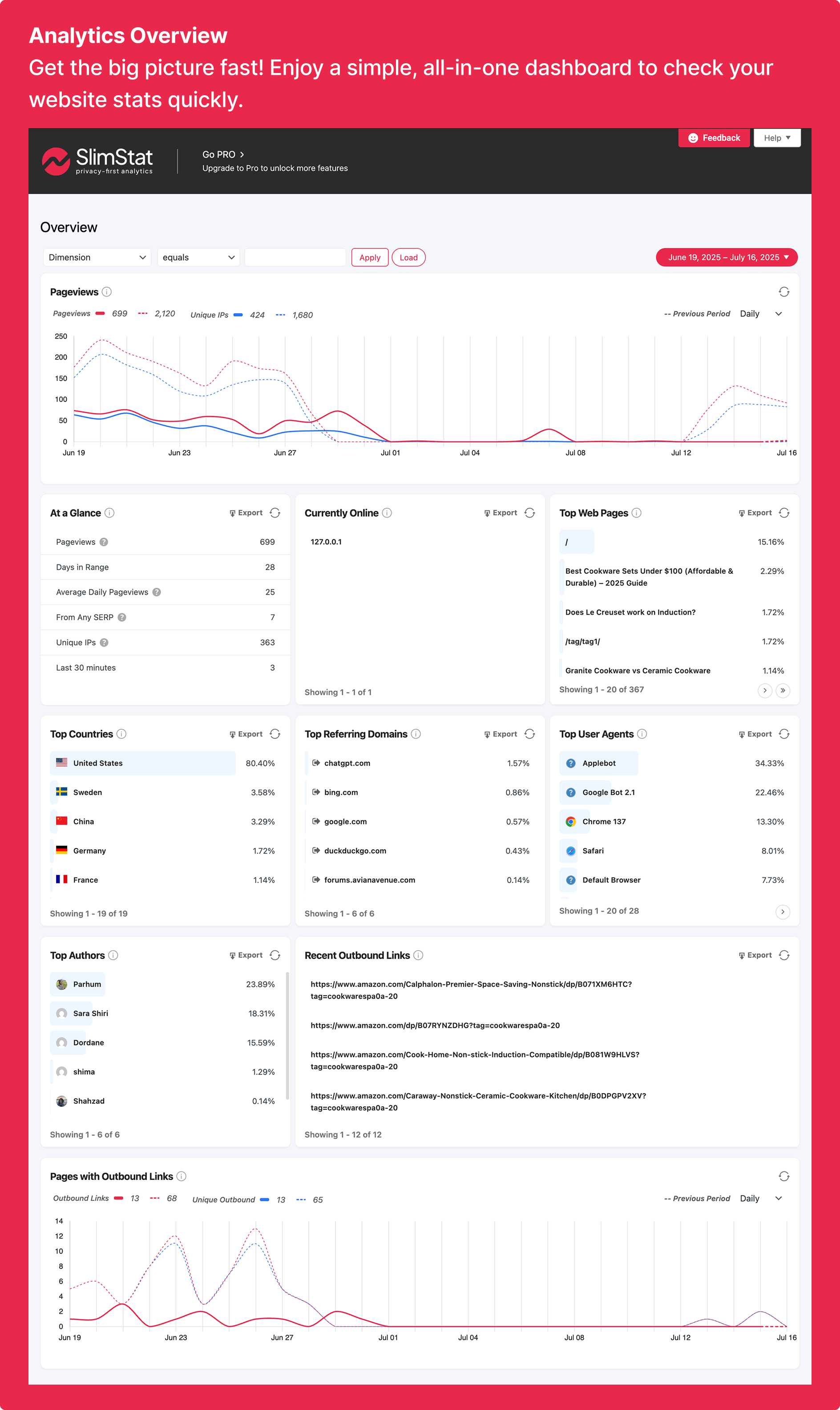
Overview – Your website traffic at a glance. Enjoy a simple, all-in-one dashboard to check your website stats quickly. 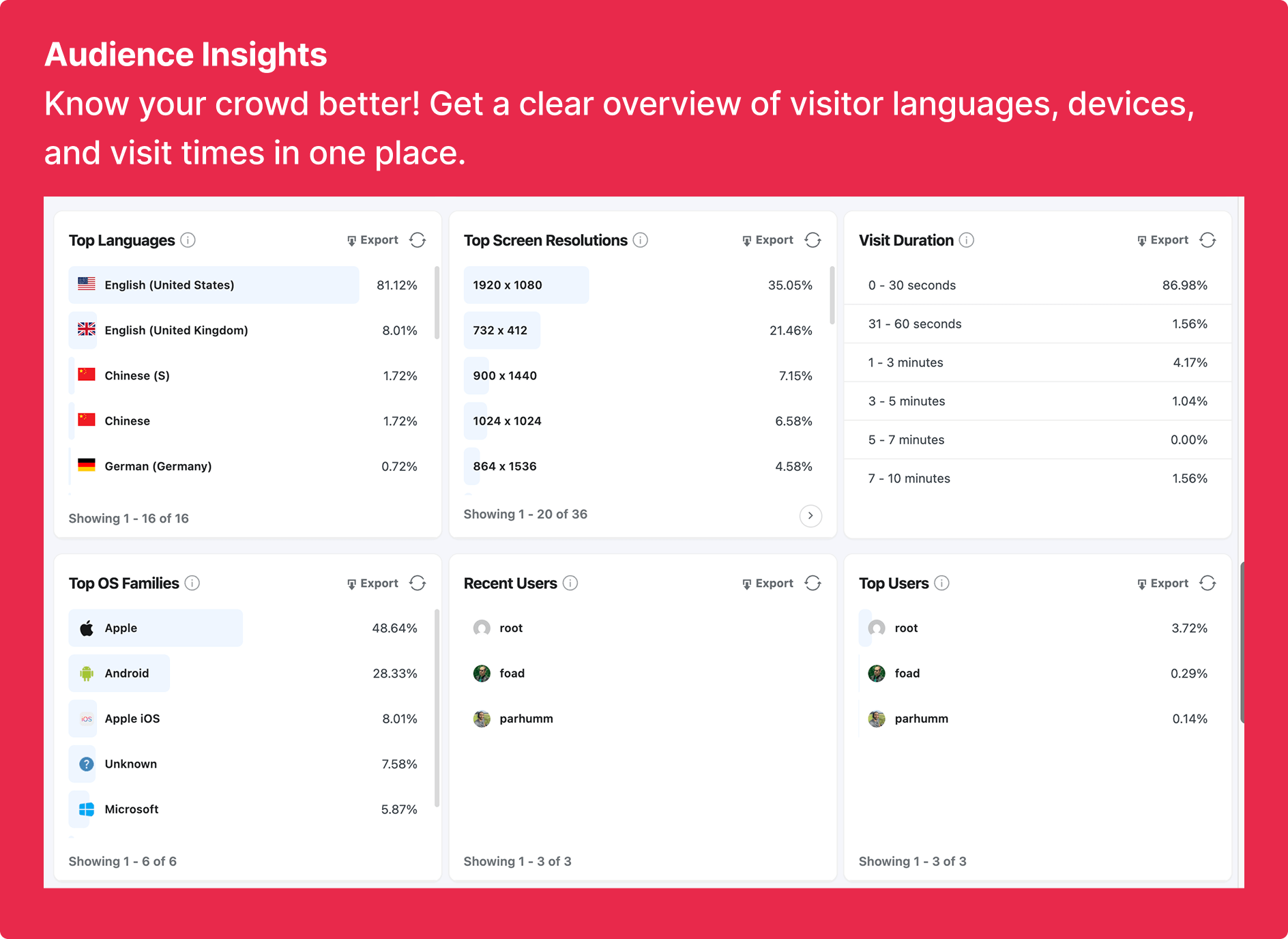
Publikum – Sieh dir die vollständigen Informationen zu deinen Besuchern an. 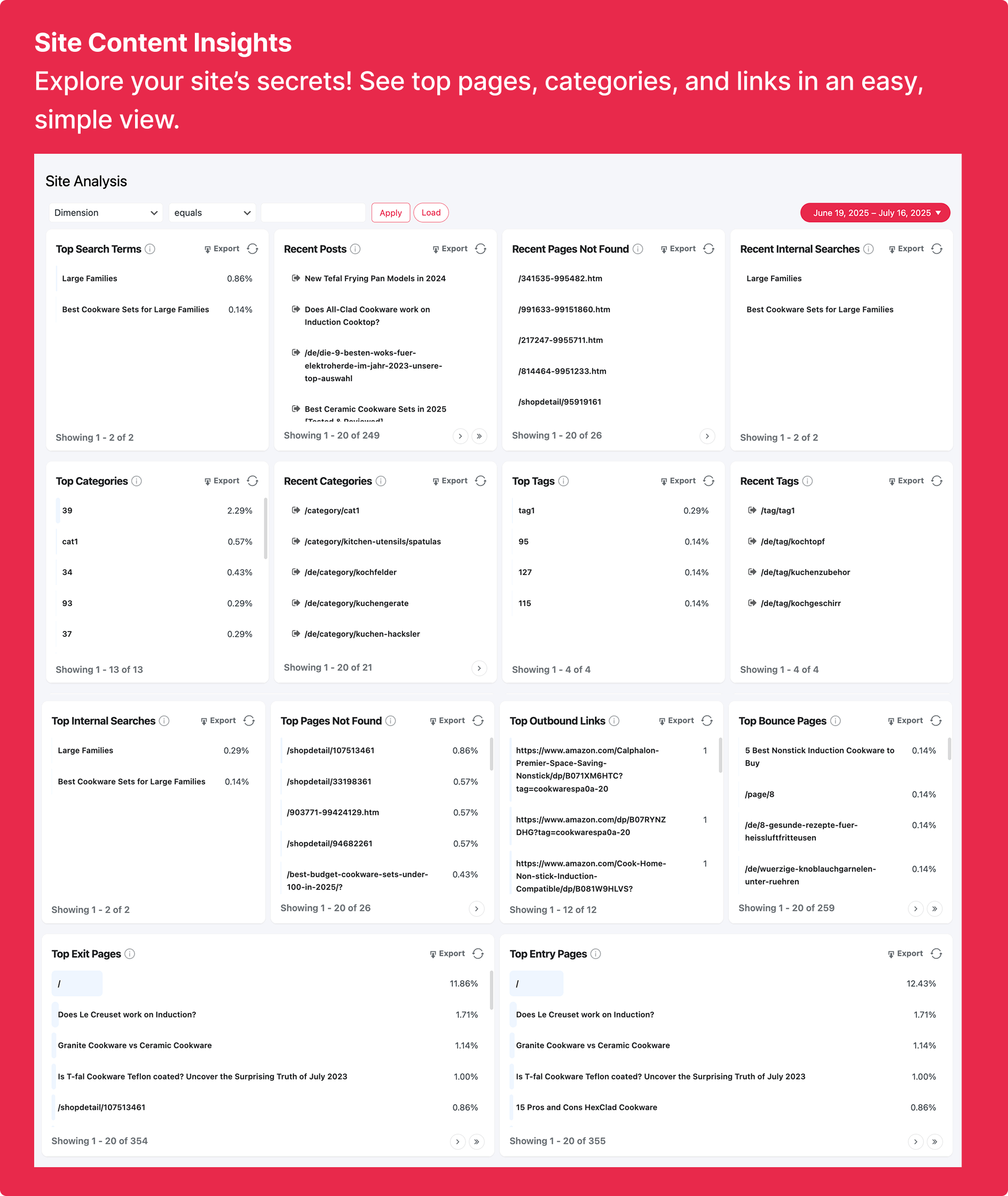
Site Analysis – See top pages, categories, download and outbound links in an easy, simple view. 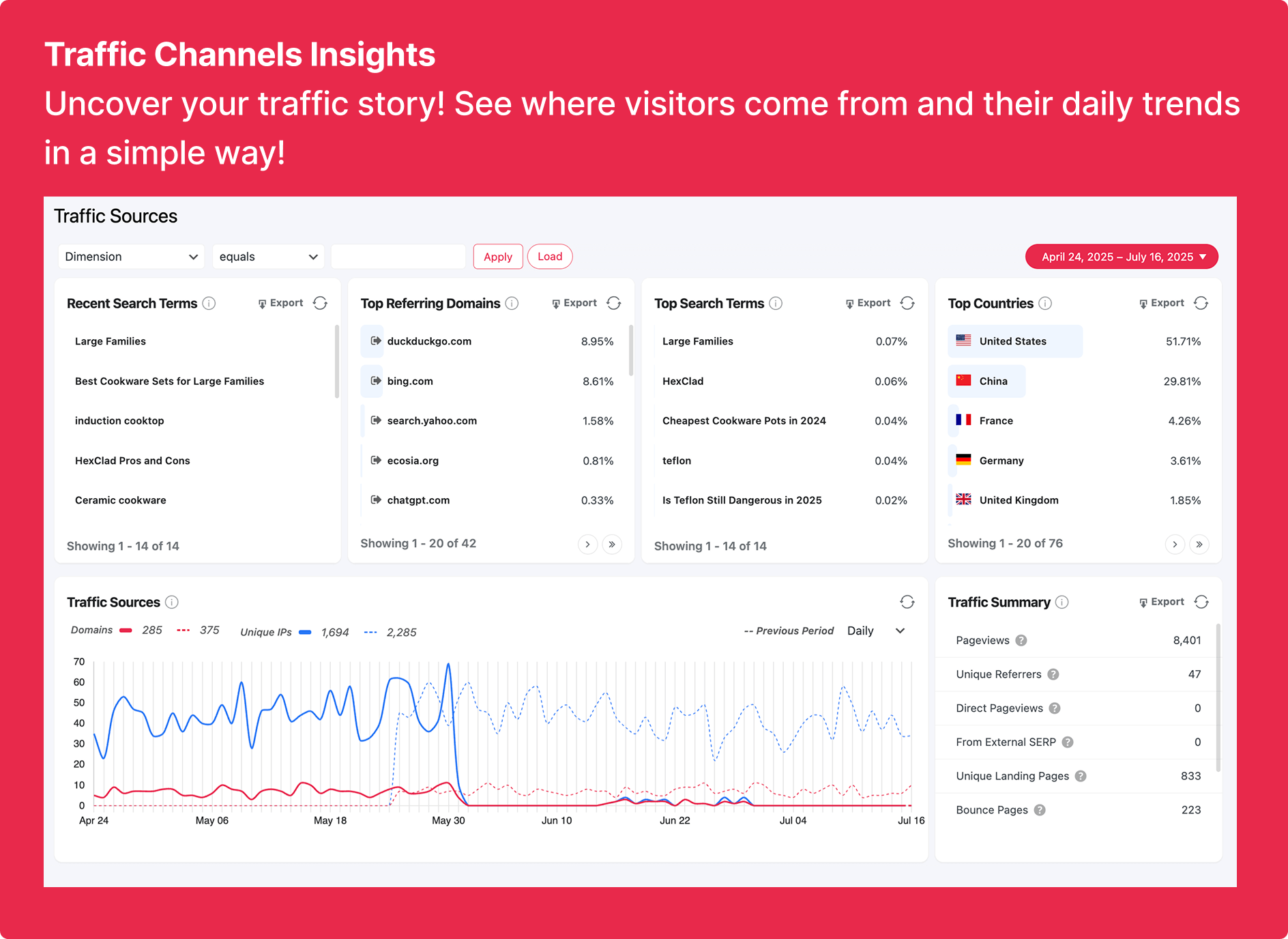
Traffic-Quellen – Erfahre, woher deine Besucher kommen, zum Beispiel von Suchmaschinen, sozialen Medien oder verweisenden Websites. 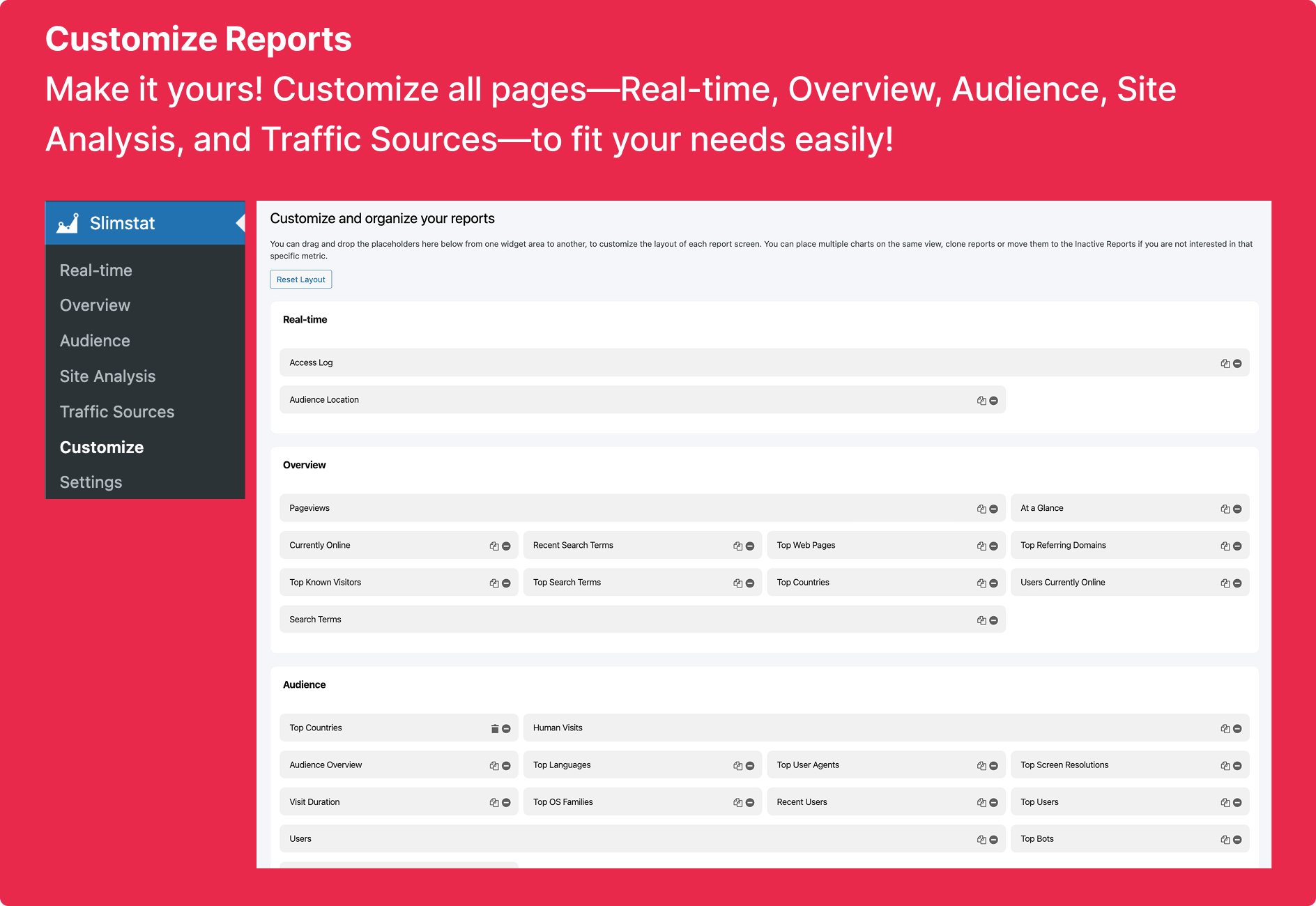
Customize widgets – Customize all pages—Real-time, Overview, Audience, Site Analysis, and Traffic Sources—to fit your needs easily! 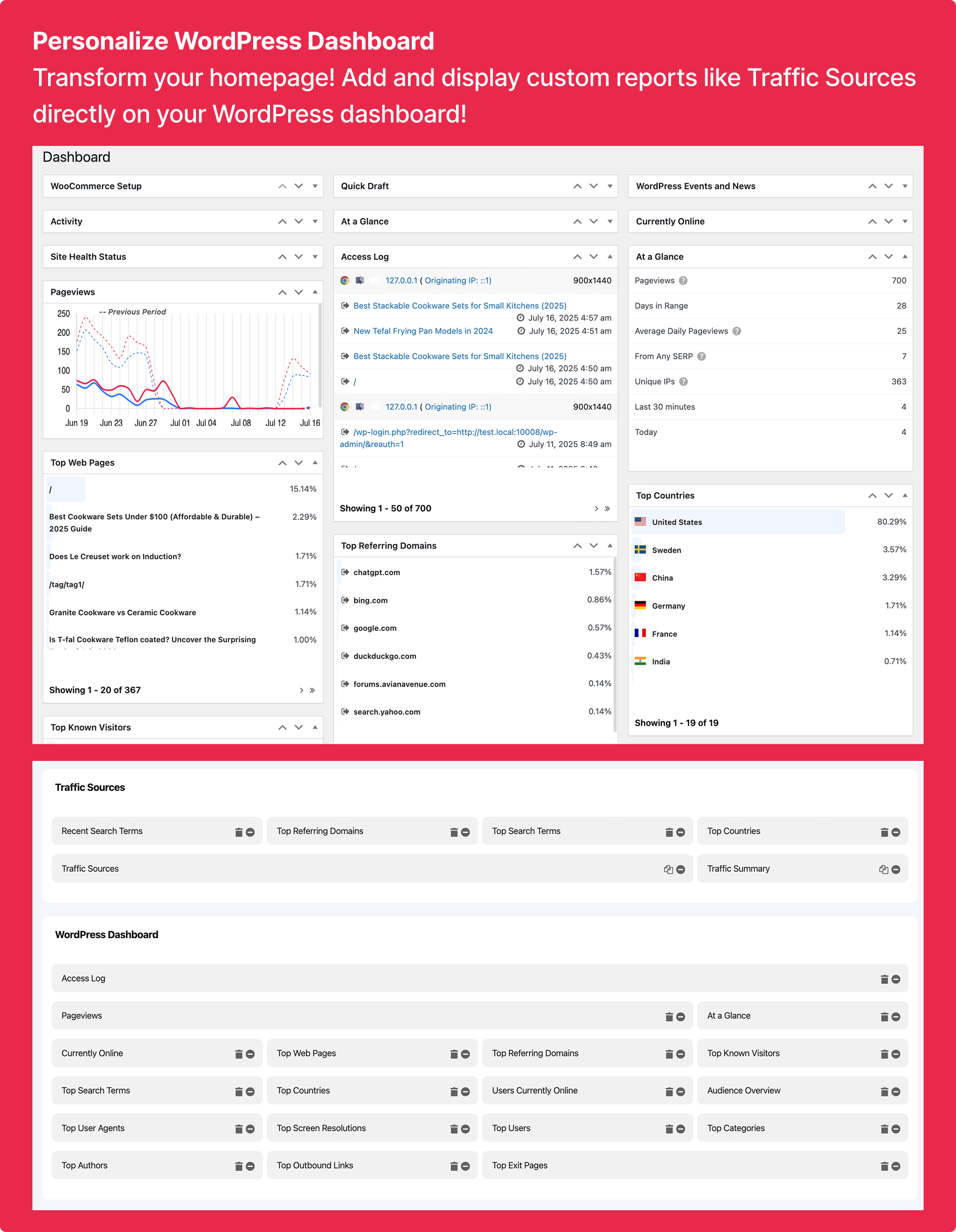
WordPress Dashboard – Add and display custom reports like Traffic Sources directly on your WordPress dashboard! 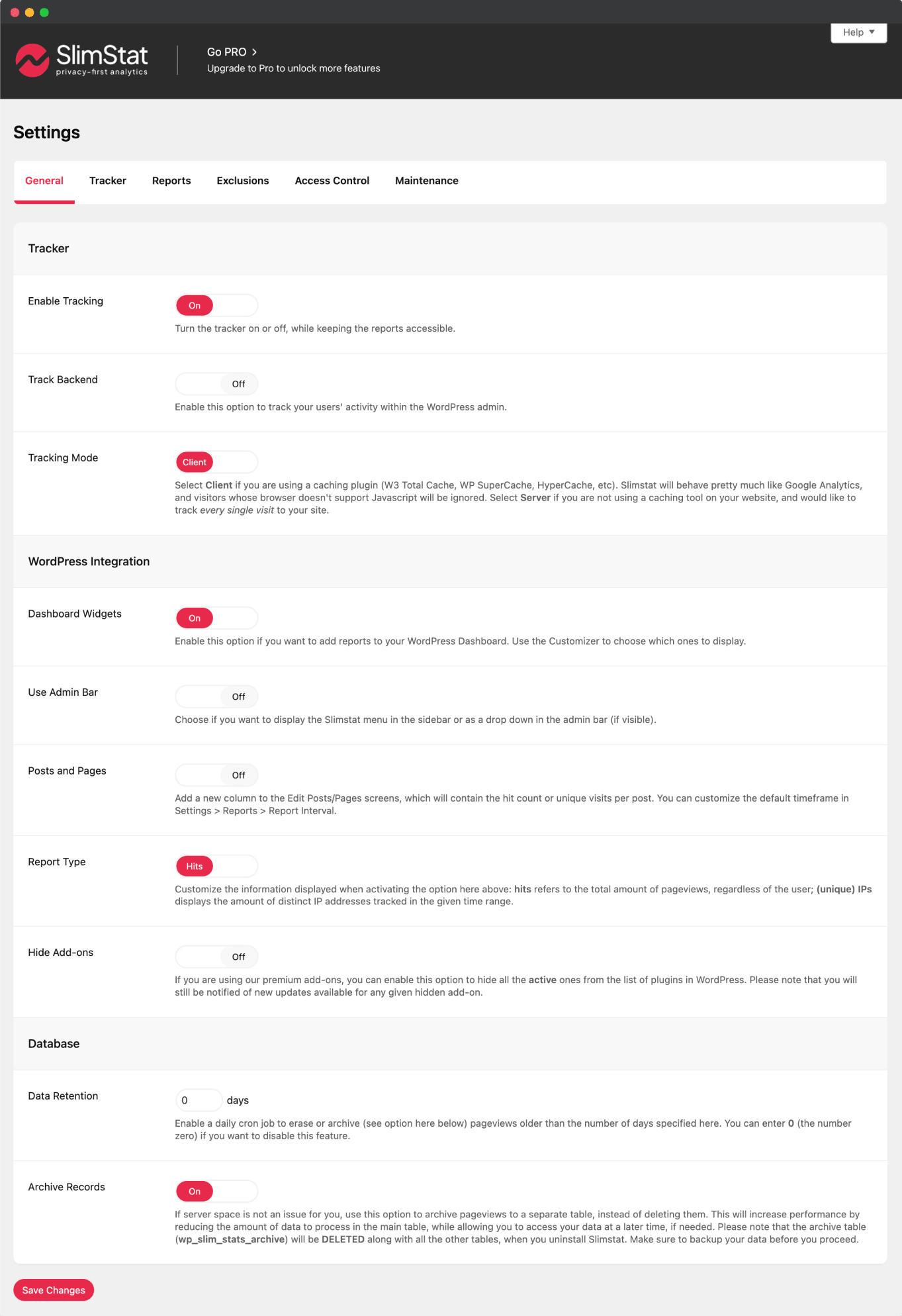
Einstellungen – Viele Optionen zum Anpassen des Plugin-Verhaltens


Installation
- Gehe in deinem WordPress-Adminbereich zu Plugins > Installieren
- Suche nach Slimstat Analytics
- Klicke auf Jetzt installieren neben Slimstat Analytics und aktiviere dann das Plugin.
- Stelle sicher, dass dein Template den
wp_footer()oder den entsprechenden Hook irgendwo aufruft (möglicherweise kurz vor dem</body>Tag).
FAQ
Eine umfangreiche Wissensdatenbank ist auf unserer Website verfügbar.
Rezensionen


Mitwirkende und Entwickler
„SlimStat Analytics“ ist Open-Source-Software. Folgende Menschen haben an diesem Plugin mitgewirkt:
Mitwirkende


„SlimStat Analytics“ wurde in 12 Sprachen übersetzt. Danke an die Übersetzer für ihre Mitwirkung.
Übersetze „SlimStat Analytics“ in deine Sprache.
Interessiert an der Entwicklung?
Durchstöbere den Code, sieh dir das SVN-Repository an oder abonniere das Entwicklungsprotokoll per RSS.
Änderungsprotokoll
5.4.6 – 2026-03-23
We heard you — upgrading to 5.4.x broke tracking for many of you. Visitor counts dropped to zero, IPs were masked without your permission, and a consent banner appeared on sites that never asked for one. This release fixes all of that. After updating, your site works the way it did before 5.4.0 — no manual steps required.
If you want to enable GDPR features:
- Consent banner: Settings Tracker Data Protection GDPR Compliance Mode = On, then Settings Tracker Consent Management choose SlimStat Banner, WP Consent API, or Real Cookie Banner
- Anonymize IPs: Settings Tracker Data Protection Anonymize IP Addresses = On
- Hash IPs: Settings Tracker Data Protection Hash IP Addresses = On
Fixed
- Visitor counts dropping to zero after upgrading: a consent banner was silently enabled on every site, blocking all anonymous visitors. The banner is now off by default. If you had configured opt-in or opt-out privacy features in an earlier version, we detect that and keep consent enabled for you automatically.
- IPs being masked or hashed without your permission: v5.4.0 changed IP storage defaults, so full IP addresses were replaced with anonymized or hashed values. Your IPs are now stored in full again, matching pre-5.4 behavior.
- Tracking broken on sites using WP Rocket, W3TC, or other caching plugins: fresh installs defaulted to server-side tracking, which doesn’t work with page caching. We’ve restored browser-based (JavaScript) tracking as the default.
- Ad-blocker bypass failing after plugin updates: the bypass URL included the plugin version, so cached pages had a stale URL after every update. The bypass URL is now stable across versions.
- Internal tracking URLs and bypass file URLs appearing as pages in the Access Log. All SlimStat-internal URLs are now filtered from both reports and server-side tracking.
- Access Log pagination showing the same rows when clicking the next-page arrow. The second page now correctly shows the next set of results.
- Pageviews silently lost when a transport fails: the tracker now tries adblock-bypass, AJAX, and REST fallbacks before giving up.
- Stale cached tracker data causing abandoned pageviews: the tracker recovers gracefully.
- „Respect Do Not Track“ setting only working when GDPR mode was on: DNT is now honored regardless of your GDPR setting. The DNT toggle is now always visible in settings.
- Migration admin notice linking to a non-existent settings page. The link now correctly opens Settings Tracker Data Protection.
Improved
- Tracker health diagnostics now distinguish between fatal errors and recoverable warnings.
- Session cookies are restored by default — returning visitors are recognized across pages again, just like in v5.3.x.
- Cookie info registered with WP Consent API now uses proper plural-aware translations.
5.4.5 – 2026-03-20
- Fix: Hardened user exclusion logic — fixed consent-upgrade path, capability key matching, and defensive
wp_get_current_user()calls (#246) - Fix: GDPR consent cookie domain, cached page banner display, and anonymous nonce handling
- Fix: Removed double-escaping in report filters and tightened XSS sanitization (#243, #244)
- Fix: Strict fingerprint input sanitization (#244)
- Fix: Output escaping in reports default case (#244)
- Fix: Store attachment content_type as
cpt:attachment(#236) - Fix: Narrowed dashboard nested widget CSS selectors to avoid style conflicts (#247)
- Fix: Increased Access Log widget height on WP Dashboard
- Fix: Synced stat before
ensureVisitIdto prevent ID loss on finalization - Fix: Skipped REST nonce for anonymous users on non-consent tracking endpoints, removed dead adblock fallback URL
- Security: Restored nonce verification for all consent endpoints
- Improved: Refactored
isUserExcluded()into standalone method with full test coverage - Improved: Inlined
get_current_user_id()in nonce guards for clarity
5.4.4 – 2026-03-17
- Fix: Chart data not showing due to incorrect bounds check (PR #232)
- Fix: Weekly chart not showing today’s data and not respecting start_of_week setting (PR #235)
- Improved: Added
cpt:prefix guidance to content type exclusion setting
5.4.3 – 2026-03-16
- Fix: Fixed fatal error on servers without the PHP calendar extension (PR #229)
- Fix: Added defensive fallback for corrupted
start_of_weekoption in calendar-related reports - Improved: Moved day names array to a class constant in DataBuckets for better maintainability
5.4.2 – 2026-03-15
- Fix: Fixed tracking data not being recorded on some server configurations — REST API and admin-ajax endpoints now return responses correctly (PR #218)
- Fix: Fixed visitor locations showing a proxy server IP instead of the real visitor IP on Cloudflare-powered sites (#150)
- Fix: Fixed 503 errors that could occur on high-traffic sites due to inefficient visit ID generation (#155)
- Fix: Fixed excessive server requests when WP-Cron is disabled, caused by repeated geolocation lookups (#164)
- Fix: Fixed a CSS rule that could accidentally disable animations across your entire site, not just on SlimStat pages (#167)
- Fix: Fixed outbound link clicks, file downloads, and page-exit events not being recorded — a silent regression in recent versions (#174)
- Fix: Fixed consent rejections being ignored — visitors who declined tracking could still be tracked, and unconfigured consent types were incorrectly treated as granted (PR #178)
- Fix: Fixed a crash when the WP Consent API plugin is not installed alongside SlimStat (PR #172)
- Fix: Fixed a crash during background geolocation database updates (#180)
- Fix: Fixed geolocation database updates not retrying after a failed download — previously blocked retries for up to a month (PR #185)
- Fix: Fixed admin page styling conflicts with WordPress core styles (PR #175)
- Fix: Fixed Email Reports page layout not matching other SlimStat admin pages (PR #177)
- Fix: Fixed browser detection failing due to a library compatibility issue (#187)
- Fix: Fixed the external page tracking snippet being completely broken — the snippet only set the legacy
ajaxurlparameter while the tracker expects transport-specific endpoints (#220) - Improved: Every fix in this release is backed by ~329 automated tests across 46 test files — covering tracking, geolocation, consent, performance, and upgrade safety
- Improved: Restored the server-side tracking API (
wp_slimstat::slimtrack()) for themes and plugins that track visits programmatically (#171) - Improved: Unique visitor counts now work correctly even when IP addresses are anonymized or hashed (PR #178)
- Improved: 261+ previously untranslated strings are now available for translation in all languages (#173)
- Improved: Geolocation now works consistently across all request types, including background tasks
- Improved: DB-IP restored as the default geolocation provider for new installations
- Improved: Faster admin page loads by removing redundant database queries (PR #189)
5.4.1 – 2026-03-09
- New: The GDPR consent banner message, accept, and decline labels can now be translated with WPML and Polylang (#145)
- Fix: Fixed the GDPR consent banner appearing even when GDPR Compliance Mode was turned off (#140)
- Fix: Fixed duplicate Accept/Deny buttons showing in the consent banner when the custom message contained links (#144)
- Fix: Fixed charts not loading in older browsers including Firefox before version 121 (#139)
- Fix: Fixed a potential error when chart data was missing from the page
- Fix: Fixed real URLs (e.g., privacy policy links) being incorrectly stripped from the consent banner message
- Fix: Fixed refresh button not resetting countdown timer (#153)
5.4.0 – 2026-03-08
- Breaking: Removed internal GDPR consent management system (shortcode, banner, opt-in/opt-out cookies) in favor of external CMP integrations.
- New: Integration with Consent Management Platforms (CMPs) for GDPR compliance: WP Consent API and Real Cookie Banner Pro.
- New: GDPR Compliance Mode toggle – Enable/disable GDPR compliance requirements (default: enabled).
- New: Consent change listener that automatically resumes tracking when user grants consent via CMP.
- New: Do Not Track (DNT) header respect with configurable option in settings.
- New: WordPress Privacy Policy content registration for GDPR Article 13/14 compliance.
- Enhancement: Refactored GDPR architecture – consent management fully delegated to external CMPs.
- Enhancement: Smart IP handling – automatically upgrades from anonymized/hashed IP to full IP when consent is granted.
- Enhancement: Improved JavaScript consent handling with polling-based consent state monitoring.
- Enhancement: Default data retention period set to 420 days (14 months) for GDPR compliance.
- Fix: Legacy mode now conservatively denies PII collection when GDPR enabled and no CMP configured.
- Fix: Consent revocation properly deletes tracking cookie when user opts out via banner.
- Fix: Removed legacy cookie-based opt-in/opt-out handling for cleaner, CMP-based consent flow.
See full release notes
5.3.6
- Security: Hardened output escaping in reports
5.3.5 – 2025-12-31
- Security: Hardened plugin security
5.3.4 – 2024-12-28
- Security: Hardened plugin security
5.3.3 – 2025-12-17
- Maintenance: Stability and compatibility improvements.
5.3.2 – 2025-11-24
- Fix: Minor improvements & Hardened plugin security.
5.3.1 – 2025-09-09
- Fix: Resolved „Invalid Date, NaN“ error in monthly charts for 12-month ranges.
- Fix: Real-time report date filters not properly cleared during auto-refresh.
- Fix: Real-time report not updating at midnight with filters.
- Fix: Undefined variable $unpacked in PHP tracking logic;
- Enhancement: Enhanced responsive design for the „Access Log“ report.
- Enhancement: Improved tracking logic to prevent duplicate pageviews and events.
- Enhancement: Enhanced interaction tracking and heartbeat finalization.
5.3.0 – 2025-08-25
- New: Tracker type options (REST API + Ad-blocker bypass) for improved tracking flexibility.
- New: Support for WordPress date format setting in charts.
- New: Hourly, daily, weekly, monthly, and yearly chart granularities for deeper insights.
- Enhancement: Redesigned line charts for better readability.
- Enhancement: Compatibility with WordPress’s Interactivity API for seamless integration.
- Enhancement: Added new 3 date ranges formats (Last 2 weeks, Previous month, This month).
See full release notes
5.2.13 – 2025-04-29
- Fix: Resolved issues with pagination in reports.
5.2.12 – 2025-04-26
- Enhancement: Removed red color from report export boxes to reduce eye strain and improve user experience.
5.2.11 – 2025-04-25
- Full release notes WordPress Real-time Analytics Plugin – SlimStat 5.2.11 Release Notes
- Visual Enhancement: Improved UI with eye-catching visual elements for better user experience.
- Enhancement: Optimized SQL query to reduce the chances of errors and improve overall performance.
- Enhancement: The „Export“ button for non-Pro users now links to the Slimstat PRO version page, improving clarity around upgrade options.
- Enhancement: Added support for the WordPress date format setting for the charts.
- Fix: Fatal error in EmailReportsAddon.php for missing
get_pluginsmethod. - Fix: Prevented PHP warning by checking if ‚referer‘ array key is set in searchterms reports view.
- Fix: Fix a database error related to the notes column.
- Fix: Prevented horizontal scrolling in the reports area and improved page loading animations by ensuring styles are applied correctly.
- Fix: Addressed several user-reported issues to enhance overall stability and user experience.
- Fix: Investigate and resolve the „Division by zero“ fatal error in
wp-slimstat-db.phpcaused by PHP version 8.2.22. Further investigation needed to determine the root cause and provide a fix.
5.2.9 – 2024-11-12
- Erweiterung: Sicherstellung der Kompatibilität mit WordPress Version 6.7.
- Fehlerbehebung: Das Problem mit der Top Referring Domain wurde behoben.