
Beschreibung
Ein kostenloses und benutzerfreundliches Plugin zur Zwei-Faktor-Authentifizierung für WordPress
Füge eine zusätzliche Sicherheitsebene zur Anmeldung auf deiner WordPress-Website hinzu und schütze deine Benutzer. Aktiviere die Zwei-Faktor-Authentifizierung (2FA), den besten Schutz gegen Passwortlecks, automatisches Erraten von Passwörtern und Brute-Force-Angriffe.
Verwende das WP 2FA-Plugin, um die Zwei-Faktor-Authentifizierung für deinen WordPress-Administrator zu aktivieren und um deine Website-Benutzer oder Benutzer mit einer bestimmten Rolle zur Verwendung von 2FA zu zwingen. Dieses Plugin ist sehr einfach zu bedienen; alles kann über Assistenten mit klaren Anweisungen konfiguriert werden, so dass auch technisch nicht versierte Benutzer 2FA ohne technische Unterstützung einrichten können.
Funktionen | Erste Schritte | Hol dir Premium!
🔒 WP 2FA key plugin features and capabilities
- Passkeys support for passwordless logins
- Free two-factor authentication (2FA) for all users
- Multiple 2FA methods supported, including authenticator app (TOTP) and code over email
- Developer API to integrate any alternative 2FA method (WhatsApp, OTP Token, etc.)
- Universal 2FA app support – works with Google Authenticator, Authy, and any TOTP-compatible app
- Backup codes (16 digits) for recovery access
- Wizard-driven setup – no technical knowledge required
- 2FA policies to enforce setup with grace periods or instant activation
- REST API endpoints for custom integrations and headless WordPress setups
- Dashboard-free setup – users can configure 2FA without WP admin access
- Editable email templates for full customization
- Much more!
💎 Upgrade to WP 2FA Premium and get even more benefits
Die Premium-Version von WP 2FA bietet noch mehr Funktionen, um die Sicherheit der Anmeldung deiner WordPress-Website auf die nächste Stufe zu heben.
Mit der Premium-Edition von WP 2FA erhältst du mehr 2FA-Methoden, eine 1-Klick-Integration mit WooCommerce, eine Funktion für vertrauenswürdige Geräte, umfangreiche White-Labeling-Funktionen und einiges mehr!
Liste der Premiumfunktionen
- Everything in the free version
- Full white labeling capabilities to change all text and visuals in the wizards, emails, SMS, and 2FA pages
- Support for multiple passkeys per user for flexible passwordless logins
- Zero-setup email 2FA that automatically enrolls users without manual configuration
- YubiKey hardware key support for enterprise-grade security
- Additional 2FA methods such as SMS, email link, and more
- Trusted devices so users can log in without 2FA for a configured period
- Require 2FA on password reset to strengthen account protection
- Allow next user login without 2FA to help recover accounts locked out of authentication
- One-click WooCommerce integration to enable 2FA for customers and store admins
- And much more!
Auf der Seite WP 2FA Plugin Funktionen und Vorteile (engl.) findest du weitere Informationen über die Vorteile eines Upgrades auf WP 2FA Premium.
🛠️ Free and premium support
Der Support für die kostenlose Version von WP 2FA ist in den WordPress-Supportforen kostenlos. Premium-Benutzern steht ein erstklassiger Support per E-Mail zur Verfügung – ein Upgrade auf Premium gewährt dir E-Mail-Support.
Für weitere Fragen, Feedback oder wenn du einfach mit uns in Kontakt treten möchtest, benutze bitte unser Kontaktformular.
GEPFLEGT UND UNTERSTÜTZT VON MELAPRESS
Melapress develops high-quality WordPress management and security plugins, such as Melapress Login Security, Melapress Role Editor, and WP Activity Log; the #1 user-rated activity log plugin for WordPress.
Durchsuche unsere Liste der WordPress Sicherheits- und Administrations-Plugins (engl.), um zu sehen, wie unsere Plugins dir helfen können, die Sicherheit und Administration deiner WordPress-Websites und Benutzer besser zu verwalten und zu verbessern.
Installation von WP 2FA
Aus WordPress heraus
- Navigiere zu ‚Plugins > Neues Plugin hinzufügen‘
- Suche nach ‚WP 2FA‘
- Installiere und aktiviere WP 2FA von deiner Plugins-Seite
Manuell
- Lade das Plugin aus dem WordPress-Plugin-Repository herunter
- Entpacke die Zip-Datei und lade den Ordner in das Verzeichnis /wp-content/plugins/ hoch
- Aktiviere das WWP 2FA-Plugin über das Menü ‚Plugins‘ in WordPress
Vorgestellt auf:
Screenshots
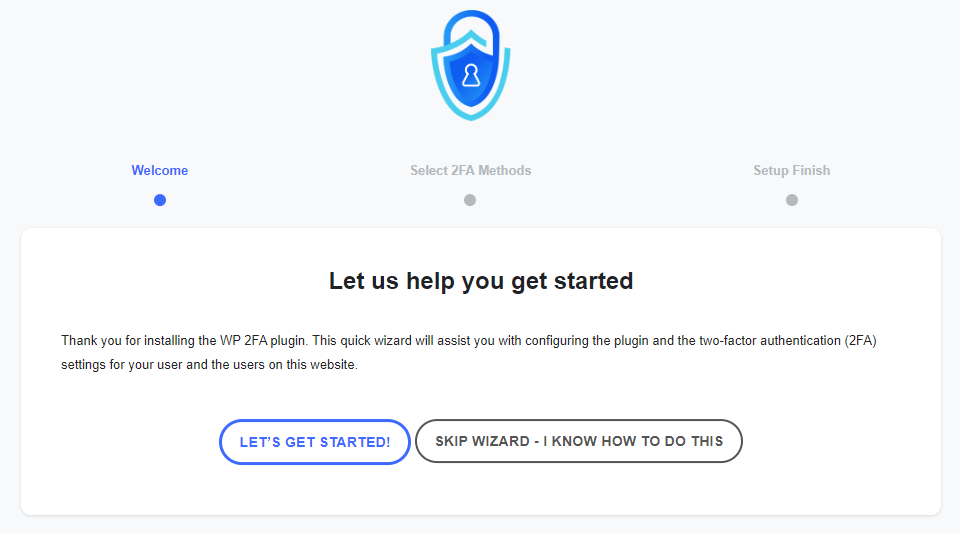
The first-time install wizard allows you to set up 2FA on your website and for your users within seconds. 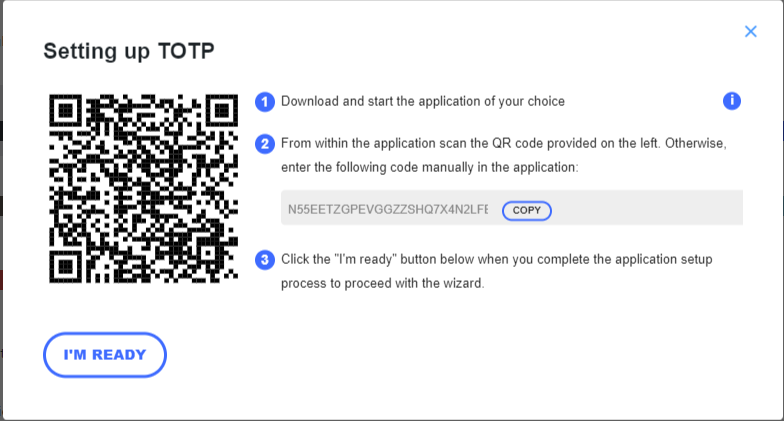
The wizards make setting up 2FA very easy, so even non-technical users can set up 2FA without requiring help. 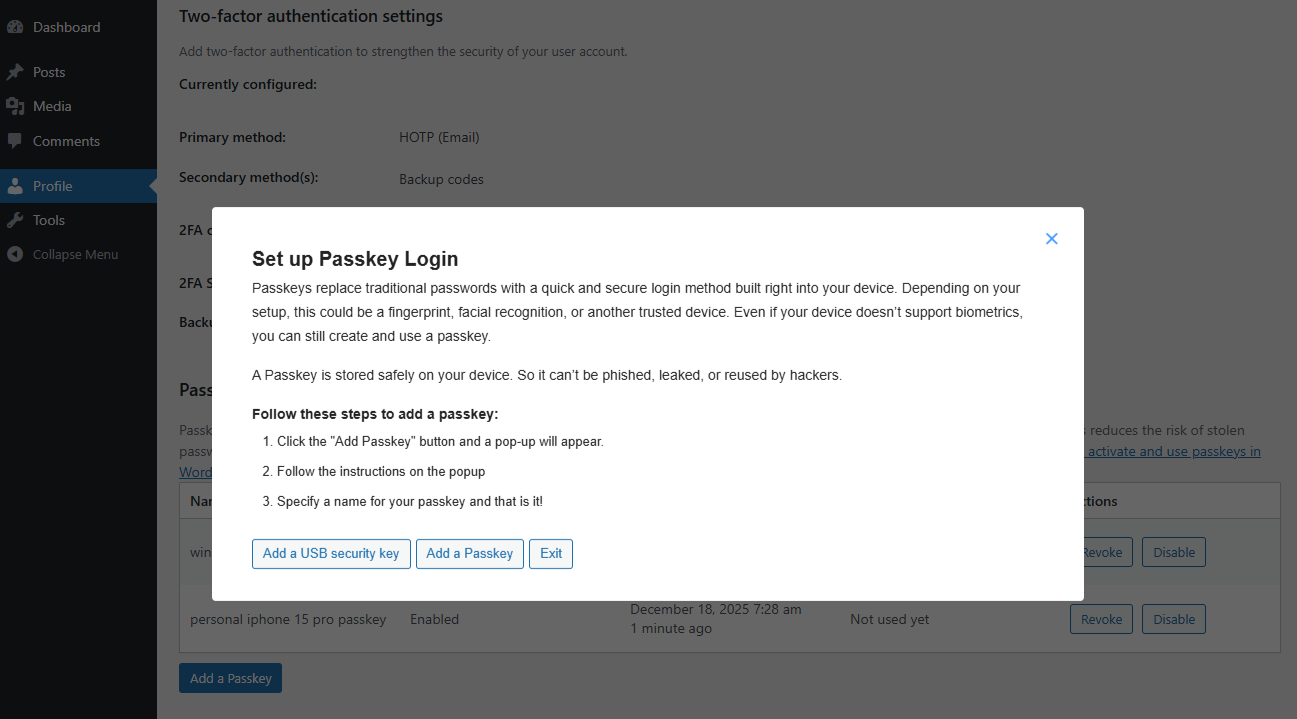
Setting up Passkeys is also a straightforward in WP 2FA. The users just have to follow the step by step instructions. 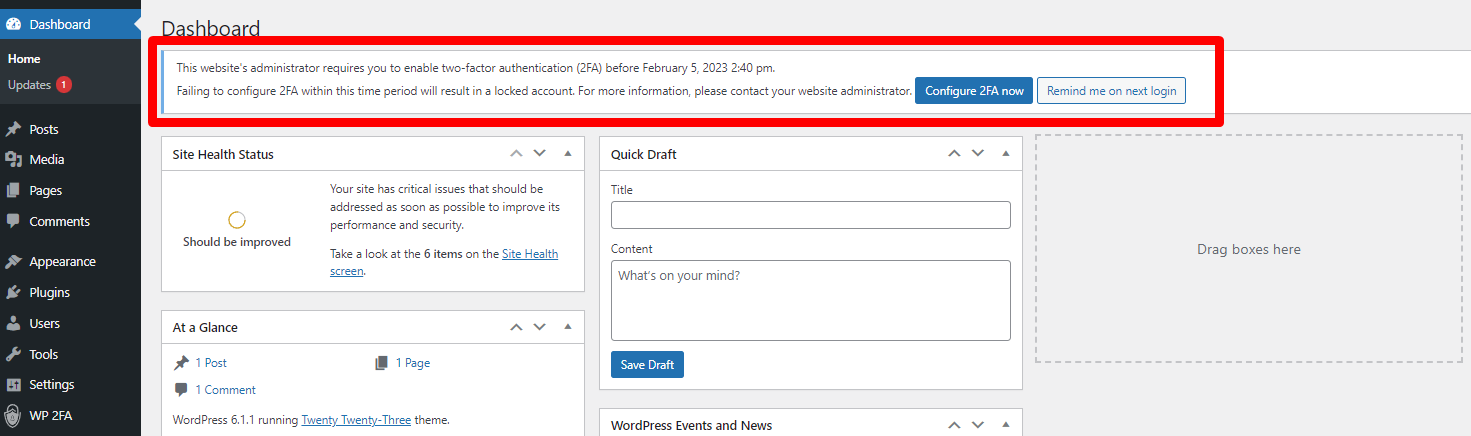
Du kannst von Benutzern verlangen, 2FA zu aktivieren, und ihnen dafür auch eine Frist einräumen. 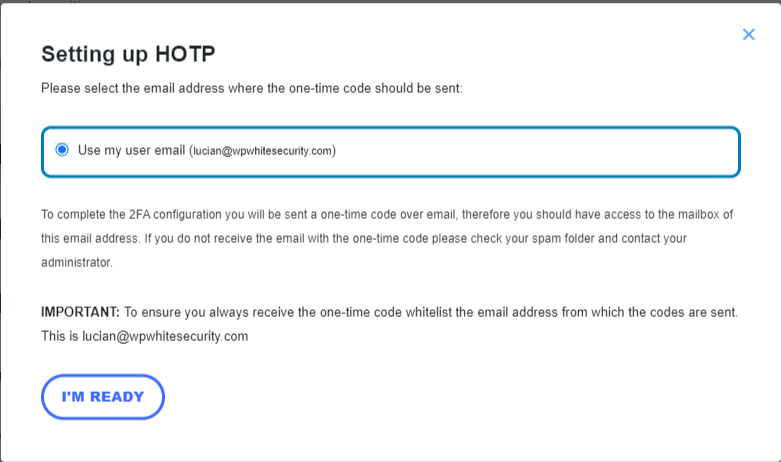
Die Benutzer können auch Einmalcodes per E-Mail als Zwei-Faktor-Authentifizierungsmethode verwenden. 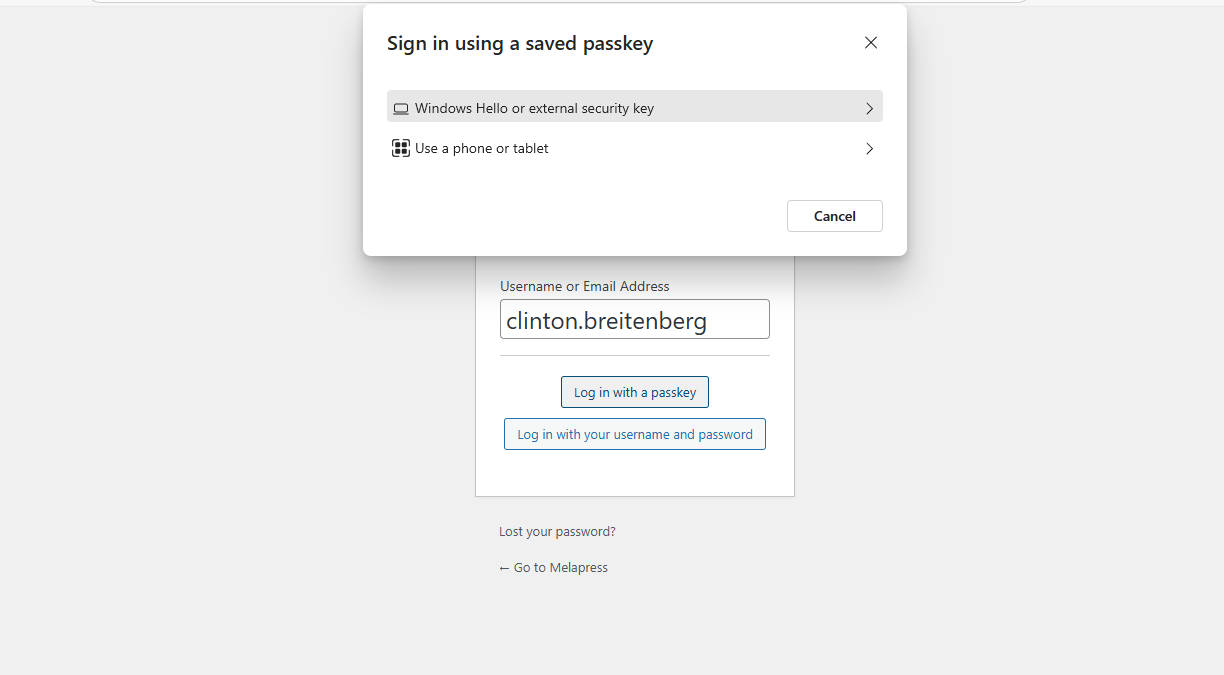
Users can configure and use Passkeys to log in to the website when using WP 2FA. 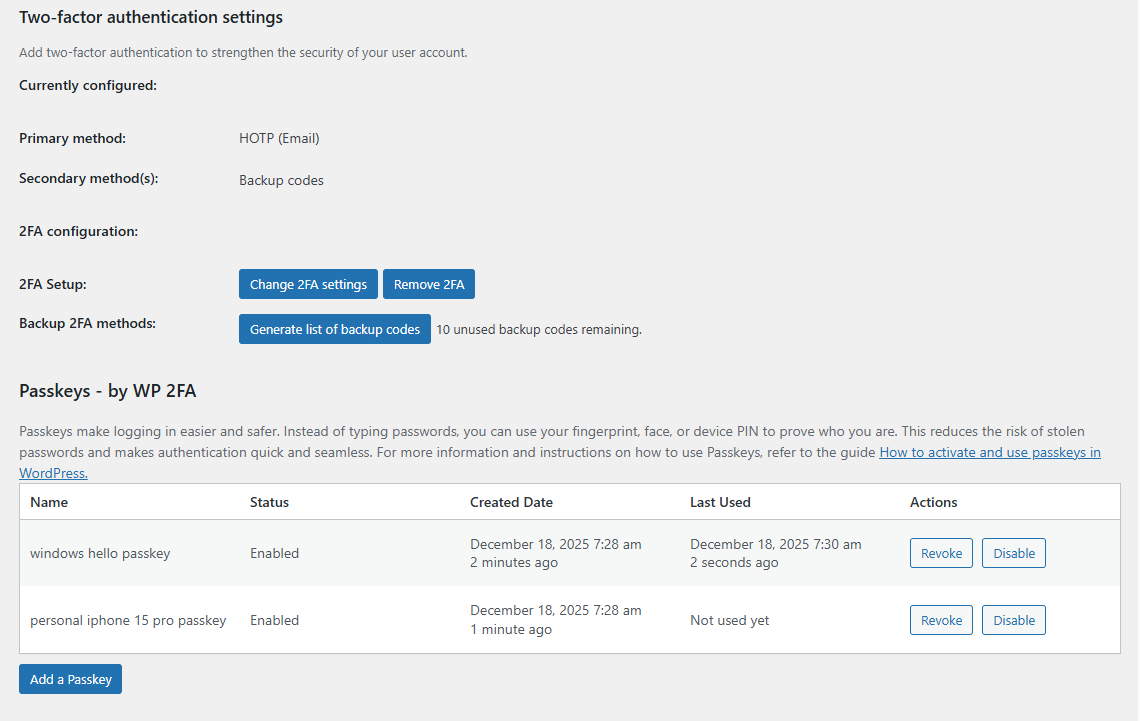
Users can easily manage their Passkeys from their user profile page. 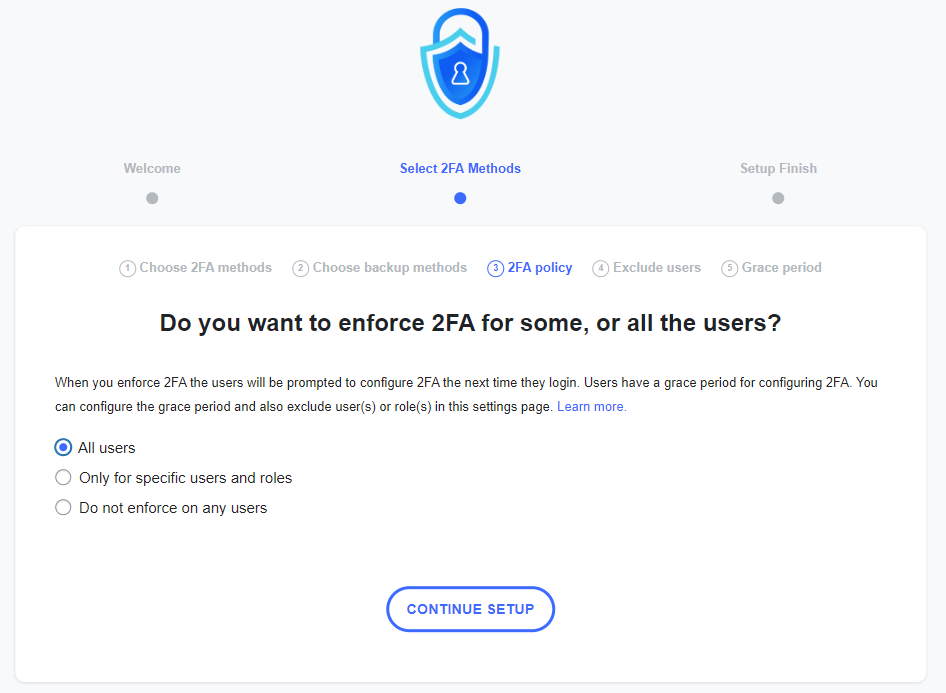
You can use policies to require users to instantly set up and use 2FA, so the next time they log in, they will be prompted with this. 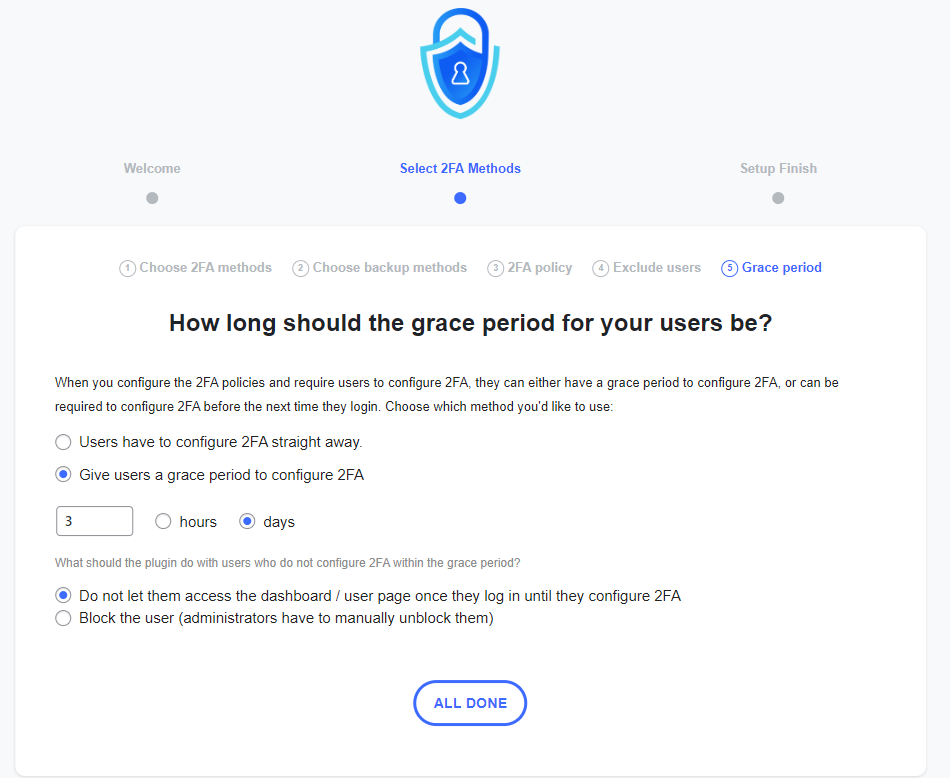
You can give users a grace period until they configure 2FA. You can also specify what the plugin should do once the grace period is over. 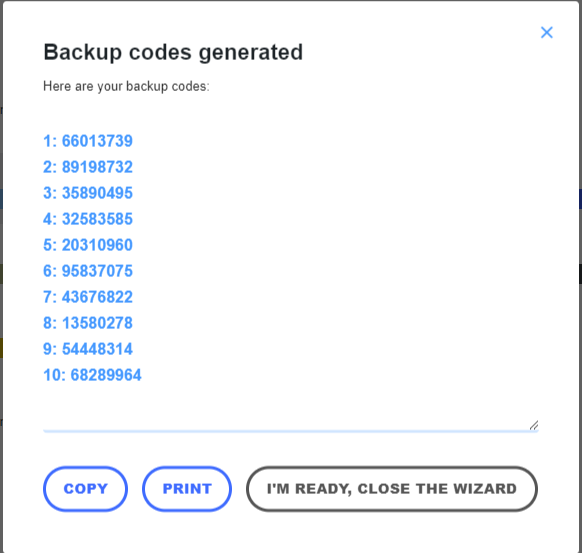
Es wird empfohlen, dass alle Benutzer auch Backup-Codes generieren, für den Fall, dass sie keinen Zugriff auf ihr Primärgerät haben. 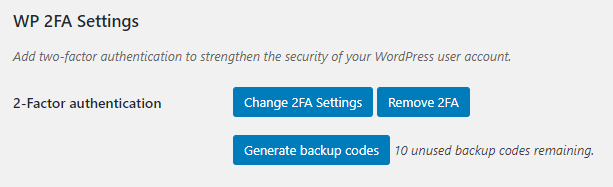
In the user profile, users only have a few 2FA options, so it is not confusing for them, and everything is self-explanatory.


FAQ
-
Sendet das Plugin irgendwelche Daten an Melapress?
-
No, the plugin does not send any data to us whatsoever. The only data we receive is license data from the premium edition of the plugin.
-
Welche 2FA-Methoden sind mit dem Plugin verfügbar?
-
The free edition of WP 2FA includes the following 2FA methods: Authenticator app 2FA and code over email. This allows you to use Google Authenticator OTP The premium edition adds YubiKey, one-click email link, SMS 2FA, and Authy push notifications.
-
How can I integrate two-factor authentication (2FA) into my custom login process or AJAX-based form?
-
WP 2FA includes a REST API that allows developers to enable and verify 2FA during custom authentication flows, such as AJAX-based login forms, mobile apps, or headless WordPress websites. Refer to the REST API in WP 2FA documentation for more information.
-
Wie kann ich sicherstellen, dass ich nicht ausgesperrt werde?
-
WP 2FA includes backup authentication methods so that if the primary authentication method fails, you and your users can still log in. The free version of the plugin includes backup codes, which can be configured during 2FA configuration or at any point after that from the profile page. The premium edition adds 2FA backup codes over email.
-
Was passiert, wenn ich mich ausgesperrt habe?
-
In the unlikely event that you are unable to supply your 2FA code, there are several steps you can take to gain access to your WordPress dashboard. First, check if there is another administrator who can reset your 2FA. If this is not possible, manually deactivate the plugin, log in without 2FA, re-activate the plugin, and then reconfigure your 2FA.
-
Unterstützt WP 2FA Multisite-Netzwerke?
-
Yes, WP 2FA is multisite compatible. The plugin can be activated at the network level. 2FA policies can be enforced on all users, a subsection of users, or per site on the network. It also supports network setups with different domains.
-
Erhält dieses Plugin Aktualisierungen?
-
Wir aktualisieren das Plugin in regelmäßigen Abständen, um sicherzustellen, dass das Plugin weiterhin einwandfrei funktioniert und fügen von Zeit zu Zeit neue Funktionen hinzu.
-
Unterstützt das Plugin Google Authenticator?
-
Ja, WP 2FA unterstützt Google Authenticator auf WordPress vollständig. WP 2FA unterstützt auch viele andere 2FA-Authentifikator-Apps.
-
Kann ich Unterstützung bekommen, wenn ich nicht weiterkomme?
-
Der Support für die kostenlose Version des Plugins wird ausschließlich über die WordPress.org-Supportforen geleistet. Du kannst auch auf unseren Support-Seiten alle technischen Unterlagen und Produktdokumentationen nachlesen.
Wenn du die Premium-Edition nutzt, erhältst du direkten Zugang zu unserem Support-Team über einen persönlichen E-Mail-Support.
-
Wie kann ich Sicherheitslücken melden?
-
You can report security bugs through the Patchstack Vulnerability Disclosure Program. Please use this form. For more details, please refer to our Melapress plugins security program.
Rezensionen


Mitwirkende und Entwickler
„WP 2FA – Two-factor authentication for WordPress“ ist Open-Source-Software. Folgende Menschen haben an diesem Plugin mitgewirkt:
Mitwirkende

„WP 2FA – Two-factor authentication for WordPress“ wurde in 14 Sprachen übersetzt. Danke an die Übersetzer für ihre Mitwirkung.
Übersetze „WP 2FA – Two-factor authentication for WordPress“ in deine Sprache.
Interessiert an der Entwicklung?
Durchstöbere den Code, sieh dir das SVN-Repository an oder abonniere das Entwicklungsprotokoll per RSS.
Änderungsprotokoll
3.1.1.2 (2026-02-25)
- Improvements
- Added a check in the wizard for when a user is setting up 2FA over email, to restrict user to only use the email address on account if they are not allowed to use any other email address.
- Improved the survey admin notice logic so that once acted upon, it does not reappear after plugin updates.
Im vollständigen Plugin-Änderungsprotokoll findest du detaillierte Informationen darüber, was in früheren Versions-Updates von WP 2FA neu hinzugefügt, verbessert und behoben wurde.