

Beskrivelse
Finally, analytics that you’ll actually use.
Google Analytics is overkill. Other WordPress statistics plugins are cluttered and confusing. You just want to know what’s happening on your site – without a data science degree.
Burst Statistics gives you a clean, intuitive analytics dashboard focused on the metrics that actually matter. No external accounts. No complex setup. Install, activate, and understand your traffic in seconds.
Trusted by 200,000+ WordPress sites. Built by the experienced team behind UpdraftPlus, WP-Optimize, and All-In-One Security.
What our users are saying
“Finally, an analytics plugin I can actually explain to clients.”
— @anguskeystone on wordpress.org“I tried WP Statistics and Independent Analytics, but they’re overloaded and confusing. Burst’s UI is intuitive and focused on what matters to me.”
— @vallered on wordpress.org
Why Burst Statistics?
Designed to be actionable
Other analytics plugins throw everything at you. Burst shows what matters — visitors, pageviews, referrers, top pages — in a dashboard you’ll actually use. No overload of data. No confusing menus.
Privacy-first by design
All statistics stay on your server. No external tracking. Your data is yours – we never see it without your explicit permission.
Zero setup friction
Install, activate, done. No Google accounts, no tracking codes, no configuration headaches. Start seeing live visitors immediately.
Built for WordPress
Not a port from another platform. Designed specifically for WordPress with native performance and seamless integration.
Fast and lightweight
Optimized database queries, no bloated scripts (<4kb tracking script), no external dependencies slowing down your pages. Designed to track accurately even when using aggressive server-side caching.
Funktioner
Understand your traffic
- View table of top performing pages and posts
- Track key metrics (Visitors, Sessions, Pageviews, Bounce Rate)
- Breakdown of visitors by device (Desktop, Tablet, Mobile)
- Filter data by custom date ranges
- Compare traffic over time
Real-time analytics
- Identify the real-time source for live visitors
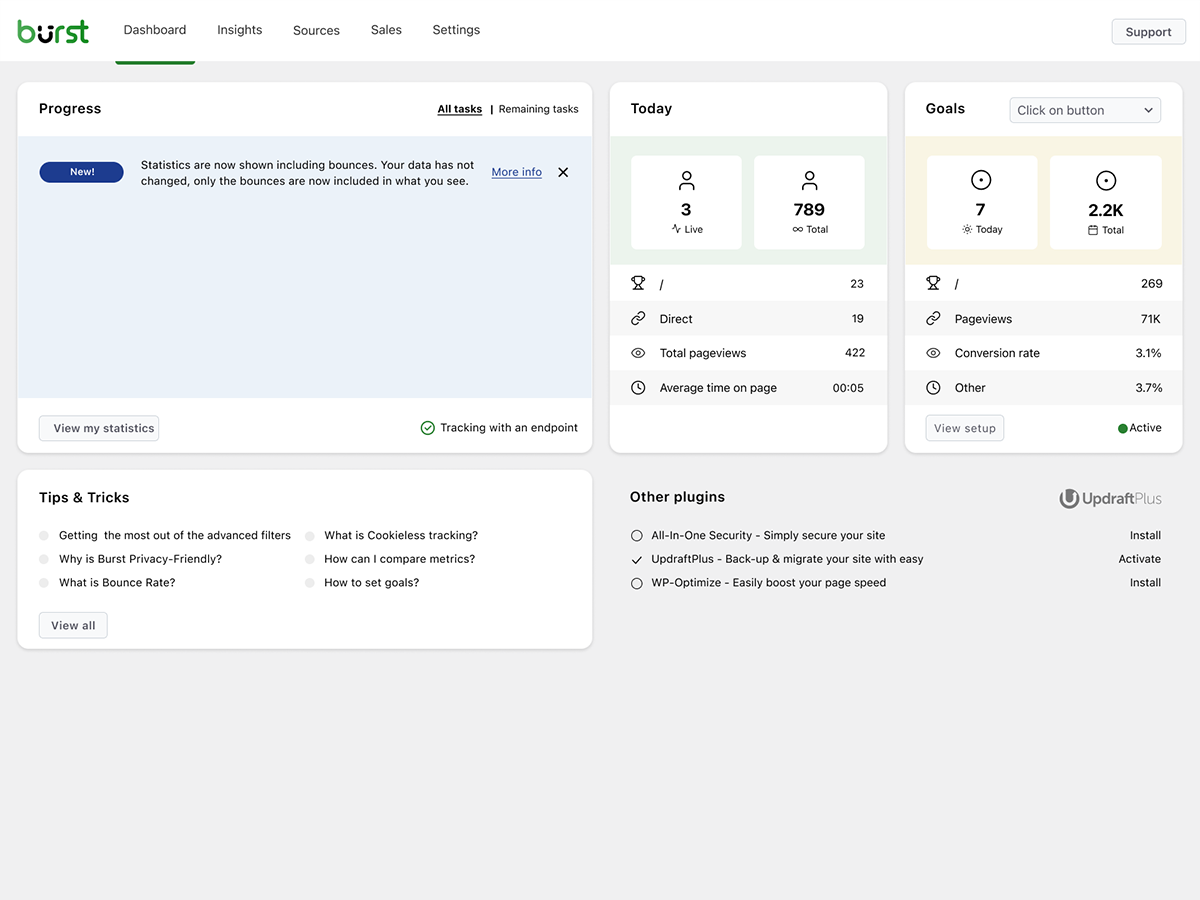
- View the specific pages users are visiting now
- See a live count of active users on your site
See what content performs
- Top pages and posts ranked by views
- Compare any date range
- Track individual page performance
Custom conversion tracking
- Track views, clicks and hooks
- Track WooCommerce sales
- Track custom events or hooks
Privacy without compromise
- 100% self-hosted — all statistics stored locally in your WordPress database
- Cookieless tracking option (no consent banner required in some countries)
- Designed to support GDPR, CCPA, DSGVO, AVG, RGPD, and PECR compliance
Stay informed
- Weekly or monthly email reports delivered to your inbox
- Compare periods to spot trends
- Get notified when tracking does not work
Fra skaberne af UpdraftPlus, WP Optimize og All In One Security
Burst Statistics was created by experienced developers who also created:
* UpdraftPlus: WP Backup & Migration Plugin
* All-In-One Security (AIOS) – Security and Firewall
* WP-Optimize – Cache, Compress images, Minify & Clean database to boost page speed & performance
Who is Burst for?
- Bloggers & content creators — See which posts resonate with your audience
- Small business owners — Understand your traffic without complexity
- WooCommerce stores — Track visitor behavior and sales (Burst Pro – Business plan)
- Agencies & freelancers — Manage analytics for your clients (Burst Pro – Agency plan)
- Privacy-conscious site owners — GDPR-compliant stats without consent banners
- Anyone tired of Google Analytics — Get clarity instead of confusion
Lås op for omfattende indsigt i dine besøgendes adfærd på dit websted med Burst Pro. Drag fordel af avancerede funktioner designet til at forbedre ydeevnen, øge engagementet og drive konverteringer. Forbedr din dataanalyseoplevelse ved at opgradere til Burst Pro i dag.
Free vs Pro
Burst Statistics (Free) includes everything you need to understand your website traffic: visitors, pageviews, referrers, top content, device stats, goal tracking, email reports, and more.
Burst Pro adds advanced features for businesses and professionals:
CREATOR PLAN
* UTM campaign tracking — See which marketing efforts drive results
* Geographic data — Country and city-level visitor insights
* Advanced filtering — Segment data by any dimension
* Data archiving settings — Keep your database lean automatically
* Priority support — Direct contact with our developers (You’ll speak to actual humans!)
BUSINESS PLAN
* Everything in the creator plan +
* Full sales dashboard — Understand what content brings in the most revenue
* Revenue attribution — Connect WooCommerce sales to traffic sources
AGENCY PLAN
* Everything in the business plan +
* Reporting — Generate shareable reports
All Burst Pro plans include priority support. You’ll have direct contact with our developers (You’ll speak to actual humans!)
Learn More
Privacy and Data Sharing
Burst Statistics includes an optional data sharing program. It is disabled by default. You can enable it under Burst Statistics Settings Data Sharing, and you can turn it off again at any time from the same location.
When enabled, the plugin sends a small set of aggregated, anonymized metrics to Burst Statistics’ servers once per month. This includes traffic statistics (visitors, pageviews, bounce rate, session duration), database row counts and query performance timings. No personal data, IP addresses, domain names, or visitor information is ever transmitted. All data is aggregated on your server before it leaves, making it impossible to trace back to your website or any individual user.
We use this data to:
* build anonymous industry benchmarks so you can compare your site’s performance against peers;
* understand which features are most used, so we can prioritize development effectively;
* know which WordPress and PHP versions are in active use, so we can make informed support decisions;
* identify slow database queries across real-world installs, so we can improve plugin performance for everyone.
For the complete list of data fields collected and full details on how the data is used, please read our Data Sharing Policy.
This feature connects to: https://api.burst-statistics.com
Installation
- Go to Plugins Add New in your WordPress dashboard
- Search for Burst
- Click Install Now, then Activate
- Visit Statistics Dashboard to see your analytics
That’s it. No external accounts. No tracking codes to paste. Burst starts collecting statistics immediately.
Skærmbilleder
Burst Statistics: Analytics Dashboard 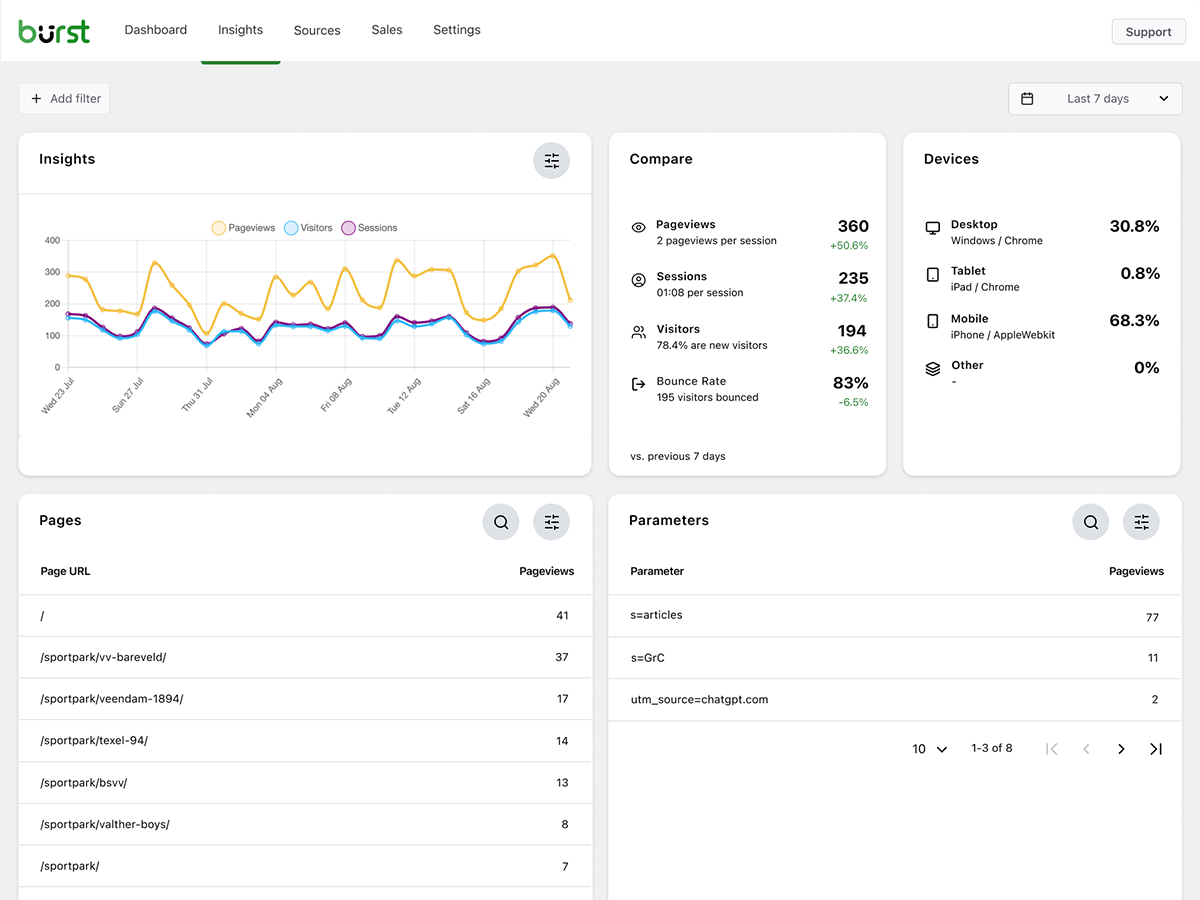
Dashboard: Clean and easy-to-read overview 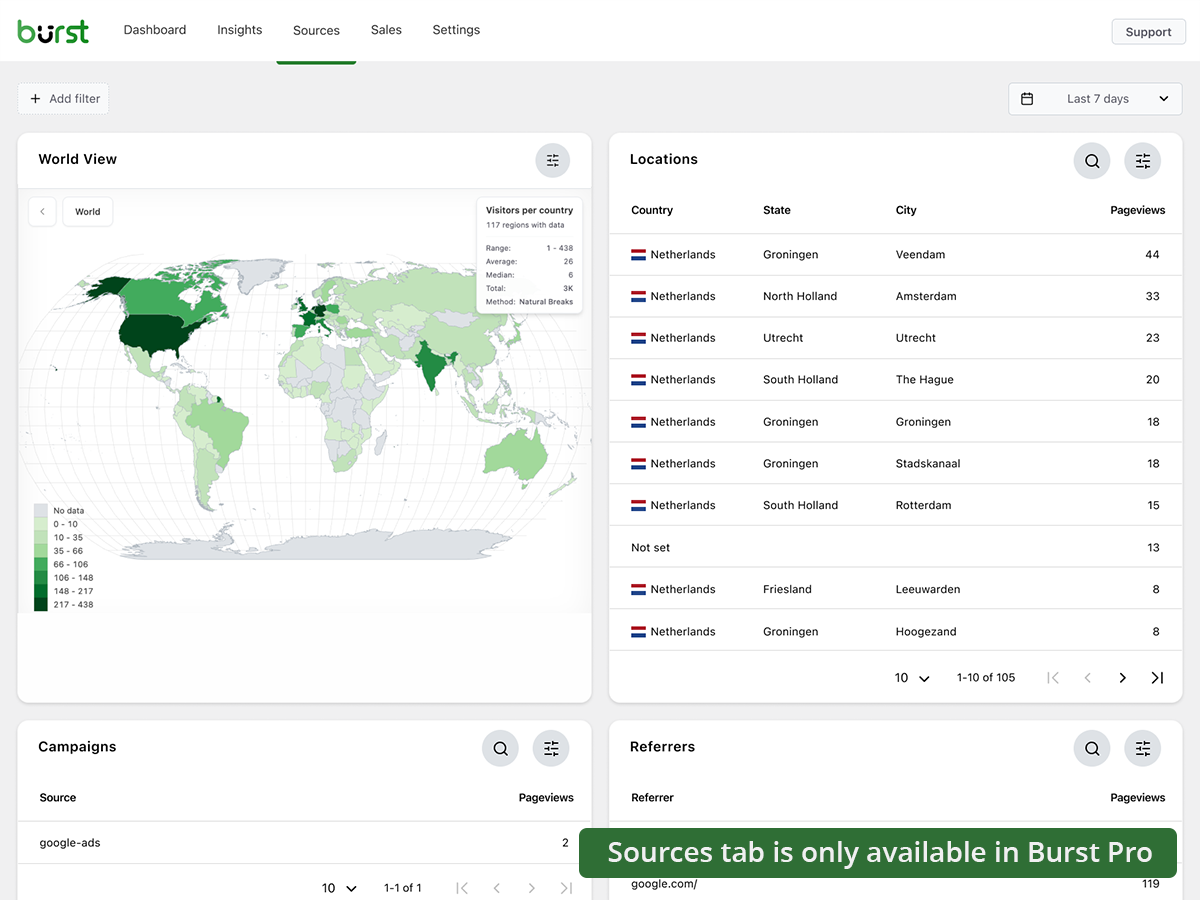
Insights: See exactly how your website performs 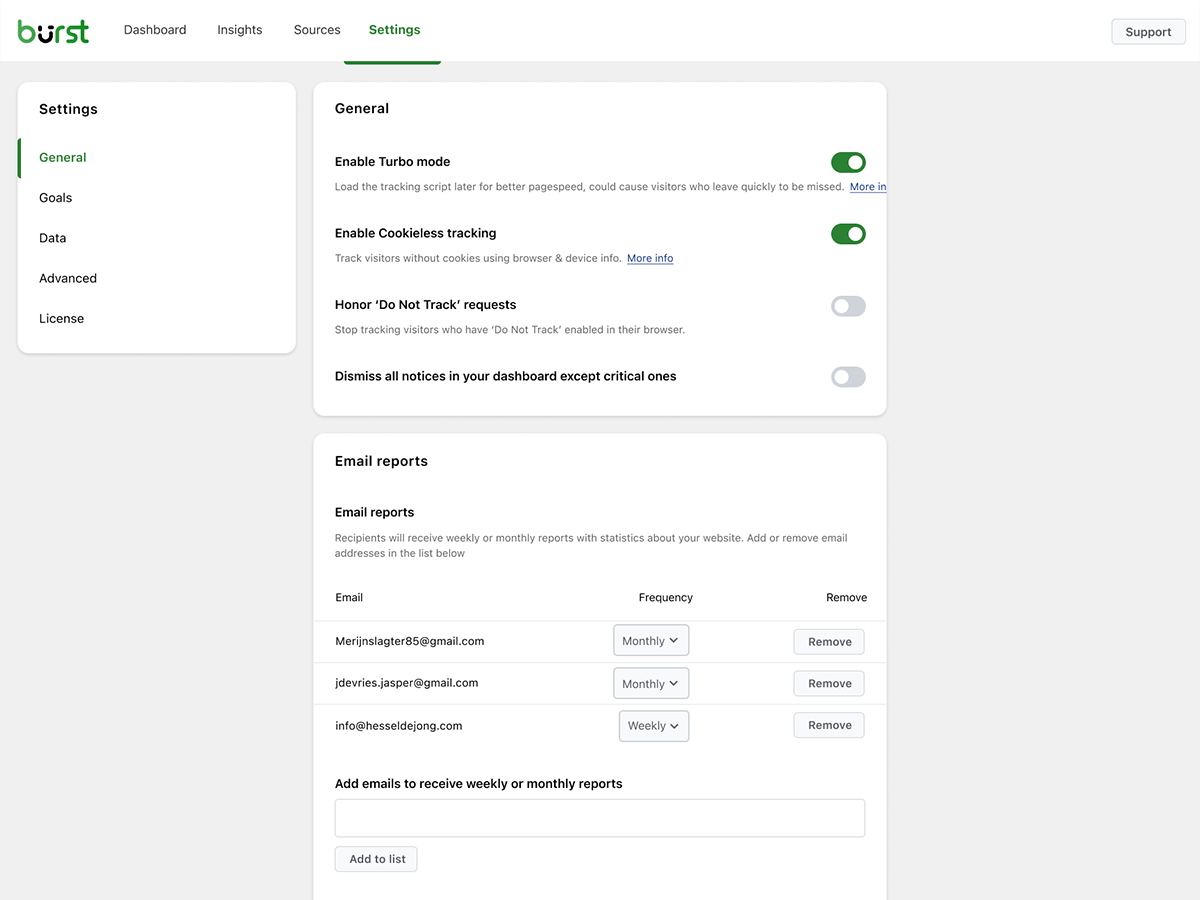
Sources: Analyze where your visitors come from (Burst Pro)


Blokke
Dette plugin giver 1 blok.
- Pageviews Counter
FAQ
-
Is Burst really free?
-
Yes. Burst Statistics is 100% free with no tracking limits. Pro is optional for users who need advanced features like UTM tracking, revenue attribution, geographic data or reporting. That’s how we can keep Burst Statistics Free for most users.
-
Hvor er dataene gemt?
-
All statistics are stored in your own WordPress database. Unlike Google Analytics or cloud-based tools, we have zero access to your data. Your data never leaves your server, unless you manually opt in to share anonymous usage insights with us.
-
Is Burst a good Google Analytics alternative?
-
Yes. If you find GA4 too complex or are concerned about sending visitor data to Google, Burst is the perfect replacement. You get the statistics you actually need – visitors, referrers, top pages, conversions – without the overwhelm.
-
Skal jeg have en konto?
-
Nej, du behøver ikke en konto; ingen data sendes til en anden hjemmeside.
-
Er der en grænse for, hvor mange besøgende jeg kan spore?
-
Nej, der er ingen grænse. Den eneste begrænsende faktor er din egen database og server.
-
Der er en mulighed for at bruge cookieløs sporing, hvis du foretrækker det. Men som standard bruger Burst cookies, fordi de er mere præcise og lette. Mens du bruger cookies, forbliver Burst privatlivsvenlig, fordi alle data er anonyme og gemt på din server. Læs mere om hvorfor cookies er misforstået.
-
Burst Statistics kan bruges uden at sætte cookies eller gemme data i browsere. Dette kan dog påvirke nøjagtigheden, så en hybrid mulighed med cookies efter samtykke er mulig. Læs mere om Cookieless tracking.
-
Hvorfor er Burst Statistics privatlivsvenlig?
-
Burst Statistics tilbyder et analyse-kontrolpanel med anonymiserede data, der er dine og kun dine. Læs mere om Hvorfor Burst Statistics er privatlivsvenlig.
-
How is Burst different from WP Statistics or Independent Analytics?
-
Burst focuses on clarity over quantity. While other plugins can feel cluttered and overwhelming, Burst’s dashboard is designed to show you what matters without the noise. Users consistently mention our clean, intuitive interface as the reason they switched.
-
Can I use Burst alongside Google Analytics?
-
Yes. Many users run both during a transition period or keep GA4 for historical data while using Burst for daily insights. There’s no conflict.
-
Does Burst Statistics slow down my website? ?
-
No. Burst is built for performance with optimized database queries, minimal tracking scripts, and Turbo Mode if speed is more important than accuracy. Your site stays fast.
-
Does Burst work with WooCommerce?
-
Yes. Basic pageview tracking works in the free version. For revenue tracking, product analytics, and sales attribution, you’ll need Burst Pro.
-
How do I migrate from another analytics plugin?
-
Install and activate Burst — it starts tracking immediately. Historical data from other plugins can’t be imported, but you can run both side-by-side during a transition period.
-
Er det muligt at installere Burst Statistics med Composer?
-
Absolut! Både gratis og premium-plugins kan administreres med Composer. Læs dokumentationen for mere information.
-
Kan jeg give feedback om plugin’et?
-
Vi værdsætter din feedback. Du kan indsende en supportanmodning på WordPress-foraene, og vi vil svare hurtigt.
Anmeldelser


Bidragsydere & udviklere
“Burst Statistics – Privacy-Friendly WordPress Analytics (Google Analytics Alternative)” er open source-software. Følgende personer har bidraget til dette plugin.
Bidragsydere


“Burst Statistics – Privacy-Friendly WordPress Analytics (Google Analytics Alternative)” er blevet oversat til 56 sprog. Tak til oversætterne for deres bidrag.
Interesseret i udvikling?
Gennemse koden, tjek SVN repository, eller abonner på udviklerloggen via RSS.
Ændringslog
3.2.3
- March 12th 2026
- Fix: share link for non logged in users not loading page.
3.2.1
- March 9th 2026
- Security fix: Fixed a missing authorization check that allowed users with Burst View privilege to manage reports. Props Sanjay Singh Jhala.
- Improvement: set turbo default to enabled, and add notice to recommend enabling it when cookieless tracking is enabled.
- Improvement: check if PharData class is installed on the server to prevent fatal errors.
- Fix: Store scheme for usage during cron jobs. During cron, the site_url is http. For the javascript generation, we need it to reflect the actual scheme, usually https.
- Fix: duplicate fields in the reporting settings when the share link is opened by an admin user.
- Fix: url not found warning when classic premium report is generated.
- Fix: too strict use of sanitizers causing table prefixes to get lowercase. props @parkentosh
3.2.0
- February 25rd 2026
- New: anonymously share data to help us improve Burst Statistics: build industry benchmarks, targeted feature development, and performance improvements.
- New: add notice about discord, inviting users to join our discord server.
- New: Easily share statistics with your team or clients, with the share button in the Burst Statistics dashboard.
- Fix: catch non json encoded data in Rest API tracking, props @rajkumarreddyv
- Fix: Bounce and bounce rate calculations now correctly count distinct bounced sessions instead of summing bounce flags, preventing inflated numbers.
- Fix: default value logic for ‘merge variables and scripts’ made it impossible to disable the setting.
3.1.6
- 20. januar 2026
- Rettet: Sletning af gamle data i arkivfunktionen virkede ikke på grund af forkert SQL-syntaks.
- Rettet: Browser/OS-data blev ikke filtreret efter enhed i indsigt-blokken, tak til @alisontaylorbc.
- Forbedring: tilføj automatisk test for sletning af data.
- Forbedring: tilføj vedvarende sortering til datatabel-blok, props @ankush.
- Forbedring: filtrering efter kontinent.
3.1.5
- 7. januar 2026
- Forbedring: luk automatisk meddelelser i nederste højre hjørne af skærmen.
- Forbedring: nogle mindre forbedringer af mobilresponsivitet.
- Forbedring: udvid automatiserede tests med test af live besøgende.
- Forbedring: ombrydning af lange URL’er i visningen af live besøgende.
- Forbedring: udvidet PHPCS-dækning.
- Rettet: når browserens lokale lager er fyldt, kunne tilføjelse af filtre forårsage en fejl.
- Rettet: tving https på kombinerede variabler og script-URL’er for at undgå advarsler om blandet indhold.
- Rettet: onboarding for RTL-sprog forsøgte at indlæse en ikke-eksisterende RTL CSS-fil.
3.1.4
- 23. december 2025
- Forbedring: styling af datatabelblokke og indlæsningsstatusser.
- Forbedring: forbedringer af henvisningsforespørgsels ydeevne.
- Forbedring: forbedret ydeevne for parameterforespørgsler.
- Forbedring: udeluk track hit over Rest Api fra Burst Rest Api Optimizer, så alle plugins bliver indlæst under hit’et, hvilket er nødvendigt for hook-mål.
- Forbedring: tilføjet en fallback til standardmetoden for at kombinere variabler og scripts, hvis upload-mappen ikke kan skrives til.
- Forbedring: beskeden ‘cron kører ikke’ kan ikke længere afvises, da det er et kritisk problem.
- Forbedring: tillad søgning efter formaterede data i datatabeller, f.eks. kan du nu søge efter ‘United States’ i stedet for US i lokationsdatatabellen.
- Forbedring: tilføj parameterfiltrering.
- Rettet: filtrering på enhedsblokken.
3.1.0.3
- 1. december
- Rettet: at gemme ændringer i indstillingerne efter at have gemt de første ændringer krævede en genindlæsning.
- Ydelse: Forbedringer af ydeevnen ved at flytte ressourcekrævende processer under sporing til cron i batches
- Forbedring: Forbedringer af User Agent Parser, fjernelse af ugyldige browsere
- Rettet: dropdown for avancerede filtre filtrerer ikke listen.
- Rettet: udefineret fane forårsaget af ufuldstændig fjernelse af salgsmenupunktet, når der ikke er fundet WooCommerce eller EDD.
- Rettet: objektcaching på sideantal forårsager langsom opdatering af sideantal, tak til @fveits
3.0.2
- 25. november 2025
- Rettet: nogle meddelelser blev fejlagtigt afvist under validering.
- Forbedring: tilføjet automatiseret test for hook-mål.
- Forbedring: tilføjet automatisk test for gendannelse af arkivering.
3.0.0
- 11. november 2025
- Rettet: kompatibilitet med ukendt plugin, der tillader null-værdi i get_timerange_dropdown() på WooCommerce produktoversigt, tak til @tegid
- Rettet: Behandl ikke www og ikke-www domæner som forskellige domæner, når der opdages opsætning med flere domæner.
- Rettet: fjern overflødig skråstreg i indlæsningen af mål-scriptet, som på nogle opsætninger får det til at blive blokeret, tak til @jhndkrvzc
- Rettet: topbjælketælleren viste ikke ‘k’ for tusinder, ‘M’ for millioner osv., den viste kun 1 i stedet for 1k.
- Nyhed: øg de minimale krævede versioner til PHP 8.0 og WordPress 6.4
2.2.9.3
- Rettet: noget css-styling er blevet rettet.
2.2.9.2
- Forbedring: css-ændring for at sikre, at Burst-ikonet er korrekt justeret i menuen
- Forbedring: fjern forældet loglinje
- Forbedring: fjern upgrader_process_complete hook for at håndtere opgraderinger
- Forbedring: fjernede nogle forældede filer
2.2.9.1
- Forbedring: Mulighed for at vælge datointerval i oversigtsskærmindstillingerne for sider og indlæg.
- Rettet: problem med lagring af data i onboarding-guiden.
2.2.9
- Rettet: flyt kode-mappen fra /src til /includes, ellers bliver javascript-filerne ikke scannet for oversættelser af WordPress
2.2.8
- Nyhed: forbedret bibliotek til cookieless tracking.
- Ny: filter for indgangs-/udgangssider
- Forbedring: tilføjet en alternativ databaseopgraderingsmekanisme, hvis den normale opgradering ikke blev udført.
- Forbedring: fjernelse af PHP-meddelelse.
2.2.7
- Ny: Detaljeret fane for live besøgende
- Forbedring: responsivitet på mobil, gendannet 1280px breakpoint
- Forbedring: mistænkelige data (over 1000 besøg fra 1 bruger) bliver nu kun opdaget, og administratoren bliver informeret, men de fjernes ikke automatisk.
- Rettet: På multisite med Burst-netværket aktiveret, opdagede endpointet fejlagtigt ikke Burst som aktiv, hvilket forhindrede sporing i at finde sted.
2.2.6.1
- Rettet: fjern falsk positiv besked om manglende tabeller.
2.2.6
- Forbedring: send post_id til javascript ved at bruge et data-attribut i body-elementet for at forbedre nøjagtigheden af de side-specifikke sidevisninger.
- Forbedring: fjernet brugen af den upræcise post_meta sidevisningsmetrik helt.
- Forbedring: gjort det muligt at spore hook-mål uden brug af cookies.
- Forbedring: migrerede al resterende css til tailwind css.
- Rettet: Gruppering i parameteroversigten bør ske efter kombinationen af parameter og værdi.