
Popis
WooCommerce Checkout Field Editor enables you to edit the default checkout fields of your WooCommerce platform, add, edit, hide, or delete the default fields, change labels, rearrange checkout fields, validate the checkout fields, add custom css classes etc.
🔥 #The Ultimate Solution for Customizing WooCommerce Checkout Fields
The default WooCommerce checkout field editor offers only basic fields, limiting the ability to collect crucial information. Moreover, manually customizing checkout fields with code is time-consuming and complex and leads to the following issues
❌ No Personalization – Customers expect a seamless, customized experience, but the default setup doesn’t allow it.
❌ Poor User Experience – A cluttered checkout page with unnecessary fields can frustrate customers, leading to cart abandonment.
❌ Reduced Conversions – An unoptimized checkout process can increase drop-offs and lower sales.
How WooCommerce Checkout Field Editor (Checkout Manager) simplifies customization?
✳️ Complete Checkout Field Customization Effortlessly add, edit, remove, and rearrange fields.
✳️ 24+ Field Types Add additional field types to your Checkout page.
✳️ Optimized for Conversions Create a seamless checkout flow, reducing friction and increasing sales.
✳️ Compatible with Classic & Block Checkout Effortlessly customize fields, whether you’re using the classic checkout layout or the modern block-based layout .
✳️ Custom Hooks Easily Add more functionalities features with developer-friendly custom Hooks.
👉Note: Block Compatibility Our Checkout Field Editor (Checkout Manager) for WooCommerce now supports WooCommerce Checkout Blocks, allowing customization with Text, Select, Radio, and Checkbox fields, plus validation for Email, Phone, and URL. More field types will be added in upcoming updates.
Try Demo | Documentation | Get Pro
🔥 EXPLORE WHAT OUR FREE VERSION OFFERS
✅ ADD FIELDS TYPES TO CHECKOUT PAGE
👉 Easily add up to 20 different checkout field types to gather more customer information using Classic checkout.
1.  Text
2.  Number
3.  Hidden
4.  Password
5.  Email
6.  Phone
7.  Radio
8.  Textarea
9.  Select
10. Multi Select
11. Checkbox
12. Checkbox Group
13. DateTime Local
14. Date
15. Month
16. Time
17. Week
18. URL
19. Heading
20. Paragraph
👉 Also the users can add 4 checkout field types to gather more customer information using Block checkout.
1.  Text
2.  Select
3.  Radio
4.  Checkbox
Users can edit, delete and enable/disable these fields. With the simple drag-and-drop interface, users can also easily reposition fields to meet their business needs effortlessly.
✅ Kontrola správnosti polí při objednávce
Validate both custom and default checkout fields to prevent incomplete or incorrect submissions, enhancing the user experience and reducing errors during checkout.
- Number: Restricts input to numerical values
- Email: Ensures correct email formatting
- Phone: Validate phone number input
- Stát a PSČ: Kontroluje údaje podle lokace
- URL: Povoluje pouze správně formátované webové adresy
✅ Správa viditelnosti vlastních polí objednávky
-
In Classic checkout control the visibility of custom checkout fields on the Order Details Page and in emails with a simple checkbox option
-
In Block checkout control the visibility of custom checkout fields in the Admin emails, customer emails, admin order details & customer order details with a simple checkbox option
✅ Zabránění přepsání polí s adresou
By default, WooCommerce will change the address format based on the countries. Using this plugin, you can prevent the override address field properties and use the values set using the plugin. You can also change the address formats displayed in the addresses in My Account page, Thank You page and Transactional Emails.
👉Note: The custom fields created using this plugin can also be included in the addresses using the override feature.
✅ Jedním kliknutím obnovíte výchozí pole
Restore the original state and revert to default fields effortlessly with a single click.
✅ Umožňuje snadný překlad do jiných jazyků
The Checkout Field Editor plugin supports WPML, Polylang, and Loco Translate, making it simple to translate fields into different languages. For dynamic strings, use the Polylang or WPML plugin.
🔥 Proč se vyplatí přejít na PRO verzi?
While the free version of Checkout Field Editor for WooCommerce offers essential features to enhance your checkout pages, the premium version offers full control over your checkout process & easily customize WooCommerce Checkout Fields – Works with Both Classic & Block Checkout!—ensuring a better customer experience and higher revenue such as:
👉 4 additional field types for more flexibility
👉 Add & edit display sections and fields conditionally
👉 Custom validations to ensure accurate data
👉 Price fields with a variety of price types
👉 Change the address display format
👉 Developer friendliness with custom hooks
👉 Compatibility with third-party plugins for extended functionality
GET FULL ACCESS WITH PREMIUM NOW !
👉 WPML Compatibility
The WooCommerce Checkout Field Editor works smoothly with WPML, allowing you to translate checkout field labels and text into multiple languages for a better multilingual checkout experience.
🔥 SEE OUR PREMIUM FEATURES
Try Demo | Documentation | Get Pro
✅ ADD 4 ADDITIONAL FIELDS TYPES TO CHECKOUT PAGE
1.  File Upload
2.  Time Picker
3.  Date Picker
4.  Label
🆕 👉 Note: The Pro version lets you add an extra checkout field type Date Picker when using Block Checkout.
✅ POSITION SECTIONS AT 14 POSITIONS
Display sections at 14 different locations, offering greater flexibility in organizing your checkout page.
1.  Before customer details
2.  After customer details
3.  Before billing form
4.  After billing form
5.  Before shipping form
6.  After shipping form
7.  Before registration form
8.  After registration form
9.  Before order notes
10. After order notes
11. Before terms & conditions
12. After terms & conditions
13. Before submit button
14. After submit button
👉Note: Additionally, with our WooCommerce Multistep Checkout plugin, you can add custom sections inside a custom step, giving you a total of 15 placement options
✅ DISPLAY SECTIONS & FIELDS BASED ON CONDITIONS
Show/hide custom fields only when specific conditions are met.
- Cart contains
- Mezisoučet košíku
- Celková částka košíku
- Uživatelské role
- Produkt
- Varianty produktu
- Kategorie produktů
- Na základě hodnot ostatních polí
- Based on Shipping Method
- Based on Payment Method
✅ CREATE & APPLY CUSTOM VALIDATIONS FOR CHECKOUT FIELDS
You can validate checkout fields before order submission. Along with default validation options, you can create custom validation rules to ensure your fields meet specific requirements
✅ CREATE CONFIRM FIELD VALIDATION
You can create confirm field validators to compare the values of two fields. For example, ensure that the ‚password‘ and ‚confirm password‘ fields match before proceeding with the checkout
✅ ADD PRICE FIELDS WITH MULTIPLE PRICE TYPE
Add additional price values to the total by including price fields in the checkout form. You can also set predefined fixed prices using hidden fields in WooCommerce Checkout.
-
Fixed Price: Add a fixed amount to the total price when the field is selected.
-
Custom Price: Let users enter their own price, ideal for donations or tips.
-
Percentage of Cart Total: Set the field price as a percentage of the cart total..
-
Percentage of Subtotal: Add a price based on a percentage of the subtotal.
-
Percentage of Subtotal Excluding Tax : Add a price based on the percentage subtotal excluding tax.
-
Dynamic Price: Set price per unit, with the total calculated based on the number of units selected.
✅ EDIT & PERSONALIZE ADDRESS FORMATS
With the WooCommerce Checkout Field Editor, you can customize the address format displayed on the My Account page, Thank You page, and transactional emails. Additionally, you can include custom fields created with the plugin in the address format using the override feature.
✅ SET REPEAT RULES FOR CUSTOM FIELDS
The Pro version of the WooCommerce Checkout Manager plugin allows you to set repeat rules for custom fields and sections based on criteria such as product quantity and cart count only in classic checkout
✅ DEVELOPER FRIENDLY
All the custom fields in the Checkout Field Editor are available through hooks. So, the developers can use the checkout fields to extend the functionality of the fields.
✅ SUPPORTED PLUGINS & THEMES
👉 PLUGINS
- PDF Invoices & Packing Slips for WooCommerce by WP Overnight
- Customer / Order / Coupon Export for WooCommerce by SkyVerge
- Multi-language Support (WPML, Polylang & Loco Translate)
- Podpora Zapier
👉 THEMES
- Astra
- WoodMart
- Divi
- Avada
- Flatsome
- OceanWP
- Storefront etc..
Why ThemeHigh
At themehigh, we specialize in providing thoughtful solutions to help you create your store in the easiest and simplest way possible, providing you with a smooth and enjoyable customization experience.
🏆 2 Million+ Customers
🏆 Quickest Turn-around Support
🏆 Most Lightweight Plugins
🔥 Explore More
If you like the Extra product option, then consider checking out our other WordPress Plugins:
👉Extra Product Options For WooCommerce:
This Custom Product addons plugin lets you quickly add additional fields (19 custom field types) and sections to your WooCommerce Product page.
👉 Variation Swatches for WooCommerce:
Using the WooCommerce Variation Swatches plugin, you can easily convert default WooCommerce product attribute drop-downs into customizable swatches and display customized product variations.
👉 Email Customizer for WooCommerce | Drag and Drop Email Templates Builder:
Email Customizer is a plugin that helps you effortlessly customise your WooCommerce transactional emails using its intuitive drag-and-drop builder.
👉 MultiStep Checkout for WooCommerce:
The Multistep checkout plugin helps you split the regular WooCommerce checkout process into multiple steps and create a simpler and more organized checkout experience.
Happy Users of Checkout Manager Plugin
captainprint (@captainprint)⭐⭐⭐⭐⭐
I had a great experience with this plugin’s customer service. I ran into an issue, and their team was very helpful. They solved my problem efficiently, and I really appreciated their support. Highly recommend!giannisdigitup (@giannisdigitup)⭐⭐⭐⭐
Fastest support ever! Not asking stupid things and not blamming other plugins for their problems. Provided me with a valid solution in minutes.
Good job guys!!!amitaugma (@amitaugma) ⭐⭐⭐⭐⭐
The plugin functionally provides all the necessary tools to successfully build a clean checkout form with conditional and easy to use interface. On top of that, their support is amazing and would take the extra mile to help with any inquires. RECOMMENDED!dragoso (@dragoso) ⭐⭐⭐⭐⭐
Support is super speedy and the PRO plugin is totally awesome and works like a charm. Very happy with the purchase! Thank you guys!DCM (@bcreativos) ⭐⭐⭐⭐⭐
Great complement in both versions: Free and paid. Excellent support. Thank you very much recommended 100%.
OTHER USEFUL LINKS
👉 VIEW ALL FEATURES
👉 GET DOCUMENTATION
👉 GET THEMEHIGH SUPPORT
👉 JOIN COMMUNITY
👉 FOLLOW US ON Facebook, LinkedIn, X , YouTube & Reddit.
Snímky obrazovky
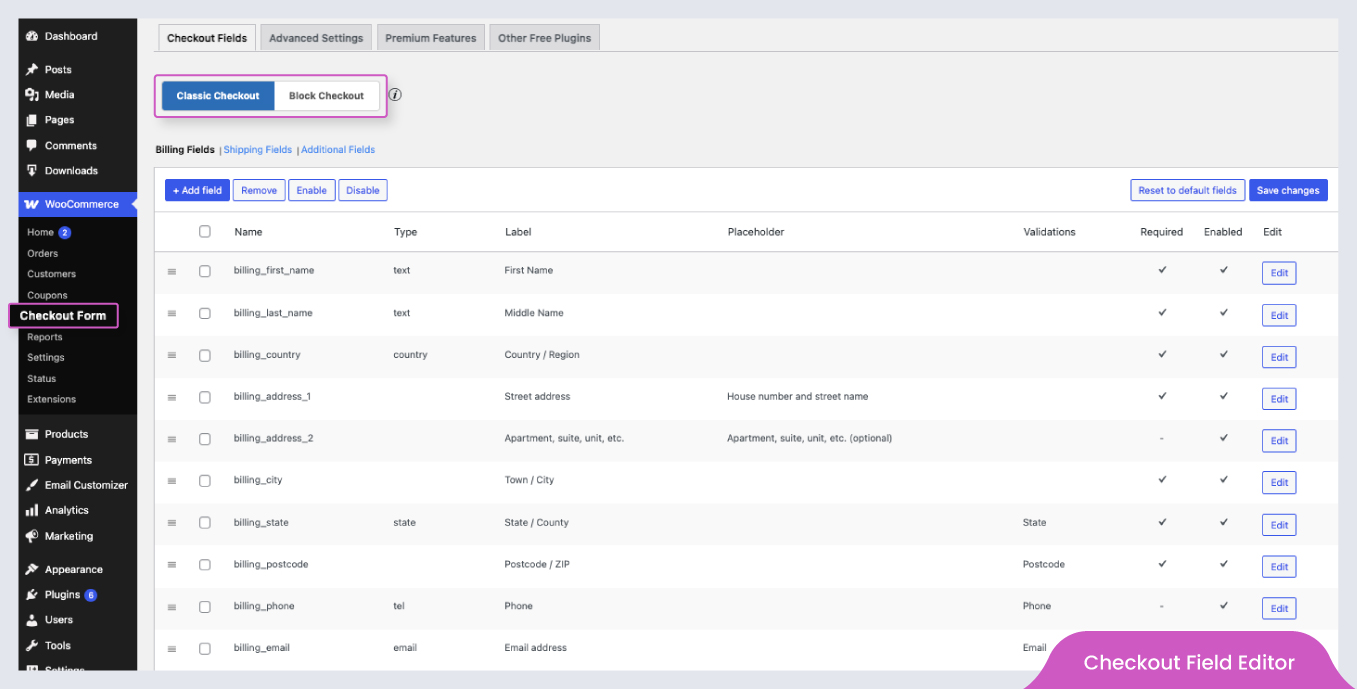
WooCommerce > Checkout Form 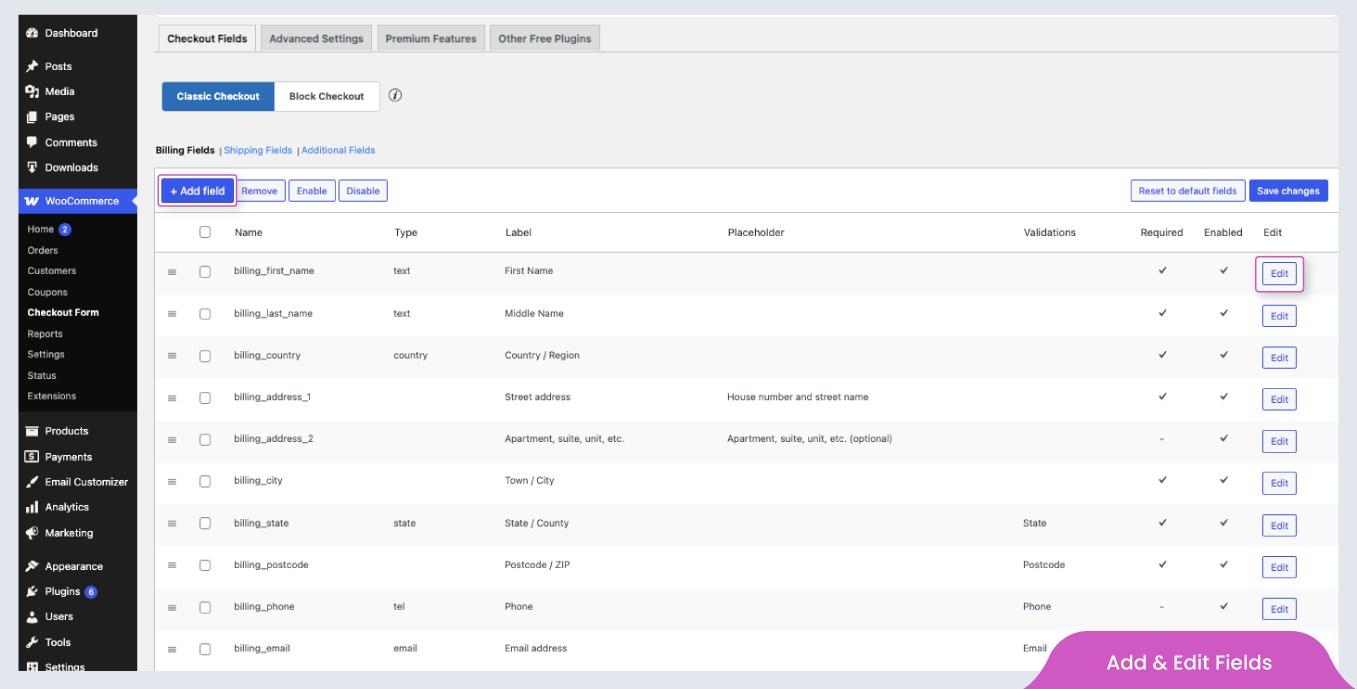
Add and edit field 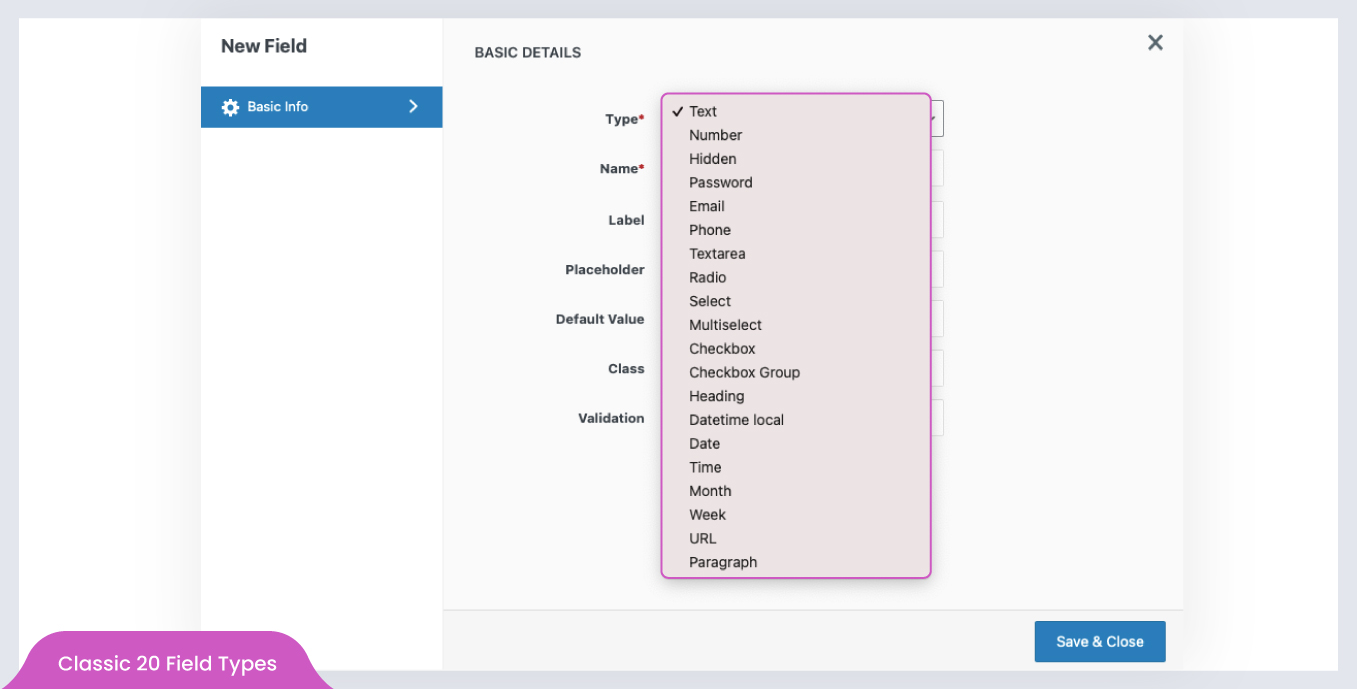
New field popup form 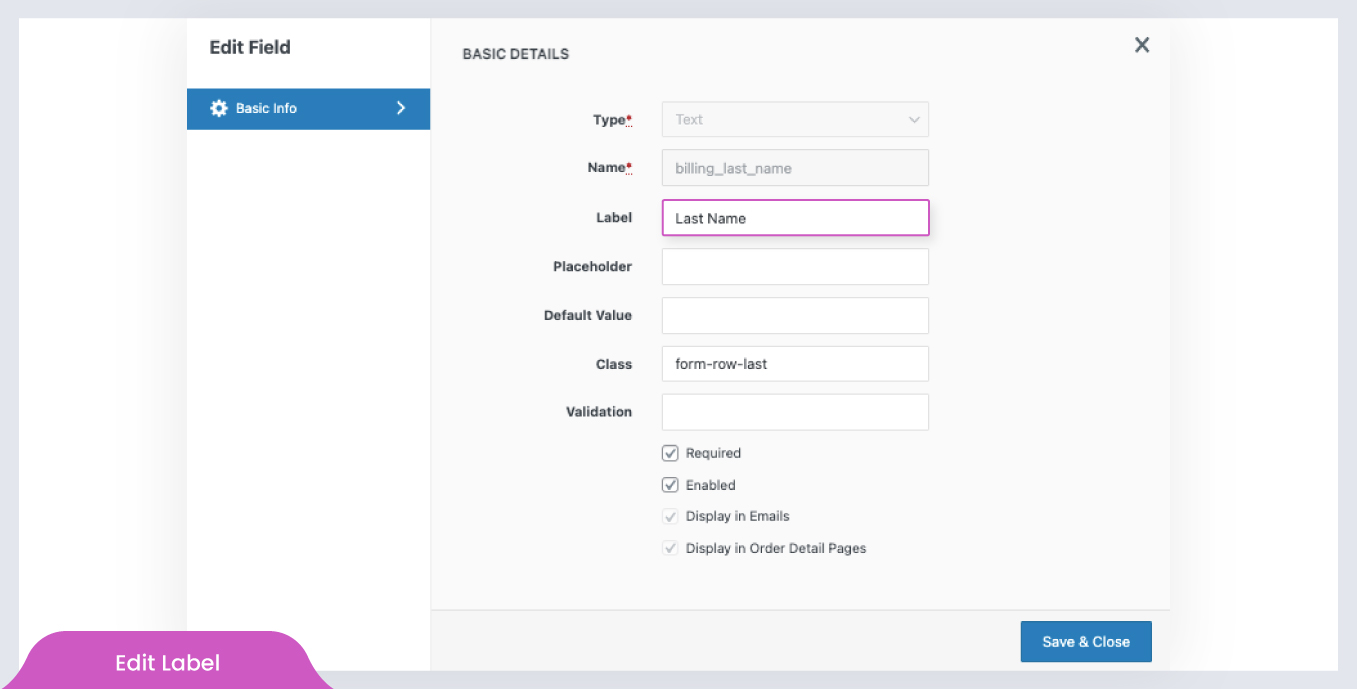
Edit field popup form 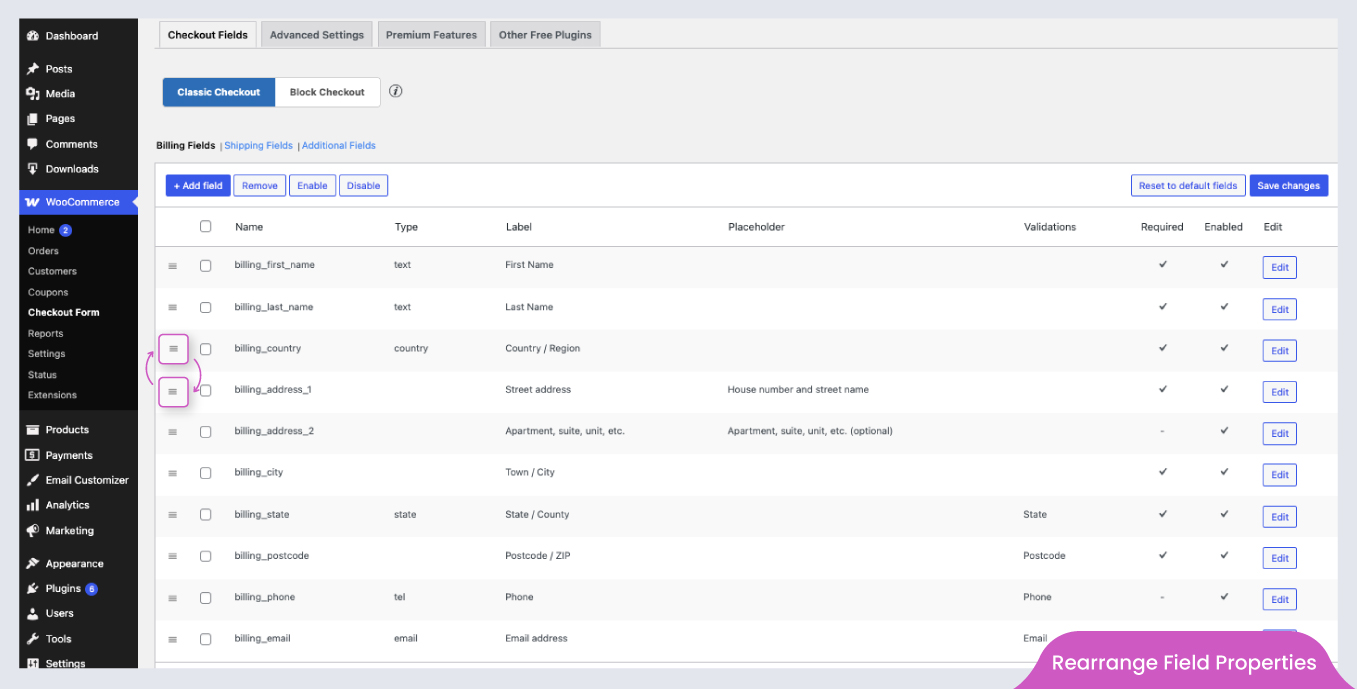
Rearrange fields (change field’s display order) 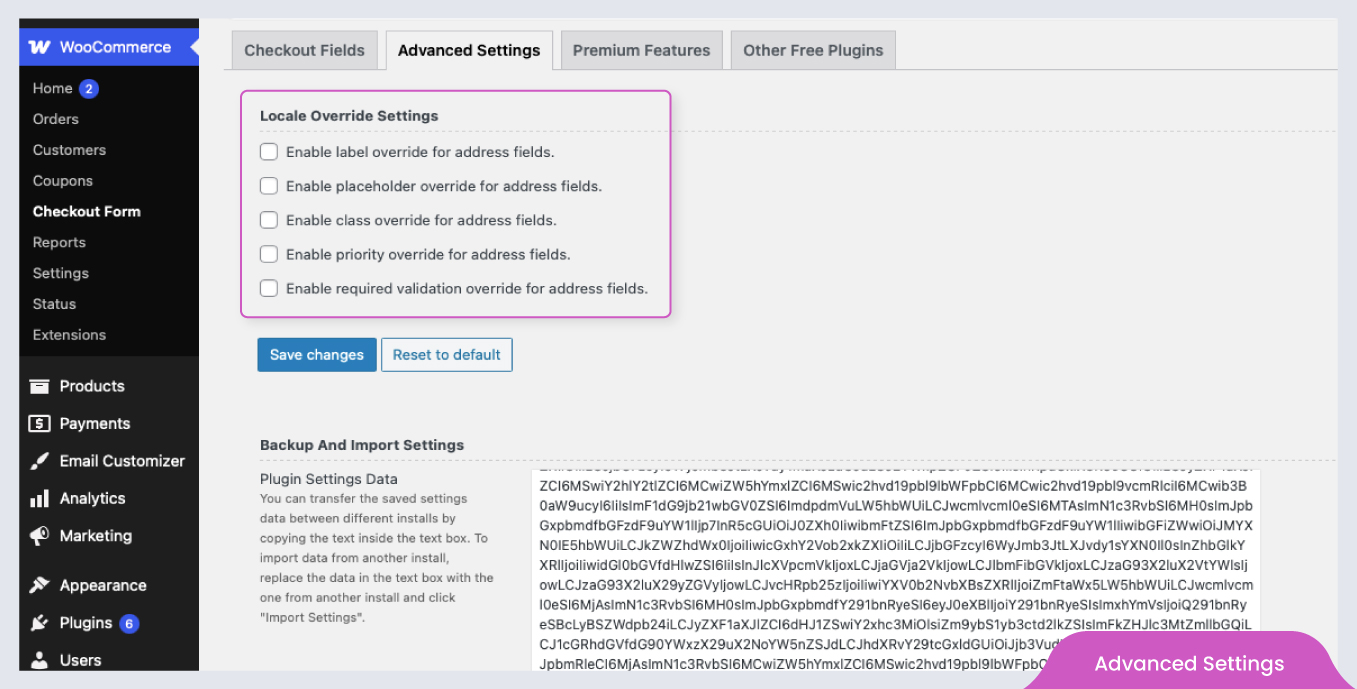
Advance settings 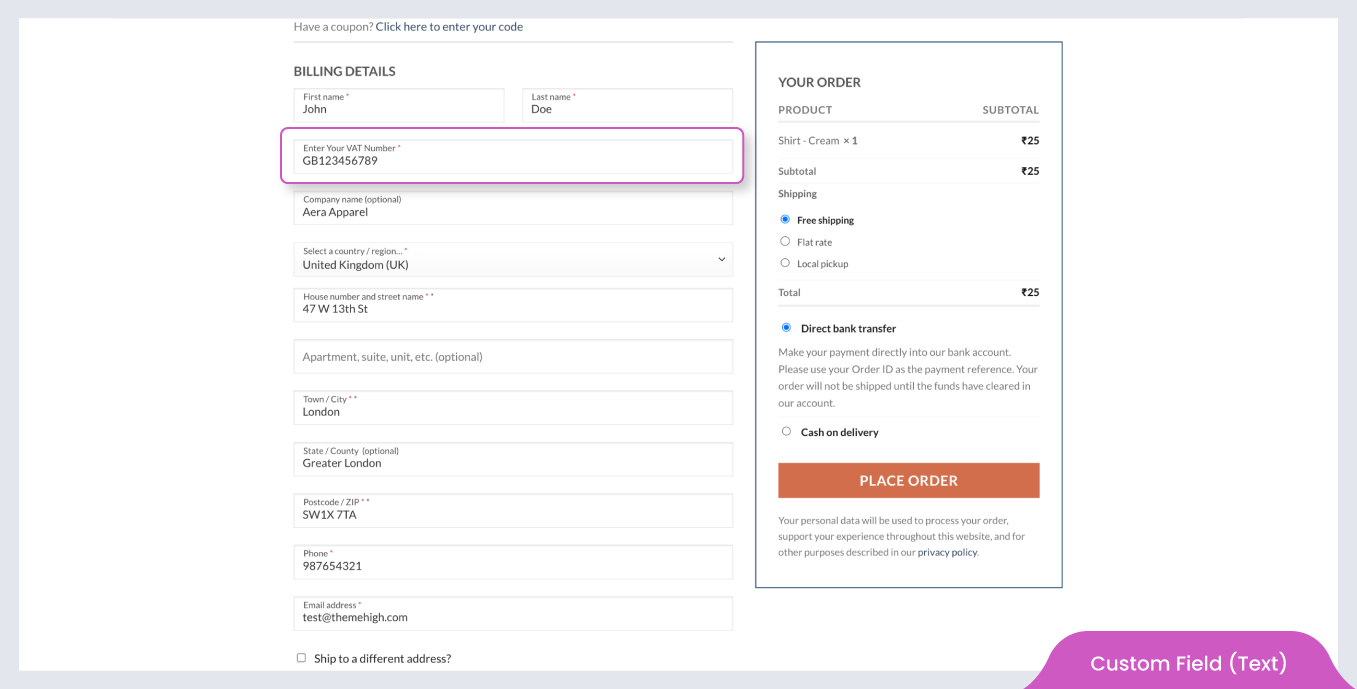
Custom field (Text) 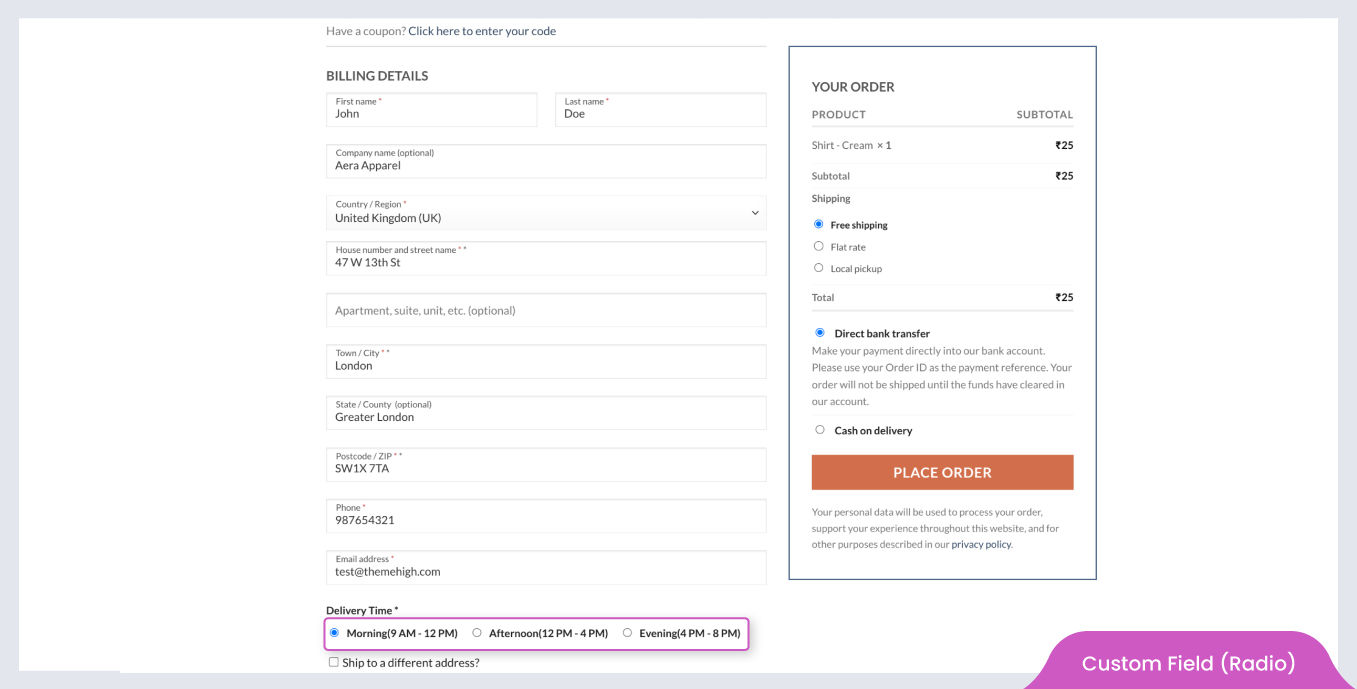
Custom field (Radio) 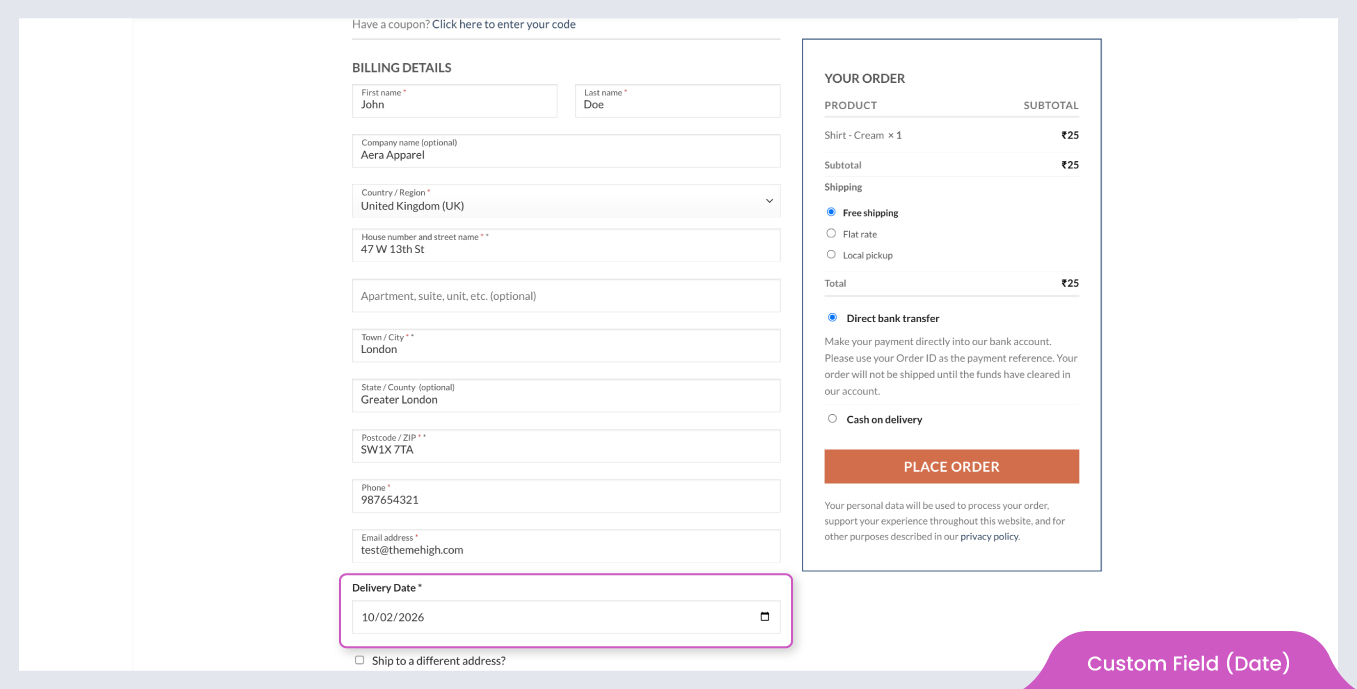
Custom field (Date) 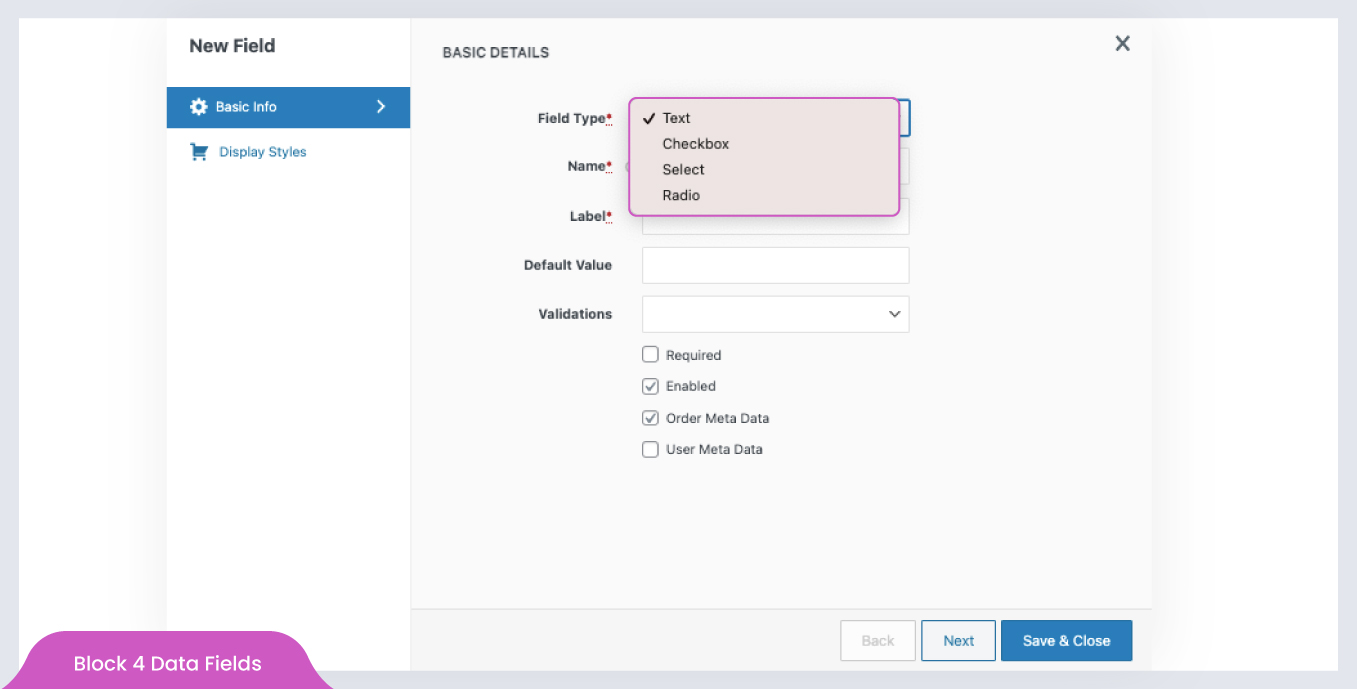
Block Data fields 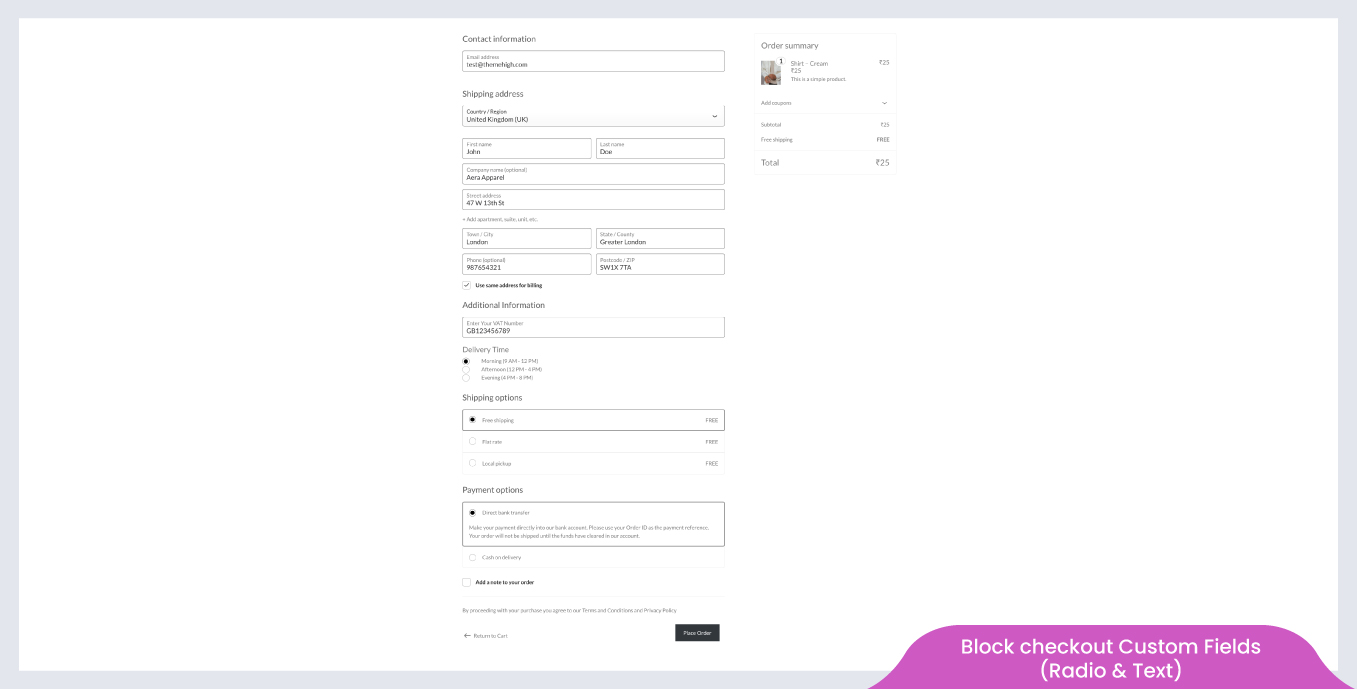
Block checkout custom fields( Radio and Text)


Instalace
Minimální požadavky
- WooCommerce 3.0 nebo novější
- WordPress 4.9 nebo vyšší
Automatická instalace
- Přihlaste se do administrace WordPressu.
- Přejděte do nabídky Pluginy a klikněte na „Přidat nový“.
- Search and locate ‚Checkout Field Editor (Checkout Manager) for WooCommerce‘ plugin.
- Klikněte na „Nainstalovat nyní‘ a WordPress se o zbytek postará.
Ruční instalace
Manual installation method requires downloading the ‚Checkout Field Editor (Checkout Manager) for WooCommerce‘ plugin and uploading it to your web server via your FTP application. The WordPress codex contains instructions on how to do this here.
Nejčastější dotazy
Na hlavní stránce pluginu najdete spoustu nápovědy. Podívejte se zde:
🔗 Funkce pluginu
🔗 Nápověda / Dokumentace
🔗 Podpora ThemeHigh
-
Is the plugin compatible with WooCommerce Checkout Blocks?
-
Ano, plugin je kompatibilní s WooCommerce Checkout Blocks. Momentálně je v editoru bloků dostupných jen několik typů polí, další budou přidány v budoucích aktualizacích.
-
Why are my checkout fields not appearing on the checkout page?
-
Mohl byste prosím potvrdit, jak je vaše stránka pokladny nastavena? Používáte shortcody nebo bloky?
- Pokud je stránka pokladny vytvořena pomocí shortcode, pole by měla být přidána a aktualizována v sekci Classic Checkout Fields.
- Pokud je vaše pokladna nastavena pomocí WooCommerce Blocks, pole by měla být přidána a aktualizována v sekci Blocks Checkout Fields.
-
Can I revert to WooCommerce default checkout fields later?
-
Ano, plugin poskytuje tlačítko Obnovit výchozí pole, které vám umožní kdykoliv obnovit původní pole pokladny WooCommerce.
-
Mohu přiřadit cenu k polím vytvořeným tímto pluginem?
-
Ne, bezplatná verze nepodporuje funkci cen. Nicméně verze PRO umožňuje přidávání cen pomocí šesti různých typů cen, což umožňuje pokročilé úpravy pokladny.
-
Can I display custom checkout fields on the My Account page?
-
V bezplatné verzi lze vlastní pole zobrazovat a upravovat pouze na stránce objednávky. Ve verzi PRO lze pole zobrazovat a upravovat také na:
- Stránka Pokladny
- Stránka Můj účet
- Uživatelský profil (v administraci WordPressu)
Navíc jsou hodnoty zadané uživateli uloženy pro budoucí použití, což snižuje potřebu opětovného zadávání informací při každé objednávce.
-
Jak mohu upravit stylování polí vytvořených tímto pluginem?
-
Plugin nabízí funkci: Třída pro úpravu stylů polí.
1. Definujte třídu v sekci Další CSS (Vzhled >> Přizpůsobit >> Další CSS).
2. Zadejte název vytvořené třídy do pole Třída v okně Přidat/Upravit a uložte změny.
3. Styl definovaný v této třídě se aplikuje na výchozí i vlastní pole, u kterých je tato třída použita. -
Jak mohu nastavit pole typu Výběr (Select) tak, aby nemělo žádnou výchozí volbu?
-
Chcete-li zobrazit výběrové pole bez automatického výběru první možnosti, postupujte takto:
1. Nechte první možnost prázdnou (jak text možnosti, tak její hodnotu).
2. Pokud je potřeba, zadejte text do pole placeholder (např.: Vyberte možnost). -
Mohu přidat vlastní ověřovací pravidla nad rámec přednastavených?
-
Bezplatná verze obsahuje předdefinovaná pravidla pro ověřování polí, například pro e-mail, telefon apod. Pokud potřebujete vlastní ověřování, verze PRO vám umožní definovat vlastní validační pravidla pomocí regulárních výrazů.
-
Mohu pole opakovat podle počtu produktů nebo množství v košíku?
-
Ne, bezplatná verze tuto funkci nepodporuje. Ve verzi PRO však můžete nastavit pole tak, aby se dynamicky opakovala na základě:
- Počet položek v nákupním košíku
- Počet kusů určitého produktu
Recenze


Autoři
Checkout Field Editor (Checkout Manager) for WooCommerce je otevřený software. Následující lidé přispěli k vývoji tohoto pluginu.
Spolupracovníci
Plugin „Checkout Field Editor (Checkout Manager) for WooCommerce“ byl přeložen do 24 jazyků. Děkujeme všem překladatelům za jejich pomoc.
Přeložte “Checkout Field Editor (Checkout Manager) for WooCommerce” do svého jazyka.
Zajímá vás vývoj?
Prohledejte kód, podívejte se do SVN repozitáře, nebo se přihlaste k odběru protokolu vývoje pomocí RSS.
Přehled změn
2.1.8
- Security: Fixed a Stored XSS vulnerability affecting custom fields submitted through the WooCommerce Store API checkout endpoint reported by Dmitrii Ignatyev.
- Added WooCommerce 10.5 compatibility.
2.1.7
- Fixed incorrect use of translation function in paragraph field.
2.1.6
- Added compatiblity for Archiva for WooCommerce.
- Improved dynamic string translation for WPML.
- Added WooCommerce 10.4 compatibility.
- Added WordPress 6.9 compatibility.
2.1.5
- Added required validation for the checkbox field in the block checkout (WC 9.8+).
- Fixed radio button styling issues with default WordPress block themes (e.g., Twenty Twenty-Four, Twenty Twenty-Five).
- Přidána kompatibilita s WooCommerce 10.2.
2.1.4
- Fixed shipping calculation issue when „Hide shipping costs until an address is entered“ is enabled (WooCommerce 9.8+ compatibility).
- Přidána kompatibilita s WooCommerce 9.8.
- Added WordPress 6.8 compatibility.
2.1.3
- Improved the address fields functionality in the Checkout block.
- Přidána kompatibilita s WooCommerce 9.7.
2.1.2
- Added translation support for Checkout block.
- Optimized styles loading by limiting it to relevant block pages only.
- Přidána kompatibilita s WooCommerce 9.6.
2.1.1
- Added WooCommerce backward compatibility for versions below 8.7.
2.1.0
- Added options to add additional sections and custom checkout fields in the checkout block.
- Added email,phone and url custom validations.
- Přidána kompatibilita s WooCommerce 9.5.
2.0.6
- Fixed an issue where certain fields were not displaying on the order details page.
2.0.5
- Added WordPress 6.7 compatibility.
- Přidána kompatibilita s WooCommerce 9.4.
- Added new filter for remove object cache – (thwcfe_disable_settings_cache).