
Popis
Uncanny Automator is the easiest and most powerful way to automate your WordPress site with no code. Build automations in minutes that connect your WordPress plugins, sites and apps together using billions of recipe combinations.
Here’s how Uncanny Automator works:
When something happens, Automator can make other things happen.
When a user buys a product, add them to a membership level, enroll them in a course and pass their information to Google Sheets.
It’s that simple! Here’s a video outlining how it all works.
If you’ve used Zapier, setting things up will be intuitive. And if not, that’s okay too!
E-commerce Automation
Improve customer engagement by having your purchases trigger marketing automation campaigns, award store credit, promote 5-star reviews, schedule time-limited bonus offers and offer profile-driven discounts. Or for advanced reporting and customer service, create WooCommerce automations that send purchase details to Google Sheets, Slack and ActiveCampaign with our native integrations. It all happens automatically!
Google Sheets Automation
Build powerful reports and dashboards based on almost any WordPress activity or data with 1-click Google Sheets integration. Track purchases, course completions, blog post updates, forum posts and more. Not only can you create new rows for reports with Uncanny Automator, but you can update existing records, making it perfect for dashboard reporting.
Webhook Automation
Looking for the most powerful and comprehensive webhook support to connect your WordPress site to other apps? Uncanny Automator has support for security headers, any request method and any data format (including nesting support, JSON, XML, arrays and more). Use our 1-click sample generation and debug records to simplify connecting to other sites and systems, and send unlimited outgoing webhooks with the free version.
LearnDash and E-Learning Automation
Personalize student experiences and deliver better learning outcomes with no-code automations. Notify an instructor when users fail a quiz and enroll them in a remedial course–automatically. Add users to groups based on performance to allow easy collaboration. Automate student outreach when users fall behind in their coursework and offer easy learning interventions.
Social Media Automation
Spend less time sharing your posts and announcements on social media with automatic posting. Automatically post anything you want to Facebook Pages, Facebook Groups, X/Twitter, LinkedIn and Instagram, including with images and links. Sign up for a free account to get 250 credits for social posting; Pro plugin users get unlimited posting.
OpenAI Automation
Connect your new posts and site activity to OpenAI, with full support for ChatGPT and Dall-E models. Use Automator and the OpenAI to generate article summaries, social media posts, SEO descriptions, translations, email campaigns, featured images and more.
Marketing Automation
Integrate your favourite CRM with your WordPress plugins for full marketing automation. Add or remove tags based on course activity, purchases and more, and keep your email lists updated automatically. Or, with Automator Pro and Loops, send emails out in bulk and use Automator as your own CRM.
Free doesn’t mean limited
The free version of Automator is incredibly powerful and comes with built-in automation and integration support for all of these popular apps and WordPress plugins:
Supported apps
- ActiveCampaign
- Anthropic
- Asana
- AWeber
- Bitly
- Bluesky
- Brevo
- Campaign Monitor
- ClickUp
- Cohere
- Constant Contact
- DeepSeek (Deprecated)
- Discord
- Drip
- Facebook Groups
- Facebook Lead Ads
- Facebook Pages
- GetResponse
- GitHub
- Google Calendar
- Google Contacts
- Google Gemini
- Google Sheets
- Google Sheets Web App (Pro)
- GoTo Training
- GoTo Webinar
- Help Scout
- HubSpot
- Keap
- Kit
- LinkedIn Pages
- Mailchimp
- MailerLite (Pro)
- Mautic
- Mistral AI
- Microsoft Teams
- Notion
- Ontraport
- OpenAI and GPT
- Perplexity
- QuickBooks Online (Elite)
- Salesforce (Elite)
- Sendy
- Slack
- Stripe
- Telegram
- Threads
- Trello
- Twilio
- X/Twitter
- xAI
- Zoho Campaigns
- Zoom Meetings
- Zoom Webinars
WordPress Plugins Integrations
- Advanced Ads
- Advanced Coupons
- Advanced Custom Fields (Pro)
- AffiliateWP
- Airtable
- All in One SEO
- Amelia
- ARMember
- Automator Core
- FunnelKit Automations
- BadgeOS
- bbPress
- Bricks Builder
- BuddyBoss
- BuddyPress
- Caldera Forms
- CSV (Pro)
- Custom User Fields (Plus Addon)
- Charitable
- Cloudflare
- Code Snippets
- Contact Form 7
- Custom Action (Pro)
- Date and Time (Pro)
- Database Query (Pro)
- Divi
- Dynamic Content (Elite Addon)
- Duplicator
- Easy Affiliate
- Easy Digital Downloads
- Easy Digital Downloads-Recurring Payments
- Easy Digital Downloads-Software Licensing
- Easy WP SMTP
- Elementor Pro
- Emails
- Events Manager
- Everest Forms
- Fluent Forms
- Fluent Support
- FluentBooking
- FluentCommunity
- FluentCRM
- Formidable Forms
- Formatter (Pro)
- Forminator
- GamiPress
- Generator (Pro)
- GiveWP
- Gravity Forms
- GravityKit (Pro)
- Groundhogg
- H5P (Pro)
- HappyForms
- Heroic Knowledge Base
- IFTTT
- Integrately
- Integromat
- JetEngine (Pro)
- JetFormBuilder
- Jetpack CRM
- JSON (Pro)
- Kadence
- KonnectzIT
- LearnDash
- LearnDash Achievements
- LearnPress
- LifterLMS
- LiteSpeed Cache
- Loop (Pro)
- Logging
- Magic Button (Pro)
- MailPoet
- Mailster
- Make
- MasterStudy LMS
- Memberium For Keap
- MemberMouse
- MemberPress
- MemberPress Courses
- Meta Box (Pro)
- Modern Events Calendar
- myCred
- Newsletter (Pro)
- Ninja Forms
- OptinMonster (Pro)
- Pabbly Connect
- Paid Memberships Pro
- PeepSo
- Plugin Actions (Pro)
- Popup Maker
- Presto Player
- Pretty Links
- QR Code (Pro)
- RafflePress
- Rank Math SEO
- Restrict Content Pro
- RSS feed (Pro)
- Restrict Content (Plus Addon)
- Run Code (Pro)
- Run Now (Pro)
- Schedule (Pro)
- SliceWP
- SeedProd
- Speed Optimizer
- Security Optimizer
- Studiocart
- Sugar Calendar
- SureCart
- SureForms
- SureMembers
- The Events Calendar
- Thrive Apprentice
- Thrive Architect
- Thrive Leads
- Thrive Ovation
- Thrive Quiz Builder
- Thrive Theme Builder
- Thrive Ultimatum
- ThriveCart (Pro)
- Tin Canny Reporting
- Typeform (Pro)
- Tutor LMS
- Ultimate Member
- User Lists (Plus Addon)
- Uncanny Codes
- Uncanny Continuing Education Credits
- Uncanny Groups
- Uncanny Toolkit
- Upsell Plugin
- URL
- UserFeedback
- W3 Total Cache
- Webhooks
- Wholesale Suite
- Wishlist Member
- WooCommerce
- WooCommerce Bookings
- WooCommerce Memberships
- WooCommerce ShipStation
- WooCommerce Subscriptions
- WordPress
- WordPress Multisite (Pro)
- WordPress Download Manager
- WP Admin (Pro)
- WP All Import
- WP Bitly (Pro) (Deprecated)
- WP Courseware
- WP Event Manager
- WP Fusion
- WP Fusion Lite
- WP Job Manager
- WP LMS
- WP Mail SMTP Pro
- WP Rocket
- WP Simple Pay
- WP Super Cache
- WP User Manager
- WP Webhooks
- WP-Polls
- WPCode
- WPForms
- WS Form LITE
- wpDiscuz
- wpForo
- XML (Pro)
- Yoast SEO
- Zapier
Over 350 automation triggers and actions are available for the plugins and apps listed above in the free version. There’s straightforward documentation in our Knowledge Base, including some quick and straightforward instructional videos. Developers, there’s robust documentation and code samples for you too!
Beyond the plugin and app integrations, this free version of Uncanny Automator also supports common WP triggers and actions in automations:
- A user views a page
- A user submits a comment
- A user logs in
- A user publishes a post
- Send an email
- Create a post
- Add a WP role
All WP plugin triggers and actions included in Uncanny Automator come with a forever free license, which allows unlimited usage on your WordPress site. By creating a free, optional Automator account, you can unlock 250 credits to try out app integrations. You can use credits on your site to:
- Post new content to Facebook Groups, Facebook Pages, X/Twitter and Instagram
- Pass records to Google Sheets (to generate charts or reports or manipulate data outside of WordPress)
- Notify staff of key events in Slack
- Register customers in Zoom events on product purchase
- Send Mailchimp campaigns when new blog posts are published
- Generate, proofread or translate text with OpenAI and GPT
- and more
Take automation to the next level
Uncanny Automator Pro, our premium plugin, adds even more features and integrations, including the ability to create users and posts, delay and schedule actions, connect multiple sites together, add conditions to actions, and unlock unlimited use of app integrations like Google Sheets and X/Twitter. It also triples the number of available triggers and actions.
Pro also adds features like Run Now and Loops, which allow you to do things like send emails to all users matching certain criteria, tagging users based on site activity, or even generating instant reports in Google Sheets of all users that completed a specific course, purchased a certain product, or anything else you can imagine.
Here are some of the other really cool automations you can create with Automator Pro:
- When a user makes a purchase using WooCommerce on one site, create a user on another WP site, send the user a link to set a new password, enroll the user in a course and add a membership level.
- When a user submits a form, add the user to a mailing list if their email address matches a certain domain, add them to a social group and schedule their trial access to expire in 7 days if they don’t make a purchase.
- When a new course is published, send an email campaign, post to X/Twitter and Facebook with GPT-generated content, post to the BuddyBoss sitewide activity stream and notify instructors in a Slack channel.
- Whenever you want, generate a list of all users in a group that haven’t yet completed a course.
And here are some of the key features in the Pro version that allow incredibly flexible and powerful automations for WP:
- Run recipes for logged out users with Everyone recipes; you can even create and update existing users.
- Have external apps trigger recipes and vice versa.
- Set up buttons and links that can trigger any recipe on click.
- Set custom user and post meta, both individually and in bulk via loops.
- Delay or Schedule an action
- Filter actions so they only run when conditions are met, like a matching user email domain or WordPress role.
- Run any WordPress hook or call custom functions in your recipes.
- Automatic log pruning to keep log size down.
Plus licenses and higher get access to our Custom User Fields, Restrict Content, and User Lists addons which makes it really easy to create and manage user profile fields in WordPress. Automatically add new fields to user edit pages and connect fields to your recipes and plugins like Advanced Custom Fields.
An Automator Pro license also includes access to our world-class premium support.
For the full list of triggers and actions, make sure to check out this list.
Here’s what other people are saying about Uncanny Automator:
Snímky obrazovky
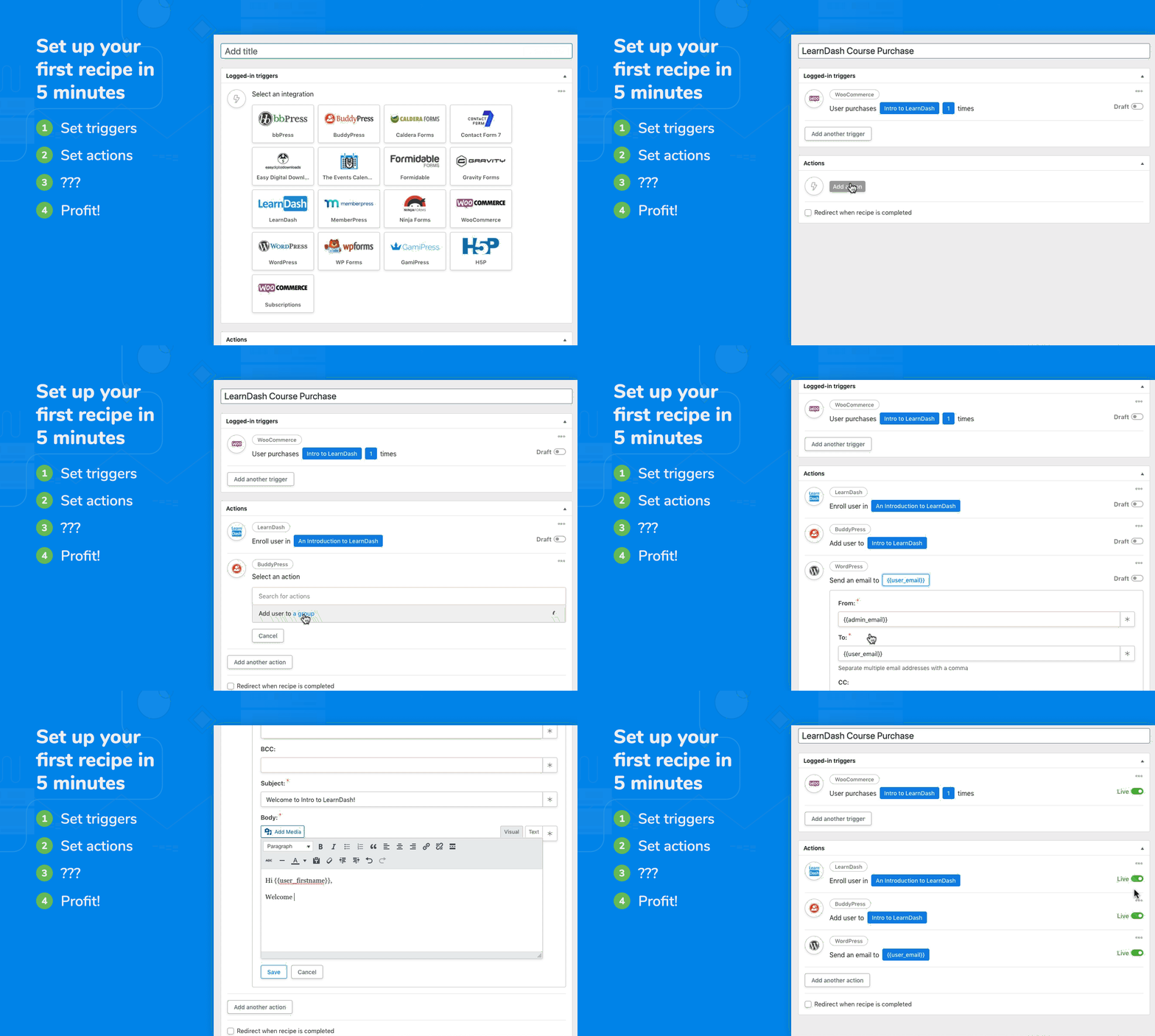
Set up your first recipe in 5 minutes 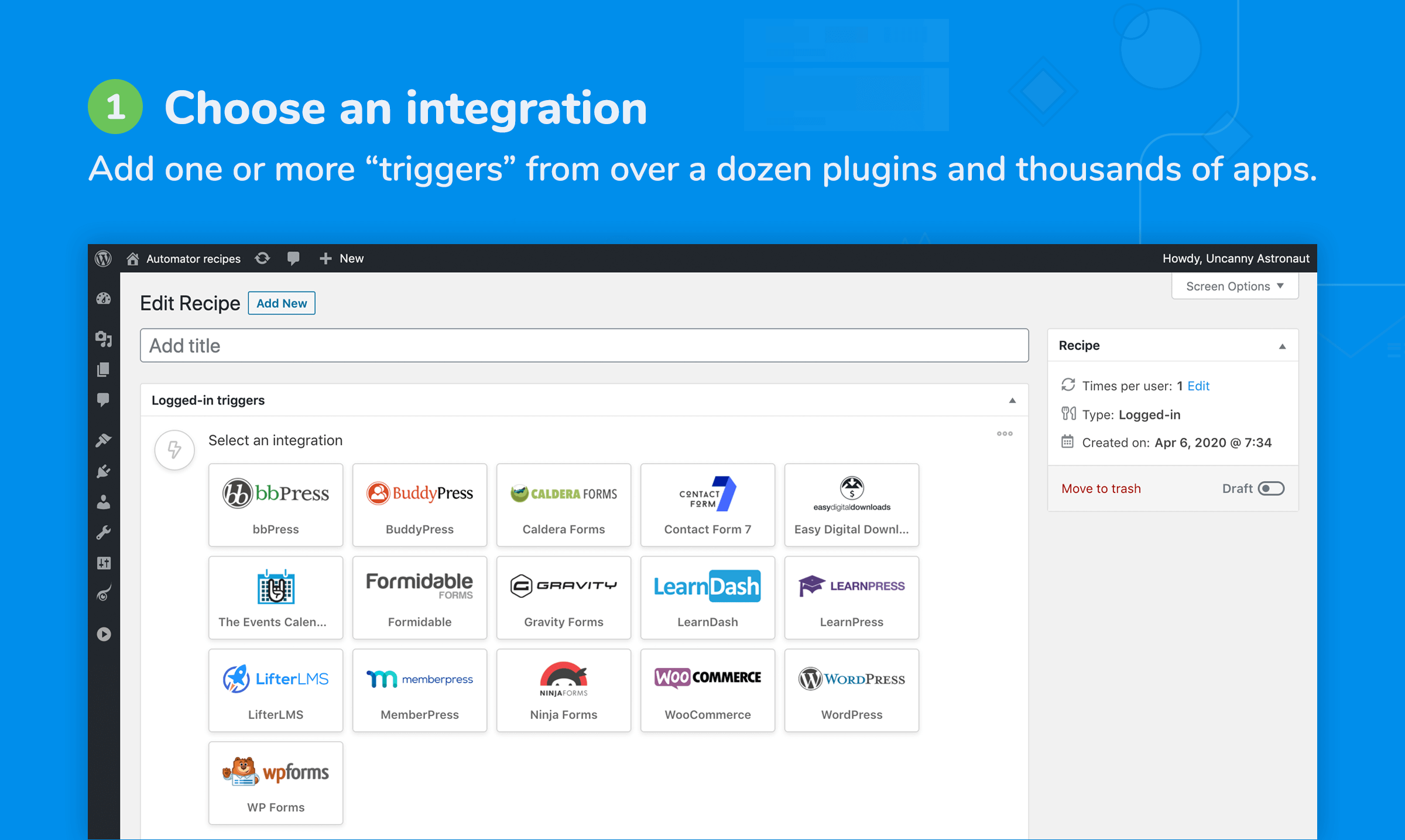
Add one or more triggers from dozens of plugins and thousands of apps 
Identify what starts the recipe, like a purchase or form submission 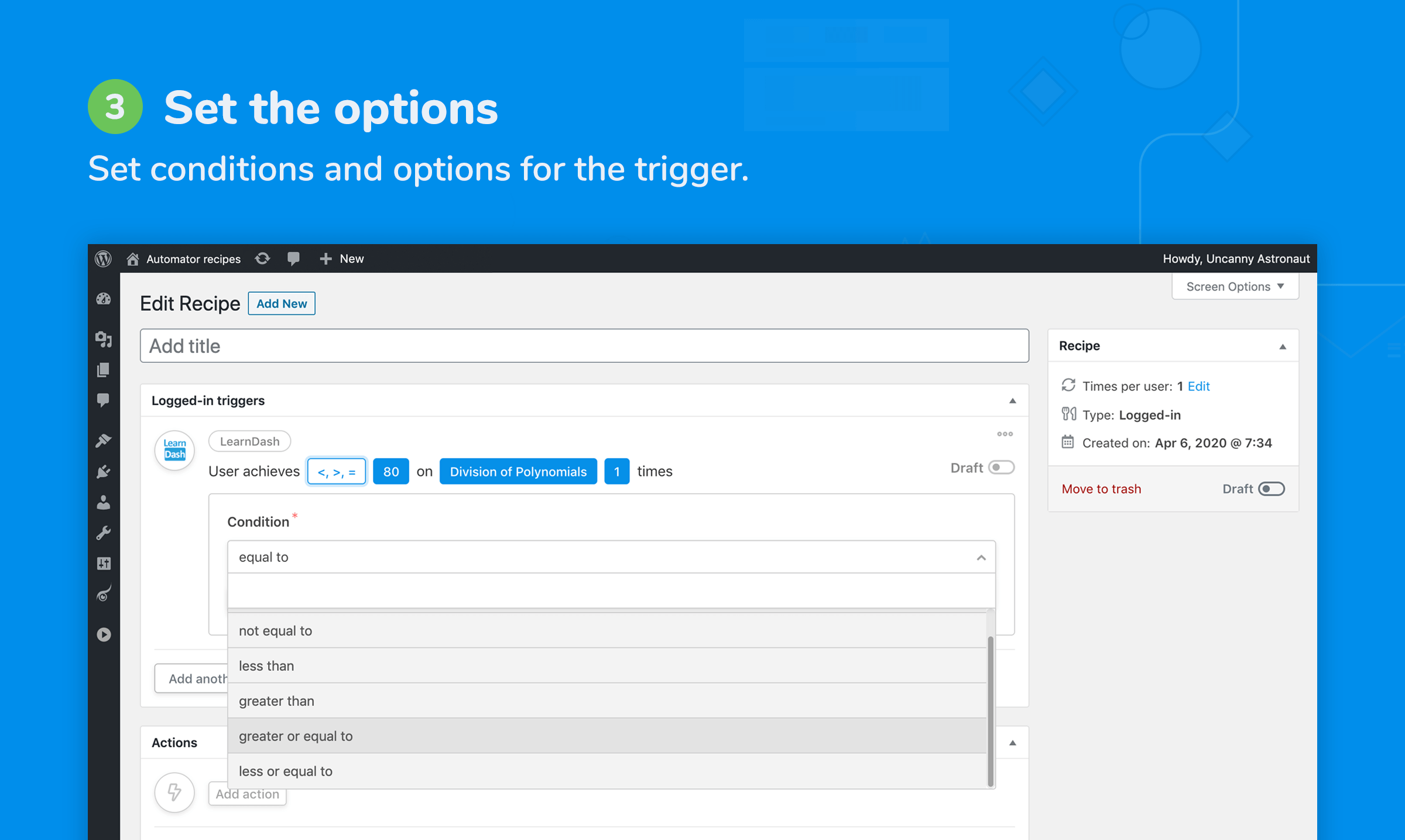
Set conditions and options for the trigger(s) 
Add one or more actions from any of the available integrations 
When the triggers are completed, actions run automatically 
Customize your actions to do exactly what you need 
Create powerful recipes that just work, all with one plugin


Nejčastější dotazy
-
Where can I find Automator documentation and more info?
-
You can learn more about Uncanny Automator on our website at https://automatorplugin.com/ and our Knowledge Base is here: https://automatorplugin.com/knowledge-base/
-
How do I get started with my first automation?
-
Have a look at https://automatorplugin.com/knowledge-base/creating-a-recipe/. There’s also an onboarding wizard inside the plugin to help you build your first recipe. Hopefully it will be the first of many!
-
Will Uncanny Automator slow down my website?
-
Uncanny Automator is built from the ground up for efficiency and performance. Automator adds negligible overhead to WordPress sites and has been rigorously tested across dozens of hosting environments.
-
What are the limits of your free version?
-
All integrations, triggers, actions and tokens listed here that don’t have a „Pro“ label are available in our free version. For the WordPress plugins listed, we include a forever-free license that allows you to run recipes with these triggers and actions an unlimited number of times. There are also no limits on the number of recipes you can set up or what you can include in each. For recipes that include apps, like X/Twitter and Facebook, you can create a free account to unlock 250 credits to try out these integrations.
-
Is Automator translation friendly?
-
Absolutely! The plugin was created with translation in mind and tested with a variety of translation plugins. We will support any translation issues you run into.
-
How can I request an integration for a plugin?
-
The best thing you can do is reach out to the creator of the plugin that you want an integration for. Let them know you’re using Uncanny Automator and that they could greatly extend the capabilities of their plugin by helping us develop an integration for it. As more plugin authors become aware of Uncanny Automator and realize its potential for their users, we’ll be able to continue to invest in expanding Uncanny Automator’s capabilities! Also, fill out this form on our site to let us know what you’re looking for.
-
How can I add an integration for my plugin?
-
Check out our developer documentation over at https://developer.automatorplugin.com/. Also consider reaching out to our team, maybe we can help or even turn it into an official integration!
-
Yes. It is easy to set up automation and share content on Social Media platforms. Set up integrations with Instagram, Facebook Pages, Facebook Groups, LinkedIn Pages and X/Twitter by creating a free account to unlock 250 free credits.
-
Do I need coding skills or help from a developer?
-
No coding skills are required. Uncanny Automator is built for non-developers to build automations using our intuitive recipe builder.
-
Does Automator work with LearnDash?
-
Absolutely! LearnDash is our most popular integration. Automator provides an easy way to build powerful LearnDash activity reports, personalize learning paths, connect LearnDash to live events and more.
-
How does Automator use OpenAI?
-
By connecting your recipes to an OpenAI API account, you can send prompts to OpenAI and use the responses in other actions. Generate titles and descriptions, excerpts for social media, translations, new blog posts and more; you can even perform sentiment analysis on submitted text. Automator supports GPT-3.5, GPT-4 and other OpenAI models.
-
Does Uncanny Automator allow me to customize the look and design of the emails it sends?
-
Yes, with WordPress’s „Send Email“ action, send rich text, plain text and raw HTML emails. Create follow-up emails with your own custom HTML templates.
-
Why should I consider upgrading to Uncanny Automator Pro?
-
You can use the free version forever without purchasing the Uncanny Automator Pro version. However, with Uncanny Automator Pro, you’ll get access to more automation triggers and actions, additional features, and unlimited credits for app integrations. Visit our plans page to learn more.
-
Who is Uncanny Owl?
-
We’re a Toronto-based WordPress company specializing in elearning and automation solutions for WordPress. We’re behind the popular Uncanny LearnDash Toolkit plugin and we also have a suite of highly-acclaimed commercial LearnDash add-ons.
Recenze


Autoři
Uncanny Automator – Easy Automation, Integration, Webhooks & Workflow Builder Plugin je otevřený software. Následující lidé přispěli k vývoji tohoto pluginu.
Spolupracovníci


Plugin „Uncanny Automator – Easy Automation, Integration, Webhooks & Workflow Builder Plugin“ byl přeložen do 4 jazyků. Děkujeme všem překladatelům za jejich pomoc.
Zajímá vás vývoj?
Prohledejte kód, podívejte se do SVN repozitáře, nebo se přihlaste k odběru protokolu vývoje pomocí RSS.
Přehled změn
7.2.1 [2026-04-09]
Fixed:
- Microsoft Teams – Some integration items were missing from v7.2.0 release, so the integration has been re-pushed to ensure everything is available.
Under the hood:
- Legacy Helper chaining – Added a defensive code guard to method and property handling. #7125
- Switched to the new framework:
- Facebook Lead Ads #6642
- Facebook Pages #6563
- Instagram #6563
- Ontraport #6303
- Trello #6831
7.2.0.1 [2026-04-09]
Fixed:
- Pro integration helpers overwriting Free helpers, causing fatal „undefined property $options“ on trigger/action load. #7123
7.2.0 [2026-04-07]
New Triggers:
- AffiliateWP – An affiliate’s unpaid referral count is greater than, less than, or equal to a specific number #7004
- AffiliateWP – An affiliate’s visit count is greater than, less than, or equal to a specific number #7003
New Actions:
- Kit – Create a broadcast #6821
- Kit – Create a custom field #6825
- Kit – Create a purchase #6822
- Kit – Create a tag #6824
- Kit – Unsubscribe a subscriber #6823
- LinkedIn – Schedule a post on LinkedIn profile #6683
- Mautic – Add tags to a contact #6838
- Mautic – Create a tag #6837
- Mautic – Remove tags from a contact #6839
- Microsoft Teams – Add a user to a tag in a team #6906
- Microsoft Teams – Add a user to a team as a role #6905
- Microsoft Teams – Archive a team #6907
- Microsoft Teams – Create a group chat #6908
- Microsoft Teams – Create a tag in a team #6910
- Microsoft Teams – Create an online meeting #6909
- Microsoft Teams – Delete a channel from a team #6911
- Microsoft Teams – Remove a user from a team #6912
- Microsoft Teams – Reply to a channel message #6913
- Microsoft Teams – Update settings for a team #6914
Updated:
- LinkedIn – Posting to personal pages now supported! #6769
- Bluesky – Error messages are improved and external links can now strut without images. #7026
- Closure – Only the current tab gets a redirect, others relax. #4486
- Closure – Now storing redirects in privacy-friendly sessions, no more cookies. #6870
- FluentCRM – Triggers can now play „Any“ tag/list bingo. #6764
- Recipe logs – Paginated loop runs now sprint through large datasets. #6866
- Recipe logs – Timestamps now speak human instead of robot. #7005
- Stripe – Invoices dropped their empty line items—going lean and mean. #6855
- SG Optimizer and SG Security got their names updated. #7016
Fixed:
- Action conditions – Double quotes no longer play charades. #6997
- Activity log – Trigger and action counts now speak the correct language. #6874
- Bitly – API calls tamed on settings page. #6878
- Database queries – Action count query’s new best friend is a prepared statement. #6875
- Gravity Forms – Radio fields tuned to parse token labels correctly. #7017
- MemberPress – Array key „ID“ got found in the token hunt. #6988
- MemberPress – Trigger now pops for trial subscriptions via Stripe. #6786
- OptinMonster – Campaign scripts now know their way home. #6876
- Scheduled actions no longer stuck when new users are created, user selector mischief managed. #7024
- SureCart – Argument counts between checkout and webhook now shake hands. #6817
- Twilio – Phone numbers trimmed of HTML frills. #6979
- Uncaught TypeError – Undefined triggers now politely decline. #7023
- WordPress – Profile updates won’t retrigger recipes after role changes. #6805
is_action_or_trigger_active()– Query streamlined for the data packrats. #6880- WordPress – Titles now truly live up to their unique promise when creating posts with „Title must be unique“ setting. #7067
- Memory leaks plugged, code tightened like a drum. #6755
- Security improvements – The usual suspects got rounded up. #6976
Under the hood:
- Core improvements – Smarter integrations, leaner storage, faster caching, safer triggers, lighter memory use, quicker database lookups, speedier plugin loading, more reliable trigger queues, and redirects that finally speak up—everything’s running fitter, faster, and just a bit more chatty. #7034 #6756 #6808 #6868 #6871 #6865 #6867 #6869 #6877 #6853 #6872 #6873
- Recipe UI – Sentence tokens now behave when added via API. #7020
- Recipe log – Pagination plays nice, and constants got cozy. #6882
- Automator Views Schema – SQL SECURITY INVOKER keeps DEFINER errors at bay during migrations. #6881
- Repeater – Textareas keep their formatting cool during edits. #6350
- REST functionality is back, even when permalinks are in their plainest form. #7041
- New framework party
- Drip #6829
- ClickUp #6842
- Kit (ConvertKit) #6832
- LinkedIn #6833
- Mautic #6830
- Microsoft Teams #6844
- OpenAI #6843
- Zoho Campaigns #6307