
Popis
THE #1 NO CODE DRAG & DROP WORDPRESS WEBSITE BUILDER POWERING 23M+ WEBSITES WORLDWIDE, NOW WITH AGENTIC AI.
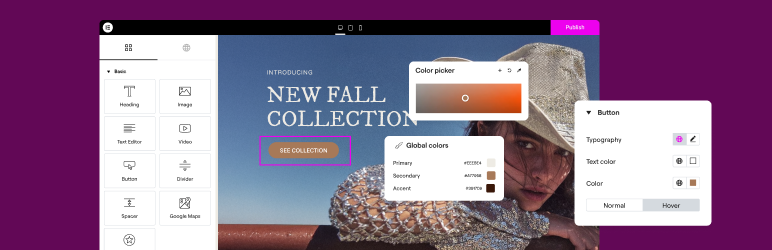
Elementor, přední platforma pro tvorbu webů ve WordPressu, vám umožňuje snadno vytvářet profesionální webové stránky dotažené do posledního pixelu díky bezkódovému Atomic Editoru s funkcí přetahování prvků.
Supporting the full website lifecycle, Elementor lets you build, optimize, and manage your website with extended capabilities such as agentic AI creation, native MCP connection, image optimization, transactional email delivery, accessibility tools, performance boosters, and more.
Elementor is now in version 4, with a new generation of performance-first atomic building blocks that put you in control of every part of your site. Define your global design systems and reusable components once, and they apply everywhere instantly – turning hours or even days of work into single clicks.
NEW! Connect your favorite AI tools, including Claude, Codex, and Cursor, directly to your Elementor sites. The Elementor MCP acts as a new execution layer, turning plain-language prompts into real, fully editable Elementor structures, layouts, and design systems while keeping you in complete control.
Unlock all Pro features with Elementor Pro.
Potřebujete rychlý a bezpečný cloud hosting pro svůj web na Elementoru? Vyzkoušejte Elementor Host s technologií Google Cloud a Cloudflare. Hodnocení 4,9/5 na Trustpilotu.
🌟 Create professional stunning websites
- Intuitive drag & drop builder: Build any website with our no-code, drag-and-drop Editor. Achieve design precision with full control over layout and style.
- Pixel-perfect design tools: Upload SVGs, apply masks, gradients, box shadows, headline effects, shape dividers, and use built-in CSS controls for advanced customization.
- Template Library: Apply complete website kits for instant setups, or choose from a vast library of single pages, blocks, and pop-up templates.
- Advanced widgets: Access over 40 FREE widgets, including heading, image, text editor, video, button, gallery, carousels, and more.
- Agentic AI for WordPress capabilities: Describe what you want in natural language and Elementor AI builds it: custom widgets, sections, full layouts, and WordPress snippets, delivered as production-ready, fully editable code native to your site.
🗝️ Key features
- Design system: Use Variables and Classes for consistent colors, typography, and design elements that update everywhere at once.
- Responsive design: Optimize your design for every device with custom breakpoints, ensuring a seamless desktop, tablet, and mobile experience.
- Elementor MCP: Seamlessly connect external AI tools such as Claude, Codex, Cursor and more, to build native Elementor pages, sections, and design systems instantly. Bring in context from other tools like Figma and review or refine every generation in the visual Elementor Editor before publishing.
- Mask shapes: Turn any element, like an image or video, into whatever shape you desire to create standout designs.
- CSS transform: Use CSS Transform to rotate, scale, and skew elements, adding dynamic styling to your site.
- Entrance animations: Add entrance animations to elements to create engaging and interactive user experiences.
- Revision history: Track and revert to previous versions of your designs at any point in the creative process.
- Developer-friendly: Extensive documentation, API, developer tools, and custom code areas, let developers extendElementor and build custom solutions.
- Floating buttons: Add customizable, floating action buttons that stay in view as users scroll.
- Components [Pro]: Reuse the same building blocks across pages and sites, and update them everywhere they appear, with controlled content editing, so collaborators and clients update only exposed content properties.
- Theme Builder [Pro]: Design every part of your site: headers, footers, posts, and archives,for full control over appearance.
- Popup Builder [Pro]: Create popups with advanced targeting and triggering options to optimize user engagement and conversions.
- Forms [Pro]: Design and integrate custom forms with advanced features and integrations to capture lead submissions.
- WooCommerce Builder [Pro]: Design custom product pages, shop layouts, archives, carts, checkout and account pages for your store.
- Dynamic Content [Pro]: Connect your designs to data sources to build personalized, interactive web experiences.
- Notes [Pro]: Leave feedback and comments directly on the design interface for better team collaboration.
- Custom Code [Pro]: Insert custom code to extend the functionality of your site, with flexibility for advanced customizations.
- Custom CSS [Pro]: Apply Custom CSS to fine-tune the styling of elements with precise control.
- Motion effects [Pro]: Add motion effects to elements for a more dynamic and engaging user experience.
- Custom fonts and icons [Pro]: Upload and use custom fonts and icons that match your brand’s identity.
😍 Elementor FREE widgets
Access a suite of free widgets and tools built to support your website creation process:
- Heading: Add eye-catching headlines.
- Image: Control the size, opacity and more.
- Text Editor: Just like the WordPress text editor.
- Video: Add YouTube, Vimeo, VideoPress, Dailymotion or self-hosted videos.
- Button: Create interactive buttons.
- Link in Bio: Build link in bio components to promote your business / services.
- Image Box: A box with image, headline and text.
- Testimonials: Customer testimonials.
- Icon: Place one or more of 600+ icons available.
- Icon Box: An icon, headline, and text with one widget.
- Social Icons: Link to your social pages with the Facebook/X (formerly Twitter) icons.
- Image Gallery: Display your images in a grid.
- Image Carousel: Create rotating carousels or sliders for chosen images.
- Icon List: Use any icon to create a bullet list.
- Counter: Show numbers in an escalating manner.
- Progress Bar: Include an escalating progress bar.
- Nested Tabs: Display content in vertical or horizontal tabs.
- Nested Accordion: Display any type of content in collapsible sections.
- Rating: Display how many stars (or another icon) other visitors gave.
- Alert: Include a colored alert box to draw visitor’s attention.
- HTML: Insert code into the page.
- Shortcode: Insert shortcodes from any plugin into the page.
- Menu Anchor: Link any menu to this anchor.
- Read More: Set the Read More cut-off for the excerpt in archive pages.
- Sidebar: Add sidebars onto the page.
- Google Maps: Embed maps into the page.
- SoundCloud: Add SoundCloud audio bits.
- Divider: Separate content with a designed divider.
- Spacer: Add space between elements.
- Text Path: Attach your text to a path.
- And more.
🚀 Enhance your website
High-performing websites: Website performance affects your visitors’ experience and search result ranking. Elementor, in partnership with Google Chrome, continuously improves performance without compromising design.
Mezi hlavní funkce patří:
- Reduced DOM output: Streamlined HTML structure for faster rendering.
- Improved media file loading: Optimized loading of images, videos, and other media assets.
- Reduced CSS and JS files: Minimized stylesheets and scripts individually loaded only on demand for quicker load times.
- Lazy loading: Deferred loading of non-critical resources to improve initial page load speed.
- Faster font loading: Efficient delivery of web fonts to enhance text rendering speed.
- Optimized front-end asset loading: Efficient loading of assets like JavaScript and CSS to minimize render-blocking.
- Element caching: Cache frequently accessed design elements to reduce server response time and enhance overall performance.
🔥 Elementor Editor Pro features
Create unparalleled websites while saving time, money and resources with Elementor Pro’s full website builder. Get access to 100+ professional widgets, features, and tools.
Editor Pro design widgets:
- Posts: Display your blog posts with customizable layouts and styles.
- Share Buttons: Let visitors share your content on various social media platforms.
- Portfolio: Showcase your work or projects with portfolio layouts.
- Slides: Create slideshows with custom animations and transitions.
- Form: Design and customize advanced forms for user interaction and data collection.
- Login: Add a login form or user registration module to your website.
- WordPress Menu: Customize and style your website’s navigation menu.
- Animated Headline: Create attention-grabbing headlines with animated effects.
- Price Table: Display pricing plans or packages in a structured format.
- Price List: Showcase a list of prices or services with customizable styling.
- Gallery: Create image galleries with layout options and lightbox support.
- Flip Box: Add flip animations to highlight content or features.
- Call to Action: Encourage user interaction and conversions with dedicated sections.
- Media Carousel: Showcase a carousel of media files such as images or videos.
- Testimonial Carousel: Display client testimonials in a carousel format for social proof.
- Nested Carousel: Create nested carousels for more complex content organization.
- Loop Carousel: Display content in a looped carousel for continuous viewing.
- Table of Contents: Generate a table of contents for longer articles or guides.
- Countdown: Add countdown timers to create urgency for promotions or events.
- Facebook Page: Embed your Facebook page feed or content onto your website.
- Blockquote: Highlight quotes or testimonials with stylish formatting options.
- Template: Save and reuse design templates for consistent branding and layout.
- Reviews: Showcase customer reviews and ratings to build trust and credibility.
- Facebook Button: Add buttons to promote interactions with your Facebook page or content.
- Facebook Embed: Embed Facebook posts or content onto your website.
- Facebook Comments: Enable Facebook comments on your website’s pages or posts.
- PayPal Button: Integrate PayPal buttons for online payments.
- Stripe Button: Integrate Stripe payment buttons for secure online transactions.
- Lottie Widget: Add Lottie animations to enhance visual appeal and engagement.
- Code Highlight: Display code snippets with syntax highlighting for better readability.
- Video Playlist: Create and customize playlists for video content on your website.
- Mega Menu: Přizpůsobte si rozšířené menu pro lepší navigaci a přehlednější zobrazení složitějšího obsahu.
- Off-Canvas: Vytvářejte vysouvací oblasti pro doplňující informace nebo menu, aniž by narušily hlavní rozvržení stránky.
Editor Pro theme widgets:
Build and customize all the key parts of your website including headers, footers, 404 page, global archives, and more.
- Post Title: Customize the title of individual blog posts or pages.
- Post Excerpt: Display a brief summary or teaser of your blog posts.
- Post Content: Customize the main content area of your blog posts or pages.
- Featured Image: Set and customize featured images for blog posts or pages.
- Author Box: Display author information and bios on blog posts.
- Post Comments: Customize the appearance and functionality of comments sections on your website.
- Post Navigation: Add navigation links to adjacent posts for easy browsing.
- Post Info: Display additional information about blog posts, such as author and date.
- Site Logo: Upload and customize your website’s logo for branding purposes.
- Site Title: Customize the title of your website.
- Page Title: Customize the title of individual pages.
- Search Bar: Add a search bar to allow users to search your website’s content.
- Breadcrumbs: Display hierarchical navigation paths for better user navigation.
- Sitemap: Generate a sitemap for better search engine indexing and user navigation.
- Loop Grid: Design and customize grid layouts for blog post archives or product listings.
Editor Pro WooCommerce widgets:
Navrhněte a přizpůsobte kompletní online nákupní prostředí pro celý svůj web.
- Produkt: Zobrazuje jednotlivé produkty s možností upravit jejich rozvržení a styl.
- Drobečková navigace: Zobrazuje hierarchii navigace, která uživatelům usnadňuje orientaci v obchodě.
- Název produktu: Upravte zobrazení názvu jednotlivých produktů.
- Obrázky produktů: Nastavte a upravte obrázky zobrazované ve výpisech produktů.
- Cena produktu: Zobrazuje cenu jednotlivých produktů.
- Add To Cart: Add customizable add to cart buttons for easy purchasing.
- Product Rating: Display ratings and reviews for products.
- Product Stock: Display stock availability for products.
- Product Meta: Display additional information about products, such as SKU and categories.
- Product Content: Customize the main content area of product descriptions.
- Short Description: Display brief summaries or teasers of products.
- Product Data Tabs: Organize product information into tabbed sections for better organization.
- Additional Information: Display additional details about products, such as dimensions and weight.
- Product Related: Showcase related products to encourage additional purchases.
- Upsells: Promote upsell products to increase average order value.
- Products: Display a grid or list of products with customizable settings.
- Custom Add To Cart: Customize the add to cart button for specific products.
- WooCommerce Pages: Design and customize WooCommerce-specific pages, such as the cart and checkout pages.
- Product Categories: Display product categories for easy navigation within your store.
- Košík v menu: Zobrazte v navigační nabídce ikonu košíku pro snadný přístup k nákupnímu košíku.
- Košík: Přizpůsobte vzhled a fungování stránky košíku.
- Pokladna: Přizpůsobte vzhled a fungování stránky pokladny.
- Můj účet: Přizpůsobte vzhled a funkčnost zákaznického účtu.
- Souhrn nákupu: Zobrazuje přehled nákupu během dokončení objednávky.
- Oznámení WooCommerce: Přizpůsobte si vzhled a fungování oznámení WooCommerce, například zpráv potvrzujících objednávku.
Build professional websites with Elementor Pro
🔒 Security and compliance
Elementor places a strong backed by industry certifications such as ISO/IEC 27001, ISO/IEC 27017, ISO/IEC 27018, ISO/IEC 27701, and SOC 2 Type II. These certifications reflect our commitment to robust security measures and recognized industry standards.
We encourage ethical security research through our Bug Bounty program. We work with leading bug bounty services so researchers can report vulnerabilities in our service backed by a triage team available 24/7/365.
For more information: Trust Center.
♿ Accessibility best practices
Elementor offers accessibility tools and enhancements to help you provide a better experience for all users. Including HTML5 semantics, full keyboard navigation menus, ongoing improvements of features and widget.
🌐 Translated to 63+ languages, includes RTL support
Elementor podporuje více jazyků, různé typografie i psaní zprava doleva a editor je přeložen do více než 63 jazyků.
It’s compatible with WPML, Polylang, TranslatePress, Weglot, and more. To contribute, add a new language via translate.wordpress.org. See our guide on how to translate and localize the plugin.
🧩 Use of 3rd-party services
To improve the user experience, Elementor may use the following 3rd party services if the required feature is enabled:
- Google Fonts are loaded to add additional fonts to your website. Google’s TOS and Privacy Policy apply.
- Some Elementor features require loading assets from Elementor.com. These assets are not used for tracking unless explicitly stated, and require your approval and manual opt-in. Learn more in our TOS and Privacy Policy.
📧 Related products by Elementor
Image Optimizer: Image compression for faster, high-quality website performance.
Site Mailer: Reliable email management without SMTP plugins, keeping your communications reliable.
Ally: Improves website usability for people with disabilities. Ally scans, detects, and remediates key accessibility violations, and works on all WordPress and Elementor websites.
Manage: Centralized dashboard to monitor, optimize, and maintain multiple WordPres sites without switching between individual site admins.
Cookiez: GDPR and CCPA compliant cookie banner with automatic cooking scanning, script blocking and consent logging.
Activity Log: Records every change on your WordPress site, who did it, when, and where the request came from (WP Admin, REST API, WP-CLI, WP-Cron, or the WP Abilities API), for a full audit trail).
= 📣 See what our users have …
Snímky obrazovky


Instalace
Minimální požadavky LearnDash
- WordPress 6.8 or greater
- PHP verze 7.4 nebo vyšší
- MySQL version 5.6 or MariaDB version 10.5 or greater
- PHP Memory limit of 256 MB or greater
- WordPress Memory limit of 256 MB or greater
Recommended Requirements
- WordPress 7.0 or greater
- PHP version 8.3 or greater
- MySQL version 8.0 or MariaDB version 10.6 or greater
- PHP Memory limit of 512 MB (768 MB for best performance) or greater
- WordPress Memory limit of 512 MB (768 MB for best performance) or greater
Note: These requirements are for Elementor and Elementor Pro only. If you are using additional plugins on your site that also have minimum requirements such as WooCommerce or Elementor addons, you may need to increase your PHP and WordPress Memory limit to help avoid loading issues. See also, the following documentation Elementor Widget Panel Not Loading.
Instalace
- Nainstalujte pomocí vestavěného instalátoru pluginů WordPressu nebo rozbalte soubor zip a vložte jeho obsah do adresáře
wp-content/plugins/v instalaci WordPressu. - Zásuvný modul aktivujte v nabídce „Zásuvné moduly“ ve WordPressu.
- Přejít na stránky > Přidat nové
- Stiskněte tlačítko „Upravit pomocí Elementoru“.
- Nyní můžete přetahovat widgety z levého panelu do oblasti obsahu a přidávat nové oddíly a sloupce, které tvoří strukturu stránky.
Dokumentaci a výukové programy naleznete v naší znalostní databázi.
Nejčastější dotazy
-
Jak nainstaluji Elementor?
-
To install the free version of Elementor, follow the steps below:
From your WordPress dashboard -> Go to Plugins -> Click on ‘Add new’-> In the Search field, enter Elementor and choose Elementor website builder.
Press install -> After installation, click Activate. -
Does Elementor work with all the themes?
-
Elementor works with any theme that respects the coding standards of WordPress set by its Codex. We recommend using Elementor’s Hello Theme, a lightweight blank canvas, to enjoy full flexibility when using Elementor Editor, and optimize your experience.
-
Is Elementor compatible with Gutenberg?
-
Elementor and Gutenberg work together. You can easily decide which editor to use at every point while editing your site.
-
Mohu si vytvořit online obchod?
-
Yes, with the Elementor Pro WooCommerce Builder you can customize every page of your store to build a customer experience that drives sales.
-
Funguje s jinými pluginy WordPress?
-
It works with almost all the plugins. If you experience an incompatibility issue, please report it to us and to the plugin that conflicts with Elementor.
-
Musím umět programovat?
-
No. Elementor provides you with all the widgets and features that you need to build a professional website without using code.
-
Do I need to know how to design?
-
No. Choose between professionally designed kits and templates that fit to every industry and have all you need to create your own professional website.
-
Will Elementor slow down my website?
-
As Elementor prioritizes speed and performance, you enjoy better and faster performance with each new version of the Editor. When testing the same page layout on older versions you can see a significant performance improvement, from a score of 82 in Google PageSpeed Insight in version 3.1, to a score of 95 in version 3.5.
-
Is my site secure with Elementor?
-
The security of your website matters to us and we take proactive measures to keep your websites secure. Elementor is ISO 27001 certified, and has a dedicated team of security professionals that implements industry best-practices for maximum security and compliance, 24/7.
There is also a managed security Bug Bounty program, using the power of community for 24/7/365 crowdsourced vulnerability detection.
-
Mohu si šablony zakoupit samostatně?
-
Yes. you can use any template that supports Elementor
-
Is Elementor compatible with Post and Custom Post Types?
-
Yes. You can set which post types will enable Elementor in the settings page.
-
What is the difference between Elementor’s free Editor plugin and Elementor Pro?
-
Elementor’s Free version gives you our drag & drop live editor, basic widgets and templates. Elementor Pro (Essential, Advanced, Expert, Studio, and Agency) adds professional tools that speed up your workflow, help you build more advanced content, and convert visitors.
-
How can I become a Contributor?
-
If you want to contribute, go to our Elementor GitHub Repository and see where you can help. You can also add a new language via translate.wordpress.org. We’ve built a short guide explaining how to translate and localize the plugin.
Recenze


Autoři
Elementor Website Builder – víc než jen nástroj pro tvorbu webu je otevřený software. Následující lidé přispěli k vývoji tohoto pluginu.
Spolupracovníci
Plugin „Elementor Website Builder – víc než jen nástroj pro tvorbu webu“ byl přeložen do 64 jazyků. Děkujeme všem překladatelům za jejich pomoc.
Přeložte “Elementor Website Builder – víc než jen nástroj pro tvorbu webu” do svého jazyka.
Zajímá vás vývoj?
Prohledejte kód, podívejte se do SVN repozitáře, nebo se přihlaste k odběru protokolu vývoje pomocí RSS.
Přehled změn
4.3.5 – 2026-10-13
- Fix: Page editing can fail when Internal CSS Embedding is enabled (#37468)
- Fix: Improved code security enforcement across CSS, SVG, and element ID handling
- Fix: Theme Builder fails to open correctly from „Edit with Elementor“ on the frontend
4.3.4 – 2026-10-05
- Tweak: Improved MCP connector setup instructions across macOS, Windows, and Linux
- Fix: Dropdown menus do not open on the frontend due to missing feature dependencies (props @faisalahammad)>
- Fix: Widget styles can be missing when rendered inside saved Templates
- Fix: Element settings may lost when updating pages through MCP
- Fix: MCP connection setup does not show an error when WordPress Application Passwords are unavailable
- Fix: MCP resources fail to load with older adapter versions
- Fix: Elementor update can fail during version upgrade
- Fix: Editor can freeze when editing settings or styles in large nested elements
4.3.3 – 2026-09-30
- Tweak: Improved access control when MCP is disabled
- Fix: MCP build errors do not clearly identify invalid or unclosed elements
- Fix: Certain MCP style values are not applied correctly in Atomic elements
4.3.2 – 2026-09-24
- Tweak: Improved the Editor onboarding flow for a smoother getting-started experience.
- Fix: HTML Tags do not work correctly with Background Video (#37393)
- Fix: Improved compatibility with sites protected by HTTP Basic Authentication (#37421)
- Fix: Page styles may not load correctly after being regenerated
- Fix: Improved code security enforcement in data handling
- Fix: Improved update stability between Elementor Core and Pro
4.3.1 – 2026-09-23
- Fix: Top bar translations are not displayed correctly on Elementor admin pages
4.3.0 – 2026-09-22
- New: Introducing Elementor MCP – enabling compatible AI tools to build pages, edit elements, and work with your design system
- New: Introducing a dedicated Elementor MCP page for connecting external AI tools to your site
- New: Introducing Background Video for placing locally uploaded videos behind section content, with built-in play and pause controls
- New: Introducing Accordion for building expandable and collapsible content sections with nested content
- New: Introducing Default Styles for setting and managing styles for supported HTML tags globally
- Tweak: Added ‚nav‘ and ‚main‘ HTML tag options to Flexbox and Div Block elements (#33682)
- Tweak: Removed the WordPress section from the widget panel
- Tweak: Added text decoration controls to the inline text editing toolbar in Heading and Paragraph elements
- Tweak: Improved element duplication to prevent duplicate IDs
- Tweak: Updated minimum supported versions for Chrome, Firefox, and Safari
- Tweak: Updated Grid layout presets to use Atomic Grid
- Tweak: Improved nested elements by auto-wrapping them in a Flexbox Container
- Tweak: Improved the Elementor switch mode button text in the WordPress editor
- Tweak: Improved Atomic element references when importing kits
- Fix: Components may not load correctly on pages with multiple or nested Components (#36647)
- Fix: Divider is not visible inside row containers
- Fix: Select field names and values are incorrect in submitted forms in Form element
- Fix: Duplicate IDs may be generated in Tabs element
- Fix: Draft classes are deleted when importing a Kit
- Fix: Incorrect ARIA semantics in Floating Button
- Fix: Converting a local class to a Global Class may not work
- Fix: Parent Container handles are missing in the Editor for Single template documents
- Fix: „Edit with Elementor“ button incorrectly appears on the Shop archive page