codezm 的个人博客 2026-01-05T03:10:00.755Z https://codezm.github.io/ codezm Hexo harbor-upgrade-from-v1.8.2-to-v2.14.1 https://codezm.github.io/posts/harbor/4ce8794f.html 2025-11-27T09:26:24.000Z 2026-01-05T03:10:00.755Z 今天将群晖 NAS 上的 harbor 迁移到绿联 NAS 上,发现我一直用的 harbor 版本还是 v1.8.2,最新版已经是 v2.14.1。毕竟要做数据迁移,不如顺便把 harbor 版本也升级到最新版本。

如果是 v1.8.2 升级到 v1.9.0 还好说,直接用官方的 prepare 工具升级就完了,但是我这跨越的版本太大了,我的迁移思路是通过 harbor 自带的 复制管理 功功能来同步仓库的所用 docker 镜像,连打包 harbor 数据都省了。

具体流程

1.备份 Synology 设备上的 harbor 所有数据:registry、数据库等

这一步可以不用做,因为我是直接把挂载在群晖上的硬盘挂载到了绿联上,需要找一台 centos 重启启动 v1.8.2 版本的 harbor。

1
2
3
4
5
6
7
8
9
10
11
12
tar cvf data.tar /data

# 找一台 centos 虚拟机
# 还原 v1.8.2 版本的 harbor
wget -c https://github.com/goharbor/harbor/releases/download/v1.8.2/harbor-online-installer-v1.8.2.tgz
tar zxf harbor-online-installer-v2.14.1.tgz
tar xvf data.tar -C /data
cd harbor
# 配置 data_volume 指向 /data
vim harbor.yml

./install.sh

2. 在绿联NAS 设备上下载并启动最新版 harbor

1
2
3
4
5
6
7
8
9
wget -c https://github.com/goharbor/harbor/releases/download/v2.14.1/harbor-online-installer-v2.14.1.tgz
tar zxf harbor-online-installer-v2.14.1.tgz
cd harbor
cp harbor.yml.tmpl harbor.yml

# 个性化配置 harbor.yml

# 安装最新版 harbor
./install.sh

3. 浏览器登录绿联NAS上的 harbor

3.1 新建目标

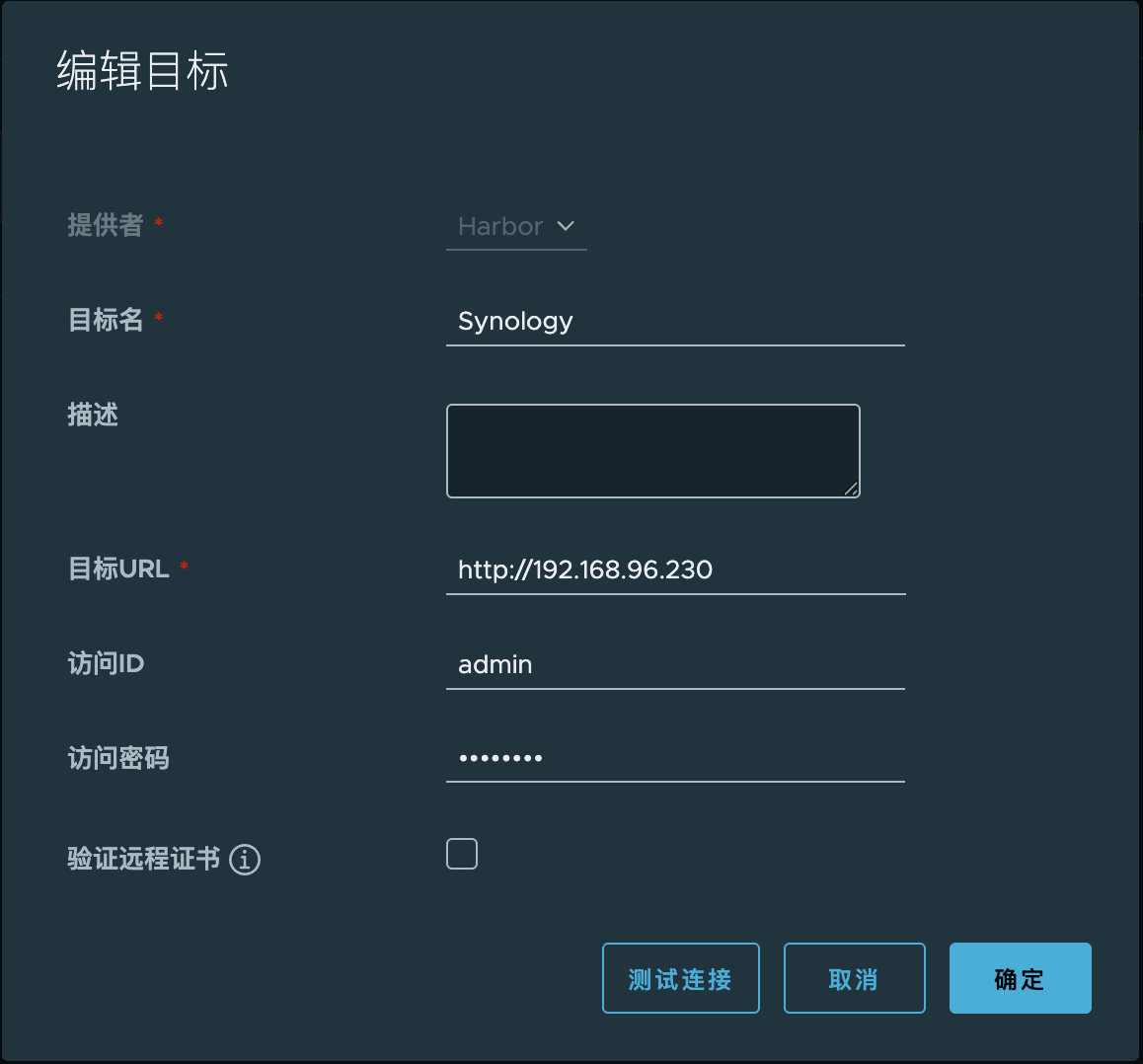
系统管理仓库管理新建目标

注意这里的访问ID和访问密码就是旧版 harbor 的登录账号及密码,配置上之后可以通过私有镜像。

image-20251127115017727

3.2 新建规则

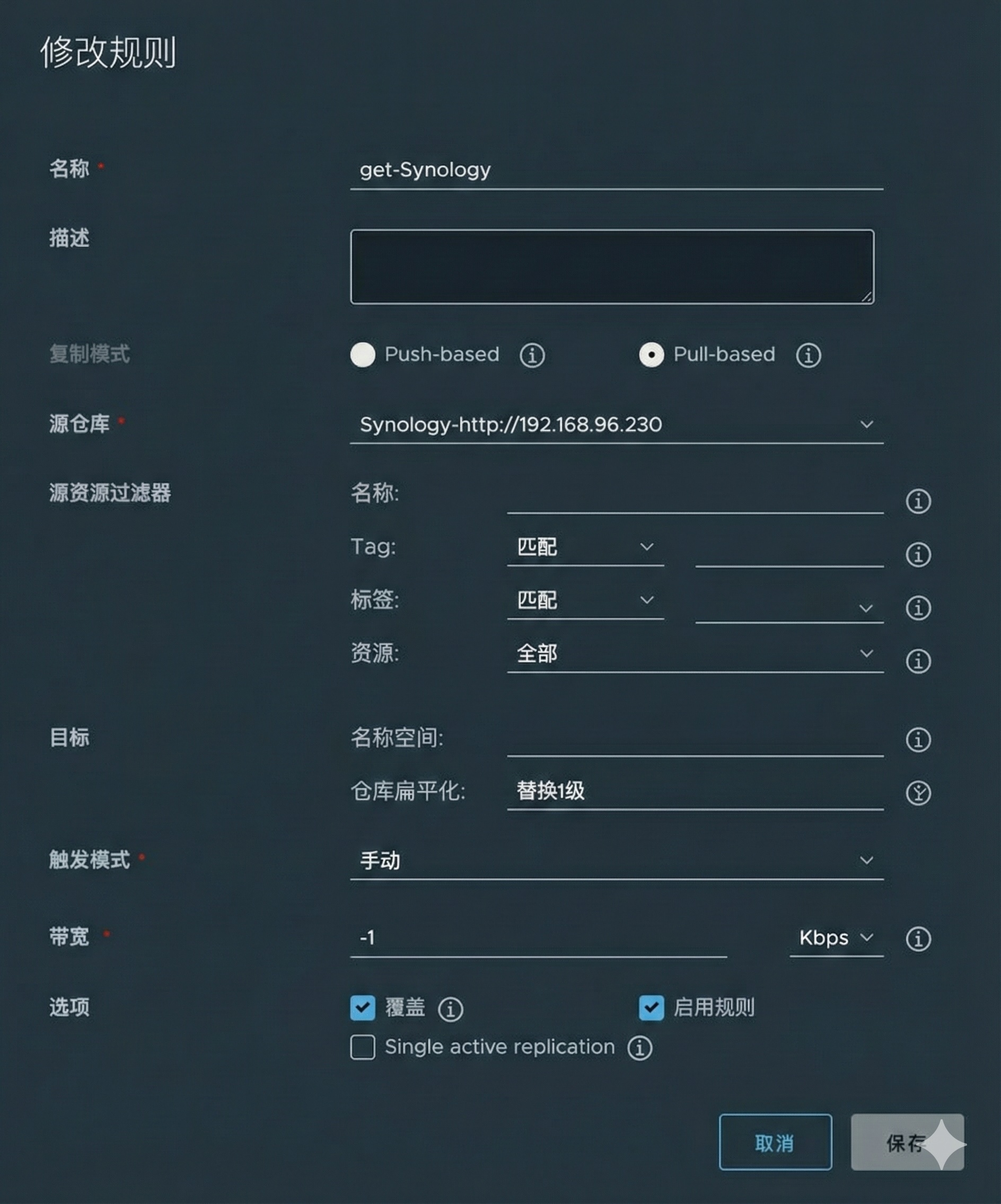
系统管理复制管理新建规则

Sync-harbor#### 3.3 复制

选中要执行的规则后,点击复制按钮,等待任务执行完成即可。

image-20251127123925283]]>
<p>今天将群晖 NAS 上的 harbor 迁移到绿联 NAS 上,发现我一直用的 harbor 版本还是 <code>v1.8.2</code>,最新版已经是 <code>v2.14.1</code>。毕竟要做数据迁移,不如顺便把 harbor 版本也升级到最新版本。</p> <p>如果是 <code>v1.8.2</code> 升级到 <code>v1.9.0</code> 还好说,直接用官方的 <code>prepare</code> 工具升级就完了,但是我这跨越的版本太大了,我的迁移思路是通过 harbor 自带的 <code>复制管理</code> 功功能来同步仓库的所用 docker 镜像,连打包 <code>harbor</code> 数据都省了。</p>
hhkb-professional-2 https://codezm.github.io/posts/%E9%94%AE%E7%9B%98/a18128ef.html 2025-11-07T10:56:48.000Z 2026-01-05T03:10:00.761Z 快捷键

切换大小写

左 Alt + Fn + Tab

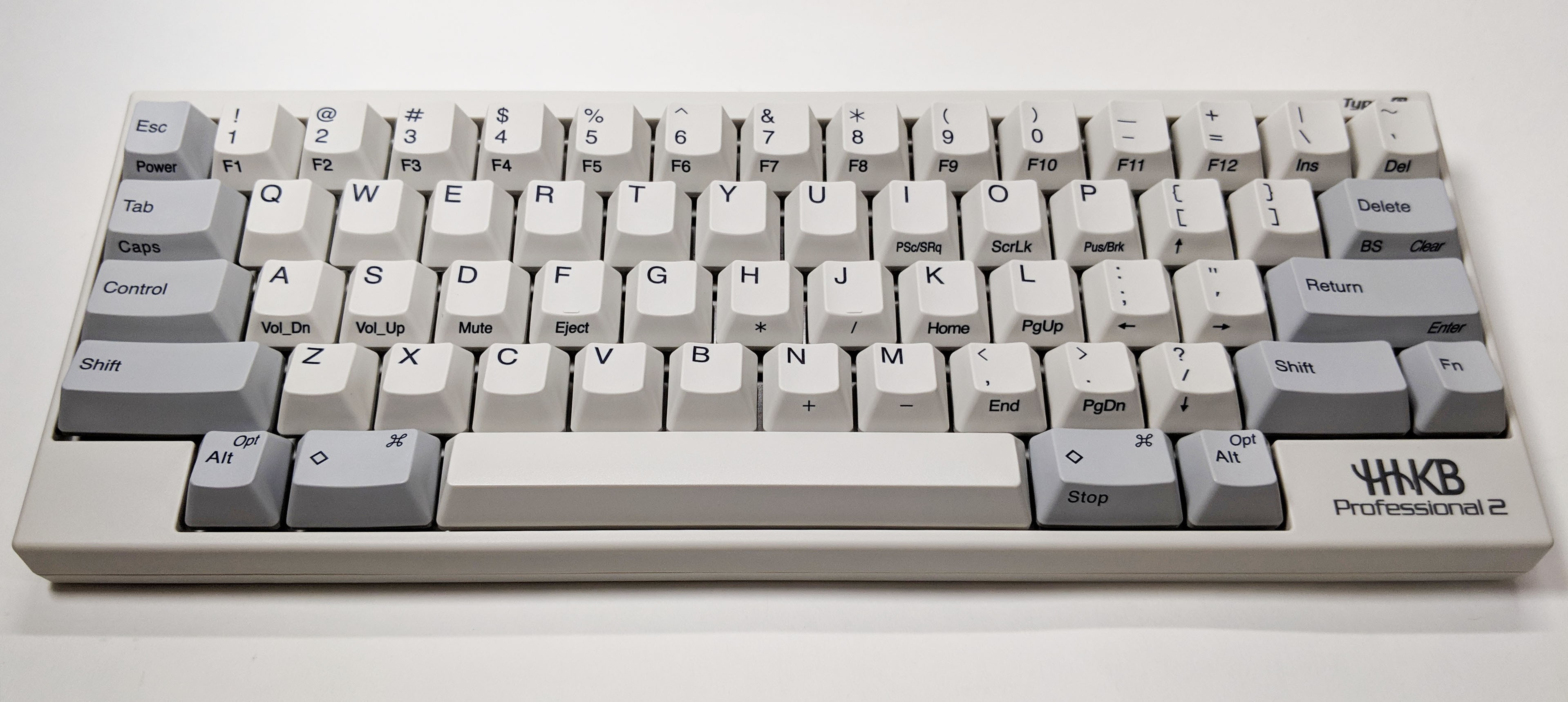
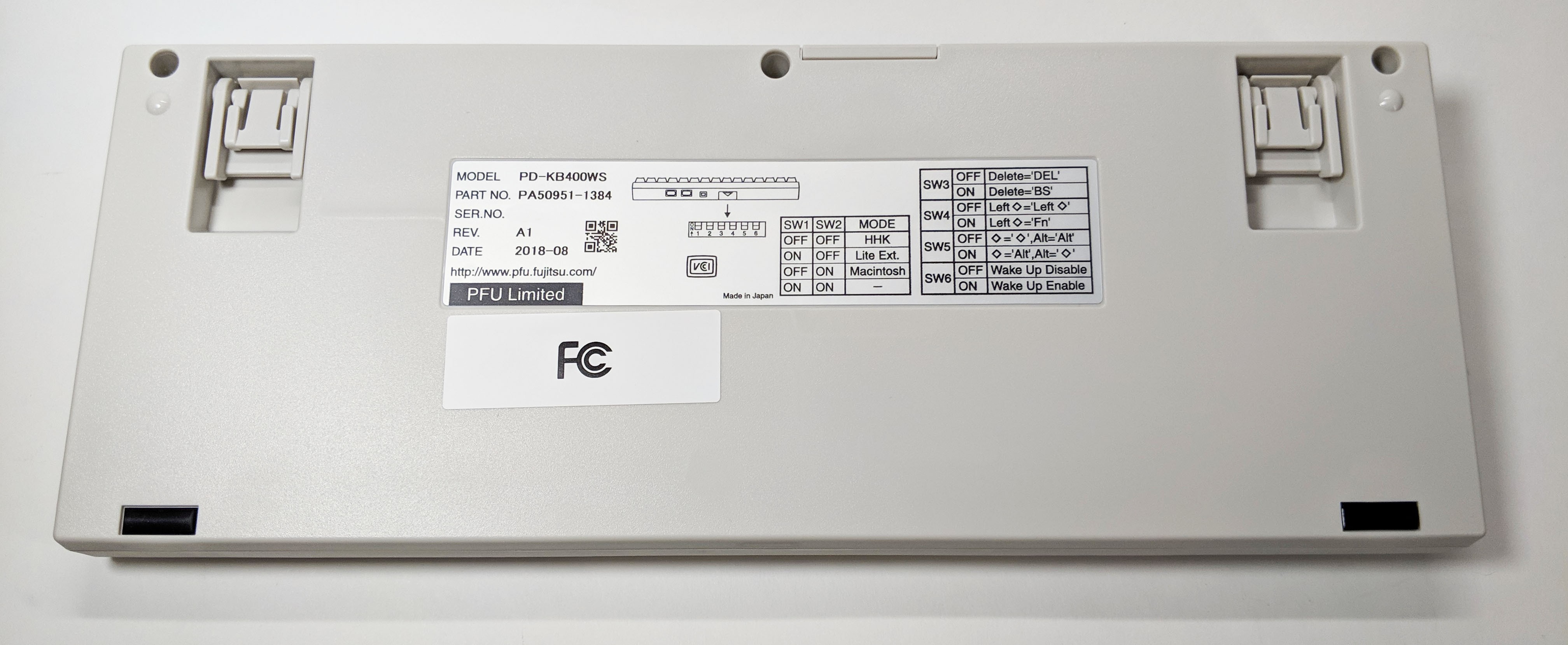
图片展示

happy-hacking-professional-2-type-s-keyboard-05happy-hacking-professional-2-type-s-keyboard-13]]>
<h2 id="快捷键"><a href="#快捷键" class="headerlink" title="快捷键"></a>快捷键</h2><h3 id="切换大小写"><a href="#切换大小写" class="headerlink" title="切换大小写"></a>
JavaScript 中实用的 API https://codezm.github.io/posts/JavaScript/47110.html 2025-09-18T15:06:33.000Z 2026-01-05T03:10:00.858Z JavaScript 中实用的 API

1. URL查询参数解析

过去,要从一个URL中获取查询参数(如 id),我们通常需要使用正则表达式或一连串的 split 方法,代码冗长且容易出错。

1
2
3
4
5
6
7
8
9
10
11
12
13
14
// 以前的方式
function getQueryParam(url, param) {
 const search = url.split('?')[1];
 if (!search) { return null; }
 const params = search.split('&');
 for (let i = 0; i < params.length; i++) {
    const pair = params[i].split('=');
    if (pair[0] === param) { return decodeURIComponent(pair[1]); }
  }
 return null;
}

const url = 'https://example.com/page?id=123&category=tech';
const id = getQueryParam(url, 'id'); // "123"

现在,URLSearchParams 对象让这一切变得无比简单:

1
2
3
//现代的方式
const url = new URL('https://example.com/page?id=123&category=tech');
const id = url.searchParams.get('id'); // "123"

内置的 URLSearchParams 不仅代码更短,而且在处理URL编码、多个同名参数等边缘情况时更加健壮可靠。

2. 对象深拷贝

深拷贝是面试和工作中的常见痛点,最广为人知但有缺陷的方法是 JSON.parse(JSON.stringify(obj)),它无法处理 Date 对象、undefined、等特殊类型。

1
2
3
4
5
6
7
8
9
10
const original = {
  birth: new Date('1990-01-01'),
  id: undefined,
};

// 以前的方式
const copy = JSON.parse(JSON.stringify(original));
// 问题暴露
console.log(copy.birth); // "1990-01-01T00:00:00.000Z" (变成了字符串)
console.log(copy.id);    // undefined (undefined 丢失)

现在,我们有了原生的、强大的深拷贝工具 structuredClone

1
2
3
4
5
// 现代的方式
const copy = structuredClone(original);
// 完美拷贝
console.log(copy.birth);// Date object(依然是 Date 对象)
console.log(original.birth === copy.birth); // false(是全新的对象)

structuredClone 是官方推荐的深拷贝方式,支持绝大多数数据类型(除函数、DOM节点等),彻底解决了 JSON 方法的弊端。

3. 数组分组

1
2
3
4
5
6
7
8
9
10
11
12
13
const products = [
  { name'苹果'category'水果' },
  { name'电视'category'电器' }
];

// 以前的方式
const grouped = products.reduce((acc, product) => {
 const key = product.category;
 if (!acc[key]) { acc[key] = []; }
  acc[key].push(product);
 return acc;
}, {});
// grouped: { '水果': [...], '电器': [...] }

ES2023 引入了 Object.groupBy(),让分组操作变得语义化且极其简单。

1
2
3
// 现代的方式
const grouped = Object.groupBy(products, product => product.category);
// grouped: { '水果': [...], '电器': [...]}

Object.groupBy() 将一个意图直接翻译成了一行代码,可读性远超复杂的 reduce 实现。

]]>
<p>JavaScript 中实用的 API</p>
Fetch API 结合 AbortController 实现请求取消与请求超时取消 https://codezm.github.io/posts/JavaScript/13368.html 2025-09-18T14:54:57.000Z 2026-01-05T03:10:00.858Z Fetch API 结合 AbortController 实现请求取消与请求超时取消

1. 请求取消

想象一个场景:用户在搜索框中快速输入,每次输入都触发一次请求。我们只关心最后一次请求的结果。使用 AbortController,实现起来易如反掌。

1
2
3
4
5
6
7
8
9
10
11
12
13
14
15
16
17
18
19
20
21
22
23
24
let controller;

async function handleSearch(query) {
 // 如果上一个请求正在进行,取消它
 if (controller) {
    controller.abort();
  }

 // 为新请求创建一个新的控制器
 controller = new AbortController();
 const signal = controller.signal;

 try {
    const response = await fetch(`/api/search?q=${query}`, { signal });
    const data = await response.json();
    console.log('Search results:', data);
  } catch (error) {
    if (error.name === 'AbortError') {
      console.log('Fetch aborted');
    } else {
      console.error('Fetch error:', error);
    }
  }
}

3. 请求超时

1
2
3
4
5
6
7
8
9
10
11
12
13
14
15
16
17
18
19
20
21
22
async function fetchWithTimeout(resource, options ={}, timeout = 8000){
const controller = new AbortController();
const id = setTimeout(() => controller.abort(), timeout);
const response = await fetch(resource, {
...options,
signal: controller.signal
});

clearTimeout(id);
return response;
}

// 使用
try {
const response = await fetchWithTimeout('/api/slow-data', {}, 5000);// 5秒超时
const data = await response.json();
console.log(data);
} catch (error){
if(error.name =='AbortError'){
console.log('Fetch request timed out.');
}
}
]]>
<h2 id="Fetch-API-结合-AbortController-实现请求取消与请求超时取消"><a href="#Fetch-API-结合-AbortController-实现请求取消与请求超时取消" class="headerlink" title="Fetch API 结合 AbortController 实现请求取消与请求超时取消"></a>Fetch API 结合 AbortController 实现请求取消与请求超时取消</h2>
16 个 JavaScript 简写神技 https://codezm.github.io/posts/JavaScript/33991.html 2025-09-18T14:40:14.000Z 2026-01-05T03:10:00.858Z 16 个 JavaScript 简写神技

JavaScript 是一门强大且灵活的语言,拥有丰富的特性和语法糖。分享下 16 个最常用的 JavaScript 的简写技巧,掌握它们可以让我们编写出更简洁、更优雅的代码,并显著提升开发效率(增加摸鱼时间)。

1. 三元运算符简化条件判断

1
2
3
4
5
6
7
8
9
10
// 传统写法
let result;
if (someCondition) {
    result = 'yes';
else {
    result = 'no';
}

// 简写方式
const result = someCondition ? 'yes' : 'no';

2. 空值合并运算符

1
2
3
4
5
// 传统写法
const name = user.name !== null && user.name != undefined ? user.name : 'default';

// 简写方式
const name = user.name ?? 'default'

3. 可选链操作符

1
2
3
4
5
// 传统写法
const street = user && user.address && user.address.street;

// 简写方式
const street = user?.address?.street;

4. 数组去重

1
2
3
4
5
6
7
// 传统写法
function unique(arr){
return arr.filter((item, index) => arr.index0f(item) === index);
}

// 简写方式
const unique = arr => [...new Set(arr)];

5. 快速取整

1
2
3
4
5
// 传统写法
const floor = Math.floor(4.9);

// 简写方式
const floor = ~~4.9;

6. 合并对象

1
2
3
4
5
// 传统写法
const merged = object.assign({}, obj1, obj2);

// 简写方式
const merged = {...obj1, ...obj2};

7. 短路求值

1
2
3
4
5
6
7
// 传统写法
if (condition) {
    doSomething();
}

// 简写方式
condition && doSomething();

8. 默认参数值

1
2
3
4
5
6
7
8
// 传统写法
function greet(name) {
    name = name || 'Guest';
    console.log(`Hello ${name}`);
}

// 简写方式
const greet = (name = 'Guest') => console.log(`Hello ${name}`);

9. 解构赋值

1
2
3
4
5
6
// 传统写法
const first = arr[0];
const second = arr[1];

// 简写方式
const [first, second] = arr;

10. 字符串转数字

1
2
3
4
5
// 传统写法
const num = parseInt('123');

// 简写方式
const num = +'123';

11. 多重条件判断

1
2
3
4
5
6
7
8
9
// 传统写法
if (value === 1 || value === 2 || value === 3) {
    // ...
}

// 简写方式
if ([123].includes(value)) {
    // ...
}

12. 快速幂运算

1
2
3
4
5
// 传统写法
Math.pow(23);

// 简写方式
2 ** 3;

13. 对象属性简写

1
2
3
4
5
// 传统写法
const obj = { x: x, y: y };

// 简写方式
const obj = { x, y };

14. 数组映射

1
2
3
4
5
6
7
8
9
// 传统写法
const numbers = [1, 2, 3];
const doubled = numbers.map(function(num) {
return num * 2;
});

// 简写方式
const doubled = numbers.map(num => num * 2);

15. 交换变量值

1
2
3
4
5
6
7
// 传统写法
let temp = a;
a = b;
b = temp;

// 简写方式
[a, b] = [b, a];

16. 动态对象属性

1
2
3
4
5
6
7
8
// 传统写法
const obj = {};
obj[dynamic + 'name'] = value;

// 简写方式
const obj = {
[`${dynamic}name`]: value
};

参考

]]>
<h2 id="16-个-JavaScript-简写神技"><a href="#16-个-JavaScript-简写神技" class="headerlink" title="16 个 JavaScript 简写神技"></a>16 个 JavaScript 简写神技</h2><p>JavaScript 是一门强大且灵活的语言,拥有丰富的特性和语法糖。分享下 16 个最常用的 JavaScript 的简写技巧,掌握它们可以让我们编写出更简洁、更优雅的代码,并显著提升开发效率(增加摸鱼时间)。</p>
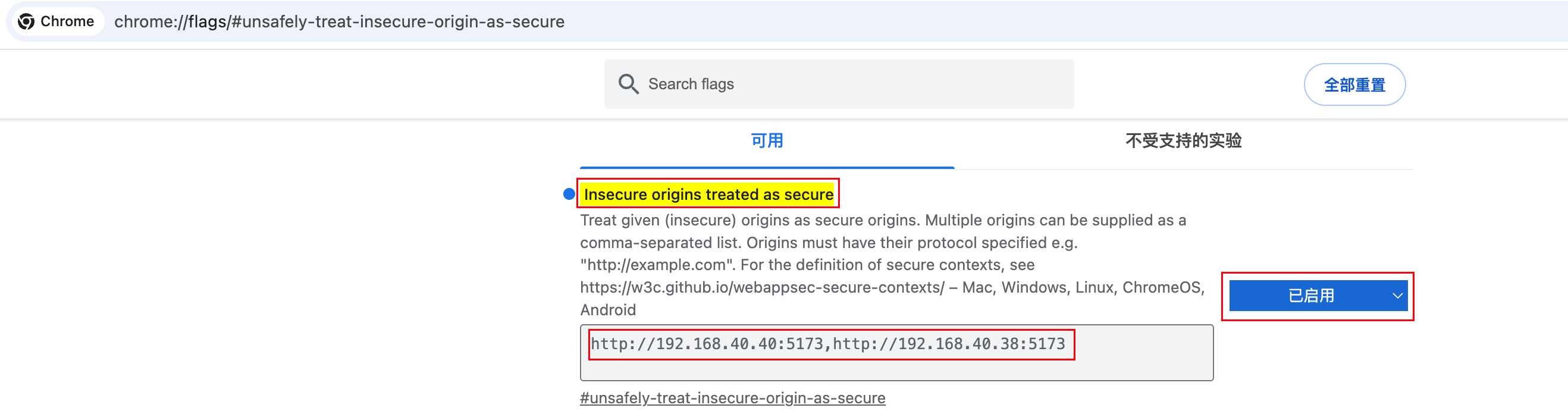
Chrome麦克风授权 https://codezm.github.io/posts/Chrome/e3041ae8.html 2025-09-18T00:00:00.000Z 2026-01-05T03:10:00.752Z 使用 127.0.0.1、localhost及 https 可以正常获取麦克风权限。如果使用的是局域网 IP 地址则需要设置信任的地址

信任的地址配置

chrome://flags/#unsafely-treat-insecure-origin-as-secure

image-20250918103132601

启用后需要重启 Chrome 浏览器,重启后就能成功调起麦克风。

如何设置麦克风设备

  1. 打开浏览器 设置:chrome://settings/。
  2. 依次选择隐私和安全网站设置
  3. 在“权限”下,选择麦克风
  4. 如需选择默认麦克风,请选择向下箭头 。
image-20250928110414005

查看当前设置的麦克风设备:

1
2
3
4
5
6
7
8
9
10
11
navigator.mediaDevices.getUserMedia({ audio: true })
.then((stream) => {
// 获取音频轨道
const audioTracks = stream.getAudioTracks();
if (audioTracks.length > 0) {
const audioTrack = audioTracks[0];
const audioSettings = audioTrack.getSettings();
console.log("音频设备 ID:", audioSettings.deviceId);
console.log("音频设备标签:", audioTrack.label); // 可能为空(需用户授权)
}
});
1
2
3
4
5
6
7
8
9
10
11
12
13
14
15
16
17
18
19
20
21
22
23
24
25
26
27
28
29
30
// 首先请求用户权限(这是必要的,否则设备标签可能被隐藏)
navigator.mediaDevices.getUserMedia({ audio: true })
.then(stream => {
// 即使我们不需要流,也需要请求权限才能获取设备标签
// 获取设备列表
return navigator.mediaDevices.enumerateDevices();
})
.then(devices => {
// 筛选出音频输入设备
const audioInputs = devices.filter(device => device.kind === 'audioinput');

console.log('可用的音频输入设备:', audioInputs);

// 处理设备列表
audioInputs.forEach(device => {
console.log(`设备ID: ${device.deviceId}`);
console.log(`设备标签: ${device.label || '未命名设备'}`);
console.log(`设备类型: ${device.kind}`);
console.log('-------------------');
});

// 如果你想停止获取的音频流(因为我们只需要权限)
if (stream) {
stream.getTracks().forEach(track => track.stop());
}
})
.catch(error => {
console.error('获取设备时出错:', error);
});

]]>
<p>使用 127.0.0.1、localhost及 https 可以正常获取麦克风权限。如果使用的是局域网 IP 地址则需要设置信任的地址</p> <h3 id="信任的地址配置"><a href="#信任的地址配置" class="headerlink" title="信任的
大屏抽奖项目总结 https://codezm.github.io/posts/Project/7b8a2e1a.html 2024-10-16T11:51:24.000Z 2026-01-05T03:10:00.791Z 本次大屏抽奖项目采用纯前端技术实现。

项目需求

  1. 一等奖与其他奖项的抽奖人员名单不同。
  2. 三等奖需抽取两次。
  3. 抽奖人员名单在抽奖当日提供 Excel 文件。
  4. 大屏展示抽奖页面,共有三种状态切换:
    1. 等待抽奖:抽奖未开始时展示效果。
    2. 开始抽奖:动画展示抽奖人员名单。
    3. 停止抽奖:展示中奖人员名单。

项目实现方案

设计页面介绍:

  1. 抽奖页:此页面将投放至大屏展示。
  2. 抽奖操控页:此页面由抽奖人根据主持人指示操作开始、结束抽奖。
  3. Excel 文件数据提取页:用于将甲方提供的中奖人员名单转换成 json 数据格式保存至 localStorage 中。
  4. 恢复页:用于恢复抽奖页状态。
    1. 各奖项抽奖中、各奖项中奖人员名单。
    2. 等待抽奖。
    3. 导出中奖人员名单:将中奖人员的 json 数据导出至 Excel 文件中。

项目采用 localStorage 来进行页面间的消息存储。

  • 抽奖页通过 setIntval 定时器监听 localStorage操作项值的变化,来进行页面中元素展现。

  • 抽奖操控页实现奖品的抽取及操作项状态的变更。

注意事项

  1. 页面设计的尺寸在大屏上展示的效果不理想:可以试试 ctrl -ctrl + 缩放下页面。

    大屏也只是个屏幕而已,电脑连接上后,选择扩展屏幕,将抽奖页拖动到大屏屏幕,然后全屏展示即可:

    • Windows:F11 全屏。

    • MacOS:Command + Ctrl + F Chrome窗口最大化(隐藏菜单栏及Docker栏),Command + Shift + F Chrome全屏(隐藏Chrome 的 tab 标签栏及地址栏)。

  2. 注意原数据格式问题:因甲方提供的是 Excel 文件,其中的人员名单保存到 json 中时要特别注意人名中有可能存在 \n\t 等特殊字符,这些特殊字符需提前处理掉,不然在中奖名单中就会像这样展示:王\t五

  3. 注意中奖人员姓名拼接问题:甲方提供的人员名单中 是拆开的。在对其进行合并时要注意中文姓名中间不能加空格,英文姓名则需要加空格。

    1
    2
    3
    4
    function isAllChinese(str) {
    const reg = /[^\u4e00-\u9fa5]/;
    return !reg.test(str);
    }
  4. 注意抽奖端操控便利性问题:鼠标点击不如键位便捷准确,在进行奖品选项选择时可通过监听键盘:数字1、数字2、数字3 来对应奖品:一等奖、二等奖、三等奖。绑定 Enter 键代替鼠标点击 开始抽奖停止抽奖返回 按钮。

    1. 你不知道场控方提供的电脑是否带外接鼠标,场地是否有足够的空间来操作鼠标。警惕:触摸板
    2. 第二个为什么要用键盘来代替鼠标的理由:你看看中控台就知道了,全是实体键位操控。
  5. 注意采集卡传输分辨率。

    如果采集卡传输分辨率是1920*1080,而屏显分辨率是 2048*768。则页面设计的时候最好做两版。因为你不知道场控方是否可以调整采集卡分辨率,调整后是否有背景图失真情况。

    在彩排时发现图片及文字在最终屏幕上有变形,经与场控方沟通后才得知采集卡分辨率是1920*1080,而我们是按照屏显 2048*768做的。在配合场控方调整外屏分辨率时,虽然文字及图片显示正常了,但是图片失真很严重。在调回原始分辨率后图片也失真,无法还原到初始状态了。更换到另一个采集卡

项目收尾

因程序是放在场控方提供的电脑上运行,应甲方数据保密要求需处理好善后工作。

  1. 清除 localStroage 中的全部数据。

  2. 删除抽奖程序:shift + delete 键删除。

    这里有个小插曲哈,第一次删除的时候没按 shift 键,文件进到回收站了,而回收站又打不开:

    Win + R 打开 cmd 命令行。

    1
    rd /s /q C:$Recycle.Bin
]]>
<p>本次大屏抽奖项目采用纯前端技术实现。</p>
MacOS设置sshd服务免密登录 https://codezm.github.io/posts/MacOS/8dd9e79a.html 2024-05-28T10:12:34.000Z 2026-01-05T03:10:00.785Z MacOS设置sshd服务免密登录

本篇将介绍如何使用免密证书的方式登录 MacOS 系统。

生成证书

1
ssh-keygen -t rsa -b 4096 -c "codezm@163.com"

安装证书

将公钥证书安装到 192.168.36.47 MacOS 机器。

1
ssh-copy-id -i ~/.ssh/id_rsa.pub codezm@192.168.36.47

确认免密登录

1
2
3
4
5
6
7
8
9
10
11
# 若私钥文件名是 id_rsa,那么 -i ~/.ssh/id_rsa 参数可省略。
ssh -i ~/.ssh/id_rsa codezm@192.168.36.47

# 若私钥文件名不是 id_rsa,今后登录时也不想指定证书文件。
# 有以下两种方式:
# 1. 可以将私钥添加到身份验证密钥管理工具:ssh-add。之后登录就不需要指定私钥路径了。
ssh-add -K id_rsa
# 2.编辑文件: ~/.ssh/config
Host 192.168.36.47
HostName 192.168.36.47
IdentityFile ~/.ssh/id_rsa

关闭账号密码登录

1
vim /etc/ssh/sshd_config

向文件尾部追加以下内容:

1
2
3
4
5
6
7
8
9
10
11
# 禁用密码认证
PasswordAuthentication no

# 禁用键盘交互认证
KbdInteractiveAuthentication no

# 确保启用公钥认证
PubkeyAuthentication yes

# 禁用挑战-响应认证
ChallengeResponseAuthentication no

重启 sshd 服务,使配置生效。

1
2
sudo launchctl unload /System/Library/LaunchDaemons/ssh.plist
sudo launchctl load -w /System/Library/LaunchDaemons/ssh.plist

记录免密登录失败分析思路

1
2
3
4
5
6
$ log show --predicate 'process == "sshd"' --info --last 10

Filtering the log data using "process == "sshd""
Skipping debug messages, pass --debug to include.
Timestamp Thread Type Activity PID TTL
2024-05-28 09:59:33.732102+0800 0x7ff0 Info 0x0 6224 0 sshd: Authentication refused: bad ownership or modes for directory /Volumes/work

问题原因是由软链引起的。

初衷是想将 .ssh 目录放到 dotfile 中由 Git 统一管理维护,但万万没想到竟然造成 sshd 无法实现免密证书登录。

1
2
ln -s /Users/codezm/.config/dotfile/.ssh ~/.ssh
ln -s /Volumes/work/envconfig ~/.config
]]>
<h1 id="MacOS设置sshd服务免密登录"><a href="#MacOS设置sshd服务免密登录" class="headerlink" title="MacOS设置sshd服务免密登录"></a>MacOS设置sshd服务免密登录</h1><p>本篇将介绍如何使用免密证书的方式登录 MacOS 系统。</p>
MacOS快捷键 https://codezm.github.io/posts/MacOS/kjj.html 2024-05-24T09:35:43.000Z 2026-01-05T03:10:00.785Z MacOS快捷键
功能快捷键
截全屏图Command+Shift+3
自定义截图Command+Shift+4
截屏或录屏Command+Shift+5
立即锁定屏幕Control + Command + Q
退出登录你的 macOS 用户账户。系统将提示你进行确认。
要在不确认的情况下立即退出登录,请按下 Option-Shift-Command-Q。
Command + Shift + Q
将最前方的窗口最小化至程序坞。Command-M
访达
创建一个新文件夹Shift-Command-N
推出所选磁盘或宗卷。Command-E
打开“桌面”文件夹Shift-Command-D
打开“最近使用”窗口,其中会显示你最近查看或更改过的所有文件。Shift-Command-F
打开“前往文件夹”窗口。Shift-Command-G
打开当前 macOS 用户账户的个人文件夹。Shift-Command-H
打开“网络”窗口Shift-Command-K
打开“下载”文件夹Option-Command-L
前往上一个文件夹。Command-左中括号 ([)
前往下一个文件夹。Command-右中括号 (])
打开包含当前文件夹的文件夹。Command-上箭头
在一个新窗口中打开包含当前文件夹的文件夹。Command-Control-上箭头
打开所选项目。Command-下箭头

Mac 键盘快捷键

]]>
<h1 id="MacOS快捷键"><a href="#MacOS快捷键" class="headerlink" title="MacOS快捷键"></a>MacOS快捷键</h1><table> <thead> <tr> <th>功能</th> <th>快捷键</th> </t
快捷键汇总 https://codezm.github.io/kjj.html 2024-05-23T16:20:44.000Z 2026-01-05T03:10:00.846Z 快捷键汇总
graph LR  A[快捷键]---AA[fa:fa-apple MacOS操作系统 fa:fa-link]  AA-.-AAB[fa:fa-link Typora]  AA-.-AAC[fa:fa-link NeoVim]  A[快捷键]---AB[fa:fa-windows Windows操作系统 fa:fa-link]  A[快捷键]---AC[VSCode fa:fa-link]  A[快捷键]---AD[IDEA fa:fa-link]  A[快捷键]---AE[Chrome fa:fa-link]  A[快捷键]---AF[HHKB键盘图 fa:fa-link]  AB-.-ABB[fa:fa-link Typora]  AB-.-ABC[fa:fa-link NeoVim]  ABC---ABCA[fa:fa-link Vim]    click AA "/posts/MacOS/kjj.html"    click AB "/posts/Windows/kjj.html"    click AC "/posts/VSCode/kjj.html"    click AD "/posts/IDEA/kjj.html"  click AE "/posts/Chrome/kjj.html"  click AF "/images/hhkb.jpg"  click AAB "https://support.typora.io/Shortcut-Keys/"  click ABCA "https://www.runoob.com/w3cnote/all-vim-cheatsheat.html"

参考

https://mermaid.live/

https://zhuanlan.zhihu.com/p/355997933

https://csnotes.gitlab.io/csnotes/tools/markdown/mermaid.html

Mermaid 支持的图标

]]>
<h1 id="快捷键汇总"><a href="#快捷键汇总" class="headerlink" title="快捷键汇总"></a>快捷键汇总</h1><pre class="mermaid">graph LR A[快捷键]---AA[fa:fa-apple MacOS操作系统 fa:fa-link] AA-.-AAB[fa:fa-link Typora] AA-.-AAC[fa:fa-link NeoVim] A[快捷键]---AB[fa:fa-windows Windows操作系统 fa:fa-link] A[快捷键]---AC[VSCode fa:fa-link] A[快捷键]---AD[IDEA fa:fa-link] A[快捷键]---AE[Chrome fa:fa-link] A[快捷键]---AF[HHKB键盘图 fa:fa-link] AB-.-ABB[fa:fa-link Typora] AB-.-ABC[fa:fa-link NeoVim] ABC---ABCA[fa:fa-link Vim] click AA "/posts/MacOS/kjj.html" click AB "/posts/Windows/kjj.html" click AC "/posts/VSCode/kjj.html" click AD "/posts/IDEA/kjj.html" click AE "/posts/Chrome/kjj.html" click AF "/images/hhkb.jpg" click AAB "https://support.typora.io/Shortcut-Keys/" click ABCA "https://www.runoob.com/w3cnote/all-vim-cheatsheat.html"</pre>
若依用户分表鉴权 https://codezm.github.io/posts/java/d3954bd.html 2024-05-15T14:59:00.000Z 2026-01-05T03:10:00.858Z 若依用户分表鉴权

若依自带了管理后台及服务端,但项目通常还有客户端业务。那客户端如何实现鉴权?最简单的方式是在原有的 sys_user 上增加业务逻辑,但随着项目越做越大耦合度也会成倍增加。那解耦就势在必行。

本篇将介绍如何让客户端拥有一套独立表来实现用户鉴权。完整代码参见

创建 auths Maven 模块

一个项目有可能有多个业务用户鉴权需求,所有的鉴权都放在这个模块中进行管理。

接下来我们将以创建 news 业务出发,目录文件结构如下:

1
2
3
4
5
6
7
8
9
10
11
12
13
14
15
16
17
18
19
20
21
22
23
24
25
26
27
28
29
30
31
32
33
34
35
36
37
38
39
40
41
42
43
44
45
46
47
48
49
codezm-auths
├── pom.xml
└── src
└── main
├── java
│   └── com
│   └── codezm
│   └── auths
│   └── news
│   ├── config
│   │   ├── NewsSecurityConfig.java
│   │   └── properties
│   │   └── PermitAllUrlProperties.java
│   ├── constant
│   │   └── CacheConstants.java
│   ├── domain
│   │   ├── NewsLoginBody.java
│   │   ├── NewsLoginUser.java
│   │   └── NewsUser.java
│   ├── manager
│   │   ├── AsyncManager.java
│   │   └── factory
│   │   └── AsyncFactory.java
│   ├── mapper
│   │   └── LoginUserMapper.java
│   ├── security
│   │   ├── UserPwdAuthenticationProvider.java
│   │   ├── UserPwdAuthenticationToken.java
│   │   ├── context
│   │   │   ├── AuthenticationContextHolder.java
│   │   │   └── PermissionContextHolder.java
│   │   ├── filter
│   │   │   └── JwtAuthenticationTokenFilter.java
│   │   └── handle
│   │   ├── AuthenticationEntryPointImpl.java
│   │   └── LogoutSuccessHandlerImpl.java
│   ├── service
│   │   ├── ILoginUserService.java
│   │   ├── LoginService.java
│   │   ├── TokenService.java
│   │   ├── UserPwdServiceImpl.java
│   │   └── impl
│   │   └── LoginUserServiceImpl.java
│   └── untils
│   └── SecurityUtils.java
└── resources
└── mapper
└── news
└── LoginUserMapper.xml

auths/src/main/java/com/codezm/auths/news/config/NewsSecurityConfig.java

1
2
3
4
5
6
7
8
9
10
11
12
13
14
15
16
17
18
19
20
21
22
23
24
25
26
27
28
29
30
31
32
33
34
35
36
37
38
39
40
41
42
43
44
45
46
47
48
49
50
51
52
53
54
55
56
57
58
59
60
61
62
63
64
65
66
67
68
69
70
71
72
73
74
75
76
77
78
79
80
81
82
83
84
85
86
87
88
89
90
91
92
93
94
95
96
97
98
99
100
101
102
103
104
105
106
107
108
109
110
111
112
113
114
115
116
117
118
119
120
121
122
123
124
125
126
127
128
129
130
131
132
133
134
135
136
137
138
139
140
141
142
143
144
145
146
147
148
149
150
151
152
153
154
155
156
157
158
159
160
161
package com.codezm.auths.news.config;


import com.codezm.auths.news.config.properties.PermitAllUrlProperties;
import com.codezm.auths.news.security.UserPwdAuthenticationProvider;
import com.codezm.auths.news.security.filter.JwtAuthenticationTokenFilter;
import com.codezm.auths.news.security.handle.AuthenticationEntryPointImpl;
import com.codezm.auths.news.security.handle.LogoutSuccessHandlerImpl;
import org.springframework.beans.factory.annotation.Autowired;
import org.springframework.beans.factory.annotation.Qualifier;
import org.springframework.context.annotation.Bean;
import org.springframework.context.annotation.Configuration;
import org.springframework.core.annotation.Order;
import org.springframework.security.authentication.AuthenticationManager;
import org.springframework.security.config.annotation.authentication.builders.AuthenticationManagerBuilder;
import org.springframework.security.config.annotation.web.builders.HttpSecurity;
import org.springframework.security.config.annotation.web.configuration.WebSecurityConfigurerAdapter;
import org.springframework.security.config.annotation.web.configurers.ExpressionUrlAuthorizationConfigurer;
import org.springframework.security.config.http.SessionCreationPolicy;
import org.springframework.security.core.userdetails.UserDetailsService;
import org.springframework.security.crypto.bcrypt.BCryptPasswordEncoder;
import org.springframework.security.web.authentication.UsernamePasswordAuthenticationFilter;
import org.springframework.security.web.authentication.logout.LogoutFilter;
import org.springframework.web.filter.CorsFilter;

/**
* spring security配置
*
* @author ruoyi
*/

//@EnableGlobalMethodSecurity(prePostEnabled = true, securedEnabled = true)
//@EnableWebSecurity
@Order(1)
@Configuration
public class NewsSecurityConfig extends WebSecurityConfigurerAdapter
{


/**
* 系统前台用户身份认证逻辑
*/
@Autowired
@Qualifier("NewsUserPwdServiceImpl")
private UserDetailsService userPwdService;

/**
* 认证失败处理类
*/
@Autowired
@Qualifier("NewsAuthenticationEntryPointImpl")
private AuthenticationEntryPointImpl unauthorizedHandler;

/**
* 退出处理类
*/
@Autowired
@Qualifier("NewsLogoutSuccessHandlerImpl")
private LogoutSuccessHandlerImpl logoutSuccessHandler;

/**
* token认证过滤器
*/
@Autowired
@Qualifier("NewsJwtAuthenticationTokenFilter")
private JwtAuthenticationTokenFilter authenticationTokenFilter;

/**
* 跨域过滤器
*/
@Autowired
private CorsFilter corsFilter;

/**
* 允许匿名访问的地址
*/
@Autowired
@Qualifier("NewsPermitAllUrlProperties")
private PermitAllUrlProperties permitAllUrl;


/**
* 解决 无法直接注入 AuthenticationManager
*
* @return
* @throws Exception
*/
@Bean("NewsAuthenticationManager")
@Override
public AuthenticationManager authenticationManagerBean() throws Exception
{

return super.authenticationManagerBean();
}

/**
* anyRequest | 匹配所有请求路径
* access | SpringEl表达式结果为true时可以访问
* anonymous | 匿名可以访问
* denyAll | 用户不能访问
* fullyAuthenticated | 用户完全认证可以访问(非remember-me下自动登录)
* hasAnyAuthority | 如果有参数,参数表示权限,则其中任何一个权限可以访问
* hasAnyRole | 如果有参数,参数表示角色,则其中任何一个角色可以访问
* hasAuthority | 如果有参数,参数表示权限,则其权限可以访问
* hasIpAddress | 如果有参数,参数表示IP地址,如果用户IP和参数匹配,则可以访问
* hasRole | 如果有参数,参数表示角色,则其角色可以访问
* permitAll | 用户可以任意访问
* rememberMe | 允许通过remember-me登录的用户访问
* authenticated | 用户登录后可访问
*/
@Override
protected void configure(HttpSecurity httpSecurity) throws Exception
{
// 注解标记允许匿名访问的url
ExpressionUrlAuthorizationConfigurer<HttpSecurity>.ExpressionInterceptUrlRegistry registry = httpSecurity.authorizeRequests();
permitAllUrl.getUrls().forEach(url -> registry.antMatchers(url).permitAll());

httpSecurity
.requestMatchers((request) -> {
request.antMatchers("/news/**");
})
// CSRF禁用,因为不使用session
.csrf().disable()
// 禁用HTTP响应标头
.headers().cacheControl().disable().and()
// 认证失败处理类
.exceptionHandling().authenticationEntryPoint(unauthorizedHandler).and()
// 基于token,所以不需要session
.sessionManagement().sessionCreationPolicy(SessionCreationPolicy.STATELESS).and()
// 过滤请求
.authorizeRequests()
// 对于登录login 注册register 验证码captchaImage 允许匿名访问
.antMatchers("/news/login", "/news/register", "/news/captchaImage").anonymous()
// 静态资源,可匿名访问
// .antMatchers(HttpMethod.GET, "/", "/*.html", "/**/*.html", "/**/*.css", "/**/*.js", "/profile/**","/static/**").permitAll()
// .antMatchers("/swagger-ui.html", "/swagger-resources/**", "/webjars/**", "/*/api-docs", "/druid/**").permitAll()
// 除上面外的所有请求全部需要鉴权认证
.anyRequest().authenticated()
.and()
.headers().frameOptions().disable();
// 添加Logout filter
httpSecurity.logout().logoutUrl("/news/logout").logoutSuccessHandler(logoutSuccessHandler);
// 添加JWT filter
httpSecurity.addFilterBefore(authenticationTokenFilter, UsernamePasswordAuthenticationFilter.class);
// 添加CORS filter
httpSecurity.addFilterBefore(corsFilter, JwtAuthenticationTokenFilter.class);
httpSecurity.addFilterBefore(corsFilter, LogoutFilter.class);
}

/**
* 身份认证接口
*/
@Override
protected void configure(AuthenticationManagerBuilder auth) throws Exception
{
UserPwdAuthenticationProvider userPwdAuthenticationProvider = new UserPwdAuthenticationProvider();
userPwdAuthenticationProvider.setUserDetailsService(userPwdService);
auth.authenticationProvider(userPwdAuthenticationProvider);
auth.userDetailsService(userPwdService).passwordEncoder(new BCryptPasswordEncoder());
}
}

auths/src/main/java/com/codezm/auths/news/config/properties/PermitAllUrlProperties.java

1
2
3
4
5
6
7
8
9
10
11
12
13
14
15
16
17
18
19
20
21
22
23
24
25
26
27
28
29
30
31
32
33
34
35
36
37
38
39
40
41
42
43
44
45
46
47
48
49
50
51
52
53
54
55
56
57
58
59
60
61
62
63
64
65
66
67
68
69
70
71
72
73
package com.codezm.auths.news.config.properties;

import com.ruoyi.common.annotation.Anonymous;
import org.apache.commons.lang3.RegExUtils;
import org.springframework.beans.BeansException;
import org.springframework.beans.factory.InitializingBean;
import org.springframework.context.ApplicationContext;
import org.springframework.context.ApplicationContextAware;
import org.springframework.context.annotation.Configuration;
import org.springframework.core.annotation.AnnotationUtils;
import org.springframework.stereotype.Component;
import org.springframework.web.method.HandlerMethod;
import org.springframework.web.servlet.mvc.method.RequestMappingInfo;
import org.springframework.web.servlet.mvc.method.annotation.RequestMappingHandlerMapping;

import java.util.*;
import java.util.regex.Pattern;

/**
* 设置Anonymous注解允许匿名访问的url
*
* @author ruoyi
*/
@Component("NewsPermitAllUrlProperties")
@Configuration
public class PermitAllUrlProperties implements InitializingBean, ApplicationContextAware
{
private static final Pattern PATTERN = Pattern.compile("\\{(.*?)\\}");

private ApplicationContext applicationContext;

private List<String> urls = new ArrayList<>();

public String ASTERISK = "*";

@Override
public void afterPropertiesSet()
{
RequestMappingHandlerMapping mapping = applicationContext.getBean(RequestMappingHandlerMapping.class);
Map<RequestMappingInfo, HandlerMethod> map = mapping.getHandlerMethods();

map.keySet().forEach(info -> {
HandlerMethod handlerMethod = map.get(info);

// 获取方法上边的注解 替代path variable 为 *
Anonymous method = AnnotationUtils.findAnnotation(handlerMethod.getMethod(), Anonymous.class);
Optional.ofNullable(method).ifPresent(anonymous -> Objects.requireNonNull(info.getPatternsCondition().getPatterns())
.forEach(url -> urls.add(RegExUtils.replaceAll(url, PATTERN, ASTERISK))));

// 获取类上边的注解, 替代path variable 为 *
Anonymous controller = AnnotationUtils.findAnnotation(handlerMethod.getBeanType(), Anonymous.class);
Optional.ofNullable(controller).ifPresent(anonymous -> Objects.requireNonNull(info.getPatternsCondition().getPatterns())
.forEach(url -> urls.add(RegExUtils.replaceAll(url, PATTERN, ASTERISK))));
});
}

@Override
public void setApplicationContext(ApplicationContext context) throws BeansException
{
this.applicationContext = context;
}

public List<String> getUrls()
{
return urls;
}

public void setUrls(List<String> urls)
{
this.urls = urls;
}
}

auths/src/main/java/com/codezm/auths/news/constant/CacheConstants.java

1
2
3
4
5
6
7
8
9
10
11
12
13
14
15
16
17
18
19
20
21
22
23
24
25
26
27
28
29
30
31
32
33
34
35
36
37
38
39
40
41
42
43
44
45
package com.codezm.auths.news.constant;

/**
* 缓存的key 常量
*
* @author ruoyi
*/
public class CacheConstants
{
/**
* 登录用户 redis key
*/
public static final String LOGIN_TOKEN_KEY = "login_tokens_news:";

/**
* 验证码 redis key
*/
public static final String CAPTCHA_CODE_KEY = "captcha_codes:";

/**
* 参数管理 cache key
*/
public static final String SYS_CONFIG_KEY = "sys_config:";

/**
* 字典管理 cache key
*/
public static final String SYS_DICT_KEY = "sys_dict:";

/**
* 防重提交 redis key
*/
public static final String REPEAT_SUBMIT_KEY = "repeat_submit:";

/**
* 限流 redis key
*/
public static final String RATE_LIMIT_KEY = "rate_limit:";

/**
* 登录账户密码错误次数 redis key
*/
public static final String PWD_ERR_CNT_KEY = "pwd_err_cnt:";

}

auths/src/main/java/com/codezm/auths/news/domain/NewsLoginBody.java

1
2
3
4
5
6
7
8
9
10
11
12
13
14
15
16
17
18
19
20
21
22
23
24
25
26
27
28
29
30
31
32
33
34
35
36
37
38
39
40
41
42
43
44
45
46
47
48
49
50
51
52
53
54
55
56
57
58
59
60
61
62
63
64
65
66
67
68
69
package com.codezm.auths.news.domain;

/**
* 用户登录对象
*
* @author ruoyi
*/
public class NewsLoginBody
{
/**
* 用户名
*/
private String username;

/**
* 用户密码
*/
private String password;

/**
* 验证码
*/
private String code;

/**
* 唯一标识
*/
private String uuid;

public String getUsername()
{
return username;
}

public void setUsername(String username)
{
this.username = username;
}

public String getPassword()
{
return password;
}

public void setPassword(String password)
{
this.password = password;
}

public String getCode()
{
return code;
}

public void setCode(String code)
{
this.code = code;
}

public String getUuid()
{
return uuid;
}

public void setUuid(String uuid)
{
this.uuid = uuid;
}
}

auths/src/main/java/com/codezm/auths/news/domain/NewsLoginUser.java

1
2
3
4
5
6
7
8
9
10
11
12
13
14
15
16
17
18
19
20
21
22
23
24
25
26
27
28
29
30
31
32
33
34
35
36
37
38
39
40
41
42
43
44
45
46
47
48
49
50
51
52
53
54
55
56
57
58
59
60
61
62
63
64
65
66
67
68
69
70
71
72
73
74
75
76
77
78
79
80
81
82
83
84
85
86
87
88
89
90
91
92
93
94
95
96
97
98
99
100
101
102
103
104
105
106
107
108
109
110
111
112
113
114
115
116
117
118
119
120
121
122
123
124
125
126
127
128
129
130
131
132
133
134
135
136
137
138
139
140
141
142
143
144
145
146
147
148
149
150
151
152
153
154
155
156
157
158
159
160
161
162
163
164
165
166
167
168
169
170
171
172
173
174
175
176
177
178
179
180
181
182
183
184
185
186
187
188
189
190
191
192
193
194
195
196
197
198
199
200
201
202
203
204
205
206
207
208
209
210
211
212
213
214
215
216
217
218
219
220
221
222
223
224
225
226
227
228
229
230
231
232
233
234
235
236
237
238
239
240
241
242
243
244
245
246
247
248
249
250
251
252
253
254
255
256
257
258
259
260
261
262
263
264
265
266
267
268
269
270
271
272
273
274
275
276
277
278
279
280
package com.codezm.auths.news.domain;

import com.alibaba.fastjson2.annotation.JSONField;
import com.codezm.auths.news.domain.NewsUser;
import org.springframework.security.core.GrantedAuthority;
import org.springframework.security.core.userdetails.UserDetails;

import java.util.Collection;
import java.util.Set;

/**
* 登录用户身份权限
*
* @author ruoyi
*/
public class NewsLoginUser implements UserDetails
{
private static final long serialVersionUID = 1L;

/**
* 用户ID
*/
private Long userId;

/**
* 部门ID
*/
private Long deptId;

/**
* openId
*/
private String openId;

/**
* 用户唯一标识
*/
private String token;

/**
* 登录时间
*/
private Long loginTime;

/**
* 过期时间
*/
private Long expireTime;

/**
* 登录IP地址
*/
private String ipaddr;

/**
* 登录地点
*/
private String loginLocation;

/**
* 浏览器类型
*/
private String browser;

/**
* 操作系统
*/
private String os;

/**
* 权限列表
*/
private Set<String> permissions;

/**
* 用户信息
*/
private NewsUser newsUser;

public NewsLoginUser()
{
}

public NewsLoginUser(NewsUser newsUser, Set<String> permissions)
{
this.newsUser = newsUser;
this.permissions = permissions;
}

public NewsLoginUser(Long userId, Long deptId, NewsUser newsUser)
{
this.userId = userId;
this.deptId = deptId;
this.newsUser = newsUser;
//this.permissions = permissions;
}

public Long getUserId()
{
return userId;
}

public void setUserId(Long userId)
{
this.userId = userId;
}

public Long getDeptId()
{
return deptId;
}

public void setDeptId(Long deptId)
{
this.deptId = deptId;
}

public String getToken()
{
return token;
}

public void setToken(String token)
{
this.token = token;
}

public String getOpenId() {
return openId;
}

public void setOpenId(String openId) {
this.openId = openId;
}

@JSONField(serialize = false)
@Override
public String getPassword()
{
return newsUser.getPassword();
}

@Override
public String getUsername()
{
return newsUser.getUserName();
}

/**
* 账户是否未过期,过期无法验证
*/
@JSONField(serialize = false)
@Override
public boolean isAccountNonExpired()
{
return true;
}

/**
* 指定用户是否解锁,锁定的用户无法进行身份验证
*
* @return
*/
@JSONField(serialize = false)
@Override
public boolean isAccountNonLocked()
{
return true;
}

/**
* 指示是否已过期的用户的凭据(密码),过期的凭据防止认证
*
* @return
*/
@JSONField(serialize = false)
@Override
public boolean isCredentialsNonExpired()
{
return true;
}

/**
* 是否可用 ,禁用的用户不能身份验证
*
* @return
*/
@JSONField(serialize = false)
@Override
public boolean isEnabled()
{
return true;
}

public Long getLoginTime()
{
return loginTime;
}

public void setLoginTime(Long loginTime)
{
this.loginTime = loginTime;
}

public String getIpaddr()
{
return ipaddr;
}

public void setIpaddr(String ipaddr)
{
this.ipaddr = ipaddr;
}

public String getLoginLocation()
{
return loginLocation;
}

public void setLoginLocation(String loginLocation)
{
this.loginLocation = loginLocation;
}

public String getBrowser()
{
return browser;
}

public void setBrowser(String browser)
{
this.browser = browser;
}

public String getOs()
{
return os;
}

public void setOs(String os)
{
this.os = os;
}

public Long getExpireTime()
{
return expireTime;
}

public void setExpireTime(Long expireTime)
{
this.expireTime = expireTime;
}

public Set<String> getPermissions()
{
return permissions;
}

public void setPermissions(Set<String> permissions)
{
this.permissions = permissions;
}

public NewsUser getUser()
{
return newsUser;
}

public void setUser(NewsUser newsUser)
{
this.newsUser = newsUser;
}

@Override
public Collection<? extends GrantedAuthority> getAuthorities()
{
return null;
}
}

auths/src/main/java/com/codezm/auths/news/domain/NewsUser.java

1
2
3
4
5
6
7
8
9
10
11
12
13
14
15
16
17
18
19
20
21
22
23
24
25
26
27
28
29
30
31
32
33
34
35
36
37
38
39
40
41
42
43
44
45
46
47
48
49
50
51
52
53
54
55
56
57
58
59
60
61
62
63
64
65
66
67
68
69
70
71
72
73
74
75
76
77
78
79
80
81
82
83
84
85
86
87
88
89
90
91
92
93
94
95
96
97
98
99
100
101
102
103
104
105
106
107
108
109
110
111
112
113
114
115
116
117
118
119
120
121
122
123
124
125
126
127
128
129
130
131
132
133
134
135
136
137
138
139
140
141
142
143
144
145
146
147
148
149
150
151
152
153
154
155
156
157
158
159
160
161
162
163
164
165
166
167
168
169
170
171
172
173
174
175
176
177
178
179
180
181
182
183
184
185
186
187
188
189
190
191
192
193
194
195
196
197
198
199
200
201
202
203
204
205
206
207
208
209
210
211
212
213
214
215
216
217
218
219
220
221
222
223
224
225
package com.codezm.auths.news.domain;

import com.ruoyi.common.core.domain.BaseEntity;
import org.apache.commons.lang3.builder.ToStringBuilder;
import org.apache.commons.lang3.builder.ToStringStyle;

import java.util.Date;

/**
* 用户信息对象 news_user
*
* @author ruoyi
* @date 2024-03-05
*/
public class NewsUser extends BaseEntity
{
private static final long serialVersionUID = 1L;

/** 用户ID */
private Long userId;

/** 部门ID */
// @Excel(name = "部门ID")
private Long deptId;

/** 用户账号 */
// @Excel(name = "用户账号")
private String userName;

/** 用户昵称 */
// @Excel(name = "用户昵称")
private String nickName;

/** 用户类型(00系统用户) */
// @Excel(name = "用户类型", readConverterExp = "0=0系统用户")
private String userType;

/** 用户邮箱 */
// @Excel(name = "用户邮箱")
private String email;

/** 手机号码 */
// @Excel(name = "手机号码")
private String phonenumber;

/** 用户性别(0男 1女 2未知) */
// @Excel(name = "用户性别", readConverterExp = "0=男,1=女,2=未知")
private String sex;

/** 头像地址 */
// @Excel(name = "头像地址")
private String avatar;

/** 密码 */
// @Excel(name = "密码")
private String password;

/** 帐号状态(0正常 1停用) */
// @Excel(name = "帐号状态", readConverterExp = "0=正常,1=停用")
private String status;

/** 删除标志(0代表存在 2代表删除) */
private String delFlag;

/** 最后登录IP */
// @Excel(name = "最后登录IP")
private String loginIp;

/** 最后登录时间 */
// @JsonFormat(pattern = "yyyy-MM-dd")
// @Excel(name = "最后登录时间", width = 30, dateFormat = "yyyy-MM-dd")
private Date loginDate;


public void setUserId(Long userId)
{
this.userId = userId;
}

public Long getUserId()
{
return userId;
}
public void setDeptId(Long deptId)
{
this.deptId = deptId;
}

public Long getDeptId()
{
return deptId;
}
public void setUserName(String userName)
{
this.userName = userName;
}

public String getUserName()
{
return userName;
}
public void setNickName(String nickName)
{
this.nickName = nickName;
}

public String getNickName()
{
return nickName;
}
public void setUserType(String userType)
{
this.userType = userType;
}

public String getUserType()
{
return userType;
}
public void setEmail(String email)
{
this.email = email;
}

public String getEmail()
{
return email;
}
public void setPhonenumber(String phonenumber)
{
this.phonenumber = phonenumber;
}

public String getPhonenumber()
{
return phonenumber;
}
public void setSex(String sex)
{
this.sex = sex;
}

public String getSex()
{
return sex;
}
public void setAvatar(String avatar)
{
this.avatar = avatar;
}
public String getAvatar()
{
return avatar;
}
public void setPassword(String password)
{
this.password = password;
}

public String getPassword()
{
return password;
}
public void setStatus(String status)
{
this.status = status;
}

public String getStatus()
{
return status;
}
public void setDelFlag(String delFlag)
{
this.delFlag = delFlag;
}

public String getDelFlag()
{
return delFlag;
}
public void setLoginIp(String loginIp)
{
this.loginIp = loginIp;
}

public String getLoginIp()
{
return loginIp;
}
public void setLoginDate(Date loginDate)
{
this.loginDate = loginDate;
}

public Date getLoginDate()
{
return loginDate;
}

@Override
public String toString() {
return new ToStringBuilder(this,ToStringStyle.MULTI_LINE_STYLE)
.append("userId", getUserId())
.append("deptId", getDeptId())
.append("userName", getUserName())
.append("nickName", getNickName())
.append("userType", getUserType())
.append("email", getEmail())
.append("phonenumber", getPhonenumber())
.append("sex", getSex())
.append("avatar", getAvatar())
.append("password", getPassword())
.append("status", getStatus())
.append("delFlag", getDelFlag())
.append("loginIp", getLoginIp())
.append("loginDate", getLoginDate())
.append("createBy", getCreateBy())
.append("createTime", getCreateTime())
.append("updateBy", getUpdateBy())
.append("updateTime", getUpdateTime())
.append("remark", getRemark())
.toString();
}
}

auths/src/main/java/com/codezm/auths/news/manager/factory/AsyncFactory.java

1
2
3
4
5
6
7
8
9
10
11
12
13
14
15
16
17
18
19
20
21
22
23
24
25
26
27
28
29
30
31
32
33
34
35
36
37
38
39
40
41
42
43
44
45
46
47
48
49
50
51
52
53
54
55
56
57
58
59
60
61
62
63
64
65
66
67
68
69
70
71
72
73
74
75
76
77
78
79
80
81
82
83
84
85
86
87
88
89
90
91
92
93
94
95
96
97
98
99
100
101
102
103
package com.codezm.auths.news.manager.factory;

import com.ruoyi.common.constant.Constants;
import com.ruoyi.common.utils.LogUtils;
import com.ruoyi.common.utils.ServletUtils;
import com.ruoyi.common.utils.StringUtils;
import com.ruoyi.common.utils.ip.AddressUtils;
import com.ruoyi.common.utils.ip.IpUtils;
import com.ruoyi.common.utils.spring.SpringUtils;
import com.ruoyi.system.domain.SysLogininfor;
import com.ruoyi.system.domain.SysOperLog;
import com.ruoyi.system.service.ISysLogininforService;
import com.ruoyi.system.service.ISysOperLogService;
import eu.bitwalker.useragentutils.UserAgent;
import org.slf4j.Logger;
import org.slf4j.LoggerFactory;

import java.util.TimerTask;

/**
* 异步工厂(产生任务用)
*
* @author ruoyi
*/
public class AsyncFactory
{
private static final Logger sys_user_logger = LoggerFactory.getLogger("sys-user");

/**
* 记录登录信息
*
* @param username 用户名
* @param status 状态
* @param message 消息
* @param args 列表
* @return 任务task
*/
public static TimerTask recordLogininfor(final String username, final String status, final String message,
final Object... args)
{
final UserAgent userAgent = UserAgent.parseUserAgentString(ServletUtils.getRequest().getHeader("User-Agent"));
final String ip = IpUtils.getIpAddr(ServletUtils.getRequest());
return new TimerTask()
{
@Override
public void run()
{
String address = AddressUtils.getRealAddressByIP(ip);
StringBuilder s = new StringBuilder();
s.append(LogUtils.getBlock(ip));
s.append(address);
s.append(LogUtils.getBlock(username));
s.append(LogUtils.getBlock(status));
s.append(LogUtils.getBlock(message));
// 打印信息到日志
sys_user_logger.info(s.toString(), args);
// 获取客户端操作系统
String os = userAgent.getOperatingSystem().getName();
// 获取客户端浏览器
String browser = userAgent.getBrowser().getName();
// 封装对象
SysLogininfor logininfor = new SysLogininfor();
logininfor.setUserName(username);
logininfor.setIpaddr(ip);
logininfor.setLoginLocation(address);
logininfor.setBrowser(browser);
logininfor.setOs(os);
logininfor.setMsg(message);
// 日志状态
if (StringUtils.equalsAny(status, Constants.LOGIN_SUCCESS, Constants.LOGOUT, Constants.REGISTER))
{
logininfor.setStatus(Constants.SUCCESS);
}
else if (Constants.LOGIN_FAIL.equals(status))
{
logininfor.setStatus(Constants.FAIL);
}
// 插入数据
SpringUtils.getBean(ISysLogininforService.class).insertLogininfor(logininfor);
}
};
}

/**
* 操作日志记录
*
* @param operLog 操作日志信息
* @return 任务task
*/
public static TimerTask recordOper(final SysOperLog operLog)
{
return new TimerTask()
{
@Override
public void run()
{
// 远程查询操作地点
operLog.setOperLocation(AddressUtils.getRealAddressByIP(operLog.getOperIp()));
SpringUtils.getBean(ISysOperLogService.class).insertOperlog(operLog);
}
};
}
}

auths/src/main/java/com/codezm/auths/news/manager/AsyncManager.java

1
2
3
4
5
6
7
8
9
10
11
12
13
14
15
16
17
18
19
20
21
22
23
24
25
26
27
28
29
30
31
32
33
34
35
36
37
38
39
40
41
42
43
44
45
46
47
48
49
50
51
52
53
54
55
56
57
package com.codezm.auths.news.manager;

import com.ruoyi.common.utils.Threads;
import com.ruoyi.common.utils.spring.SpringUtils;

import java.util.TimerTask;
import java.util.concurrent.ScheduledExecutorService;
import java.util.concurrent.TimeUnit;


/**
* 异步任务管理器
*
* @author ruoyi
*/
public class AsyncManager
{
/**
* 操作延迟10毫秒
*/
private final int OPERATE_DELAY_TIME = 10;

/**
* 异步操作任务调度线程池
*/
private ScheduledExecutorService executor = SpringUtils.getBean("scheduledExecutorService");

/**
* 单例模式
*/
private AsyncManager(){}

private static AsyncManager me = new AsyncManager();

public static AsyncManager me()
{
return me;
}

/**
* 执行任务
*
* @param task 任务
*/
public void execute(TimerTask task)
{
executor.schedule(task, OPERATE_DELAY_TIME, TimeUnit.MILLISECONDS);
}

/**
* 停止任务线程池
*/
public void shutdown()
{
Threads.shutdownAndAwaitTermination(executor);
}
}

auths/src/main/java/com/codezm/auths/news/mapper/LoginUserMapper.java

1
2
3
4
5
6
7
8
9
10
11
12
13
14
15
16
17
18
19
20
21
22
23
24
25
26
27
28
29
30
31
32
33
34
35
36
37
38
39
40
41
42
43
44
45
46
47
48
49
50
51
52
53
54
55
56
57
58
59
60
61
62
63
64
65
66
67
68
69
70
71
72
73
74
75
76
77
78
79
80
package com.codezm.auths.news.mapper;

import com.codezm.auths.news.domain.NewsUser;
import org.springframework.stereotype.Repository;

import java.util.List;

/**
* 用户信息Mapper接口
*
* @author ruoyi
* @date 2024-03-05
*/
@Repository
public interface LoginUserMapper
{
/**
* 查询用户信息
*
* @param userId 用户信息主键
* @return 用户信息
*/
public NewsUser selectUserByUserId(Long userId);

/**
* 查询用户信息
*
* @param userName 用户信息主键
* @return 用户信息
*/
public NewsUser selectUserByUserName(String userName);

/**
* 查询用户信息
*
* @param phone 用户信息主键
* @return 用户信息
*/
public NewsUser selectUserByPhone(String phone);

/**
* 查询用户信息列表
*
* @param newsUser 用户信息
* @return 用户信息集合
*/
public List<NewsUser> selectUserList(NewsUser newsUser);

/*
* 新增用户信息
*
* @param newsUser 用户信息
* @return 结果
*/
public int insertUser(NewsUser newsUser);

/**
* 修改用户信息
*
* @param newsUser 用户信息
* @return 结果
*/
public int updateUser(NewsUser newsUser);

/**
* 删除用户信息
*
* @param userId 用户信息主键
* @return 结果
*/
public int deleteUserByUserId(Long userId);

/**
* 批量删除用户信息
*
* @param userIds 需要删除的数据主键集合
* @return 结果
*/
public int deleteUserByUserIds(Long[] userIds);
}

auths/src/main/java/com/codezm/auths/news/security/context/AuthenticationContextHolder.java

1
2
3
4
5
6
7
8
9
10
11
12
13
14
15
16
17
18
19
20
21
22
23
24
25
26
27
28
29
package com.codezm.auths.news.security.context;

import org.springframework.security.core.Authentication;

/**
* 身份验证信息
*
* @author ruoyi
*/
public class AuthenticationContextHolder
{
private static final ThreadLocal<Authentication> contextHolder = new ThreadLocal<>();

public static Authentication getContext()
{
return contextHolder.get();
}

public static void setContext(Authentication context)
{
contextHolder.set(context);
}

public static void clearContext()
{
contextHolder.remove();
}
}

auths/src/main/java/com/codezm/auths/news/security/context/PermissionContextHolder.java

1
2
3
4
5
6
7
8
9
10
11
12
13
14
15
16
17
18
19
20
21
22
23
24
25
26
27
28
29
package com.codezm.auths.news.security.context;

import org.springframework.security.core.Authentication;

/**
* 身份验证信息
*
* @author ruoyi
*/
public class AuthenticationContextHolder
{
private static final ThreadLocal<Authentication> contextHolder = new ThreadLocal<>();

public static Authentication getContext()
{
return contextHolder.get();
}

public static void setContext(Authentication context)
{
contextHolder.set(context);
}

public static void clearContext()
{
contextHolder.remove();
}
}

auths/src/main/java/com/codezm/auths/news/security/filter/JwtAuthenticationTokenFilter.java

1
2
3
4
5
6
7
8
9
10
11
12
13
14
15
16
17
18
19
20
21
22
23
24
25
26
27
28
29
30
31
32
33
34
35
36
37
38
39
40
41
42
43
44
45
46
47
package com.codezm.auths.news.security.filter;

import com.codezm.auths.news.domain.NewsLoginUser;
import com.codezm.auths.news.service.TokenService;
import com.codezm.auths.news.untils.SecurityUtils;
import com.ruoyi.common.utils.StringUtils;

import org.springframework.beans.factory.annotation.Autowired;
import org.springframework.security.authentication.UsernamePasswordAuthenticationToken;
import org.springframework.security.core.context.SecurityContextHolder;

import org.springframework.security.web.authentication.WebAuthenticationDetailsSource;
import org.springframework.stereotype.Component;
import org.springframework.web.filter.OncePerRequestFilter;

import javax.servlet.FilterChain;
import javax.servlet.ServletException;
import javax.servlet.http.HttpServletRequest;
import javax.servlet.http.HttpServletResponse;
import java.io.IOException;

/**
* token过滤器 验证token有效性
*
* @author ruoyi
*/
@Component("NewsJwtAuthenticationTokenFilter")
public class JwtAuthenticationTokenFilter extends OncePerRequestFilter
{
@Autowired
private TokenService tokenService;

@Override
protected void doFilterInternal(HttpServletRequest request, HttpServletResponse response, FilterChain chain)
throws ServletException, IOException
{
NewsLoginUser newsLoginUser = tokenService.getLoginUser(request);
if (StringUtils.isNotNull(newsLoginUser) && StringUtils.isNull(SecurityUtils.getAuthentication()))
{
tokenService.verifyToken(newsLoginUser);
UsernamePasswordAuthenticationToken authenticationToken = new UsernamePasswordAuthenticationToken(newsLoginUser, null, newsLoginUser.getAuthorities());
authenticationToken.setDetails(new WebAuthenticationDetailsSource().buildDetails(request));
SecurityContextHolder.getContext().setAuthentication(authenticationToken);
}
chain.doFilter(request, response);
}
}

auths/src/main/java/com/codezm/auths/news/security/handle/AuthenticationEntryPointImpl.java

1
2
3
4
5
6
7
8
9
10
11
12
13
14
15
16
17
18
19
20
21
22
23
24
25
26
27
28
29
30
31
32
33
34
35
36
package com.codezm.auths.news.security.handle;

import com.alibaba.fastjson2.JSON;
import com.ruoyi.common.constant.HttpStatus;
import com.ruoyi.common.core.domain.AjaxResult;
import com.ruoyi.common.utils.ServletUtils;
import com.ruoyi.common.utils.StringUtils;
import org.springframework.security.core.AuthenticationException;
import org.springframework.security.web.AuthenticationEntryPoint;
import org.springframework.stereotype.Component;

import javax.servlet.http.HttpServletRequest;
import javax.servlet.http.HttpServletResponse;
import java.io.IOException;
import java.io.Serializable;

/**
* 认证失败处理类 返回未授权
*
* @author ruoyi
*/
@Component("NewsAuthenticationEntryPointImpl")
public class AuthenticationEntryPointImpl implements AuthenticationEntryPoint, Serializable
{
private static final long serialVersionUID = -8970718410437077606L;

@Override
public void commence(HttpServletRequest request, HttpServletResponse response, AuthenticationException e)
throws IOException
{
int code = HttpStatus.UNAUTHORIZED;
String msg = StringUtils.format("请求访问:{},认证失败,无法 访问系统资源", request.getRequestURI());
ServletUtils.renderString(response, JSON.toJSONString(AjaxResult.error(code, msg)));
}
}

auths/src/main/java/com/codezm/auths/news/security/handle/LogoutSuccessHandlerImpl.java

1
2
3
4
5
6
7
8
9
10
11
12
13
14
15
16
17
18
19
20
21
22
23
24
25
26
27
28
29
30
31
32
33
34
35
36
37
38
39
40
41
42
43
44
45
46
47
48
49
50
51
52
53
54
55
56
57
package com.codezm.auths.news.security.handle;

import com.alibaba.fastjson2.JSON;
import com.codezm.auths.news.domain.NewsLoginUser;
import com.codezm.auths.news.manager.AsyncManager;
import com.codezm.auths.news.manager.factory.AsyncFactory;
import com.codezm.auths.news.service.TokenService;
import com.ruoyi.common.constant.Constants;
import com.ruoyi.common.core.domain.AjaxResult;
import com.ruoyi.common.utils.ServletUtils;
import com.ruoyi.common.utils.StringUtils;

import org.springframework.beans.factory.annotation.Autowired;
import org.springframework.context.annotation.Configuration;
import org.springframework.security.core.Authentication;
import org.springframework.security.web.authentication.logout.LogoutSuccessHandler;
import org.springframework.stereotype.Component;

import javax.servlet.ServletException;
import javax.servlet.http.HttpServletRequest;
import javax.servlet.http.HttpServletResponse;
import java.io.IOException;

/**
* 自定义退出处理类 返回成功
*
* @author ruoyi
*/
@Component("NewsLogoutSuccessHandlerImpl")
@Configuration
public class LogoutSuccessHandlerImpl implements LogoutSuccessHandler
{
@Autowired
private TokenService tokenService;

/**
* 退出处理
*
* @return
*/
@Override
public void onLogoutSuccess(HttpServletRequest request, HttpServletResponse response, Authentication authentication)
throws IOException, ServletException
{
NewsLoginUser newsLoginUser = tokenService.getLoginUser(request);
if (StringUtils.isNotNull(newsLoginUser))
{
String userName = newsLoginUser.getUsername();
// 删除用户缓存记录
tokenService.delLoginUser(newsLoginUser.getToken());
// 记录用户退出日志
AsyncManager.me().execute(AsyncFactory.recordLogininfor(userName, Constants.LOGOUT, "退出成功"));
}
ServletUtils.renderString(response, JSON.toJSONString(AjaxResult.success("退出成功")));
}
}

auths/src/main/java/com/codezm/auths/news/security/UserPwdAuthenticationProvider.java

1
2
3
4
5
6
7
8
9
10
11
12
13
14
15
16
17
18
19
20
21
22
23
24
25
26
27
28
29
30
31
32
33
34
35
36
37
38
39
40
41
42
43
44
package com.codezm.auths.news.security;

import org.springframework.security.authentication.AuthenticationProvider;
import org.springframework.security.core.Authentication;
import org.springframework.security.core.AuthenticationException;
import org.springframework.security.core.userdetails.UserDetails;
import org.springframework.security.core.userdetails.UserDetailsService;

public class UserPwdAuthenticationProvider implements AuthenticationProvider {

private UserDetailsService userDetailsService;

@Override
public Authentication authenticate(Authentication authentication) throws AuthenticationException {
UserPwdAuthenticationToken authenticationToken = (UserPwdAuthenticationToken) authentication;

String userName = (String) authenticationToken.getPrincipal();

UserDetails userDetails = userDetailsService.loadUserByUsername(userName);

// 此时鉴权成功后,应当重新 new 一个拥有鉴权的 authenticationResult 返回
UserPwdAuthenticationToken authenticationResult = new UserPwdAuthenticationToken(userDetails, userDetails.getAuthorities());

authenticationResult.setDetails(authenticationToken.getDetails());

return authenticationResult;
}


@Override
public boolean supports(Class<?> authentication) {
// 判断 authentication 是不是 SmsCodeAuthenticationToken 的子类或子接口
return UserPwdAuthenticationToken.class.isAssignableFrom(authentication);
}

public UserDetailsService getUserDetailsService() {
return userDetailsService;
}

public void setUserDetailsService(UserDetailsService userDetailsService) {
this.userDetailsService = userDetailsService;
}
}

auths/src/main/java/com/codezm/auths/news/security/UserPwdAuthenticationToken.java

1
2
3
4
5
6
7
8
9
10
11
12
13
14
15
16
17
18
19
20
21
22
23
24
25
26
27
28
29
30
31
32
33
34
35
36
37
38
39
40
41
42
43
44
45
46
47
48
49
50
51
52
53
54
55
56
57
58
59
60
61
62
63
64
65
66
67
package com.codezm.auths.news.security;

import org.springframework.security.authentication.AbstractAuthenticationToken;
import org.springframework.security.core.GrantedAuthority;
import org.springframework.security.core.SpringSecurityCoreVersion;
import org.springframework.util.Assert;

import java.util.Collection;


public class UserPwdAuthenticationToken extends AbstractAuthenticationToken {

private static final long serialVersionUID = SpringSecurityCoreVersion.SERIAL_VERSION_UID;

/**
* 在 UsernamePasswordAuthenticationToken 中该字段代表登录的用户名,
* 在这里就代表登录的手机号码
*/
private final Object principal;

private Object credentials;

/**
* 构建一个没有鉴权的 SmsCodeAuthenticationToken
*/
public UserPwdAuthenticationToken(Object principal, Object credentials) {
super(null);
this.principal = principal;
this.credentials = credentials;
setAuthenticated(false);
}

/**
* 构建拥有鉴权的 SmsCodeAuthenticationToken
*/
public UserPwdAuthenticationToken(Object principal, Object credentials,
Collection<? extends GrantedAuthority> authorities) {
super(authorities);
this.principal = principal;
this.credentials = credentials;
super.setAuthenticated(true); // must use super, as we override
}

@Override
public Object getCredentials() {
return this.credentials;
}

@Override
public Object getPrincipal() {
return this.principal;
}

@Override
public void setAuthenticated(boolean isAuthenticated) throws IllegalArgumentException {
Assert.isTrue(!isAuthenticated,
"Cannot set this token to trusted - use constructor which takes a GrantedAuthority list instead");
super.setAuthenticated(false);
}

@Override
public void eraseCredentials() {
super.eraseCredentials();
this.credentials = null;
}
}

auths/src/main/java/com/codezm/auths/news/service/impl/LoginUserServiceImpl.java

1
2
3
4
5
6
7
8
9
10
11
12
13
14
15
16
17
18
19
20
21
22
23
24
25
26
27
28
29
30
31
32
33
34
35
36
37
38
39
40
41
42
43
44
45
46
47
48
49
50
51
52
53
54
55
56
57
58
59
60
61
62
63
64
65
66
67
68
69
70
71
72
73
74
75
76
77
78
79
80
81
82
83
84
85
86
87
88
89
90
91
92
93
94
95
96
97
98
99
100
101
102
103
104
105
106
107
108
109
110
111
112
113
114
115
package com.codezm.auths.news.service.impl;

import java.util.List;

import com.codezm.auths.news.domain.NewsUser;
import com.codezm.auths.news.mapper.LoginUserMapper;
import com.codezm.auths.news.service.ILoginUserService;
import com.codezm.auths.news.service.TokenService;
import com.ruoyi.common.utils.DateUtils;
import org.springframework.beans.factory.annotation.Autowired;
import org.springframework.stereotype.Service;


/**
* 用户信息Service业务层处理
*
* @author ruoyi
* @date 2024-03-05
*/
@Service
public class LoginUserServiceImpl implements ILoginUserService
{
@Autowired
private LoginUserMapper loginUserMapper;

@Autowired
private TokenService tokenService;

/**
* 查询用户信息
*
* @param userId 用户信息主键
* @return 用户信息
*/
@Override
public NewsUser selectUserByUserId(Long userId)
{
return loginUserMapper.selectUserByUserId(userId);
}

/**
* 查询用户信息列表
*
* @param newsUser 用户信息
* @return 用户信息
*/
@Override
public List<NewsUser> selectUserList(NewsUser newsUser)
{
return loginUserMapper.selectUserList(newsUser);
}
/**
* 通过用户名查询用户
*
* @param userName 用户名
* @return 用户对象信息
*/
@Override
public NewsUser selectUserByUserName(String userName)
{
return loginUserMapper.selectUserByUserName(userName);
}

/**
* 新增用户信息
*
* @param newsUser 用户信息
* @return 结果
*/
@Override
public int insertUser(NewsUser newsUser)
{
newsUser.setCreateTime(DateUtils.getNowDate());
return loginUserMapper.insertUser(newsUser);
}

/**
* 修改用户信息
*
* @param newsUser 用户信息
* @return 结果
*/
@Override
public int updateUser(NewsUser newsUser)
{
newsUser.setUpdateTime(DateUtils.getNowDate());
return loginUserMapper.updateUser(newsUser);
}

/**
* 批量删除用户信息
*
* @param userIds 需要删除的用户信息主键
* @return 结果
*/
@Override
public int deleteUserByUserIds(Long[] userIds)
{
return loginUserMapper.deleteUserByUserIds(userIds);
}

/**
* 删除用户信息信息
*
* @param userId 用户信息主键
* @return 结果
*/
@Override
public int deleteUserByUserId(Long userId)
{
return loginUserMapper.deleteUserByUserId(userId);
}
}

auths/src/main/java/com/codezm/auths/news/service/ILoginUserService.java

1
2
3
4
5
6
7
8
9
10
11
12
13
14
15
16
17
18
19
20
21
22
23
24
25
26
27
28
29
30
31
32
33
34
35
36
37
38
39
40
41
42
43
44
45
46
47
48
49
50
51
52
53
54
55
56
57
58
59
60
61
62
63
64
65
66
67
68
69
70
71
72
73
74
75
76
77
78
79
80
81
82
83
84
85
86
87
88
89
90
91
92
93
94
95
96
97
98
99
100
101
102
103
104
105
106
107
108
109
110
111
112
113
114
115
package com.codezm.auths.news.service.impl;

import java.util.List;

import com.codezm.auths.news.domain.NewsUser;
import com.codezm.auths.news.mapper.LoginUserMapper;
import com.codezm.auths.news.service.ILoginUserService;
import com.codezm.auths.news.service.TokenService;
import com.ruoyi.common.utils.DateUtils;
import org.springframework.beans.factory.annotation.Autowired;
import org.springframework.stereotype.Service;


/**
* 用户信息Service业务层处理
*
* @author ruoyi
* @date 2024-03-05
*/
@Service
public class LoginUserServiceImpl implements ILoginUserService
{
@Autowired
private LoginUserMapper loginUserMapper;

@Autowired
private TokenService tokenService;

/**
* 查询用户信息
*
* @param userId 用户信息主键
* @return 用户信息
*/
@Override
public NewsUser selectUserByUserId(Long userId)
{
return loginUserMapper.selectUserByUserId(userId);
}

/**
* 查询用户信息列表
*
* @param newsUser 用户信息
* @return 用户信息
*/
@Override
public List<NewsUser> selectUserList(NewsUser newsUser)
{
return loginUserMapper.selectUserList(newsUser);
}
/**
* 通过用户名查询用户
*
* @param userName 用户名
* @return 用户对象信息
*/
@Override
public NewsUser selectUserByUserName(String userName)
{
return loginUserMapper.selectUserByUserName(userName);
}

/**
* 新增用户信息
*
* @param newsUser 用户信息
* @return 结果
*/
@Override
public int insertUser(NewsUser newsUser)
{
newsUser.setCreateTime(DateUtils.getNowDate());
return loginUserMapper.insertUser(newsUser);
}

/**
* 修改用户信息
*
* @param newsUser 用户信息
* @return 结果
*/
@Override
public int updateUser(NewsUser newsUser)
{
newsUser.setUpdateTime(DateUtils.getNowDate());
return loginUserMapper.updateUser(newsUser);
}

/**
* 批量删除用户信息
*
* @param userIds 需要删除的用户信息主键
* @return 结果
*/
@Override
public int deleteUserByUserIds(Long[] userIds)
{
return loginUserMapper.deleteUserByUserIds(userIds);
}

/**
* 删除用户信息信息
*
* @param userId 用户信息主键
* @return 结果
*/
@Override
public int deleteUserByUserId(Long userId)
{
return loginUserMapper.deleteUserByUserId(userId);
}
}

auths/src/main/java/com/codezm/auths/news/service/LoginService.java

1
2
3
4
5
6
7
8
9
10
11
12
13
14
15
16
17
18
19
20
21
22
23
24
25
26
27
28
29
30
31
32
33
34
35
36
37
38
39
40
41
42
43
44
45
46
47
48
49
50
51
52
53
54
55
56
57
58
59
60
61
62
63
64
65
66
67
68
69
70
71
72
73
74
75
76
77
78
79
80
81
82
83
84
85
86
87
88
89
90
91
92
93
94
95
96
97
98
99
100
101
102
103
104
105
106
107
108
109
110
111
112
113
114
115
116
117
118
119
120
121
122
123
124
125
126
127
128
129
130
131
132
133
134
135
136
137
138
139
140
141
142
143
144
145
146
147
148
149
150
151
152
153
154
155
156
157
158
159
160
161
162
163
164
165
166
package com.codezm.auths.news.service;

import com.codezm.auths.news.constant.CacheConstants;
import com.codezm.auths.news.domain.NewsUser;
import com.codezm.auths.news.domain.NewsLoginUser;
import com.codezm.auths.news.manager.AsyncManager;
import com.codezm.auths.news.manager.factory.AsyncFactory;
import com.codezm.auths.news.security.context.AuthenticationContextHolder;
import com.ruoyi.common.constant.Constants;
import com.ruoyi.common.constant.UserConstants;
import com.ruoyi.common.core.redis.RedisCache;
import com.ruoyi.common.exception.ServiceException;
import com.ruoyi.common.exception.user.*;
import com.ruoyi.common.utils.DateUtils;
import com.ruoyi.common.utils.ServletUtils;
import com.ruoyi.common.utils.StringUtils;
import com.ruoyi.common.utils.ip.IpUtils;
import com.ruoyi.system.service.ISysConfigService;
import org.springframework.beans.factory.annotation.Autowired;
import org.springframework.beans.factory.annotation.Qualifier;
import org.springframework.security.authentication.AuthenticationManager;
import org.springframework.security.authentication.BadCredentialsException;
import org.springframework.security.authentication.UsernamePasswordAuthenticationToken;
import org.springframework.security.core.Authentication;
import org.springframework.stereotype.Component;
import com.ruoyi.common.utils.MessageUtils;

@Component("NewsLoginService")
public class LoginService {

@Autowired
@Qualifier("NewsTokenService")
private TokenService tokenService;
@Autowired
private ISysConfigService configService;
@Autowired
@Qualifier("NewsAuthenticationManager")
private AuthenticationManager authenticationManager;
@Autowired
private RedisCache redisCache;

@Autowired
private ILoginUserService loginUserService;

/**
* 登录验证
*
* @param username 用户名
* @param password 密码
* @param code 验证码
* @param uuid 唯一标识
* @return 结果
*/
public String login(String username, String password, String code, String uuid)
{
// 验证码校验
validateCaptcha(username, code, uuid);
// 登录前置校验
loginPreCheck(username, password);
// 用户验证
Authentication authentication = null;
try
{
UsernamePasswordAuthenticationToken authenticationToken = new UsernamePasswordAuthenticationToken(username, password);
AuthenticationContextHolder.setContext(authenticationToken);
// 该方法会去调用UserDetailsServiceImpl.loadUserByUsername
authentication = authenticationManager.authenticate(authenticationToken);
}
catch (Exception e)
{
if (e instanceof BadCredentialsException)
{
AsyncManager.me().execute(AsyncFactory.recordLogininfor(username, Constants.LOGIN_FAIL, MessageUtils.message("user.password.not.match")));
throw new UserPasswordNotMatchException();
}
else
{
AsyncManager.me().execute(AsyncFactory.recordLogininfor(username, Constants.LOGIN_FAIL, e.getMessage()));
throw new ServiceException(e.getMessage());
}
}
finally
{
AuthenticationContextHolder.clearContext();
}
AsyncManager.me().execute(AsyncFactory.recordLogininfor(username, Constants.LOGIN_SUCCESS, MessageUtils.message("user.login.success")));
NewsLoginUser newsLoginUser = (NewsLoginUser) authentication.getPrincipal();
recordLoginInfo(newsLoginUser.getUserId());
// 生成token
return tokenService.createToken(newsLoginUser);
}

/**
* 校验验证码
*
* @param username 用户名
* @param code 验证码
* @param uuid 唯一标识
* @return 结果
*/
public void validateCaptcha(String username, String code, String uuid)
{
boolean captchaEnabled = configService.selectCaptchaOnOff();
if (captchaEnabled)
{
String verifyKey = CacheConstants.CAPTCHA_CODE_KEY + StringUtils.nvl(uuid, "");
String captcha = redisCache.getCacheObject(verifyKey);
redisCache.deleteObject(verifyKey);
if (captcha == null)
{
AsyncManager.me().execute(AsyncFactory.recordLogininfor(username, Constants.LOGIN_FAIL, MessageUtils.message("user.jcaptcha.expire")));
throw new CaptchaExpireException();
}
if (!code.equalsIgnoreCase(captcha))
{
AsyncManager.me().execute(AsyncFactory.recordLogininfor(username, Constants.LOGIN_FAIL, MessageUtils.message("user.jcaptcha.error")));
throw new CaptchaException();
}
}
}

/**
* 登录前置校验
* @param username 用户名
* @param password 用户密码
*/
public void loginPreCheck(String username, String password)
{
// 用户名或密码为空 错误
if (StringUtils.isEmpty(username) || StringUtils.isEmpty(password))
{
AsyncManager.me().execute(AsyncFactory.recordLogininfor(username, Constants.LOGIN_FAIL, MessageUtils.message("not.null")));
throw new UserNotExistsException();
}
// 密码如果不在指定范围内 错误
if (password.length() < UserConstants.PASSWORD_MIN_LENGTH
|| password.length() > UserConstants.PASSWORD_MAX_LENGTH)
{
AsyncManager.me().execute(AsyncFactory.recordLogininfor(username, Constants.LOGIN_FAIL, MessageUtils.message("user.password.not.match")));
throw new UserPasswordNotMatchException();
}
// 用户名不在指定范围内 错误
if (username.length() < UserConstants.USERNAME_MIN_LENGTH
|| username.length() > UserConstants.USERNAME_MAX_LENGTH)
{
AsyncManager.me().execute(AsyncFactory.recordLogininfor(username, Constants.LOGIN_FAIL, MessageUtils.message("user.password.not.match")));
throw new UserPasswordNotMatchException();
}
}

/**
* 记录登录信息
*
* @param userId 用户ID
*/
public void recordLoginInfo(Long userId)
{
NewsUser newsUser = new NewsUser();
newsUser.setUserId(userId);
newsUser.setLoginIp(IpUtils.getIpAddr(ServletUtils.getRequest()));
newsUser.setLoginDate(DateUtils.getNowDate());
loginUserService.updateUser(newsUser);
}

}

auths/src/main/java/com/codezm/auths/news/service/TokenService.java

1
2
3
4
5
6
7
8
9
10
11
12
13
14
15
16
17
18
19
20
21
22
23
24
25
26
27
28
29
30
31
32
33
34
35
36
37
38
39
40
41
42
43
44
45
46
47
48
49
50
51
52
53
54
55
56
57
58
59
60
61
62
63
64
65
66
67
68
69
70
71
72
73
74
75
76
77
78
79
80
81
82
83
84
85
86
87
88
89
90
91
92
93
94
95
96
97
98
99
100
101
102
103
104
105
106
107
108
109
110
111
112
113
114
115
116
117
118
119
120
121
122
123
124
125
126
127
128
129
130
131
132
133
134
135
136
137
138
139
140
141
142
143
144
145
146
147
148
149
150
151
152
153
154
155
156
157
158
159
160
161
162
163
164
165
166
167
168
169
170
171
172
173
174
175
176
177
178
179
180
181
182
183
184
185
186
187
188
189
190
191
192
193
194
195
196
197
198
199
200
201
202
203
204
205
206
207
208
209
210
211
212
213
214
215
216
217
218
219
220
221
222
223
224
225
226
227
228
229
package com.codezm.auths.news.service;

import com.codezm.auths.news.constant.CacheConstants;
import com.codezm.auths.news.domain.NewsLoginUser;


import com.ruoyi.common.constant.Constants;
import com.ruoyi.common.core.redis.RedisCache;
import com.ruoyi.common.utils.ServletUtils;
import com.ruoyi.common.utils.StringUtils;
import com.ruoyi.common.utils.ip.AddressUtils;
import com.ruoyi.common.utils.ip.IpUtils;
import com.ruoyi.common.utils.uuid.IdUtils;
import eu.bitwalker.useragentutils.UserAgent;
import io.jsonwebtoken.Claims;
import io.jsonwebtoken.Jwts;
import io.jsonwebtoken.SignatureAlgorithm;
import org.springframework.beans.factory.annotation.Autowired;
import org.springframework.beans.factory.annotation.Value;
import org.springframework.stereotype.Component;

import javax.servlet.http.HttpServletRequest;
import java.util.*;
import java.util.concurrent.TimeUnit;

/**
* token验证处理
*
* @author ruoyi
*/
@Component("NewsTokenService")
public class TokenService
{
// 令牌自定义标识
@Value("${news.token.header}")
private String header;

// 令牌秘钥
@Value("${news.token.secret}")
private String secret;

// 令牌有效期(默认30分钟)
@Value("${news.token.expireTime}")
private int expireTime;

protected static final long MILLIS_SECOND = 1000;

protected static final long MILLIS_MINUTE = 60 * MILLIS_SECOND;

private static final Long MILLIS_MINUTE_TEN = 20 * 60 * 1000L;

@Autowired
private RedisCache redisCache;

/**
* 获取用户身份信息
*
* @return 用户信息
*/
public NewsLoginUser getLoginUser(HttpServletRequest request)
{
String token = getToken(request);
if (StringUtils.isNotEmpty(token))
{
try
{
Claims claims = parseToken(token);
// 解析对应的权限以及用户信息
String uuid = (String) claims.get(Constants.LOGIN_USER_KEY);
String userKey = getTokenKey(uuid);
NewsLoginUser user = redisCache.getCacheObject(userKey);
return user;
}
catch (Exception e)
{
}
}
return null;
}

/**
* 设置用户身份信息
*/
public void setLoginUser(NewsLoginUser newsLoginUser)
{
if (StringUtils.isNotNull(newsLoginUser) && StringUtils.isNotEmpty(newsLoginUser.getToken()))
{
refreshToken(newsLoginUser);
}
}

/**
* 删除用户身份信息
*/
public void delLoginUser(String token)
{
if (StringUtils.isNotEmpty(token))
{
String userKey = getTokenKey(token);
redisCache.deleteObject(userKey);
}
}

/**
* 创建令牌
*
* @param newsLoginUser 用户信息
* @return 令牌
*/
public String createToken(NewsLoginUser newsLoginUser)
{
String token = IdUtils.fastUUID();
newsLoginUser.setToken(token);
setUserAgent(newsLoginUser);
refreshToken(newsLoginUser);

Map<String, Object> claims = new HashMap<>();
claims.put(Constants.LOGIN_USER_KEY, token);
return createToken(claims);
}

/**
* 验证令牌有效期,相差不足20分钟,自动刷新缓存
*
* @param newsLoginUser
* @return 令牌
*/
public void verifyToken(NewsLoginUser newsLoginUser)
{
long expireTime = newsLoginUser.getExpireTime();
long currentTime = System.currentTimeMillis();
if (expireTime - currentTime <= MILLIS_MINUTE_TEN)
{
refreshToken(newsLoginUser);
}
}

/**
* 刷新令牌有效期
*
* @param newsLoginUser 登录信息
*/
public void refreshToken(NewsLoginUser newsLoginUser)
{
newsLoginUser.setLoginTime(System.currentTimeMillis());
newsLoginUser.setExpireTime(newsLoginUser.getLoginTime() + expireTime * MILLIS_MINUTE);
// 根据uuid将loginUser缓存
String userKey = getTokenKey(newsLoginUser.getToken());
redisCache.setCacheObject(userKey, newsLoginUser, expireTime, TimeUnit.MINUTES);
}

/**
* 设置用户代理信息
*
* @param newsLoginUser 登录信息
*/
public void setUserAgent(NewsLoginUser newsLoginUser)
{
UserAgent userAgent = UserAgent.parseUserAgentString(ServletUtils.getRequest().getHeader("User-Agent"));
String ip = IpUtils.getIpAddr(ServletUtils.getRequest());
newsLoginUser.setIpaddr(ip);
newsLoginUser.setLoginLocation(AddressUtils.getRealAddressByIP(ip));
newsLoginUser.setBrowser(userAgent.getBrowser().getName());
newsLoginUser.setOs(userAgent.getOperatingSystem().getName());
}

/**
* 从数据声明生成令牌
*
* @param claims 数据声明
* @return 令牌
*/
private String createToken(Map<String, Object> claims)
{
String token = Jwts.builder()
.setClaims(claims)
.signWith(SignatureAlgorithm.HS512, secret).compact();
return token;
}

/**
* 从令牌中获取数据声明
*
* @param token 令牌
* @return 数据声明
*/
private Claims parseToken(String token)
{
return Jwts.parser()
.setSigningKey(secret)
.parseClaimsJws(token)
.getBody();
}

/**
* 从令牌中获取用户名
*
* @param token 令牌
* @return 用户名
*/
public String getUsernameFromToken(String token)
{
Claims claims = parseToken(token);
return claims.getSubject();
}

/**
* 获取请求token
*
* @param request
* @return token
*/
private String getToken(HttpServletRequest request)
{
String token = request.getHeader(header);

if (StringUtils.isNotEmpty(token) && token.startsWith(Constants.TOKEN_PREFIX))
{
token = token.replace(Constants.TOKEN_PREFIX, "");
}
return token;
}

private String getTokenKey(String uuid)
{
return CacheConstants.LOGIN_TOKEN_KEY + uuid;
}
}

auths/src/main/java/com/codezm/auths/news/service/UserPwdServiceImpl.java

1
2
3
4
5
6
7
8
9
10
11
12
13
14
15
16
17
18
19
20
21
22
23
24
25
26
27
28
29
30
31
32
33
34
35
36
37
38
39
40
41
42
43
44
45
46
47
package com.codezm.auths.news.service;

import com.codezm.auths.news.domain.NewsUser;
import com.codezm.auths.news.domain.NewsLoginUser;


import com.ruoyi.common.enums.UserStatus;
import com.ruoyi.common.exception.ServiceException;
import com.ruoyi.common.utils.StringUtils;
import org.slf4j.Logger;
import org.slf4j.LoggerFactory;
import org.springframework.beans.factory.annotation.Autowired;
import org.springframework.security.core.userdetails.UserDetails;
import org.springframework.security.core.userdetails.UserDetailsService;
import org.springframework.security.core.userdetails.UsernameNotFoundException;
import org.springframework.stereotype.Service;

@Service("NewsUserPwdServiceImpl")
public class UserPwdServiceImpl implements UserDetailsService {
private static final Logger log = LoggerFactory.getLogger(UserPwdServiceImpl.class);

@Autowired
private ILoginUserService loginUserService;


@Override
public UserDetails loadUserByUsername(String username) throws UsernameNotFoundException {
NewsUser newsUser = loginUserService.selectUserByUserName(username);
if (StringUtils.isNull(newsUser)) {
log.info("登录用户:{} 不存在.", username);
throw new ServiceException("登录用户:" + username + " 不存在");
} else if (UserStatus.DELETED.getCode().equals(newsUser.getDelFlag())) {
log.info("登录用户:{} 已被删除.", username);
throw new ServiceException("对不起,您的账号:" + username + " 已被删除");
} else if (UserStatus.DISABLE.getCode().equals(newsUser.getStatus())) {
log.info("登录用户:{} 已被停用.", username);
throw new ServiceException("对不起,您的账号:" + username + " 未激活");
}

return createLoginUser(newsUser);
}

public UserDetails createLoginUser(NewsUser newsUser) {
return new NewsLoginUser(newsUser.getUserId(), newsUser.getDeptId(), newsUser);
}
}

auths/src/main/java/com/codezm/auths/news/untils/SecurityUtils.java

1
2
3
4
5
6
7
8
9
10
11
12
13
14
15
16
17
18
19
20
21
22
23
24
25
26
27
28
29
30
31
32
33
34
35
36
37
38
39
40
41
42
43
44
45
46
47
48
49
50
51
52
53
54
55
56
57
58
59
60
61
62
63
64
65
66
67
68
69
70
71
72
73
74
75
76
77
78
79
80
81
82
83
84
85
86
87
88
89
90
91
92
93
94
95
96
97
98
99
100
101
102
103
104
105
106
107
108
109
110
111
112
113
114
115
116
117
118
119
120
121
122
123
124
125
126
127
128
129
130
131
132
133
134
135
136
package com.codezm.auths.news.untils;

import com.codezm.auths.news.domain.NewsLoginUser;
import com.ruoyi.common.constant.HttpStatus;
import com.ruoyi.common.exception.ServiceException;
import org.springframework.security.core.Authentication;
import org.springframework.security.core.context.SecurityContextHolder;
import org.springframework.security.crypto.bcrypt.BCryptPasswordEncoder;

/**
* 安全服务工具类
*
* @author ruoyi
*/
public class SecurityUtils
{
/**
* 用户ID
**/
public static Long getUserId()
{
try
{
return getLoginUser().getUserId();
}
catch (Exception e)
{
throw new ServiceException("获取用户ID异常", HttpStatus.UNAUTHORIZED);
}
}

/**
* 用户OpenId
**/
public static String getOpenId()
{
try
{
return getLoginUser().getOpenId();
}
catch (Exception e)
{
throw new ServiceException("获取用户OpenId异常", HttpStatus.UNAUTHORIZED);
}
}

/**
* 获取部门ID
**/
public static Long getDeptId()
{
try
{
return getLoginUser().getDeptId();
}
catch (Exception e)
{
throw new ServiceException("获取部门ID异常", HttpStatus.UNAUTHORIZED);
}
}

/**
* 获取用户账户
**/
public static String getUsername()
{
try
{
return getLoginUser().getUsername();
}
catch (Exception e)
{
throw new ServiceException("获取用户账户异常", HttpStatus.UNAUTHORIZED);
}
}

/**
* 获取用户
**/
public static NewsLoginUser getLoginUser()
{
try
{
return (NewsLoginUser) getAuthentication().getPrincipal();
}
catch (Exception e)
{
throw new ServiceException("获取用户信息异常", HttpStatus.UNAUTHORIZED);
}
}

/**
* 获取Authentication
*/
public static Authentication getAuthentication()
{
return SecurityContextHolder.getContext().getAuthentication();
}

/**
* 生成BCryptPasswordEncoder密码
*
* @param password 密码
* @return 加密字符串
*/
public static String encryptPassword(String password)
{
BCryptPasswordEncoder passwordEncoder = new BCryptPasswordEncoder();
return passwordEncoder.encode(password);
}

/**
* 判断密码是否相同
*
* @param rawPassword 真实密码
* @param encodedPassword 加密后字符
* @return 结果
*/
public static boolean matchesPassword(String rawPassword, String encodedPassword)
{
BCryptPasswordEncoder passwordEncoder = new BCryptPasswordEncoder();
return passwordEncoder.matches(rawPassword, encodedPassword);
}

/**
* 是否为管理员
*
* @param userId 用户ID
* @return 结果
*/
public static boolean isAdmin(Long userId)
{
return userId != null && 1L == userId;
}
}

/auths/src/main/resources/mapper/news/LoginUserMapper.xml

1
2
3
4
5
6
7
8
9
10
11
12
13
14
15
16
17
18
19
20
21
22
23
24
25
26
27
28
29
30
31
32
33
34
35
36
37
38
39
40
41
42
43
44
45
46
47
48
49
50
51
52
53
54
55
56
57
58
59
60
61
62
63
64
65
66
67
68
69
70
71
72
73
74
75
76
77
78
79
80
81
82
83
84
85
86
87
88
89
90
91
92
93
94
95
96
97
98
99
100
101
102
103
104
105
106
107
108
109
110
111
112
113
114
115
116
117
118
119
120
121
122
123
124
125
126
127
128
129
130
131
132
133
134
135
136
137
138
139
140
141
142
143
144
145
<?xml version="1.0" encoding="UTF-8" ?>
<!DOCTYPE mapper
PUBLIC "-//mybatis.org//DTD Mapper 3.0//EN"
"http://mybatis.org/dtd/mybatis-3-mapper.dtd">
<mapper namespace="com.codezm.auths.news.mapper.LoginUserMapper">

<resultMap type="NewsUser" id="UserResult">
<result property="userId" column="user_id" />
<result property="deptId" column="dept_id" />
<result property="userName" column="user_name" />
<result property="nickName" column="nick_name" />
<result property="userType" column="user_type" />
<result property="email" column="email" />
<result property="phonenumber" column="phonenumber" />
<result property="sex" column="sex" />
<result property="avatar" column="avatar" />
<result property="password" column="password" />
<result property="status" column="status" />
<result property="delFlag" column="del_flag" />
<result property="loginIp" column="login_ip" />
<result property="loginDate" column="login_date" />
<result property="createBy" column="create_by" />
<result property="createTime" column="create_time" />
<result property="updateBy" column="update_by" />
<result property="updateTime" column="update_time" />
<result property="remark" column="remark" />
</resultMap>

<sql id="selectUserVo">
select user_id, dept_id, user_name, nick_name, user_type, email, phonenumber, sex, avatar, password, status, del_flag, login_ip, login_date, create_by, create_time, update_by, update_time, remark from news_user
</sql>

<select id="selectUserList" parameterType="NewsUser" resultMap="UserResult">
<include refid="selectUserVo"/>
where del_flag='0'
<if test="deptId != null "> and dept_id = #{deptId}</if>
<if test="userName != null and userName != ''"> and user_name like concat('%', #{userName}, '%')</if>
<if test="nickName != null and nickName != ''"> and nick_name like concat('%', #{nickName}, '%')</if>
<if test="userType != null and userType != ''"> and user_type = #{userType}</if>
<if test="email != null and email != ''"> and email = #{email}</if>
<if test="phonenumber != null and phonenumber != ''"> and phonenumber = #{phonenumber}</if>
<if test="sex != null and sex != ''"> and sex = #{sex}</if>
<if test="avatar != null and avatar != ''"> and avatar = #{avatar}</if>
<if test="password != null and password != ''"> and password = #{password}</if>
<if test="status != null and status != ''"> and status = #{status}</if>
<if test="loginIp != null and loginIp != ''"> and login_ip = #{loginIp}</if>
<if test="loginDate != null "> and login_date = #{loginDate}</if>

</select>

<select id="selectUserByUserId" parameterType="Long" resultMap="UserResult">
<include refid="selectUserVo"/>
where user_id = #{userId} and del_flag = '0' limit 1
</select>

<insert id="insertUser" parameterType="NewsUser" useGeneratedKeys="true" keyProperty="userId">
insert into news_user
<trim prefix="(" suffix=")" suffixOverrides=",">
<if test="deptId != null">dept_id,</if>
<if test="userName != null and userName != ''">user_name,</if>
<if test="nickName != null and nickName != ''">nick_name,</if>
<if test="userType != null">user_type,</if>
<if test="email != null">email,</if>
<if test="phonenumber != null">phonenumber,</if>
<if test="sex != null">sex,</if>
<if test="avatar != null">avatar,</if>
<if test="password != null">password,</if>
<if test="status != null">status,</if>
<if test="delFlag != null">del_flag,</if>
<if test="loginIp != null">login_ip,</if>
<if test="loginDate != null">login_date,</if>
<if test="createBy != null">create_by,</if>
<if test="createTime != null">create_time,</if>
<if test="updateBy != null">update_by,</if>
<if test="updateTime != null">update_time,</if>
<if test="remark != null">remark,</if>
</trim>
<trim prefix="values (" suffix=")" suffixOverrides=",">
<if test="deptId != null">#{deptId},</if>
<if test="userName != null and userName != ''">#{userName},</if>
<if test="nickName != null and nickName != ''">#{nickName},</if>
<if test="userType != null">#{userType},</if>
<if test="email != null">#{email},</if>
<if test="phonenumber != null">#{phonenumber},</if>
<if test="sex != null">#{sex},</if>
<if test="avatar != null">#{avatar},</if>
<if test="password != null">#{password},</if>
<if test="status != null">#{status},</if>
<if test="delFlag != null">#{delFlag},</if>
<if test="loginIp != null">#{loginIp},</if>
<if test="loginDate != null">#{loginDate},</if>
<if test="createBy != null">#{createBy},</if>
<if test="createTime != null">#{createTime},</if>
<if test="updateBy != null">#{updateBy},</if>
<if test="updateTime != null">#{updateTime},</if>
<if test="remark != null">#{remark},</if>
</trim>
</insert>

<update id="updateUser" parameterType="NewsUser">
update news_user
<trim prefix="SET" suffixOverrides=",">
<if test="deptId != null">dept_id = #{deptId},</if>
<if test="userName != null and userName != ''">user_name = #{userName},</if>
<if test="nickName != null and nickName != ''">nick_name = #{nickName},</if>
<if test="userType != null">user_type = #{userType},</if>
<if test="email != null">email = #{email},</if>
<if test="phonenumber != null">phonenumber = #{phonenumber},</if>
<if test="sex != null">sex = #{sex},</if>
<if test="avatar != null">avatar = #{avatar},</if>
<if test="password != null">password = #{password},</if>
<if test="status != null">status = #{status},</if>
<if test="delFlag != null">del_flag = #{delFlag},</if>
<if test="loginIp != null">login_ip = #{loginIp},</if>
<if test="loginDate != null">login_date = #{loginDate},</if>
<if test="createBy != null">create_by = #{createBy},</if>
<if test="createTime != null">create_time = #{createTime},</if>
<if test="updateBy != null">update_by = #{updateBy},</if>
<if test="updateTime != null">update_time = #{updateTime},</if>
<if test="remark != null">remark = #{remark},</if>
</trim>
where user_id = #{userId}
</update>

<delete id="deleteUserByUserId" parameterType="Long">
update news_user set del_flag = '2' where user_id = #{userId}
</delete>

<delete id="deleteUserByUserIds" parameterType="String">
update news_user set del_flag = '2' where user_id in
<foreach item="userId" collection="array" open="(" separator="," close=")">
#{userId}
</foreach>
</delete>

<select id="selectUserByUserName" parameterType="String" resultMap="UserResult">
<include refid="selectUserVo"/>
where user_name = #{userName} and del_flag = '0' limit 1
</select>

<select id="selectUserByPhone" parameterType="String" resultMap="UserResult">
<include refid="selectUserVo"/>
where phonenumber = #{phonenumber} and del_flag = '0' limit 1
</select>
</mapper>

主 pom.xml 文件增加模块依赖

pom.xml

1
2
3
4
5
6
7
8
9
10
11
12
13
14
15
16
17
    <dependencyManagement>
...
<dependencies>
+ <dependency>
+ <groupId>com.codezm</groupId>
+ <artifactId>auths</artifactId>
+ <version>${ruoyi.version}</version>
+ </dependency>
</dependencies>
</dependencyManagement>
<modules>
...
<module>ruoyi-quartz</module>
<module>ruoyi-generator</module>
<module>ruoyi-common</module>
+ <module>auths</module>
</modules>

ruoyi-framework

增加依赖配置

ruoyi-framework/pom.xml

1
2
3
4
5
6
7
8
9
<dependencyManagement>
...
<dependencies>
+ <dependency>
+ <groupId>com.codezm</groupId>
+ <artifactId>auths</artifactId>
+ </dependency>
</dependencies>
</dependencyManagement>

ruoyi-framework 中创建基础 spring security 配置文件

ruoyi-framework/src/main/java/com/ruoyi/framework/config/SecurityBaseConfig.java

1
2
3
4
5
6
7
8
9
10
11
12
13
14
15
16
17
18
package com.ruoyi.framework.config;

import com.codezm.auths.news.config.NewsSecurityConfig;
import org.springframework.context.annotation.Import;
import org.springframework.security.config.annotation.method.configuration.EnableGlobalMethodSecurity;

/**
* spring security配置
*
* @author ruoyi
*/

@EnableGlobalMethodSecurity(prePostEnabled = true, securedEnabled = true)
@Import({SecurityConfig.class, NewsSecurityConfig.class})
public class SecurityBaseConfig
{

}

ruoyi-framework/src/main/java/com/ruoyi/framework/config/SecurityConfig.java

1
2
3
4
5
6
7
8
9
10
11
12
13
14
15
16
17
18
19
20
21
22
23
24
25
26
27
28
29
30
 import org.springframework.beans.factory.annotation.Autowired;
import org.springframework.beans.factory.annotation.Qualifier;
import org.springframework.context.annotation.Bean;
+import org.springframework.context.annotation.Configuration;
+import org.springframework.context.annotation.Primary;
+import org.springframework.core.annotation.Order;
import org.springframework.http.HttpMethod;
import org.springframework.security.authentication.AuthenticationManager;
import org.springframework.security.config.annotation.authentication.builders.AuthenticationManagerBuilder;
@@ -27,7 +30,9 @@ import org.springframework.web.filter.CorsFilter;
*
* @author ruoyi
*/
-@EnableGlobalMethodSecurity(prePostEnabled = true, securedEnabled = true)
+//@EnableGlobalMethodSecurity(prePostEnabled = true, securedEnabled = true)
+@Configuration
+@Order(999)
public class SecurityConfig extends WebSecurityConfigurerAdapter
{
/**
@@ -82,7 +87,8 @@ public class SecurityConfig extends WebSecurityConfigurerAdapter
* @return
* @throws Exception
*/
- @Bean
+ @Bean("manageAuthenticationManager")
+ @Primary
@Override
public AuthenticationManager authenticationManagerBean() throws Exception
{

增加 token 环境变量

ruoyi-admin/src/main/resources/application.yml

1
2
3
4
5
6
7
8
9
10
+# token配置
+news:
+ token:
+ # 令牌自定义标识-统一或者和前端商定
+ header: Authorization
+ # 令牌密钥
+ secret: abcdefgcodepiaonopqrstuvwxyz
+ # 令牌有效期(默认30分钟)
+ expireTime: 120
+

登录 Controller

1
2
3
4
5
6
7
8
9
10
11
12
13
14
15
16
17
18
19
20
21
22
23
24
25
26
27
28
29
30
31
32
33
34
35
36
37
package com.codezm.news.controller;

import com.codezm.auths.news.domain.newsLoginBody;
import com.codezm.auths.news.service.LoginService;
import com.codezm.auths.news.untils.SecurityUtils;
import com.ruoyi.common.constant.Constants;
import com.ruoyi.common.core.domain.AjaxResult;
import org.springframework.beans.factory.annotation.Autowired;
import org.springframework.web.bind.annotation.*;

/**
* @author codezm
* @date 2024-05-14 15:56
*/

@RequestMapping("/news")
@RestController
public class UserController {

@Autowired
private LoginService loginService;

@PostMapping("/login")
public AjaxResult login(@RequestBody newsLoginBody newsLoginBody) {
AjaxResult ajax = AjaxResult.success();
// 生成令牌
String token = loginService.login(newsLoginBody.getUsername(), newsLoginBody.getPassword(), newsLoginBody.getCode(), newsLoginBody.getUuid());
ajax.put(Constants.TOKEN, token);
return ajax;
}

@GetMapping("/info")
public String info() {
return SecurityUtils.getUsername();
}
}

表SQL

1
2
3
4
5
6
7
8
9
10
11
12
13
14
15
16
17
18
19
20
21
22
23
24
CREATE TABLE `news_user` (
`user_id` bigint NOT NULL AUTO_INCREMENT COMMENT '用户ID',
`dept_id` bigint DEFAULT NULL COMMENT '部门ID',
`user_name` varchar(30) CHARACTER SET utf8mb4 COLLATE utf8mb4_general_ci NOT NULL COMMENT '用户账号',
`nick_name` varchar(30) CHARACTER SET utf8mb4 COLLATE utf8mb4_general_ci NOT NULL COMMENT '用户昵称',
`user_type` varchar(2) CHARACTER SET utf8mb4 COLLATE utf8mb4_general_ci DEFAULT '00' COMMENT '用户类型(00系统用户)',
`email` varchar(50) CHARACTER SET utf8mb4 COLLATE utf8mb4_general_ci DEFAULT '' COMMENT '用户邮箱',
`phonenumber` varchar(11) CHARACTER SET utf8mb4 COLLATE utf8mb4_general_ci DEFAULT '' COMMENT '手机号码',
`sex` char(1) CHARACTER SET utf8mb4 COLLATE utf8mb4_general_ci DEFAULT '0' COMMENT '用户性别(0男 1女 2未知)',
`avatar` varchar(100) CHARACTER SET utf8mb4 COLLATE utf8mb4_general_ci DEFAULT '' COMMENT '头像地址',
`password` varchar(100) CHARACTER SET utf8mb4 COLLATE utf8mb4_general_ci DEFAULT '' COMMENT '密码',
`status` char(1) CHARACTER SET utf8mb4 COLLATE utf8mb4_general_ci DEFAULT '0' COMMENT '帐号状态(0正常 1停用)',
`del_flag` char(1) CHARACTER SET utf8mb4 COLLATE utf8mb4_general_ci DEFAULT '0' COMMENT '删除标志(0代表存在 2代表删除)',
`login_ip` varchar(128) CHARACTER SET utf8mb4 COLLATE utf8mb4_general_ci DEFAULT '' COMMENT '最后登录IP',
`login_date` datetime DEFAULT NULL COMMENT '最后登录时间',
`create_by` varchar(64) CHARACTER SET utf8mb4 COLLATE utf8mb4_general_ci DEFAULT '' COMMENT '创建者',
`create_time` datetime DEFAULT NULL COMMENT '创建时间',
`update_by` varchar(64) CHARACTER SET utf8mb4 COLLATE utf8mb4_general_ci DEFAULT '' COMMENT '更新者',
`update_time` datetime DEFAULT NULL COMMENT '更新时间',
`remark` varchar(500) CHARACTER SET utf8mb4 COLLATE utf8mb4_general_ci DEFAULT NULL COMMENT '备注',
PRIMARY KEY (`user_id`)
) ENGINE=InnoDB AUTO_INCREMENT=100 DEFAULT CHARSET=utf8mb4 COLLATE=utf8mb4_general_ci COMMENT='用户信息表';

INSERT INTO `ruoyi`.`sys_user`(`user_id`, `dept_id`, `user_name`, `nick_name`, `user_type`, `email`, `phonenumber`, `sex`, `avatar`, `password`, `status`, `del_flag`, `login_ip`, `login_date`, `create_by`, `create_time`, `update_by`, `update_time`, `remark`) VALUES (1, 103, 'admin', '若依', '00', 'ry@163.com', '15888888888', '1', '', '$2a$10$7JB720yubVSZvUI0rEqK/.VqGOZTH.ulu33dHOiBE8ByOhJIrdAu2', '0', '0', '127.0.0.1', '2022-12-28 15:47:23', 'admin', '2022-12-11 16:51:52', '', '2022-12-28 15:47:22', '管理员');
]]>
<h1 id="若依用户分表鉴权"><a href="#若依用户分表鉴权" class="headerlink" title="若依用户分表鉴权"></a>若依用户分表鉴权</h1><p>若依自带了管理后台及服务端,但项目通常还有客户端业务。那客户端如何实现鉴权?最简单的方式是在原有的 sys_user 上增加业务逻辑,但随着项目越做越大耦合度也会成倍增加。那解耦就势在必行。</p> <p>本篇将介绍如何让客户端拥有一套独立表来实现用户鉴权。完整代码<a href="https://github.com/codezm/codezm-auths">参见</a>。</p>
Docker-制作whistle镜像 https://codezm.github.io/posts/Docker/53910851.html 2024-05-11T10:59:09.000Z 2026-01-05T03:10:00.755Z 本篇将介绍如何通过 Github 的 Action 自动化脚本制作 whistle 的 docker 镜像并发布到 ghcr.io 上。

https://github.com/codezm/whistle

Dockerfile

1
2
3
4
5
FROM node:lts-alpine3.18

RUN npm install -g whistle

CMD ["w2 run"]

Actions

任何 Git 的 push 动作将触发脚本的执行。本脚本将构建 linux/amd64 平台的 docker 镜像,交叉编译多平台可参见:https://github.com/codezm/whistle/blob/master/.github/workflows/docker.yml

1
2
3
4
5
6
7
8
9
10
11
12
13
14
15
16
17
18
19
20
21
22
23
24
25
26
27
28
29
30
31
32
33
34
35
36
37
38
39
40
41
42
43
44
45
46
47
48
name: Docker Image CI

on:
push

env:
GHCR_IMAGE_NAME: ${{ github.repository }}
GHCR_TOKEN: ${{ secrets.GITHUB_TOKEN }}
GHCR_USERNAME: ${{ github.actor }}

jobs:
docker_build:
runs-on: ubuntu-latest
permissions:
contents: read
packages: write
attestations: write
steps:
- name: Checkout
uses: actions/checkout@v4
with:
fetch-depth: 0

- name: Login to GHCR
uses: docker/login-action@v3
with:
registry: ghcr.io
username: ${{ env.GHCR_USERNAME }}
password: ${{ env.GHCR_TOKEN }}

- name: Docker meta
id: meta
uses: docker/metadata-action@v5
with:
images: |
ghcr.io/${{ env.GHCR_IMAGE_NAME }}
tags: |
type=ref,event=tag
type=raw,value=latest,enable=${{ startsWith(github.ref, 'refs/tags/') }}
type=pep440,pattern={{raw}},enable=${{ startsWith(github.ref, 'refs/tags/') }}

- name: Build and push
uses: docker/build-push-action@v5
with:
context: .
push: true
tags: ${{ steps.meta.outputs.tags }}
labels: ${{ steps.meta.outputs.labels }}
]]>
<p>本篇将介绍如何通过 Github 的 Action 自动化脚本制作 whistle 的 docker 镜像并发布到 ghcr.io 上。</p> <p><a href="https://github.com/codezm/whistle">https://github.com/codezm/whistle</a></p>
Docker 镜像仓库 https://codezm.github.io/posts/Docker/d6d418a.html 2024-05-11T10:21:53.000Z 2026-01-05T03:10:00.755Z Docker 镜像仓库

ghcr.io简介

ghcr.io 是GitHub Container Registry 的域名。

GitHub Container Registry 是GitHub 提供的容器镜像注册表服务,允许开发者在GitHub 上存储、管理和分享Docker 镜像。

阿里云容器镜像服务

https://cr.console.aliyun.com/cn-hangzhou/instances

]]>
<h1 id="Docker-镜像仓库"><a href="#Docker-镜像仓库" class="headerlink" title="Docker 镜像仓库"></a>Docker 镜像仓库</h1><ul> <li><a href="https://hub.docker.
Chrome中如何禁用JavaScript来实现复制自由 https://codezm.github.io/posts/Chrome/e3041ae7.html 2024-01-05T17:27:27.000Z 2026-01-05T03:10:00.752Z Chrome中如何禁用JavaScript来实现复制自由

禁用或启用 JavaScript

  1. Chrome 打开 DevTools(F12 / ⌥+⌘+J)
  2. ⌘ + ⇪ + P(Ctrl + shift + P) 打开 Command Menu
  3. 输入Disable JavaScript 来启用或禁用。需要还原时再输入:Enable JavaScript
]]>
<p>Chrome中如何禁用JavaScript来实现复制自由</p>
Chrome快捷键 https://codezm.github.io/posts/Chrome/kjj.html 2023-12-21T16:15:07.000Z 2026-01-05T03:10:00.752Z Chrome快捷键
快捷键功能
⇪⌘B显示/隐藏书签栏
⌘,打开设置页
⌥⌘L下载内容
⌘Y历史记录
⇪B打开书签检索框
⌃⇥切换至下一个标签页
⌃⇪⇥切换至上一个标签页

Chrome 浏览器下载

默认当前系统版本:
https://www.google.cn/intl/zh-CN/chrome/

Windows 64:
https://www.google.cn/intl/zh-CN/chrome/?standalone=1&platform=win64

Windows 32:
https://www.google.cn/intl/zh-CN/chrome/?standalone=1&platform=win

Mac:
https://www.google.cn/intl/zh-CN/chrome/?standalone=1&platform=mac

Linux:
https://www.google.cn/intl/zh-CN/chrome/?standalone=1&platform=linux

历史版本:
https://www.slimjet.com/chrome/google-chrome-old-version.php

url 的参数说明:

standalone=1:下载最新的完整离线安装包

platform=win64:适用于Windows操作系统,64代表64位

platform=win:如果不写64,就是下载的32位安装包

installdataindex=defaultbrowser: 设置 Chrome 为默认浏览器,

installdataindex=empty:不设置 Chrome 为默认浏览器

extra=stablechannel:指定下载的版本为稳定版,还有其他版本(betachannel、devchannel、canarychannel)分别是测试版、开发版、金丝雀版

]]>
<h2 id="Chrome快捷键"><a href="#Chrome快捷键" class="headerlink" title="Chrome快捷键"></a>Chrome快捷键</h2><table> <thead> <tr> <th>快捷键</th> <th>功能</th>
MySQL数据库引擎InnoDB物理文件备份 https://codezm.github.io/posts/MySQL/7b6f5b70.html 2023-12-13T12:05:00.000Z 2026-01-05T03:10:00.773Z MySQL数据库引擎InnoDB物理文件备份

Percona XtraBackup(简称PXB)是 Percona 公司开发的一个用于 MySQL 数据库物理热备的备份工具,支持 MySQL(Oracle)、Percona Server 和 MariaDB。

XtraBackup

操作步骤

1. 生成SQL

  • 生成丢弃表空间的SQL
  • 生成导入表空间的SQL
  • 导出表结构SQL&移除表结构SQL中的表外键
  • 更改数据库名
1
2
3
4
5
6
7
8
9
10
-- mysql 使用 --secure-file-priv 参数启用,需查看允许导出的目录。
-- SHOW VARIABLES LIKE "secure_file_priv";

# 生成丢弃表空间的SQL
mysql> select concat('alter table ',table_schema,'.',TABLE_NAME , ' discard tablespace', ';') from information_schema.tables where TABLE_SCHEMA = 'school_last1' into outfile '/var/lib/mysql-files/discard.sql';
Query OK, 75 rows affected (0.05 sec)

# 生成导入表空间的SQL
mysql> select concat('alter table ',table_schema,'.',TABLE_NAME , ' import tablespace', ';') from information_schema.tables where TABLE_SCHEMA = 'school_last1' into outfile '/var/lib/mysql-files/import.sql';
Query OK, 75 rows affected (0.00 sec)

导出 school_last1 数据库中所有表的结构

1
$ mysqldump -uroot -proot -d school_last1 > school_last1-table-structure.sql

删除表外键(在后期删除表空间时有影响)

1
2
3
4
# 查看表外键
# grep "CONSTRAINT.*RESTRICT" school_last1-table-structure.sql
$ sed -i -e ":a;N;s/,\n/,,/g;$!ba;" school_last1-table-structure.sql
$ sed -i -e "s/,,\s*CONSTRAINT.*RESTRICT//g;s/,,/,\n/g" school_last1-table-structure.sql

修改数据库名

1
2
$ sed -i -e "s/school_last1/school/g" discard.sql
$ sed -i -e "s/school_last1/school/g" import.sql

2. 备份指定数据库

1
2
3
4
5
6
7
8
9
10
11
12
13
14
15
16
17
18
19
20
# on 10.10.16.10
$ curl https://repo.percona.com/percona/yum/release/centos/7/RPMS/x86_64/percona-xtrabackup-80-8.0.27-19.1.el7.x86_64.rpm
$ yum install -y percona-xtrabackup-80-8.0.27-19.1.el7.x86_64.rpm
$ xtrabackup --backup --target-dir=/tmp/mysql \
--datadir=/home/htdocs/mysql
--user=root \
--password=root \
--host=127.0.0.1 \
--port=3307 \
--databases=school_last1 \
--use-memory=4G

xtrabackup: recognized server arguments: --datadir=/var/lib/mysql --datadir=/home/htdocs/mysql
xtrabackup: recognized client arguments: --backup=1 --target-dir=/tmp/mysql --user=root --password=* --host=127.0.0.1 --port=3307 --databases=school_last1 --use-memory=4G
xtrabackup version 8.0.27-19 based on MySQL server 8.0.27 Linux (x86_64) (revision id: 50dbc8dadda)
230912 17:32:31 version_check Connecting to MySQL server with DSN 'dbi:mysql:;mysql_read_default_group=xtrabackup;host=127.0.0.1;port=3307' as 'root' (using password: YES).
...
xtrabackup: Transaction log of lsn (79075768667) to (79076184216) was copied.
230912 17:37:57 completed OK!
$ xtrabackup --apply-log-only --prepare --export --target-dir=/tmp/mysql

xtrabackup 工具参数:

  • –backup 将备份保存到 target-dir

  • —target-dir 指定备份目录路径

  • –datadir 数据库物理路径

  • –use-memory 导出时可使用的内存限制,默认:100MB

  • –databases 指定要备份数据库名

mysqldump 导出的sql文件近 6GB,xtrabackup 备份用时不到 6 分钟。

1
2
3
4
5
6
7
8
# on 10.10.16.10
$ mv school_last1-table-structure.sql import.sql discard.sql /tmp/mysql/
$ tar czvf school_last1.tar.gz /tmp/mysql
$ ls -lah
-rw-r--r--. 1 root root 3.4G 9月 13 09:52 school_last1.tar.gz
$ du -d 1 -h
25G./mysql
$ scp /tmp/school_last1.tar.gz c79user@10.10.51.81:/tmp/

3. 还原数据库表结构

1
2
# on 10.10.51.81
$ mkdir /data1/mysql-bk && tar zxvf /tmp/school_last1.tar.gz -C /data1/mysql-bk
1
2
3
4
5
6
# on 10.10.51.81
mysql> create database school default character set utf8mb4 collate utf8mb4_general_ci;
mysql> use school;
mysql> source /data1/mysql-bk/tmp/mysql/school_last1-table-structure.sql;
# 删除表空间
mysql> source /data1/mysql-bk/tmp/mysql/discard.sql;

4. 迁移数据库表物理文件

1
2
3
# on 10.10.51.81
$ mv /data1/mysql-bk/tmp/mysql/school_last1/* /data1/mysql/data/school/
$ chown -R mysql:mysql /data1/mysql/data/school
1
2
3
# on 10.10.51.81
# 导入表空间
mysql> source /data1/mysql-bk/tmp/mysql/import.sql;

5. 还原表外键

1
2
3
4
5
6
# on 10.10.51.81
alter table qrtz_blob_triggers add CONSTRAINT `qrtz_blob_triggers_ibfk_1` FOREIGN KEY (`sched_name`, `trigger_name`, `trigger_group`) REFERENCES `qrtz_triggers` (`sched_name`, `trigger_name`, `trigger_group`) ON DELETE RESTRICT ON UPDATE RESTRICT;
alter table qrtz_cron_triggers add CONSTRAINT `qrtz_cron_triggers_ibfk_1` FOREIGN KEY (`sched_name`, `trigger_name`, `trigger_group`) REFERENCES `qrtz_triggers` (`sched_name`, `trigger_name`, `trigger_group`) ON DELETE RESTRICT ON UPDATE RESTRICT;
alter table qrtz_simprop_triggers add CONSTRAINT `qrtz_simprop_triggers_ibfk_1` FOREIGN KEY (`sched_name`, `trigger_name`, `trigger_group`) REFERENCES `qrtz_triggers` (`sched_name`, `trigger_name`, `trigger_group`) ON DELETE RESTRICT ON UPDATE RESTRICT;
alter table qrtz_simple_triggers add CONSTRAINT `qrtz_simple_triggers_ibfk_1` FOREIGN KEY (`sched_name`, `trigger_name`, `trigger_group`) REFERENCES `qrtz_triggers` (`sched_name`, `trigger_name`, `trigger_group`) ON DELETE RESTRICT ON UPDATE RESTRICT;
alter table qrtz_triggers add CONSTRAINT `qrtz_triggers_ibfk_1` FOREIGN KEY (`sched_name`, `job_name`, `job_group`) REFERENCES `qrtz_job_details` (`sched_name`, `job_name`, `job_group`) ON DELETE RESTRICT ON UPDATE RESTRICT;

6. 清理

1
2
3
4
5
6
# on 10.10.51.81
rm -rf /tmp/school_last1.tar.gz
rm -rf /data1/mysql-bk

# on 10.10.16.10
rm -rf /tmp/school_last1.tar.gz /tmp/mysql

总结

通过上述方式备份及还原数据库时,支持热备及热还原。中途并未暂停及重启过位于 10.10.16.1010.10.51.81 上的数据库。

]]>
<h1 id="MySQL数据库引擎InnoDB物理文件备份"><a href="#MySQL数据库引擎InnoDB物理文件备份" class="headerlink" title="MySQL数据库引擎InnoDB物理文件备份"></a>MySQL数据库引擎InnoDB物理文件备份</h1><p>Percona XtraBackup(简称PXB)是 <a href="https://www.percona.com/software/mysql-database/percona-xtrabackup">Percona</a> 公司开发的一个用于 MySQL 数据库物理热备的备份工具,支持 MySQL(Oracle)、Percona Server 和 MariaDB。</p>
Windows系统常用快捷键 https://codezm.github.io/posts/Windows/kjj.html 2023-12-01T14:08:41.000Z 2026-01-05T03:10:00.791Z Windows系统常用快捷键
快捷键功能
win打开开始屏幕
win+r打开运行窗口
win+d快速回桌面
win+i设置
win+e资源管理器,类似我的电脑
win+l快速锁屏
win+s快速小娜搜索,比浏览器查百度好多了
win+p映射
win+tab多工作区域切换
win+pause电脑信息
win+x快捷菜单
win+prtsc全屏截图 截图在资源管理器图片
win+shift+swin10最骚截图功能
ctrl+p快速打印,甚至网页内容都可以打印
ctrl+alt+delete任务管理器,系统软中断
shift+delete彻底删除
alt+tab任务切换
f1windows应用程序帮助页面
f2快速重命名
f3资源管理器内快速搜索文件
f4资源管理器中显示地址列表
以下功能全部基于win+r
cmd命令提示符
winverwindows版本信息
calc计算器
dxdiagdx检测工具
mspaint画图
msconfig修改启动引导
regedit注册表编辑器
gpedit.msc策略组编辑器
]]>
<h1 id="Windows系统常用快捷键"><a href="#Windows系统常用快捷键" class="headerlink" title="Windows系统常用快捷键"></a>Windows系统常用快捷键</h1><table> <thead> <tr> <th>
Vue中实现el-table导出xlsx文件下载 https://codezm.github.io/posts/Vue/386f97a7.html 2023-10-17T11:23:01.000Z 2026-01-05T03:10:00.859Z Vue中实现el-table导出xlsx文件下载

安装 xlsx 组件

1
pnpm install --save xlsx

实现代码示例

1
2
3
4
5
6
7
8
9
10
11
12
13
14
15
16
17
18
19
20
21
22
23
24
25
26
27
28
29
30
31
32
33
<template>
<el-table id="download" ...>
</el-table>
</template>
<script>
import * as XLSX from 'xlsx';
import FileSaver from 'file-saver';
export default {
methods: {
/** 导出按钮操作 */
handleExport() {
let xlsxParam = {raw:true}
var wb = XLSX.utils.table_to_book(
document.querySelector("#download"),
xlsxParam
);
var wbout = XLSX.write(wb, {
bookType: "xlsx",
bookSST: true,
type: "array"
});
try {
FileSaver.saveAs(
new Blob([wbout], { type: "application/octet-stream" }),
`调查问卷-${this.parseTime(new Date(), '{y}_{m}_{d}_{h}:{i}')}.xlsx`
);
} catch (e) {
if (typeof console !== "undefined") console.log(e, wbout);
}
return wbout;
}
}
</script>
]]>
<p>Vue中实现el-table导出xlsx文件下载</p>
VSCode快捷键 https://codezm.github.io/posts/VSCode/kjj.html 2023-09-28T17:31:17.000Z 2026-01-05T03:10:00.856Z VSCode快捷键
功能
说明
MacOS快捷键Windows快捷键
核心导航(必会!)
快速打开文件
按下后输入文件名,快速跳转到任何文件,神器中的神器!
Cmd + P
命令面板
VSCode 的“魔法咒语”,所有功能都可以在这里搜索并执行。
Shift+Cmd+PCtrl+Shift+P
聚焦到资源管理器
如果侧边栏已打开,快速将焦点切换到文件资源管理器。
Cmd + Shift + E
在打开的文件之间切换
像浏览器标签一样切换最近使用的文件。
Ctrl + Tab
快速导航到符号(类、方法、变量等)Shift+Cmd+OCtrl + Shift + O
显示/隐藏侧边栏
最大化编辑区域。
Cmd + B
显示/隐藏面板
切换下方面板(问题输出、调试控制台、终端等)的显示。
Cmd + J
编辑技巧(大幅提升编码速度)
多选相同词
选中一个单词后,按一次选中下一个相同的词,可以同时编辑多处。
Cmd + DCtrl + D
多光标编辑
在任意位置按住 Option并点击鼠标,可以添加多个光标,同时输入。
Option + 点击
向上/向下移动行
快速移动当前行或选中的多行代码。
Option + ↑/↓
向上/向下复制行
快速复制当前行或选中的多行代码。
Option + Shift + ↑/↓
删除行
无需选中,直接删除光标所在行。
Cmd + Shift + K
添加/移除行注释
注释或取消注释当前行或选中的多行。
Cmd + /
格式化文档
使用 Prettier 等格式化工具自动整理代码格式。
Option + Shift + F
下方插入行
无论光标在行中任何位置,直接跳到行尾并换行。
Cmd + Enter
切换自动换行
当代码行很长时,开启/关闭自动换行。
Option + Z
鼠标拖动竖向列选(当前光标处开始)Option + Shift + 鼠标向上或向下拖动
搜索与替换(快速定位)
在文件中查找
当前文件内搜索。
Cmd + F
在文件中替换
当前文件内替换。
Option + Cmd + F
查找下一个/上一个
在查找模式下快速跳转。
Cmd + G/ Shift + Cmd + G
在全局中查找
在整个项目文件夹中搜索,功能非常强大。
Shift + Cmd + FCtrl + Shift + F
在全局中替换
在整个项目文件夹中搜索并替换。
Shift + Cmd + HCtrl + Shift + H
跳转到指定行号Ctrl + GCtrl + G
代码操作(理解与重构)
跳转到定义
跳转到变量、函数或类的定义处。
F12
查看定义
在不跳转的情况下,以小浮窗形式预览定义。
Option + F12
重命名符号
重命名变量、函数等,所有引用处会同步修改。
F2
后退
跳转到定义后,可以快速跳回原来的位置。
Ctrl + -
查看引用
显示所有引用该符号的地方。
Shift + F12
快速修复
当光标在有问题的代码上时,触发快速修复(如自动导入)。
Cmd + .Ctrl + .
启动或继续调试F5
停止调试Shift + F5
重构
显示可用的重构选项(如提取函数、变量等)。
Shift + Option + F12
窗口与标签页管理
拆分编辑器
向右拆分当前编辑器,实现分栏编辑。
Cmd + |
聚焦到第1/2/3个编辑组
在拆分后的多个编辑组之间快速切换焦点。
Cmd + 1/2/3
关闭当前标签页
关闭当前活动的编辑器。
Cmd + W
关闭所有标签页
先按 Cmd + K,松开后再按 W
Cmd + Kthen W
在编辑器和终端间切换焦点
让光标在编辑器和集成终端之间快速切换。
Ctrl +`(Tab上方的键)

Bookmarks插件快捷键

功能MacOS快捷键Windows快捷键
创建或消除书签Cmd+Option+KCtrl+alt+K
跳转到前一个书签Cmd+Option+JCtrl+alt+J
跳转到后一个书签Cmd+Option+LCtrl+alt+L
]]>
<h1 id="VSCode快捷键"><a href="#VSCode快捷键" class="headerlink" title="VSCode快捷键"></a>VSCode快捷键</h1><table> <thead> <tr> <th>功能<br>说明</th> <th>MacOS快捷键</th> <th>Windows快捷键</th> </tr> </thead> <tbody><tr> <td><u>核心导航(必会!)</u></td> <td></td> <td></td> </tr> <tr> <td></td> <td></td> <td></td> </tr> <tr> <td>快速打开文件<br>按下后输入文件名,快速跳转到任何文件,神器中的神器!</td> <td>Cmd + P</td> <td></td> </tr> <tr> <td>命令面板<br>VSCode 的“魔法咒语”,所有功能都可以在这里搜索并执行。</td> <td>Shift+Cmd+P</td> <td><em>Ctrl</em>+<em>Shift</em>+<em>P</em></td> </tr> <tr> <td>聚焦到资源管理器<br>如果侧边栏已打开,快速将焦点切换到文件资源管理器。</td> <td>Cmd + Shift + E</td> <td></td> </tr> <tr> <td>在打开的文件之间切换<br>像浏览器标签一样切换最近使用的文件。</td> <td>Ctrl + Tab</td> <td></td> </tr> <tr> <td>快速导航到符号(类、方法、变量等)</td> <td>Shift+Cmd+O</td> <td>Ctrl + Shift + O</td> </tr> <tr> <td>显示/隐藏侧边栏<br>最大化编辑区域。</td> <td>Cmd + B</td> <td></td> </tr> <tr> <td>显示/隐藏面板<br>切换下方面板(问题输出、调试控制台、终端等)的显示。</td> <td>Cmd + J</td> <td></td> </tr> <tr> <td></td> <td></td> <td></td> </tr> <tr> <td><u>编辑技巧(大幅提升编码速度)</u></td> <td></td> <td></td> </tr> <tr> <td></td> <td></td> <td></td> </tr> <tr> <td>多选相同词<br>选中一个单词后,按一次选中下一个相同的词,可以同时编辑多处。</td> <td>Cmd + D</td> <td>Ctrl + D</td> </tr> <tr> <td>多光标编辑<br>在任意位置按住 <code>Option</code>并点击鼠标,可以添加多个光标,同时输入。</td> <td>Option + 点击</td> <td></td> </tr> <tr> <td>向上/向下移动行<br>快速移动当前行或选中的多行代码。</td> <td>Option + ↑/↓</td> <td></td> </tr> <tr> <td>向上/向下复制行<br>快速复制当前行或选中的多行代码。</td> <td>Option + Shift + ↑/↓</td> <td></td> </tr> <tr> <td>删除行<br>无需选中,直接删除光标所在行。</td> <td>Cmd + Shift + K</td> <td></td> </tr> <tr> <td>添加/移除行注释<br>注释或取消注释当前行或选中的多行。</td> <td>Cmd + /</td> <td></td> </tr> <tr> <td>格式化文档<br>使用 Prettier 等格式化工具自动整理代码格式。</td> <td>Option + Shift + F</td> <td></td> </tr> <tr> <td>下方插入行<br>无论光标在行中任何位置,直接跳到行尾并换行。</td> <td>Cmd + Enter</td> <td></td> </tr> <tr> <td>切换自动换行<br>当代码行很长时,开启/关闭自动换行。</td> <td>Option + Z</td> <td></td> </tr> <tr> <td>鼠标拖动竖向列选(当前光标处开始)</td> <td>Option + Shift + 鼠标向上或向下拖动</td> <td></td> </tr> <tr> <td></td> <td></td> <td></td> </tr> <tr> <td><u>搜索与替换(快速定位)</u></td> <td></td> <td></td> </tr> <tr> <td></td> <td></td> <td></td> </tr> <tr> <td>在文件中查找<br>当前文件内搜索。</td> <td>Cmd + F</td> <td></td> </tr> <tr> <td>在文件中替换<br>当前文件内替换。</td> <td>Option + Cmd + F</td> <td></td> </tr> <tr> <td>查找下一个/上一个<br>在查找模式下快速跳转。</td> <td>Cmd + G<code>/ </code>Shift + Cmd + G</td> <td></td> </tr> <tr> <td>在全局中查找<br>在整个项目文件夹中搜索,功能非常强大。</td> <td>Shift + Cmd + F</td> <td>Ctrl + Shift + F</td> </tr> <tr> <td>在全局中替换<br>在整个项目文件夹中搜索并替换。</td> <td>Shift + Cmd + H</td> <td>Ctrl + Shift + H</td> </tr> <tr> <td>跳转到指定行号</td> <td>Ctrl + G</td> <td>Ctrl + G</td> </tr> <tr> <td></td> <td></td> <td></td> </tr> <tr> <td><u>代码操作(理解与重构)</u></td> <td></td> <td></td> </tr> <tr> <td></td> <td></td> <td></td> </tr> <tr> <td>跳转到定义<br>跳转到变量、函数或类的定义处。</td> <td>F12</td> <td></td> </tr> <tr> <td>查看定义<br>在不跳转的情况下,以小浮窗形式预览定义。</td> <td>Option + F12</td> <td></td> </tr> <tr> <td>重命名符号<br>重命名变量、函数等,所有引用处会同步修改。</td> <td>F2</td> <td></td> </tr> <tr> <td>后退<br>跳转到定义后,可以快速跳回原来的位置。</td> <td>Ctrl + -</td> <td></td> </tr> <tr> <td>查看引用<br>显示所有引用该符号的地方。</td> <td>Shift + F12</td> <td></td> </tr> <tr> <td>快速修复<br>当光标在有问题的代码上时,触发快速修复(如自动导入)。</td> <td>Cmd + .</td> <td>Ctrl + .</td> </tr> <tr> <td>启动或继续调试</td> <td>F5</td> <td></td> </tr> <tr> <td>停止调试</td> <td>Shift + F5</td> <td></td> </tr> <tr> <td>重构<br>显示可用的重构选项(如提取函数、变量等)。</td> <td>Shift + Option + F12</td> <td></td> </tr> <tr> <td></td> <td></td> <td></td> </tr> <tr> <td><u>窗口与标签页管理</u></td> <td></td> <td></td> </tr> <tr> <td></td> <td></td> <td></td> </tr> <tr> <td>拆分编辑器<br>向右拆分当前编辑器,实现分栏编辑。</td> <td>Cmd + |</td> <td></td> </tr> <tr> <td>聚焦到第1/2/3个编辑组<br>在拆分后的多个编辑组之间快速切换焦点。</td> <td>Cmd + 1/2/3</td> <td></td> </tr> <tr> <td>关闭当前标签页<br>关闭当前活动的编辑器。</td> <td>Cmd + W</td> <td></td> </tr> <tr> <td>关闭所有标签页<br>先按 <code>Cmd + K</code>,松开后再按 <code>W</code>。</td> <td>Cmd + K<code>then </code>W</td> <td></td> </tr> <tr> <td>在编辑器和终端间切换焦点<br>让光标在编辑器和集成终端之间快速切换。</td> <td>Ctrl +`(Tab上方的键)</td> <td></td> </tr> </tbody></table>
项目中添加 jsconfig.json 文件 https://codezm.github.io/posts/Vue/5e5ddc84.html 2023-09-28T17:31:17.000Z 2026-01-05T03:10:00.860Z 项目中添加 jsconfig.json 文件,jsconfig.json 的工作区中有一个定义项目上下文的文件时,JavaScript 体验会得到改善。

文件代码示例

1
2
3
4
5
6
7
8
9
10
11
{
"allowJs": true,
"compilerOptions": {
"baseUrl": ".",
"paths": {
"@/*": ["./src/*"]
}
},
"include": ["src/**/*"],
"exclude": ["node_modules"]
}

文件作用

目录中存在此类文件表明该目录是 JavaScript 项目的根目录。文件本身可以选择列出属于项目的文件、要从项目中排除的文件以及编译器选项。

当使用 Visual Studio Code 编辑器打开存在 jsconfig.json 文件的项目时,可以获得更好的上下文体验。

参考

]]>
<p>项目中添加 jsconfig.json 文件,<code>jsconfig.json </code>的工作区中有一个定义项目上下文的文件时,JavaScript 体验会得到改善。</p>