

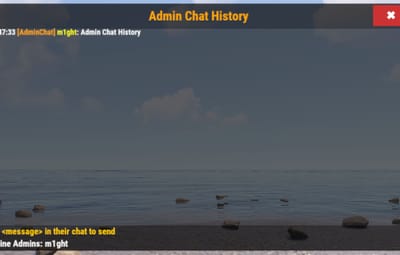
About AdminChat
AdminChat
Description:
AdminChat is a lightweight, clean, and professional plugin that gives your Rust staff a dedicated, private communication channel—both via in-game chat and a fully skinnable GUI panel. Whether you’re running a PvP server or an RP community, AdminChat keeps your admin conversations discreet and organized.
Key Features
- Admin-only chat via /ac <message>
-
Sleek GUI Panel opened with /acpanel, closed with the
 button or /acclose
Full Layout & Color Control
- Header / Content / Footer sections
- Configure every background & text color in the JSON
- Reposition the panel anywhere on-screen via PanelAnchorMin / PanelAnchorMax
- Move or center your header text via HeaderTextAnchorMin / HeaderTextAnchorMax
True 20-line Scroll History in the center content area, updating in real-time
Customizable Labels
- Rename “Admin Chat” header (HeaderText)
- Rename “Online Admins:” footer label (AdminsLabelText)
- Change /ac and /acpanel via config:
Automatic Panel Cleanup
- On /oxide.reload AdminChat, server restart, or player disconnect, all open panels close cleanly
- Message history and panel state are cleared per-player on disconnect — no memory leaks
Locale-Safe Rendering — UI renders correctly on servers running any system language (German, French, etc.)
Crash-Resistant Config — corrupted or invalid config files are caught gracefully with a warning and regenerated automatically
Permission-based — access via adminchat.use
Ultra-Lightweight & Optimized— History only stored for admins, automatic trimming, minimal performance impact
Configuration Example
{
  "CommandName": "ac",
  "PanelCommand": "acpanel",
  "CloseCommand": "acclose",
  "ChatPrefix": "[AdminChat]",
  "PrefixColor": "#00B3FF",
  "NameColor": "#FFCC00",
  "PanelAnchorMin": "0.30 0.30",
  "PanelAnchorMax": "0.70 0.70",
  "PanelBackgroundColor": "0.05 0.05 0.05 0.9",
  "MaxMessages": 20,
  "HeaderColor": "0.0 0.0 0.0 0.8",
  "ContentColor": "0.1 0.1 0.1 0.6",
  "FooterColor": "0.0 0.0 0.0 0.8",
  "HeaderText": "Admin Chat",
  "HeaderTextColor": "1.0 0.65 0.0 1.0",
  "HeaderTextAnchorMin": "0 0",
  "HeaderTextAnchorMax": "1 1",
  "HistoryTextColor": "1.0 1.0 1.0 1.0",
  "ReminderColor": "1.0 0.8 0.0 1.0",
  "AdminListColor": "0.0 1.0 0.0 1.0",
  "ReminderText": "Use /ac <message> to chat",
  "AdminsLabelText": "Online Admins:"
}
Commands :
- /ac <message> – Send a private admin chat message
- /acpanel – Open the AdminChat GUI panel
-
/acclose – Close the panel (or click )
Installation :
- Upload AdminChat.cs (v2.2.30) to your oxide/plugins/ folder.
- Delete or reset oxide/config/AdminChat.json so new fields appear.
- Reload in console/RCON:
- oxide.reload AdminChat
- Customize colors, positions, labels in oxide/config/AdminChat.json and reload again to apply.
If you need support, please join to our discord server!