Jekyll2026-02-03T20:11:47+00:00/feed.xmlBrian Donohue – Makin’ that InstapaperHi, I’m Brian. I’m originally from Fort Lee NJ, of Chris Christie Bridgegate fame, and spent several years living in Brooklyn NY before moving to Oakland CA. I went to college at a small, private technology school in Hoboken NJ called Stevens Institute of Technology, where I majored in Computer Science and graduated with High Honors. In my post-college professional life I’ve worked at a string of startups, including one I started that I refer to as “a great learning experience.” I was previously the CEO of Instapaper, where I also did all of the software engineering. In August 2016 Instapaper was acquired by Pinterest, where I continue to operate Instapaper.Surfacing Account Information & Filtering Spam in Zendesk2026-02-03T00:00:00+00:002026-02-03T00:00:00+00:00/2026/02/03/surfacing-account-information-filtering-spam-zendeskI spent the past week doing Instapaper support, which I do myself from time to time to get a sense of the top issues facing Instapaper customers and our support team.

There are two big problems with Instapaper’s customer support flow: going from tickets in Zendesk to Instapaper users to debug accounts, and dealing with the volume of spam that Instapaper support receives. This time I streamlined both with a bit of prompting in Claude.

Surfacing User Information

Instapaper has an admin panel for looking up user information, and a set of commonly needed tools for customer support to use on those accounts.

However, going from Zendesk to the admin panel is a cumbersome, multi-step process:

  • Click into the user information in Zendesk
  • Copy email address
  • Open Instapaper admin panel in a new tab
  • Paste the email address and press enter

After all that, sometimes you find that the user is writing from an email that doesn’t have an account associated with it.

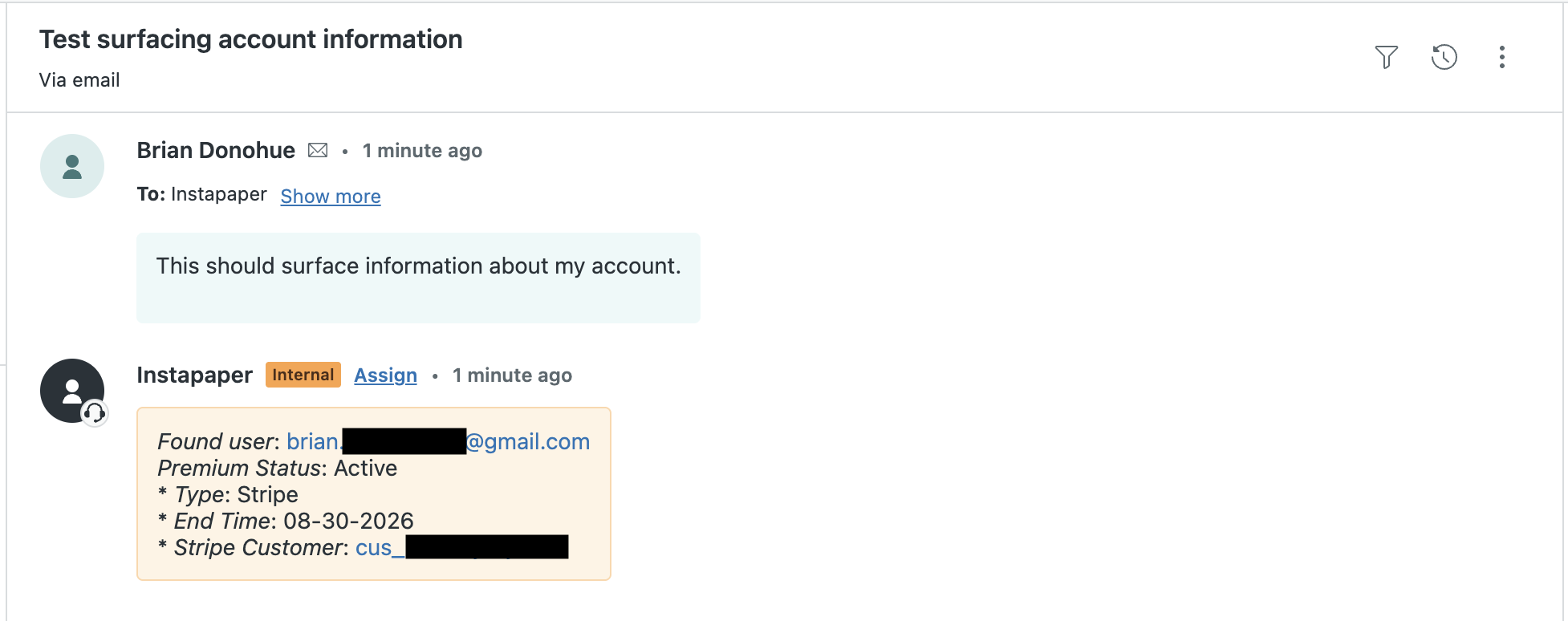
I1 implemented a webhook integration in Zendesk that executes on every new ticket, and checks to see if the sender has an Instapaper account. If the user has an account, the webhook creates a private comment on the ticket that contains a link to the admin portal, their subscription status, a link to their subscription in Stripe or Google Play if applicable, etc.

This has reduced a lot of steps from the Zendesk flow, and made customer support a lot more efficient.

Spam Filtering

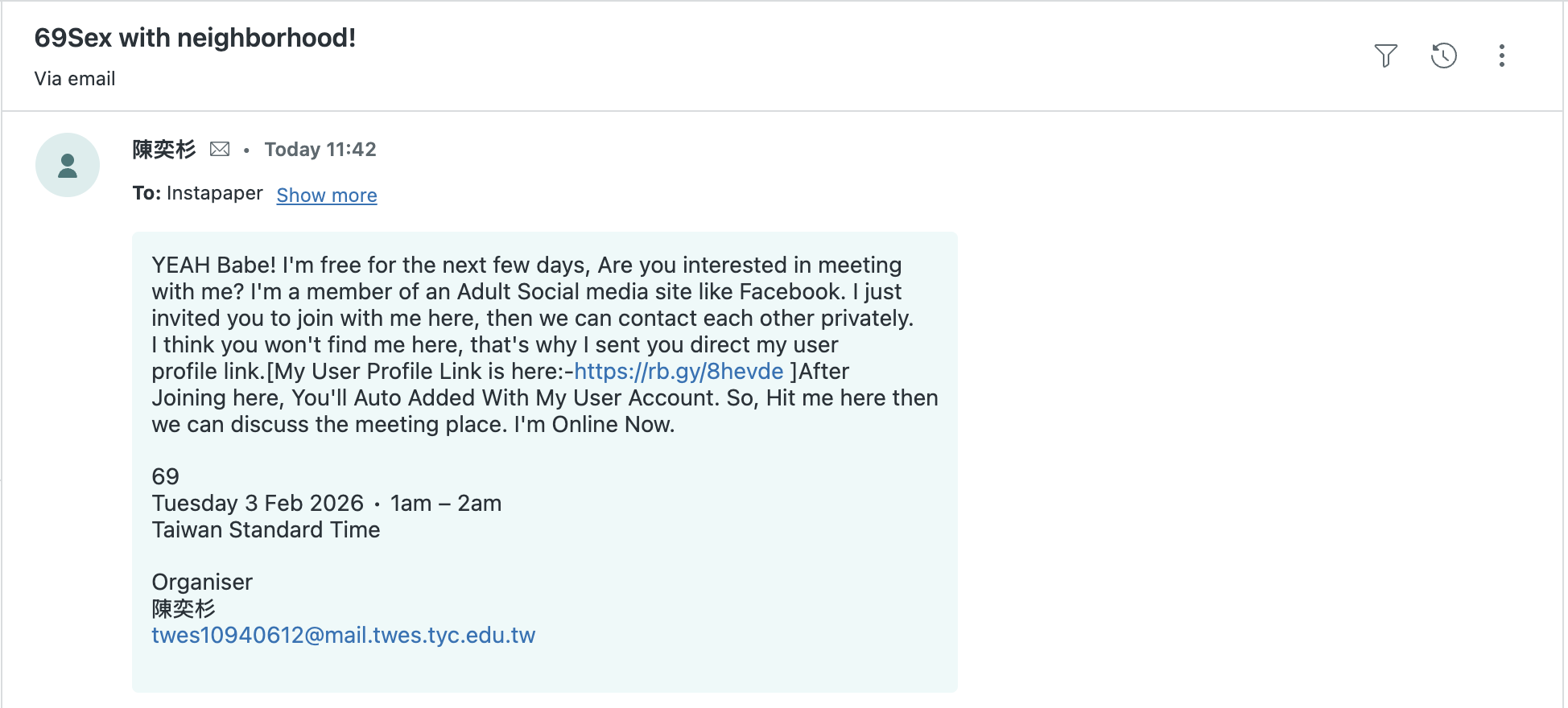
After years of publicly sharing our support email, Instapaper Support has accumulated quite a bit of spam that arrives daily into Zendesk. While Zendesk does have spam detection built-in, we’ve found it to be lacking—Zendesk routinely allows fairly obvious spam messages. For example:

In order to solve this, Claude helped me train a small model to do spam detection.

Spam Model Training Data

Because Instapaper deals with spam regularly in support, there are several thousand tickets that have been marked as spam from our support team, and I could extract those from the API. I was also able to create a “ham” (i.e. not-spam) dataset by pulling solved tickets from Zendesk.

After extracting both datasets I wound up with spam.csv and ham.csv, which contained the ticket_id, subject, and description.

Training the Model

For this use case, Claude recommended I use TF-IDF and Logistic Regression to return a value between 0 and 1 when providing the subject and message. I’m far from an expert, but my understanding is this is one of the most simple/straightforward approaches for doing this type of binary classification with text.

In addition to suggesting the approach, Claude wrote the code using sklearn, and the training resulted in a model with accuracy reported at 98%.

Testing Predictions

Claude also wrote the prediction code that loads in the model, and I extended the script to provide text from the command line.

After spot checking a few values for accuracy, I prompted Claude to write a script to grab the most recent Zendesk tickets, run each ticket through the model, and output detected spam based on a given thresholds (e.g. 50%, 75%, 85%).

I selected an 85% threshold, which missed some spam but caught the really obvious, frequent spam cases.

Integrating into Production

Before going to production, I checked the model size, memory footprint, and CPU usage. The model is ~800KB, increases memory usage by ~2% on ECS, and the predictions happen in 1 ms, which checks all of the boxes. After confirming it fit production requirements, I uploaded the model to an S3 bucket, and modified the predict function to lazy load the model from S3 instead of from disk.

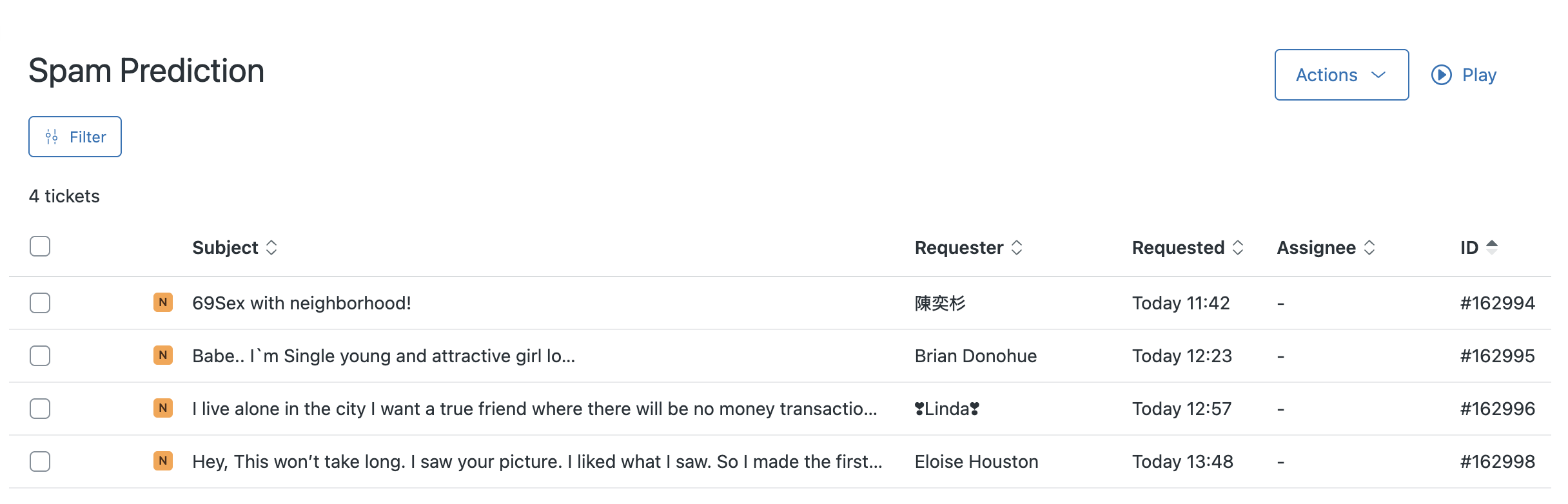
The last step was to extend the Zendesk webhook to check for spam only if the sender is not an Instapaper user. If the message is predicted to be spam, the ticket gets a “spam” tag added to it, and it’s moved from the main ticket queue to a “Spam Predicted” ticket queue. That queue gets reviewed by a human for false positives, and can then be dealt with in bulk without polluting the main support queue:

Concluding Thoughts

Since Going Full-Time on Instapaper, one of my major goals has to build a better understanding of machine learning. It’s getting a lot of easier in practice with tools like Claude, which help identify the right approach to a problem, build the solution, and streamline the entire process.

Last year, I followed Lesson 2 from Practical Deep Learning for Coders to build a Hotdog or Cheeseburger Image Classifier. That process helped build the foundation for understanding some of the core concepts implemented in the Spam Detection model, but building something even that simple took me many hours over several days.

With assistance from Claude, I was able to extract the data from Zendesk, train a model, check model quality, and deploy to production in 3-4 hours. It’s my first time training and deploying a simple classifier that uses first-party data to solve a real problem, and I’m excited to see the barriers lowering for training and deploying basic models.

  1. Or should I say Claude? 

]]>
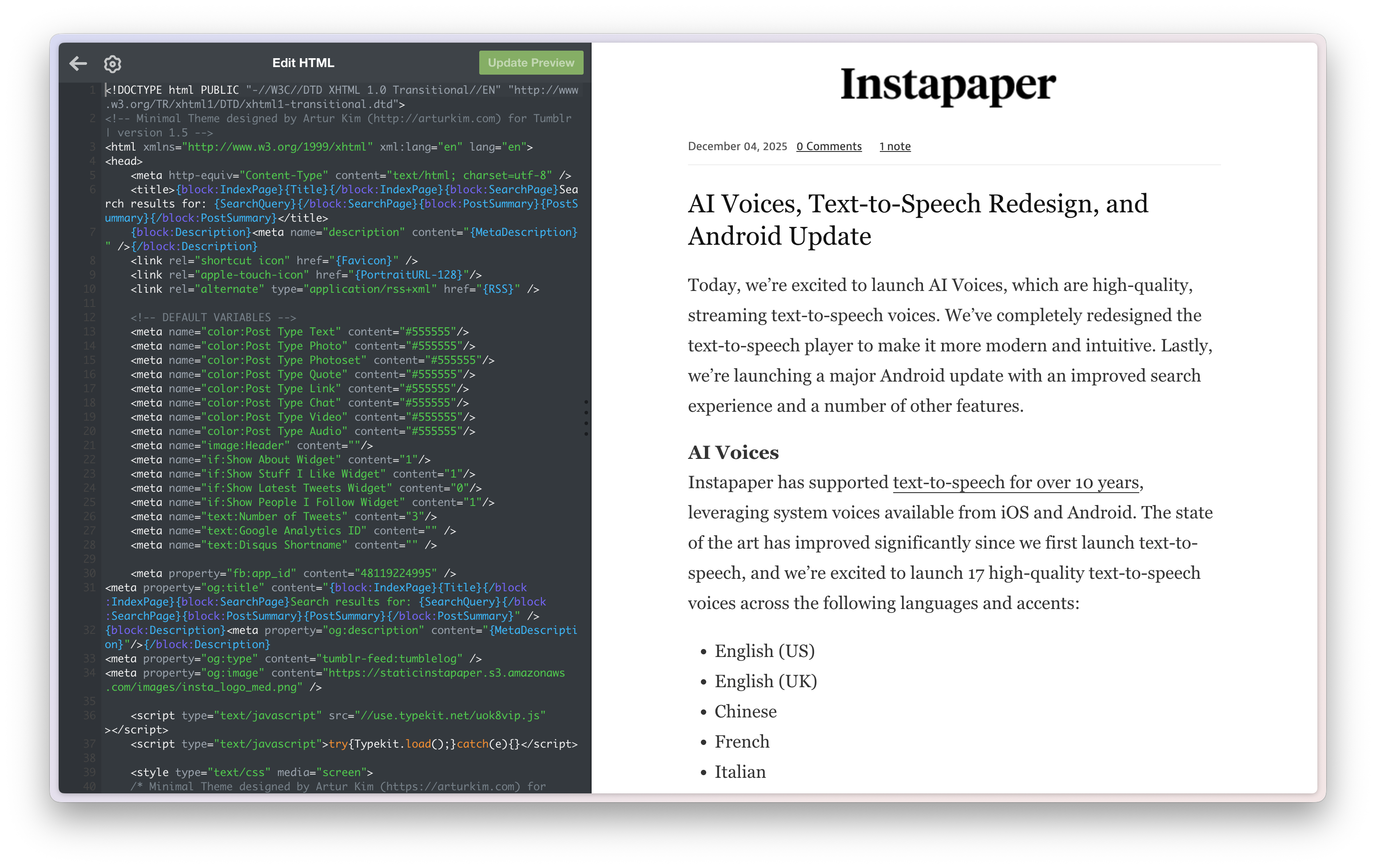
Au Revoir, Tumblr2026-01-08T00:00:00+00:002026-01-08T00:00:00+00:00/2026/01/08/au-revoir-tumblrAfter 18 years, the Instapaper blog is moving off of Tumblr in favor of Jekyll on GitHub Pages.

For several years now I’ve been really embarrassed about the state of Instapaper’s blog. It’s been simultaneously the lowest quality part of of our web presence, and also the place where we made our most important announcements. I had dreaded the idea of spending a lot of time migrating and modernizing it.

Thanksfully, AI made this a lot easier and accelerated the process. With a handful of prompts, I was able to get the entire migration and modernization done in just 2-3 days. Without AI, I think this easily could’ve taken me a few weeks to accomplish something similar and likely not as good.

Leaving Tumblr

There were several key reasons for migrating off Tumblr:

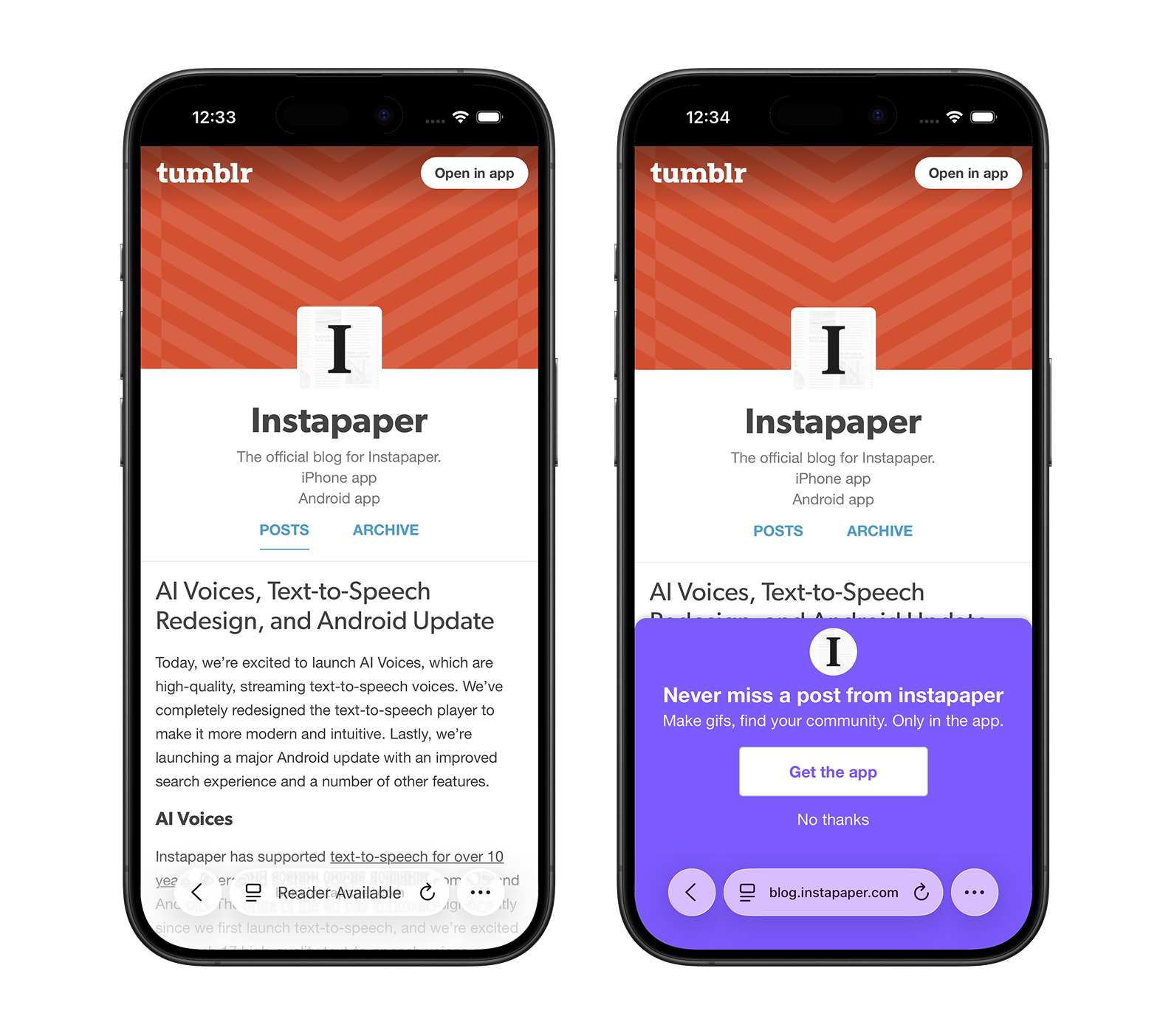
  • Mobile Theme Overrides: For a while now, Tumblr has been overriding custom themes on mobile devices, forcing Tumblr-specific theming that doesn’t match the desktop experience. This created a strange and inconsistent experience for our blog, especially where Tumblr is trying to market their own product on the blog where we’re marketing Instapaper.

  • Reduced Image Quality: When using the CMS, Tumblr resizes and reduces the quality of image uploads, and doesn’t allow for higher resolution images for retina devices. That meant a lot of our images, especially screenshots with text, looked blurry on the Tumblr blog. In the past, we could edit the HTML of the post directly and integrate our images from a self-hosted CDN, but at some point Tumblr started blocking that, too.

  • Theme Editor: The process of building and editing themes on Tumblr was always cumbersome, with a smallish editor in the left panel, no version control, and a lack of modern tooling.

Migration Process

The migration involved several steps to ensure we preserved all content and maintained link integrity.

Initial Import

I started by using the tumblr to Jekyll tool to download all blog posts as markdown.

Our #1 requirement was to preserve the original blog links. The Tumblr to Jekyll import tool includes a tumblr_url field in the frontmatter of each post. I used AI to write a script that included a permalink field in frontmatter containing only the path of the tumblr_url, which ensured that all existing links to the blog were preserved.

Importing Images

The Tumblr to Jekyll tool has an image download option, but I found it only worked on a portion of the images. I used AI to write a script that iterates over all posts, parses image URLs in the markdown, downloads the images to the img/ directory, and updates the URLs appropriately.

In 2018, I migrated my personal blog from Medium to Jekyll, and I had implemented a similar script. That script took me about 6 hours to write, and I had a moment of reflection about how amazing it was that the computer could now do the same in about 1-2 minutes.

Modernizing the Blog

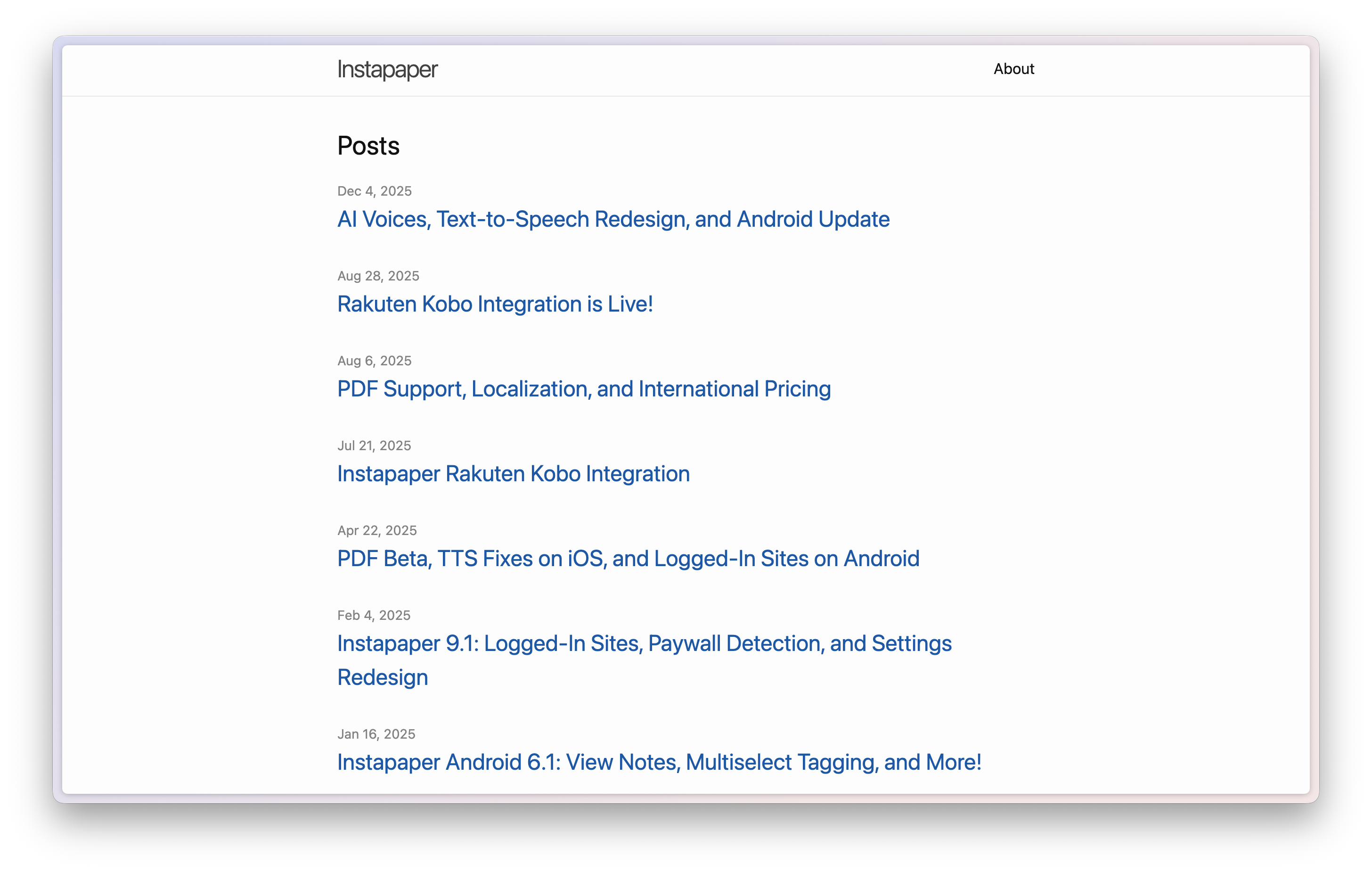
After getting all of the content into Jekyll, we had the unstyled blog above, and the last step was to style and modernize the blog.

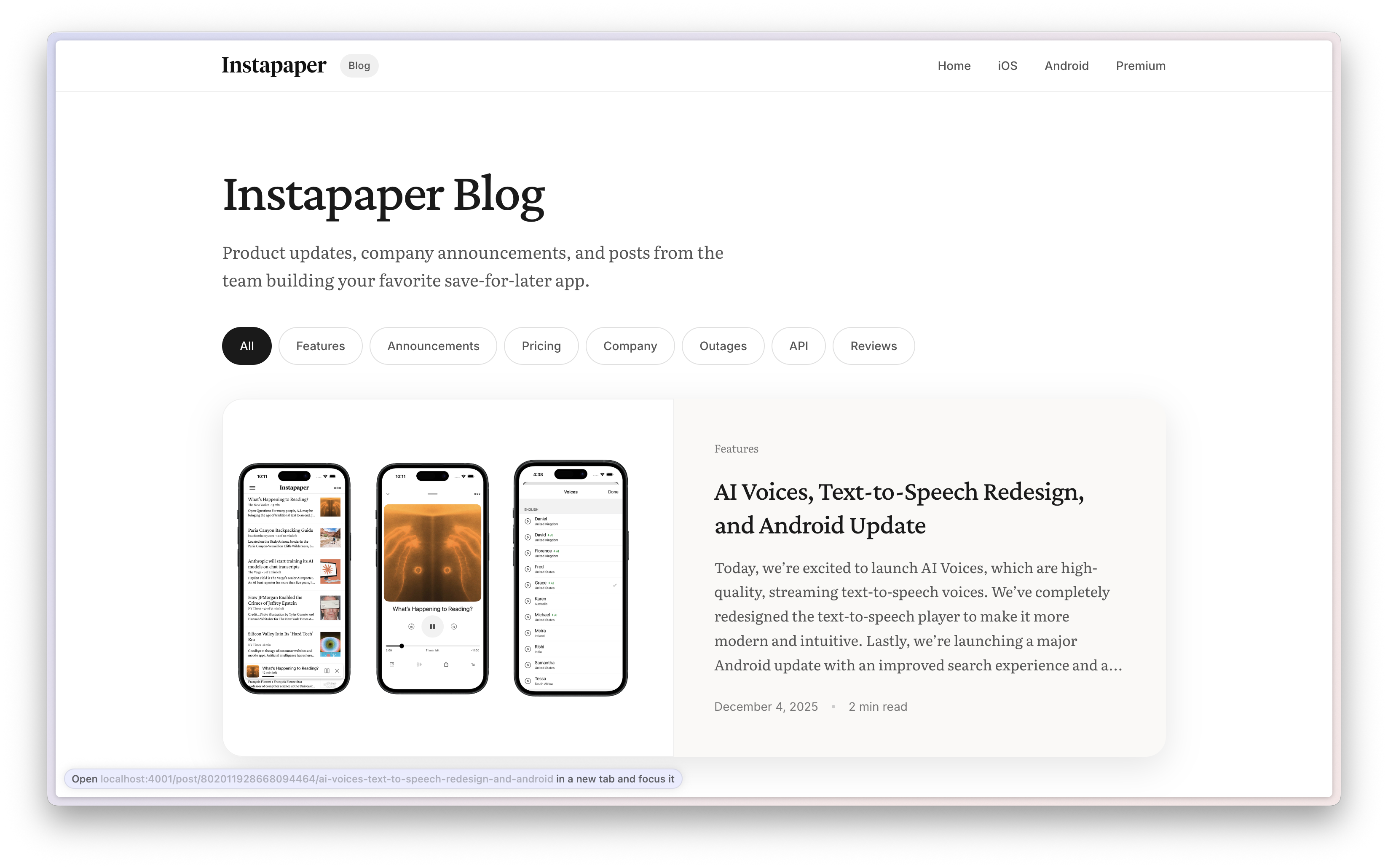
AI came to the rescue here too, and built a well-designed blog including typographic touches, animations, hover states, SEO integration, mobile support, and a clean, modern aesthetic that feels appropriate for 2026.

Categorizing the Blog

The blog contains hundreds of posts from the past 18 years, which were difficult or impossible to navigate previously. Without an explicit prompt from me, AI added some categories into Jekyll and built filtering on the website.

I manually refined the categories, then asked AI to write a script to categorize each blog post into one of those categories, and include the category in the post’s frontmatter.

It did a reasonable job and I went through once to edit the categories. It was fun to look back at categories like Company and see some early “Company announcements” like Marco sharing that he’s going on vacation. A little less fun to look back at a category like Outages and re-live some stressful moments in my life.

Going Live

After preserving the blog and modernizing it, the last step was switching DNS records from Tumblr to GitHub. In theory this should have been straightforward, but it took GitHub about 5 minutes to get the updated DNS records and generate an SSL certificate. In that time the blog was briefly offline.

Closing Thoughts

AI was the true MVP of the blog migration and modernization. This has been a task I have dreaded for years, and AI made it trivial to accomplish.

I was also somewhat amused that the scripts I had prompted the AI to write, like downloading the images into a folder and updating the image URLs in the posts, were generated so quickly and well that I just threw them away when I was finished. Contrast that to my effort to download the Medium images for this blog, which took 6-ish hours and I enshrined in its own repo. Times have changed!

The quality of the blog now matches the importance of the announcements that Instapaper has been publishing for the past 18 years. Au revoir, Tumblr.

]]>
Cora and Time Shifted Email2025-04-02T00:00:00+00:002025-04-02T00:00:00+00:00/2025/04/02/cora-time-shifted-emailFor the past two months, I’ve been using Cora, a website that connects to your Gmail and handles all of your email for you. Cora automatically organizes, labels, and archives your email. It then sends you a morning and afternoon digest with your emails to review.

It’s been a while since I can remember getting excited about an email product (Superhuman? Mailbox?), and email is a space that seems ripe for rethinking with the relatively new access to AI tools. I eagerly signed up for the waitlist, and got access to Cora.

Time-Shifted Email

When I started using Cora I recognized that it was in a lot of ways very similar to time-shifted reading apps like Instapaper. Instead of attempting to read/review each item as it comes in, there’s a place where they get stored, and then consumption happens all at once…. later.

My first impression using Cora was extremely high. I am an aspiring inbox-zero person, and I usually have about a dozen emails in my inbox at a time that are things I need to follow-up on eventually. I found that Cora eliminated the burden of a constant influx of emails into my inbox, and allowed me to analyze/manage my emails in bulk at specific periods of the day.

However, over the past few months I’ve experience enough gaps and pain points with Cora that I’m removing it from my workflow.

Missed Emails

Cora does not delete any emails, but I’ve found that by having most emails skip the inbox I’ve been completely missing important emails. Here’s just a few samples over the past 2 months:

  • Daughter’s daycare invoice
  • Common charges needed to pay for my neighbor
  • Coordinating a meeting with someone who provided times 1

I’ll admit that some of this is a human/me problem. That said, when you take every email and time-shift it for processing later, the person reading it is far, far more likely to hyper-skim the digest. The result where you miss important emails feels inevitable.

I do think an area Cora can improve is to stop trying to handle every email. Cora could do a lot better in differentiating unimportant, non-time-sensitive email from critically important and time-sensitive emails 2.

Some of the most frustrating experiences have been when I’m actively in an email exchange with someone, and Cora time-shifts that email such that I’m either not timely in a response or miss the response altogether.

Digest Pileups

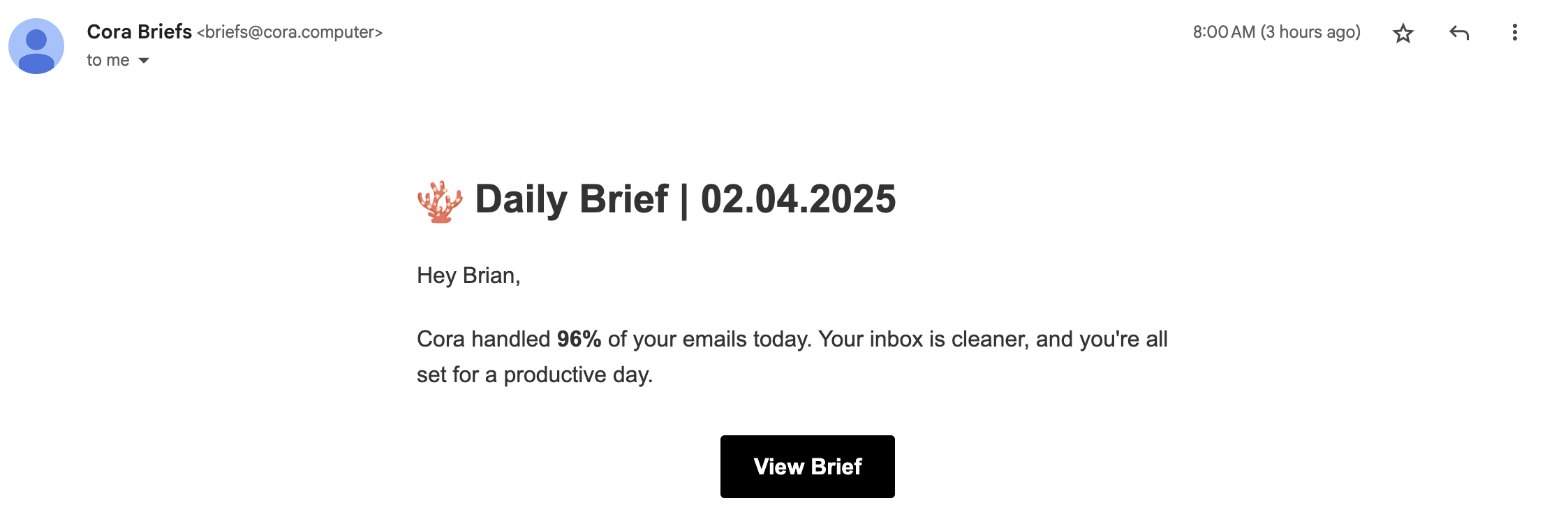
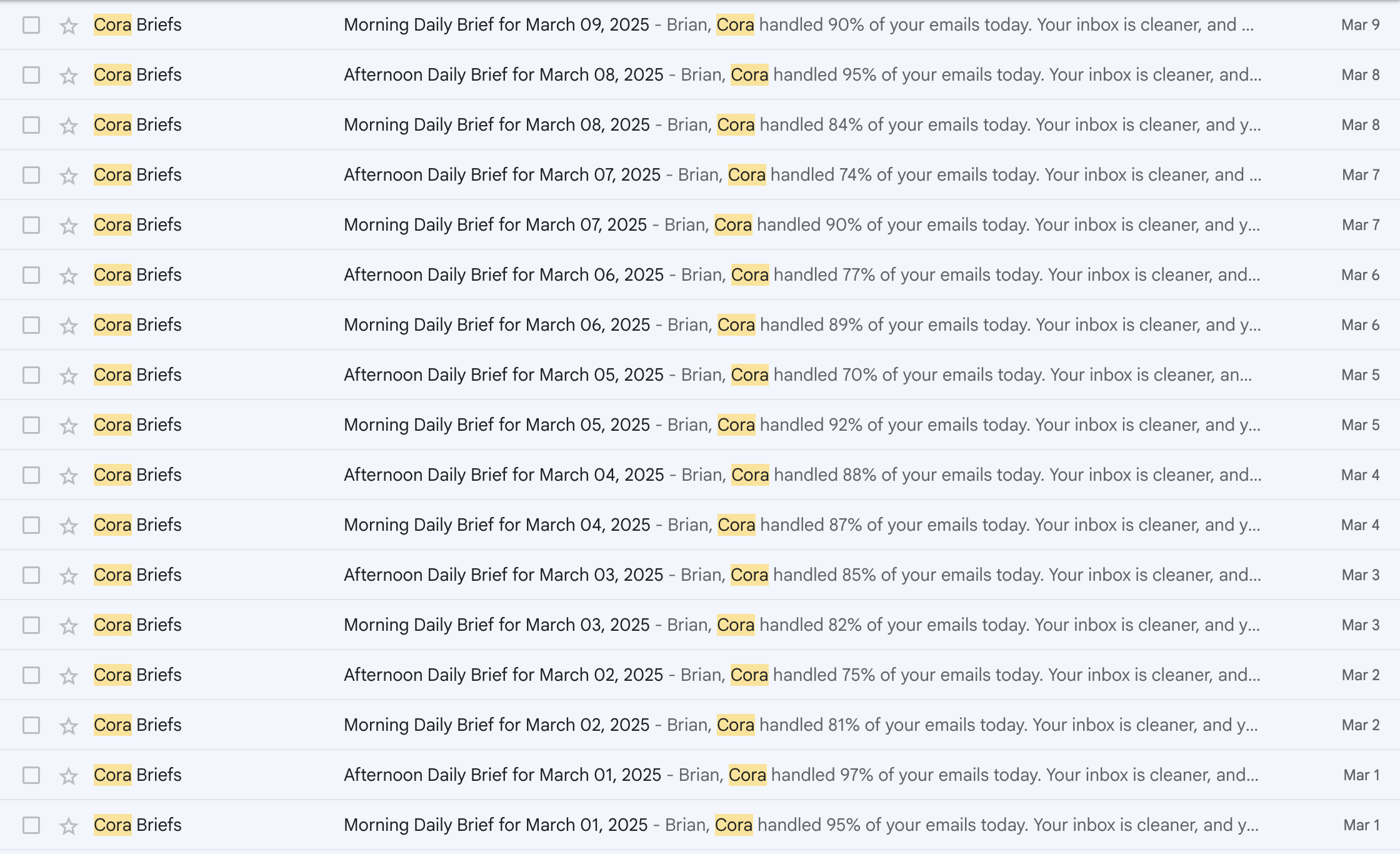
I went on vacation in early March. While on the one hand I was super happy to have Cora time-shift my emails during vacation, on the other I was super unhappy to come back to this experience:

Each of these digests has a “View Brief” button that takes you to the Cora website for viewing the digest. Going through your email like this is worse than just dealing with the emails as they come in 3.

On reflection, I could have also just gone to the “All Mail” tab in Gmail and navigated through a week’s worth of email. Not sure that’s much better.

Low-Quality Drafts

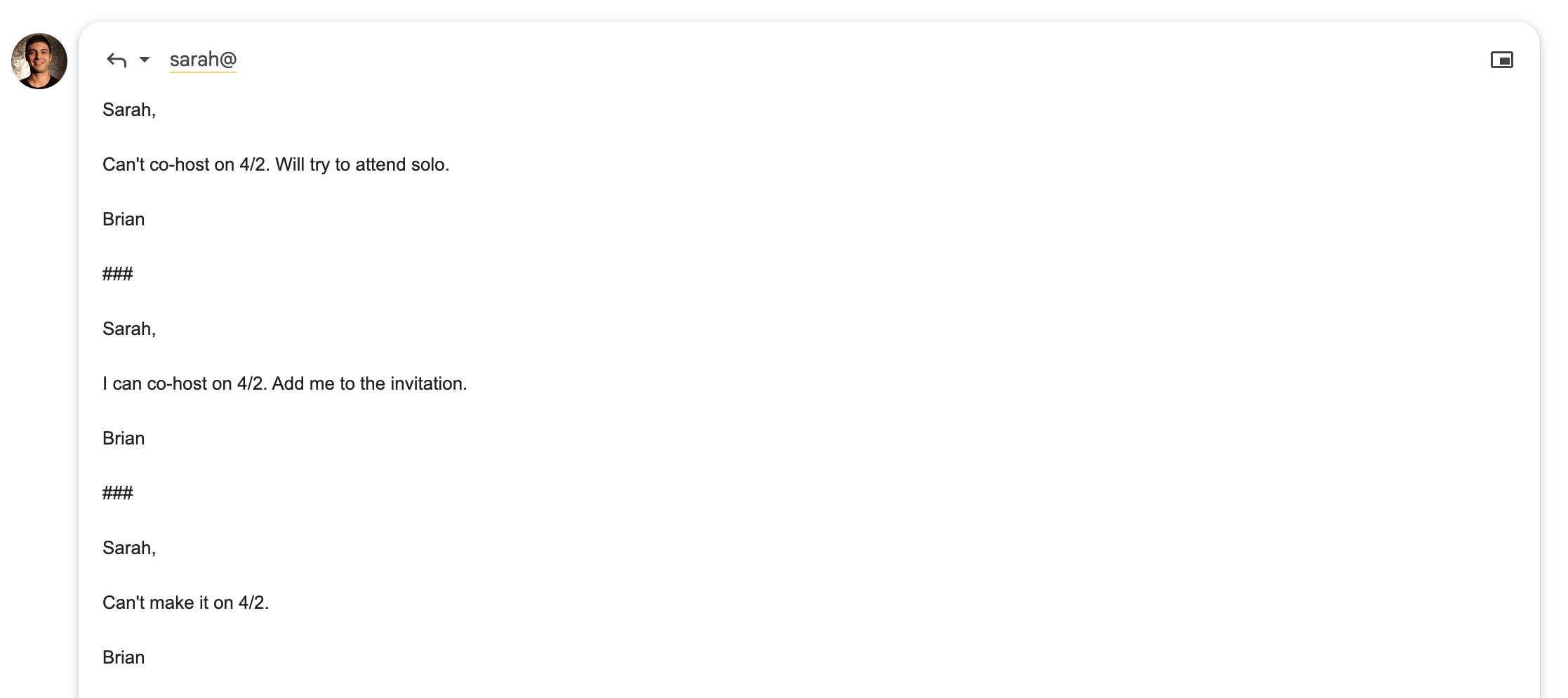
Cora attempts to draft email responses for you. I’ve found they’re pretty terse, impersonal, and usually not appropriate as a reply. In addition to that, it often drafts responses to email I would not personally reply to, like this invitation from the political campaign of a NYC-mayoral candidate to host a trivia night:

More bothersome than the bad drafts, which I usually wholesale delete when I do need to reply, is the mess it makes of your draft tab. I recently tried to go back to a draft I was working on, and it was buried under a bunch of other drafts Cora had attempted.

Lack of Integration into Email

A big challenge I’ve had with Cora is how unintegrated it is into email. It works in the background, archives your email, and then emails you a digest which links to the website.

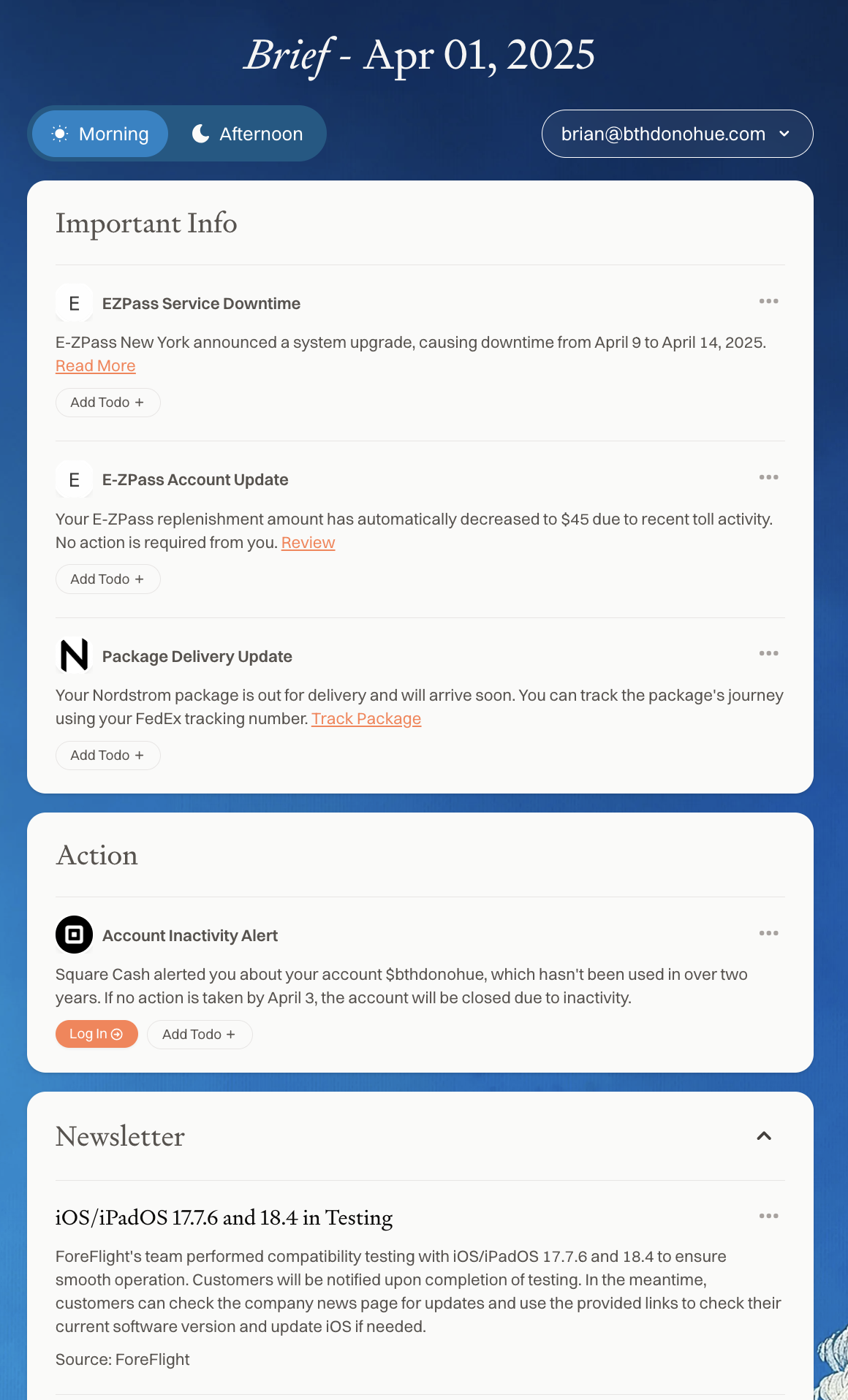
From the website, there is a feed of all of your emails. The feed is segmented by category, and uses different information architecture for each section which makes scanning more difficult.

For example, in the Newsletter section below you can see the email subject is at the top and the sender is below. When scanning this my first thought is “which app is in testing?”

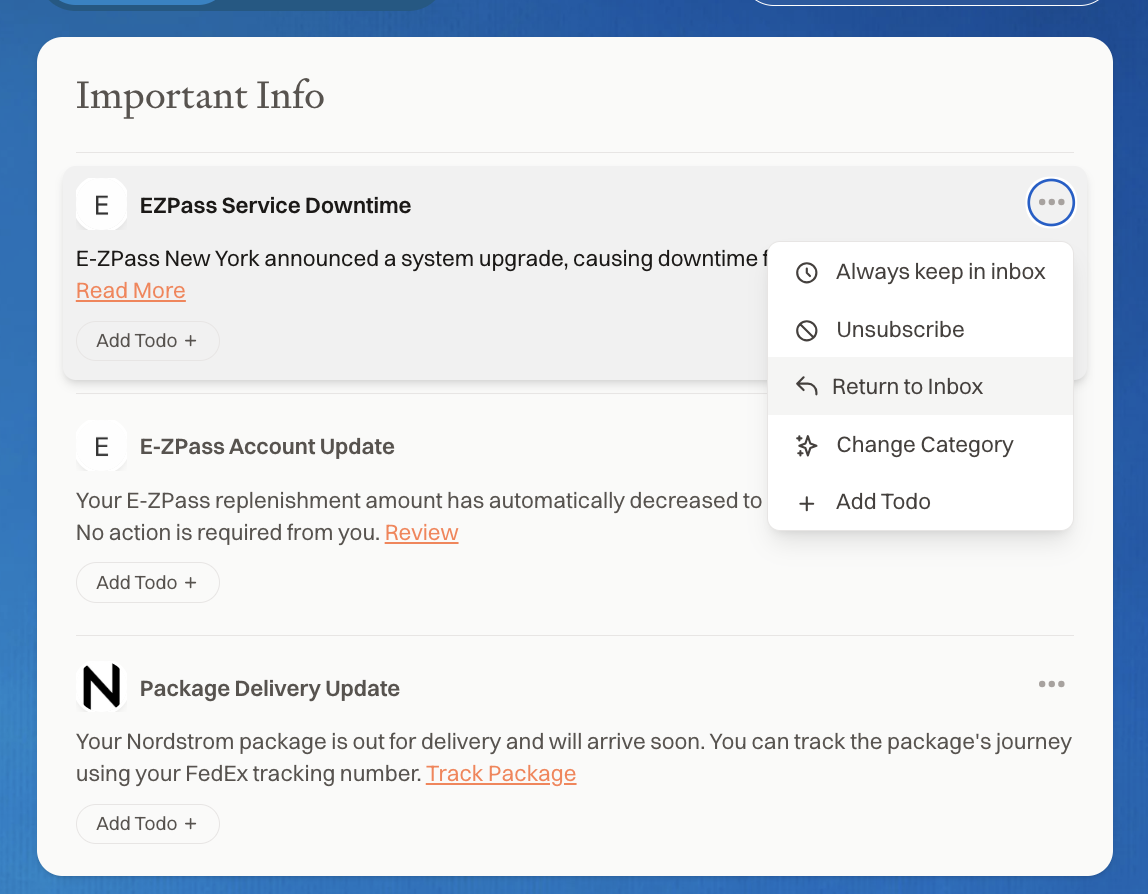
From the feed, you can open each email within the website, return the email to your inbox, or unsubscribe from the email. The unsubscribe function seems to only work within Cora itself, and doesn’t actually unsubscribe you from the email (just filters within Cora).

The biggest pain point with the website flow is on mobile. I’m periodically logged out of Cora from the Gmail in-app browser, requiring me to re-authenticate with Google sign in, which usually results in me just not reviewing digests on my phone/over the weekend 4.

Learnings

My biggest takeaway from using Cora is that 95% of the email I receive is trash. It’s unimportant stuff that takes my time and attention, and I should really aggressively unsubscribe from all the newsletters and things I think I want but actually do not. It’s obvious in hindsight but until using Cora I didn’t really appreciate that.

I also think time-shifted email will be a major, standard flow in the future, though I suspect the execution will be far more integrated directly into the email client versus separating the consumption into a separate website and dealing with the clunky flows that result.

I’ll be happy to try Cora again if/when these issues get resolved. If you’re building in the space, I’d be interested in trying your products, too!

  1. In this case, someone emailed me on Thursday at 11AM with times for a time-sensitive appointment for Friday. Their email got put into my “Afternoon Brief” delivered at 3PM. I read the brief at 5PM, and by then it was too late to lock in those times for Friday. It got pushed to Tuesday as a result. 

  2. And leave them in my inbox, please. 

  3. IMO, Even on vacation. 

  4. This further exacerbates the problems above with missed emails and digest pileups. 

]]>
Hotdog or Cheeseburger Image Classifier2025-02-05T00:00:00+00:002025-02-05T00:00:00+00:00/2025/02/05/hotdog-or-cheeseburgerOne of my goals this year is to teach myself Machine Learning.

I had the opportunity to work with a lot of ML engineers at Pinterest and DoorDash. Other than helping to define the problem, providing the inputs, and fetching the outputs, the whole process of building, training, and deploying models has been a black box to me…

It feels like it’s only going to become more important to understand how to build and deploy ML models over time.

My previous efforts to teach myself ML were mired in setbacks around the foundations. At some point during my Computer Science undergrad, I took courses in linear algebra and statistics, but haven’t used either extensively since final exams.

This time I came across Practical Deep Learning for Coders, which has been really helpful in terms of getting exposed to the concepts without being bogged down trying to teach myself all the math fundamentals to achieve the goal of training and deploying models.

As part of lesson 2, the material teaches how to train an image classifier, deploy to HuggingFace, and embed directly on a website. I trained this image classifier to identify images of hotdogs or cheeseburgers, which it does reasonably well. You can try it below:

As you can see, the model works with high confidence when provided images that are either hot dogs or cheeseburgers.

The pizza result predicts hotdog with lower confidence, which is also acceptable. I did try uploading a variety of other images, including a picture of a coffee cup that was predicted to be 100% cheeseburgers, so the model is pretty far from perfect.

You can upload your own images on HuggingFace Spaces. The code is available on GitHub and HuggingFace Spaces.

]]>
The Closed Web2025-01-22T00:00:00+00:002025-01-22T00:00:00+00:00/2025/01/22/closed-webI’ve been observing a growing shift toward a more Closed Web. At the core of this change appear to be fundamental shifts in the value exchanges between web publishers and technology platforms.

Given that Instapaper is a product that relies on the Open Web, I’ve been thinking a lot about this shift, the underlying causes, and the impact to Instapaper & similar Open Web products.

1. Shift to Subscription Models

Over the past decade, the media industry has heavily shifted the way they monetize content from ad-supported models toward subscriptions. The NYTimes paved the way here with their leaky paywall, which introduced some friction to customers, but largely left the content available and accessible on the open web.

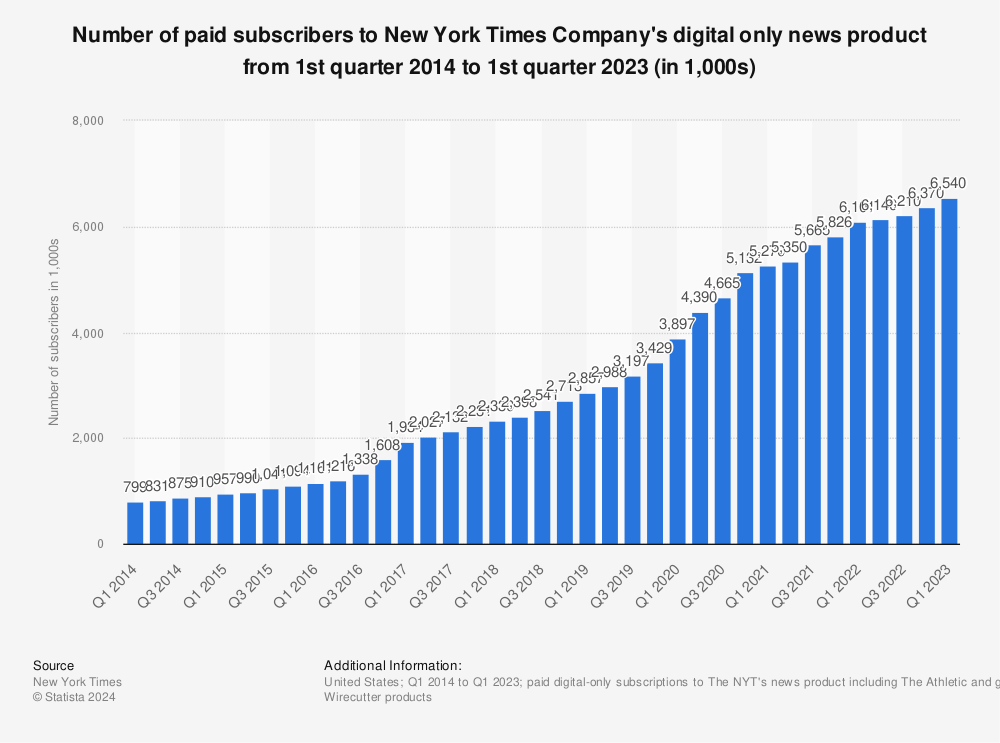
In the past 10 years, NYTimes grew their digital-only subscribers from 800k to 6.5M for their news product, and reported over 10M digital subscriptions across all their products, and surpassing $1B in revenue from digital subscriptions in ’23.
On the coattails of the NYTimes success, many of the large media companies have followed suit. Additionally, entire tech platforms have been built on the back of the shift to subscriptions including companies like Substack and Patreon.

Subscription-based content marks a fundamental shift from the value model that defined the early days of the Open Web. Back then, monetization was largely ad-driven; the goal was to attract as much traffic as possible, maximize links, and minimize friction for visitors.

In today’s more Closed Web, it’s nearly impossible to browse the web without a barrage of paywalls with CTAs to enter your email and subscribe.

2. Rise of Large Language Models

In late 2022, OpenAI launched ChatGPT, marking the beginning of the Large Language Model era. The biggest challenge in Machine Learning is always around collecting large amounts of high-quality data for training, and OpenAI did something fairly novel. They used the Transformer framework published by Google, trained it on web-scale data, and launched it as ChatGPT.

Unlike earlier web-scale platforms such as Google, ChatGPT emerged as an AI presented as all-knowing, leveraging knowledge sourced from the Open Web without linking and driving traffic to original sources. In doing so, ChatGPT disrupted the established value exchange that has long underpinned the Open Web.

And web publishers are pissed. In late ’23, NYTimes launched a lawsuit around OpenAI and Microsoft’s use of their copyrighted data in training these models claiming billions of dollars in damages.

Last year Apple announced their AI offering. As part of the announcement, Apple shared that the training data was collected from the Open Web using Applebot (previously only used by Siri and Spotlight). This came as an unexpected surprise to Apple bloggers who are sometimes critical, but generally extremely loyal to Apple. From Federico Viticci at Macstories:

Everything was cool until they mentioned how – surprise! – Applebot had already indexed web content to train their model without publishers’ consent, who can only opt out now. (This was also confirmed by Apple executives elsewhere.)

As a creator and website owner, I guess that these things will never sit right with me. Why should we accept that certain data sets require a licensing fee but anything that is found “on the open web” can be mindlessly scraped, parsed, and regurgitated by an AI? Web publishers (and especially indie web publishers these days, who cannot afford lawsuits or hiring law firms to strike expensive deals) deserve better.

Increasingly I’ve noticed that LLMs like ChatGPT and Gemini from Google are providing LLM responses while also citing sources, and I’m hopeful that this will provide a balance between the convenience offered to end users and the value exchange publishers expect.
3. Bot Detection and Blocking

There’s been an increasing effort around bot detection and blocking traffic from “bots”. There are likely a few factors converging here, but I suspect an important one is the use of open web data to train large language models.

In late ’23 and early ’24 , I received a flood of reports that Instapaper was being blocked by the NYTimes. After digging in, I noticed NYTimes started using DataDome to prevent bots from accessing their website. DataDome appears to be a relatively small company that promises to “Detect and mitigate bot & online fraud attacks with unparalleled accuracy and zero compromise.” The timing seems to line up with the NYTimes OpenAI lawsuit.

It goes without stating that the NYTimes should serve traffic (or block traffic) to whomever they see fit. That said, I’d like to think that the intention of implementing bot detection is not to block their subscribers from saving articles to a service like Instapaper1.

These bot-blocking companies really throw the Open Web baby out with the bot traffic. They will often offer a Verified Bot Program whose requirements are opaque. For example, I reached out to DataDome customer support to inquire about their Verified Bot Program. I was told that Instapaper needed a DataDome customer to ask DataDome to allow Instapaper otherwise we’d continue to be blocked from all websites they support. 2

In addition to the platform approach to blocking “bot” traffic, smaller independent bloggers are putting together posts about blocking AI crawlers:

Of course, these techniques require that companies adhere to robots.txt and/or provide an identifiable User-Agent. From The Verge:

In theory, Perplexity’s chatbot shouldn’t be able to summarize WIRED articles because our engineers have blocked its crawler via our robots.txt file since earlier this year. This file instructs web crawlers on which parts of the site to avoid, and Perplexity claims to respect the robots.txt standard. WIRED’s analysis found that in practice, though, prompting the chatbot with the headline of a WIRED article or a question based on one will usually produce a summary appearing to recapitulate the article in detail.

While I understand and appreciate the concern from the publishers3, I am concerned we’re moving toward a Web where access is deny-by-default instead of allow-by-default. Further, I’m concerned about the impact that will have on the accessibility, innovation, and openness of the web.

4. Closed APIs

A hallmark of the Web 2.0 era was open APIs. There was almost an implicit expectation that any Web 2.0 service would have an open API where application developers could build new programs/services/bots, and users could access their content outside the confines of the walled-garden nature of the Web 2.0 services.

More recently, there’s been a trend toward closed APIs that has been at least partially inspired by the rise of Large Language Models.

In February ’23, Twitter started the trend of closing their API to a more limited, paid-only version. At the time it seemed that the motivation was to shutdown the ecosystem of third-party Twitter Reader applications that existed since Twitter’s inception, but shortly after Elon sent some tweets to suggest that it was at least partly motivated to limit companies use of tweets as training data:

Shortly afterward in April ’23, Reddit announced a similar change to a closed, paid-only version of the API. A few months later, Reddit CEO confirmed this was inspired by Twitter’s shuttering of third-party app ecosystem:

Huffman said he saw Musk’s handling of Twitter, which he purchased last year, as an example for Reddit to follow.

“Long story short, my takeaway from Twitter and Elon at Twitter is reaffirming that we can build a really good business in this space at our scale,” Huffman said.

“Now, they’ve taken the dramatic road,” he added, “and I guess I can’t sit here and say that we’re not either, but I think there’s a lot of opportunity here.”

But it’s also clear that a major motivation for Reddit was limiting access to companies like OpenAI from using Reddit comments as training data:

“The Reddit corpus of data is really valuable,” Steve Huffman, founder and chief executive of Reddit, said in an interview. “But we don’t need to give all of that value to some of the largest companies in the world for free.”

Since then Reddit has struck content licensing deals with both Google ($60M) and OpenAI (undisclosed).

With these more limited, paid-only APIs, we are likely to see less innovation and competition from companies building on other platforms. After seeing what happened with products like Tweetbot and Apollo, I’d personally be hesitant to build on anyone else’s platform ever again.

5. Slowing Growth

In 30 years the number of users on the web went from 15 million to over 5 billion today. It has been a period of remarkable growth and adoption. In the wake of that growth, some of the largest companies of all-time were built like Amazon, Google, and Facebook, and countless others capitalized on that growth and adoption.

However, as the number of Internet users surpasses 68% of the total population the opportunities for free growth are shrinking. The average growth rate over the past 5 years has been 6%, versus 11% in the prior 5 years.
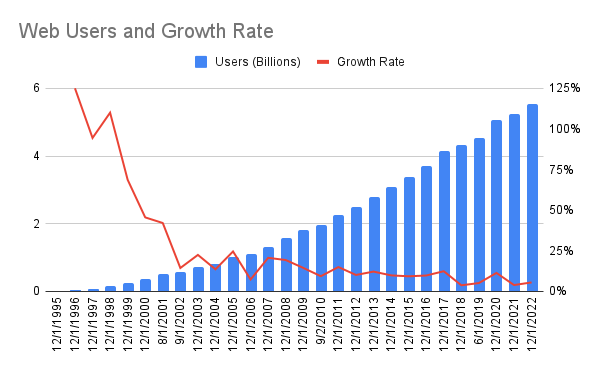
It’s impossible to correlate the overall macro trend with the shifts we are seeing on the web, but I hypothesize there’s a relationship between the web’s growth rate and the trend toward a more closed web.

It seems more likely that with double-digit yearly growth, people and companies are more open to offering their products with low friction to drive higher usage and adoption. As growth slows, people and companies are more focused on capturing value from the existing users.

Impact on Instapaper & Open Web Products

Instapaper enables users to save links for later reading, relying on the Open Web to display links and their content effectively. Closed Web trends like the rise of paywalls, bot-blocking measures, and restricted APIs pose a significant threat to Instapaper and similar services that depend on an Open Web.

Recent analysis of parsing failures on Instapaper revealed that ~75% stemmed from the platform being unable to access content. While paywalls were a contributing factor, bot blockers increasingly caused issues, returning 403 Forbidden errors that even blocked access to basic metadata like titles, descriptions, and thumbnails.

This shift has been a personal source of anxiety, raising concerns about Instapaper’s long-term viability if these trends persist.

I’m happy to share that we’ve largely addressed this challenge and will be rolling out an update to Instapaper in the coming weeks. Our solution respects paywalled content while ensuring subscribers can access their content when saved to Instapaper. More details will be shared when the update launches, and I plan to write a follow-up here afterwards.

That said, the broader trend toward a more Closed Web remains deeply concerning. These barriers threaten the broader ecosystem of Open Web innovation. Without open access, it may become difficult to build new link-based products, thereby stifling innovation on the web.

  1. Instapaper only accesses content when a user saves it, and does not systematically scrape websites for other purposes.

    Additionally, Instapaper is very small scale relative to NYTimes’ digital subscription base, and the majority of people saving articles are NYTimes subscribers. 

  2. If you, dear reader, are a customer or employee of DataDome please do get in touch with me directly

  3. And again, it’s their right to block whomever. 

]]>
Microservices are Technical Debt2024-09-26T00:00:00+00:002024-09-26T00:00:00+00:00/2024/09/26/microservices-are-technical-debtMatt Ranney, a Principal Engineer at DoorDash, recently gave an interview called Microservices are Technical Debt. I had the opportunity to work with Matt at DoorDash, and we had a lot of conversations on this topic 1.

Are microservices technical debt?

I was strongly in the less-but-better-microservices camp at DoorDash. Like many things, there’s a balance to be struck. Microservices 2 are critical to any web-scale system. That said, when you start to microservice all the things you tend to trade one set of problems for another, and they are not necessarily an easier set of problems to deal with 3.

The thing I liked most about the statement Microservices are Technical Debt is that it’s provocative enough to start the right conversation. I do agree that a microservices-only architecture likely introduces more challenges and technical debt than it’s worth.

  1. Occasionally over several beers :-) 

  2. Maybe we should just call them “services”? 

  3. For instance you might take your monolith spaghetti code and turn it into distributed systems spaghetti instead. The former is a lot easier to fix and work with, IMO. 

]]>
Multi-Level Summarization in Instapaper2024-04-24T00:00:00+00:002024-04-24T00:00:00+00:00/2024/04/24/multilevel-summarization-instapaperToday Instapaper launched Summaries, which is a feature I’ve wanted to build for a long time. Summaries help readers both understand an article before reading it, and help them recall the details of previously read articles.

Building summarization features has become a whole lot easier with new tools and APIs, and this post will outline the technical details on how Instapaper generates its summaries.

Instapaper Summaries are generated using a multi-level summarization technique, where the summary is generated in two steps:

  1. Extractive Summarization: Most relevant sentences extracted from the text.
  2. Abstractive Summarization: Generate an independent summary from the extracted sentences.

Below we’ll dive into the technical details on each step and how it comes together in the product…

Extractive Summarization

Extractive Summarization is a technique to create a summary by extracting portions of the provided text.

For instance, Instapaper Summaries use TextRank for Sentence Extraction, which is based on the premise that the most relevant sentences have the most similarity to other sentences in the document. The algorithm identifies the most relevant sentences by constructing a graph where every node is a sentence, and sentences are connected by similarity based on overlapping words.

Instapaper uses an open source library to build the graph using the TextRank algorithm, grabs the top 15 sentences (or fewer when fewer are returned), and then sorts them in the order they appear in the text. In the application code:

def key_sentences(text, num_sentences=15):
    scored_sentences = textrank(text)

    # Create dictionary with score and index
    index_scored_sentences = [{'sentence': s[0], 'score': s[1], 'index': i} for i, s in enumerate(scored_sentences)]

    # Sort by score and grab top N
    index_scored_sentences.sort(key=lambda d: d['score'], reverse=True)
    top_scored_sentences = index_scored_sentences[:num_sentences]

    # Sort again by the original order/index and return only sentences
    top_scored_sentences.sort(key=lambda d: d['index'])
    return [d['sentence'] for d in top_scored_sentences]

In testing I often used Eugene Wei’s Status-as-a-Service blog post, which is both an excellent read, and an extremely long read. It clocks in at almost 20k words, 550 sentences, and would take the average reader over an hour to read.

Using TextRank we’ll extract the most relevant sentences from Status-as-a-Service. The table below includes the top 15 most relevant sentences in the article, and the position of each sentence in the article. If you look at each sentence’s position you’ll notice that, while not perfectly uniform, the highly ranked sentences are well distributed throughout the article.

Sentence Position in Article
A social network like Facebook allows me to reach lots of people I would otherwise have a harder time tracking down, and that is useful.
7%
So, to answer an earlier question about how a new social network takes hold, let’s’ add this: a new Status as a Service business must devise some proof of work that depends on some actual skill to differentiate among users.
19%
If I were an investor or even an employee, I might have something like a representative basket of content that I’d post from various test accounts on different social media networks just to track social capital interest rates and liquidity among the various services.
23%
Otherwise a form of social capital inequality sets in, and in the virtual world, where exit costs are much lower than in the real world, new users can easily leave for a new network where their work is more properly rewarded and where status mobility is higher.
26%
The same way many social networks track keystone metrics like time to X followers, they should track the ROI on posts for new users.
27%
Maintenance of existing social capital stores is often a more efficient use of time than fighting to earn more on a new social network given the ease of just earning interest on your sizeable status reserves.
41%
This bottom right quadrant is home to some businesses with over a billion users, but in minimizing social capital and competing purely on utility-derived network effects, this tends to be a brutally competitive battleground where even the slimmest moat is fought for with blood and sweat, especially in the digital world where useful features are trivial to copy.
49%
In fact, it’s usually the most high status or desirable people who leave first, the evaporative cooling effect of social networks.
59%
As with aggregate follower counts and likes, the Best Friends list was a mechanism for people to accumulate a very specific form of social capital.
66%
Still, given the precarious nature of status, and given the existence of Instagram which has always been a more unabashed social capital accumulation service, it’s not a bad strategy for Snapchat to push out towards increased utility in messaging instead.
69%
One way to combat this, which the largest social networks tend to do better than others, is add new forms of proof of work which effectively create a new reserve of potential social capital for users to chase.
70%
Engagement goals may drive them towards building services that are optimized as social capital games, but they themselves are hardly in need of more status, except of a type they won’t find on their own networks.
79%
It’s strange to think that social networks like Twitter and Facebook once allowed users to just wholesale export their graphs to other networks since it allowed competing networks to jumpstart their social capital assets in a massive way, but that only goes to show how even some of the largest social networks at the time underestimated the massive value of their social capital assets.
88%
He accumulated millions of followers on Instagram in large part by taking other people’s jokes from Twitter and other social networks and then posting them as his own on Instagram.
89%
Twitter is another social network where people tend to bring interesting content in the hopes of amassing more followers and likes.
92%

Leveraging this technique we’ve been able to generate an extractive summary that reduces the article by 98% to 550 words.

If you’ve read the post previously, I’m sure the above sentences will jog your memory. In addition to being a great tool for initially evaluating an article, it’s a great way to recall an article for the key points and easily jump between them.

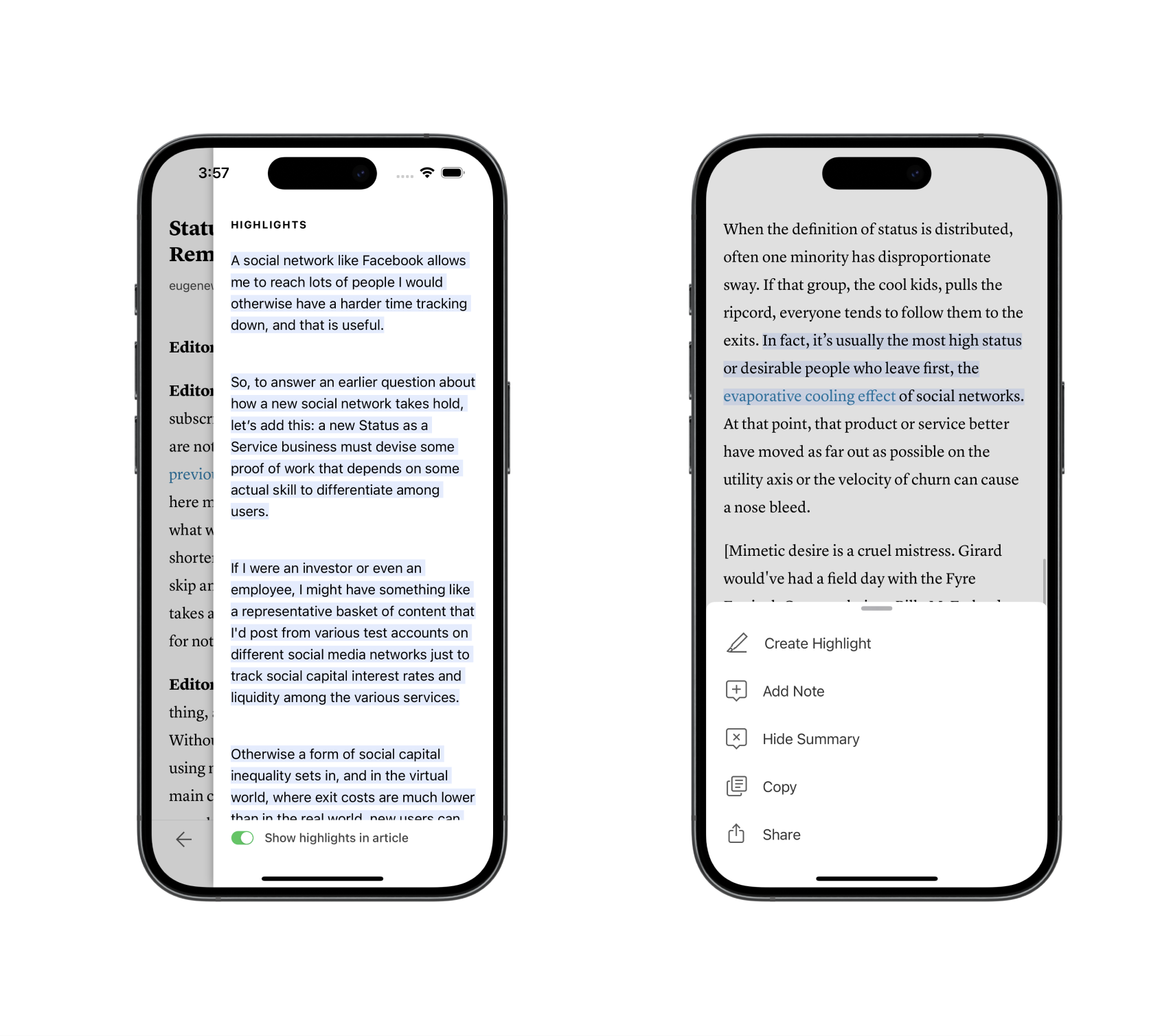
Extracted Summary is shown as “Summary Highlights”. Readers can tap each highlight to navigate to the highlight in the article. It also connects to Instapaper's other features like highlights and note taking.

Extractive Summarization Performance

When building Instapaper Summaries, performance was a major consideration, and each component of the summarization process had performance evaluations around time, cost, and quality.

TextRank Sentence Extraction is a deterministic graph-based ranking algorithm, and its performance is directly correlated with the amount of text provided. Below is a table containing a selection of articles, the number of sentences in each article, and the time it took TextRank to generate the extractive summary.

Article Sentences Est. Read Time Time
The Mystery of White Rural Rage 33 5 min .06s
Why Substack is at a crossroads 146 15 min .4s
The Pain Hustlers 325 35 min 1.5s
Status as a Service 547 82 min 7.3s

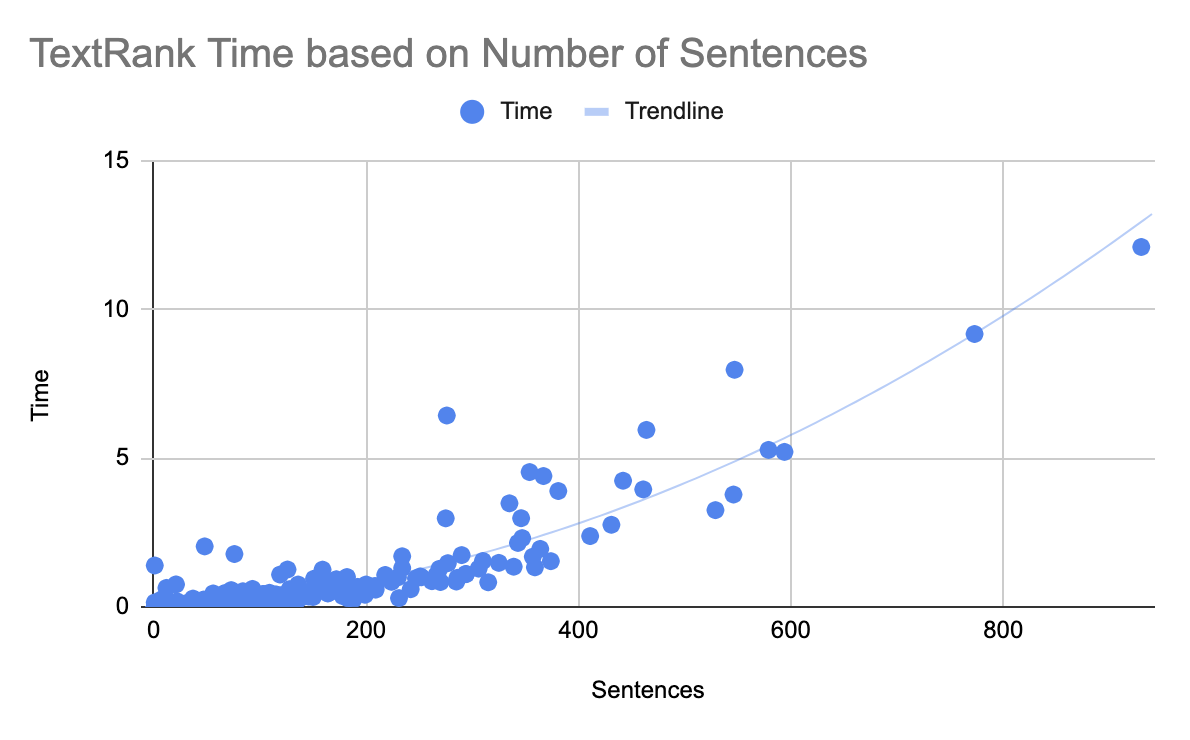
Graphing a sample of 1,000 articles from Instapaper, we can see the majority of articles have less than 400 sentences, and those mostly complete within a second:

Below are the mean, median, and P95 for the 1,000 articles in the dataset evaluated:

Stat Sentences Est. Reading Time Time
Mean 63 8 min .25s
Median 36 5 min .05s
P95 234 26 min 1.01s

While the results are effective and create the right product experience, this call is expensive for longer articles.

In order to prevent server-side performance issues, I rely on a few factors:

  • TextRank Sentence Extraction runs on compute-optimized machines that can withstand longer running tasks (i.e. not our API/web servers).
  • Sentence extraction for large articles is done asynchronously, and the results are stored to prevent recomputing them.
  • There is caching in place for all sentence extraction.
  • Very few articles saved to Instapaper are more than 30 minute reads.

Abstractive Summarization

I evaluated a few abstract summary models including pegasus-xsum, t5, ChatGPT-3.5 Turbo, and ChatGPT-4 to generate abstract summaries of the articles. At this stage, the model evaluation was done mostly on the quality of the response and ignoring other factors like time and cost.

Based on the results from a small sample of articles, it’s clear that ChatGPT is the winner here. Given similar quality and less cost, we opted to use ChatGPT-3.5 Turbo instead of ChatGPT-4. Notably absent from the evaluation were other LLMs like Llama from Meta and Claude from Anthropic. Once I found that ChatGPT generated great summaries, I stopped evaluating additional models.

Long-term, I would like to bring the abstract summary closer to Instapaper’s infrastructure, especially given we can likely tune a model only focused on summarization that can potentially be smaller and faster than more general purpose LLMs.

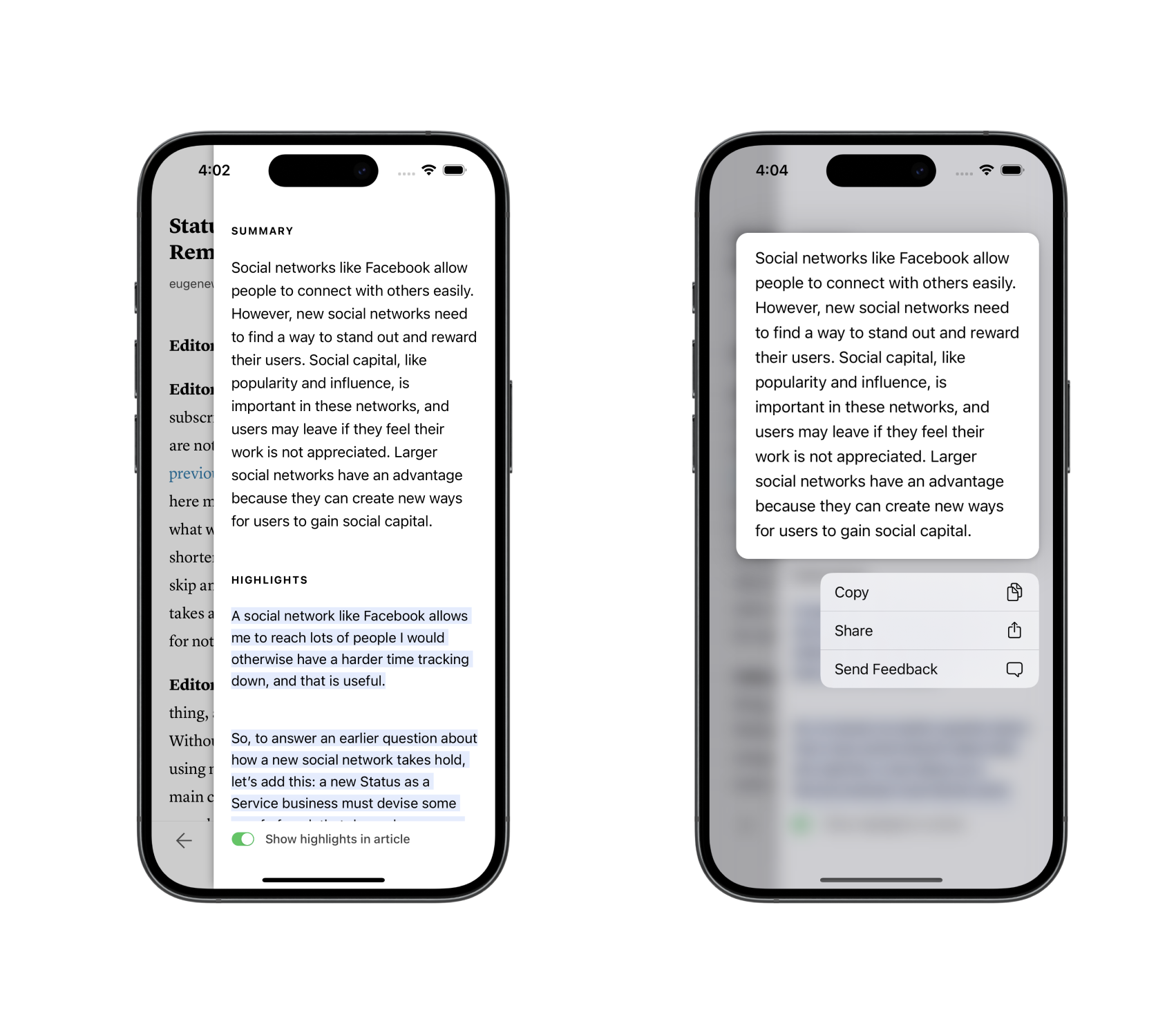
In the product, the abstract summary is shown above the summary highlights. Long press on the abstract summary provides the reader with some options.

Using Status-as-a-Service against ChatGPT, there’s an issue with the size of the text provided. Here’s the response from the Completions API:

This model’s maximum context length is 16385 tokens. However, your messages resulted in 23607 tokens. Please reduce the length of the messages.

This seems to be a fairly common problem, and I quickly came across How to send long articles for summarization? from the OpenAI community forums. There are two solutions recommended in the thread:

  • Sub-Summaries: Chunk the text into smaller parts. Summarize each part with ChatGPT. Combine the summaries, and then provide that to ChatGPT for a final summary.
  • Refine: Chunk the text into smaller parts. Summarize the first part with ChatGPT. Combine the first summary with the second part, then summarize with ChatGPT. Repeat for all parts.

Using Status-as-a-Service, we’ll compare the above two approaches with Multi-Level Summarization, which provides the Extractive Summarization sentences to ChatGPT to generate the abstract summary.

Abstractive Summarization Performance

Approach Prompt Tokens Cost Time Abstract Summary
Sub-Summaries 23,646 1.21c 5.83s Social networks are like popularity contests where people try to gain more followers and likes to increase their status. Young people are often more active on social media because they have more free time and less social status than adults. While social media can be fun, it can also have negative effects on mental health and spread harmful information. It’s important for these platforms to find a balance between being enjoyable and keeping users safe.
Refine 23,718 1.19c 4.47s Social networks like Facebook and Instagram are like games where people try to increase their popularity and status by accumulating likes, followers, and other forms of social capital. Young people often dominate social media because they have more time and less existing social capital compared to adults. However, social networks can also have negative effects on mental health and lead to feelings of anxiety and inadequacy.
Multi-Level Summarization 643 .063c 1.62s Social networks like Facebook and Instagram are places where people can connect with others and share things like jokes, photos, and ideas. These networks can be competitive because people want to gain more followers and likes, which can make them feel important. Sometimes, people might leave one social network for another if they think they can earn more status or attention there.

Each approach comes with trade-offs against time, cost, and quality. Comparing Sub-Summaries with Refine:

  • Time: Sub-Summaries require an additional API call to get the final summarized output, which results in +30% time to completed response.
  • Cost: The cost difference is negligible (+1.6% for sub-summaries) because they use a similar amount of prompt tokens and output tokens, despite the additional API call.
  • Quality: The output is very similar in terms of structure and content. That said, the last sentence about social media & mental health is not something actually discussed in the article other than a brief mention of societal impact of social networks.

Next we’ll compare Refine with Multi-Level Summarization:

  • Time: Multi-Level Summarization requires a single API call to ChatGPT, which is 63% faster than Refine. However, it requires the upfront time to generate the sentences. Combining the total time for Multi-Level Summarization (8.92s), it’s 50% slower when the sentences also need to be extracted.
  • Cost: Given Multi-Level Summarization uses a sample of highly ranked sentences to generate the summary, it uses significantly fewer prompt tokens (98% less), and as a result is 47% cheaper. There is some negligible compute cost to extract the sentences that are not included.
  • Quality: Despite much less text input, ChatGPT seems to return a more on-topic and appropriate summary for multi-level summarization. The last sentence in particular more accurately captures the point of the article versus the other two approaches.

With longer articles, multi-level summaries can be conducted in less time and cheaper than alternative solutions. Additionally, there’s evidence to suggest that ChatGPT performs better when being provided with fewer, more highly relevant sentences versus the entire text.

For completeness, we also evaluated ChatGPT against shorter articles which fit within one API call. We found time difference negligible between approaches, cost for multi-level approach was 65% cheaper, and quality to be comparable. See below for abstract summaries for Why the Internet Isn’t Fun Anymore (50 sentences, 5 min read):

Approach Prompt Tokens Cost Time Abstract Summary
Entire Text 1,682 .087c 1.77s The author discusses how social media platforms like Twitter, Instagram, and TikTok have changed over time. They explain that these platforms have become less fun, more hierarchical, and focused on self-promotion. The decline in these platforms has also affected the spread of news and content from outside sources.
Multi-Level Summarization 515 .031c 1.57s Recently, the social media platform X (formerly known as Twitter) has been filled with posts that aren’t very meaningful and keep repeating the same few topics. Users who pay to be verified by Elon Musk dominate the platform and often share right-wing opinions and false information. Social media used to be a place for conversation and connecting with others, but now it feels more like a broadcast station where one person talks to millions of followers. Additionally, people are spending less time on social media and less likely to click on links shared there.

Based on the above, I chose Multi-Level Summarization as the best approach for all Instapaper summaries given the fewer API calls, lower cost, and optimizations made for sentence extraction in large articles.

Abstract Summary Internationalization

People from all over the world use Instapaper to read, and I wanted to ensure some basic support for internationalization in summaries. For Extractive Summarization, the summaries are generated using text directly in the article, and I did some testing to ensure that languages like Chinese and Japanese, which do not use a Latin-style period, worked reasonably well.

For the Abstract Summary powered by ChatGPT, I found that when prompted in English with non-English text, the response would be in English. I attempted some prompt engineering to ensure the responses were in the same language of the text and added “Respond in the language of the text.” to our prompt. I found that while this mostly worked, ChatGPT would occasionally revert to English when responding.

In order to ensure ChatGPT responds in the correct language, I integrated language detection to determine the language on the extracted sentences:

def language_code_for_text(text):
    lang_probabilities = langdetect.detect_langs(text)
    if not lang_probabilities:
        return None
    lang_probability = lang_probabilities[0]
    return lang_probability.lang if lang_probability.prob >= 0.8 else None

In testing, I found a probability over 80% was a pretty reliable indicator of successful language detection, with most results returning over 95%. Performance-wise langdetect runs pretty reliably in 20-30ms regardless of the language or size of text.

If language detection fails, Instapaper falls back on the prompt engineering solution:

language = nlp.language_for_text(prompt) or 'the language of the text'
system_prompt = 'Respond in %s.' % language

In Summary…

For fun, I took a draft of this article, saved it to Instapaper, and generated a summary:

Instapaper has developed a way to generate summaries of articles using a two-step process. First, they create a summary by taking important parts of the text. Then, they use a tool called ChatGPT to generate a more general summary. This method is faster and cheaper than other methods they tried, and it works well for articles in different languages.

This was my first deeper foray into natural language processing, generative AI, and building features based on these new tools. A big reason I’ve been excited about Going Full-Time on Instapaper is exploring how to improve Instapaper with machine learning.

Summaries are a small baby step in that direction. It was a lot of fun exploring the different techniques for summarizing text, understanding the power of the new generative AI tools–and its limits, and I’m ultimately really happy with how the feature came out. If you have a chance to try Instapaper Summaries, I’d love to hear your feedback on Twitter1.

Thanks to Jon Parise, Linus Lee, and Ying Yang for providing feedback on drafts of this post. Also special thanks to Linus Lee who provided feedback on the technical approach throughout the implementation

  1. Still calling it Twitter. 

]]>
Going Full-Time on Instapaper2024-03-06T00:00:00+00:002024-03-06T00:00:00+00:00/2024/03/06/going-fulltime-on-instapaperAfter almost 8 years in big tech engineering leadership1, I’m taking the leap to go full-time on Instapaper (again!)

I have a lot of mixed feelings about the change: nervousness, excitement, and a bit of the old FUD…

Sustainability

Since Instapaper spun out of Pinterest in 2018, it’s been a part-time endeavor. When we did the spinout Instapaper had server bills over $400k/year and no revenue.

Underlying the dubious economics was a hypothesis: we could reduce the server costs, and re-launch the Instapaper Premium subscription to make Instapaper profitable and sustainable.

We outlined that goal in a 2018 post titled The next ten years of Instapaper:

Our goal is to build a long-term sustainable product and business, without venture capital, and we need your help to achieve that goal.

4 months after relaunching Instapaper Premium, we achieved that goal by keeping operating overhead low and not paying ourselves salaries. We were ramen profitable. It was and has continued to be a labor of love.

Through ’18–’21 Instapaper subscription revenue grew slowly and compounded. In late ’22 and ’23 it became clear that it could actually support one person full-time at below market rates.

Last November I wrote about my 10 Years of Instapaper, and hinted about this:

It’s only been in the past year or two that Instapaper has generated enough revenue to support additional contractors and maybe now a full-time employee. I’ve been thinking a lot about this. Maybe after 10 years it’s time to pass the torch to another iOS engineer-would-be-CEO.

I haven’t made any decisions there, but increasing investment in Instapaper is top of mind and something we’re working toward for 2024. There is still so much untapped opportunity for Instapaper and, even after 10 years, there is still much work to do.

Price Change

In December we took the first step toward increasing investment in Instapaper without sacrificing sustainability, which was to launch Permanent Archive and increase the price of Instapaper Premium from $3/month to $6/month.

Despite this being our first price change since 2014 2, we still upset many customers, particularly around moving the price up 100%.

Honestly, I was between increasing the price from $3/month to either $5/month (+66% increase) or $6/month (+100% increase). At these low amounts per month, any price increase represents a fairly significant percent change.

With a lot of analysis, I determined that $6/month would help to ensure I could go full-time on Instapaper, significantly increase the investment, and not sacrifice our goals around sustainability.

At this point, I don’t anticipate further price increases for Instapaper Premium on a similar scale of time.3

Two months into the price change, retention has remained close to what we modeled (~80%) and, for the first time in many years, I can now work full-time on Instapaper and support my family.

Despite some of the negative reactions from customers, I also received positive ones that have stuck with me and boosted my motivation:

No questions or concerns, just wanted to say that I fully support this change and want you to remain in business until the end of linear time.

Remaining in business until the end of linear time. It’s ambitious, and it’s our new goal.

Looking Forward

More than ever, I’m excited to work full-time on Instapaper. A lot has changed over the past few years of my part-time stewardship, including our customers’ expectations.

I’m looking forward to meeting and exceeding our customers’ expectations, getting my hands back into software full-time, exploring how to improve Instapaper with machine learning4, and generally getting back to my roots.

In many ways it’s strange to have made this big journey from working on Instapaper, to leading engineering orgs at Pinterest and DoorDash, and back to working on Instapaper. The journey has taken me back to where I started, albeit with significantly more experience and perspective.

Psychologically I have battled with the question: is this taking a step backwards in my career? It’s almost felt like revisiting a relationship with an old significant other with whom you had lots of great memories, but also some challenges.

I’m fortunate to be surrounded by friends and family who have given me the confidence to put those concerns to the side and take another big leap with my dear, old friend Instapaper.


I’m also hoping to have a bit more time to write on this blog, and send out emails when new articles are published. If interested, you can subscribe by submitting your email below.

  1. Has it been that long already? 

  2. How many times has Netflix or Spotify increased their subscription price over the same time period?! 

  3. i.e. almost a decade 

  4. Machine learning, not “AI”. 

]]>
10 Years of Instapaper2023-11-15T00:00:00+00:002023-11-15T00:00:00+00:00/2023/11/15/10-years-instapaperTen years ago, in the summer of 2013, my startup failed. We had run out of money, everyone was laid off, and I ran down my personal savings trying to make it work. I needed a job as soon as possible, and there was only one place I wanted to work: betaworks.

At the time, betaworks was a startup studio in NYC known for building (bitly/Chartbeat), investing in (Tumblr/Kickstarter), and acquiring companies (Digg/Instapaper). There were a few open opportunities for my skill set (full stack iOS development), and I quickly chose Instapaper because…

  • I love reading.
  • It was primarily an iOS app, and I was interviewing as an iOS engineer.
  • It was an opportunity to work at a much larger scale than my previous startup efforts.

After passing the interview, I received the job offer. That was 10 years ago. I couldn’t have imagined the journey working on Instapaper, building an amazing product with incredible people. This work has been the source of my most fulfilling and greatest career achievements, and wanted to do a brief look back at the phases of my involvement in Instapaper over the past 10 years.

2013–2016: betaworks era

Instapaper was acquired by betaworks in spring 2013, and I joined the betaworks-Instapaper founding team in June 2013. I was hired as an iOS engineer, but I had developed a broader, founder skill set at my failed startup. As gaps in responsibilities emerged, I instinctively went to pick them up. Blog post? I’ll write it. Financial model? I’ll create it. Competitive landscape? I’ll do it.

Within 18 months I moved from iOS engineer to CEO. The big bet where I earned the CEO role was moving Instapaper to a freemium subscription business. Instapaper was previously a $3.99 app download with an optional $1/month subscription. I advocated for it to be free to download with a $3/month subscription.

That was an obvious decision in hindsight. The world’s biggest software companies have since moved to subscription business models (Microsoft, Adobe, Apple, etc). In 2013, that was not a foregone conclusion and the decision meant forgoing ~50% of the company’s revenue. You’d be prudent to be skeptical of some 24 year old kid telling you to dump half your company’s revenue and bet it all on some untested business model, and the betaworks team was prudent.

That said, I had the benefit of 5 years of Instapaper data and it clearly pointed to freemium as the logical evolution of the business.

After executing the freemium shift, the company’s revenue followed a J-curve and began to grow, we were on a path toward profitability, and I was put into the CEO role.

In 2015 we started exploring potential buyers for Instapaper. While the business was growing, it was slower than expected, and it became clear to us that the read-it-later market had become saturated and stopped growing.

It’s not a coincidence that Pocket/Instapaper acquisitions and Readability shutdown all occurred in 2016.

2016–2018: Pinterest acquisition

Pinterest was not in the initial set of conversations in 2015, and had come somewhere out of left field during the process. They had acquired some companies betaworks invested in, and expressed an interest in news. 9 months later they bought Instapaper (August 2016).

In late 2016, I put together a 2017 plan for Instapaper which included a few options:

  • Resource a full team around the product.
  • Staff some data engineers to explore news for Pinterest.
  • Put the product in maintenance mode.

After presenting to Pinterest’s founders, they asked for my recommendation. I knew that Pinterest was growing quickly and, from a business perspective, it did not make sense to divert resources from Pinterest to invest in Instapaper (which was not growing quickly). I recommended we put the product in maintenance mode.

Shortly afterwards, the deal sponsor for the Instapaper acquisition left Pinterest. I continued to work on Instapaper for 2 hours every Friday, nights, and weekends. Other than that I was full-time on Pinterest projects starting with Instapaper integrations, then ultimately moving on to other projects.

Through 2017 and 2018 I saw the writing on the wall. Instapaper was heading for a shutdown. No one explicitly said that to me, but I could connect the dots on the trajectory of its future. It’s something that weighed on me, and eventually I reached out to the CEO to discuss changing Instapaper’s trajectory.

Many conversations later, I exhausted the miniscule political capital I did have, and Pinterest agreed to spin Instapaper into an independent company.

I really have to give the credit for this decision to Ben Silbermann, Pinterest’s founder and then-CEO. Many CEOs pay lip service toward putting users first, but Ben actually makes decisions that put users first. That was the only reason to spin Instapaper out. He earned my deep admiration and respect for caring about Instapaper users as deeply as Pinterest users.

2018–Present: Independent Company

After completing the spin out in 2018, we published The Next 10 Years of Instapaper which was both a nod to the company being 10 years old, and a manifesto for how the new company would operate (long-term, sustainable, no venture capital).

We inherited Instapaper with no revenue (Pinterest had eliminated Instapaper revenue in 2016) and fairly large server costs ($35k/month). We raised a small friends & family round to cover operating expenses, relaunched Premium, streamlined the server costs, and were profitable within 4 months.

As part of the spinout, there was a handshake agreement that I would not be leaving Pinterest. I continued to lead larger teams there, ultimately leading all of the Product Engineering teams on the Core side of the company. I left Pinterest in ‘21 to join DoorDash as a Director of Engineering where I continue to work full-time.

And I continue to work on Instapaper nights and weekends (but not 2 hours every Friday anymore).

I took a look back at Instapaper’s blog, and I’m proud of everything we accomplished over the past 5 years especially given the level of investment we’ve been able to make in that time period.

That said, people’s expectations are always rising. I’ve heard a lot of feedback that people want Instapaper to do a lot more for them, and they want to see larger investment into Instapaper. We’ve brought on some contractors this year and started to address that feedback, and we’ve delivered three meaningful updates so far this year.

Over the past 5 years, Instapaper’s revenue has continued to grow. It’s only been in the past year or two that Instapaper has generated enough revenue to support additional contractors and maybe now a full-time employee. I’ve been thinking a lot about this. Maybe after 10 years it’s time to pass the torch to another iOS engineer-would-be-CEO.

I haven’t made any decisions there, but increasing investment in Instapaper is top of mind and something we’re working toward for 2024. There is still so much untapped opportunity for Instapaper and, even after 10 years, there is still much work to do.

]]>
Building an Inclusive & Diverse Team2022-06-03T00:00:00+00:002022-06-03T00:00:00+00:00/2022/06/03/building-inclusive-diverse-teamIn 2020, our organization at Pinterest led the company in hiring from underrepresented backgrounds. Pinterest had set engineering-wide hiring goals of 25% women and 8% underrepresented engineers. Our organization vastly exceeded those goals, hiring 63% women and 25% underrepresented engineers in 2020H2.

Building an inclusive and diverse team requires dedication and active participation at all leadership levels. We greatly exceeded the eng-wide goals via a focus on inclusion, a diverse slate approach, ambitious goal setting, and full team prioritization of inclusion & diversity.

I am sharing the factors that led to such success with the hope that it can be replicated by other teams and organizations…

Focus on Inclusion

Inclusion is the first step toward building a diverse team. Without inclusion, team members of diverse backgrounds can feel isolated and unsafe, resulting in attrition. Inclusive teams are the foundation on which diverse teams are built.

Our organization led an optional I&D Learning Day on Juneteenth of 2020. In the aftermath of the George Floyd murder, we created time and space for the team to learn more about inclusion and diversity, specifically as it related to racial injustice affecting the black community. All participants benefitted from one day of focused learning, and it provided a common language an understanding at an organizational level.

Introduction to Inclusion program was launched in 2020 as a company-wide educational resource. The Engineering team set attendance goals for 100% of engineering managers and 50% of engineers. Within our organization, the directors raised the goal to 100% of their team, which had a cascading effect to the team-level engineering leaders. As a result, 81% of our organization completed Introduction to Inclusion in 2020.

The impact of our focus on inclusion could be seen in our employee surveys. For the prompt, “On my team, my ideas are valued even when they are different from others” our organization showed an increase from 84% in October 2019, to 91% in March 2020, and up to 92% in October 2020.

Diverse Slates Approach

Applying the Diverse Slates Approach (DSA) to all roles was the most critical action which resulted in our team outperforming the rest of the company in hiring from underrepresented backgrounds.

Diverse Slates Approach requires that an on-site interview is conducted for women and/or underrepresented engineers for an open role. When a diverse slate was met with either a woman or underrepresented engineer, it was referred to as DS1. When it was met for both women and underrepresented talent it was referred to as DS2.

Our organization implemented Diverse Slates Approach with the DS2 requirement. This requirement did slow down recruiting efforts and required more work from hiring managers, but resulted in interviewing a broader applicant pool.

The emphasis on Diverse Slates Approach from the leadership team informed our approach and partnership with the recruiting team. As a result of defining those goals, recruiting sourced more candidates from underrepresented backgrounds which contributed to the increase in underrepresented hires. Recruiting attributed the success to hiring managers prioritizing underrepresented talent, focusing on talent from unique backgrounds (less emphasis on FAANG), and more underrepresented candidates for the roles our team hired (e.g. Web, Mobile, Full Stack).

Despite a slower process, our team was able to fill almost all open roles in 2020.

Ambitious Goal Setting

In 2020, Pinterest set several company-wide OKRs around Inclusion & Diversity. Our team focused on two of these company-wide goals:

  • 80% of roles require DS1, with on-site interviews conducted for a least one woman or underrepresented candidate.
  • 100% of EMs and 50% of engineers attend Introduction to Inclusion.

Our organization set more ambitious goals for each of these company-wide goals. Additionally, the directors of our organization included these goals in our personal OKRs, further emphasizing their importance.

  • 100% of roles require DS2, with on-site interviews conducted for both one woman and one underrepresented candidate.
  • 100% of our team attends Introduction to Inclusion.

We missed both of these more ambitious goals, but exceeded the company goals:

  • 16 hires were made with 100% meeting DS1, but only 50% meeting DS2 (exceeding company goal of 80% roles require DS1).
  • 100% of EMs and 81% of engineers completed Introduction to Inclusion (exceeding company goal of 50% for engineers).

Prioritizing Inclusion & Diversity

By prioritizing both inclusion and diversity (in that order), our organization led Pinterest in creating a more inclusive and diverse team and greatly exceeded company goals around hiring from underrepresented backgrounds. In addition to full-time hires, we also brought on 5 software apprentices from coding bootcamps in 2020, most of whom were from underrepresented backgrounds, but not included in our hiring stats shared above.

As a result of these efforts, we successfully built a team of people from diverse backgrounds and different perspectives. Diverse teams build better products for the diverse communities of people we serve, and resulted in Pinterest furthering its mission to bring everyone the inspiration they need to create a life they love.

]]>