


JAVA课设:电子英汉词典
电子英汉词典功能概述
整体要求:用图形用户界面实现,能够编辑词典库中的信息,能够实现英译汉,汉译英。(要考虑一词多义)
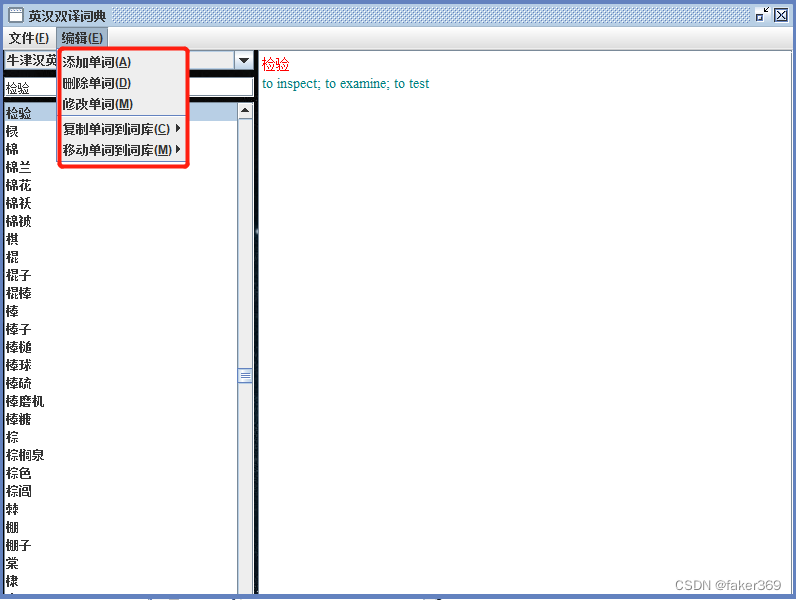
具体实现:1、用图形用户界面实现;2、能够实现英译汉,汉译英并且考虑一词多义;3、能过编辑词典库中的信息(添加单词、删除单词、修改单词、复制单词到词库(当前词库、牛津英汉词典、新建词库)、移动单词到词库(当前词库、牛津英汉词典、新建词库));4、文件编辑(新建词库、删除当前词库、将词库备份到文件,移动单词到词库)
代码链接:https://pan.baidu.com/s/1F7dEBfny5aAU_AKpLpwCiA
提取码:3pxo
代码截图
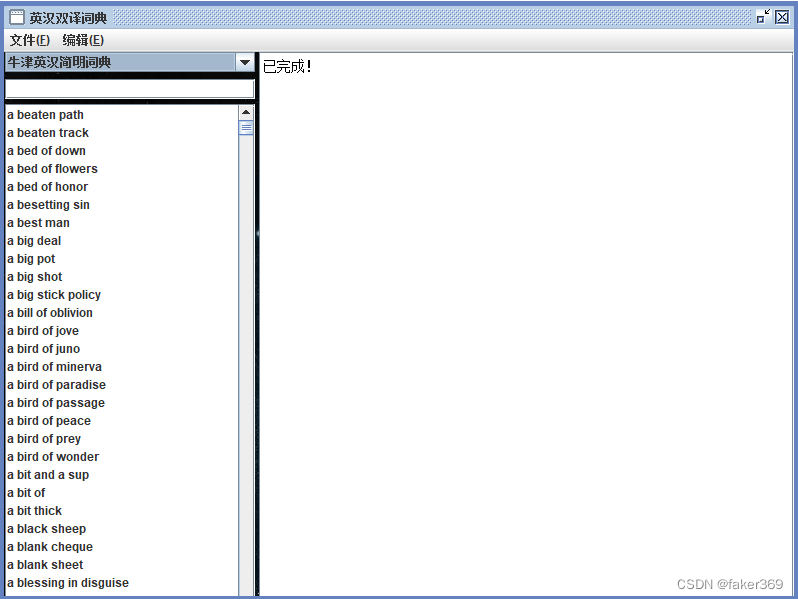
1、词典主界面
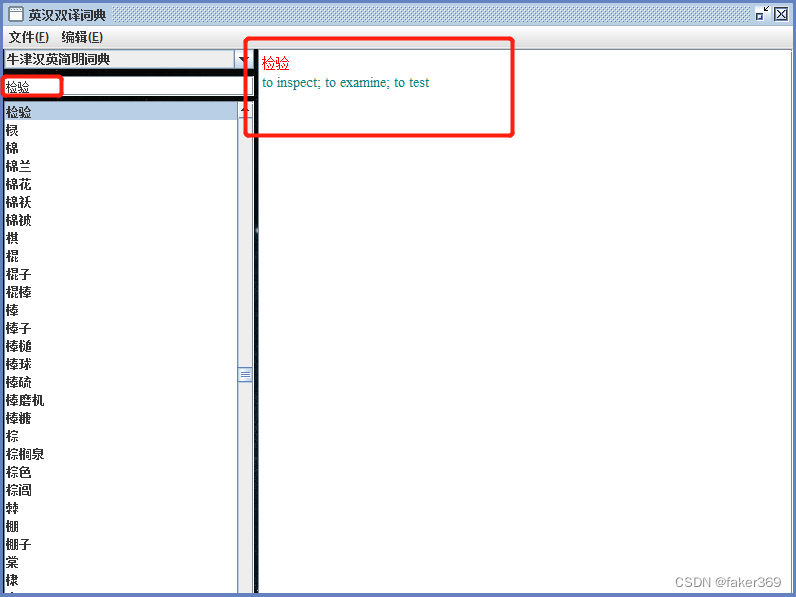
2、翻译单词检验
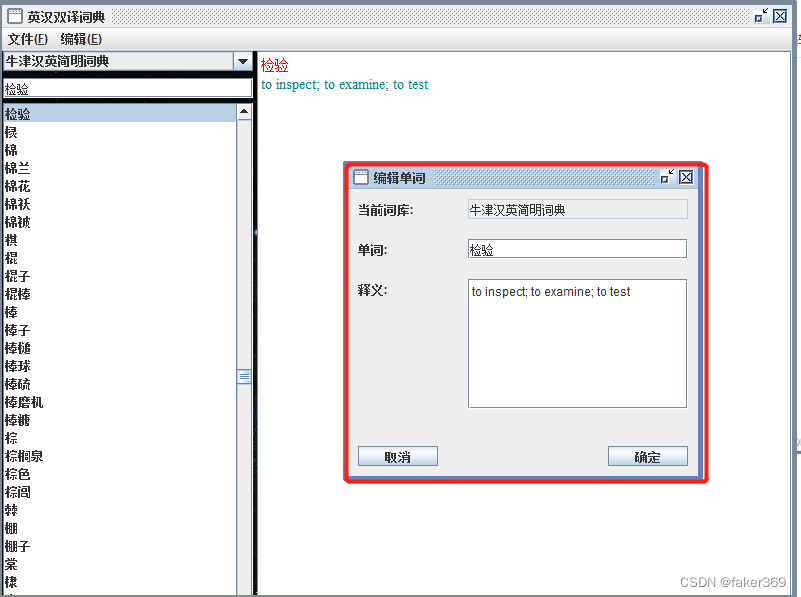
3、编辑单词
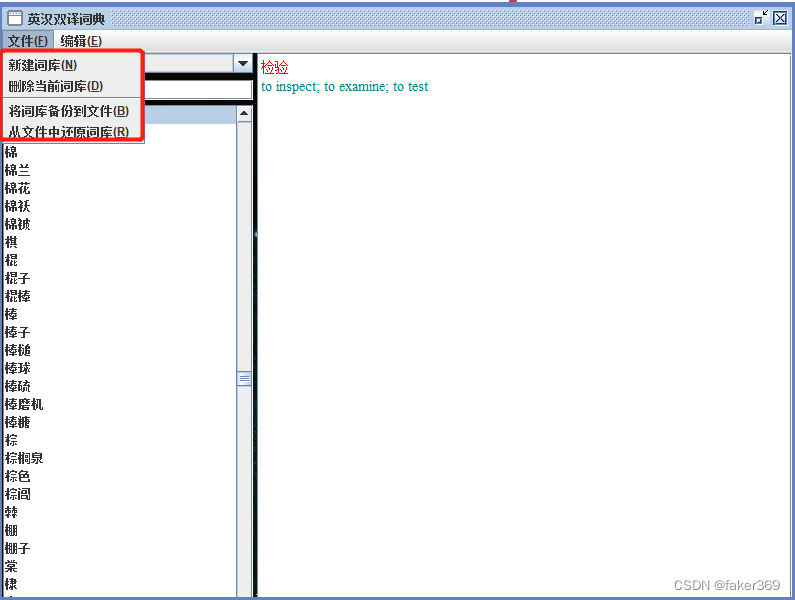
4、功能概述
核心代码
1、系统主界面
package main;

import java.awt.Graphics;
import java.awt.GridLayout;
import java.awt.Image;
import java.awt.event.ActionEvent;
import java.awt.event.ActionListener;
import java.awt.event.ItemEvent;
import java.awt.event.ItemListener;
import java.awt.event.KeyEvent;
import java.awt.event.MouseEvent;
import java.awt.event.MouseListener;
import java.io.IOException;
import java.util.Vector;

import javax.swing.JComboBox;
import javax.swing.JEditorPane;
import javax.swing.JFrame;
import javax.swing.JLabel;
import javax.swing.JLayeredPane;
import javax.swing.JList;
import javax.swing.JMenu;
import javax.swing.JMenuBar;
import javax.swing.JMenuItem;
import javax.swing.JPanel;
import javax.swing.JPopupMenu;
import javax.swing.JScrollPane;
import javax.swing.JTextField;
import javax.swing.ListSelectionModel;
import javax.swing.ScrollPaneConstants;
import javax.swing.event.DocumentEvent;
import javax.swing.event.DocumentListener;
import javax.swing.event.ListSelectionEvent;
import javax.swing.event.ListSelectionListener;
import javax.swing.ImageIcon;


import dictionary.DicLib;
import file_operation.FileFrame;
import file_operation.LoadProcess;
import library_operation.DropFrame;
import library_operation.NewFrame;
import word_operation.AddFrame;
import word_operation.DeleteFrame;
import word_operation.EditFrame;

/**
 * 主界面是JFrame的子类,实现了DocumentListener, ListSelectionListener, ActionListener,
 * ItemListener, MouseListener, Runnable接口
 *
 *
 *
 */
@SuppressWarnings({ "rawtypes", "unchecked" })
public class MainFrame extends JFrame
		implements DocumentListener, ListSelectionListener, ActionListener, ItemListener, MouseListener, Runnable {
	private static final long serialVersionUID = 776572726716394096L;
	private Vector<DicLib> dicLibs = new Vector<DicLib>(); // 存储词库的向量
	private DicLib currentDicLib = new DicLib("当前词库");; // 指向当前词库
	private JMenuBar menuBar; // 菜单栏
	// 文件、编辑顶层菜单,弹出式菜单的子菜单,移动复制实时更新菜单
	// 弹出式菜单的子菜单结构与编辑菜单完全相同
	private CloneableMenu fileMenu, editMenu, forPopupMenu, activeMenu[];
	private JPopupMenu listMenu; // 弹出式菜单
	private JComboBox libCombo = new JComboBox(); // 显示所有词库
	// private JTextField showText; // 显示释义
	private JEditorPane showText; // 显示释义
	private JScrollPane showPane; // showText的容器,含有垂直滚动条
	private JTextField wordSeeked; // 查询单词用的文本框
	private JList wordList = new JList(currentDicLib); // 显示当前词库的单词列表
	private JScrollPane wordPane; // wordList的容器,含有垂直滚动条

	public MainFrame() throws IOException {
		super("英汉双译词典");
		 //插入图片
        ImageIcon icon1=new ImageIcon("src/images/1.jpg" );
        //添加JLabel 放置图片
        JLabel label1=new JLabel(icon1);
        //设置label的位置、大小,label大小为图片的大小
        label1.setBounds(0,0,icon1.getIconWidth(),icon1.getIconHeight());
        super.getLayeredPane().add(label1,new Integer(Integer.MIN_VALUE));
        JPanel panel =new JPanel();

        //panelTop,顶层容器
        JPanel panelTop=new JPanel();
        panelTop=(JPanel)super.getContentPane();

        //panel和panelTop设置透明
        panelTop.setOpaque(false);
        panel.setOpaque(false);
        //添加panel,设置大小,可视
        super.add(panel);
        super.setSize(800, 600);
        super.setVisible(true);

		setLayout(null);
		setSize(800, 600);
		setVisible(true);
		setResizable(false);
		setLocationRelativeTo(null);
		setJMenuBar(createMenuBar());
		getContentPane().add(createLibCombo());
		getContentPane().add(createShowPane());
		getContentPane().add(createWordSeeked());
		getContentPane().add(createWordPane());
		getContentPane().add(createPopupMenu());
		createDefaultDicLib();


	}

	public DicLib getCurrentDicLib() {
		return currentDicLib;
	}

	public void setCurrentDicLib(DicLib currentDicLib) {
		this.currentDicLib = currentDicLib;
	}

	public Vector<DicLib> getDicLibs() {
		return dicLibs;
	}

	public void setDicLibs(Vector<DicLib> dicLibs) {
		this.dicLibs = dicLibs;
	}

	public JComboBox getLibCombo() {
		return libCombo;
	}

	public void setLibCombo(JComboBox libCombo) {
		this.libCombo = libCombo;
	}

	public JList getWordList() {
		return wordList;
	}

	public void setWordList(JList wordList) {
		this.wordList = wordList;
	}

	/**
	 * 创建默认词库
	 *
	 * @throws IOException
	 */
	private void createDefaultDicLib() throws IOException {
		// currentDicLib.add(new Word("student", "学生"));
		// currentDicLib.add(new Word("computer", "计算机"));
		dicLibs.add(currentDicLib);
		listMenu.setEnabled(false);
		libCombo.setEnabled(false);
		wordSeeked.setEnabled(false);
		fileMenu.setEnabled(false);
		editMenu.setEnabled(false);
		Thread t = new Thread(this); // 开辟一个线程,用于载入默认词库
		t.start();
	}

	private JMenuBar createMenuBar() {
		menuBar = new JMenuBar();

		fileMenu = new CloneableMenu("文件(F)", this);
		fileMenu.setMnemonic(KeyEvent.VK_F);

		createOneMenuItem("新建词库(N)", KeyEvent.VK_N, fileMenu);
		createOneMenuItem("删除当前词库(D)", KeyEvent.VK_D, fileMenu);
		fileMenu.addSeparator();
		createOneMenuItem("将词库备份到文件(B)", KeyEvent.VK_B, fileMenu);
		createOneMenuItem("从文件中还原词库(R)", KeyEvent.VK_R, fileMenu);
		menuBar.add(fileMenu);

		editMenu = new CloneableMenu("编辑(E)", this);
		editMenu.setMnemonic(KeyEvent.VK_E);
		createOneMenuItem("添加单词(A)", KeyEvent.VK_A, editMenu);
		createOneMenuItem("删除单词(D)", KeyEvent.VK_D, editMenu);
		createOneMenuItem("修改单词(M)", KeyEvent.VK_M, editMenu);
		editMenu.addSeparator();
		activeMenu = new CloneableMenu[2];
		activeMenu[0] = createOneSubMenu("复制单词到词库(C)", KeyEvent.VK_C, editMenu);
		activeMenu[1] = createOneSubMenu("移动单词到词库(M)", KeyEvent.VK_M, editMenu);
		createActiveMenuItem();
		menuBar.add(editMenu);

		return menuBar;
	}

	private JPopupMenu createPopupMenu() {
		listMenu = new JPopupMenu();
		return listMenu;
	}

	/**
	 * 简便书写,创建一个菜单项
	 *
	 * @param label 菜单项标签字符串
	 * @param mnemonic 访问键
	 * @param menu 被加入的菜单
	 * @return
	 */
	private JMenuItem createOneMenuItem(String label, int mnemonic, JMenu menu) {
		JMenuItem menuItem = new JMenuItem(label);
		menuItem.setMnemonic(mnemonic);
		menuItem.addActionListener(this);

		menu.add(menuItem);

		return menuItem;
	}

	/**
	 * 简便书写,创建一个子菜单
	 *
	 * @param label 子菜单标签字符串
	 * @param mnemonic 访问键
	 * @param menu 被加入的菜单
	 * @return
	 */
	private CloneableMenu createOneSubMenu(String label, int mnemonic, JMenu menu) {
		CloneableMenu subMenu = new CloneableMenu(label, this);
		if (mnemonic != -1)
			subMenu.setMnemonic(mnemonic);

		menu.add(subMenu);

		return subMenu;
	}

	private JComboBox createLibCombo() {
		libCombo = new JComboBox();
		for (DicLib d : dicLibs) {
			libCombo.addItem(d.getName());
		}
		libCombo.setBounds(1, 0, 250, 20);
		libCombo.addItemListener(this);
		return libCombo;
	}

	private JScrollPane createShowPane() {
		// showText = new JTextArea();
		showText = new JEditorPane();
		showText.setContentType("text/html");
		showText.setEditable(false);

		showPane = new JScrollPane(showText);
		showPane.setBounds(255, 0, getContentPane().getWidth() - 255, getContentPane().getHeight());
		return showPane;
	}

	private JTextField createWordSeeked() {
		wordSeeked = new JTextField();
		wordSeeked.setBounds(1, 27, 250, 20);
		wordSeeked.getDocument().addDocumentListener(this);
		return wordSeeked;
	}

	private JScrollPane createWordPane() {
		wordList = new JList(currentDicLib);
		wordList.addListSelectionListener(this);
		wordList.setSelectionMode(ListSelectionModel.SINGLE_SELECTION);
		wordList.addMouseListener(this);
		wordPane = new JScrollPane(wordList);
		wordPane.setHorizontalScrollBarPolicy(ScrollPaneConstants.HORIZONTAL_SCROLLBAR_NEVER);
		wordPane.setBounds(1, 52, 250, getContentPane().getHeight() - 52);

		return wordPane;
	}

	/**
	 * 创建复制、移动单词的实时更新菜单项
	 */
	public void createActiveMenuItem() {
		for (int i = 0; i < activeMenu.length; i++) {
			activeMenu[i].removeAll();
			for (DicLib d : dicLibs) {
				if (!currentDicLib.equals(d)) {
					JMenuItem menuTemp = createOneMenuItem(d.getName(), -1, activeMenu[i]);
					menuTemp.addActionListener(new MyAction(this, menuTemp, i == 0 ? false : true));
				}
			}
			if (dicLibs.size() != 1)
				activeMenu[i].addSeparator();
			JMenuItem menuTemp = createOneMenuItem("新建词库(N)", KeyEvent.VK_N, activeMenu[i]);
			menuTemp.addActionListener(new MyAction(this, menuTemp, i == 0 ? false : true));
		}
	}

	/**
	 * 刷新主界面
	 */
	public void receiveMessage() {
		wordList.setListData(currentDicLib);

		for (DicLib d : dicLibs) {
			boolean existFlag = false;
			for (int j = 0; j < libCombo.getItemCount(); j++) {
				if (((String) libCombo.getItemAt(j)).equals(d.getName())) {
					existFlag = true;
					break;
				}
			}
			if (!existFlag)
				libCombo.addItem(d.getName());
		}
		createActiveMenuItem();
	}

	@Override
	/**
	 * 重写ListSelectionListener的valueChanged(ListSelectionEvent
	 * arg0)的方法,用于在showText中显示已选中单词的释义
	 */
	public void valueChanged(ListSelectionEvent arg0) {
		// TODO Auto-generated method stub
		if (wordList.getSelectedIndex() != -1) {

			showText.setText(currentDicLib.get(wordList.getSelectedIndex()).getMeaning());
			showText.setCaretPosition(0); // 将滚动条置于最上方
		}
	}

	/*
	 * 响应wordSeeked的事件,将单词定位到查询的单词
	 */
	private void seek() {
		int index = currentDicLib.index(wordSeeked.getText());
		if (index != -1) {
			wordList.setSelectedIndex(index);
			wordList.ensureIndexIsVisible(currentDicLib.size() - 1);
			wordList.ensureIndexIsVisible(index); // 滚动滚动条,保证用户可以看到当前单词
		}
	}

	@Override
	/*
	 * 重写DocumentListener的changedUpdate(DocumentEvent arg0)方法,用于将单词定位到查询的单词
	 */
	public void changedUpdate(DocumentEvent arg0) {
		// TODO Auto-generated method stub
		seek();
	}

	/*
	 * 重写DocumentListener的insertUpdate(DocumentEvent arg0)方法,用于将单词定位到查询的单词
	 */
	@Override
	public void insertUpdate(DocumentEvent arg0) {
		// TODO Auto-generated method stub
		seek();
	}

	/*
	 * 重写DocumentListener的removeUpdate(DocumentEvent arg0)方法,用于将单词定位到查询的单词
	 */
	@Override
	public void removeUpdate(DocumentEvent arg0) {
		// TODO Auto-generated method stub
		seek();
	}

	/*
	 * 响应按钮,菜单项时间
	 */
	@Override
	public void actionPerformed(ActionEvent arg0) {
		// TODO Auto-generated method stub
		// 添加、删除、修改单词
		if ("添加单词(A)".equals(arg0.getActionCommand())) {
			new AddFrame(this).setVisible(true);
		}

		if ("删除单词(D)".equals(arg0.getActionCommand())) {
			if (wordList.getSelectedIndex() != -1) {
				new DeleteFrame(this).setVisible(true);
			} else { // 没有单词选中
				new MessageFrame("提示", "请先选中要删除的单词!").setVisible(true);
			}
		}

		if ("修改单词(M)".equals(arg0.getActionCommand())) {
			if (wordList.getSelectedIndex() != -1) {
				new EditFrame(this).setVisible(true);
			} else { // 没有单词选中
				new MessageFrame("提示", "请先选中要修改的单词!").setVisible(true);
			}
		}

		if ("新建词库(N)".equals(arg0.getActionCommand())) {
			new NewFrame(this).setVisible(true);
		}

		if ("删除当前词库(D)".equals(arg0.getActionCommand())) {
			new DropFrame(this).setVisible(true);
		}

		if ("从文件中还原词库(R)".equals(arg0.getActionCommand())) {
			new FileFrame(this, false).setVisible(true);
		}

		if ("将词库备份到文件(B)".equals(arg0.getActionCommand())) {
			new FileFrame(this, true).setVisible(true);
		}

	}

	/*
	 * 改变当前词库
	 */
	@Override
	public void itemStateChanged(ItemEvent arg0) {
		// TODO Auto-generated method stub
		int index = libCombo.getSelectedIndex();
		if (index != -1) {
			currentDicLib = dicLibs.get(index);
		}
		receiveMessage();
	}

	/*
	 * 响应单词列表的右击事件
	 */
	@Override
	public void mouseClicked(MouseEvent arg0) {
		// TODO Auto-generated method stub
		if (arg0.getButton() == MouseEvent.BUTTON3) {
			int index = wordList.locationToIndex(arg0.getPoint());
			wordList.setSelectedIndex(index);
			forPopupMenu = editMenu.clone();
			listMenu.removeAll();
			listMenu.add(forPopupMenu);
			listMenu.show(arg0.getComponent(), arg0.getX(), arg0.getY());
		}
	}

	@Override
	public void mouseEntered(MouseEvent arg0) {
	}

	public void mouseExited(MouseEvent arg0) {
	}

	public void mousePressed(MouseEvent arg0) {
	}

	public void mouseReleased(MouseEvent arg0) {
	}

	/*
	 * 载入默认词库的线程
	 */
	@Override
	public void run() {


		// TODO Auto-generated method stub
		try {
			showText.setText("正在载入牛津英汉简明词典...");
			dicLibs.add(LoadProcess.readDic("res/e2c.dcl"));
			showText.setText("正在载入牛津汉英简明词典...");
			Thread.sleep(1000);
			dicLibs.add(LoadProcess.readDic("res/c2e.dcl"));
			receiveMessage();
		} catch (IOException e) {
			// TODO Auto-generated catch block
			e.printStackTrace();
		} catch (InterruptedException e) {
			// TODO Auto-generated catch block
			e.printStackTrace();
		}

		showText.setText("已完成!");
		listMenu.setEnabled(true);
		wordSeeked.setEnabled(true);
		libCombo.setEnabled(true);
		fileMenu.setEnabled(true);
		editMenu.setEnabled(true);
	}

	/*
	 * 主方法
	 */
	public static void main(String args[]) throws IOException {
		MainFrame.setDefaultLookAndFeelDecorated(true);
		new MainFrame().setDefaultCloseOperation(EXIT_ON_CLOSE);


	}
}
2、词库类代码
package dictionary;

import java.util.Collection;
import java.util.Collections;
import java.util.Comparator;
import java.util.Vector;

/**
 * 词库类
 *
 *
 */
public class DicLib extends Vector<Word> { // 词库类是Vector<Word>的子类
	private static final long serialVersionUID = -2809128821012099186L;

	private String name;

	/**
	 * 默认构造方法, 默认词库名为"New Dictionary Library"
	 */
	public DicLib() {
		name = "New Dictionary Library";
	}

	public DicLib(String name) {
		this.name = name;
	}

	public DicLib(Collection<? extends Word> c, String name) {
		super(c);
		this.name = name;
	}

	public DicLib(int initialCapacity, String name) {
		super(initialCapacity);
		this.name = name;
	}

	public DicLib(int initialCapacity, int capacityIncrement, String name) {
		super(initialCapacity, capacityIncrement);
		this.name = name;
	}

	public String getName() {
		return name;
	}

	public void setName(String name) {
		this.name = name;
	}

	/**
	 * 获取以bar开头的第一个单词
	 *
	 * @param bar 单词首字母
	 * @return 单词在词库中的位置,未找到返回-1
	 */
	public int index(String bar) {
		for (int i = 0; i < size(); i++) {
			if (get(i).getOrigin().startsWith(bar)) { // 判断单词是否以bar开头
				return i;
			}
		}
		return -1;
	}

	/**
	 * 对词库进行排序
	 *
	 * @param isDesc 当isDesc为真时,降序排序;反之升序
	 */
	public void sort(boolean isDesc) {
		if (isDesc) {
			Comparator<Word> comp = Collections.reverseOrder();
			Collections.sort(this, comp);
		} else {
			Collections.sort(this);
		}

	}

	public String toString() {
		return name;
	}
}
3、单词类代码
package dictionary;

/**
 * 单词类
 *

 *
 */
public class Word implements Comparable<Word> { // 实现Comparable接口,方便排序

	private String origin; // 单词
	private String meaning; // 释义

	public Word() {
		origin = "";
		meaning = "";
	}

	public Word(String origin, String meaning) {
		this.origin = origin;
		this.meaning = meaning;
	}

	public String getOrigin() {
		return origin;
	}

	public void setOrigin(String origin) {
		this.origin = origin;
	}

	public String getMeaning() {
		return meaning;
	}

	public void setMeaning(String meaning) {
		this.meaning = meaning;
	}

	public String toString() {
		return origin;
	}

	@Override
	/**
	 * 重写Comparable的compareTo(Object otherObject)方法,采用单词字符串的按字典顺序排序(忽略大小写)
	 *
	 * @return 返回origin与other.origin的按字典顺序排序(忽略大小写)结果
	 */
	public int compareTo(Word other) {
		return origin.compareToIgnoreCase(other.origin);
	}
}
4、词库文件类
package file_operation;

import java.io.BufferedReader;
import java.io.File;
import java.io.FileReader;
import java.io.FileWriter;
import java.io.IOException;
import java.io.PrintWriter;
import java.net.URI;

import dictionary.DicLib;
import dictionary.Word;

/**
 * 词库文件类
 *
 *
 */
public class DicFile extends File { // 定义词库文件类是File类的子类
	private static final long serialVersionUID = -3007674007192114857L;

	private BufferedReader raf = null; // 用于从文件中读取词库信息
	private PrintWriter waf = null; // 用于将词库信息写入文件

	public DicFile(String pathName, boolean isWriter) throws IOException {
		// TODO Auto-generated constructor stub
		super(pathName);
	}

	/**
	 * 定义此构造方法的目的是方便将词库文件加入项目,并通过URL转化为URI读取文件
	 */
	public DicFile(URI uri, boolean isWriter) throws IOException {
		// TODO Auto-generated constructor stub
		super(uri);
	}

	/**
	 * 通过从文件中读取第一个文本行来确定该文件是否为适合于项目使用的词库文件,如果不是,返回null;如果是,则返回词库名
	 * 当文件第一个文本行内容为"Dictionary name=词库名"时,才不会返回null
	 *
	 * @return 如果读取词库文件成功,返回词库名;否则返回null
	 */
	public String getDicName() throws IOException {
		BufferedReader r = new BufferedReader(new FileReader(this));
		String s1 = "Dictionary name=";
		String s2 = r.readLine();
		r.close();
		if (!s2.startsWith(s1)) { // 判断s2是否以"Dictionary name="开头
			return null;
		}
		return s2.replace(s1, "");
	}

	/**
	 * 从资源中读取词库信息,并返回一个词库对象
	 *
	 * @param str 用于表示文件读取进度的字符串缓冲区,方便在后台线程中动态改变读取进度
	 * @return 词库对象
	 */
	public DicLib readDic(StringBuffer str) throws IOException, IndexOutOfBoundsException {
		raf = new BufferedReader(new FileReader(this));
		String s1 = "Dictionary name=";
		String s2 = raf.readLine(); // 读取文件第一行
		if (!s2.startsWith(s1)) {
			return null;
		}

		raf.readLine(); // 再读取一个空行,然后开始读取第一个单词
		DicLib dicLib = new DicLib(s2.replace(s1, ""));
		long l = 0; // 用于组成文件读取进度,表示已读取的文件内容大小
		while (true) {
			String temp = raf.readLine();

			if (temp != null) {
				l += temp.length(); // 读取一行,将该行的大小增加到l

				// 将l与文件大小的比值转化为百分数,作为读取进度,并存储到字符串缓冲区str
				str.replace(0, str.length(), String.format("%.2f%%", l / (double) length() * 100));

				// 通过制表符来分割字符串,用于区分单词与释义,如果该行没有制表符,则会抛出IndexOutOfBoundsException异常
				Word word = null;
				try {
					word = new Word(temp.split("\t")[0], temp.split("\t")[1]);
				} catch (IndexOutOfBoundsException e) { // 当temp.split("\t")数组越界,退出while循环
					break;
				}
				dicLib.add(word);
			} else {
				break;
			}
		}
		dicLib.sort(false);
		return dicLib;
	}

	/**
	 * 将词库信息写入文件
	 *
	 * @param dicLib 要写入的词库对象
	 * @param str 用于表示文件写入进度的字符串缓冲区,方便在后台线程中动态改变写入进度
	 */
	public void writeDic(DicLib dicLib, StringBuffer str) throws IOException {
		waf = new PrintWriter(new FileWriter(this));
		waf.println("Dictionary name=" + dicLib.getName()); // 将文件第一行写入"Dictionary name=词库名"
		waf.println(); // 写入一个空行
		for (int i = 0; i < dicLib.size(); i++) {
			// 定义一个单词行(单词+制表符+释义)
			String temp = dicLib.get(i).getOrigin() + "\t" + dicLib.get(i).getMeaning();

			waf.println(temp); // 写入一行单词

			// 将数组当前索引与词库总的大小的比值转化为百分数,作为写入进度,并存储到字符串缓冲区str
			str.replace(0, str.length(), String.format("%.2f%%", i / (double) dicLib.size() * 100));
		}
		waf.close();
	}
}
5、文件处理界面
package file_operation;

import java.awt.event.ActionEvent;
import java.awt.event.ActionListener;
import java.io.File;
import java.io.IOException;

import javax.swing.JFileChooser;
import javax.swing.JFrame;
import javax.swing.JLabel;
import javax.swing.filechooser.FileNameExtensionFilter;

import main.MainFrame;
import main.MessageFrame;

/**
 * 文件处理界面是JFrame的子类,实现了ActionListener接口
 *
 *
 */
public class FileFrame extends JFrame implements ActionListener {
    private static final long serialVersionUID = -5019495375438539969L;
    private MainFrame frame; // 项目主界面
    private JFileChooser fc; // 文件选择器,用于选择要处理的文件
    private boolean isSave; // 确定文件是读取还是写入,如果是写入则其值为true

    public FileFrame(MainFrame frame, boolean isSave) {
        // super("选择文件");
        super(isSave ? "另存为" : "打开");
        this.frame = frame;
        this.isSave = isSave;
        setLayout(null);
        setLocationRelativeTo(null);
        setSize(480, 400);
        setVisible(true);
        setResizable(false);
        // JLabel messageLabel = new JLabel("请选择文件:");
        JLabel messageLabel = new JLabel("请选择要" + (isSave ? "备份" : "还原") + "的文件:");
        messageLabel.setBounds(10, 10, getContentPane().getWidth() - 110, 20);
        getContentPane().add(messageLabel);
        getContentPane().add(createFileChooser());
    }

    private JFileChooser createFileChooser() {
        fc = new JFileChooser(".");
        fc.setAcceptAllFileFilterUsed(false); // 去掉所有文件可选属性
        // 将扩展名为.dcl的文件加入过滤器
        fc.addChoosableFileFilter(new FileNameExtensionFilter("词库文件(*.dcl)", "dcl"));
        fc.setBounds(0, 40, getContentPane().getWidth(), 320);
        // 如果要写入文件,默认文件名为"词库名.dcl"
        if (isSave)
            fc.setSelectedFile(new File(frame.getCurrentDicLib().getName() + ".dcl"));
        fc.setApproveButtonText("确定");
        fc.addActionListener(this);

        return fc;
    }

    @Override
    public void actionPerformed(ActionEvent arg0) {
        // TODO Auto-generated method stub
        if (JFileChooser.APPROVE_SELECTION.equals(arg0.getActionCommand())) { // "确定"按钮事件监听
            setVisible(false);
            try {
                if (!isSave) {
                    // 当该文件不是适合于项目使用的词库文件,发出提示信息
                    if (new DicFile(fc.getSelectedFile().getPath(), false).getDicName() == null) {
                        new MessageFrame("提示", "不是规范化的词库文件!").setVisible(true);
                        return;
                    }
                }
                // 打开备份还原对话框
                new RecoverFrame(frame, fc.getSelectedFile().getPath(), isSave).setVisible(true);
            } catch (IOException e) {
                // TODO Auto-generated catch block
                e.printStackTrace();
            }
        }

        if (JFileChooser.CANCEL_SELECTION.equals(arg0.getActionCommand())) {
            setVisible(false);
        }
    }
}





 扫一扫
扫一扫


&spm=1001.2101.3001.5002&articleId=128105819&d=1&t=3&u=9ee198caedf44ad592d2870fb562a193)
 972
972

 被折叠的 条评论
为什么被折叠?
被折叠的 条评论
为什么被折叠?
 到【灌水乐园】发言





