Abstract Class in Java (With Real-World Examples)
backend
10 min read
Abstract Class in Java (With Real-World Examples)
Abstract classes in Java are one of the most misunderstood OOP concepts. Here's a practical guide with real-world examples, code you can actually use, and the mistakes most devs make.
Published By: Nelson Djalo | Date: April 18, 2026
An abstract class in Java is a class you can't instantiate directly. It exists to be extended. If you've been writing Java for any amount of time, you've probably used one without thinking twice - HttpServlet, AbstractList, Number. They're everywhere in the standard library and in well-designed codebases, because they solve a very specific problem: sharing state and behavior across related classes while forcing subclasses to fill in the blanks.
This post covers everything you need to know about abstract classes in Java - what they are, how they work, when to use them over interfaces, and the mistakes that trip up even experienced developers.
Table of Contents
- What Is an Abstract Class?
- Abstract vs Concrete Methods
- When to Use Abstract Classes
- Abstract Class vs Interface
- Real-World Example: Payment Processing
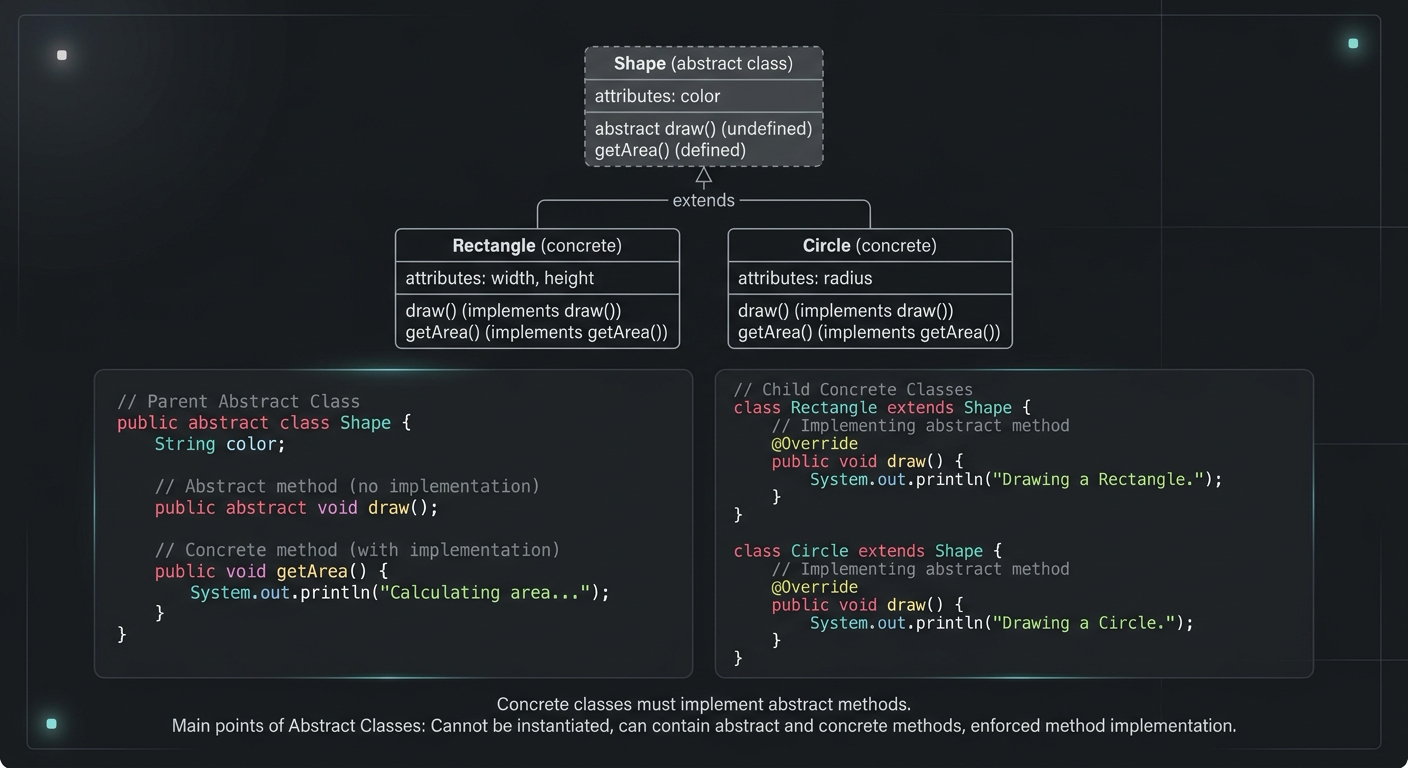
- Real-World Example: Shape Hierarchy
- Common Mistakes
- Quick Reference
- Summary
What Is an Abstract Class?
An abstract class is a class declared with the abstract keyword. It can have:
- Abstract methods - methods with no body that subclasses must implement
- Concrete methods - regular methods with full implementations
- Fields - instance variables, static variables, constants
- Constructors - yes, even though you can't instantiate the class directly
The key idea: an abstract class defines a template. It says "here's what all subclasses share, and here's what each subclass must define on its own."
public abstract class Vehicle {

    private String make;
    private int year;

    public Vehicle(String make, int year) {
        this.make = make;
        this.year = year;
    }

    // Every vehicle must define how it starts
    public abstract void start();

    // Shared behavior - all vehicles have this
    public String getDescription() {
        return year + " " + make;
    }
}
You cannot do new Vehicle("Toyota", 2024). The compiler won't let you. You must create a subclass that implements start().
Abstract vs Concrete Methods
This is where abstract classes earn their value. You get to mix and match.
Abstract methods have no body. They end with a semicolon. Every non-abstract subclass must provide an implementation.
Concrete methods have a full body. Subclasses inherit them as-is, or override them if needed.
public abstract class Notification {

    private String recipient;

    public Notification(String recipient) {
        this.recipient = recipient;
    }

    // Abstract - each channel sends differently
    public abstract void send(String message);

    // Concrete - shared validation logic
    public boolean isValid() {
        return recipient != null && !recipient.isBlank();
    }

    public String getRecipient() {
        return recipient;
    }
}

public class EmailNotification extends Notification {

    private String subject;

    public EmailNotification(String recipient, String subject) {
        super(recipient);
        this.subject = subject;
    }

    @Override
    public void send(String message) {
        System.out.println("Sending email to " + getRecipient());
        System.out.println("Subject: " + subject);
        System.out.println("Body: " + message);
    }
}

public class SmsNotification extends Notification {

    public SmsNotification(String phoneNumber) {
        super(phoneNumber);
    }

    @Override
    public void send(String message) {
        System.out.println("Sending SMS to " + getRecipient() + ": " + message);
    }
}
Both EmailNotification and SmsNotification inherit isValid() and getRecipient() for free. They only implement what's unique to them. That's the whole point.
When to Use Abstract Classes
Use an abstract class in Java when:
-
Related classes share state. If your subclasses need common fields (like
recipientabove), an interface can't help you - interfaces don't have instance fields. -
You want to enforce a contract AND provide default behavior. Abstract classes let you do both in one place.
-
You need constructors. Abstract classes can have constructors that initialize shared state. Interfaces cannot.
-
You're building a template method pattern. This is the classic use case - define the skeleton of an algorithm in the abstract class, let subclasses fill in specific steps.
public abstract class DataProcessor {

    // Template method - defines the algorithm skeleton
    public final void process() {
        String data = readData();
        String transformed = transform(data);
        save(transformed);
    }

    protected abstract String readData();
    protected abstract String transform(String data);
    protected abstract void save(String data);
}
Subclasses implement readData(), transform(), and save(). The overall flow is locked in. This pattern shows up constantly in frameworks - Spring's AbstractController, JUnit's test lifecycle, and many others.
Abstract Class vs Interface
This is the question that comes up in every Java interview. Here's a clear comparison:
| Feature | Abstract Class | Interface |
|---|---|---|
| Instantiation | Cannot instantiate | Cannot instantiate |
| Methods | Abstract + concrete | Abstract + default (Java 8+) |
| Fields | Instance + static fields | Only public static final constants |
| Constructors | Yes | No |
| Access modifiers | Any (private, protected, etc.) | public only (methods) |
| Inheritance | Single (extends one class) | Multiple (implements many) |
| State | Can hold mutable state | No mutable state |
| When to use | "is-a" relationship with shared state | "can-do" capability contract |
The rule of thumb: use an abstract class when your subclasses are genuinely related and share state. Use an interface when unrelated classes need to support the same behavior.
A CreditCardPayment and PayPalPayment both extend PaymentMethod because they are payment methods. But a Document, Image, and User might all implement Serializable because they can be serialized - they have nothing else in common.
If you want a deeper dive into this comparison with more nuanced examples, check out the abstract class vs interface post.
Real-World Example: Payment Processing
Let's build something closer to production code. A payment processing system where different payment methods share common validation and logging, but each processes payments differently.
public abstract class PaymentMethod {

    private String id;
    private String customerName;
    private boolean active;

    public PaymentMethod(String id, String customerName) {
        this.id = id;
        this.customerName = customerName;
        this.active = true;
    }

    // Abstract - each payment type handles this differently
    public abstract PaymentResult charge(double amount);

    // Abstract - each type validates differently
    protected abstract boolean validateDetails();

    // Concrete - shared across all payment methods
    public PaymentResult processPayment(double amount) {
        if (!active) {
            return PaymentResult.failure("Payment method is inactive");
        }
        if (amount <= 0) {
            return PaymentResult.failure("Amount must be positive");
        }
        if (!validateDetails()) {
            return PaymentResult.failure("Invalid payment details");
        }
        log("Processing " + amount + " for " + customerName);
        return charge(amount);
    }

    private void log(String message) {
        System.out.println("[Payment] " + message);
    }

    // Getters
    public String getId() { return id; }
    public String getCustomerName() { return customerName; }
    public boolean isActive() { return active; }
    public void deactivate() { this.active = false; }
}
Now the concrete implementations:
public class CreditCardPayment extends PaymentMethod {

    private String cardNumber;
    private String expiryDate;

    public CreditCardPayment(String id, String customer,
                              String cardNumber, String expiryDate) {
        super(id, customer);
        this.cardNumber = cardNumber;
        this.expiryDate = expiryDate;
    }

    @Override
    public PaymentResult charge(double amount) {
        // Call credit card gateway API
        return PaymentResult.success("Charged card ending in "
            + cardNumber.substring(cardNumber.length() - 4));
    }

    @Override
    protected boolean validateDetails() {
        return cardNumber != null && cardNumber.length() == 16
            && expiryDate != null;
    }
}

public class BankTransferPayment extends PaymentMethod {

    private String routingNumber;
    private String accountNumber;

    public BankTransferPayment(String id, String customer,
                                String routingNumber, String accountNumber) {
        super(id, customer);
        this.routingNumber = routingNumber;
        this.accountNumber = accountNumber;
    }

    @Override
    public PaymentResult charge(double amount) {
        // Initiate ACH transfer
        return PaymentResult.success("Bank transfer initiated for account "
            + accountNumber.substring(accountNumber.length() - 4));
    }

    @Override
    protected boolean validateDetails() {
        return routingNumber != null && routingNumber.length() == 9
            && accountNumber != null;
    }
}
Notice how processPayment() in the abstract class handles all the common validation and logging. Subclasses only worry about their specific charge logic and validation rules. This is the abstract class in Java doing exactly what it's designed to do.
Real-World Example: Shape Hierarchy
The classic example, but done properly:
public abstract class Shape {

    private String color;

    public Shape(String color) {
        this.color = color;
    }

    public abstract double area();
    public abstract double perimeter();

    public String describe() {
        return color + " shape with area " +
            String.format("%.2f", area());
    }

    public String getColor() {
        return color;
    }
}

public class Circle extends Shape {

    private double radius;

    public Circle(String color, double radius) {
        super(color);
        this.radius = radius;
    }

    @Override
    public double area() {
        return Math.PI * radius * radius;
    }

    @Override
    public double perimeter() {
        return 2 * Math.PI * radius;
    }
}

public class Rectangle extends Shape {

    private double width;
    private double height;

    public Rectangle(String color, double width, double height) {
        super(color);
        this.width = width;
        this.height = height;
    }

    @Override
    public double area() {
        return width * height;
    }

    @Override
    public double perimeter() {
        return 2 * (width + height);
    }
}
You can now write code that works with any Shape without caring about the specific type:
List<Shape> shapes = List.of(
    new Circle("red", 5),
    new Rectangle("blue", 4, 6)
);

for (Shape shape : shapes) {
    System.out.println(shape.describe());
}
Polymorphism at work. The describe() method calls area(), which resolves to the correct subclass implementation at runtime.
Common Mistakes
1. Making everything abstract when an interface would do.
If your "abstract class" has zero fields and zero concrete methods, it should probably be an interface. Don't use abstract classes just because you can.
2. Forgetting that abstract classes can't be instantiated.
This seems obvious, but it comes up in complex factory patterns where developers accidentally try to instantiate the base class.
3. Not making template methods final.
If you define an algorithm skeleton in an abstract class, mark it final so subclasses can't accidentally break the flow:
// Good - subclasses can't override the process flow
public final void process() {
    validate();
    execute();
    cleanup();
}
4. Deep inheritance hierarchies.
Abstract classes encourage inheritance, but going deeper than 2-3 levels usually means your design needs rethinking. Prefer composition when the hierarchy gets complex.
5. Putting too much in the abstract class.
An abstract class should contain genuinely shared behavior. If only 2 out of 5 subclasses use a method, it doesn't belong in the base class. Move it down or extract it into a separate concern.
Quick Reference
Here's what you need to remember about abstract classes in Java:
// Declare with abstract keyword
public abstract class Animal {

    // Can have fields
    private String name;

    // Can have constructors
    public Animal(String name) {
        this.name = name;
    }

    // Abstract method - no body, subclass must implement
    public abstract void makeSound();

    // Concrete method - inherited by subclasses
    public String getName() {
        return name;
    }

    // Static methods work fine
    public static String kingdom() {
        return "Animalia";
    }
}

// Extend with concrete class
public class Dog extends Animal {

    public Dog(String name) {
        super(name);
    }

    @Override
    public void makeSound() {
        System.out.println(getName() + " says: Woof!");
    }
}
Summary
Abstract classes in Java give you a way to define a shared foundation for related classes. They sit between interfaces (pure contracts) and concrete classes (full implementations), offering the best of both: enforced contracts through abstract methods and shared code through concrete methods and fields.
Use them when your subclasses genuinely share state and behavior. Avoid them when an interface would keep your design more flexible. And watch out for deep hierarchies - two or three levels is usually the sweet spot.
If you're learning Java from scratch or want to solidify your OOP fundamentals, the Java for Beginners course walks through abstract classes, interfaces, inheritance, and polymorphism with hands-on exercises that build on each other.
Related Articles

9 Books That Made Me a Better Software Engineer (Not the Usual List)
Skip the generic recommendations. These 9 books changed how I write code, lead teams, and think about systems - from Clean Code to books most devs haven't heard of.

How to Become a Java Full Stack Developer in 2025 (Step-by-Step)
The exact skills, tools, and learning order to go from zero to hired as a Java full stack developer. Covers Spring Boot, React, databases, Docker, and what employers actually look for.

Abstract Class vs Interface in Java (When to Use Each)
Abstract class or interface? Most Java devs get this wrong. Here's a clear breakdown with a side-by-side comparison table, code examples, and a simple decision rule.
Your Career Transformation Starts Now
Join thousands of developers mastering in-demand skills with Amigoscode. Try it free today.