JSON Form
The JSON Form plugin renders a rich, schema-driven form for a JSON column instead of the default raw text area. You describe the shape of the data with a JSON Schema (extended with a few x-* keywords for layout and validation messages) and the form is generated by jedison, a JSON-Schema form generator, mounted inside the AdminForth create/edit views.
Installation
pnpm add @adminforth/json-form --save
Setting up
The plugin works only with json columns. If the target column is not of type json, the plugin throws during config validation.
First, update the schema:
model apartments {
      ...
  config    Json?
}
and make a migration:
pnpm makemigration --name add-apartment-config; pnpm migrate:local
Then make sure the target column is declared with the json datatype:
import { AdminForthDataTypes } from 'adminforth';

export default {
  ...
  columns: [
    ...
    {
      name: 'config',
      type: AdminForthDataTypes.JSON,   // required: must be JSON
      label: 'Config',
    },
  ],
}
And finally import and attach the plugin, passing the field name and a schema:
import JsonFormPlugin from '@adminforth/json-form';

export default {
  ...
  plugins: [
    ...
    new JsonFormPlugin({
      fieldName: 'config',
      schema: {
        title: 'RPG Character Creator',
        description: 'Create and customize your adventurer',
        type: 'object',
        'x-format': 'nav-vertical',
        properties: {
          identity: {
            title: 'Identity',
            type: 'object',
            'x-format': 'grid',
            required: ['name'],
            properties: {
              name: {
                title: 'Name',
                type: 'string',
                minLength: 2,
                'x-grid': { columns: 6 },
                'x-messages': { required: 'Every adventurer needs a name!' },
                default: 'Thalion Oakenshield',
              },
              // ...
            },
          },
          // ...
        },
      },
    }),
  ],
}
The same form is rendered in both the create and edit views for the config field.
Key-value renderer
Since using JSON as key-value storage is a popular use case, the JSON Form plugin provides a custom key-value editor:
schema: {
  "title": "Specifications",
  "type": "object",
  "additionalProperties": {
      "type": "string"
  }
}
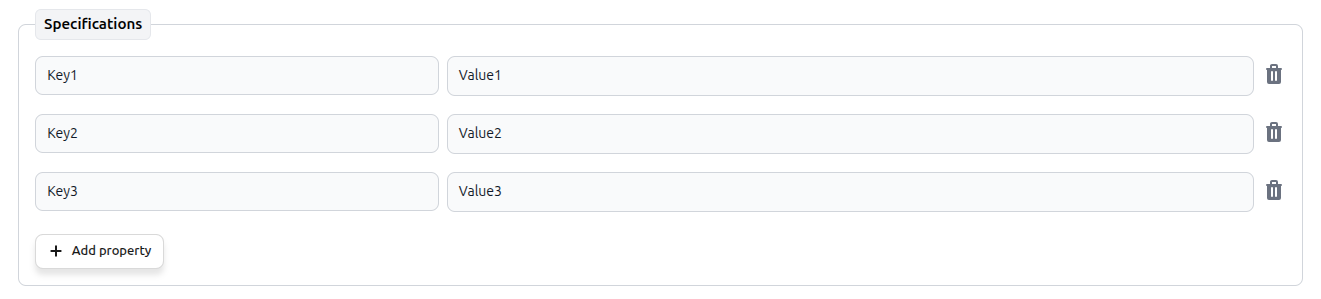
Any object that declares no properties and does not set additionalProperties: false is rendered this way by default, so no extra keyword is needed to opt in. Rows are added inline, without a popup: the new key starts empty and gets the focus, the key itself is applied when the input loses focus or on Enter, and the trash button removes the entry right away. Renaming a key to one that already exists is refused with an inline message.
The value cell holds the regular editor for whatever additionalProperties describes, so values are not limited to strings — nested objects and arrays work too, and keep their own formatting and validation rules.