

Switch Statement in C
Switch Statement in C
The switch statement in C language is used to execute the code from multiple conditions or case. It is same like if else-if ladder statement.
A switch statement work with byte, short, char and int primitive data type, it also works with enumerated types and string.
Syntax
switch(expression or variable)
{
case  value:
//statements
// any number of case statements
break;  //optional
default: //optional
//statements
}
Flow chart
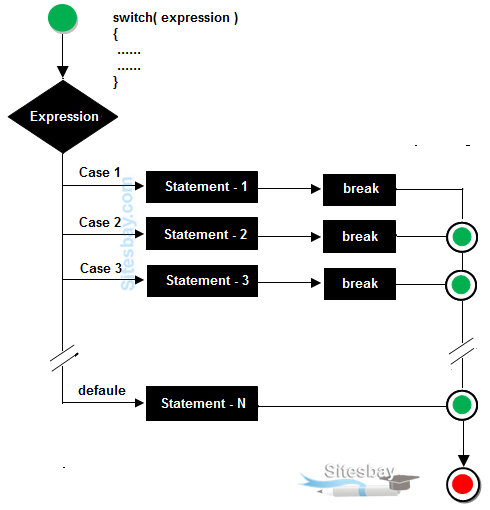
Rules for apply switch
- The switch expression must be of integer or character type.
- With switch statement use only byte, short, int, char data type.
- With switch statement not use float data type.
- You can use any number of case statements within a switch.
- The case value can be used only inside the switch statement.
- Value for a case must be same as the variable in switch.
Valid statement for switch
Example
int x;
byte y;
short z;
char a,b;
Limitations of switch
Logical operators can not be used with switch statement. For instance
Example
case k>20&&k=20: // is not allowed
Switch case variables can have only int and char data type. So float data type is not allowed.
case 4.2: // Invalid
Syntax
switch(ch)
{
case 1:
statement 1;
break;
case 2:
statement 2;
break;
}
In this ch can be integer or char and can not be float or any other data type.
Rulse table of switch
| Valid Switch | Invalid Switch | Valid Case | Invalid Case |
|---|---|---|---|
| switch(a) | switch(2.3) | case 3; | case 2.5; |
| switch(a>b) | switch(a+2.5) | case 'a'; | case x; |
| switch(a+b-2) | case 1+2; | case x+2; | |
| switch(func(a,b)) | case 'a'>'b'; | case 1,2,3; |
Example of switch case
#include<stdio.h>
#include<conio.h>

void main()
{
int ch;
clrscr();
printf("Enter any number (1 to 7)");
scanf("%d",&ch);
switch(ch)
{
case  1:
printf("Today is Monday");
break;
case  2:
printf("Today is Tuesday");
break;
case  3:
printf("Today is Wednesday");
break;
case  4:
printf("Today is Thursday");
break;
case  5:
printf("Today is Friday");
break;
case  6:
printf("Today is Saturday");
break;
case  7:
printf("Today is Sunday");
break;
default:
printf("Only enter value 1 to 7");
}
getch();
}
Output
Note: In switch statement default is optional but when we use this in switch default is executed at last whenever all cases are not satisfied the condition.
Example of Switch without break
#include<stdio.h>
#include<conio.h>

void main()
{
int ch;
clrscr();
printf("Enter any number (1 to 7)");
scanf("%d",&ch);
switch(ch)
{
case  1:
printf("Today is Monday");
case  2:
printf("Today is Tuesday");
case  3:
printf("Today is Wednesday");
case  4:
printf("Today is Thursday");
case  5:
printf("Today is Friday");
case  6:
printf("Today is Saturday");
case  7:
printf("Today is Sunday");
default:
printf("Only enter value 1 to 7");
}
getch();
}
Output
Note: In switch statement when you not use break keyword after any statement then all the case after matching case will be execute. In above code case 4 is match and after case 4 all case are execute from case-4 to case-7.
C Program for calculator
Example
#include<stdio.h>
#include<conio.h>

void main()
{
char choice;
int a,b,res=0;
clrscr();
printf("Enter first value: ");
scanf("%d",&a);
printf("\n Enter operator: ");
choice=getch();
printf("\n Enter second value: ");
scanf("%d",&b);

switch(choice)
{
case '+':
  res=a+b;
  printf("Sum: %d",res);
break;
case '-':
  res=a-b;
  printf("Difference: %d",res);
break;
case '*':
  res=a*b;
  printf("Product: %d",res);
break;
case '/':
  res=a/b;
  printf("Quotient: %d",res);
break;
default:
  printf("Enter Valid Operator!!");
}
getch();
}
Example
Enter First number: 6
Enter operator : +
Enter Second number: 10
Sum: 16
Explanation: In above code choice=getch(); is used for scan or get one value by using getch() function from keyboard, and store is choice.