Tapestry Training -- From The Source

Let me help you get your team up to speed in Tapestry ... fast. Visit howardlewisship.com for details on training, mentoring and support!
Showing posts with label eclipse. Show all posts

Tuesday, December 28, 2010

Is it time to switch back to IntelliJ?

I've been trying to stick with Eclipse now for a while. I switched from IntelliJ 8 to Eclipse because IntelliJ stopped working for Tapestry (I still don't know why) and because my fingers were getting tied in knots switching between IntelliJ and Eclipse. I have to switch back and forth because my Tapestry training uses Eclipse and I got a lot of negative feedback the times I tried to get people to use IntelliJ as part of the training.

In any case, I've been gritting my teeth against the travesty that is Eclipse; the inconsistent behaviors, the needless complexity, the lack of sense in much of the UI. I often wonder what IDE the Eclipse developers use, because it couldn't possibly be Eclipse itself, or they would have fixed some of the more brain-damaged stuff years ago.

One thing that is currently killing me is that Eclipse has no concept that some source folders contain production code and some contain test code. Because of that, when I collect coverage, EMMA instruments the test code as well as the production code. That not only throws off coverage figures, but breaks some of my tests (advanced ones about bytecode manipulation, that are sensitive to when EMMA adds new fields or methods to existing classes).

Fortunately, EMMA has an option to restrict its instrumentation (though it a global preference, and not configurable for individual projects) ... but shouldn't Eclipse understand this distinction natively? IntelliJ does, and it helps prevent a lot of problems, not just with coding, but with testing as well.

I keep hoping that there's a better, faster, simpler solution out there ... something that is elegant and precise. Eclipse is dumb as a sackful of hammers, and IntelliJ is almost fractal in its complexity, and ugly to boot.

I haven't found my perfect IDE yet. Maybe it's NetBeans?

Thursday, March 11, 2010

Why Eclipse leaves me wanting

I think I've come to understand why Eclipse leaves me always feeling a bit frustrated. Yes, it is more stable than IDEA, uses less memory, has some documentation, and a lot of acceptance ... but even so, it just leaves me cold (and I was an early adopter, signed up for the beta way back in 2000!).

Keystrokes are not modal

The fact that I can type a common keystroke into an Eclipse window and not know what it will do is painful. How a keystroke is interpreted depends on what perspective is active, what view or editor has focus, and what kind of data is being edited in the editor. That's dead wrong; keystrokes are about muscle memory, and muscle memory remembers motion, not context. The end result is that I get frustrated hitting keystrokes and seeing nothing happening. It doesn't help that I cycle between Mac and a PC on most days.

You can't have it your way

A tool as powerful and extensible as Eclipse walks the tightrope of offering lots of features and customizations without overwhelming the user. Alas, Eclipse is lying in a broken heap fifty feet below that tightrope. Eclipse has an unending set of options and defaults for things I don't care about, but anything I do care about seems to never be presents. Here's a few ideas of the top of my head:

  • Stop running launches when I close the project (I often have to kill them from the command line)
  • Give me a quick way to stop all running launches
  • Why so many steps to implement an interface? It's the second most common thing I do!
  • How about a button to quickly relaunch the current running launch?
  • Why are the available refactorings so paltry and where are the 3rd party ones?

Who's eating their own dog food?

When I used IDEA, I was constantly struck by little details that showed that the IDE developers were also its prime users. For example, it has open-type and open-resource dialogs much like Eclipse ... but each recognizes the keystroke for the other, so that if you mistakenly activate the open-type dialog, you just hit the normal keystroke to switch over to open-resource. Eclipse makes you cancel the dialog first.

Another example: in IDEA if you rename a field, it notices the getter and setter and will offer to rename those as well.

IDEA also has lots of quick fixes everywhere, such as "implement this interface" and lots of other tiny, cool things I miss every single day I use Eclipse. It's been about a year since I gave up on IDEA and I still miss it.

Is it cultural or organizational? Eclipse gives me the impression that day-to-day developers either have no concept of how the IDE gets used (and what rough spots are causing some serious chafing) OR they are somehow prohibited from fixing things that are obviously wrong.

If you love IDEA so much why don't you marry it?

So why don't I use IDEA anymore? Two main reasons: first, it's become very bloated, to the point that unless you go in and shut off a ton of features, it's unusable on my hardware. Merlyn has the same problem doing GWT work on his MacBook Pro ... all the help it gives you comes at a cost in terms of CPU and memory utilization and some instability.

Secondly, I tried (even before IDEA went open source) to use IDEA in my training labs and I hit a stone wall of non-acceptance. Switching to Eclipse was a benefit to my students since, even running in Ubuntu instead of Windows, it was familiar and easy to navigate. It also out-performs IDEA inside my Ubuntu Virtual Machine. I simply lack the ability to switch between the two on a constant basis without getting completely confused and frustrated. I had to choose one, and I chose Eclipse: stable and accepted, even if it is brain dead.

Why call it Ugly?

One thing I don't get is how many people claim Eclipse is "ugly" and IDEA "beautiful". I found IDEA to be overly chock-full of modal dialogs and a number of improperly resized (or non-resizable) dialogs and windows. It's a real dog's breakfast in terms of UI, and has the classically ugly Swing look and feel.

I've always found Eclipse to look sharp and somewhat elegant. You can have a debate about the technical merits of SWT vs. AWT and Swing, or the ability to tune Swing to look like SWT ... but SWT out of the box is simply a better L&F visually.

On a Mac they both suck at keyboard navigation, though.

There, I've vented. See what going cold-turkey from Twitter can do?

Thursday, July 02, 2009

Caught between Two IDEs

I seem to be caught between two IDEs: Eclipse and IntelliJ. I abandoned Eclipse a couple of years back, partly based on wide spread recommendations from many different people, and partly because Eclipse just stopped working for me (it crashed out).

After I got started with IntelliJ I started to appreciate its merits, despite a generally clunky interface (with lots of modal windows), truly awful documentation. Many things are streamlined and only a ctrl-alt-shift-coke-bottle-touch-your-nose away.

However, over time, using IntelliJ got slower and slower and slower. It also started running the Tapestry test suite horrifically slowly: 40 minutes and up (it should be about five). It would often go away, even when memory wasn't tight. Indexing? Checking Repositories? Computing primes? No way to tell.

Meanwhile, Eclipse has been moving forward, with Eclipse Galileo being a Cocoa (not a Carbon) application. Critical plugins such as M2Eclipse have gotten nice, and the Clojure plugin is mostly better than the IntelliJ one (though both are very early).

For a while I was using IntelliJ when teaching Tapestry (as part of the VMWare image I use when training) ... and I got a lot of resistance. People were much happier with Eclipse on the last couple of go-rounds, and I'm sticking with it.

Overall, I'm feeling that most of what I've grown used to in IntelliJ is present in Eclipse, just handled a bit differently. The Clojure plugins are a wash; IntelliJ has the edge on the Git plugin. I think Subversion inside Eclipse is actually better.

I've even cranked up NetBeans but didn't find anything there compelling enough to switch.

It seems like all my major tools (Firefox, Firebug, Eclipse, IntelliJ) are in the habit of growing too complex, and doing too much stuff in the background that I don't care about. All those intentions in IntelliJ that you have to turn off (for performance reasons), and all those extra plugins for Eclipse that you need to not download in the first place ... they're all getting in my way.

I think a lot of this falls into the general category of accidental complexity ... to address the limitations of the Java programming language, all this extra stuff is coming into play: tools and wizards and plugins and indexes and whatnot. I find it pretty pleasant to work with Clojure instead, where the accidental complexity of Java is managed and isolated and the IDE doesn't feel the need to be overly ambitious. That's the Clojure concept right there ... grow the language to your needs, rather than building up tools. I think that's the Tapestry ethic as well.

Monday, April 13, 2009

Is it time to abandon IDEA for Eclipse?

I've been a big fan of IDEA since I made the switch about two years ago ... but as I've run each new preview release of IDEA it seems to be getting slower and slower. My Tapestry integration tests take about 5 to 6 minutes to run from the command line; inside IDEA the time to run has recently spiked up: they are now taking 15 - 20 minutes ... I just had a run take nearly 30! My suspicion is that it has something to do with all the console output from the tests. I see the launched Java process (which runs TestNG, Selenium and Jetty) consuming 3% of CPU and IDEA consuming 97%. IDEA is almost completely non-responsive while the tests run. I run both IDEA and the launched Java process with 600M max heap.

Two years ago, IDEA was stable and Eclipse was not runnable on Mac OS X. That's what prompted my first switch to IDEA. I'm now finding Eclipse to run faster on OS X and on Ubuntu. Lately, I feel pulled in the opposite direction: IDEA is quickly becoming too painful to use!

Friday, April 10, 2009

Using Maven Quickstart Archetype from Eclipse

I'm working on a Tapestry article for JavaWorld, and I wanted to discuss setting up Eclipse with Maven and Jetty support, and creating a new Tapestry project from the latest quickstart archetype.

It ended up being much too large to include in the main article, so I've created a full rundown on the Tapestry360 wiki instead.

This covers where to get the plugins, how do deal with a M2Eclipse bug and the workaround that lets you use the Tapestry quickstart archetype, and some other customizations of the environment.

Friday, February 20, 2009

Ruby script to rebuild Eclipse .classpath

I'm in the process of rebuilding my Tapestry training workshop to use Eclipse instead of IDEA. One part of this is that I use the Maven Ant tasks to handle dependencies from an Ant build file. The end result are folders of JAR files:

lib/runtime
Runtime JARs
lib/runtime-src
Corresponding source JARs (where available)
lib/test
Test-only JARs
lib/test-src
Corresponding source JARs

With Tapestry + Hibernate, that's like 20 JAR files ... way too many to maintain by hand (especially across five similar projects). I mean, the Eclipse API for this is not designed for frequent changes ... I should be able to point Eclipse at a directory and say "take everything you find" (like I can in IDEA).

I tend to chase the Tapestry release, updating the Workshop project as each new Tapestry release is available. I can't be doing this by hand all the time!

What to do, what to do ... ah, a Ruby script! I've actually gotten very rusty with Ruby, so there's probably easier ways to do this, but the basics are there. I love that Ruby has lots of ways of quoting text that aren't intrusive:

#!/usr/bin/ruby
# Rebuild the .classpath file based on the contents of lib/runtime, etc.

# Probably easier using XML Generator but don't have the docs handy

def process_scope(f, scope)
 # Now find the actual JARs and add an entry for each one.
 
 dir = "lib/#{scope}"

 return unless File.exists?(dir)
 
 Dir.entries(dir).select { |name| name =~ /\.jar$/ }.sort.each do |name|
   f.write %{  <classpathentry kind="lib" path="#{dir}/#{name}"}
   
   srcname = dir + "-src/" + name.gsub(/\.jar$/, "-sources.jar") 

   if File.exist?(srcname)
      f.write %{ sourcepath="#{srcname}"}
   end
   
   f.write %{/>\n}
 end
end

File.open(".classpath", "w") do |f|
  f.write %{<?xml version="1.0" encoding="UTF-8"?>
<classpath>
  <classpathentry kind="src" path="src/main/java"/>
  <classpathentry kind="con" path="org.eclipse.jdt.launching.JRE_CONTAINER"/>
}

 process_scope(f, "runtime")
 process_scope(f, "test")
 
 f.write %{
  <classpathentry kind="lib" path="src/main/resources"/>
  <classpathentry kind="output" path="target/classes"/>
</classpath>
}
    
end

I integrated this script into my Ant build file, so that it runs after I pull down dependencies.

Once I get to the new workshop session on testing, I may need to update this to take account of testing (including compiling src/test/java to target/test-classes, etc.). Still, 45 minutes of tweaking (which would have been 10 minutes if I wasn't so rusty) will save me lots of time in the future, dividends payable immediately.

Wednesday, May 16, 2007

Free and Excellent Code Coverage for Eclipse

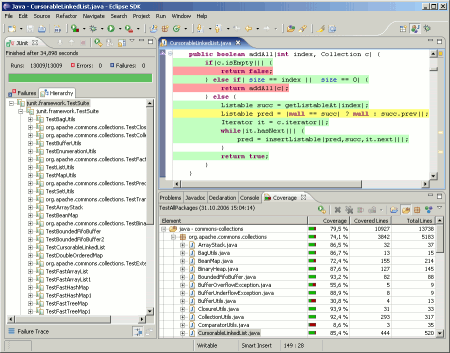
The EMMA plugin for Eclipse is my latest addition to the "can't live without it" category. It allows you to run applications and test suites from within Eclipse and gather code coverage ... better yet, that code coverage data is shown visibly in your code, much as it is in an HTML Cobertura report.

The plugin is slick, fast, easy and non-intrusive.

The one thing you do need to do is split your output directories, so that production code goes into bin, and test code goes into test-bin; this allows you to turn off coverage information for your test classes, and just gather

Of course, IDEA also has code coverage, based on EMMA, built right in.