Mar 28 2010

Check if Someone Hacked Your GMail Account

The Chinese government might not be trying to hack your Google Mail account but maybe your ex has. The most common security violation is a significant other or an ex hacking into, logging into without authorization, into a email account. Google Mail has a small feature that allows you to check the activity for your GMail account to see if there are unauthorized logins.

Once you have logged into GMail, scroll all they way to the bottom, between the Google copyright and the available storage capacity you will see a line that reads like the following: Last account activity: 33 minutes ago on this computer. Details.

Clicking on the Details link will popup a window that shows you activity history for your GMail account. The Details page will list the IP address of each time you account was accessed, the date/time of each login, it will show the number of logins from the current session.

You will get a different session each time you login, for example when you use a different computer, etc. Since you can track the date/time, IP address, and session for each login you should be able to verify the activity of your GMail account. This should be enough information for you to spot irregular activity.

From the account activity Details page you can log out from all sessions by clicking the “Sign out all other sessions” button. This will log out all sessions from all computers, for example if you forgot to logout from your schools computer, etc. Signing out from a session would require users to sign back in with your username and password. If you spot irregular activity in your mail account, you should consider changing your password.

If you find mysterious IP addresses in you account activity you can Google for any number of web sites that can track an location to your IP address. These services are not accurate to the city, it might report a city 20 miles away from the actual location but location to IP address services might provide additional hints to track down the location of where your account was accessed.


Nov 10 2009

The Ultimate Geek Gift Guide 2009

This geek gift guide is not so much for geeks and techies but for those that have geeks and techies in their life and need a little help in finding the right geek gift this holiday season. So if you don’t know what is the hottest gift item or you want to redeem yourself from the Cosby sweater you gave last year, this is the gift guide for you.

The hottest tech gift two years running must be the Apple iPhone GS3. The iPhone is one of those gifts that will be used every single day, and not just to make calls. In fact, the feature I use most often is email, browsing online, and Google Maps. I also use the iPhone to play freely available casual games available on the App Store. And of course you can play your iTunes music on the iPhone just as you would on your iPod. This year, the iPhone has some competition in the new breed of Android phones in particular the Motorola Droid.

Netbooks are a trendy new segment in the ultra portable laptop market. Netbooks usually refer to sub $500 laptops perfect for email and internet browsing. The ASUS Eee PC is perhaps the most popular brand in this market but there are available models like the HP Mini 1140NR and Acer Aspire One.
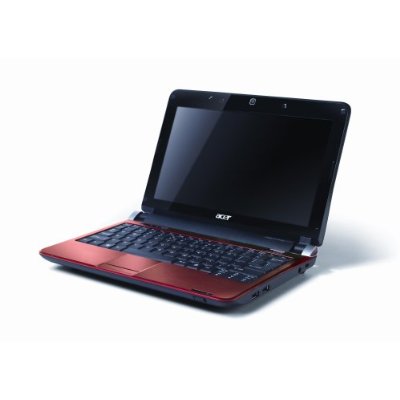
Acer Aspire One

Acer Aspire One

The Flip MinoHD is quickly gaining a big market share of the camcorder business from established brands such as Sony, Panasonic, Canon, etc. The Flip is the iPod of video cameras. It is small, portable, and simple to use. When recording, you can zoom in out and stop. When playing back you can increase/decrease the volume and pause. We have take ours on every trip we take and it is easier to use than the standard point and shoot digital camera.

The new version of the Sony PlayStation Portable (PSPgo) has the best graphic intense games available in the hand held gaming market. The PSPgo has a new slim down form factor. Download movies, shoes, and games directly from the PlayStation Network.

The Nintendo DSi portable gaming system will also be a popular with geeks this holiday season. Unlike the PSPgo, the DSi has more innovative games that take full advantage of its touch dual screens. On the DSi, the geeks in the family will enjoy games like Scribblenauts, KORG DS-10 Synthesizer, and DS classics like Brain Age 2 and TouchMaster 3.

The Nintendo Wii is perhaps the innovative console and social gaming platform currently available. The game play with the Wii Remote can be very animated. The Wii is definitely a gaming console for the whole family, and there are plenty of games that the family can play together. This holiday season Nintendo is releasing a whole slew of Mario Bros games. What geek doesn’t love Super Mario Bros based games? Two highly anticipated games are Super Mario Galaxy 2 and New Super Mario Bros.. The Mario Bros have been geek classics since the first game came out in the original Nintendo Entertainment System.

One item that a geek never has enough of is disk space. Technologist can easily fill a 100 GB hard drive with bittorrents, software, games, movies, pictures, data, etc. in no time. The geek in your life will appreciate a portable hard drive like the Western Digital My Passport which are available with 360 or 500 GB. The My Passport is the slimmest, slickest, and sexiest of the portable drives I have seen. They are small enough to carry with you in your laptop bag. As a stocking stuffer, you might be interested in getting a 32 GB USB drive. Some of the cutest USB drives are the Star Wars Mimobot Thumb Drives.

As everyone already knows, the standard geek uniform is jeans and a t-shirt. Any self respecting geek needs to have some ThinkGeek shirts in his wardrobe. ThinkGeek gear is like Armani Exchange for geeks, binary fashionable and geek chic.

Another category of gadgets in every techie at heart wishlist is electronic book readers. The Amazon Kindle DX is probably the best ebook reader in the market at this time. But Sony and Barnes and Nobles have their own offerings.
The Kindle’s wireless connectivity allow you to shop and download books on the fly as you go on the run. Hundreds of blogs are also available through the Kindle such as Slashdot and The Onion. I have a growing collection of ebooks on my Kindle, in fact I have not bought a hard cover book since I got my Kindle last year, just like I have not bought a CD since I first had my first MP3 music player.

The Powermat is the perfect gift for the early adopter techie. The Powermat is a wireless power adapter. To enable your favorite gadget (iPhone, Blackberry, DSi, etc) you need to buy and use power receiver for your device in the form of a case. With the power receiver, simply place the device on the Powermat to recharge wirelessly.

No geek gift guide is complete without a computer mouse. The Apple Magic Mouse has the form factor of something out of science fiction. The Magic Mouse uses multi-touch technology used in the iPhone. The multi-touch technology allows the whole mouse to be a button and/or a scroll wheel without actually having a button or scroll wheel. You don’t just any mouse pad you having laying around with the Magic Mouse, the SteelSeries SX Mouse Pad is more appropriate.
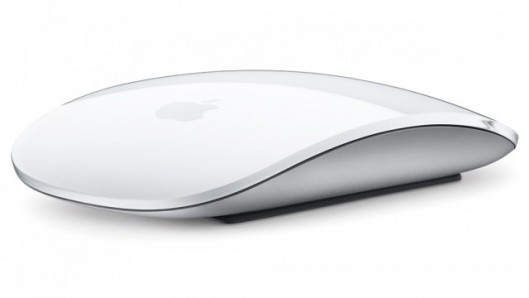
Apple Magic Mouse

Apple Magic Mouse

Be sure to take a look a the Juixe Store. We have selected the best software development books that need to be in every software developer’s bookshelf such as the classics like Code Complete, The Mythical Man-month, and The Pragmatic Programmer.

If you still need a little bit more help in finding the right tech gift for the geek in your life, take a look at the following geek gift guides from other sources such as CNET.


Jul 8 2009

Google Chrome OS

Google just announced that they are working on a new Operating System designed for netbooks. You might think they are talking a new version of Android specially designed for netbooks, but you’ve be wrong. Google is developing a new web-based browser-powered Operating System dubbed Chrome OS. Android is Google’s Operating System for mobile devices such as the G1 phone. Chrome is Google’s internet browser comparable to Mozilla Firefox or Apple Safari. Android, Chrome OS are two different and separate overlapping projects intended for the the same market. Technology pundits had for the longest time talked about a Google Operating System of mythical proportion that would go head to head with Microsoft Windows.

The idea of a Internet Operation System is not new. The idea of the browser as a platform is as old as, well the first browser. More recently, the Palm Pre uses a proprietary Web OS, there have been rumors floating around that Facebook has been working on a web Operating System, and yet the idea has never taken off.

The engineering masterminds behind Google Chrome OS intend to initially target the new Operating System for netbooks to be released sometime after the second half of 2010. That’s like, next year! Originally, when the first netbooks started to be sold by ASUS, like last year, the de facto OS was a version of Linux. But consumers don’t want a netbook with a watered down Operating System, consumers don’t want to run some wonky cloud clone of Word. Netbooks users, myself included, want to run a full Operating System with all of the application I have already invested time and money on, such as Word! For all the engineering capital behind this project, I feel that they haven’t taken into account the trends behind current netbook sales!

As computer users, we all want a better experience. But Chrome OS is not thinking outside the box, it is not revolutionary, and it is not a disruptive technology. Chrome OS is definitely not what consumers asked for. When users say they want to get to their email instantly, that they hate waiting ten minutes to startup, and that they hate having to constantly upgrade applications… All this does not mean users want a browser powered OS! Their can better be meet with an “always on” computing device, much like the iPhone.

The iPhone is the device of the future, not a water down web powered netbook device! The OS behind the iPhone is the same OS behind OS X! Your iPhone is a netbook device! When the iPhone was initially released, the only way to develop application for the device was through the Safari browser, so all iPhone applications were initially web applications. For a whole year, web applications were the only way to develop for the iPhone. As soon, as Apple released the native iPhone SDK an explosive new market has been carved out by developers. I don’t see this same effect being caused by Google Chrome OS.

Here are a few select links regarding Google Chrome Operating System.


Jul 7 2009

Disposable Laptops

I think the price range of laptops have made them disposable. Recently, I had the choice of sending an HP laptop repaired at $400 or just buy a new one for about the same price. There are many laptop models, from many vendors, at the sub-$500 dollar range. So, what would you do? Deal with customer support, send in your laptop, wait a week to have the display fixed or just go in to Best Buy and get a new one? The choice is clear, buy a new one.

This wasn’t so clear a few months ago, when I had a similar decision to make when four year old Apple laptop had problems recharging the battery. As it was out of warranty, I paid $300 dollars to send it in to have the power unit repaired and had he laptop refurbished to original manufacturing specifications. Two months later, the monitor was crapping out!


Jun 16 2009

Top Griffon Tutorials and Resources

Griffon is the rapid desktop development equivalent to Grails or Ruby on Rails. Griffon is a desktop application framework written in Groovy, a scripting language that runs on the Java Virtual Machine. Just like Grails or Rails, Griffon is very DRY and opinionated, comes with generators, and separates your models from your controllers from your views.

Griffon is a new project with the most recent release clocking in at version 0.1.1. Even though Griffon is new, it is based mainstay libraries such as Groovy, Swing Builders, and SwingX. Even with a version number of 0.1.1, Griffon provides enough features to develop functional and complex UIs. To help getting started with Griffon, here is a collection of Griffon tutorials and resources that I have found insightful and helpful.


Jun 8 2009

NetBeans 6.7 RC2

NetBeans 6.7 Release Candidate 2 was released recently and I already have it installed and running. It is also worth noting that several NetBeans related books came out in print just before JavaOne 2009.

In full disclosure, NetBeans is not my primary IDE. I mainly use Eclipse for Java development, sometimes Visual Studio for some C# projects, and occasionally Aptana Studio for Ruby and Rails applications… I probably use Komodo Edit more than NetBeans. In essence I am an IDE connoisseur. I use NetBeans for the sake of familiarizing myself it, for evaluating its features and plugins, and for rapid GUI prototyping.

That said, I am really impressed with NetBeans 6.7 and in particular NetBeans 6.5. NetBeans has very good out of the box support for Ruby, Groovy, and PHP. It has a good GUI Builder support out of the box, no additional plugins required. It also has Spring MVC, JavaServer Faces, Struts, Hibernate support out of the box as well. NetBeans 6.7 is definitely worth the download and install.

NetBeans 6.7 RC2

NetBeans 6.7 RC2

To help you get started with NetBeans, take a look at some of these recent books covering NetBeans and the NetBeans Platform.