Salesforce started using the “No Software” motto and logo going back to the early 2000’s. Since then, over the last twenty years, we’ve seen technology adoption across every sector and industry but software development for the most part is still very time consuming. Fortunately there are a great number of new platforms that took the “No Software” mindset and turned it into the “No Code” movement, in the process enabling thousands of entrepreneurs that have turned their ideas into applications and startups. Just about every cloud platform has product aimed at the “No Code” space. Amazon Web Services launched AWS Honeycode in 2020, Google Cloud has had multiple products in this space, and Microsoft Office is pushing Power Apps. In addition to the large cloud providers there are a large number of internet startups that have fueled the “No Code” movement, most notably Airtable and Zapier.
The “No Code” movement is not necessarily new, as already mentioned Salesforce had the idea of “No Software” back in the early 2000’s and going back further into the 1990’s there have been platforms and products that provided GUI builders or form designers. The reason that the “No Code” has become a movement now is that internet access is available in most parts of the world, there is a whole generation that grew up as internet natives, software as a service with trial or no cost tiers, and the explosion of data.
So what are you waiting for? I’m sure you have a great idea, or maybe just a specific need for an application that doesn’t yet exist. You can get started with any of the new breed of “No Code” platforms to making that idea into a reality.
Homebew is convenient package manager for the OS X. Once you install Homebrew on your Mac, you can then easily intall and uninstall tools, libraries, and applications through the brew command. The brew command accepts an install and unistall option, as well as list option that prints all currently installed applications.
You can install an application through a brew formula. There is a plathora of homebrew formulae.
The following homebrew formulae are the ones that I’ve found most useful as a software developer.
Every programmer should be well versed with Bash, from finding files to schedule tasks. The following are some of the most common Bash commands that I use on a weekly basis.
grep -i aBc <FILE>
Grep ignore case
grep –color abc <FILE>
Color highlight matching pattern
grep -v ABC <FILE>
Ignore any lines that include ABC
grep abc $(find . -mtime 0 -type f)
Grep recently modified files
grep “abc xyz” <FILE> | grep “02/03/19 09”
Find all lines that contain “abc xyz” and then find the remaining lines that contain the following timestamp
ps -ef | grep java
Find Java processes
history | grep git
Find all commands in the history that contain the word git
history -cw
Clear history
wc -l <FILE>
Number of lines in file
ls -1 | wc -l
Count the number of files in the current directory
ls -lh
Show the size unit of the file, such as K for kilobyte, M for megabyte, etc
ln -s <SOURCE_FILE> <LINK_FILE>
Create a symbolic file link reference to <SOURCE_FILE>
df -P <FILE>
Find free disk space and if it’s mounted
du -hs
Find disk usage for each file in current directory
cat /dev/null > <FILE>
Clear/wipe file
zip -r <FILE>
Zip all contents in current directory into the specified zip file
zip -er <FILE> <DIRECTORY>
Zip and encrypt all contents in given directory into the specified zip file
zip -d <FILE> “file.txt”
Remove file file.txt from the specified zip file
unzip -l <FILE>
List contents of given zip file
diff -rq <DIRECTORY_ONE> <DIRECTORY_TWO>
Recursively diff two directory structures
crontab -l
List cron rules for current user
crontab -e
Open crontab for editing
at -f <COMMAND> -t 201906160701
Schedule a command or batch file to run at the specified time
atq
List current scheduled tasks
atrm
Remove a scheudle task
uuidgen
Create a 128-bit UUID
date | md5
Use md5 on a date to generate a UUID based on a hash
$RANDOM
Create a random number between 0 and 32k
tcpdump -ni eth0 -vvv -s0 -w capture.pcap
Listen to eth0 interface in verbose mode and write out to file
tcpdump -ni eth0 port 1812 or port 1813 -vvv -s0 -w capture.pcap
Listen to eth0 interface for only ports 1812 and 1813
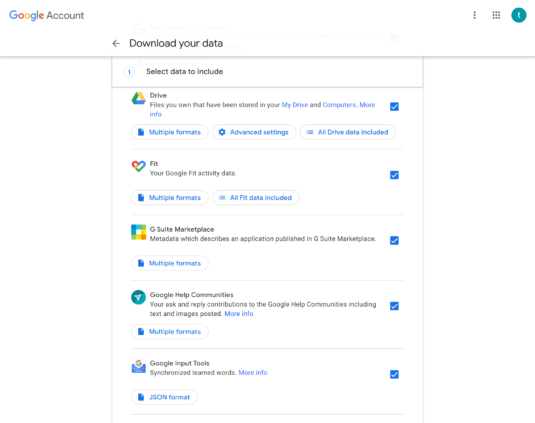
It feels like every year we rely more on online services, from Google, Twitter, Instagram, Facebook, and others. Each of these online services stores a lot of your personal data, not just meta data, but actual data like contacts, posts, photos, chats. Data is more than just personal and private, it is often our work and livelihood.
Unfortunately, to drive user engagement on their own platforms, these services don’t make it easy to interoperate with others, in essence locking you in. Much the personal and private data that we pour into these services is locked into the one service you posted, uploaded, or commented on.
It is a good idea to export all your personal and private data you consider valuable, at least once a year, from any online platform or services. Be sure to backup this data accordingly, using both physical and cloud backup solutions.
For example, with Google Takeout you can export your Blogger posts and pages, GMail email and contacts, Drive documents, YouTube videos and comments, and much more.
Google Takeout
I don’t backup my data off of Google because they would lose it, but because it has been documented a number of times that Google can suspend any account, even for what would be considered normal behavior and usage by the account holder. In the case of services like Twitter and Instagram, there are cases that accounts have been hijacked by hackers or even former friends. Additionally, these services can be bought up by other companies and can change their terms of service in a way that impacts your data and work, like when Flickr got acquired by SmugMug in 2018.
Laptops are designed to travel with. We taken home, to the coffee shop, to the library, when we travel, everywhere. It is not uncommon to misplace your power adapter when travel, or equally as bad forget it at home after you left for a trip. And of course, the cable used by the power adapter does wear and tear and would need to be replaced. I must have been about 3 years when I last needed to replace the power adapter to a MacBook Pro. I remember the sticker shock when I picked up a replacement power adapter and found it cost $69, but I needed it so I paid the Apple tax and bought it. Recently I had left behind at the office the power adapter for current MacBook Pro, 2016 model. I haven’t been in the office since and I needed charge my laptop. Luckily, so I thought, I have an Apple Store two blocks away from home. This time around, the full cost of a power adapter was $79, but Thunderbolt cable or batteries not included, I needed to shell out an additional $39 for a 0.8M USB-C cable.
Apple Store Receipt for MBP Power Adapter
This is truly Apple’s genius. To take a technology, like electricity, that was invented over a hundred years ago. A commodity technology that is found in products priced at $10 and below, like power cords. Change the connectors in such a way that others can’t legally copy your design. Break a product down to their essential components, the actual power adapter from the cable. Charge as much as possible for each component that is sold as a product.
If you have an existing WordPress blog that you’ve used for years and have built up some Google juice but now are required to relocate to a different domain, you way want to redirect all the inbound links for the old domain to your new domain. If you still have access to the old existing domain, you can easily redirect all the inbound links to the new domain using the following .htaccess script.
RewriteEngine On

RewriteCond %{HTTP_HOST} ^.*old-domain\.com$ [NC]
RewriteRule ^(.*)$ http://new-domain.com/$1 [R=301,L]
Replace old-domain and new-domain with the correct domain names. If you WordPress blog was located in old-domain.com/wordpress then drop this in the wordpress directory that contains your WordPress installation. Of course, this only works for as long as you have access to the old-domain. Also, be sure to use the same permalink settings in the new WordPress insulation as in the previous so that the redirection maps the blogs posts correctly.