Apr 30 2008

Ruby on Twitter

Here is a short list of 21 fellow rubyist that also use twitter. By no means is this a complete list, this is just all the ruby/rails hackers that I follow. If you like to follow me just befriend me and I’ll be sure to add you to my friend list.

Technorati Tags: , , , , ,


Apr 16 2008

Running with Shoes – Form and Function

The Shoes microframework has a small number of succinct data entry controls. Essentially you can create User Interface forms and screens with buttons, text fields, text areas, and select options.

All of the Shoes UI controls can have associated code blocks that execute when the control changes. For example, lets create a text field in Shoes, default it with a string value, and print the current text in the console when someone edits the text field. Here is the code that does what we want!

[source:ruby]
Shoes.app do
stack do
@text = edit_line :text => “Default Value” do
puts “Text Changed To: #{@text.text}”
end
end
end
[/source]

Notice that the method edit_line creates a text field. The method edit_box create a text area, and edit_list creates a select box. To create a button, simply use the aptly named button method.

Lets create a little more elaborate Shoes UI example. Lets add a text field, selection list, and button in a Shoes canvas. When the button is pressed, we will set the text field with the value of the currently selected value in the list.

[source:ruby]
Shoes.app do
stack do
@text = edit_line
@list = list_box :items => [‘Apple’, ‘Orange’, ‘Guava’]
button ‘Update’ do
@text.text = “You Selected: #{@list.text}”
end
end
end
[/source]

Lets create another Shoes example. This time lets dynamically update the available items in a list when a button is pushed. Here is the code for this scenario.

[source:ruby]
Shoes.app do
@counter = 0
stack do
@list = list_box :items => [@counter.to_s] do
puts “list changed”
end
button ‘Add To List’ do
@counter += 1
# Pushing new item to array does not update list
# To update list values call items=
@list.items = (@list.items < < @counter.to_s) end end end [/source] Notice that for to update the available values in the list, you need to call the items= method. To create a text area use the edit_box method. Like the edit_line, edit_box accepts a code block that is executed every time the text is modified. As expected, you can set the edit box height and width. The height needs to be an integer number of pixels. The width can be an integer number of pixels or a decimal (0.0 - 1.0) for the percent of the available space. For example, to create a text box that is 200 pixels high and takes up 50 percent of the available canvas width we can use code like the following. [source:ruby] Shoes.app do stack do @box = edit_box 'Default', :width => 0.5, :height => 200 do
puts @box.text
end
end
end
[/source]

All Shoes UI control widgets, and shapes for that matter, can be made to hide, and appear by invoking the hide and show methods respectively.

As of this writing, Shoes does not support checkboxes, radio buttons, tabs, or tables.

There are more Shoes GUI tutorials and code samples here.

Technorati Tags: , , , ,


Apr 14 2008

Ruby Web Frameworks

Ruby on Rails is perhaps the most popular Ruby-based web framework, but it is not the only web framework that is available to fellow rubyist. In fact there is a growing number of alternative Ruby Web Frameworks. In not particular order, here is a short list of my top favorite Ruby web frameworks.

Ruby on Rails – Rails is a full-stack framework for developing database-backed web applications according to the Model-View-Control pattern.
Nitro – Nitro provides everything you need to create state-of-the-art Web 2.0 applications with ease and joy. Nitro applications are written using Ruby (server side) and Javascript (client side).
Camping – Camping is a web microframework which consistently stays at less than 4kb of code.
Merb – Like Ruby on Rails, Merb is an MVC framework. Unlike Rails, Merb is ORM-agnostic, JavaScript library agnostic, and template language agnostic, preferring plugins that add in support for a particular feature rather than trying to produce a monolithic library with everything in the core.
Waves – Waves is feature-rich, compact, and extensible. Waves is thread-safe, hot-patchable, and supports easy clustering. Waves relies on best-of-breed Ruby libraries, including Rack, Sequel, and Markaby among others.
Ramaze – Ramaze is a simple, light and modular open-source web application framework.
Sinatra – Sinatra is the easiest way to create a Fast, RESTful, web-application in Ruby with few dependencies, setup, and LOC.

Technorati Tags: , , , , , , , ,


Apr 13 2008

The Ruby and Rails Library

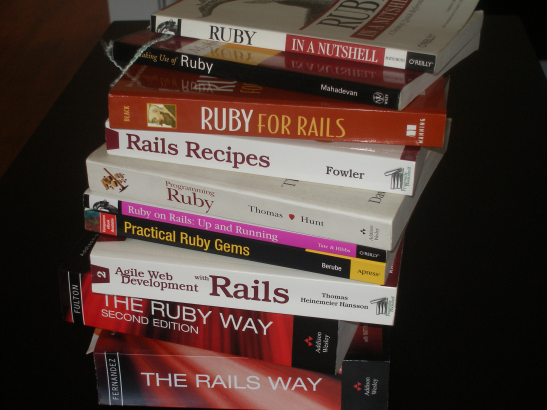
I own my personal and private Ruby and Rails library. If I haven’t misplaced any of my books, I currently have ten of the top Ruby and Rails books. From each book I have learned something new about Ruby and Rails. If you are a new programmer learning Ruby or Rails, you don’t need all of these books. For a new Rubyist, I simply recommend any one Ruby and one Rails book from the list below.

Ruby and Rails Books

Ruby
Ruby In A Nutshell, Yukihiro Matsumoto, David L. Reynolds
Programming Ruby
The Ruby Way, Hal Fulton
Practical Ruby Gems, David Berube
Making Use of Ruby, Suresh Mahadevan, etc.
Ruby For Rails, David A. Black

Ruby on Rails
The Rails Way, Obie Fernandez
Agile Web Development with Rails, Dave Thomas, David Hansson, etc.
Ruby on Rails: Up and Running, Bruce Tate, Curt Hibbs
Rails Recipes, Chad Fowler

I plan to add the following books to my growing Ruby and Rails library.

The Ruby Programming Language, David Flanagan, Yukihiro Matsumoto
Beginning Ruby: From Novice to Professional, Peter Cooper
Learning Ruby, Michael Fitzgerald
Flexible Rails, Peter Armstrong
Advanced Rails Recipes: 84 New Ways to Build Stunning Rails Apps
Design Patterns in Ruby, Russ Olsen


Mar 23 2008

Running with Shoes – Tasty Text

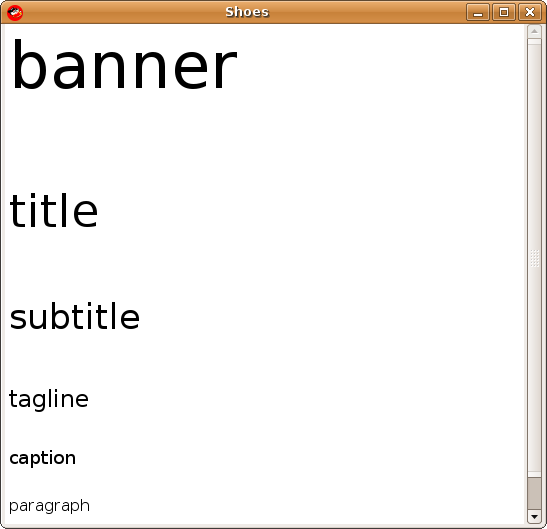
The Shoes toolkit has a nice rich text format support. At first sight it might seem that Shoes text support borrows a lot from HTML, for example the most commonly used text block is para. In addition to the paragraph text block, you can use banner, title, subtitle, tagline, caption, and inscription.

[source:ruby]
Shoes.app do
stack do
banner “banner”
title “title”
subtitle “subtitle”
tagline “tagline”
caption “caption”
para “paragraph”
inscription “inscritpion”
end
end
[/source]
shoes toolkit text block

As you can see banner is the largest text block, followed by tittle, etc. The default size for banner, title, subtitle, tagline, caption, para, and inscription is 48, 34, 26, 18, 14, 12, 10 pixels respectively. You can also change the default size of a text block by using the optional size parameter.

[source:ruby]
Shoes.app do
stack do
banner “banner”, :size => 20
end
end
[/source]

Most often you will use the paragraph text block. If you have to display a great amount of text on a paragraph you pass in variable number of strings parameters.

[source:ruby]
Shoes.app do
stack do
para “Lorem ipsum dolor sit amet, “,
“consectetur adipisicing elit”
end
end
[/source]

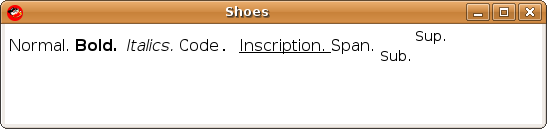
In addition to text blocks, Shoes supports text formats such as strong, em, code, ins, span, sub, and sup. Here is an example of using a paragraph block with all of the text formats.

[source:ruby]
Shoes.app do
stack do
para “Normal. “,
strong(“Bold. “),
em(“Italics. “),
code(“Code. “),
ins(“Inscription. “),
span(“Span. “),
sub(“Sub. “),
sup(“Sup. “)
end
end
[/source]
shoes toolkit text format

In addition to simple text blocks and text formatting methods, you can create hyper links. Just like the hyper web, links can execute some event or code.

[source:ruby]
Shoes.app do
hyper_link = link “hyper link” do
puts “link pressed”
end
stack do
para hyper_link
end
end
[/source]

The above code creates a link and assigns it to the hyper_link variable. The link is later passed on to the paragraph block for display. If you click on the link ‘link pressed’ will be printed on the terminal console.

In addition to executing custom code when a link is pressed, you can also launch the default browser if you use the click parameter. The code below displays a link and when pressed it will launch the Firefox or your default browser to the given URL.

[source:ruby]
Shoes.app do
stack do
para(link “Juixe TechKnow”, :click => “http://www.juixe.com/techknow”)
end
end
[/source]

All the text formatting methods also accept an option stroke parameter to sent the color. Here is a simple example of using color with your text.

[source:ruby]
Shoes.app do
stack do
para em(“Hello, “, :stroke => green),
strong(“World!”, :stroke => blue)
end
end
[/source]

Here is a recap of the available methods for working with text with the Shoes toolkit.

Text Blocks:
para, banner, title, subtitle, tagline, caption, inscription

text formats:
strong, em, del, ins, link, span, sub, sup

There are more Shoes GUI tutorials and code samples here.

Technorati Tags: , , , , , ,


Mar 13 2008

Top 5 Ruby Presentations on Google engEDU Tech Talks

JRuby: The power of Java and Ruby, presented by Ola Bini.

I work for ThoughtWorks Studios, and recently published the book Practical JRuby on Rails at APress. I’m very interested in Artificial Intelligence, Lisp, Ruby and the fuzzy lines between languages…

Ruby 1.9, presented by Yukihiro Matsumoto

Yukihiro Matsumoto (Matsumoto Yukihiro, a.k.a. Matz, born 14 April 1965) is a Japanese computer scientist and software programmer best known as the chief designer of the Ruby programming language.

He was born in Osaka Prefecture, in western Honshu. According to an interview conducted by Japan Inc., he was a self-taught programmer until the end of high school. He graduated with an information science degree from Tsukuba University, where he associated himself with research departments dealing with programming languages and compilers.

As of 2006, Matsumoto is the head of the research and development department at the Network Applied Communication Laboratory, an open source systems integrator company in Shimane prefecture. He is a member of The Church of Jesus Christ of Latter-day Saints and served as a missionary for the church. Matsumoto is married and has four children.

How To Design A Domain Specific Language, presented by David Pollak

David Pollak has been developing commercial software for 28 years. He founded Athena Design and wrote Mesa, the first real-time spreadsheet. David wrote Integer, the first online, collaborative spreadsheet. Since 2000, David has been developing domain specific languages for security and general web development.

ABSTRACT
David will describe a framework for developing DSLs which includes: Identifying the constituents in a development project; Determining the costs and benefits of a DSL for a particular constituency vs. hand-coding functionality for that constituency based on interviews and specs;

Ruby And Google Maps, presented by Andre Lewis

Andre will be covering topics such as the following:
– ImageMagick and geographic data: creating custom Google Map overlays with RMagick
– Google Maps custom controls: creating a better (or at least different) zoom control
– Demystifying the geocoder: you, too, can create a geocoder

Code Generation With Ruby, presented by Jack Herrignton

Jack Herrington, the author of Code Generation in Action (Manning, July 2003) , will talk about code generation techniques using Ruby. He will cover both do-it-yourself and off-the-shelf solutions in a conversation about where Ruby is as a tool, and where it’s going.

Technorati Tags: , , , , ,