Oct 28 2008

Silicon Valley Code Camp 2008

The Silicon Valley Code Camp is happening this year at Foothill College on Nov 8-9. There are over 100+ scheduled sessions lined up with nearly 1000 developer attending. Although you need to register, attending the Code Camp is free. Looking at the scheduled session, it will be a very diverse conference with talks on Open Source, Java, C#, and Web Development. Speakers include Douglas Crockford of Yahoo, Paul King of Groovy in Action, Bill Venners of Artima, Arun Gupta of Sun, Karthik Gurumurthy of Wicket, David Pollak of Lift, Andres Almiray author of several Groovy Builders, and a ton of other Bay Area coders and hackers.

Some of the session talks that I am most interested in attending include the following…

  • GridGain – Java Grid Computing Made Simple, Nikita Ivanov
  • JavaScript: The Good Parts, Douglas Crockford
  • Introduction to Building RIA with Adobe Flex and AIR, Abdelmonaim Reman
  • Introduction to Spring Web Services, Pyounguk Cho
  • Building Rich Applications with Groovy’s SwingBuilder, Andres Almiray
  • The Feel of Scala, Bill Venners
  • Rails powered by GlassFish, Arun Gupta
  • Ruby Meta-programming, Bala Paranj
  • Building Enterprise RIAs with Cairngorm Microarchitecture, Abdelmonaim Remani
  • Develop Rich Internet Applications using JavaFX, Sridhar Reddy
  • Flex and 3D UI, for games and more, Vic Cekvenich
  • Introduction to Grails, James Williams
  • Lift: a simply functional web framework, David Pollak

Technorati Tags: , , , , , , , , , , ,


Oct 26 2008

The Rubyist: September Edition

Here is a recap of the top Ruby-related links for the month of September 2008. Links for The Rubyist are provided by A Rubyist Railstastic Adventure, a tumblelog.

Technorati Tags: , , , , , , , , ,


Oct 22 2008

Create Flash Animations with ActionScript 3 and Tweener

One of the kewl things about Flash is its vector graphic animation and tweening capabilities. Since I have been playing around with FlashDevelop to create ActionScript based graphics I thought it would be a nice idea to do some animations. The easiest way to create animations in Flash is to tween a graphic, so to speak, and the Tweener library make this incredibly easy that it is best to describe what tweening is by showing some code.

package
{
  import flash.display.Shape;
  import flash.display.Sprite;
  import flash.events.Event;
  import flash.text.TextField;
  import flash.text.TextFormat;
  import flash.text.TextFieldAutoSize;
  import caurina.transitions.*;

  public class Main extends Sprite
  {

    public function Main():void
    {
      if (stage) init();
      else addEventListener(Event.ADDED_TO_STAGE, init);
    }

    private function init(e:Event = null):void
    {
      removeEventListener(Event.ADDED_TO_STAGE, init);

      // Create a text field.
      var texty:TextField = new TextField();
      texty.text = "Holla, Tweener!";
      texty.autoSize = TextFieldAutoSize.CENTER;

      // Size and color the text field
      var textyFormat:TextFormat = new TextFormat();
      textyFormat.color = 0xFF00f0;
      textyFormat.size = 50;
      texty.setTextFormat(textyFormat);

      this.addChild(texty);

      // Animate the text field for 8 seconds
      // to move to the x, y coordinates
      Tweener.addTween(texty, {x:300,y:200, time:8, delay:0, alpha:0});
    }
  }
}

The code above is from the Main.as file that is created from FlashDevelop when you create a new ActionScript 3 project. I only modified the init function.

To actually build and run this code, you will first need to create an ActionScript 3 project in FlashDevelop. Also, download the Tweener AS3 library. After you unzip the Tweener code, copy the ActionScript source files to the src directory in the newly created project. At this point hitting F8 will build the project.

Technorati Tags: , , , , , , ,


Oct 20 2008

Develop Flash Applications with ActionScript and FlashDevelop

My abilities as an artist extends to drawing stick figures. Although this might be enough for internet comics such as xkcd, I always wanted to create complex geometric based artwork. I played around with Flash before, but I found many of the designer oriented concepts in the Flash authoring tool a bit to cumbersome for my programmer mindset. I didn’t want to start with a timeline, I wanted to start with a main method. Fortunately for programmers like me that want to dabble with Flash animations, Flash fully supports ActionScript, a programming language based on JavaScript. With Flash, I could write ActionScript programs that would create designs as precise as my programming abilities would dictate, not my drawing abilities. The only major drawback to using Flash, if it is not part of your job, is the is the price tag. The Flash CS4 authoring tool is priced well beyond my budget for Open Source projects, which is $0. Fortunately, FlashDevelop fits right between my price range.

FlashDevelop is a free and open source editor for Flex, Air, and ActionScript projects. FlashDevelop is a .NET project and has a look and feel similar to Visual Studio. To get started with FlashDevelop you will need to download the latest version of Flex SDK and FlashDevelop.

To configure FlashDevelop, you need to point to the location where you unzipped the Flex SDK. I typically unzip Open Source libraries under C:\OSDEV. Once FlashDevelop has been configured to point to the Flex SDK, you can create an ActionScript 3.0 project by going to Project | Create Project and selecting ActionScript 3.0 project from the project wizard.
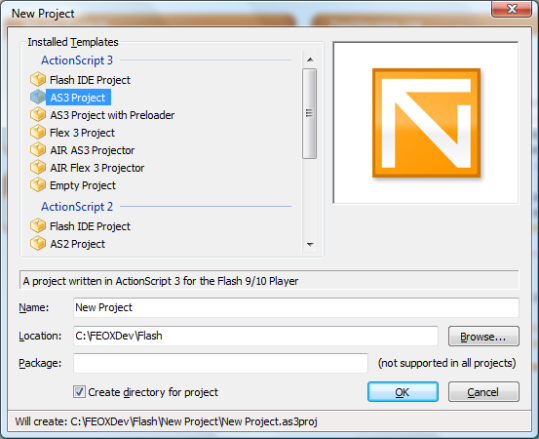
FlashDevelop New Project

Creating a new project will create a project directory structure with a bin, lib, and src folders. Under the src folder there is an Main.as ActionScript file with the following scaffold code…

package
{
  import flash.display.Sprite;
  import flash.events.Event;

  /**
  * ...
  * @author DefaultUser (Tools -> Custom Arguments...)
  */
  public class Main extends Sprite
  {

    public function Main():void
    {
      if (stage) init();
      else addEventListener(Event.ADDED_TO_STAGE, init);
    }

    private function init(e:Event = null):void
    {
      removeEventListener(Event.ADDED_TO_STAGE, init);
      // entry point
    }
  }
}

Inside the init function, below the comment ‘entry point’ you can add your custom ActionScript code. For example, to create the standard ‘Hello, World!’ example you can add the following code.

      var texty:TextField = new TextField();
      texty.text = "Holla, World!";
      texty.textColor =  0xFF00f0;
      this.addChild(texty);

If you want to work with shapes here is an example to create a square and a circle.

      var shapely:Shape = new Shape();
      shapely.graphics.beginFill(0xFF0000);
      shapely.graphics.moveTo(0, 0);
      shapely.graphics.lineTo(100, 0);
      shapely.graphics.lineTo(100, 100);
      shapely.graphics.lineTo(0, 100);
      shapely.graphics.endFill();

      shapely.graphics.beginFill(0x00FF00);
      shapely.graphics.drawCircle(150, 150, 50);
      shapely.graphics.endFill();

      this.addChild(shapely);

Build the project and open launch the index.html file under the bin directory.

Technorati Tags: , , , , , , ,


Oct 15 2008

Beginning iPhone Development

Apple recently dropped the Non Disclosure Agreement (NDA) that developers had to agree to develop iPhone applications using the iPhone Software Development Kit (SDK). The NDA prohibited iPhone developers from writing tutorials, guides, blogs, books, and even wikis about the iPhone SDK. Apple has always been overbearingly protected and goes so far as to have attendees of their World Wide Developer Conference agree to such an NDA as well. But since the NDA has been lifted on the iPhone SDK many publishers have announced the release dates of books aimed to assist in the development of iPhone applications. Here is a list of upcoming books devoted to the iPhone SDK.

If you are new to the Apple development platform, in particular Objective-C of XCode, here is a short list of books that can also be of help.

Technorati Tags: , , , , , , ,


Sep 26 2008

Code Archeology

I work with codebase that has revisions going back over five years. Like dog years, the age of code adds up quickly. A five year old source file is like fifteen in code years. In that amount of time, boat loads of engineers have come and gone, checked in fixes and bugs alike, have left comments, and removed methods. Code has been written and rewritten and refactored and removed in that time span. Third party vendors emerge, merge, and disappear.

The codebase is large, with thousands of class source files and millions of line of code with hundreds of third party resources. No one person alone knows the system inside out, it’s behavior is a mystery to some. To grasp it in your debugger or your mind you need the collective knowledge of the whole team. In such an environment, tests are that much more important. Test become a part of the collective knowledge, an opinionated specification, and essentially another team member, of sorts.

Debugging such legacy source code becomes like code archeology, but instead of finding ceremonial tombs encrusted with jewels you find unceremonious hacks littered with bugs.

After reading thousands of source files, like the matrix, you begin to recognize patterns, fads, and trends, like XML configuration files, to code generation, to dependency injection, to annotations, to configuration over configuration, to new languages, etc.

Along the way, your realize that if code is art, then having Picasso on your software development team would not necessary help keep defect count low.

Technorati Tags: , , , , , , , ,