May 11 2009

The Anatomy of a JavaScript Bookmarklet

I think of bookmarklets as a way to greasemonkey patch a webpage with custom JavaScript not approved by the author of the website you are visiting. Bookmarklets are a bit of JavaScript that you save as a bookmark and when visiting a page, if you click on that bookmark, the JavaScript will run on the context of the current page that is being viewed. This allows you to modify the current page in ways that the original author did not think off or allow. In essence, bookmarklets are a way to extend, modify, and enhance sites you are visiting.

Common examples of bookmarklets are the Amazon Universal Wishlist, Tumblr share bookmarklet, and DZone submission bookmarklet. In the case of the Amazon bookmarklet, when you click the bookmarked JavaScript a new frame dialog pops up that allows you to select an image from the current page, add a price, and title and then add that product description to your Amazon wishlist. The Tumblr and Dzone bookmarklets help in submitting the current page to their respective services as a social bookmark.

Bookmarks are not new, they have been around since JavaScript was first introduced, but it is a technique that opens a lot of opportunities for a power users. Bookmarklets allows your users to submit information to your service about and from whichever website they are visiting.

Here is the hello world example of a bookmarklet.

javascript:alert('hello, world!');

Type the above code snippet in the location bar of your browser and click enter! You should have seen the alert dialog pop up with the correct greeting. That is your first bookmarklet.

To allow users to save the JavaScript bookmark as a bookmarklet into their favorites or bookmark toolbar you will need to create a link. Here is an example of a link with a bookmarklet.

<a href="javascript:alert('hello, world!');">Say Hello</a>

Now that we have the mechanics of a bookmarklet down, lets go over some practical scenarios. In the examples listed above, the bookmarklet simply loads an additional JavaScript source file that acts as the main application which in turn may load additional resources such as images and CSS files. Once all the resources have been loaded, from the main JavaScript source file, you can invoke the necessary methods.

Here is an example of the JavaScript bookmarklet which will load the secondary JavaScript main application source file. This bookmarklet simply acts as a loader. Notice that for the actual bookmarlet, the JavaScript needs to be escaped and obfuscated into a single line.

(
  function(){
    var w=window,
        u='<url TO MAIN SCRIPT>',
        l=w.location,
        d=w.document,
        s=d.createElement('script'),
        e=encodeURIComponent,
        x='undefined';

    function g(){
      if(d.readyState && d.readyState!='complete'){
        setTimeout(g,200);
      }else{
        if(typeof MainApp==x) {
          s.setAttribute('src',u+'.js');
          d.body.appendChild(s);
        }
        
        function f(){
          if(typeof MainApp==x){
            setTimeout(f,200)
          }else {
            MainApp.show();
          }
        }

        f();
      }
    }
    g();
  }()
)

Again, you need to obfuscate the above JavaScript into a bookmarklet by removing all non-essential white spaces and line breaks. The bookmarklet should all fit in a single line in the href of a HTML link. That said, lets explain the above bookmarklet a bit. The first thing that will happen is that the a new HTML script tag will be created for the main JavaScript source file. The script will set timeouts until the additional script file has been downloaded, interpreted, and the MainApp object is defined. Once the MapApp object has been defined you can invoke the custom code that will run in the browser in the context of the current web page. The MainApp object is defined in the JavaScript file which was loaded by the bookmarklet.

For completeness sake, here is a simplified trivial example of the main JavaScript source file.

var MainApp = function(){
  var greetings = function(message) {
    alert(message);
  }
  
  return {
    show: function() {
      greetings('Hello, World');
    }
  }
}();

Remember that the main JavaScript source file can load additional resources, ask for user input, and post data back to your server. It runs in the context of the current page you are visiting and has access to all elements in the DOM. In my opinion, bookmarlets are the easiest way to enhance a page without using a browser plugin or extension.

May 11 2009

Dynamically Create HTML Elements with JavaScript

Twenty-five percent of AJAX is the J part, the JavaScript. When working with dynamic data coming from the back end you must create the necessary DIV containers and HTML elements and append the new new elements into the document body. In FireFox you can create a new element using the createElement method on the document object. It is good to note that creating an element this way just creates a object, and does not actual insert the element into page until you append it a parent element node.

var link = document.createElement('a');
link.setAttribute('href', 'http://juixe.com');
link.innerHTML = "Hello, Juixe!";
document.body.appendChild(link);

This is all simplified with jQuery, especially since jQuery normalized the browser quarks and differences. Here is the equivalent code but using jQuery, note that you need to load the appropriate jQuery JavaScript version for this work in your browser.

var link = $('a');
link.attr('href', 'http://juixe.com');
link.html('Hello, TechKnow!');
$('body').append(link);

All that can be streamlined and broken down to two lines.

var link = $("<a href='http://juixe.com'>Hello, jQuery!</a>");
$('body').append(link);

Using jQuery you can actually create more complex HTML elements than a simple link.

var link = $("<a href='http://juixe.com'>Hello, <b>World</b>!</a>");
$('body').append(link);

May 5 2009

Top JavaScript and Web Performance Presentations on Google Tech Talks

Google has a YouTube channel with over 1000++ videos of presentations on a large number of programming and software development topics. Here are the top videos recently released in the Google Tech Talks channel regarding JavaScript and web performance that every web developer should see.

  • JavaScript: The Good Parts / Douglas Crockford – In JavaScript there is a beautiful, highly expressive language that is buried under a steaming pile of good intentions and blunders. The best nature of JavaScript was so effectively hidden that for many years the prevailing opinion of JavaScript was that it was an unsightly, incompetent abomination. This session will expose the goodness in JavaScript, an outstanding dynamic programming language.
  • Drop-in JavaScript Performance / John Resig – Browsers are continually upgrading – providing new features from the latest specifications. We’ll look at modern JavaScript and DOM techniques that you can easily drop in to your applications for instant speed-ups.
  • Best Practices in Javascript Library Design / John Resig – This talk explores all the techniques used to build a robust, reusable, cross-platform JavaScript Library such as jQuery.
  • High Performance Web Sites and YSlow / Steve Souders – Yahoo!’s Exceptional Performance Team has identified 14 best practices for making web pages faster. These best practices have proven to reduce response times of Yahoo! properties by 25-50%.
  • Life’s Too Short – Write Fast Code / Steve Souders – Techniques to help yoru web site perform better are discussed such as coupling asynchronous scripts, use iframes sparingly, and flush the document early.
  • Debugging and Testing the Web with Firebug / Rob Campbell – In this talk we explore web development and debugging strategies with Firebug. An overview of new and improved features and how to use them is presented. We wrap-up with a peek at FireUnit, a new Firebug extension by John Resig and Jan Odvarko, and it’s role in unittesting Firebug itself.
  • Faster HTML and CSS: Layout Engine Internals for Web Developers / David Baron – How fast Web pages load and how fast they change dynamically depends on both the Web page and the browser it’s running in. Browser makers put significant effort into making their browsers faster, but there are also things that Web page authors can do to make their pages more responsive.
  • jQuery / Dmitri Gaskin – jQuery is a JavaScript library that stands out among its competitors because it is faster, focuses on writing less code, and is very extensible.

Apr 14 2009

Juixe Tweetbox 0.1

Twitter Clients
Writing a Twitter client has become the new Hello, World! There are Twitter libraries in just about every major language such as PHP, Ruby, ActionScript, Python, Java, and more. The Twitter API is simple enough that you don’t need much, you can go a long way with the command line and curl.

As Twitter popularity grows so does the number of Twitter applications. On the iPhone I have tried three of them and on the desktop one. But with all the growth and creativity surrounding Twitter the desktop are essentially all clones of the official Twitter web interface.

To amend for the huge gap in what Twitter client do and what I think they can do in terms of missing features I have thrown my developer hat into the ring. There is a virtual arms race as startups rush to develop Twitter desktop clients. To add fuel to the fire, a few days ago a new Twitter desktop client was announced.

Tweetbox
Tweetbox, released under pre-beta, is my hello, world twitter client. Tweetbox is written mostly in JavaScript and jQuery with a PHP back end that acts as a Proxy to Twitter. Tweetbox also uses Google Gears for added functionality and desktop interactivity. As of the current release of Tweetbox, version 0.1, the key features is the ability to have multiple Twitter accounts. I currently have a huge laundry list of features to complete, including UI plastic surgery, adding support for timelines, retweets, and replies.

I do hope that in the near future Tweetbox will hit the sweet spot for some users. An ultimate goal is to allow extension points to allow for plugins.


Sep 7 2008

Google Chrome

The Browser War is flaring up once again with the release of Google Chrome. Google Chrome is a new browser based on many freely available open source components such as WebKit and Firefox. Chrome is bare bones, chromeless, browser with very little UI fluff and decoration. It is interesting to note that the UI for the Google browser took a note from the companies colorful logo, the Chrome UI is very cartoon-like with a blue pastel color scheme.

Many of the features that are high lighted in Chrome are not necessarily revolutionary, instead I would say that the Google browser is retro-evolutionary. Chrome basically reduced the browser to the location bar, tabs, and content page.

The most touted features in Chrome are its crash control, incognito mode, and safe browsing. Chrome runs each web page on its own process so that if one page fails only that page is effected. Incognito mode is like Safari’s Private Browsing, aka Porn Mode, it allows you to surf the web without caching cookies and history of the sites you visit on your local computer. It’s safe browsing feature will help you to identify web sites with malicious code or applications. Many of these features are not entirely novel, so why would Google go to the efforts of creating a new browser?

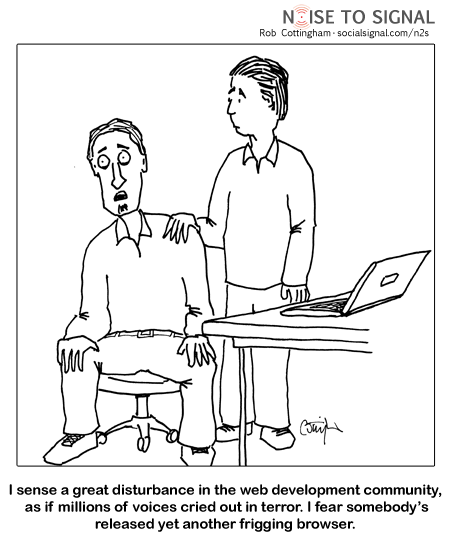
What I think is novel is that Google decided to release yet another browser. The browser space is already crowded with Firefox, IE, Safari, Opera, Konqueror, and Flock to name just a few. It is clear that Google will align Chrome with its properties, search, applications, development tools, and user generated content sites. Seeing Google take this approach I wonder if other companies follow suit and release internet browsers that compliment their business. Can you imagine a custom browser from Adobe, Mcaffee, Oracle, Amazon, or EBay?

Chrome Web Development Disturbance
Via Noise to Signal

Technorati Tags: , , , , , ,


Jul 7 2008

Edit Me

Just saw an interesting bit of JavaScript that allows anyone to edit the content of a web page from IE or FireFox. This is a JavaScript trick that runs on the client side and does not have any effects on the actual file on the server. With this you can change the text of a web page to your hearts content.

Once you visit a page you are interesting in modifying, enter the following JavaScript in the address or location bar all in one line.

javascript:document.body.contentEditable=’true’;document.designMode=’on’; void 0

To edit this page, just click here.

Technorati Tags: , , ,