- New BSD license
- Firefox 1.5 support
- powerful new components
- New Matrix control combines Tree, List and Edit Grid capabilities and adds large data set scrolling and pagination tuners
- Chart package implemented in SVG to enable execution in Firefox without a plug-in
- Load-time optimizations with smaller initial footprint
- API and visual tooling enhancements throughout
- Lots more as described in the release notes
Showing posts with label ide. Show all posts
Showing posts with label ide. Show all posts
Monday, October 16, 2006
Tibco GI now opensource
TIBCO General Interface is a AJAX rich internet application (RIA) toolkit that lets organizations capitalize on the lower costs of Web applications while delivering the rich graphical look and feel of desktop-installed software and components. General Interface helps you in creating sophisticated web-based applications that run in a standard web browser without plug-ins, Active-X controls, Java applets or client-side software installation. Now, Tibco released Tibco General Interface (GI) 3.2 Beta, which is opensourced under the BSD license. Tibco GI, version 3.2 introduces several major features:


Friday, September 01, 2006
Eclipse SQL Explorer
Eclipse SQL Explorer 3, an Eclipse plugin that allows you to query and browse any JDBC compliant database, has been released. The SQL Explorer adds a new perspective and a few new views to eclipse. The following is a short list:
- The SQL editor provides syntax highlighting and content assist.
- Using the Database Structure view, you can explore multiple databases simultaneously. When a node is selected, the corresponding detail is shown in the database detail view.
- Provides database-specific features for DB2, Oracle, and MySQL)
Monday, August 21, 2006
Eclipse Test and Performance Tools Platform
Eclipse Test and Performance Tools Platform (TPTP) provides a comprehensive suite of open source performance-testing and profiling tools, including integrated application monitoring, testing, tracing and profiling log analyzing and static-code analysis tools. The Eclipse Callisto 3.2 release includes version 4.2 of the Eclipse Test & Performance Tools Platform (TPTP). OnJava.com recently featured an introduction to using the tool. TPTP lets you test several aspects of your application's behavior, including memory usage, execution statistics, and test coverage.
Installing TPTP
Open the Remote Update window (Help -> Software Updates -> Find and Install), and select the Callisto Discovery Site. If Callisto Discovery Site is not listed, add a "New Remote Site", and add http://download.eclipse.org/callisto/releases/, to the list and select it. You will have to select the "Charting and Reporting", "Enabling features" and "Testing and Performance" options to install.
Profiling with Eclipse TPTP
Follow these steps to profile an application
References:
Installing TPTP
Open the Remote Update window (Help -> Software Updates -> Find and Install), and select the Callisto Discovery Site. If Callisto Discovery Site is not listed, add a "New Remote Site", and add http://download.eclipse.org/callisto/releases/, to the list and select it. You will have to select the "Charting and Reporting", "Enabling features" and "Testing and Performance" options to install.
Profiling with Eclipse TPTP
Follow these steps to profile an application
- Create a JUnit test profile using "Run -> Profile" option from the main menu. If you have a test package, it will be automatically selected in the "Test" tab of the profile dialog box.
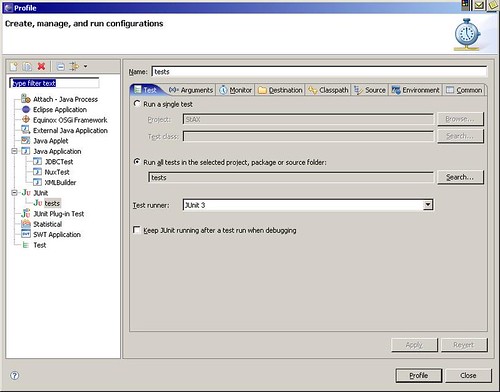
- Select the "Monitor" tab and choose the required options.
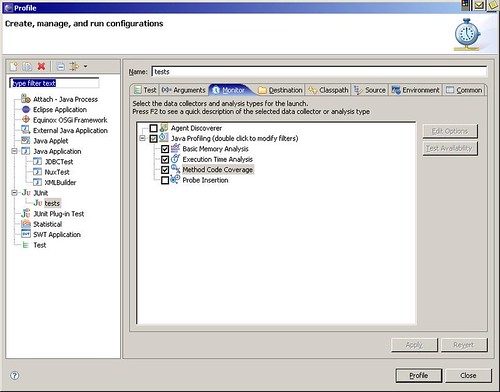
- Click on profile.
References:
- Profiling Your Applications with Eclipse Callisto
- Eclipse Test and Performance Tools Platform
- Introduction: Eclipse Test and Performance Tools Platform (Tutorial)
- Eclipse Test and Performance Tools Platform, Part 1: Test, profile, and monitor applications (Tutorial)
- Eclipse Test and Performance Tools Platform, Part 2: Monitor applications (Tutorial)
Wednesday, August 02, 2006
Jad Decompiler Plug-in for Eclipse
JAD Eclipse is an eclipse plug-in for the JAD Decompiler. The following is a quick description of how to setup JAD Eclipse (assuming you already have eclipse setup).
- Download the latest version of JAD decompiler and set modify your path to add JAD_HOME directory.
- Download the latest version of JAD Eclipse from the link shown above and extract it to your eclipse plugins directory.
- Restart eclipse and configure JAD as follows
- In eclipse, go to - Window->Preferences->Java->JadClipse
- Set Path to decompiler to "jad" (jad is already in your path).Click Apply.
Thursday, July 20, 2006
Weblogic Workshop Studio 3.2
The latest version of BEA Weblogic Workshop Studio has been upgraded to core Eclipse platform, version 3.2 and the Web Tools Project(WTP) version 1.5 (Part of the Callisto release).Following is a list of new features:
- Upgrade to Eclipse 3.2 and WTP 1.5 (the Callisto release of June 30/2006)
- Updated Spring support -- automatic generation of Spring artifacts from O/R mappings
- Improved Kodo support: a Kodo facet, integrated Kodo development license, Kodo tutorial
- Support the final EJB 3.0 spec for persistence.
- Hot deployment
- Manual deployment
- Remote debugging
Monday, July 17, 2006
WSAD 5.1, WAS 5.0 Support Ends in September
As Bobby Woolf notes, WSAD 5.1 support ends in September. Support for WAS 5.0 is also scheduled to end on the same day. For more information on software support dates, visit the IBM Software support lifecycle page.
Thursday, April 20, 2006
StarUML: Open source modeling tool
The lack of a RSA at my new job led me to search for a free modeling tool. That is how I stumbled upon StarUML. StarUML is an open source modeling tool for the Windows platform. It is sponsored by Plastic Software which is a member of OMG. StarUML comes with support for UML 2.0 and MDA (Model driven architecture). Plugins for StarUML may be written any COM compatible language. Plugins for code generation and reverse engineering applications for common programming languages (Java, C++, C# etc.) are already available. The following is a list of features available in the current release of StarUML:
- Accurate UML Standard Model: Strictly adheres to UML standard.
- Open Software model format: All files are managed in standard XML format.
- MDA Support
- Applicability of methodologies and platforms: Support for application framework models like .NET and Java Enterprise Edition.
- Excellent Extensibility: All functions are extensible through plugins which can be written in any COM compatible language.
- Software model verification function: Automatic verification of models, facilitating eary discovery of errors.
- Useful Add-Ins: Includes many useful add-ins. Generates code for most common programming languages, and also generates models from code.
Subscribe to:
Comments (Atom)