Posts

Showing posts with the label wpf

A Good Mix 35: Visual Studio, WPF, a cross-platform Resolver One and IronJS (A DLR based Javascript)
Image
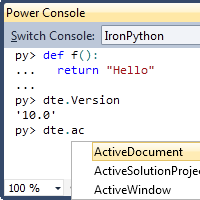
Another collection of IronPython and DLR related articles from recent weeks. Visual Studio 2010 Extension: IronPython IronRuby Console This extension adds IronPython and IronRuby to PowerConsole  so that you can interact with Visual Studio in IronPython/IronRuby. Please be aware that this extension only provides a simple tool to explore and interact with VS itself. It does not aim to be a development experience for the included languages. Tinesware: EasyWPF 0.3.93 An IronPython GUI library compatible with the Python GUI library EasyGUI . As the name implies, it is built on the WPF GUI library (making it Windows only). Like EasyGUI it has a demo app when you run the file showing the different controls/widgets the library supports. For more examples of how to use it visit the EasyGUI tutorial . Preview of the New Grid in Resolver One Resolver One  is a programmable spreadsheet written in IronPython. As well as being extremely powerful Resolver One is the largest ...

A Good Mix 34: Silverlight Logging, WPF and NotifyIcon, more Python and Ruby and pickling Python books

Another collection of IronPython and DLR related articles from around the web. A fine way to end 2009. SLog: Silverlight Logging A nascent project to Port Log(4|5)J from Java to C# with the goal of usefulness in Silverlight, especially for IronPython. A WPF Picture Viewer NotifyIcon to use from IronPython  Two Japanese blog entries, both by sasakima-nao. As with previous entries the code examples are very readable. The first is a simple WPF picture viewer (nice penguins) and the second shows how to create a NotifyIcon and ContextMenu in the taskbar (with Windows Forms classes). Python-Ruby (and a little bit of soap) This blog entry is in Russian, but I think there are enough code examples for it to be useful for those of us who don't speak Russian. As I've mentioned before the promise of the Dynamic Language Runtime is that dynamic languages can interoperate and share libraries. This is exactly what this blog entry shows: using the Ruby soap/wsdlDriver from Python. ...

Databinding and WCF Services with IronPython 2.6

One of the important new features in IronPython 2.6 is the __clrtype__ metaclass.The __clrtype__ metaclass allows you to create a real .NET class that backs your Python classes. This is important because there are many .NET features that * require * a real .NET class: which includes databinding and implementing WCF services (Windows Communication Foundation). The problem with __clrtype__ is that it requires dealing with low level details; namely building the class yourself from IL bytecode. Harry Pierson and Shri Borde have been working on a library ( clrtype.py ) to make this simpler. Lukáš Čenovský has looked at this before but hit limitations with what clrtype made possible. In three new blog entries he demonstrates how to use __clrtype__ with databinding in WPF and Silverlight and to implement WCF services. INotifyPropertyChanged and databinding in IronPython WPF   INotifyPropertyChanged is important interface for building WPF or Silverlight applications using M-V-...

Two Articles: IronPython 2.0 and WPF Error

Two more articles from Ibrahim Kivanc, the Turkish blogger who has written several articles on IronPython and Silverlight. Both of these articles are in English. IronPython 2.0 and Access to .NET Libraries IronPython 2.0 version now runs on DLR (Dynamic Language Runtime). DLR is a platform on .NET which is host Dynamicly typed languages on it. Now Dynamic Languages Communicate eachother and C#,VB, COM Objects, .NET Libraries. IronPython, with 2.0 version runs on DLR (Dynamic Language Runtime); it’s a platform like CLR architecture. It’s host for Dynamic Languages on .NET. With this architecture Dynamic Languages now faster then running on CLR and easily communicate with other .NET objects!   IronPython WPF Error In my opinion IronPython Studio is not stable enough for production use. It does have the advantage of being integrated in Visual Studio so some people can't resist trying it out. (You can read my write-up of IronPython Studio at: IronPython Tools and IDEs .) If y...

A Good Mix 28: NTornado, WPF, Testing in Italian, More Benchmarking, and adodbapi

Yet another collection of IronPython and DLR related articles, projects and blog entries from the past few weeks. NTornado NTornado is an IronPython version of the Tornando web server. The Tornado Web Server is the open source version of the non-blocking web server that power FriendFeed and now part of the Facebook's open source initiative. This server is coded in Python and with strong emphasis on operating systems with epoll support. NTornado is a port of Tornado to IronPython using asynchronous high-performance sockets in .NET. To run the demos (requires IronPython 2.6): > ipy -X:Frames "demo file name".py Getting WPF Control Template in IronPython I always find myself needing a control template so I can customize one of the WPF controls. I used to fire up Expression Blend to get it, and then realized I could write a little IronPython code to do it. Paste this code into the IronPython 2.0 or 2.6 console to see it work! Modulo .NET test con IronPython  A tr...

Sheldon: A WPF IronPython Console Control

Image
Sheldon is a Windows Presentation Foundation (WPF, the Windows user interface library that is part of .NET 3) component for embedding an interactive interpreter into a .NET application. Embedding IronPython is one of the core use cases for IronPython and whilst I have seen several Windows Forms Console components, but this is one of the first reusable WPF one I'm aware of. Sheldon: A WPF IronPython Console Control Sheldon Project Subversion Repository This sample was created to pitch an idea to a client about enabling a macro system in their application. Users might be able to make use of functions like OpenAccount("ACME") , ExecuteJob("SalesForecast2009") , and so on. Using the Command Pattern, commands could be written to an Output window in the application while the user uses the UI - that could be used as a learning tool for learning the command line.  

A Good Mix 23: IronPython 2.0.3, Eclipse 3.5, a WPF Hyperlink, dynamic in C#, MathNet and more...

Another collection of blog entries and articles related to IronPython and the Dynamic Language Runtime. IronPython 2.0.3 Must Fix Bugs With IronPython 2.6 Release Candidate 1 out of the door you might think that IronPython 2.0 was already defunct. Not true! David DiCato, an IronPython core developer, just posted to the IronPython mailing list asking what bugs people would like to see fixed in a 2.0.3 release: As we work towards our IronPython 2.0.3 bugfix release, Dino and I would like to get a feel for which bugs left unresolved in 2.0.2 are most important for us to fix in the next release. Please let us know ASAP if there’s an issue you’d like to see fixed in IronPython 2.0.3. Thanks! IronPython unter Eclipse 3.5 mit PyDev - Veni, vidi, vici  A blog entry (in German with just a hint of Latin) from Rainer Schuster about how he bent Eclipse 3.5 (with PyDev ) to his will for IronPython development. Google translate reveals his conclusion: From now on you is CodeCompletition ...

Using IronPython in WPF to evaluate expressions

IronPython makes a ridiculously good expression evaluator, and for some reason it seems to get used a lot for adding dynamic features to WPF. For example see Using IronPython for Converters in Silverlight and Binding Dynamic Types with WPF . This Code Project article, by Sacha Barber, uses IronPython with WPF to evaluate mathematical expressions from C#. Using IronPython in WPF to evaluate expressions I have just read a little book on IronPython and thought it a pretty cool language. What I especially liked was the fact that it can be hosted in .NET as a script. This gave me an idea, wouldn't it be cool if we could use IronPython as a script to evaluate mathematical expressions for us and return a value. Think javascripts eval function, which is missing from C# (at least it is right now, it may be part of C# 4.0 who knows). So with this thought in mind I whipped up a small proof of concept and was actually very pleased with the results, so much so I have turned it into this articl...

Simon Segal: A WPF IronPython REPL and messaging with NServiceBus

Simon Segal has been building an Entity Framework tool with built-in IronPython scripting support. Part of this has involved creating quite a fully fledged interactive Python interpreter as a WPF GUI component. This turns out to be quite a useful tool on its own. An IronPython REPL Console in a WPF User Control So to move forward with the WPF user control console project I decided to refactor it to support IronPython. Mark has jumped in just recently and started to contribute by adding the new “cached commands”, which offer up / down arrow repeat command behaviour such as found on a DOS console. You will also notice from the screenshot above I have imported the entire System namespace to demonstrate that it is possible (using the environment menu) to print the entire state of the default scopes current set of variables. Configuring, Testing and Probing NServiceBus with IronPython I have recently been working with NServiceBus quite a bit and whilst I was working on a WPF IronPython Co...

A Good Mix 10: WPF, .NET Introspection, the Solver Foundation, Resolver One and Cobra

Another selection on a wide range of topics from the last few weeks. Resolver One 1.5 Release Resolver One is an IronPython spreadsheet system and is the largest IronPython codebase in production. Normally a new release would be big news but we've already covered the Python console which is the biggest new feature in version 1.5. Other big new features include CSV import / export and a goto line dialog for the code editor. You can read a full list of all the improvements in the changelog . Now that 1.5 is out we're working hard on features for version 1.6. Our latest blog entry has a sneak preview of one of the coming attractions . Introspecting .NET Types and Methods from IronPython For Python methods you can use the inspect module to get information about methods / functions; like what arguments they take and so on. Methods on .NET types don't have the attributes used by inspect (although methods of Python objects defined in IronPython work fine). We can get around thi...

Using IronPython for Converters in Silverlight

Another blog entry from David Seruyange on using IronPython with Silverlight, and another example of using IronPython for binding dynamic types in WPF . Using IronPython for Converters in Silverlight The concept is a really nice one but I’m not wild about having to write a class that implements the IValueConverter interface every time I need some ad-hoc tweaking of the values I get from being data bound and how I’d like to use them within XAML. What set me off this track was a case where I simply needed to invert a boolean – what should just be “ not myvalue ” ended up requiring a class, an interface, and so on. Dynamic languages excel at this sort of thing and since they support the ability to evaluate code on the fly I thought it would make sense to write a single implementation of IValueConverter and host Python inside of it to evaluate binding expressions that are passed in. No magic, just instantiate the Python runtime and then proceed to leverage it in the Convert phase by taki...

WPF on IronPython: Windows and Dispatching

Two unrelated posts on working with WPF (Windows Presentation Foundation - the new .NET user interface library for Windows built on top of DirectX) and IronPython. WPF Dispatcher Decorator in IronPython Like most UI toolkits WPF requires that interaction with components of the GUI be done on the same thread that they were created on. The WPF technique for communicating with the user interface from another thread involves using a dispatcher. Jose Ramon Calzada discovers that Python decorators provide an ideal way of ensuring that functions or methods are invoked onto the UI thread. IronPython で WPF A Japanese blog entry; as usual the code samples and screenshots speak for themselves, but there is always google translate (which does really odd things to the code samples however). The blog entry takes you through creating and configuring simple windows and message boxes with WPF.

John Conway's Game of Life in XAML/WPF using embedded Python

Daniel Paull has an implementation of John Conway's Game of Life (cellular automata) written with XAML/WPF (Windows Presentation Foundation - a Microsoft UI library built on top of DirectX) and using embedded Python scripts. John Conway's Game of Life in XAML/WPF using embedded Python Following on from my series on embedding DLR scripts in XAML, I present an implementation of John Conway's Game of Life in XAML/WPF using embedded Python scripts. The game is loaded completely from loose XAML. Even the initial game state is defined in dynamically loaded XAML files! The game is hosted in the very dynamic application described in a previous post. The Game of Life is played by calculating successive generations of the board. We add a button to calculate the next generation. A simple implementation of the Game of Life is written in the Python script. The button's DataContext is bound to the board, allowing the script to retrieve the board from the button.

Binding dynamic types in WPF using IronPython and DLR

There have been a couple of projects in the past integrating IronPython into WPF XAML to add more dynamic features: IronPython and data binding plus the PyBinding markup extension Embedding DLR Scripts in XAML WPF, Windows Presentation Foundation, is the new User Interface library by Microsoft which is part of .NET 3.0. It uses the graphics card GPU to do UI drawing, so as well as being more powerful than Windows Forms it can also perform better. It isn't available in Mono though, so has the disadvantage of not being cross-platform. XAML is the XML markup used to describe GUIs, transformations, etc in WPF and Silverlight (which uses a subset of WPF XAML). Here's (yet) another way of adding dynamic features to WPF. This time it is for dynamic binding: Binding dynamic types in WPF using IronPython and DLR Covered in this post: Creating classes in IronPython and comparing with C# classes. Adding public properties in IronPython class. Using classes/interfaces in IronPython class w...

Introduction to WPF with IronPython

Windows Presentation Foundation (WPF) is the successor to Windows Forms; a powerful user interface library for .NET. Where Windows Forms is built on GDI/GDI+ for drawing the GUI, WPF is built on DirectX. This means that much of the work can actually be done on the GPU (the graphics card), and so despite being richer and easier to theme WPF can perform better than Windows Forms. Mark Bloodworth has been experimenting with WPF and IronPython: An Introduction to WPF with IronPython Having scanned a few pages, I decided to create a very simple app that included databinding and an event handler. Armed with Notepad++, XamlPad and a command prompt I set out. First step was a little C#. I created a class as detailed here that adds a little dynamic-ness to WPF. WPF is also used by Silverlight - which was originally called WPF/E - and is one of the few Microsoft projects to go from a boring codename to an interesting final release name; WPF itself was originally codenamed Avalon. WPF has a new...

Silvershell 0.6.1 Released

There is a new release of Silvershell, version 0.6.1. As well as fixing several bugs this release includes the sourcecode! Silvershell is a Python interactive interpreter with intellisense and lots of other features. It can run on the Windows desktop with WPF or in the browser with Silverlight: Silvershell Project Page Dan Eloff announced the release on the IronPython mailing list: There's an important new bugfix release. I put a lot of irritating flaws in the "intellisense" to rest, including a major issue with member completion that crept into 0.6.0 at the last minute. Had I known there was going to be such a response I think I would have tested it more thoroughly. As promised all source code is in this release. Please notify me of remaining bugs, either via email, or via the issue tracker on Google Code. Patches are most welcome.

IronPython and data binding plus the PyBinding markup extension

XAML is a markup language used to describe user interfaces for the Windows Presentation Foundation (WPF) UI library. PyBinding is a library created by Pixel-in-Gene allowing you to use IronPython for custom expressions in data binding situations: " essentially a DSL for creating Bindings ". A second blog entry discusses a detail of the WPF framework that makes this less useful than it could be in some situations. The PyBinding MarkupExtension: use Python statements for Data Binding Huge limitation of a MarkupExtension Many of us have felt the need to have custom expressions inside of Bindings. The need has ranged from applying mathematical operators to calling methods on bound objects. For simple needs you can probably create a custom IValueConverter or a IMultiValueConverter that can do the job, but when you want to use arbitrary expressions, something more elaborate is needed. The ScriptConverter class that I blogged about earlier provides the underpinning for the PyBindi...

Rob Oakes: Learning IronPython

Rob Oakes has set about learning Python through IronPython, and has written a series of articles that both document his progress and serve as a tutorial for others following in his footsteps. He starts with a confession and a manifesto: Learning IronPython - Part 1 - A Halfhearted Manifesto There are certain times for confessions, and now seems like such a time so … here goes: My name is Rob, and I’m an addict. I am addicted to Matlab. If I didn’t have Matlab, my productivity would go to near-zero. For this reason, like any good junkie, I tolerate its expensive fees, obnoxious quirks and serious limitations. That is, until recently. Some recent events, however, have forced me to start looking for alternatives. [...] I have made a serious decision: I am going to learn Python! And why Python? Like Matlab, it is a dynamic (or scripting) language. Like Matlab, it has an enormous number of existing libraries and functions available. Indeed, after a bit of surface scratching, I’ve come to t...

IronPython is the new IValueConverter, IMultiValueConverter

A blog entry on using IronPython to create a DSL (Domain Specific Language) to evaluate expressions in WPF XAML (the XML used to describe user interfaces for Windows Presentation Foundation and Silverlight): IronPython is the new IValueConverter, IMultiValueConverter "Applying simple mathematical operations inside WPF DataBindings has always been a non-trivial task. By default the {Binding} or MultiBinding syntax does not allow the use of arbitrary expressions inside the Path. " "There are several cases where you would like to do a little bit of math inside of the {Binding} expressions. " "This requires the use of a converter that would do the actual mapping of values to the bounds of the Canvas. " "Ideally you would want the complete flexibility of a scripting language inside of your Binding expressions. Note however that there is a tendency to over-use / abuse a scripting functionality. That however is for the team to decide what level of sanity nee...

IronPython and [Insert MSFT Technology Here] (Starting with WPF)

Image
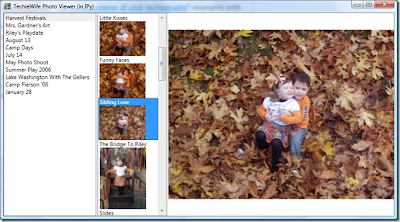
Back in November (yes, I'm still behind on my posts but catching up), Harry Pierson (IPy PM) announced his decision to write a series of posts on how to use IronPython with a range of different Microsoft technologies: IronPython and [insert MSFT Technology Here] Making good on his promise he starts with 6 posts on using the WPF (Windows Presentation Foundation) GUI toolkit with IronPython. IronPython and WPF Part 1: Introduction In the first part he starts a WPF based photo viewer for his wife's Windows Live photo collection. " Turns out building this app in IPy was fairly straightforward, with a few pitfalls. I wasted half a day digging thru data binding before realized that data binding against IPy objects works out of the box - but only if you type the case of the property correctly (Title != title)... " " Over the next several posts, I’m going to show you all the code for this app. It’s pretty small, only about 50 lines of app-specific python code + 50 lines ...