Showing posts with label statistics. Show all posts

Thursday, 16 August 2018

Linear programming in R

Linear programming is a technique to solve optimization problems whose constraints and outcome are represented by linear relationships.

aaa

Simply put, linear programming allows to solve problems of the following kind:

  • Maximize/minimize $\hat C^T \hat X$
  • Under the constraint $\hat A \hat X \leq \hat B$
  • And the constraint $\hat X \geq 0$

Monday, 13 August 2018

PCA revisited: using principal components for classification of faces

This is a short post following the previous one (PCA revisited).

In this post I’m going to apply PCA to a toy problem: the classification of faces. Again I’ll be working on the Olivetti faces dataset. Please visit the previous post PCA revisited to read how to download it.

The goal of this post is to fit a simple classification model to predict, given an image, the label to which it belongs. I’m goint to fit two support vector machine models and then compare their accuracy.

The

  1. The first model uses as input data the raw (scaled) pixels (all 4096 of them). Let’s call this model “the data model”.
  2. The second model uses as input data only some principal components. Let’s call this model “the PCA model”.


Sunday, 12 August 2018

PCA revisited

Principal component analysis (PCA) is a dimensionality reduction technique which might come handy when building a predictive model or in the exploratory phase of your data analysis. It is often the case that when it is most handy you might have forgot it exists but let’s neglect this aspect for now ;)

eig2

I decided to write this post mainly for two reasons:

  1. I had to make order in my mind about the terminology used and complain about a few things.
  2. I wanted to try to use PCA in a meaningful example.

Sunday, 5 March 2017

Resizing spatial data in R

Here I am after a short break, writing again about R!

In december I worked on a project that required me to work on spatial data. This led me to learn about how R deals with this kind of data and to look around for ways to make my “spatial data experience” less painful. I discovered that R is, as always, full of options.

I’m used to dplyr for exploring data and manipulating it, however when it comes to spatial data, I think that gstat, raster and rasterVis are just some of the useful packages that will make your life a lot easier.
Rplot01

Saturday, 24 September 2016

My first Shiny App: control charts

After having carefully followed the online official Shiny tutorial, I decided to make a quick try at making my very first Shiny App. I should say that I found myself very well with the explanation given and Shiny was definitely one of the libraries that took the less time for me to start using it. Of course I’m still not a master of Shiny by no means, but I feel more confident on how to use it and on what can be done with it.

Image 1

I’m working on an R project related to control charts and I was hinted to get to know Shiny, since it is very likely that the project will involve an interactive interface and Shiny fits the bill perfectly for this assignment. For this reason I took an afternoon for getting familiar with Shiny and build this App. Enough talk, let’s get to the App.

Friday, 5 August 2016

Image recognition tutorial in R using deep convolutional neural networks (MXNet package)

This is a detailed tutorial on image recognition in R using a deep convolutional neural network provided by the MXNet package. After a short post I wrote some times ago I received a lot of requests and emails for a much more detailed explanation, therefore I decided to write this tutorial. This post will show a reproducible example on how to get 97.5% accuracy score on a faces recognition task in R.

my_convolutional_neural_network

Tuesday, 29 March 2016

How to fit a copula model in R [heavily revised]. Part 2: fitting the copula

Here I am again with part 2. If you would like to read part 1 of this short tutorial on copulas, please click here.

In this second post I am going to select a copula model, fit it to a test dataset, evaluate the fitting and generate random observations from the fitted multivariate distribution. Furthermore I am going to show how to measure correlation using Spearman's Rho and Kendall's Tau. In order to run the code in this post you need the following packages: copula and VineCopula.

The dataset

For this example I am going to use a test dataset. You can download it from this link. This test dataset contains two variables, x and y, characterized by a strong left tail correlation.

By visually inspecting the plot of x versus y you can easily notice that low values of x tends to be highly correlated with low values of y.

Rplot

Sunday, 13 March 2016

How to fit a copula model in R [heavily revised]. Part 1: basic tools


More than a year ago I wrote a short post on how to fit a copula model in R. The post showed how to make a very raw and basic fitting of a test dataset to a two dimensional normal copula (or a gaussian copula if you wish) using the copula package. The content of the post was not much, but that was a big part of what I knew about how to use copulas in R at that time and there was not much documentation available other than the official copula package documentation which is quite technical in my opinion (as it should be) and may not be that easy for a beginner copula user.

Monday, 28 September 2015

Selecting the number of neurons in the hidden layer of a neural network

Recently I wrote a post for DataScience+ (which by the way is a great website for learning about R) explaining how to fit a neural network in R using the neuralnet package, however I glossed over the “how to choose the number of neurons in the hidden layer” part. The glossing over is mainly due to the fact that there is no fixed rule or suggested “best” rule for this task but the mainstream approach (as far as I know) is mostly a trial and error process starting from a set of rules of thumb and a heavy cross validating attitude.

Wednesday, 2 September 2015

Predicting creditability using logistic regression in R (part 1)


As I said in the previous post, this summer I’ve been learning some of the most popular machine learning algorithms and trying to apply what I’ve learned to real world scenarios. The German Credit dataset provided by the UCI Machine Learning Repository is another great example of application.

The German Credit dataset contains 1000 samples of applicants asking for some kind of loan and the creditability (either good or bad)  alongside with 20 features that are believed to be relevant in predicting creditability. Some examples are: the duration of the loan, the amount, the age of the applicant, the sex, and so on. Note that the dataset contains both categorical and quantitative features.
This is a classical example of a binary classification task, where our goal is essentially to build a model that can improve the selection process of the applicants.

Friday, 14 August 2015

Basic Hidden Markov model

A hidden Markov model is a statistical model which builds upon the concept of a Markov chain.

The idea behind the model is simple: imagine your system can be modeled as a Markov chain and the signals emitted by the system depend only on the current state of the system. If the states of the system are not visible and what you can observe are only the emitted signals, then this is a Hidden Markov model.

Saturday, 1 August 2015

Simple regression models in R

Linear regression models are one the simplest and yet a very powerful models you can use in R to fit observed data and try to predict quantitative phenomena.

Say you know that a certain variable y is somewhat correlated with a certain variable x and you can reasonably get an idea of what y would be given x. A class example is the price of houses (y) and square meters (x). It is reasonable to assume that, within a certain range and given the same location, square meters are correlated with the price of the house. As a first rough approximation one could try out the hypothesis that price is directly proportional to square meters.

Now what if you would like to predict the possible price of a flat of 80 square meters? Well, an initial approach could be gathering the data of houses in the same location and with similar characteristics and then fit a model.

A linear model with one predicting variable might be the following:

clip_image002

Alpha and Beta can be found by looking for for the two values that minimise the error of the model relative to the observed data. Basically the procedure of finding the two coefficient is equivalent to finding the “closest” line to our data. Of course this will still be an estimate and it will probably not match any of the observed values.

Thursday, 30 July 2015

Estimating arrival times of people in a shop using R

Since the first time I was taught the Poisson and Exponential distributions I have been wondering how to apply them to model a real world scenario such as arrivals of people in a shop. Last week I was in a big shopping center and I thought that was the perfect time to gather some data so I chose a shop (randomly) and started recording on a piece of paper how many people arrived and their inter-arrival time.

I went through this process for an hour, in the middle of the afternoon (around 4 to 5pm) during a week day where the influx of customers should be approximately uniform, or so I am told. Here you can download in .txt format, the data I gathered. Note that even though the file is a text file, it is arranged as a .csv so that R can easily detect data.

What is an inter-arrival time? It is the interval of time between each arrival. Assuming that the arrivals are independent, their distribution is exponential. This assumption is further confirmed below by the blue histogram of the observations.

Summary of gathered data:
- I observed the arrival of customer for 58.73 minutes (around an hour)
- During that time 74 “shopping groups” entered the shop. “A shopping group” here is a broad label for a group of 1, 2, 3 or 4 actual customers. The red histograms describes the phenomena in greater detail.

 Rplot

As you can see it seems reasonable to assume that inter-arrival times are exponentially distributed

Rplot01

The red histogram above clearly shows that the majority of “shopping groups” is composed by either a single customer or a couple of customers. Groups of 3 or 4 people are less likely to appear according to the observed data. A good estimate of the probability of the number of people in a shopping group is the relative frequency of the observations.

The following code produces the two plots above

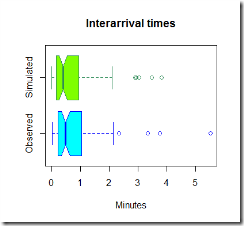
Now that we have uploaded the data, it is time to simulate some observations and compare them to the real one. Below in green is the simulated data.

Rplot03

Rplot02

The code used to simulate the data is here below

Now, the graphs above are pretty, but they are not much use, we need to compare the two sets of graphs to get an idea if our model is fine for this simple task.
Rplot04 Rplot06

Rplot07

It looks like our model tends to overestimate the number of arrivals in the 0-0.5 minutes section, however this is just one simulation and the average arrival time is close to what we expected using this model. It seems reasonable to use this distribution to estimate the inter-arrival times and the number of people arrived in the shop.

The R-code

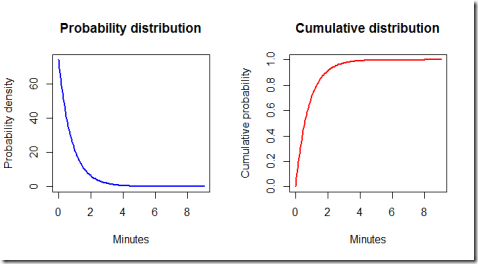
Finally, let's have a look at the ideal exponential distribution given the estimated parameters. Note that some adjustments are necessary because our model is set so that the simulated times are hours, but for practical purposes it is better to work with minutes. Furthermore, by using the exponential distribution formulas we can calculate some probabilities.
Rplot08

By running the code we find out that the probability of the waiting time being less than 3 minutes is 0.975 meaning that it is very likely that one customer group will show up in less than three minutes.

Conclusions.

This model is very basic and simple, both to fit and to run, therefore is very fast to implement. It can be useful to optimize the number of personnel in the store and their function, according to the expected inflow of customers and the average time needed to help the current customers. The hypothesis seem reasonable, given the time of the day considered and provided that the shop does not make some promotion or discount or any other event that could suggest a different behaviour of customers (for instance when there is a discount, it is likely that customers might tell each other to visit the store). For different times of the day, different parameters could be estimated by gathering more data and fitting different exponential distributions.

Saturday, 11 July 2015

Estimating data parameters using R

Say we have some data and we are pretty confident that it comes from a random variable which follows a Normal distribution, now we would like to estimate the parameters of that distribution. Since the best estimator for the population mean is the sample mean and the best estimator for the variance is the corrected variance estimator, we could use those two estimators to compute a point estimate of the parameters we need. But, what if we would like to have a rough idea of what could be the range of those parameters within a certain level of confidence? Well, then we would have to find an interval that contains the parameters at a, say, 5% confidence level.

In order to do this, since the variance is unknown and needs to be estimated, we use the Student-t distribution and the following formula for the two sided interval:

clip_image002

In the same way, we could find unilateral boundaries for the value of the population mean, simply by adjusting the formula above:

clip_image002[5]

Furthermore one could visualise the outcome by plotting the selected regions on a standard t-Student with n-1 degrees of freedom:

1) Confidence intervalRplot012) Upper boundRplot023)Lower boundRplot03

Here below is he implementation in R of the process described above:

By clicking here you can download the code of the plotting function I used to generate the plots above.

How to make a rough check to see if your data is normally distributed

Now then, in the previous article I wrote about hypothesis testing with data that is normally distributed, in this article I’m going to post some quick test you can do to check if it is fairly safe to assume your data is normal. I would like to highlight the fact that you can never be 100% sure that your data follows a particular distribution, however, in order to be able to say something about the phenomenon you are trying to understand, it is often practical to approximate its distribution with the best fit according to the measurements (the samples). At the very least this is a starting point.

First, I should point out that if you have a small sample (< 10 samples) then it is really hard to draw some conclusions, but if the sample is large enough (as a broad and very generous rule of thumb > 30) then we can consider some indices and plots.

Skewness:
First of all, if your data is normally distributed, then it should be approximately symmetric. In order to asses this characteristic you can either use a boxplot or the skewness index g4. However I suggest to use both. Suppose you have two datasets as below:

If we plot the boxplots we obtain:

Rplot01

Remembering that the black thick line is the median and that the coloured part of the boxplot contains 50% of the data, we can already see that the distribution on the left is approximately symmetric, while the one on the right has a right tail (right skew).
Then, by running the skewness function we check the numbers in order to double check our guess

Since the skewness of the first dataset is close to zero it seems reasonable to assume the first dataset is normally distributed. Note that the beta simulated dataset has a positive skewness significantly higher than 0. A final check at the histograms can help a bit more

Rplot1 Rplot2

Ok, the histogram may cast some doubt on whether the first dataset is normal, however it certainly helps us ruling out normality for the second dataset

Finally, we run the kurtosis test, which gives us some information on the shape of the bell curve

We are now in a pretty safe position to assume that the first dataset is normally distributed, since the kurtosis is pretty close to 3, and we can see that the second seems to have a “peak” which is indeed what the histogram tells us. Having so many samples in the second dataset makes us pretty confident in ruling out normality, however it could also not be the case, for instance, for some reason, say the instruments with which we made the measurements were biased, we could have ended up with biased data.

Edit: Last day, while I was writing this article I forgot a very important plot: the qqplot! The function qqnorm lets you compare  the quantiles of your data with those of the normal distribution, giving you another bit of information that could point you in the right direction.
By calling the function qqnorm(data_beta) and qqnorm(data_norm) we obtain the following plots

Rplot Rplot02

Now, ideally, what you would expect if your data is approximately normally distributed, is that the quantiles of the sample match the theoretical samples, therefore you should get a 45 degree line. Can you guess which one of the two plots is the one generated by qqnorm(data_beta)? ;)

Hypothesis testing on normally distributed data in R

Hypothesis testing is a useful statistical tool that can be used to draw a conclusion about the population from a sample. Say for instance that you are interested in knowing if the average value of a certain parameter differs significantly from a given value within a well defined confidence level: you would probably set up your test like this:

clip_image002

Note that the two hypothesis above are mutually exclusive.

Now  what can you do to check which one is more probable?
First, we should check what kind of distribution our data follows. Roughly speaking, if the number of samples is > 30 we can plot a histogram to get a visual grasp of the distribution and then run a few simple function, to assess the skewness and kurtosis of the distribution. If these parameters are close to those of a Normal distribution, then we could assume that the data comes from a Normal distribution. This assumption is not 100% sure but it is reasonable if the above parameters are close to those of a Normal distribution. If you are not sure, the other option is to run some normality tests or gather more data. Read how to make a rough check to see if your data is normally distributed.

Now that we are confident that our data is Normally distributed and hopefully the samples are independent and identically distributed, we can estimates of the sample mean and as far as the variance is concerned:
- If the population variance is known, we can use the Normal distribution in R
- If the population variance is unknown, then we should use a t-distribution with n-1 degrees of freedom (n is the number of observations). As n tends to infinity t-distribution tends to a Normal, therefore if n is sufficiently large (say > 60) you could approximate the t-distribution with a Normal one.

Now, by fixing a certain alpha (confidence level), we decide to reject the null Hypothesis (H0) if:

clip_image002[7]

Where clip_image002[9] is the sample mean, clip_image002[11] the standard deviation and z the percentile of the Normal (or Student) distribution.

Again, roughly speaking, the idea behind the test is that we should reject the null Hypothesis if the data shows that it is highly unlikely H0 to be true. For the right tail test, we should reject H0 if the statistics above (without the absolute value operator) is to the right of the red line, in the cyan shaded region:

Rplot

Aside from this test you can also make tests to check whether the population mean is higher or lower than a certain value using the same process. Here below is the implementation of the test in R assuming that the variance is unknown (and therefore using the t distribution):

In this case we can say that at 5% confidence level we do not reject the null Hypothesis in all three cases.

In case you’d like to run a z-test because you know the population variance, by clicking here you can download the script which is using the normal distribution. Essentially you only have to replace the functions related to the student distribution in the script above with those related to the Normal. Finally, here is the code used to make the plot above.

Tuesday, 17 February 2015

Some exercises with plots and matplotlib on currencies

EDIT: Apparently, some of the prices in the .csv files I used were missing, and this caused some problems with pandas dataframe since it replaces missing values with ‘na’. Should you encounter the same problem you could check every line with an if statement or use a method to replace the na. You can check the pandas’ documentation here.

Yesterday I was really bored and had some time which could be put to good use, therefore I decided to write a quick script to plot percentage change of currencies of some countries and compare them. The code I ended up with is a bit sloppy I guess, but  that’s fine since I was primarily interested in improving my (limited, as of now) use of pandas and having fun.

First of all I gathered data from Quandl, namely the prices of the selected currencies in terms of dollars, that’s to say the value per day of every selected currency with respect to the dollar:

XYZ/USD (daily)

Gathering data from Quandl is really easy and fast using the Quandl API for Python. By the way, an API for R is available too.

I then computed the percentage change for 2 years and defined some plotting functions. Here is the main result the plotting function produces given a reference currency: it plots the percentage change for every currency (with respect to the dollar) against the percentage change of the reference currency. Some of the plotted data looks definitely weird, I wonder if I did something wrong or lost some information during the process.

image2

Here is the code I used:


Disclaimer
This article is for educational purpose only. The author is not responsible for any consequence or loss due to inappropriate use. The article may well contain mistakes and errors. The data used might not be accurate. You should never use this article for purposes different from the educational one.

Saturday, 14 February 2015

CopulaClass a Python class for using copulas: a fitting example

As I have already said in my previous post Copulalib is really user-friendly, it is difficult to write something easier, however I thought I might give it a try.

This class is built around Copulalib and since it is to be used with 2-dimensional copulas, it implements plots for data visualization and some other functions such as:
-showAvailableCopulas() a method to show visually what copulas are included in the package
-generateCopula() a method to generate the copula
-printCorrelation() this method prints out Spearman’s rho, Kendall’s tau and the fitted parameter
-getSimulatedData() this method retrieves your simulated data from the copula assuming your original data is normally distributed. It would be nice to implement some tool which could figure out the most likely distribution of your data and then use it to get the simulated observations. Perhaps in the future I’ll do it.

Furthermore, the class does not mind if you feed in python lists of numpy arrays as it turns x and y in numpy arrays. Be careful however that it does not check if your lists/arrays are of the same length.

Anyway, as for the result of the testing script below, the fitting of the Frank copula to the data seems to have been successful, our simulated data seems to fit the real quite nicely:

frank_copula_fitted

Originally our data was (very) approximately normally distributed, with some sort of positive correlation as you can clearly see from the plots below

data

Here below you can see 1000 simulated pseudo-observations from the Frank copula

pseudo_observations

Below you can find the code I used to generate this simple model:

And here are the correlation details

Copulalib: How to use copulas in Python

When dealing with copulas, R is a better option in my opinion, however, what could you do if you wish to use Python instead? There’s a good starting package called Copulalib which you can easily download here.

porability_distribution

The package is really simple to use and very user-friendly I would say, it basically handles everything (pseudo-observations etc…) once you fed in the raw data. There is a simple example of implementation in the download page. Once the data has been fed into the function, the fitting is done automatically and the following parameters are generated:
-Spearman’s rho
-Kendall’s tau
-Theta (the parameter of the copula)

As of my understanding of the package, only Frank, Gumbel and Clayton copulas are available, and this of course could be a limitation, however it is for sure a good start. Another point which is problematic is that multidimensional copulas seem not to be supported.

available_copula

Now for the real complaints: for some reason once the sample size is larger than 300 observations per variable (say 300 x and 300 y) the script raises an error saying that x and y must be of the same dimensions which is strange since they are already of the same size. Anyway maybe I did something incorrect.

Here below is the short piece of code which generated the plots of the data and of the available copulas

Next I’m going to post a class for copulas.

Tuesday, 10 February 2015

How to fit a copula model in R

I have been working on this topic for a great amount of time and to be honest I find R documentation not that user-friendly as the documentation for most Python modules. Anyway the fact that copulas are not the easiest model to grasp has contributed to further delays too. But mainly the lack of examples and users of these models was the biggest obstacle. Then again, I might have looked in the wrong places, if you have any good resource to suggest please feel free to leave a comment. At the bottom of this page I’ll post some links that I found very useful.

If you are new to copulas, perhaps you’d like to start with an introduction to the Gumbel copula in R here.

The package I am going to be using is the copula package, a great tool for using copulas in R. You can easily install it through R-Studio.

The dataset
For the purpose of this example I used a simple dataset of returns for stock x and y (x.txt and y.txt). You can download the dataset by clicking here. The dataset is given merely for the purpose of this example.

First of all we need to load the data and convert it into a matrix format. Optionally one can plot the data. Remember to load the copula package with library(copula)


The plot of the data


Rplot


Now we have our data loaded, we can clearly see that there is some kind of positive correlation.


The next step is the fitting. In order to fit the data we need to choose a copula model. The model should be chose based on the structure of data and other factors. As a first approximation, we may say that our data shows a mild positive correlation therefore a copula which can replicate such mild correlation should be fine. Be aware that you can easily mess up with copula models and this visual approach is not always the best option. Anyway I choose to use a normal copula from the package. The fitting process anyway is identical for the other types of copula.


Let’s fit the data


Note that the data must be fed through the function pobs() which converts the real observations into pseudo observations into the unit square [0,1].
Note also that we are using the “ml” method (maximum likelihood method) however other methods are available such as “itau”.


The parameter of the fitted copula, rho, in our case is equal to 0.7387409. Let’s simulate some pseudo observations


By plotting the pseudo and simulated observations we can see how the simulation with the copula matches the pseudo observations


Rplot


Rplot01_


This particular copula might not be the best since it shows a heavy tail correlation which is not that strong in our data, however it’s a start.


Optionally at the beginning we could have plot the data with the distribution for each random variable as below


And get this beautiful representation of our original dataset


Rplot02


Now for the useful documentation:


Copula package official documentation:
http://cran.r-project.org/web/packages/copula/copula.pdf


R blogger article on copulas
http://www.r-bloggers.com/copulas-made-easy/


An interesting question on CrossValidated
http://stats.stackexchange.com/questions/90729/generating-values-from-copula-using-copula-package-in-r


A paper on copulas and the copula package
http://www.jstatsoft.org/v21/i04/paper


That’s all for now.