spine-phaser Runtime Documentation
Licensing
Please see the Getting Started
This is a unified page for our official Installation
To use spine-phaser in your Phaser project, you must first include its sources.
Vanilla JavaScript
In vanilla JavaScript, use a
scripttag to include the spine-phaser runtime from NPM or YarnWhen using NPM or Yarn for dependency management, add spine-phaser the usual way:
npm install @esotericsoftware/spine-phaser-v4@~4.2.0Note: Ensure that the
major.minorversion of spine-phaser matches themajor.minorSpine Editor version you are exporting from. See SamplesThe spine-phaser runtime includes several samples demonstrating its feature set.
To run the examples locally:
- Install Git and Updating the spine-phaser Runtime
Before updating your project's spine-phaser runtime, please consult our Using spine-phaser
The spine-phaser runtime supports all Spine features when using the Phaser WebGL renderer. When using the Phaser Canvas renderer, the spine-phaser runtime does not support Asset Management
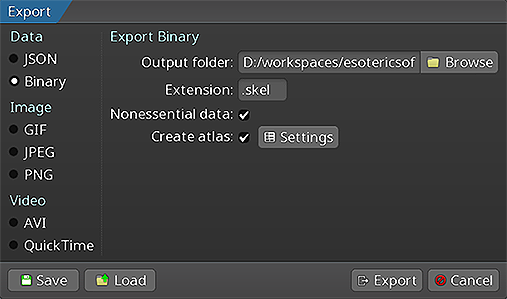
Exporting for spine-phaser
Follow the instructions in the Spine User Guide on how to:
- Updating Spine Assets
During development, you may frequently update your Spine skeleton data and texture atlas files. You can simply overwrite these source files (.json, .skel, .atlas, .png) by re-exporting from the Spine Editor and replacing the existing files in your Phaser project.
Ensure that the
major.minorversion of spine-phaser matches themajor.minorSpine Editor version you are exporting from. See Core classesThe spine-phaser API is built on top of the generic TypeScript Spine Scene Plugin
The spine-phaser scene plugin adds functionality to (pre-)load exported
.json,.skel, and.atlasfiles to a scene's Loading Spine AssetsSpine assets, like skeleton data
.json/.skelfiles, or.atlasfiles, are loaded through additional functions added to the Creating SpineGameObject instancesOnce skeleton data and a corresponding atlas have been loaded, a
SpineGameObjectcan be created and optionally be added to the current scene via thespine()functions added to the scene's SpineGameObjectA
SpineGameObjectis a Phaser Applying AnimationsApplying animations to a skeleton displayed by a
SpineGameObjectis done through theAnimationState.Note: See AnimationState Events
An
AnimationStateemits events during the life-cycle of an animation that is being played back. You can listen for this events to react as needed. The Spine Runtimes API defines the following SkinsMany applications and games allow users to create custom avatars out of many individual items, such as hair, eyes, pants, or accessories like earrings or bags. With Spine, this can be achived by Setting Bone Transforms
When authoring a skeleton in the Spine Editor, the skeleton is defined in what is called the skeleton's world coordinate system or "skeleton coordinate system". This coordinate system may not align with the coordinate system of Phaser. Mouse and touch coordinates relative to the
SpineGameObjectneed thus be converted to the skeleton coordinate system, e.g. if a user should be able to move a bone by touch.The
SpineGameObjectoffers the methodphaserWorldCoordinatesToBone(point: { x: number, y: number}, bone: Bone)which takes an a point relative to the SpineGameObject and converts it to the skeleton's coordinate system, relative to the specified bone.The reverse, that is converting from the skeleton coordinate system to the Phaser coordinate system, can be achieved via
SpineGameObject.skeletonToPhaserWorldCoordinates(point: { x: number, y: number}).spine-phaser exposes the entire Differences to the Phaser Spine Plugin
Phaser offers its own Loading skeleton and atlas data
Loading a skeleton and its atlas with the Phaser Spine Plugin is a single step:
javascriptthis.load.spine('spineboy', 'spineboy.json`, [ `spineboy.atlas` ], true);With the spine-phaser runtime, the atlas data and skeleton data are loaded separately.
this.load.spineBinary("spineboy-data", "spineboy.skel");
this.load.spineAtlas("spineboy-atlas", "spineboy.atlas");This allows you to share the same atlas across different skeletons. The spine-phaser runtime also supports both loading JSON and binary skeleton data, whereas the Phaser Spine Plugin can only load JSON skeleton data. Finally, the loader methods will automatically deduce if a skeleton's atlas uses pre-multiplied alpha or not.
The spine-phaser skeleton data loader does not support loading multiple spine skeletons from a single JSON file while the Phaser Spine Plugin does.
Creating SpineGameObject instances
Creating a
SpineGameObjectwith the Phaser Spine Plugin references only a single loaded asset, and offers many additional, optional parameters.javascriptconst spineboy = this.add.spine(400, 600, 'spineboy', 'idle', true);The spine-phaser runtime requires you to specify the keys of both the skeleton data and atlas.
javascriptconst spineboy = this.add.spine(400, 500, 'spineboy-data', "spineboy-atlas");
spineboy.animationState.setAnimation(0, "idle", true)You can provide an optional
SkeletonBoundsProvideras the 5th parameter as described above. However, you can not configure any other properties through this method. Instead, you directly access the methods and properties of theSpineGameObjectto configure it to your liking.Spine Container
The Phaser Spine Plugin features a special container class called Examples ports
To further ease the transition from the Phaser Spine Plugin to our official spine-phaser runtime, we've ported most of the Phaser Spine Plugin examples to the spine-phaser runtime.