spine-c Runtime Documentation
Licensing
Please see the Introduction
spine-c is a generic runtime for integrating Spine animations in game engines and frameworks written in C, C++, Swift, Rust, Objective-C or any other language that can interface with C.
spine-c provides functionality to:
- Load and manipulate Integrating spine-c
CMake Integration (Recommended)
The easiest way to integrate spine-c into your project is via CMake FetchContent:
cmakeinclude(FetchContent)
FetchContent_Declare(
spine-c
GIT_REPOSITORY https://github.com/esotericsoftware/spine-runtimes.git
GIT_TAG 4.3
SOURCE_SUBDIR spine-c
)
FetchContent_MakeAvailable(spine-c)
# Link against spine-c
target_link_libraries(your_target spine-c)This will automatically fetch and build spine-c along with its dependency (spine-cpp).
Include spine-c headers in your code:
c#include <spine-c.h>Manual Integration
If you prefer manual integration:
- Download the Spine Runtimes source using git (
git clone https://github.com/esotericsoftware/spine-runtimes) or download it as a zip- Add the required source files to your project:
- Add sources from
spine-cpp/src,spine-c/src- Add the include directories:
spine-cpp/include,spine-c/includeInclude spine-c headers in your code:
c#include <spine-c.h>Exporting Spine assets for spine-c
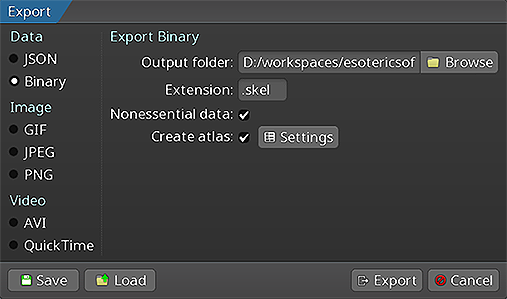
Follow the Spine User Guide to:
- Loading Spine assets
spine-c provides APIs to load texture atlases, Spine skeleton data (bones, slots, attachments, skins, animations) and define mix times between animations through Loading texture atlases
Texture atlas data is stored in a custom Option 1: Load atlas without textures
Use
spine_atlas_loadto parse the atlas data without loading textures. You'll need to manually load textures for each atlas page:c// First, load the .atlas file contents into a string
char* atlasData = read_file_to_string("path/to/skeleton.atlas");
// Parse the atlas data (doesn't load textures)
spine_atlas_result result = spine_atlas_load(atlasData);
// Check for errors
if (spine_atlas_result_get_error(result)) {
printf("Error loading atlas: %s\n", spine_atlas_result_get_error(result));
spine_atlas_result_dispose(result);
exit(1);
}
spine_atlas atlas = spine_atlas_result_get_atlas(result);
spine_atlas_result_dispose(result);
// Manual texture loading: spine_atlas_load sets page indices, not texture pointers
// You need to load textures and set them on the regions for each page
spine_array_atlas_page pages = spine_atlas_get_pages(atlas);
int num_pages = spine_array_atlas_page_size(pages);
// Load texture for each page
void** page_textures = malloc(num_pages * sizeof(void*));
spine_atlas_page* pages_buffer = spine_array_atlas_page_buffer(pages);
for (int i = 0; i < num_pages; i++) {
spine_atlas_page page = pages_buffer[i];
// Get the texture filename from the atlas
const char* texture_name = spine_atlas_page_get_texture_path(page);
// Construct full path (you need to know where your textures are)
char full_path[256];
snprintf(full_path, sizeof(full_path), "%s/%s", atlas_dir, texture_name);
// Load texture using your engine
page_textures[i] = engine_load_texture(full_path);
}
// Set renderer objects on all regions to point to their page's texture
spine_array_atlas_region regions = spine_atlas_get_regions(atlas);
int num_regions = spine_array_atlas_region_size(regions);
spine_atlas_region* regions_buffer = spine_array_atlas_region_buffer(regions);
for (int i = 0; i < num_regions; i++) {
spine_atlas_region region = regions_buffer[i];
spine_atlas_page page = spine_atlas_region_get_page(region);
// spine_atlas_load stores the page index in the page's texture field
int page_index = (int)(intptr_t)spine_atlas_page_get_texture(page);
// Set the actual texture as the region's renderer object
spine_atlas_region_set_renderer_object(region, page_textures[page_index]);
}
free(page_textures);Option 2: Provide texture loading callbacks
Use
spine_atlas_load_callbackto automatically load textures during atlas parsing:c// Define callbacks for your engine's texture system
void* my_load_texture(const char* path) {
// path is the full path: atlas_dir + "/" + texture_name
// e.g., "path/to/atlas/dir/skeleton.png"
return engine_load_texture(path);
}
void my_unload_texture(void* texture) {
engine_unload_texture(texture);
}
// First, load the .atlas file contents into a string
char* atlasData = read_file_to_string("path/to/skeleton.atlas");
// Load atlas with automatic texture loading
spine_atlas_result result = spine_atlas_load_callback(
atlasData, // Atlas file contents as string
"path/to/atlas/dir", // Directory where texture files are located
my_load_texture, // Your texture load function
my_unload_texture // Your texture unload function
);
// Check for errors
if (spine_atlas_result_get_error(result)) {
printf("Error loading atlas: %s\n", spine_atlas_result_get_error(result));
spine_atlas_result_dispose(result);
exit(1);
}
spine_atlas atlas = spine_atlas_result_get_atlas(result);
spine_atlas_result_dispose(result);Loading skeleton data
Skeleton data (bones, slots, attachments, skins, animations) can be exported to human readable Preparing animation state data
Spine supports smooth transitions (crossfades) when switching from one animation to another. The crossfades are achieved by mixing one animation with another for a specific mix time. spine-c provides the
spine_animation_state_datastruct to define these mix times:c// Create the animation state data
spine_animation_state_data anim_state_data = spine_animation_state_data_create(skeleton_data);
// Set the default mix time between any pair of animations in seconds
spine_animation_state_data_set_default_mix(anim_state_data, 0.1f);
// Set the mix time between specific animations, overwriting the default
spine_animation_state_data_set_mix_1(anim_state_data, "jump", "walk", 0.2f);The mix times defined in
spine_animation_state_datacan also be overwritten explicitly when applying animations (see below).Skeletons
Setup pose data (skeleton data, texture atlases) is shared between game objects. Each game object gets its own
spine_skeletoninstance that references the sharedspine_skeleton_dataandspine_atlas.Skeletons can be freely modified (procedural bone manipulation, animations, attachments, skins) while the underlying data stays intact. This allows efficient sharing across any number of game objects.
Creating skeletons
cspine_skeleton skeleton = spine_skeleton_create(skeleton_data);Each game object needs its own skeleton instance. The bulk data remains shared to reduce memory consumption and texture switches.
Note: Skeletons must be explicitly disposed with
spine_skeleton_dispose(skeleton)when no longer needed.Bones
A skeleton is a hierarchy of bones, with slots attached to bones, and attachments attached to slots.
Finding bones
All bones in a skeleton have a unique name:
c// Returns NULL if no bone of that name exists
spine_bone bone = spine_skeleton_find_bone(skeleton, "mybone");Local transform
A bone is affected by its parent bone, all the way back to the root bone. How a bone inherits from its parent is controlled by its World transform
After setting up local transforms (procedurally or via animations), you need the world transform of each bone for rendering and physics.
The calculation starts at the root bone and recursively calculates all child bone world transforms. It also applies Converting between coordinate systems
spine-c provides functions to convert between coordinate systems. These assume world transforms have been calculated:
cspine_bone bone = spine_skeleton_find_bone(skeleton, "mybone");
spine_bone_pose applied = spine_bone_get_applied_pose(bone);
// Get world rotation and scale
float rotationX = spine_bone_pose_get_world_rotation_x(applied);
float rotationY = spine_bone_pose_get_world_rotation_y(applied);
float scaleX = spine_bone_pose_get_world_scale_x(applied);
float scaleY = spine_bone_pose_get_world_scale_y(applied);
// Transform between world and local space
float localX, localY, worldX, worldY;
spine_bone_pose_world_to_local(applied, worldX, worldY, &localX, &localY);
spine_bone_pose_local_to_world(applied, localX, localY, &worldX, &worldY);
// Transform rotations
float localRotation = spine_bone_pose_world_to_local_rotation(applied, worldRotation);
float worldRotation = spine_bone_pose_local_to_world_rotation(applied, localRotation);Note: Modifications to a bone's local transform (and its children) are reflected in world transforms after calling
spine_skeleton_update_world_transform.Positioning
By default, a skeleton is at the origin of the world coordinate system. To position a skeleton in your game world:
c// Make a skeleton follow a game object
spine_skeleton_set_x(skeleton, myGameObject->worldX);
spine_skeleton_set_y(skeleton, myGameObject->worldY);
// Or set both at once
spine_skeleton_set_position(skeleton, myGameObject->worldX, myGameObject->worldY);Note: Changes to the skeleton's position are reflected in bone world transforms after calling
spine_skeleton_update_world_transform.Flipping
A skeleton can be flipped to reuse animations for the opposite direction:
cspine_skeleton_set_scale(skeleton, -1, 1); // Flip horizontally
spine_skeleton_set_scale(skeleton, 1, -1); // Flip vertically
// Or individually: spine_skeleton_set_scale_x(skeleton, -1); spine_skeleton_set_scale_y(skeleton, -1);For coordinate systems with y-axis pointing down (Spine assumes y-up by default), set this globally:
cspine_bone_set_y_down(true); // Affects all skeletonsNote: Scale changes are reflected in bone world transforms after calling
spine_skeleton_update_world_transform.Setting skins
Artists can create multiple Creating custom skins
You can create custom skins at runtime by combining existing skins (mix and match):
c// Create a new custom skin
spine_skin custom_skin = spine_skin_create("custom-character");
// Add multiple skins to create a mix-and-match combination
spine_skin_add_skin(custom_skin, spine_skeleton_data_find_skin(skeleton_data, "skin-base"));
spine_skin_add_skin(custom_skin, spine_skeleton_data_find_skin(skeleton_data, "armor/heavy"));
spine_skin_add_skin(custom_skin, spine_skeleton_data_find_skin(skeleton_data, "weapon/sword"));
spine_skin_add_skin(custom_skin, spine_skeleton_data_find_skin(skeleton_data, "hair/long"));
// Apply the custom skin to the skeleton
spine_skeleton_set_skin_2(skeleton, custom_skin);Note: Custom skins must be manually disposed with
spine_skin_dispose(custom_skin)when no longer needed.Note: Setting a skin considers previously active attachments. See Setting attachments
You can set individual attachments on slots directly, useful for switching equipment:
c// Set the "sword" attachment on the "hand" slot
spine_skeleton_set_attachment(skeleton, "hand", "sword");
// Clear the attachment on the "hand" slot
spine_skeleton_set_attachment(skeleton, "hand", NULL);The attachment is searched first in the active skin, then in the default skin.
Tinting
You can tint all attachments in a skeleton:
c// Tint all attachments red with half transparency
spine_skeleton_set_color_2(skeleton, 1.0f, 0.0f, 0.0f, 0.5f);
// Or using a color struct
spine_color color = spine_skeleton_get_color(skeleton);
// Modify color...
spine_skeleton_set_color_1(skeleton, color);Note: Colors in spine-c are RGBA with values in the range [0-1].
Each slot also has its own color that can be manipulated:
cspine_slot slot = spine_skeleton_find_slot(skeleton, "mySlot");
spine_slot_pose pose = spine_slot_get_pose(slot);
spine_color slot_color = spine_slot_pose_get_color(pose);
// The slot color is multiplied with the skeleton color when renderingSlot colors can be animated. Manual changes will be overwritten if an animation keys that slot's color.
Applying animations
The Spine editor lets artists create multiple, uniquely named Timeline API
spine-c provides a Animation state API
For most use cases, use the Creating animation states
cspine_animation_state animation_state = spine_animation_state_create(animation_state_data);The function takes the
spine_animation_state_datacreated during loading, which defines default mix times and mix times between specific animations for Tracks & QueueingAn animation state manages one or more Track entries
When setting or queueing an animation, a Events
An animation state generates events while playing back queued animations:
- An animation started
- An animation was interrupted, e.g. by clearing a track
- An animation was completed, which may occur multiple times if looped
- An animation has ended, either due to interruption or completion
- An animation and its corresponding track entry have been disposed
- A Updating and applying
Each frame, advance the animation state by the frame delta time, then apply it to the skeleton:
c// In your game loop
void update(float deltaTime) {
// Advance the animation state by deltaTime seconds
spine_animation_state_update(animation_state, deltaTime);
// Apply the animation state to the skeleton's local transforms
spine_animation_state_apply(animation_state, skeleton);
// Calculate world transforms for rendering
spine_skeleton_update(skeleton, deltaTime);
spine_skeleton_update_world_transform(skeleton, SPINE_PHYSICS_UPDATE);
}
spine_animation_state_updateadvances all tracks by the delta time, potentially triggering Skeleton drawableFor simplified management, spine-c provides
spine_skeleton_drawablewhich combines a skeleton, animation state, and animation state data into a single object:c// Create drawable from skeleton data
spine_skeleton_drawable drawable = spine_skeleton_drawable_create(skeleton_data);
// Access the skeleton and animation state
spine_skeleton skeleton = spine_skeleton_drawable_get_skeleton(drawable);
spine_animation_state animation_state = spine_skeleton_drawable_get_animation_state(drawable);
spine_animation_state_data animation_state_data = spine_skeleton_drawable_get_animation_state_data(drawable);
// Update and render in one call
spine_skeleton_drawable_update(drawable, deltaTime);
spine_render_command render_command = spine_skeleton_drawable_render(drawable);
// Get animation state events
spine_animation_state_events events = spine_skeleton_drawable_get_animation_state_events(drawable);
int num_events = spine_animation_state_events_get_num_events(events);
for (int i = 0; i < num_events; i++) {
spine_event_type type = spine_animation_state_events_get_event_type(events, i);
spine_track_entry entry = spine_animation_state_events_get_track_entry(events, i);
if (type == SPINE_EVENT_TYPE_EVENT) {
spine_event event = spine_animation_state_events_get_event(events, i);
// Handle event
}
}
spine_animation_state_events_reset(events);
// Dispose when done (disposes skeleton and animation state, but not skeleton data)
spine_skeleton_drawable_dispose(drawable);The drawable simplifies the update cycle by combining update and apply operations. However, for full control over the animation pipeline, use the skeleton and animation state APIs directly.
Rendering
spine-c provides a renderer-agnostic interface for drawing skeletons. The rendering process produces
spine_render_commandobjects, each representing a batch of textured triangles with blend mode and texture information that can be submitted to any graphics API.Render commands
After updating a skeleton's world transforms, generate render commands:
c// Using skeleton drawable
spine_render_command command = spine_skeleton_drawable_render(drawable);
// Or using skeleton renderer directly (reusable for multiple skeletons, not thread-safe)
spine_skeleton_renderer renderer = spine_skeleton_renderer_create();
spine_render_command command = spine_skeleton_renderer_render(renderer, skeleton);The renderer handles everything automatically:
- Batches triangles from consecutive region and mesh attachments that share the same texture and blend mode
- Applies clipping for clipping attachments
- Generates optimized draw calls
Each render command represents a batch with:
- Vertex data (positions, UVs, colors)
- Index data for triangles
- Texture to sample from
- Blend mode (normal, additive, multiply, screen)
Processing render commands
Iterate through commands and submit them to your graphics API:
c// Simplified graphics API for illustration
void render_skeleton(spine_render_command first_command) {
spine_render_command command = first_command;
while (command) {
// Get command data
float* positions = spine_render_command_get_positions(command);
float* uvs = spine_render_command_get_uvs(command);
uint32_t* colors = spine_render_command_get_colors(command);
uint16_t* indices = spine_render_command_get_indices(command);
int num_vertices = spine_render_command_get_num_vertices(command);
int num_indices = spine_render_command_get_num_indices(command);
// Get texture and blend mode
void* texture = spine_render_command_get_texture(command);
spine_blend_mode blend_mode = spine_render_command_get_blend_mode(command);
// Set graphics state
graphics_bind_texture(texture);
graphics_set_blend_mode(blend_mode);
// Submit vertices and indices to GPU
graphics_set_vertices(positions, uvs, colors, num_vertices);
graphics_draw_indexed(indices, num_indices);
// Move to next command
command = spine_render_command_get_next(command);
}
}Blend modes
Configure your graphics API blend function based on the blend mode:
cvoid graphics_set_blend_mode(spine_blend_mode mode, bool premultiplied_alpha) {
switch (mode) {
case SPINE_BLEND_MODE_NORMAL:
// Premultiplied: src=GL_ONE, dst=GL_ONE_MINUS_SRC_ALPHA
// Straight: src=GL_SRC_ALPHA, dst=GL_ONE_MINUS_SRC_ALPHA
break;
case SPINE_BLEND_MODE_ADDITIVE:
// Premultiplied: src=GL_ONE, dst=GL_ONE
// Straight: src=GL_SRC_ALPHA, dst=GL_ONE
break;
case SPINE_BLEND_MODE_MULTIPLY:
// Both: src=GL_DST_COLOR, dst=GL_ONE_MINUS_SRC_ALPHA
break;
case SPINE_BLEND_MODE_SCREEN:
// Both: src=GL_ONE, dst=GL_ONE_MINUS_SRC_COLOR
break;
}
}Example implementations
For complete rendering implementations, see:
- Memory management
spine-c memory management is straightforward. Any object created with
spine_*_createmust be disposed withspine_*_dispose. Objects returned from loaders use result types that must be disposed withspine_*_result_dispose.Lifetime guidelines:
- Create setup pose data shared by instances (
spine_atlas,spine_skeleton_data,spine_animation_state_data) at game or level startup, dispose at game or level end.- Create instance data (
spine_skeleton,spine_animation_state) when the game object is created, dispose when the game object is destroyed.- Use
spine_skeleton_drawablefor simplified management: it combines skeleton, animation state, and animation state data.Track entries (
spine_track_entry) are valid from when an animation is queued (spine_animation_state_set_animation_*,spine_animation_state_add_animation_*) until theSPINE_EVENT_TYPE_DISPOSEevent is sent to your listener. Accessing a track entry after this event causes undefined behavior.When creating objects, you pass references to other objects. The referencing object never disposes the referenced object:
- Disposing
spine_skeletondoes not disposespine_skeleton_dataorspine_atlas. The skeleton data is likely shared by other skeleton instances.- Disposing
spine_skeleton_datadoes not disposespine_atlas. The atlas may be shared by multiple skeleton data instances.- Disposing
spine_skeleton_drawabledisposes its skeleton and animation state, but not the skeleton data.Type information and casting
spine-c uses opaque pointers to represent C++ objects. Some types have inheritance relationships that require explicit casting when converting between base and derived types.
RTTI (Runtime Type Information)
Every polymorphic type in spine-c provides RTTI to identify its concrete type at runtime:
cspine_array_constraint constraints = spine_skeleton_get_constraints(skeleton);
spine_constraint* buffer = spine_array_constraint_buffer(constraints);
for (int i = 0; i < spine_array_constraint_size(constraints); i++) {
spine_constraint constraint = buffer[i];
spine_rtti rtti = spine_constraint_get_rtti(constraint);
// Check the exact type
if (spine_rtti_is_exactly(rtti, spine_transform_constraint_rtti())) {
// This is exactly a TransformConstraint
}
// Check if it's an instance of a type (includes derived types)
if (spine_rtti_is_instance_of(rtti, spine_constraint_rtti())) {
// This is a Constraint or derived from Constraint
}
// Get the class name for debugging
const char* class_name = spine_rtti_get_class_name(rtti);
printf("Constraint type: %s\n", class_name);
}Type casting
Due to C++ multiple inheritance, pointer values change when casting between types. spine-c provides cast functions that handle these adjustments correctly.
Upcasting (derived to base)
Upcasting is always safe and used when storing derived types in base-type containers:
cspine_transform_constraint tc = /* ... */;
// Cast to base type for storage in array
spine_constraint base = spine_transform_constraint_cast_to_constraint(tc);
spine_array_constraint_add(constraints_array, base);Downcasting (base to derived)
Downcasting requires knowing the actual type. Use RTTI to verify before casting:
cspine_constraint constraint = buffer[i];
// Check type before downcasting
spine_rtti rtti = spine_constraint_get_rtti(constraint);
if (spine_rtti_is_exactly(rtti, spine_transform_constraint_rtti())) {
// Safe to downcast
spine_transform_constraint tc = spine_constraint_cast_to_transform_constraint(constraint);
spine_transform_constraint_data data = spine_transform_constraint_get_data(tc);
// Use the transform constraint...
}Common type hierarchies
Key inheritance relationships that require casting:
- Constraints:
IkConstraint,PathConstraint,PhysicsConstraint,TransformConstraint→Constraint- Constraint data:
IkConstraintData,PathConstraintData, etc. →ConstraintData- Attachments:
RegionAttachment,MeshAttachment,BoundingBoxAttachment, etc. →Attachment- Timelines: Many timeline types →
CurveTimeline→TimelineExample with attachments:
cspine_slot slot = spine_skeleton_find_slot(skeleton, "weapon");
spine_attachment attachment = spine_slot_get_attachment(slot);
if (attachment) {
spine_rtti rtti = spine_attachment_get_rtti(attachment);
if (spine_rtti_is_exactly(rtti, spine_region_attachment_rtti())) {
spine_region_attachment region = spine_attachment_cast_to_region_attachment(attachment);
// Work with region attachment...
} else if (spine_rtti_is_exactly(rtti, spine_mesh_attachment_rtti())) {
spine_mesh_attachment mesh = spine_attachment_cast_to_mesh_attachment(attachment);
// Work with mesh attachment...
}
}Note: Never use C-style casts between spine-c types. Always use the provided cast functions to ensure correct pointer adjustment.