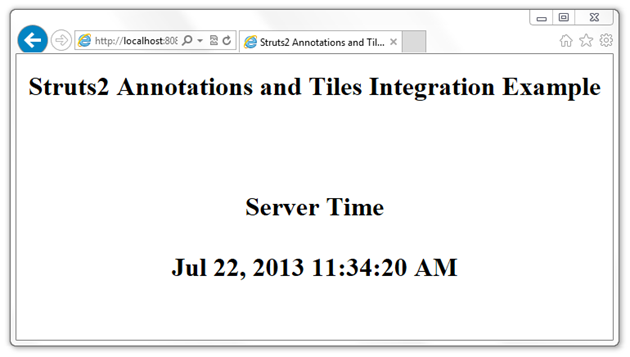
In this example, I will demonstrate how you can use Struts2 Annotations and Conventions alone to avoid XML Configuration. I will also integrate Struts2 Tiles Plugin, because I’ve seen a number of people struggling when it comes to Tiles integration with Struts2 Annotation and Convention based projects. Do note that Struts2 Convention Plugin has replaced the older Codebehind plugin and Zero Config Plugin.
The Struts2 Convention Plugin provides the following features:
- Action location by package naming conventions
- Result (JSP, FreeMarker, etc) location by naming conventions
- Class name to URL naming convention
- Package name to namespace convention
- SEO compliant URLs (i.e. my-action rather than MyAction)
- Action name overrides using annotations
- Interceptor overrides using annotations
- Namespace overrides using annotations
- XWork package overrides using annotations
- Default action and result handling (i.e. /products will try com.example.actions.Products as well as com.example.actions.products.Index)
The Convention Plugin should require no configuration to use. Many of the conventions can be controlled using configuration properties and many of the classes can be extended or overridden.
Ok, let’s start then.
Open Eclipse IDE and create a new Maven project.


Note that I’ve selected the “war” Packaging above.
From the eclipse IDE’s Project Explorer, double click on “pom.xml” file. It is your project’s Maven POM file and it should look like:
This is the bare bone maven pom file. Now, add following three dependencies to it:
- Struts2 Core
- Struts2 Convention Plugin
- Struts2 Tiles Plugin
Now,
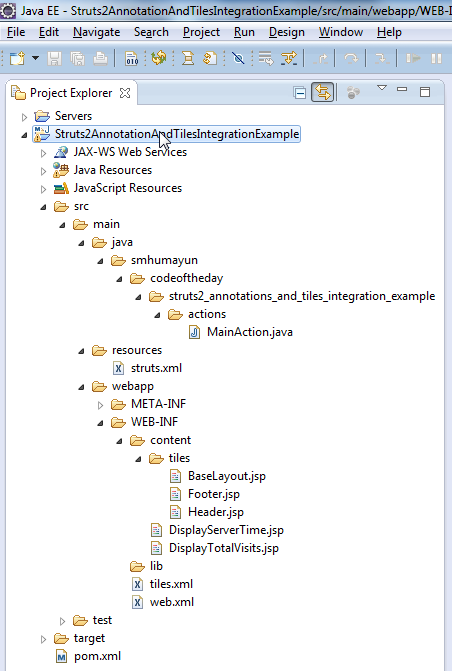
Create a package structure as you like. However, make sure the immediate parent package that contains your Struts2 Actions should be named either of the following (refer to directory structure image above):
- action
- actions
- struts
- struts2
Why? because by “Convention”, Struts2 will “scan” for Action(s) in package(s) that “exactly” matches the names mentioned above. Yes, you can do all sorts of overriding and customizations, but you have to do that using XML Configuration (file called Struts.xml), which we want to avoid in our example. So, we will stick to the “Conventions”

Create a new Action class. Make sure you follow these “Conventions”:
- Your Action class must suffix with “Action”
- For example: MyAction, ListOfAction, DownloadAction, etc..
- OR, your class must implements “com.opensymphony.xwork2.Action” interface
(refer to directory structure image above) I prefer first one because in that case I’m less coupled with the Struts2 API. Lesser the “invasion” by a framework, the better!
Also, for the very same reason, and to demonstrate the plain POJO integration concept by Struts2, I avoid extending my Action class with any of the Struts2 support classes (i.e. com.opensymphony.xwork2.ActionSupport).
Two important things to notice in the class above are:
- @Result (…, type=”tiles”) – This is to instruct Struts2 that the result is of “Tiles” type and to enable or configure that type you will have to create a minimal Struts XML Configuration file called struts.xml, because this particular configuration can not be done using Struts2 Annotations:
- @Result (…, location=”your-tile-definition-name”) – The location refers to one of the tiles defined in your tiles definition file.
Create (if not already created) a web.xml, Java Web Application Deployment Descriptor, under /src/main/webapp/WEB-INF/ and add following to it:
- Struts2 Standard Filer Mapping
- Tiles Configuration
- Tiles Listener
Create your tiles definition file and define all tiles definition:
Create following JSP files:
BaseLayout.jsp:
Header.jsp:
Footer.jsp:
DisplayServerTime.jsp:
DisplayTotalVisits.jsp:
Finally, deploy the application on any Java Web Application Server, open your browser and go to URLs: