All bloggers usually do many things to get indexed by search engines. They use many key words, some times use blackhat techniques like keyword stuffing, keyword hiding,content duplication etc. It is very important that each page or each post we write in a blog must be indexed in search engines. Indexing a page is an important step in successful Search Engine Optimization. Today I will discuss about three simple methods to index your page.( don't worry, I will bring more to you soon…). Believe me, these are extremely successful. Never think about an overnight jump in Page Rank, but over a period of time these methods will help you a lot.
Ways to improve performance and downloading time of your blog

These will help to Search Engine
Make a Crawl friendly Blog or Website by improving download time
You had to look very seriously to the design and downloading time of your website and blog. Usually newer blog templates are made with multiple frames, complex designs and Flash which delay the downloading time .
Why a blog or website to be downloaded quickly?
When we look to the crawl rate of most blogs, the spiders or robots from different search engines crawl a maximum of 40% and leave the pages immediately. This results in skipping the essential Keywords,resulting in poor Page Rank. Such sites will never come to the search results of a particular keyword.If the downloading time is less, then the Search engines crawl your sites more efficiently.
Majority of internet users in different countries especially developing countries ,using low bandwidth. So if the downloading time of our page is more than expected, then we will loose a wide audience from these places.
Always remember: “Design for Robots and Write for Humans”
One more important factor we had to keep in mind that, If a new visitor can access you blog very quickly then he will spend more time in viewing your site. Such a visitor will never hesitate to come back to your blog. Remember TIME IS PRECIOUS FOR EVERYONE.
How I know whether my blog have Crawl problems?
I have found a new solution for that. You can analyze the performance of your blog by using two simple Tools, One is A TIMER and other is A FREE CRAWL ANALYSIS FORMULA. You had to use both. ( click here to Download a Free Copy of Crawl Analysis formula. It is essential to download because it will find out whether there is any need of a change for your webpage)
FIRST STEP: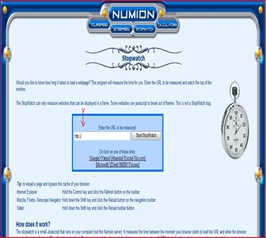
Just click here to check downloading of your blog/webpage with TIMER . This will lead to a page where you just enter your website/blog/webpage address and click. Yourself can note down the time taken by site to get download fully. Now refresh again and note down the reloading time. Write the FIRST DOWNLOADING TIME ( in seconds) and RELOADING TIME (in seconds) separately in a paper. We will use this in next step.
SECOND STEP:
Now open the downloaded FREE CRAWL ANALYSIS FORMULA. As you can see here, it a simple excel based formula which you can download from here. It will tell you, whether you had to restructure your website or blog or not.
All that you had to do is to enter the FIRST DOWNLOADING TIME ( in seconds) and RELOADING TIME (in seconds) ( this you have noted in first step) in the space given in this excel sheet. You had to repeat the same in three different days. This will help to analyze in different downloading speeds. when you enter both data in the space provided and press enter, then in the last tab, it will show what you had to do with your webpage. As default, “ No Action Required” will appear in that space. If your webpage need any change, then it will show other wise “ No Action Required” will appear there.
How to Restructure your Webpage:
Consider these simple suggestions to restructure
1. Avoid complex scripts in the webpage design.
2. Use less advertisements slots.
3. Reduce multiple frames in your blog
4. Using Basic Google Blogger templates in your blog is excellent for reducing downloading time. ( But Google Blogger templates not have Search Engine Optimized title tags in order to get higher rankings. So it is always advisable to change the title tags in the Google basic blogger templates. How to change the Title Tags in an ordinary Template to Search Engine Optimized title tags? Read this article and follow simple instructions)
5. Avoid linking to Websites or Blogs that already block the crawling of Robots. Google Robots consider your webpage as a crawl blocking one , if your page already point towards a Robot blocking website.
6. Always reduce the total number of outgoing links from your page. Google Crawling is more successful in pages with less than 100 outgoing links. The total number of links include the links from each advertisement slots also.
7. If all these efforts make no result, then consider changing your Template.
All the best.You may be interested to read :


