Stop PC Crashes with WinZip System Utilities

Enter your email address:

Showing posts with label SEO. Show all posts

Sunday, January 29, 2012

ACCOUNTANT WEBSITES – EFFECTIVE BLOGGING IS EASY

This is a Guest post by , Brian O'Connell, s the CEO and founder of CPA Site Solutions, one of the country's most successful companies dedicated entirely to designing excellent accountant websites. His firm currently provides websites for more than 4000 CPA, accounting, and bookkeeping firms.

accountant websites CPA's are in serious demand for two reasons. First, organizations need audits to be certain they are compliant  with corporate accounting rules and regulations, especially public companies that answer to the Public Company Accounting Oversight Board by law. Second, during tax season, they are very significant to private taxpayers who need to promptly file tax papers. Certified public accountants assist them in finding tax deductions and credits so that they can get the most out of their returns, or sometimes, minimize their payments. A blog is an excellent way of advertising your expertise as a CPA and to attract more people to accountant websites. Here are some strategies for efficient CPA blogging:

Educate Your Audience


Your blog should contain useful, relevant information pertaining to the practice of accounting. It should present clearly how your firm can help individuals by filing tax returns and provide mediation services with the IRS. Additionally you can list your business accounting services.  Your services are important for both public and private companies. Your blog is also an opportunity to present case studies where you have successfully helped clients achieve their goals. On many accountant websites, accounting work is normally viewed as dry, so using humor about your work or sharing a funny experience with your audience is at times a good idea.

Your blog should be fun.  It should also be an easy read. They should also be written clearly with proper formatting and good grammar so that it is interesting for the reader. A blog written in the format of an article can be un-interesting to readers, so it is a good idea to number your points so that people can skim to see your blog post length.
Keep your blog post brief, to the point, and stay on topic. 450 to 500 words is a good length. Your readers will lose interest if your posts are longer. Be sure to break your text into digestible, sensible paragraphs.
Using pictures to illustrate your point is a good idea.  However, too many graphics can make your pages take longer to load. Videos are also an excellent way to add visual appeal to your blog posts.

Encourage Interactivity


Use your blog as an interactive discussion platform, where your audience is invited to ask questions and leave comments. It is a great feeling to receive blog comment notifications in your email.  Each comment is an opportunity to create interaction. It could be a client complaint that needs to be addressed or a compliment that you can use as a client testimonial. Either way, it is important for your audience to know that you value their feedback and hence their loyalty.

In order to be viewed as a subject matter expert as a CPA, it is a good idea for you to provide external links to authoritative resources that are similar to your blog content. You can also use your blog to market your other blogs.  It is a good advertising opportunity.
As a first time blogger, starting a blog can feel like an overwhelming process. It is helpful to focus on keeping your posts brief, making them interesting, and ensuring they are free of typos and grammar errors. Make your point and talk to your readers unpretentiously. It will take some time to establish a steady audience, so be patient, relax, and enjoy the process.


Source: http://cpawebsite4u.articlealley.com/accountant-websites-effective-blogging-is-easy-2405063.html

BUSINESS BLOGS AND WHAT ADVANTAGES DO THEY HAVE FOR YOUR BUSINESS

Business blogs have a lot of advantages over other forms of advertising your business online and offline. They can reach a lot of like minded people, just by writing a short article on your blog about your particular business niche. Please read this article and it will explain some of the advantages of using a corporate blog to benefit your business.

business blogs
As we know all businesses need to be advertised big or small, you need to reach a lot of targeted potential customers simply, quickly and cheaply. You also need to advertise your product in a professional and business like manner. This is where business blogging comes in it has all the above attributes, and should be a part of your on going marketing strategies.
Using corporate blogs as part of a main business strategy, helps strengthen the business relationship between you and your customers. It can show potential customers what an expert you are, when you present your particular commodity in your relevant industry.

Here are some advantages and benefits that business blogs have:

Using blogs will help advertise your company as a leader in your industry. They will also show what an expert you are about your topic or product.
Post a blog on forums that are relevant to your industry, be careful not to sell your product in a blatant manner. Use the forum to build a trusting relationship between you and your customers. Forums are a terrific way to get your customers to interact with each other, and it will benefit your business by giving you a positive feed back about your product.
Blogs are good for you, your employees and project members to easily keep in contact with each other, so that you can discuss and possibly improve your product.
Always remember to create your blog so that is easy to read and be easily understood by all of your potential customers. Do not use technical language in your blog.
Another advantage about a business blog is it is informal, people can discuss the merits or even non merits about a product or topic. They can offer their opinions and advice on how to make the product better, it makes the discussion more open and friendly.

If you create a good informative and interesting blog, other businesses that are relevant to your own business will link to your website. Links from other authority websites will help to increase the visibility and exposure of your website and business on the internet.
There are six different types of corporate blogs:
1. Sales Blog.
The purpose of this type of blog is to promote and sell products or services. Someone in the business itself would probably be writing and creating the blog. The target for this type of blog are potential customers for your business.
2. Relationship Blogs.
This blog is used to create and strengthen relationships with target organizations.
3. Branding blogs.
This blog is used to strengthen the brand and profile of the business and the people in it. The bloggers are usually people in the company and are supported by the company. The target of this type of blog is the same as the relationship and sales.
4. Knowledge Blogs.
The knowledge type of blog is used to convey information to employees in relation to their work. It is also used to convey news and other company business. The blogger is usually the company itself or somebody appointed within the company to perform the task. The target for this blog are the employees that have an interest in a particular subject that the blog is related to.
5. Collaboration Blogs.
This blog is targeted at the companies working team and provide a tool for the team to use for specific tasks. The target for this type of blog is the team itself.
6. Culture Blogs.
Culture blogs are created to help strengthen the companies culture. This type of blog is concerned with the social and non work side of the company. This helps create good relationships between the employees no matter what their positions are in the company.
Starting a company blog is easy and straight for word and there are plenty of companies on the internet that offer a free blogging service. Use the advantages of blogging and blogs as another tool to benefit your business. Good luck.
If you found this article helpful about, Business Blogs - What Advantages do They Have For Your Business, and if you would like to make money GUARANTEED! from these online business opportunities. Then take a look at the FREE! step by step video tutorials here!

blogging for business


http://MAVERICKMONEYMAKERSUNLOCK.COM
http://www.CELLPHONECASHONLINENOW.COM

This article is free for republishing
Source: http://tomwilson.articlealley.com/business-blogs--what-advantages-do-they-have-for-your-business-1469016.html

Thursday, December 29, 2011

EFFECTIVE SEO LINK BUILDING TECHNIQUES

Guest Blogger

Author: Margarette Mcbride

image As far as any SEO experts had said, some of the most popular and effective SEO link buildings techniques still used today are as follows:


Effective SEO Link Building Techniques

Most techniques used today in SEO link building are not as new as many would think. Most of these were considered in-efficient when brute-force link building techniques were widely used. Today, however, due to the massive change in Google’s algorithm, those techniques which were seldom used had gained a lot of popularity among SEO experts.

Social Bookmarking

Social Bookmarking sites such as Digg are popular places from which an SEO link builder can generate links from. The best thing about these websites is that these are also used by internet users to find information from the World Wide Web other than the use of search engines.

Article Marketing and Press Release (PR)

Article directory sites can also be used to harvest high-quality links, particularly if the article used to contain these links are highly-visited. This can also generate higher click-through.
Similar to Article Marketing, Press Release sites or PR sites can usually offer higher valued links compared to article directories. However, having access to these websites are usually not as easy compared to article directories.

Blog Posting

Unlike blog commenting, blog posting involves the use of blog websites which allows guest posting to post articles containing their link, such as Squeedo. This had become a very effective SEO Philippines technique as Google and other search engines had put more weight on websites which continuously updates their content.

Blogging

Other than the use of an internal blog, creating an external blog which features services that the website offers can also generate high-quality links and click-through if done properly. This, technique, along with the use of social bookmarking can relatively increase its quality and authority in the World Wide Web, thus increasing the quality of links coming from it.
Philippine web design and seo services Philippines company thats bringing you online customers since 2002.
Article Source: Article Directory - http://www.freearticleforyou.com

Monday, August 15, 2011

AUTOMATIC UPDATE SOCIAL NETWORKING SITES USING GOOGLE PLUS LINKS

Are you surprising, hearing that I am going to explain how to update your all social networking platforms using Google Plus. This is one of the most simple way to update your Facebook, Twitter, Digg and all other social networking accounts with the new post you have just blogged. But before doing that, you need an account in Posterous or ping.fm. Let me explain how can you do with Posterous or ping.fm

GOOGLE PLUS LINK UPDATION

  1. Create an account with Posterous or ping.fm
  2. Add most of the social networking allowed for auto post in Posterous or ping.fm
  3. Assign posting through Email. While creating the account, you will get a special Email address in Posterous or ping.fm
  4. Now login to your Google Plus account
  5. Create a new “Circle” and add the above Email address of your Posterous or Ping.fm account, to which you are allowed to send posts by Email.
  6. Now copy the link of your new post. Share it to this “Circle”. That’s all. Done.

What happens exactly when you share with Google plus circle

When you share with that circle, it will automatically send Email to your Posterous or ping.fm address, where autopost will happen to all your social networking sites linked with that account.

Nice Search Engine Optimization or Social Networking Optimization.

Quick, easy, isn't it?

More to Read:

Sunday, June 19, 2011

WEBSITE CONVERSION ANALYSIS

Let’s first get some definitions out of the way. A website conversion can be defined as a website visitor performing a desired action. Now, conversion rate, per se, is the percentage of visitors who take such a desired action. For purposes of this article I will designate two distinct types of website conversions. Level one conversions or “revenue conversions” and level two conversions or “rain check conversions.” Revenue conversions are actions that are designated as the final goal of the website creators. Revenue conversions turn visitors into clients or customers. Rain check conversions, on the other hand, are actions that are used to facilitate a revenue conversion sometime in the future. A revenue conversion in its most common form is known as a simple sale that translates into an online transaction. Familiar rain check conversions include newsletter opt-ins, form submissions, membership sign-ups, catalog requests, e-mails to customer service, or a call to your awaiting sales department. If nurtured correctly these rain check conversions germinate into full fledge revenue conversions at a later date.

WEBSITE CONVERSION SECRETS

Understanding Your Business and Optimal Visitor Actions

Clearly defining goals for your business is not enough to beat your evolving online competition. You must have clear objectives and an understanding of your customer for your internet presence to work for you effectively. Before hiring a web designer or database programmer to build your site, you must have a solid comprehension of what it is you want your website to do. More precisely, you must have an understanding of what you want your visitors to do within your site. Is your product too complex to offer a real-time e-commerce solution? If so, a phone call might be a better desired action. Are your products too inexpensive to warrant paying for a customer service department? If so, e-commerce may be the better choice. Are you receiving dozens of unqualified phone calls on your voicemail system? You might consider creating a form that both filters and qualifies potential customers. Are your buyers educated enough to fully understand what your service provides? A prominent phone number might help to attract clients to engage you over the phone. Is your target customer executive MBA students from The Wharton School of business? If so, you might want to write copy that speaks their language.

Off-Site Conversion Factors

The most common error in conversion analysis is neglecting factors not contained within the framework of your existing website. Off-site elements affect the quality of the traffic entering your website. All things held equal, a high quality visitor converts at a higher frequency than a low quality visitor. It is commonly held that surfers originating from a Google search are considered a higher quality visitor than your average web surfer. An individual clicking on an organic or natural search engine listing is also considered a higher quality visitor than one who clicks on a pay per click advertisement. A “direct access” visitor, one who simply types in your company url as the first step in the conversion process, or a returning visitor, typically also is considered a higher quality visitor. If someone knows you by name or actively decides to come back for a second visit, the odds of a desired action increase. To the contrary, visitors arriving to your site from affiliate programs, banner advertisements, e-mail campaigns, or blogs, are usually considered lower quality visitors as their actions are less reliable.

On-Site Conversion Factors

Usability is the term used to define the efficiency of a user interface. Websites are a form of interface where human beings interact with a host computer housing a particular website. Usability is important for us because it impacts conversion rate. Your website must be efficient. Visitors must be able to perform their tasks quickly. Long forms, excessive steps in an e-commerce order process, complex account creating protocol, or an extended webpage load time can bottleneck a visitor’s desired action. The action must also be easily understood the first time the visitor enters the website. You’ve got one chance and a brief stint of time to teach your visitors and limit frustration before they move to the next site. If you do happen to get a return visitor, can they remember how to navigate the site the second time around? Your interface must therefore be memorable. Lastly, are you leaving your visitors satisfied? Does the color scheme, text font, or images in relation to website content leave your eyes hurting? A visually unappealing site can and will lead to a mass exodus of potential conversions.

Trust Us- Won’t You?

Trustworthiness is also a significant on-site factor leading to higher conversions. What however, comprises a trustworthy website? Clearly defined privacy policies, frequently asked questions, shipping instructions, order protocol, and prominently displayed terms of use can be a means to that end. Industry affiliations, awards, or memberships also give the visitor reason to believe they are doing business with a reliable corporation. Eliminating broken links, misspellings, broken images, coding or design errors can also serve to minimize visitor skepticism.

Persuasive Website Writing

Individuals tend to read newspapers, magazines, or books, while internet users scan web page content. They scan to grasp bits of information and quickly move on from page to page, topic to topic. Quick and efficient delivery of your message is a necessity to improve the stickiness of any website. Headlines should be used frequently with crisp, eye-catching, and prominent wording to give your web surfers the main idea and objective promptly. Your core topic areas should be displayed above the secondary or tertiary subject matter. The flow of content within a website’s inner pages should be intuitive and easily accessible. Websites that are content rich should have pages that are easily downloadable in pdf format or offer printable versions. Fonts, colors, and themes should be consistent throughout the website. Examples of fonts that are easiest to read are Verdana and Arial, while Times New Roman tends to be the most difficult.

Calls To Action

A call to action in a website sense refers to the active copy that compels or persuades a user to take action. This call to action can lead to either a revenue conversion or a rain check conversion. The key to calls to action are treading the line between pushing and persuading. A prominent “Act Now!” button might be too openly aggressive for the average web surfer’s taste, while an indiscreet “click here” might be too gentle to nudge your visitor towards the desired destination. A happy medium typically yields the most favorable results. Subtly pulling your visitors to your end goal is more effective than attempting to bully them around. After all, they decide what, where, and when they click on any given link to a deeper page within your site. Descriptive text links can and should be used at the end of every text paragraph to help persuade a visitor to make the desired move. The clearer the description within the link, the easier it is for the surfer to make up his or her mind.

When In Doubt- Test, Track, and Analyze

Having the ability to track your website visitors in real-time is essential in understanding what your website is doing right and what your website is doing wrong. Click path analysis, or exposing the travel patterns of your visitors as they click from one page to another is critical. Uncovering the common pages that visitors are leaving from will offer clues as to where your potential conversions are escaping. When testing different pages it is however, vital that you drive enough traffic to the site in order to make a sound decision on what works and what doesn’t. Don’t be tempted to jump the gun by changing a particular page that only received half a dozen hits or unique visitors. See how the pages perform over a longer period of time to ensure you have a critical mass of data to analyze.

Conversion Rates Still Got You Down?

Here are some miscellaneous points to consider before throwing in the conversion towel. Make sure that your website supports all major browsers (Explorer, Firefox, Navigator). Make sure you know what pages within the website you are directing visitors to. Conversions can be improved by directing visitors to the most relevant pages within your site, not just the home page. The closer the visitor is to the desired action, the less steps available to convolute the conversion process. Rain check conversions can be improved by giving away valuable information. Giving your readers something they need or want is an effective way to persuade a return visit at a future date for a future action. Make your e-commerce shopping cart linear, intuitive, and easy to use. Utilize “one click” technology to make repeat shopping attractive for your users to return. Not only should the site be memorable, but the domain name too- keep it catchy and easy to remember, and odds are your visitors will come back for seconds to convert another day.

About the Author
Brian Ortiz is the CEO of www.seomatrix.com: Ethical Search Engine Optimization. He has been specializing in search engine marketing and most notably conversion analysis for both national and international clients for over five years. SEOMatrix is a Connecticut search engine optimization company. To receive a free optimization or conversion rate analysis for your website sign up for our matrix report. To receive Brian’s monthly articles sign up for our newsletter at www.seomatrix.com. Courtesy: www.useseo.com

More to Read

WAYS TO GET BACKLINKS TO YOUR WEBSITE

This is a guest article written by Alan Liew. Backlinks or inbound links are the key to achieving high rankings in search engines. So to get your website to the top you not only need to optimize your webpages for your targeted keywords but also have to build as many backlinks as possible. There are several ways to get backlinks to your site. Here's how......

BACKLINKS

Send Link Exchange Requests to Potential Links Partners

       Before starting a link exchange campaign. You need to create a link directory that will be used to provide a link back to your potential link partners. Your website is ready to exchange link with other webmasters once the directory created.
You can find your potential link partners by searching on major search engines like Google and Yahoo for your targeted keywords and then visit each website in top 100 or top 200 listings. Make sure that the site you are requesting a link exchange related to yours. When a potential link partner has been found, you will want to go ahead and add your potential partner's link to the appropriate category in your site's link directory and then send an email to the potential link partner stating:
a) That you have linking to your potential link partner.
b) A direct link to the page where the potential link partner listing can be found.
c) How it would benefit to the potential link partner's if linking to you.
d) Your linking details.
        To achieve better result, you should not get backlinks to your home page only. Try to get links pointing to your other webpages too. Also use more than one keyword anchor text.


Article Marketing
Writing several articles and submitting them to article directories for publication is a great way to build one-way links. By including a link to your website in your articles resource box, you not only gain quality one-way links but also drive free targeted traffic to your site. Your articles may drive truckloads of traffic if they are impressive. There are hundreds of article directories if not thousands. You can find them by going to Google and entering the search term 'article directories'.


Directories
Submitting your website's link to directories is another way of getting backlinks. Directories normally offer 3 types of listings:
1) Paid listing
2) Free listing
3) Free listing but require a link back from you.
If you choose the first or third option and your website meets the submission guidelines and rules of the directories, your link will usually be listed within days. If you select the second option, you have to wait longer and your website's listings aren't guaranteed.
Getting listed in quality directories with Google page rank 7 or higher such as DMOZ and Yahoo directory can be more beneficial for increasing your rankings than a lot of links from smaller and newer directories. But it is not easy to be accepted by these quality directories.


Press Release
Press release is simply an announcement of an important event for your business. Just like article marketing, you can gain one-way links by writing a press release with a link pointing to your site and submitting it to other websites. To find websites that accept press release, you can go to Google and enter the search term 'submit press release'.


Affiliate Program
If you are selling a product or a membership service, launching an affiliate program is a good idea to increase both your inbound links and online sales. Webmasters that are interested to market your product will place your link on their websites and you get free one-way links.

About the Author
Alan Liew is the webmaster of online4income.com which provides information, tips and ideas of how to make money online. You can also visit his blog to find out more ways to make money online.

Coutesy: useseo.com

More to Read:

Monday, May 30, 2011

EFFECTIVE SEO THROUGH GOOD CODE STRUCTURE

For a successful Search Engine Optimization strategy, take into consideration that search engines look at content and also at the structure of the markup. They emphasize the importance of text content, page titles, keywords rich text, meta descriptions and information architecture. A website where quality of content and code prevails will rank higher in the major search engines.There are many Search Engine Optimization tactics, but try to find the best combination and don't sacrifice the usability and performance of your website. Here is some basic information about improving your source code from an SEO perspective:

SEO

Avoid classical 404 error pages
The 404 - File Not Found - page is presented to the user by the server as an error page. The user gets this message directly from the server of the website he is trying to visit. This error page is supposed to appear only when the server cannot find the requested location and is unsure of its status.

In the vast majority of cases, the 404 error emerges for pages that were moved or even deleted or the layout of the site or page information changed.

Many hosting companies offer a 404 redirect page. This means that when a user enters the URL of any page of your domain, and that page does not exist or can no longer be found, you can automatically redirect the user to a specified page - usually your home page or your sitemap.

Pay special attention when you decide to delete certain pages. Remember to redirect them to a main page of your site using the 301 (Moved Permanently) HTTP response code.

You can greatly improve the user friendliness of your website by creating a custom 404 page:

  • Present a message of apology for the inconvenience;
  • Try to ease the user's way back to your site. Introduce error messages and include evident links to the home page, sitemap, and contact page;
  • Offer assistance and encourage the user to continue to search for the information he needs on your site. You could even include a search box right on the error page;
  • Keep the same design for the error page as for the rest of the website.

See: www.avangate.com/4040404404.

But remember that the best strategy for a 404 error page is to prevent it from coming up altogether, as many customers might be left with the impression that the whole website does not exist and not just the specific page they were trying to access.

Keep away from orphan pages
An orphan page is a page that is not linked to another one an thus cannot be found by spiders. To avoid having orphan pages on your website, check regularly that all your pages are linked to each other.

Search engines consider sites with orphan pages to be unprofessional, and not worthy of getting a high rank. This kind of website is under construction or is the result of a poor design process. If your pages aren't linked properly search engines won't index them and will consider them irrelevant for the search.

Pay attention to the fact that some search engines don't index correctly websites that use HTML frames. When spiders crawl through your internal pages, they index each individual page and display them as orphan pages in search results. Most frame designs include a content frame and a navigation frame.

Visitors require both frames to navigate through the site. Create a JavaScript to check if the page is loading correctly, and load the frameset. In this way, users won't be able to open pages outside the frame. This is a very easy way of losing clients.

Use 301 redirect pages
To avoid displaying a 404 error page, set up a 301 redirect page. The code 301 means "moved permanently" and it's the easiest way to preserve your search engine rankings for that page.

There are two ways of generating proper 301 redirect pages. If your site is hosted on a Linux or Unix server create a .htaccess file to add the redirect to your server's web root.

The .htaccess file contains specific instructions for certain requests, including security, redirection issues and how to handle certain errors. If it is hosted on a Windows or IIS server then the 301 redirect can be set up in the Administrator's section of the server software or through the DNS (Domain Name Server) zone.

Make a habit of reviewing the log files which contain data sent by your server. Search engine spiders often make critical decisions based on what your server tells them through the server's headers.

Pay attention, an improper 301 redirect can cause you big problems, since your website might fail and users won't be able to visit your pages. Setting up a correct "301 redirect" assures that you'll stay high in search rankings.

Create a sitemap
A sitemap is a web page that lists all the pages on your website. They are intended both for users - to find easier the information they need , and for search engines to index pages.

Your sitemap link should be right on your home page. In this way spiders are sent directly to the place where all your content information is gathered. Sitemaps can improve SEO, however, be advised that they only take into consideration a limited number of links to those pages.

To make sure that spiders check your whole site and have more chances to get indexed, it would be a good idea to use a sitemap generator. You can use ROR sitemaps that are readable by all search engines.

ROR is a sitemap tool that uses XML feeds to describe your website. ROR sitemaps allow search engines to match text search with structured information, thus obtaining more relevance for your site. This kind of sitemap helps search engines to better understand your website content - products, services, images, articles, etc. By creating a file with product names, descriptions, prices, images, availability, affiliate programs, and any other relevant information customers can find you easier.

Don't overuse dynamic pages
Dynamic web pages include dynamic content - images, text, etc - which changes without the page being reloaded. Client-side languages like JavaScript and ActiveX are usually used to create these types of web pages.

Search engines don't rank well dynamic pages with many parameters. If you choose not to turn your dynamic URLs into static ones, at least put the most important parameters in your URLs first and try to limit dynamic parameters to no more than two.

Spiders can't read the text rendered as graphics. Any text that you want the spiders to read and index should be written out as text. At the very least, put any text that appears in graphics into the images' ALT attribute.

A slightly better alternative is to write your text in Flash, but remember to have a "Skip this intro..." link that takes visitors (and spiders) to the text-rich content of your site. Don't neglect this information if you want to optimize your search engine strategy.

Put .CSS and JavaScript into external files
For a search engine, improperly formatted code will have a negative impact on your rankings. Since search engines read only a certain amount of information on a web page, you should try to increase the text content to HTML tag ratio.

If you have too much HTML code, the text content won't be seen entirely. For reducing HTML code, utilize hand coding using external .css files and Javascript.

Make sure you have well formatted [X]HTMLTry to fix as many of the HTML errors as possible. Although the search engines don't rank better websites that have standard compliant code they tend to "read" them easier. Use the W3 HTML Validator to check the validity of your code.

For a successful Search Engine Optimization strategy, take into account all of the aspects presented here. It takes time, effort and patience to achieve a higher rank in the main search engines. The idea is to have a long term strategy that makes your website stay on top for an extended period of time.

About the Author
Read
full article.
Copyright © 2006,
www.avangate.com all rights reserved. This article was written by a Web Marketing Specialist at Avangate B.V. Avangate is an eCommerce platform for electronic software distribution incorporating an easy to use and secure online payment system plus additional marketing and sales tools. Courtesy: www.usseo.com

More to Read:

SOCIAL MEDIA OPTIMIZATION IS AN INNOVATIVE OPTIMIZATION METHOD

Social media optimization is the newest thing which is happening in the World Wide Web. Everything associated with the web is changing on a constant basis and to be attuned with the latest, one needs to know all about the latest happenings like social media optimization. The internet world is rapidly expanding these days and the due to this the way we communicate with people is also undergoing vast changes. Earlier after people left school, college or their birth city there was very little chance of getting in touch with family and friends who are associated with those places.

SOCIAL MEDIA OPTIMIZATION Today that is no longer the case, all thanks to social media platform which in turn has given rise to social media optimization. Today, social media optimization has become the best means through which one can promote anything on the web.Social media optimization ideally means promoting about something on all the social media platforms. Studies have found out the more then 70 percent of people those who surf the web regularly have an online profile on some social networking site or the other.

So it makes sense if someone wants to promote about their things on all these social networking platforms and attract attention. The whole idea is to create a buzz on the web about the thing which you want the people to know.

Naturally when a buzz is created everywhere, there will be lots of discussion and debate about that aspect and this is a very good means to become popular on the web without making extensive efforts.


Getting popularity is not an easy task and one needs to undertake lots of work and effort to make this a success. The business world is rapidly expanding and one needs to know all about the latest which is happening to become successful. One of the main things, which need to be done for successful social media optimization, is facilitating free travel of content on the web. Webmasters are always on the lookout for well written content and if you have really good content written on your site you can become popular very easily.

Whenever someone uses the articles or content from your site, a link will of your site will be provided and this will make sure that more and more visit your site and you become popular.


The basic idea behind social media optimization is rather simple. You just need to implement certain things on your site which will make it more easily accessible to visitors at all social media platforms.

Another means which can be implemented for social media optimization is through participating in all the discussions that are taking place on the web about the subject on which you are promoting. The web is populated with forums on anything and everything.

The best part about talking part in these discussions is that even if there is no discussion taking place, you can very easily create a thread about the concerned subject and start the discussion. Social media optimization has huge scope and all you need to do is identify the proper method for doing this.

About the Author
Steve Waganer has specialization in Web Marketing. He is expert in Search engine optimization,Affiliated marketing,
Social Media Optimization.To get the Search engine Optimization tips for your website to get high rank and top position in major search engines visit www.cometsearchenginemarketing.com. COURTESY: http://www.useseo.com

More to read:

Thursday, May 19, 2011

BACKLINKS CHECKER

Backlinks are incoming links to a website or web page, which are also known as incoming links, inbound links, inlinks, and inward links. In the process of search engine optimization (SEO), the number of backlinks is one indication of the popularity website or web page. Google also gives much importance for quality backlinks while determining PR or PageRank of a  website. For a blogger, it is very essential to know the source of backlinks towards his blog or website. Finding the source of backlinks, helps to analyze the quality and build up more quantity of quality links.


How to check backlinks.

backlinks checker

Hereby providing a backlinks checker tool for all my blogging friends and readers. Simply enter the URL of the page or the main URL of your blog / website. Then click on check. All backlinks will be listed down to the table, here in the page  itself. Analyze it and increase the number of backlinks in natural methods.

Enter URL
  (eg. www.businessvartha.com)
 

Source: www.iwebtools.com

More to read:

Thursday, April 28, 2011

SEO STEPS TO WIN SEARCH ENGINE RANKINGS

Search Engines are built to help the searchers. Search Engines strive to put the best fit/standard websites on top rankings so that searchers get their required info within few clicks. How do Search Engines know a website’s standard and its relevance with searched keywords? What are the steps you should follow for a complete SEO to improve your website’s rankings?

This article covers Search Engine Optimization in two levels - the first is On-page optimization, and the next is Off-Page Optimization. An effective On-page optimization together with good Off-page optimization will improve your Search Engine Rankings.

SEO STEPS


On-Page Optimization

Define your Business& Target Audience - The first step in any business starts with analysis. Determine what kind of services your website is to provide and what kind of audience you want for your website?

Don’t Purchase a New Domain - If you already have a good domain name don’t try to purchase a new one, as some search engines look for the age of the website as a ranking factor.

Choosing your Domain Name - If you are planning for a new website, try to get a domain name with keywords included. If you target regional customers, you can have your domain based on the region, say for example .uk or .au or .in

Make your Website look Clean & Simple - Now you have a domain name and you know whom you want to target. Website design is the key factor which keeps your visitor to stay for a while in your website and navigate your services. Make sure your website design has a good feel & look, clean and simple.

Evaluate your Website - If you have an existing website, and now you want to do SEO for it, then evaluate your website:

Navigation structure - think in a visitor’s point of view - Can someone navigate and reach the product/services they are looking for? Make your navigation user friendly, no visitor should leave your website due to confused navigation.

  1. Check for W3 compatibility of your website.
  2. Check for any broken links in your website and fix if any.
  3. Your website should load fast so that it doesn’t check on your visitors’ patience.

Observe your competitor - Find your competitor websites. Analyze and gain knowledge on their tactics, the keywords they use, the techniques applied. With the help of this analysis you will learn what is working and what is not working, which will help in your SEO process.

Research on Keywords - List the Keywords your target audience would search for and the ones used by your competitors. Make use of keyword research tools like Overture to know more on your related search terms. Now refine your list and make your final list of target keywords.

Structure File name - If you have control over your file names - modify file names with your keywords included.

Search Engine Friendly Sitemap - A well structured search engine friendly sitemap can help Search Engines to index all your pages. With good anchor text for your navigation links you can improve your rankings

Write an Attractive Title - Why is your web page title so important? The web page title is displayed in SERPs which in turn help in attracting your visitors. Web searchers do their search with a term and look for titles in the result pages that best fit their search. Hence make your title attractive, with targeted keywords included. Try to incorporate related keywords too. For example you target for Montessori School, you can write title as ‘ Montessori School, the Preschool for your Children’. (in this way you add 2 related terms).

Meta Description Tag - Description tag is also displayed in snippets of any SERPs. This description helps to motivate searchers to visit your website. Make an effective and optimized description tag. Snippets are also taken from surrounding text of the searched keyword. You may need to edit your content a little to make your description look good.

Meta Keyword Tag - Though there is saying that Search Engines like Google doesn’t look for Meta keyword tag, there are some smaller search engines, which still follow the conventional way and spider the keywords tag. So there is no harm in making of the Meta keyword tags. Your meta keyword should contain keywords that appears in your body text.

Have Robot tags - If you don’t want any of your files of your website to be indexed, say an image or a text file, you can write your robot file insisting the search engines not to crawl those pages.

Alt Tags for images - As the name infers it acts as an alternate text for any image. This tag is both user friendly and search engine friendly. Search engines cannot read images; instead it indexes the alt tag given for any image and assumes it as the description for the image. This alt tag is not so important by Search Engines, as many spammers try to put irrelevant alt tag for the images to improve their rankings. However for an image link with a proper alt tag (keywords included) will work as great internal anchor link.

H1 & H2 heading format - Though no one is sure on whether this helps in rankings, try applying the header options, as this practice is good for any web development

Improve Keyword Prominence, Density & Proximity -Keyword prominence will increase if you have your keyword at the beginning of text part of your webpage. Keyword density refers to the ratio (percentage) of keywords contained within the total text content of the page. Keyword proximity refers to the closeness between two or more keywords. And this is yet another factor which has not much proven records but still exist in SEO practice.

Make Content look rich - As many SEO experts say content is the king. Optimized content with keywords included, along with other SEO factors working well the website can rank well in Search Engines

Keyword Rich Anchor Text - Anchor text for both internal links and external links is powerful element for Search Engine rankings. You can notice websites which doesn’t have the keyword in their web pages rank well which is all because of their anchor text of their inbound links.

Make Flash files work for you - Its better to avoid including flash files into your website. But under compelling circumstances, you can try adding keyword rich text somewhere in your file, since Search Engines like Google can index the text part of flash files

Bring your PDF files on SERPs - PDF file is a good source for keyword rich content. Most Search Engines can read & index PDF files and a few search engines shows PDF files in SERPs too. Make sure you have a good title and file name for your PDF file

Off-Page Optimization

Why Search Engines give so much of importance for inbound links?

It is easy for any website owner to optimize their website with good content, navigation, title, etc. But does that mean it’s a good website and people would love to check it out? Search Engines try to know and evaluate the standard of a website through many factors and the most significant of them is incoming/inbound links. When a website receives inbound links from related & standard websites, it obviously means that it is worth looking at. Search Engines learn about your website through inbound links and to be precise it’s through anchor text.

So natural linking with different & targeted keyword rich anchor text works great for any website. Here are a few ways to increase your inbound links/ backlinks.

Search Engines - Submit your website manually to search engines including regional search engines.

Directories - There are many directories available online for free submission. Submit your website into the category that best fits your services, most importantly with good anchor text. Try submitting in your own regional directories to improve your local business.

Forums - Participate in your industry related forums & discussion boards. Post your comments, thoughts and also provide a link to your website (without spam).

Blogs - Having your own official blog helps to post your company’s updates, product release, etc., and also inbound links. There are directories for submitting blogs. Submit your blog with proper keyword tags which helps in your blog listing.

Articles - Write keyword & content rich articles on your own and post in article junctions available online. There are article junctions which accept articles in HTML format, so you can include your links with good anchor text. Write fresh articles on your topic, post and see your traffic increasing.

Press Releases - You can post Press Releases, which also works like Article junctions & directories; however it should look more like a Press Release and not like an article.

Bookmarks - Social book marking - it serves two purposes: It gets you incoming links and it popularizes your website in your community. Make sure you put keyword rich tags for your bookmarks.

Classifieds - You can see some websites displaying free classifieds. You can put your advertisements there with link to your website.

This is a guest article from  Deepthi Kumar                                               Courtesy: http://www.useseo.com


More to read:

Wednesday, April 20, 2011

CRAWL ERRORS FACED BY BLOGGER

One blogger emailed and asked me about the Crawl errors that he saw in his Webmaster Tool page of Blogger account. He saw many crawl errors and got confused with the importance of those crawl errors. Many bloggers who are using Google Webmaster tools are frequently facing this Crawl errors. Here in this post I will give a small explanation about such errors in Google Webmaster Tools.

CRAWL ERRORSAfter adding your blog to Google Webmaster tools, Google bots will crawl your blog in certain intervals. This crawling is very important to get indexed in Search Engines, especially in Google. In the Google Webmaster tools Dashboard, you can see your blog name and when you click on it, the whole data about your site including performance, keywords, links , crawl errors will be displayed. The Crawl errors provides details about the URLs in your blog or website that Google tried to crawl but could not access. The Mobile crawl errors page provides details about problems that a Google bot encountered crawling URLs on your mobile website.

For viewing crawl errors, login to Webmaster Tools Home page, click the site you want and look under Diagnostics, then, click Crawl errors.


Different Crawl Errors and Details

Mostly the reported crawl errors are “Not found”, “URLs not followed”, “URLs restricted by robots.txt”, “URLs timed out”, “HTTP errors”, “URL unreachable”, and “Soft 404s”.

1. Not found : This crawl error indicates that while crawling, the bot failed to find the specific URL, that may be due to the server successfully returned the page,  the requested page doesn't exist or the server is temporarily unavailable. This sometime happens due to the bad performance of your site or blog or the server in which you host the blog have some technical issues. Usually this is not that much important Crawl error.

2. URLs not followed : This crawl error lists URLs that Google bots were unable to completely follow. This is considered to be an issue have some importance because, if a spider is not able to follow a URL, then the important PageRank determining data remains incomplete, which may result in penalizing the page from appearing in search results. 

In order to overcome this error,  reduce the use of features such as Javascript, cookies, session IDs, frames, DHTML, or Flash in your site. Also, If you use dynamic pages (for instance, the URL contains a ? character), then not all search engine spiders crawl dynamic and static pages. Also use links that are absolute or full URL. 

3. URLs restricted by robots.txt : This crawl error is due to the robots.txt restriction. Check whether your robots.txt file might prohibit the Googlebot entirely or it might prohibit access to the directory in which this URL is located; or it might prohibit access to the URL specifically or if a URL redirects to a URL that is blocked by a robots.txt file, the first URL will be reported as being blocked by robots.txt (even if the URL is listed as Allowed in the robots.txt analysis tool).

Google respects the use of robot.txt file to prevent crawling a URL for specific reasons of the site owner. If that is the case, then there is no need to worry about this error.

4. URLs timed out: This crawl error happens when Google spiders receive a timeout when tried to access the page or crawl the page. Check the page and make sure that your URL is accessible.

5. HTTP errors: This crawl error is produced when a request is made to your server for a page on your site  and your server returns an HTTP status code in response to the request. All the HTTP error codes can be viewed here. http://www.w3.org/Protocols/rfc2616/rfc2616-sec10.html 

6. URL unreachable: This crawl error is reported when Google encountered an error when trying to access a URL. This may be due to any of the reasons mentioned above. Other than page loading time and robot.txt file issue, other issues are normal.

7. Soft 404s : This crawl error is announced when someone requests a page that doesn’t exist, and  a server will return a 404 (not found) error. This HTTP response code informs both browsers and search engines that the page doesn’t exist. As a result, the content of the page will not be crawled or indexed by search engines.

I hope that you have received a general idea about these crawl error notifications. I will publish more articles about all these subjects in more detail manner. Kindly subscribe our feed with your email address.

More to Read:

Wednesday, March 30, 2011

BACKUP YOUR BLOG IN TWO WAYS

Can you just think about the situation in which you loose all your blog posts on one fine morning. The reason for such a disaster can be anyone of these, such as ban of your blog, accidental deletion of blog, or hack attack. If you wish to change the blog hosting platform from one to another hen also you need a full backup of your blog posts. Usually I do backup every month. But it is recommended that you must do backup of your blog posts after every time you update your blog. Here, we are providing  two ways of creating backup of your blogs.

How to backup your blog posts in Google blogger blogs

1. Login to Blogger.com
2. Go to Settings----Basic-----Blog Tools
3. Click the Export Blog button.
4. In popup window click Save.
5. You can rename the file and choose location where to save it on disk. It is saved as an XML file.

How to backup your blog posts from any blogs

For creating backup of your blog posts, you need Windows Live Writer, which is available free of cost from Microsoft. Download Windows Live Writer and install it. Open Windows Live Writer. Click on Blogs and add your blog. Once you add your blog, then Click on Open under section, “File”. A box will open where you can see “Show”, select 500 or the number which you like to view.  Then in the same box, click on your blog name. Now a popup window will open that may ask your username and password. Enter and click Ok.

Wait till downloading finishes and you can see that all your blog posts are available there. Select any one of those blog posts. Now you can view that blog post with labels, alignment, tags and even pictures. Then click on “Save draft”.

Here that blog post will be saved as draft in your computer which can be viewed through Windows Live Writer and can be uploaded to any other blog as a new post.

More to read:

Thursday, March 17, 2011

CRAWLING, INDEXING AND SEARCH ENGINE RESULTS

Many new bloggers confuse themselves about various process that happens in Search Engine Optimization. Here in this post, we would like to explain about three terms, Crawling, Indexing and Search Engine Placements. This is primarily applicable to Google, but relatively adapted by other search engines also.  After reading about these three terms, you will understand how does Google or any other search engine find web pages matching your search query, and determine the order of search results.

What is Crawling?

crawling search engines

Crawling is the process by which the search engine arms go through a new website or blog once it gets a ping that the specific parent URL is updated. In case of Google, Crawling is a process in which Googlebot discovers new and updated pages to be added to the Google index by using a huge set of computers to "crawl" billions of pages on the web. Googlebot uses an algorithmic process in which computer programs determine which sites to crawl, how often, and how many pages to fetch from each site.

Frequency of Crawling:

Googlebot designs its crawl process depending on a list of web page URLs,based on the previous crawl processes. The Sitemap grabs the data provided at the webmasters tool page. When ever Googlebot visits each of these websites it detects links on each page and adds them to its list of pages to crawl. One of the main feature of Googlebot is that it lists new sites, changes to existing sites, and dead links. Also, Googlebot determines the content tags, photo tags, Title tags etc.

What is Indexing?

After crawling, Googlebot processes each of the pages it crawls in order to compile a massive index of all the words it crawls and the location on each page with keyword density, key content tags and attributes, such as Title tags and ALT attributes. The indexing then happens after identifying the density and relative importance of each Page.

How your Page appears in Search Engine Results?

While a person search a term in the search Engine, then say for example, Google  search the index for matching pages and return relevant results.In Google, “Relevancy” is determined by more than 200 factors like  PageRank. Build your site so that bots like, Googlebots can crawl, identify the  content keywords and rank it to the top of search engine results.

More to read:

Sunday, February 27, 2011

CREATE GOOGLE FRIENDLY BLOG OR WEBSITE

Do you wish to reach the top of Google Search Engine Rankings? The first step is to create a Google Friendly Website. Before explain some tips, I would like to inform you that understanding Google Webmaster Guidelines will always help you to run a blog or a website quite safely. Click here for Webmaster Guidelines. I herewith giving a capsule tips to create a Google Friendly blog.

Tips to create Google friendly Blog or Website

Be specific and provide high-quality content on your pages

You must write pages that clearly and accurately describe your well defined topic

Develop Natural links to your site

Every page should be reachable from at least one static text link.

Don't fill your page with lists of keywords

Never attempt to "cloak" pages

Never put up "crawler only" pages

Don't create multiple copies of a page under different URLs

Remove Unnatural and broken links to and from your site or blog

Try to write with specific Keywords

Try to use text instead of images to display important names, content, or links.

Make sure that your <title> elements and ALT attributes are descriptive and accurate.

Never block search bots to crawl your sites

Monitor your site's performance and optimize load times.

Never load pages with irrelevant keywords.

More to Read:

Friday, February 25, 2011

13 QUESTIONS TO ASK YOUR SEO COMPANY

Many bloggers are now depending on SEO companies who are offering various services to make a blog or website popular or appear within the first 10 search engine page results. Before selecting an SEO Company you must have a clear idea how they are utilizing your money to generate good place in Search Engine Rankings. Here are ten questions that you must ask an SEO company and if they fail to answer your properly, skip them off.image

  1. How long have you been in SEO ?
  2. Where is your SEO company located and under which jurisdiction?
  3. Will you share all techniques that you use to improve the Search Engine Placements?
  4. Can you show me examples of your previous successful work?
  5. Do you follow the Google Webmaster Guidelines?
  6. Do you follow Yahoo Guidelines?
  7. Do you follow BIng/Facebook guidelines?
  8. Have you ever faced punishment or legal action from any of your clients or Search Engines?
  9. Do you offer any online marketing services or advice to complement your organic search business?
  10. What is your goal about my website?
  11. What is your time frame to achieve the above said Goal? 
  12. What's your experience developing international sites?
  13. What are your most important SEO techniques?

What to do, if cheated by an SEO Company?

If any SEO Company cheated you, then in the United States, the Federal Trade Commission (FTC) handles complaints about deceptive or unfair business practices. To file a complaint, visit: http://www.ftc.gov/ and click on "File a Complaint Online," call 1-877-FTC-HELP, or write to:

Federal Trade Commission
CRC-240
Washington, D.C. 20580

If your complaint is against a company in a country other than the United States, please file it at http://www.econsumer.gov/. In ECONSUMER, the member countries include Australia, Belgium, Canada, Chile, Denmark, Egypt, Estonia, Finland, Hungary, Ireland, Italy, Japan, Latvia, Lithuania, Mexico, Netherlands, New Zealand, Norway, Poland, South Korea, Spain, Sweden, Switzerland, Turkey, United Kingdom, and United States

More to Read:

Friday, February 18, 2011

ADD FOLLOW BY EMAIL GADGET IN YOUR BLOG

Want more followers for your blog? Here is a simple and much effective way of following a blog. “ Follow by Email Gadget” by Google Blogger. Inviting a visitor to follow your blog through Email, with this marvelous widget is one of the best SEO process that a blogger can do. Another important feature of this widget is that, it will automatically create a “Feedburner Feed”, if not yet created. I am very sad on another matter that my post for  CREATING AND PUBLICIZING A FEEDBURNER FEED is no more necessary for my readers.

How to add “Follow by Email gadget”

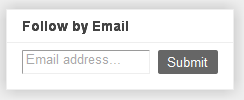
To add the Follow by Email gadget, Login to your Blogger dashboard, click the Add a Gadget link from the Design/Page Elements tab, and then select the Follow by Email gadget form the list. Then Save.Then the readers visiting your blog can then just enter their email address and click Submit.

FOLLOW BY EMAIL GADGET

Important matters to note:

1. If you already have a Feedburner Feed address, then please give that address while adding and configuring this Gadget as it is shown in the picture given below. Place your original Feedburner Feed address in the space given. (shown by black arrow in the picture)FOLLOW BY EMAILL WIDGET

2. You can view the statistics of your blog feed by logging into your FeedBurner account.

Cool: Isn’t it?

More to read:

  • businessvartha: MONETIZE BLOG FEED USING FEEDBURNER

    20 Jan 2010 ... Create a Feedburner account and syndicate your feed. ... Go to www.feedburner.com, login with your Google ID and password. ...
    businessvartha.blogspot.com/.../monetize-blog-feed-using-feedburner.html

  • businessvartha: ADD FEEDBURNER ACCOUNT TO YOUR BLOG

    20 Jan 2010 ... After you create a Feedburner account, blogger can make sure all feed traffic for your blog content goes to your FeedBurner feed. ...
    businessvartha.blogspot.com/.../add-feedburner-account-to-your-blog.html

  • businessvartha: ANALYZE BLOG FEED USING FEEDBURNER

    20 Jan 2010 ... form found on feedburner homepage after your login.If you like to publish a podcast with your Blogger feed, check the "I am a podcaster" box ...
    businessvartha.blogspot.com/.../analyze-blog-feed-using-feedburner.html

  • businessvartha: PUBLICIZE BLOG FEED USING FEED BURNER

    20 Jan 2010 ... Follow the below given steps to create a Feedburner account and syndicate your feed. If you already created this, then please proceed to ...
    businessvartha.blogspot.com/.../publicize-blog-feed-using-feed-burner.html

  • businessvartha: CONVERT YOUR BLOG AS A WIDGET

    7 May 2010 ... Follow the below given steps to create a Feedburner account and syndicate your feed. If you already created a Feed Burner account, ...
    businessvartha.blogspot.com/2010/05/convert-your-blog-as-widget.html

  • businessvartha: OPTIMIZE BLOG FEED USING FEED BURNER

    20 Jan 2010 ... Go to www.feedburner.com, login with your Google ID and password. ... LINK SPLICER – This service adds a new item to your FeedBurner feed ...
    businessvartha.blogspot.com/.../optimize-blog-feed-using-feed-burner.html

Monday, February 14, 2011

Yahoo! and Microsoft Search Alliance – Use Yahoo Site Explorer to link your blog

According to the new SERP ranking system, links that are pointing towards your blog are having much value. Google has a SERP score for every page on every website for every search phrase. Page Rank plays a vital role on how Google places a website when a specific keyword is searched. The higher the rank, the better chances that the site will be found. Now when we think about linking, then linking from “Yahoo” have huge importance.It is important that webmasters continue to use Site Explorer to inform Yahoo! about their website and its structure. This will help ensure that you continue to get high quality traffic from searches originating on Yahoo! and our partner sites, even from markets that are not transitioned to Bing systems.

“Yahoo Site Explorer” help to get the maximum from “Yahoo! and Microsoft Search Alliance”. All actions like Site and Webpage Submissions, Feed Submissions , Delete URLs, Undo Delete URLs, Add Dynamic URLs, Undo Dynamic URLs on Site Explorer that you perform which help to improve the quality of search results will be shared with Bing (Microsoft).

How to Link your blog using Yahoo

For linking your blog and blog pages in Yahoo, you had to use Yahoo Site Explorer. Site Explorer allows you to explore all the web pages indexed by Yahoo! Search. View the most popular pages from any site, dive into a comprehensive site map, and find pages that link to that site or any page. Submitting a URL requires signing in with a Yahoo! ID.

Step A:

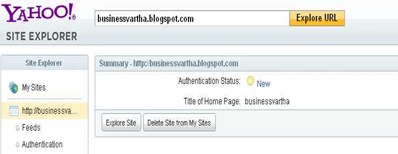
Go to http://siteexplorer.search.yahoo.com and login with your “Yahoo ID”, Click on “My Sites”, and type your blog URL and click on Add MySite

YAHOO SITE EXPLORER

Step B:

After finishing adding, you had to authenticate and add feed of your blog.

ADD URL TO YAHOO

How to authenticate your blog:

To authenticate your site ownership, you can either add a META tag to your home page, or upload a verification file to your site. For bloggers, it is better to verify using “ Add a Meta Tag to your home page”. The META tag must be within and near the beginning of the first <HEAD> section of the page, and before the first <BODY> section.

For Bloggers, login to your DashBoard, Design, Edit HTML, (Before editing your template, you may want to save a copy of it. Download Full Template and save it in your computer. This will help you to get your blog back, if you make any mistakes while editing). Inside the “Edit HTML” section, you can find <head>, under the sixth or seventh line of the HTML. Copy and Paste the MetaTag given in the “Yahoo Site Explorer” authenticating page, under <head>. Then Save.Now go back to Yahoo Site Explorer and click on “Ready to Authenticate”.

How to Add Feed?

On the left sidebar, under My Sites, you can view, “Feeds”, Click on it will take you to a form as shown in the picture given below. For bloggers, type, feeds/posts/default ,inside the empty box after the URL of your blog. Then click “Add Feed”. Your feed will get approval after few minutes.

YAHOO SUBMISSION

After authenticating the blog and adding the feed, you can logout and check again after few minutes. If you have any trouble, feel free to ask me.


More to Read:

  • businessvartha: WHY GOOGLE BAN YOUR BLOG - businessvartha

    30 Jul 2009 ... Link Exchange is an excellent SEO technique to increase PR. ... Also be careful in linking with blogs and sites having inappropriate ...
    businessvartha.blogspot.com/2009/07/why-google-ban-your-blog.html

  • businessvartha: ADD LINK BACK IMAGE WIDGETS IN YOUR BLOG

    6 Mar 2010 ... One of our distinguished reader asked us about the technique to include an image linking widget similar to the one that we are having in our ...
    businessvartha.blogspot.com/.../add-link-back-image-widgets-in-your.html

  • businessvartha: ADD LINKS IN YOUTUBE VIDEOS AND MAKE MONEY

    18 Nov 2010 ... LinkedTube is a Flash widget that adds link and sharing options to YouTube videos. With this LinkedTube, you can transform any YouTube video ...
    businessvartha.blogspot.com/.../add-links-in-youtube-videos-and-make.html

  • businessvartha: DECREASE IN THE PAGERANK OF YOUR BLOG OR LOST THE ...

    11 Nov 2009 ... PageRank gives more importance in how others link to a particular page ... X= PageRank values of each page that linking to page A: Y= Number ...
    businessvartha.blogspot.com/.../decrease-in-pagerank-of-your-blog-or.html

  • businessvartha: AUTOMATIC FREE BLOG PUBLISHING SOFTWARE

    30 Apr 2010... videos posting, picture formatting facilities, easy linking options and much more.I am using this as my automatic blogging tool. ...
    businessvartha.blogspot.com/.../automatic-free-blog-publishing-software.html

  • businessvartha: ANALYZE BLOG FEED USING FEEDBURNER

    20 Jan 2010 ... I started adding the link to my blog in my comments after learning ... After publishing our comment linking article, some email came to us ...
    businessvartha.blogspot.com/.../analyze-blog-feed-using-feedburner.html

  • businessvartha: GOOGLE BLOGGER APPROVES AMAZON ASSOCIATES – ALLOWS ...

    17 Dec 2009 ... Not only is the process of linking to products more efficient, ... The most effective factor is that, you can link to any words in your post ...
    businessvartha.blogspot.com/2009/.../google-blogger-approves-amazon.html

  • businessvartha: GENERATE METATAGS FOR YOUR BLOG

    20 Jul 2009 ... Linking the Google Way. Thanks for reading. Posted by P. Reetha at Monday, July 20, 2009 Categories: FREE SEO TOOLS, FREETOOLS, FREEWEBTOOLS ...
    businessvartha.blogspot.com/.../generate-metatags-for-your-blog_20.html

  • Blog Widget by LinkWithin